

WordPress Elementor – the No. 1 Page Builder!?!
Elementor is a popular page builder plugin for WordPress – if not the number 1 plugin – that allows users to design websites and online shops with a simple drag-and-drop interface. The web design tool with live editor offers a wide range of widgets, blocks, modules, and templates, enabling even beginners to create appealing and professional websites/webshops without needing in-depth knowledge of HTML or CSS. The options are now limitless.
Some of Elementor’s main features include:
- Live Design (Web Design): Changes are made in real-time, allowing users to immediately see how their website will look.
- Template Library: A wide selection of pre-built templates that can be easily customized.
- Responsive Design: Websites can be optimized for various device types such as desktops, tablets, and smartphones.
- Widgets: Elementor offers a variety of widgets, including text, images, buttons, carousels, and more, which can be easily integrated into pages.
- Popup Builder: With this feature, users can design pop-ups for their website, which can be used for newsletter sign-ups, promotions, or other interactions.
By using Elementor, WordPress users can create an individual and functional website without having to rely on complex code editing.
Buy WordPress Elementor Pro at low cost for best functionality and maximum flexibility
Elementor Pro* is a powerful extension of the free Elementor Page Builder, offering a variety of additional features and widgets that can take your WordPress site and WooCommerce shop to the next level.

Comparison between the free version and the paid Pro version:
Comparison and differences between the free version of the WordPress Elementor Plugin and Elementor Pro illustrated:
| Feature | Elementor (Free) | Elementor Pro |
|---|---|---|
| Widgets | 40+ Basic Widgets | 50+ additional Pro Widgets (incl. Forms, Posts, Social Media, Menus) |
| Templates and Pages | Over 40 templates | Over 300 Pro templates |
| Popup Builder | Not available | Available |
| Theme Builder | Not available | Full access to all Theme Builder features (Header, Footer, Archives, Single Posts) |
| WooCommerce Builder | Not available | Full integration and design options |
| Dynamic Content | Not available | Available (e.g., for custom fields) |
| Motion Effects | Limited | Advanced effects and animations |
| Role Manager | Not available | Role management for access controls |
| Custom CSS | Not available | Direct embedding of CSS in Elementor |
| Marketing Integrations | Limited | Advanced integrations (e.g., with Mailchimp, HubSpot) |
| Support | Community support | Premium Support |
| Price | Free | Starting from $49 per year |
Explanation of the Table:
- Widgets: Elementor Pro offers additional widgets specifically designed for creating more professional and complex pages, such as advanced forms, slides, and media widgets.
- Templates and Pages: With Elementor Pro, you have access to a larger library of templates, which facilitates the creation of specialized pages.
- Popup Builder: Available only in Elementor Pro, it allows you to create popups for newsletter sign-ups, promotions, and more.
- Theme Builder: With Pro, you can design the entire theme of your website, including headers, footers, search pages, and 404 pages.
- WooCommerce Builder: Elementor Pro offers widgets and templates for designing WooCommerce product pages and other e-commerce elements.
- Dynamic Content: Supports the integration of dynamic content, which is particularly useful for websites with a lot of content.
- Motion Effects: Elementor Pro offers advanced animation options that can improve the user experience on the website.
- Role Manager: This feature allows managing access levels and permissions for editing with Elementor within a team.
- Custom CSS: Allows adding custom CSS styles directly in Elementor, without separate plugins or child themes.
- Marketing Integrations: Pro offers advanced integrations for email marketing and other tools.
- Support: Elementor Pro users get access to dedicated premium support.
Here are some steps and tips on how you can purchase Elementor Pro at a low cost:
1. Choose the right plan
Elementor Pro offers various license plans, which differ in the number of websites on which you can use the plugin. The plans include:
- Personal: For one website – ideal for individuals or freelancers.
- Plus: For three websites – good for small businesses or freelancers with multiple projects.
- Expert: For up to 1,000 websites – best for web design agencies or developers who want to use Elementor on many websites.
2. Take advantage of special offers and discounts
- Black Friday/Cyber Monday: Elementor often offers significant discounts during Black Friday and Cyber Monday sales events. This is a good opportunity to purchase the plugin at a reduced price.
- Seasonal Offers: Look out for seasonal discounts offered throughout the year, e.g., at Christmas or during Elementor’s birthday.
- Newsletter Subscription: By subscribing to the Elementor newsletter, you can receive information about current promotions and possibly exclusive discounts.
3. Check VAT Options
In some countries, you can reclaim VAT on professionally acquired software. Make sure you correctly account for the purchase and check if you are eligible for a tax refund.
Become more visible on Google & Social Media?
In a free strategy consultation for data-driven online marketing, we uncover your untapped potential, review any existing ad accounts if necessary, examine your SEO ranking and visibility, and determine which strategy is appropriate for your budget and which active measures will lead to more inquiries or sales.

✅ More visibility & perception through targeted placement
✅ More visitors > prospects > customers > revenue
✅ Reach target groups scalably with SEA
✅ Act and grow sustainably with SEO
🫵 Maximum success with our hybrid strategy
💪 More than 15 years of experience across industries in over 1,000+ projects demonstrable!







4. Consider purchasing an older license
Sometimes users sell their unused or no longer needed Elementor Pro licenses at a reduced price. Forums and marketplaces for web developers may contain such offers.
5. Reviews and Comparisons
Compare Elementor Pro with other page builders in terms of features and costs. Make sure that the additional features of Elementor Pro are the best choice for your specific needs.
6. Using the Trial Version
Elementor sometimes offers a limited trial version of its Pro version, allowing you to test the advanced features before purchasing.
7. Group Purchases on Social Media
In some cases, web design communities or groups offer group purchases for tools like Elementor Pro, which can lower the price per license.
Elementor Pro offers extremely advanced features that are essential for professional websites, such as advanced forms, portfolio widgets, modules, custom CSS, and much more. Investing in Elementor Pro can significantly improve the quality of your web projects and help you work more efficiently. The tips mentioned above should help you acquire Elementor Pro at a more affordable price without compromising on quality.
Elementor Guide & Tutorial:
1. Basics of Operation
Elementor offers an intuitive drag-and-drop interface that allows users to visually design and edit page layouts. Elementor offers an intuitive drag-and-drop interface that allows users to visually design page layouts. After installing the plugin on a WordPress website, users can select elements from a sidebar and drag them into the workspace.
This process supports quick editing and visual design without code. Key elements include columns, images, text, and buttons. Users can edit elements in real-time, meaning all changes are immediately visible. This feature is particularly useful for users without a technical background, as it provides direct and immediate control over the layout and design of their website.
Simple User Interface
Elementor’s user interface is designed to be user-friendly and intuitive. Users can select widgets and drag and drop them into the desired layout. This significantly simplifies the web design process and makes it accessible to users of all skill levels. Over 100 widgets are available to insert text blocks, images, videos, and more.
- Advantages:
- Fast editing without technical knowledge.
- Reduced training time thanks to intuitive interface.
- Accessibility for users without programming knowledge.
Instant Preview (Live Editor)
Elementor offers a live preview, allowing designers to see changes instantly without having to reload the page. This is particularly useful for fine-tuning designs, as it enables rapid iteration and adjustment. The immediate visual feedback helps minimize errors and improve design quality.
- Advantages:
- Real-time adjustments increase design efficiency.
- Instant feedback enables precise design decisions.
- Optimization of the design process through rapid iterations.
Customizing Elements
Elementor allows users to customize every element of their website in detail. This includes adjusting margins, paddings, fonts, colors, and more. Users can also make specific responsive settings to ensure that the website looks good on all devices. This flexibility is crucial for creating a professional website that meets the specific needs of the project.
- Advantages:
- Comprehensive control over layout and design.
- Responsive adjustments for optimal display on all devices.
- Individual design options promote creativity.

Florian Ibe
CEO & Marketing Consultant
Your contact person: Florian Ibe
2. Advanced Design Options
Elementor enables the creation of sophisticated designs with a variety of widgets and settings. Elementor allows for the creation of sophisticated designs with a variety of widgets and settings for fine-tuning.
Users can make specific settings for each element, including margins, paddings, fonts, and colors. The animation options allow website elements to be elegantly faded in or transformed when scrolling. These advanced features offer the flexibility to create professional-looking websites that stand out from standardized designs. Particularly useful is the ability to make changes for different viewing modes (desktop, tablet, mobile) to ensure that the website looks good on all devices.
Responsive Design
With Elementor, designers can ensure that their websites function equally well on desktops, tablets, and mobile phones. The tool allows for specific adjustments for different screen sizes, ensuring an optimal user experience. Responsive design is a critical aspect of modern web design, as more and more users access the internet via mobile devices.
- Advantages:
- Optimal display on all devices ensures broad accessibility.
- Improved user experience through customized content display.
- Higher ranking chances in search engines through a mobile-first approach.
Animations and Effects
Elementor offers a wide range of animation options that can make pages more dynamic and engaging. Users can animate elements on scroll, which can increase the interactivity and engagement of website visitors. Such visual effects are particularly useful for highlighting important content and improving the overall aesthetic of the page.
- Advantages:
- Increased user engagement through visual stimuli.
- Ability to effectively highlight important content.
- Improvement of the aesthetic quality of the website.
Advanced Style Settings
Elementor enables users to make more in-depth style settings than traditional WordPress themes offer. These include advanced typography options, shadows, borders, and background overlays. These options give designers the freedom to create creative and unique designs that stand out from the crowd.
- Advantages:
- Finer adjustments for a professional appearance.
- Great design freedom promotes creative solutions.
- Unique visual effects differentiate the website from the competition.
3. Templates + Blocks
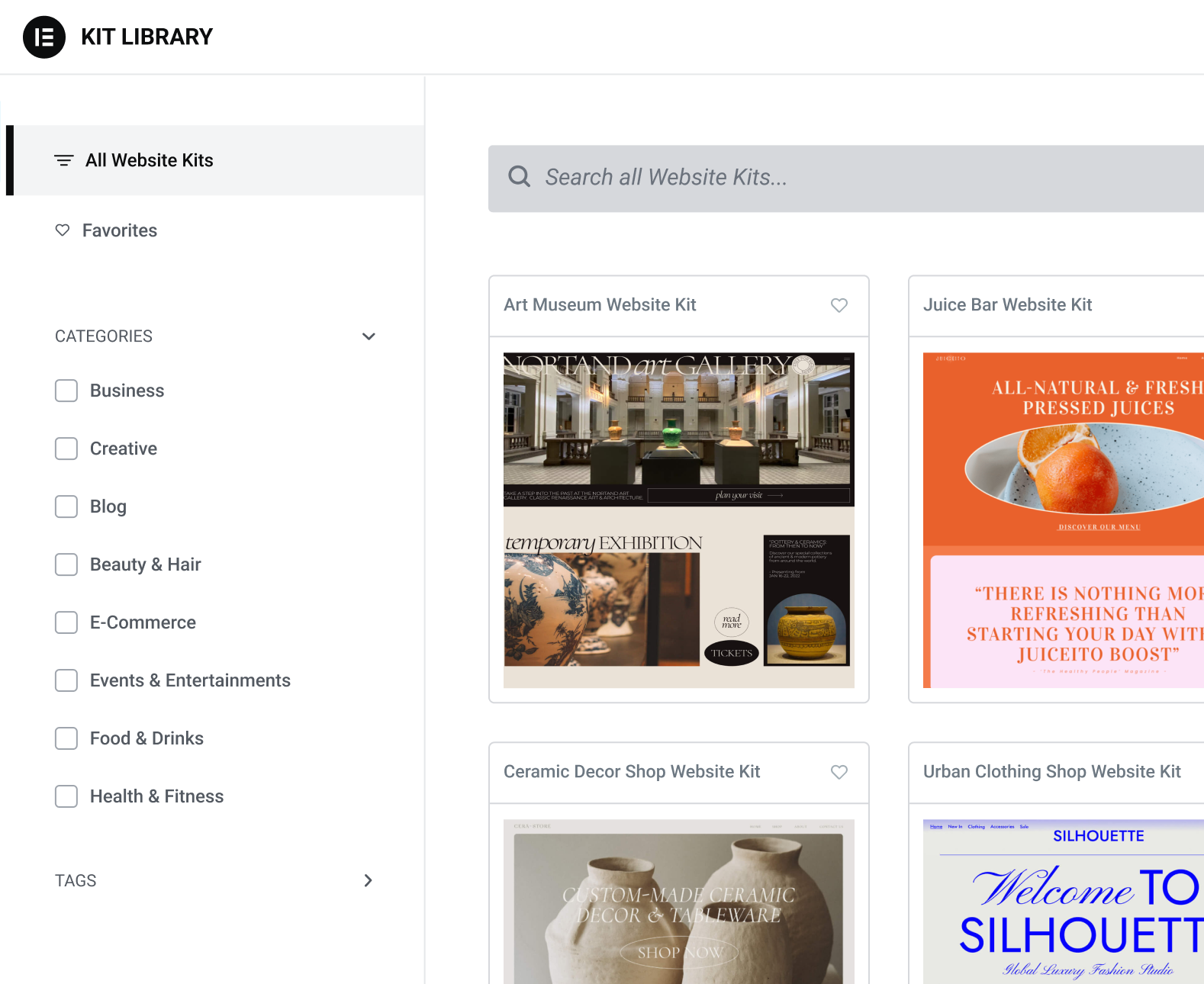
Elementor offers an extensive library of predefined templates and blocks that accelerate web design. Elementor offers an extensive library of predefined templates and blocks that accelerate website creation. These templates are designed for a variety of use cases, from corporate websites to portfolio pages.
Users can import entire page layouts or select individual sections and customize them as needed. The ability to save and reuse custom templates is particularly valuable for web designers who want to create consistent designs across multiple projects. This saves time and ensures brand consistency.
Predefined Templates
Elementor comes with an extensive library of templates suitable for a variety of industries and applications. These templates are ready to use and can be easily customized to meet the specific requirements of a project. They provide an excellent basis for quick and efficient design.
- Advantages:
- Time savings through ready-to-use layouts.
- Consistent design quality across different projects.
- Easy customization allows for quick personalization.
Save your own templates
Users can save their own page layouts as templates and reuse them on other pages or even other websites. This is particularly useful for agencies or web designers who need to create consistent designs across multiple projects. The ability to save and manage templates saves time and ensures that quality standards are maintained.
- Advantages:
- Reusable designs save development time.
- Increased efficiency through template usage.
- Consistent quality and brand identity across multiple platforms.
Import and Export of Templates
Elementor enables the import and export of templates, simplifying the reuse of proven designs across different projects. This feature supports designers in maintaining a consistent brand identity across multiple platforms and allows for quick resource sharing between teams.
- Advantages:
- Easy transfer of designs between different websites.
- Quick exchange and collaboration within teams.
- Maintenance of consistency and quality in brand appearances.
4. Popup Builder
Elementor’s Popup Builder allows for the creation of custom pop-ups for various applications. The Popup Builder is a powerful tool within Elementor that enables the creation of custom pop-ups for a website.
These can be used for a variety of purposes, such as newsletter sign-ups, promotions, or important announcements. Users can define trigger events that determine when and how pop-ups are displayed, as well as make detailed settings for the layout and design. This tool is particularly valuable for marketing campaigns and helps to increase user interaction.
Versatile applications
Elementor’s Popup Builder is extremely flexible and can be used for a variety of applications, from simple signup forms to complex promotions. Users can set various triggers, such as scrolling to a specific point on the page or staying on the website for a certain amount of time.
- Advantages:
- Supports diverse marketing and user interaction goals.
- Flexible for various campaign types.
- Increases user interaction through targeted triggers.
Trigger and Timing Options
The popup builder offers various options to determine when and how a popup is displayed. This includes time-based triggers, scroll triggers, and triggers based on user behavior. This control allows marketers to deliver targeted messages at the optimal time, increasing the effectiveness of campaigns.
- Advantages:
- Control over popup behavior improves the targeting accuracy of marketing actions.
- Timing options maximize the visibility and impact of content.
- Customizable triggers increase relevance for the user.
Detailed design options
The Popup Builder allows users to customize every element of the popup, including layout, typography, colors, and animations. This flexibility is crucial for creating popups that effectively capture users‘ attention while complementing the overall website design.
- Advantages:
- Full creative control enables unique popup designs.
- Visual coherence with the overall website aesthetic.
- Ability to integrate specific brand guidelines and styles.
5. Integrations and Compatibility
Elementor is compatible with a variety of plugins and themes, offering seamless integrations. Elementor is compatible with a variety of WordPress plugins and themes, making it a versatile choice for website design.
In particular, its integration with WooCommerce allows users to create engaging e-commerce pages with advanced features such as product listings, shopping carts, and checkout pages. Furthermore, Elementor supports various marketing and analytics tools that contribute to improving user experience and optimizing marketing strategies.
WooCommerce integration
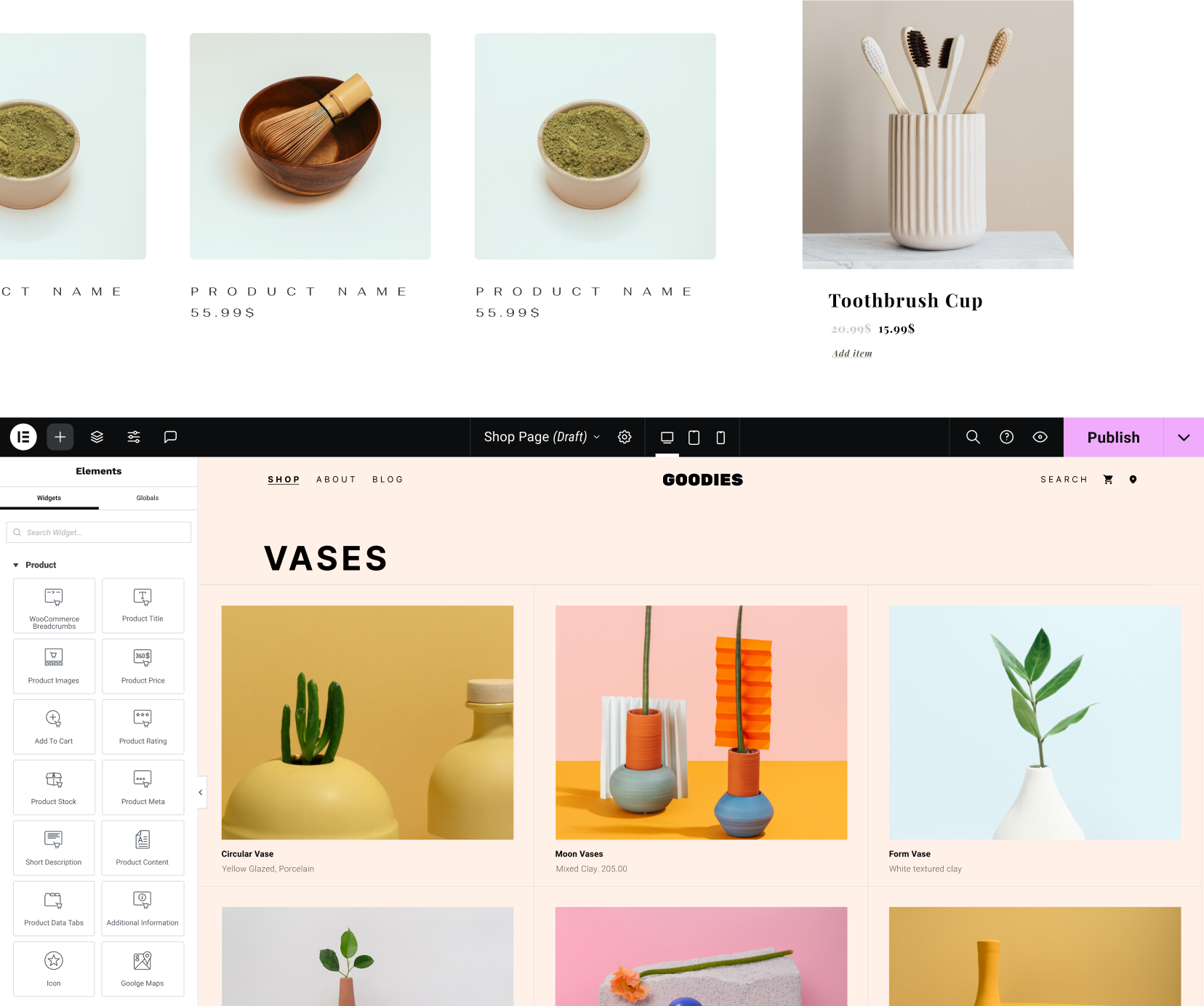
The integration of WooCommerce with Elementor allows users to create powerful and aesthetically pleasing online stores. Elementor offers special widgets and templates for product lists, individual product pages, shopping carts, and checkout processes. This integration significantly simplifies the design and management of e-commerce websites.
- Advantages:
- Extension of e-commerce functionality.
- Seamless integration simplifies the management of online stores.
- Specific widgets and tools optimize the shopping experience.
Support for marketing tools
Elementor seamlessly integrates with a variety of marketing tools, including email marketing platforms like Mailchimp, CRM systems, and analytics tools like Google Analytics. These integrations allow users to manage and optimize their marketing campaigns directly from their WordPress website, leading to better user engagement and higher conversion rates.
- Advantages:
- Improvement of online marketing strategies through integrated tools.
- Easy management of campaigns directly from the CMS.
- Better data collection and analysis for targeted marketing decisions.
Compatibility with other plugins
Elementor works seamlessly with most other WordPress plugins. This compatibility increases the flexibility and extends the functionality of websites by allowing additional features and extensions to be added without compromising core functionalities.
- Advantages:
- Increased flexibility and extended functionality through seamless plugin integration.
- Trouble-free addition of new features without conflicts.
- Extension of website functionality without limitations due to compatibility issues.
6. Performance and Optimization
Using Elementor should not negatively impact website performance; regular optimizations are important. Although Elementor is a powerful tool, it is crucial to monitor website performance. Too many widgets and complex layouts can affect loading times.
Users should regularly test their website’s speed and implement optimizations, such as reducing image sizes, using caching plugins, and minimizing JavaScript and CSS files. SEO optimization is also crucial, and Elementor offers tools and widgets that help design search engine-friendly pages.
Tip for fast and best loading times with Elementor in WordPress & WooCommerce:
Nitropack: Pagespeed optimization with just one click without settings in under 5 minutes?
Loading time improvement
By minimizing resources and using caching, Elementor can help improve a website’s loading times. This is particularly important, as fast loading times are crucial for user experience and SEO. Elementor supports lazy loading for images and offers options for minimizing CSS and JavaScript files.
- Advantages:
- Faster loading times improve user experience and SEO performance.
- Reduced server load through efficient resource utilization.
- Better conversion rates due to faster page access.
SEO Optimization
Elementor enables basic SEO optimization directly from the builder. It supports semantically correct HTML5 and automatic schema markups, which contributes to improving search engine rankings. Elementor is also compatible with leading SEO plugins such as Yoast SEO, which allows for in-depth optimization.
- Advantages:
- Improved visibility in search engines through optimized code structure.
- Easy integration with leading SEO tools for further optimization.
- Support for advanced SEO features such as metadata and sitemaps.
Conflict Management
Elementor works well with most themes and plugins, but conflicts can occasionally arise. In such cases, Elementor offers comprehensive documentation and support to quickly resolve issues. Users can also add custom CSS and JavaScript code snippets to make individual adjustments without affecting existing functionalities.
- Advantages:
- Efficient problem-solving through comprehensive support.
- High adaptability with custom code snippets.
- Stable performance through effective conflict management.
7. Development and Customization
Elementor is particularly adaptable and allows developers to extend the tool with their own add-ons. For developers, Elementor offers the possibility to extend the tool with their own add-ons and widgets. These can be developed with the help of Elementor’s extensive documentation.
By using hooks and filters, developers can add custom functions and interactions that go beyond the standard features. This allows for even deeper customization and can help meet specific customer requirements.
Create your own widgets
Developers can create their own widgets with Elementor, specifically tailored to the needs of their clients. This offers an excellent opportunity to provide unique functions and services that go beyond the standard widgets.
- Advantages:
- Individual solutions for specific customer needs.
- Differentiation from other designers through unique widgets.
- Added value for customers through customized functionalities.
Using Hooks + Filters
Elementor offers a wide range of hooks and filters that allow developers to extend or modify the functionality of the page builder. This enables deep integration and customization of Elementor to implement specific requirements or features.
- Advantages:
- Extended customization options through hooks and filters.
- Deeper integration of Elementor into complex projects.
- Flexibility in developing custom functions.
Customizable Extensions
Elementor’s open architecture allows developers to create their own extensions that expand Elementor’s core functionality. Such extensions can be published and sold on the official Elementor Marketplace, creating additional revenue streams for developers.
- Advantages:
- Unlimited possibilities for individual solutions.
- Potential for additional revenue through the sale of extensions.
- Strengthening the Elementor community by contributing new tools and features.
Tip for affordable modules to extend Elementor (Pro):

8. Community and Resources
Elementor has an active community and numerous learning resources that facilitate getting started and continuous development. Elementor has an active online community with forums, Facebook groups, and a variety of online resources. This community is a valuable resource for new and experienced users who are looking for support or want to share their knowledge.
Tutorials, courses, and webinars are also widely available, offering users the opportunity to improve their skills and get the most out of Elementor.
Online Community
Elementor has a very active online community, accessible via forums, Facebook groups, and other social media. This community is a valuable resource for exchanging knowledge, tips, and tricks.
- Advantages:
- Access to a broad knowledge base and exchange of experiences.
- Quick help with problems through community support.
- Opportunity to network with other designers and developers.
Tutorials and Courses
There are a variety of tutorials and online courses that focus on Elementor. These resources are ideal for beginners and advanced users who want to expand their skills and unlock the full potential of Elementor.
- Advantages:
- Accelerated learning through professionally designed courses.
- Continuous training opportunities in new techniques and functions.
- Improvement of design and development skills.
Webinars and Workshops
Elementor regularly offers webinars and workshops led by experienced users and developers. These events are often interactive and provide participants with the opportunity to learn directly from experts and receive immediate feedback.
- Advantages:
- Direct interaction with experts and leading designers.
- Practical learning and immediate application of new knowledge.
- Access to advanced techniques and insider knowledge.
These extensive explanations provide a detailed insight into the functionality and flexibility of Elementor as a website design tool. Each aspect contributes to maximizing effectiveness in web development while ensuring user-friendliness. Elementor remains a leading choice for designers and developers who want to create high-quality, responsive, and visually appealing websites.

Hello Elementor Theme – the best solution?
The Hello Elementor Theme is a WordPress theme specifically designed for use with the Elementor Page Builder. It is a minimalist, lightweight, and highly customizable theme that serves as a perfect foundation for creating any type of website with Elementor.

Key Features & Functions of the Hello Elementor Theme:
- Lightweight and fast:
- Hello Elementor is extremely lightweight and has almost no styles or scripts of its own. This ensures that it loads very quickly and provides a perfect basis for any type of website without loading unnecessary resources.
- Fully customizable:
- As it is a very simple theme, it offers the perfect canvas to customize it to your liking with Elementor. Almost everything can be designed directly via the Elementor Page Builder, without you having to interfere with the code.
- Compatibility with Elementor:
- Hello Elementor is fully compatible with Elementor and Elementor Pro, which means there are no conflicts between the theme and the page builder. It supports all Elementor features, including the Theme Builder, which allows you to design headers, footers, archive pages, and more.
- Responsive Design:
- The theme is responsive and ensures that your website looks good on all devices, from desktops to mobile phones.
- Developer-Friendly:
- For developers who want to make further customizations, the theme offers clean code and the ability to customize it via child themes.
- SEO-friendly:
- The theme is designed to be SEO-friendly, providing a good foundation for your website’s search engine optimization.
Areas of application for the Hello Elementor Theme (Hello Theme):
- Web designers and developers looking for a simple yet extensible base for their projects.
- Elementor users who want to benefit from the full capabilities of the page builder without being limited by the theme.
- Anyone who wants to create a fast, responsive, and easy-to-optimize WordPress website.
The Hello Elementor theme is particularly useful if you want maximum control over your website’s design while using a solid, performance-oriented foundation. It is available for free in the WordPress.org theme directory and is a popular choice for users of the Elementor Page Builder.


 DE
DE