

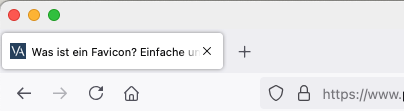
What is a Favicon?
A favicon is a small, 16×16 pixel image that represents a website in the browser tab. It is displayed in the browser’s address bar, next to the page title, and in the browser’s history and bookmark list. A favicon can help users quickly recognize your website in their bookmark list, and it can also make your website more recognizable when it is displayed in the browser’s address bar. While a favicon is not mandatory, it can be a helpful way to brand your website. If you decide to create a favicon for your website, there are a few things to keep in mind:
- Make sure the favicon is relevant to the content or theme of your website.
- You should not use too much text or complex graphics in the favicon, as it will be displayed very small.
- Keep in mind that not all browsers support favicons. So don’t rely on them as the only way to brand your website.
Why are favicons important and not to be neglected?
While a favicon may seem like an insignificant detail, favicons can actually be quite important. For one, favicons help to brand a website and make it more recognizable. They also make it easier for users to find a particular website in their browser history. In addition, favicons can be used as shortcuts on mobile devices, making it easier for users to access their favorite websites on the go. While favicons may seem like a small detail, they can have a big impact on a website’s usability and recognition.
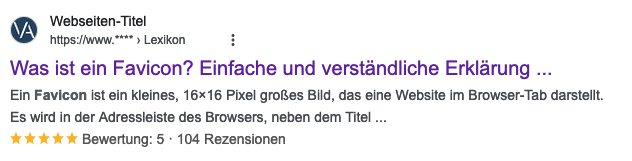
Favicon and its relevance in search engine optimization
The favicon can also play a role in search engine optimization (SEO). When someone searches for your website, the favicon may appear next to your entry in the search results. This can help increase click-through rates and improve your SEO ranking. While favicons are not strictly necessary for SEO, they can be a helpful tool to increase your online visibility.
Creating a favicon is not rocket science
Creating a favicon is relatively easy, and there are numerous online tools that allow you to create favicons from existing images. In most cases, favicons are created from .PNG or .JPG images. However, it is also possible to create favicons from scratch using vector graphics software such as Adobe Illustrator. Once you have created your favicon, you need to upload it to your website’s server and then insert a few lines of code into your website’s HTML. This will ensure that your favicon is displayed correctly in web browsers.
What size and file format should a favicon have?
When designing a favicon, it is important to consider both the size and the file format. The ideal size for a favicon is 16×16 pixels, but some browsers also support larger favicons up to 32×32 pixels.
As for the file format, favicons are usually saved as .ico or .png files. If you are unsure which format to use, .png is a good choice as it supports transparency and can be easily resized.
Remember that your favicon should be simple and recognizable, so avoid complex graphics or too many colors.
When done correctly, a favicon can be a valuable addition to your website.
Favicon Generator – a simple tool for creating a favicon
A favicon generator is a tool that helps in creating favicons. Favicon generators usually allow you to upload an image, such as a logo, and then automatically generate the favicon file. This file can then be embedded in the website’s code. In addition to creating favicons, favicon generators can also be used to edit already created favicons. For example, a favicon generator can be used to change the size of an image or crop it. Favicon generators can be obtained online for free or purchased.
Become more visible on Google & Social Media?
In a free strategy consultation for data-driven online marketing, we uncover your untapped potential, review any existing ad accounts if necessary, examine your SEO ranking and visibility, and determine which strategy is appropriate for your budget and which active measures will lead to more inquiries or sales.

✅ More visibility & perception through targeted placement
✅ More visitors > prospects > customers > revenue
✅ Reach target groups scalably with SEA
✅ Act and grow sustainably with SEO
🫵 Maximum success with our hybrid strategy
💪 More than 15 years of experience across industries in over 1,000+ projects demonstrable!







Example:

Good alternative:

If WordPress is used, here are the instructions for inserting, changing or customizing the website icon for the browser tab and search engine:
Change WordPress favicon + apple-touch-icon (logo / icon / graphic / symbol address bar browser tab)


 DE
DE