

Can we trust Google AI to deliver the best possible results for our online shop? We decided to put Google AdWords Ads Smart Shopping to the test and extensively evaluate it. Our test was conducted with 2x B2C shops (Fashion, Living, and Dog Supplies) and 1x B2B shop (Truck Spare Parts).
How good or bad are Google AdWords Smart Shopping campaigns?
In general, we are against the automation of Google Ads (formerly Google AdWords).
We are not big fans of automatic bidding, broad matching, ad rotation, smart campaigns, maximizing conversions, and pretty much all of Google’s „recommendations,“ and we don’t even get involved with AdWords Express.
To be clear, an algorithm didn’t steal our lunch money in high school. We have no personal beef with automation. When Google announced Smart Shopping in May 2018, the Fetch & Funnel team was excited.
We want to improve results and demonstrate success. It would honestly make our lives easier. Anything we can do to improve campaign performance is welcome with open arms.
However, we always test Google’s new automatic/advanced/AI-driven features, and the results generally fall short of expectations. With manual optimization, we can almost always achieve superior results. Manual bidding, single-keyword ad groups, and bid stacking (and the list goes on) generally perform better than their automated counterparts. It takes about a year for Google to fix the issues and improve the product after launch.
However, we continue to hope for every new feature Google introduces. They have some of the most advanced machine learning and AI capabilities in the world. Have you seen the future of Google Assistant? Hey Google, order my favorite food in Cologne! With that in mind, it doesn’t seem too far-fetched to believe that Smart Shopping campaigns could be the new exception to our anti-automation rule.
What is Google Smart Shopping? How does it work in the Google Ads account?
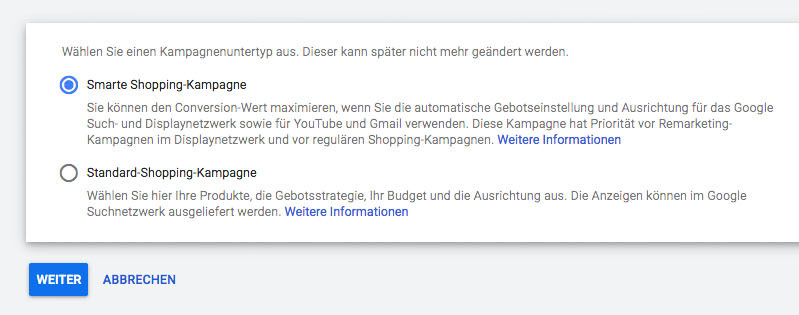
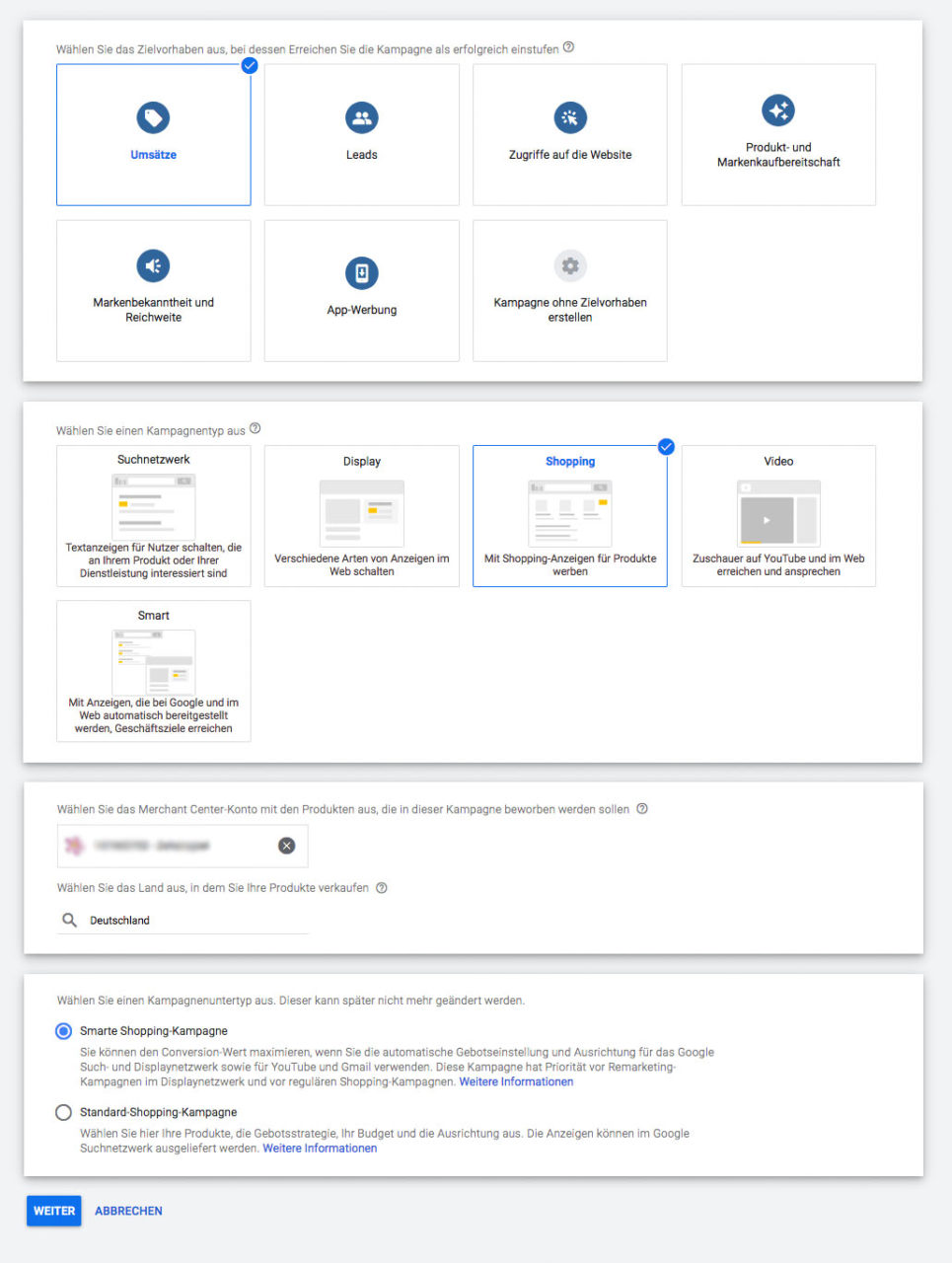 Google’s Smart Shopping campaigns are automated shopping campaigns focused on goals. Smart Shopping campaigns automatically optimize ad delivery across Google’s advertising networks to achieve the target value defined by the advertiser, such as conversions or Return on Ad Spend (ROAS).
Bids and placements are also automatically adjusted based on the determined probability that an ad click will lead to the advertiser’s stated goal. It’s something like optimizing for conversions on Facebook.
Google Ads Smart Shopping ads are shown across multiple networks, not just search. Placements appear across the Display, Shopping, YouTube, and Gmail networks. Unfortunately, you cannot split network placements for reporting purposes or exclude a specific network. That’s a big drawback – but we’ll get back to that in a moment.
Become more visible on Google & Social Media?
In a free strategy consultation for data-driven online marketing, we uncover your untapped potential, review any existing ad accounts if necessary, examine your SEO ranking and visibility, and determine which strategy is appropriate for your budget and which active measures will lead to more inquiries or sales.

✅ More visibility & perception through targeted placement
✅ More visitors > prospects > customers > revenue
✅ Reach target groups scalably with SEA
✅ Act and grow sustainably with SEO
🫵 Maximum success with our hybrid strategy
💪 More than 15 years of experience across industries in over 1,000+ projects demonstrable!







Smart Shopping Campaigns: Pitfalls
Although Smart Shopping campaigns theoretically sound incredibly easy, there are many limitations you should be aware of.
- Negative Keywords: Negative keywords are not available in Smart Shopping. They are extremely important in traditional shopping campaigns, and if you lose control here, you should feel uncomfortable. You could end up wasting valuable budget on completely irrelevant search traffic.
- Network Placements: Ad performance always varies across different networks. Display Network ads generally have lower click-through rates and lower conversion rates, while ads in Gmail and Search typically perform better when optimizing for conversions. If you don’t have the option to exclude unwanted networks, you will have to pay for clicks that do not bring you qualified traffic.
- Location Targeting: You can set the country, but you cannot target a specific region or exclude a city.
- Ad Scheduling: Google determines the best times and days to spend your budget. This means that ad scheduling is not an option. If performance stinks between 2 and 5 AM, you leave it to Google to stop serving your ads.
- Device Targeting: You cannot choose which devices your ads will be served on. If your target audience primarily uses mobile devices, you will also have to pay for ads to be shown on laptops and tablets.
- Bid Adjustments: Bid adjustments can go a long way in optimizing campaign performance and making the most of your budget. Unfortunately, bid adjustments are not an option with Smart Shopping.
- Audience Targeting: Audiences are selected for you. Google determines where to find your best customers at the lowest cost.
- Granular Reporting: This is a big one! You cannot analyze data from Display, Shopping, YouTube, and Gmail ads to determine where your sales are coming from.
One thing is 100% guaranteed: if you enable Smart Shopping, you lose control and rely on Google’s AI.
Google Ads Smart Shopping: Advantages
Despite the disadvantages mentioned above, there are some compelling reasons to use Smart Shopping. They are incredibly easy to set up and can save you a lot of time. If you are able to set up a shopping feed, Smart Shopping is the easiest way for any e-commerce brand to get started in the Google ecosystem.
While traditional shopping campaigns can be too complex. Splitting your product catalog, grouping and structuring your campaigns, bidding, location targeting, exclusions, negative keywords (immensely important). This is a highly complex advertisement that can quickly overwhelm even the most experienced PPC manager.
Smart Shopping: Best Practices
As with all Google innovations, you need to test and apply best practices to see how they work.
- Start small. Start with a specific product group and let the others run in normal shopping campaigns. In fact, smart campaigns take precedence over existing campaigns for the same products, so they affect normal ad activity and performance.
- Try it out. Run your test for at least 15 days and then evaluate the performance. If everything looks good, add more product groups until you have transferred the complete product catalog to Smart Shopping.
- Do not double up. If you plan to include your complete product catalog in a Smart Shopping campaign, Google recommends pausing existing Shopping and Dynamic Remarketing campaigns to avoid overload and wasted budget.
- Choose your strategy wisely. It is important to understand the difference between bidding strategies before choosing the one you use. The difference between Target ROAS and Maximize Conversion Value can have a significant impact on campaign performance. Maximize Conversion Value typically maximizes ROI within a given budget, while Target ROAS adheres to the target you set.
- Segment your products. Problems can arise if you have a large catalog with many different products. Some products may have strong competition, leading to higher CPCs, which in turn generates a lower ROI without increasing sales. Other products may have lower CPCs or higher prices and achieve a better ROI if sales volume remains constant. Therefore, if you want to use a Target ROAS strategy, we recommend segmenting products into separate campaigns to assign individual ROAS values. You should divide your products into several product groups, even within the same campaign and even if you are targeting the entire catalog.
- Analyze performance and adjust your strategy. Segmenting your products gives you detailed reports that allow you to accurately measure campaign performance for each product group. You may find that certain products are better off in separate campaigns to better control the budget.
Conclusion: Are Google Ads and Smart Shopping campaigns right for your business, your product, and your online store?
When it comes to performance data, our results are mixed. We are constantly testing new Smart Shopping campaigns across a variety of industries, but currently, the ability to achieve significantly improved results is simply not there.
We have experienced pros and cons, but the overall results have not been particularly impressive. Sometimes performance declined, and sometimes we saw significant improvements compared to existing Shopping and Dynamic Remarketing campaigns. Smart Shopping went live in May 2018, and although it has been about a year since they were introduced, performance does not seem to be improving. Currently, it does not look like they can consistently outperform regular shopping campaigns. Unless automation is your only option, we recommend not using Smart Shopping.
Keep in mind that traditional shopping campaigns are often the most profitable area on Google for e-commerce businesses. Strong performance relies on careful control over the right levers. Without this control, you are flying blind and the results will suffer. You will lose sales to your competitors.
However, if you are not an advanced advertiser and do not have much experience running campaigns, Smart Shopping may be the best option. Testing can’t hurt. Trial and error is a necessary evil. Or at least a necessary headache. Sometimes just showing up is enough to get the job done until you are ready to step it up.
If you are looking for an easy way to run Google Shopping, we recommend trying Smart Shopping campaigns. If, on the other hand, you find the above daunting or want to actually scale your business and dominate your competitors on Google, give us a call and we will do it professionally as a SEA agency for you!

Ihr Ansprechpartner für SEA Suchmaschinenwerbung und Smart Shopping:
E-Mail: fi@vastcob.com
Florian Ibe
Here is another interesting video on Google Shopping and/or Smart Shopping:





 DE
DE


1 Comments
[…] Ein ausschließlich Smartes Konto nutzen mit einfacher Verwaltung ohne jegliche Kontrolle (siehe Artikel hierzu) […]