

In the digital age, protecting your online platform is crucial. With the increasing number of fake registrations and unwanted customer accounts, the security of your WooCommerce shop is paramount. A proven solution to enhance the security and usability of your website is the use of Google reCAPTCHA. In this blog post, we compare Google reCAPTCHA v2 and v3 and introduce the excellent WooCommerce plugin – reCAPTCHA for WooCommerce*.
WooCommerce Captcha / ReCaptcha against Fake Accounts & Annoying Spam Customer Accounts – Google reCAPTCHA v2 vs v3
reCAPTCHA is a security service from Google that protects your website from spam and abuse. Version 2 (v2) requires users to click a checkbox to confirm they are not a robot, or they have to solve a puzzle. In contrast, reCAPTCHA v3 works in the background to analyze human behavior and then provides a score indicating how likely it is that the user is human.
While v3 offers users a more seamless experience, v2 may be more suitable in some cases, especially when explicit human verification is important. Ultimately, the choice between v2 and v3 depends on the specific requirements of your website.
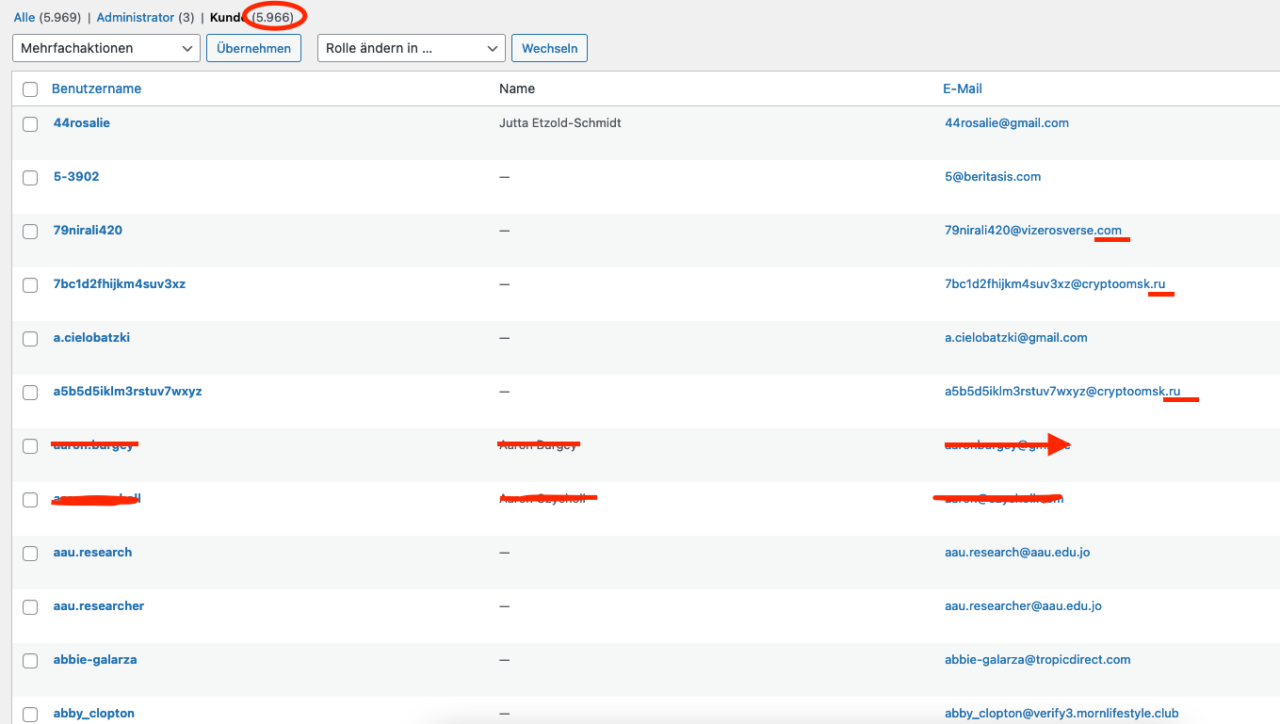
Unfortunately, this is what it can look like when fake accounts and bots register in the shop daily:
By the way, the Captcha can also be used in compliance with GDPR! Tip: Use the data protection solution from IT-Recht-Kanzlei (click here for more information)*
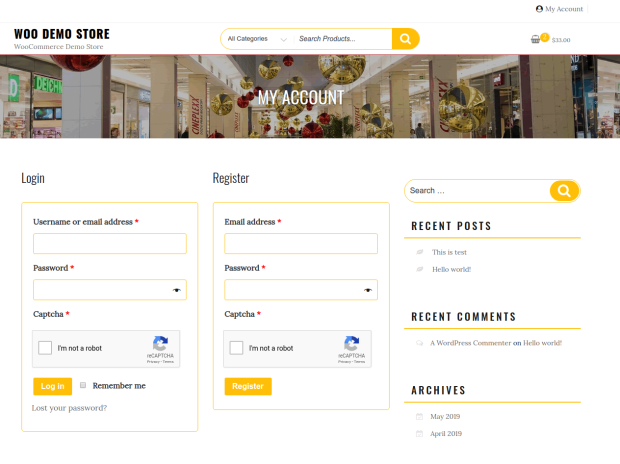
WooCommerce reCAPTCHA: Optimize Your WooCommerce Shop with Google reCAPTCHA and Protect Against Fake Accounts and Annoying Spam Customer Accounts: A Comparison of v2 and v3
reCAPTCHA for WooCommerce is a plugin that takes your website’s protection to the next level. It seamlessly integrates Google reCAPTCHA into your WooCommerce shop, helping you ward off unwanted activity.
Become more visible on Google & Social Media?
In a free strategy consultation for data-driven online marketing, we uncover your untapped potential, review any existing ad accounts if necessary, examine your SEO ranking and visibility, and determine which strategy is appropriate for your budget and which active measures will lead to more inquiries or sales.

✅ More visibility & perception through targeted placement
✅ More visitors > prospects > customers > revenue
✅ Reach target groups scalably with SEA
✅ Act and grow sustainably with SEO
🫵 Maximum success with our hybrid strategy
💪 More than 15 years of experience across industries in over 1,000+ projects demonstrable!







Features of reCAPTCHA for WooCommerce Shops:
- Supports both reCAPTCHA v2 and v3.
- Protects against fake registrations and unwanted customer accounts.
- Allows the integration of reCAPTCHA on various pages, such as login, registration, password recovery, and checkout pages + all forms!
- Login
- Registration
- Lost password
- Guest Checkout
- Login User Checkout
- Add payment method
- WooCommerce Product Review
- WooCommerce Order
- WordPress Comment Form
- WP-Login (including custom forms)
- WP-Register
- JetPack Forms
- Custom Label for reCaptcha
- Custom Error Messages
- Recaptcha Dark/Light Theme
- Captcha Full/Compact Mode
- Captcha Language Selection for V2.
- Automatically Detect User Language
- Disable Submit Button Until Captcha is Verified
- Reset Captcha on Order Postback Error
- Disable reCaptcha for IP/Range
- Easy to configure and customize.
- Provides options to control visibility based on user role.
- Supports multiple languages and is compatible with WPML.
- Is fully responsive and adapts to any device.
- Allows you to customize the size and color of the reCAPTCHA widget.
- Integration with WooCommerce reviews to prevent spam reviews.
- Offers regular updates and first-class customer support.
Advantages of using WooCommerce Google reCAPTCHA:
- Improves the security of your WooCommerce shop.
- Protects against spam registrations, fake customer accounts, and bot attacks.
- Enhances user experience through seamless human verification.
- Allows for precise customization to meet your website’s needs.
- Saves time and resources that would otherwise be spent managing spam.
- Protects your customers and their data.
- Supports SEO efforts by excluding spam and bot traffic.
- Enhances the credibility and trust in your online shop.
- Helps prevent chargebacks and e-commerce fraud.
- Offers peace of mind and security by protecting your website around the clock.
Why use ReCaptcha v3 in WordPress & WooCommerce:
Google reCAPTCHA v3 is the latest generation of Google’s CAPTCHA technology, designed to distinguish human users from bots. Unlike previous versions of reCAPTCHA, which required user interaction (such as checking a box or solving a puzzle), reCAPTCHA v3 works entirely in the background. Here’s a closer explanation of how it works:
- Behavioral Analysis: reCAPTCHA v3 analyzes user behavior on a website to determine whether they are humans or bots. It considers various factors, such as mouse movement, time spent on the website, the number of pages clicked, and other interactions.
- Risk Assessment: Instead of asking users to verify themselves, reCAPTCHA v3 provides the website with a risk score on a scale of 0.1 to 1.0 for each action performed on the website. A lower score indicates a higher probability that the action was performed by a bot.
- Customizable Actions: Website owners can define actions they want to monitor on their website. For example, an action could be filling out a form or submitting an order.
- Automated Learning: reCAPTCHA v3 uses machine learning to improve the distinction between human and automated behavior. Over time, the system learns to more accurately determine which actions are likely performed by humans and which by bots.
- Privacy-Friendly: Since reCAPTCHA v3 does not require user interaction, it does not disrupt the user experience and is therefore less intrusive.
Overall, reCAPTCHA v3 is a powerful and user-friendly method to protect your website from unwanted bot traffic and abuse, while ensuring a smooth and uninterrupted user experience for your users.
Click here for the Google reCaptcha service.
Successes and overview through v3:
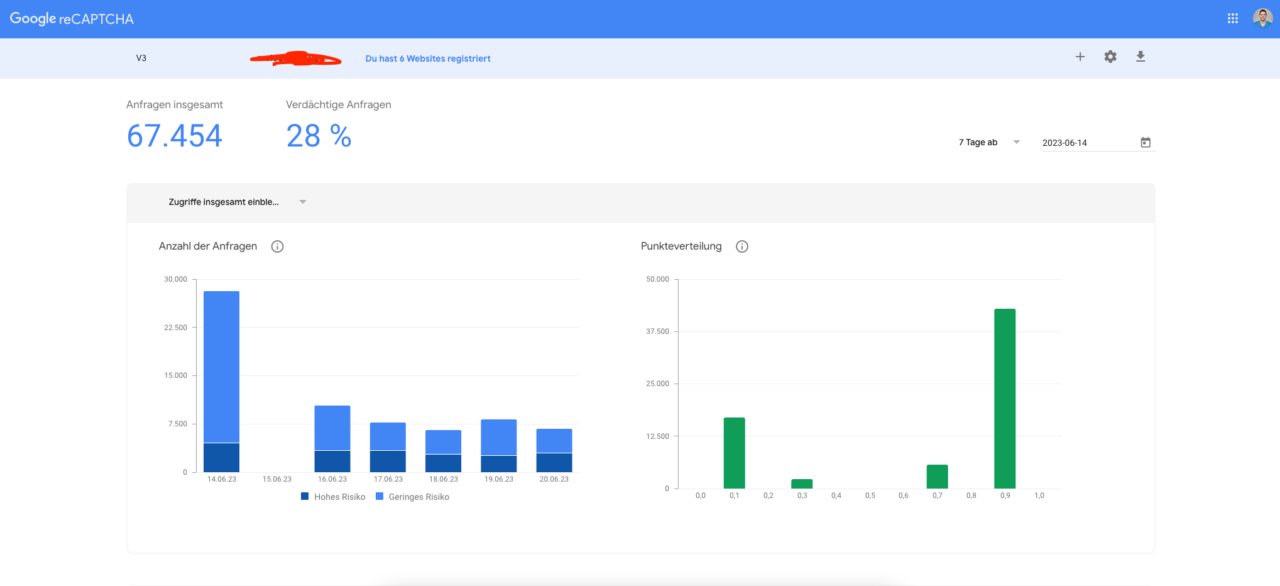
Using Google ReCaptcha with WordPress & WooCommerce to protect registration, login, and forms from spam, fake & bots
Using reCAPTCHA for WooCommerce ensures that your online store is protected from unwanted activities. Whether you choose reCAPTCHA v2 or v3, you benefit from improved security, a smoother user experience, and increased trust in your online store. It is a simple and effective way to protect your website while maintaining a high level of user-friendliness.
Securing forms on your WordPress or WooCommerce website with Google reCAPTCHA offers many advantages.
Here are some reasons why you should consider this:
- Spam Protection: Bots are known to spam contact, comment, and registration forms. This can lead to a flood of unwanted messages or fake accounts that require time and resources to manage. reCAPTCHA helps to ward off this type of spam.
- Security: Some bots can carry out malicious activities such as DDoS attacks, brute-force attacks, or intrusion into user accounts. By using reCAPTCHA, an additional level of security is added, which helps to ward off these types of threats.
- User Experience: While some security measures can negatively impact the user experience, Google reCAPTCHA (especially v3) is designed not to disturb the user. It runs in the background and, in most cases, does not require any additional actions from users.
- Protection against fake orders: In a WooCommerce shop, bots can be used to place fake orders or manipulate the system in other ways. reCAPTCHA helps to prevent this and contributes to maintaining the integrity of your shop.
- Free to use: Google offers the reCAPTCHA service for free, so you can benefit from an additional level of security without incurring additional costs.





 DE
DE

