

WordPress can do a lot by default, but in addition to the missing media library folders, there is another shortcoming/problem in the media library: renaming already uploaded images. This simply isn’t possible without an extra plugin! In the WordPress media library, the internal title, description, and alt tag can be easily changed, but the file name of the image cannot be changed.
But there is also an affordable solution for this that is worth every penny and makes life easier! More on this in the article:
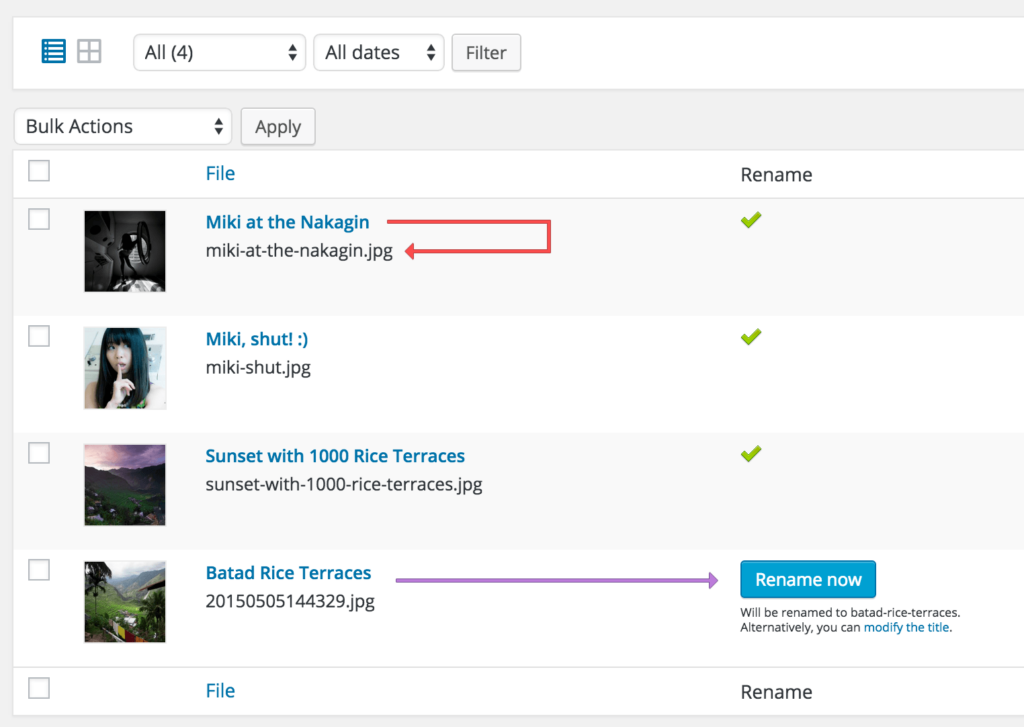
Rename WordPress Images Manually + Automatically (Change Image Names)
Media File Renamer is a WordPress plugin that renames your media files. This can be done automatically (depending on certain conditions) or manually. It is excellent for image SEO, keeping your WordPress tidy, and avoiding file-related issues. References to these filenames on your website are also updated (Pro Version!!!). It has many features, and if you set the settings correctly, you can automate the entire process and execution of renaming.

The best plugin for renaming images in WordPress AND also the filename
Standard – Free
With the free version, you can automatically rename your media entries based on their titles. This is what most users are looking for.
- Automatic renaming
When the title of a media entry is changed, the renaming process is executed automatically. - Rename Now button
In the media library, you can use the Rename Now button to preview the new file name and rename it with one click. - Lock / Unlock
You can lock the renaming if you are satisfied with the file name (and avoid renaming if you edit your media entry again). - Undo button
Have you encountered a problem? Or are you not satisfied with the file name? You can use the Undo button. - Ultra customizable
There are many filters and actions that developers can use. If you need to customize the way files are renamed or start the process at specific times, you can do so.
Become more visible on Google & Social Media?
In a free strategy consultation for data-driven online marketing, we uncover your untapped potential, review any existing ad accounts if necessary, examine your SEO ranking and visibility, and determine which strategy is appropriate for your budget and which active measures will lead to more inquiries or sales.

✅ More visibility & perception through targeted placement
✅ More visitors > prospects > customers > revenue
✅ Reach target groups scalably with SEA
✅ Act and grow sustainably with SEO
🫵 Maximum success with our hybrid strategy
💪 More than 15 years of experience across industries in over 1,000+ projects demonstrable!







Pro Version – from $24
The Pro version offers more features for experts and more SEO optimization.
- Manual Renaming
In the Media Library screen (or the Edit Media screen), you can rename the file exactly as you wish. - Additional Automatic Methods
There are additional methods for automatically renaming your files: For example, depending on the post/page, the media entry is also appended, or depending on the ALT text. - Numbered Files
If the ideal filename already exists, a number will be appended and incremented if necessary. - SQL Logging
All SQL requests executed by the Renamer, as well as the anti-requests (for rollback purposes), are logged. - Synchronize Alt
The ALT text is synchronized via the renaming depending on the chosen method. - ASCII Transliteration
If you want your filenames to be very clean, this feature will help you achieve that.
Renaming images in WordPress with the Media File Renamer Plugin
The plugin is an automatic „renamer“ based on the media title. Manual renaming (and some other functions) are available in the Pro version.
The plugin automatically renames media files based on their title. When files are renamed, their references are also updated. This works for posts, pages, products, custom types, and their metadata.
A new extra column in the media library displays the new, ideal file name. You can rename it with a button. You can lock and unlock the automatic renaming process with small icons. There is also a small dashboard called File Renamer in Media, which allows you to rename all files at once.
Advanced users can change the way files are renamed by using the plugin’s filters (see FAQ). There is also a LOCK option for each image to prevent the file name from being changed further.
This plugin does not allow you to manually change the file name in its standard version. The Pro version is required for this.

Recommendation: PRO VERSION
The Pro version includes additional features (see video), such as manual renaming, renaming based on the post to which the medium (image) is attached, or the content of the alternative text (ALT), logging of SQL queries, and some other options.
A good process is to let the plugin rename automatically (as in the free version) and manually rename the files that require fine-tuning.
This allows for targeted SEO optimization with file names even after the fact.
This plugin works perfectly with WP Retina 2x, Polylang, WPML, and many more. It has been tested on Windows, Linux, and OSX systems (Source: Plugin Description).
WordPress Images SEO – Keywords in the image name
Since Google Image Search accounts for at least 10% of search queries, and this trend is increasing, it is important that the Google algorithm and other search engines can correctly „understand“ and categorize images and display them in the appropriate context for each search query.
Either you always remember BEFORE uploading, or you do it afterwards (usually the case).
This is especially important in online marketing for shops with many products and numerous product images.
An image name like DSC_5237433.jpg is extremely unfavorable, and ISO_327423_Produkt-Shop-Hund.jpg is also not good.
Better: MANUFACTURER-PRODUCT_NAME-COLOR-SHAPE-PATTERN-ETC-ITEM_NUMBER.jpg
Example: Dog_Basket-with-Cushion-brown-round-wood-523648.jpg
Hyphens are always better than underscores!
More Questions & Answers
Will the ALT text be renamed?
You can update the ALT text based on the title by enabling the correct option in the plugin’s settings. You can also further customize it by using the filter described below. Please note that the ALT text is updated in the media item’s metadata. The HTML code is not changed by the plugin.
How do I redirect my old image URLs to the new ones?
I recommend the excellent Redirection plugin. And to make your life easier, Media File Renamer has a small feature. Visit Media > Renamer and in the Before / After section, click Show Filenames and then Export as CSV. You can import this CSV file directly into the Redirection plugin.
Manual renaming grayed out (not selectable)?
You must have the Pro version* activated. Also, manual renaming must be enabled in your settings (Meow Apps > Renamer).

Fragen zu WordPress oder dem Plugin?
E-Mail: fi@vastcob.com
Florian Ibe
Recommendation: Folders for more structure in the media library 📂

Blog article on this:
Additional tip: Clean up unused images






 DE
DE

