


Creating a real WordPress membership area with a WordPress membership plugin has never been easier. By default, the CMS does not offer any real member management. There are some examples where user roles, etc., are used to create a kind of internal area, but that is neither one thing nor the other. Creating a website with a membership area is easiest with what is known as a WordPress membership plugin, which turns parts of the existing site into a closed membership area.
Enabling member management for free is almost impossible and the effort is many times higher and tinkering without rhyme or reason. A free solution as a plugin should be avoided here, since as the operator of the member area you also have a responsibility for your internal and protected area. Many free plugins no longer exist after just a few years and support for errors is often poor or non-existent. As a rule, you can then hardly do anything yourself and must at the latest switch to a paid version of a WordPress member plugin. With the plugins presented, you can easily create an internal area with login in WordPress.

Create a real WordPress members area (member area) with a WordPress membership plugin
Are you wondering which WordPress membership plugin we can use to create your own member page? Choosing the right platform for building your member page makes a big difference when it comes to growing a business and earning more money online. In this article, we present THE best membership plugin with all the features you could wish for. It is the Ultimate Membership Pro – WordPress Membership Plugin* and costs less than 50 euros as a one-time purchase!!!
Over 10,000 membership areas have already been implemented worldwide using this WordPress membership plugin.
NOTE: At the very bottom of the article, we also report on the official WooCommerce.com Memberships Plugin*. » Jump to article
A little insider tip is SureMembers:

For just $69 per year, you get a powerful WordPress plugin with SureMembers for easy management of member areas and access restrictions. Content, pages, posts or products can be selectively released according to user roles, memberships or individual rules. The intuitive interface, high performance and seamless integration with WordPress make SureMembers the ideal solution for membership websites, online courses and protected content – without unnecessary complexity!
Before we proceed, there are a few important things you should pay attention to and considerations you should make now:
What you should pay attention to when choosing a WordPress membership plugin
Here are the criteria we used to create our list, which we believe are the most important things to look for in a WordPress membership/member plugin:
- User-Friendliness
- Compatibility
- Features
For each type of member page, certain features are required to accomplish the task.
Become more visible on Google & Social Media?
In a free strategy consultation for data-driven online marketing, we uncover your untapped potential, review any existing ad accounts if necessary, examine your SEO ranking and visibility, and determine which strategy is appropriate for your budget and which active measures will lead to more inquiries or sales.

✅ More visibility & perception through targeted placement
✅ More visitors > prospects > customers > revenue
✅ Reach target groups scalably with SEA
✅ Act and grow sustainably with SEO
🫵 Maximum success with our hybrid strategy
💪 More than 15 years of experience across industries in over 1,000+ projects demonstrable!







Let's take a look at the most common types of member pages/member areas:
- Online courses / eCourses with interactive projects, documents such as PDFs and video content
- Service-based memberships where customers must pay for access to services you provide such as coaching or consulting
- An all-in-one site where paying customers can access everything for a monthly subscription
- Online communities with forums, live chats, articles to read and other resources that are not available to unregistered users
- Product-based memberships where physical or digital products are sent regularly to members
- Limited-term memberships where members have access to locked content for a specified period
- Drip-feed models where locked content is displayed as members progress through a program
And that is just the beginning. Fortunately, most of the best WordPress membership plugins on today's market can help you create the type of member site you want.
However, not all membership plugins are the same. Below are some of the most important things you should consider when choosing a membership area plugin for WordPress.
By the way, you can also create a WordPress online learning platform with the plugins.

The best WordPress membership plugin to create a website with member area for under 50€!!!
You can turn your website into a source of income with a closed area for members by protecting your valuable content or only part of it.
Protect your: pages, products, categories, URLs, content sections, images, menus, etc. and set a redirect or content replacement rule.
Key features: Restrict content, Member management, Private content, Restrict access, WooCommerce membership, WordPress membership, Members page, Paid membership Pro, Member + GDPR GDPR-compliant ready and integrated into WordPress 4.9.6
With Membership Pro you can create an unlimited number of users and levels in a simple registration process and synchronize the users with WordPress users. This way, users can also use WP for WooCommerce purposes.

Key features of Ultimate Membership Pro:
- Multi – Level
- Unlimited Paid / Free Membership Levels
- Protect Content Lockers
- Payment gateway: PayPal , Authorize.net , Stripe , 2CheckOut ,
BrainTree , Payza , Bank transfer - Sell subscriptions via the WooCommerce platform
- Free / paid trial period
- Protection of Drip Content
- Restrict pages or any URL
- Subscription plan
- MultiPayments Option
- Login predefined templates
- Register predefined templates
- Menu protection
- 9 email marketing platforms integrated
- Visual Composer integrated
- Keywords Restrictions
- Social Login with 7 social networks:
Facebook , Twitter , Google ,
LinkedIn , Instagram , VKontakte , Tumblr - 5 predefined layouts for social buttons
- Double email confirmation
- Dashboard statistics
- Unlimited registration / profile fields
- Restricted fields based on levels
- Redirect or replace content page
- Synchronize WordPress Users
- Members List Showcases
- Search Option in Member List
- Pagination settings in the member list
- Custom Currencies
- Coupon Codes Discount
- Bulk Coupons Builder
- Customizable email notification templates
- Custom inside Content Locker
- Special custom fields: Profile picture, file uploads, multiple selection
- Registration form for conditional logic
- Check the Code / Question field
- Professional account page – Custom content, subscription actions
(Renew, Cancel, Delete) - Custom redirect links
- Multiple predefined shortcodes
- Custom dashboard access
- Taxes related to user country
- Country-specific custom field
- BuddyPress account page integration
- WooCommerce My Account Integration
- Download Monitor AddOn
- WP Social Login Integration
- Invoice orders with custom templates
- List of access posts available for current users
- Once an individual page is created for each user account
- Pushover notifications for mobile notifications in addition to regular emails
- User reports available only to administrators to improve user tracking
- With subscription delay, you can also set when the subscription should start.
- Dynamic Pricing – The user decides the price paid within certain limits
- Security login to prevent brute force attacks.
- Membership badges with custom images.
- Restrict WordPress workflow based on levels / subscriptions.
- Filter and search options in the member directory
- Pagination in the member directory
- Predefined templates for the public profile page.
- Synchronization of Gravatar and BuddyPress avatar.
- MYCred Integration for reward points based on subscriptions.
- API Module for External Calls
- Menu tabs for custom account pages
- Predefined templates for the public profile page.
- Restrict comment submission based on the assigned subscription
- Restrict post submission based on the assigned subscription
- Integrated with Ultimate Affiliate Pro
- Flat & modern design
- Once ready for user is installed
- Multiple reminder notifications
- Offers discounts for Woo products based on purchased levels / subscriptions
- Notifications about drip content
- Import users and levels via a CSV file
- Sell SubSites based on levels / subscriptions in the WP MultiSite environment
Social Login? A better way to register / log in for customers, available in 7 social networks: Facebook, Twitter, Google, LinkedIn, VKontakte, Instagram, Tumblr
Drip content means that you publish content at regular intervals. With Ultimate Membership Pro, you can do this very well by setting for each page / post when they should be available, based on subscription time or level and when they end.
You can share content:
- Immediately
- A specific time after the user subscribes
- On a specific date
You can end the display of content:
- never before
- A specific time after release
- On a specific date
You can schedule your content for specific subscribers so that users do not have to log in and can take everything in at once
The Account page for logged-in users is fully customizable, including separate sections, custom welcome message, and overview text. The "Overview" section can be set as custom content for each user by assigning regular page/post content to display.
The main section divided into tabs is:
- Overview – with customized content for each user
- Profile – with form "Edit Profile" based on custom fields
- SocialPlus – Connections to social accounts
- Subscription – with subscription tiers and options to renew / cancel / delete
- Orders – User's order history.
- Transitions – Contains payment history transactions.
- Membership gifts – Gift codes purchased by customers.
- Membership cards – available printable cards.
- Help – Complete the customization section.
- Log out
Ultimate Membership PRO with new updates offers the complete solution for a registration process with multiple templates, options, and especially with all custom fields that you need.
In addition to the standard fields (Text, Number, TextArea), the new special fields are:
Profile Picture – Date Picker – File Upload – DropDown – Multiselect – Checkboxes – RadioBox
Ultimate Membership PRO offers several options for level access:
LiveTime – Users have long-term access with no end time. Very useful for basic or standard levels
Limited – Users have a fixed time based on days / weeks / months / years before access expires. The limited period begins as soon as the user receives level access. Very useful for trial levels or small fee levels
Date Range – Users have access only during a specific time period, regardless of when they registered. Very useful for promotional levels such as during holiday seasons.
Regular Period – Users have access based on regular time as days / weeks / months / years, when access should be renewed. Very useful for recurring subscription levels.
After Level Expiration – The current level can be automatically replaced by another level if required.
Based on Access Ultimate Membership offer PRO multiple billing options :
OneTime – A one-time payment is requested from the subscribed user
OnGoing – Long-term recurring payments are requested from the subscribed user. The recurring period is based on the "regular period" defined in the "Access" section.
Limited – Limited recurring payments are requested from the subscribed user. Very useful for promotional access that is available for multiple periods.
Trial Period – A specific period or a couple of recurring cycles can be provided as a free trial or for a small fee.
After access expires, a "grace period" can be set for existing customers to renew/pay for the current subscription level
Ultimate Membership PRO can block or restrict any element / product or any dedicated page from WooCommerce and forms or themes from bbPress
Ultimate Membership PRO can:
- Restrict access to WooCommerce products
- Restrict access to WooCommerce category products with URL – Blocks module
- Restrict access to shop, cart or other WooCommerce pages
- Restrict access to bbPress forms
- Restrict access to bbPress topics
- Restrict access to a custom post type from the WP website
Ultimate Membership PRO synchronizes membership users with ALL WordPress users with different types. Users from other platforms or scripts such as WooCommerce, bbPress, or BuddyPress can be managed so that access is restricted based on the assigned level.
Users can register and log in using any form provided by Membership Pro or other scripts.
Email subscription
Offers the best options to save and manage your registration emails for further purposes in a dedicated marketing platform. There are 10 email marketing platforms available: MailChimp, MailPoet, AWeber, Campaign Monitor, Constant Contact, Mailster, iContact, GetResponse, MadMimi, ActiveCampaign.
Easy to design and customizable member areas with Visual Composer WP Bakery
Visual Composer Page Builder is one of the best page builders for WordPress on the internet. If you use it, you can now play and manage your membership forms, member pages, and content lockers directly in Visual Composer.
Create your own WordPress website with member area now and use Ultimate Membership PRO
With Ultimate Membership PRO you can achieve everything you need for a proper membership workflow or directory area.
With a great intuitive dashboard, you can complete your settings in a few minutes and your website is ready to protect your content.
And now quickly purchase the WordPress plugin for your own membership area:
Here is an explanatory video / tutorial for the membership plugin:
The official WooCommerce.com Memberships Plugin*
Strengthen your membership association, online magazine, e-learning sites and more with access control for content/products and member discounts.
A WooCommerce members area that is 100% integrated into your content and products.
WooCommerce Members Area is not just another plugin to restrict your website's content: It is a user-friendly, website-wide membership solution that brings together your content, your shop, and your memberships.
"This is perhaps one of the simplest and cleanest plugins when it comes to configuration… it is super clean and easy to manage.
"You will love this plugin." – Chris Lema
With memberships, you can create a complete membership system that integrates seamlessly with your shop.
You can restrict your content to members, but you can also "drip" this content over time to schedule when members have access. Sell access to memberships, include memberships with product purchases, assign memberships manually, and fully integrate member benefits into your shop.
Sell or assign memberships
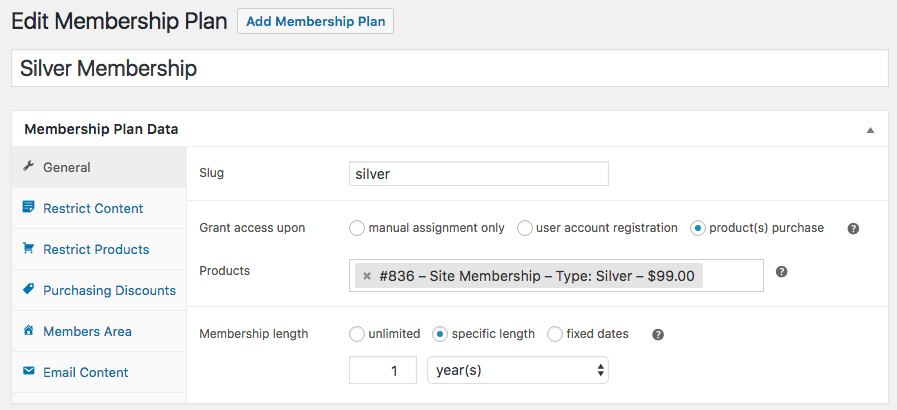
Memberships are not a special type of WooCommerce product; instead, membership plans are created independently of products. This way, you can define how access is granted to ensure maximum flexibility. You can assign 0 or more products (of almost any type) to a membership plan to support different types of memberships:
- sell a membership as a standalone product – create a product for the membership and then link the plan to this product to sell it
- Grant access to a membership as part of a product purchase – that is, buy a subscription for a meal box, get free access to the recipe section
- Grant access to the same membership from multiple products (e.g., an annual purchase or monthly subscription)
- Manually assign memberships for a members-only area with invitation only
Grant content access strategically
You have put a lot of work into your members-only content, so with Memberships you can plan when your members should have access to it. You can drip content, which means you can schedule when members have access to your content. For example, you can require customers to be members for a week before they can access certain posts or pages.
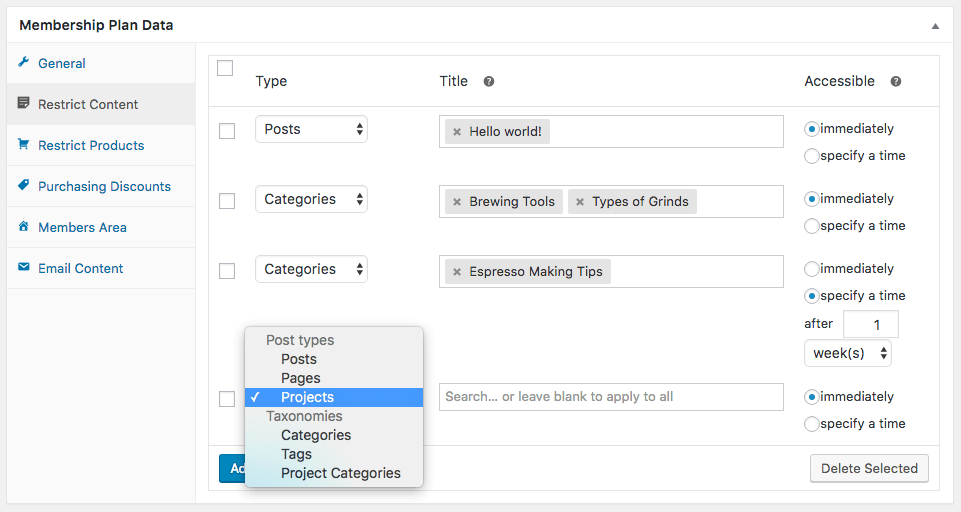
In this way, you have more control over how members begin using your website, and can familiarize members with your content at your own pace.
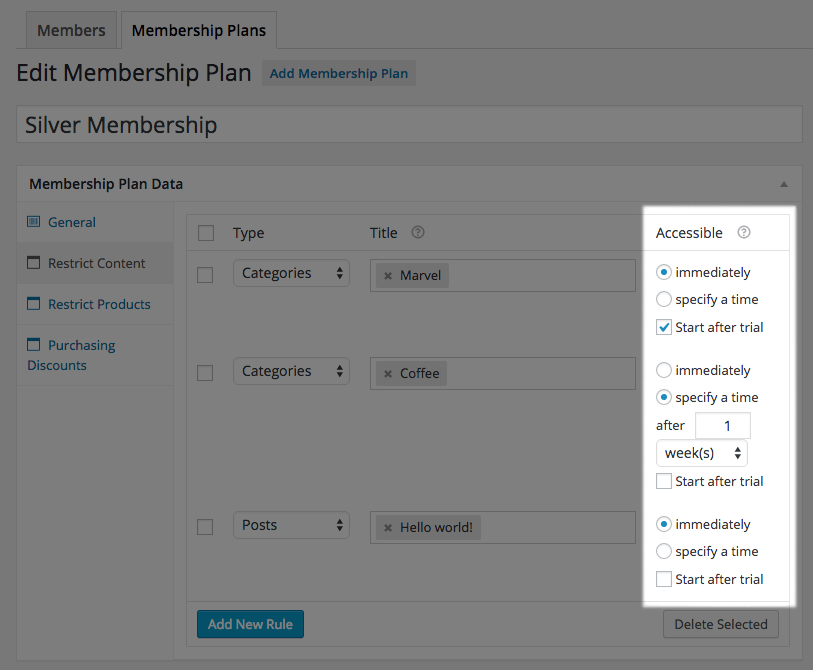
If you use this with subscriptions, you can even determine which content is included in a free trial period with content dripping rules.
Transform your shop into a shopping club
With memberships, you can create products exclusively for members, so your website can become a shopping club, or offer certain products exclusively to members.
You can restrict the product view to members, which means these products are hidden for non-members in your shop. You can also restrict purchases, which means products are public but only members can buy them.
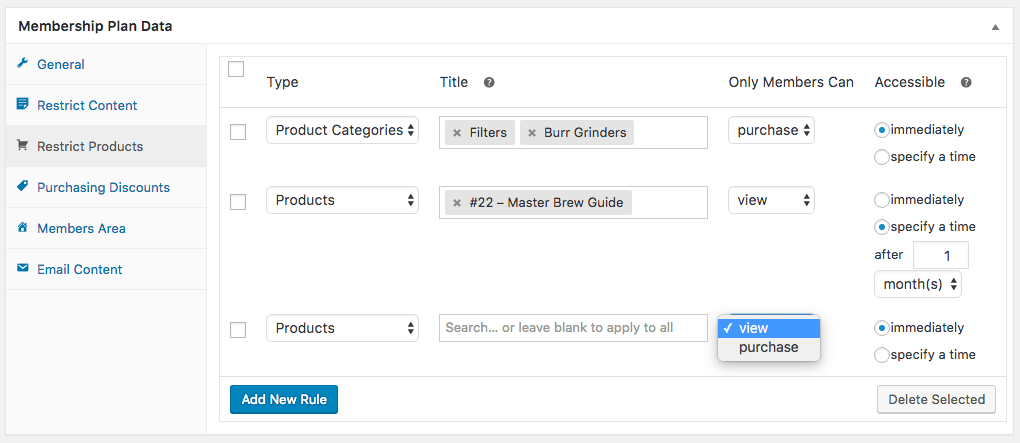
You can also throttle product access so members do not get immediate access to products.
Offer members better shipping options
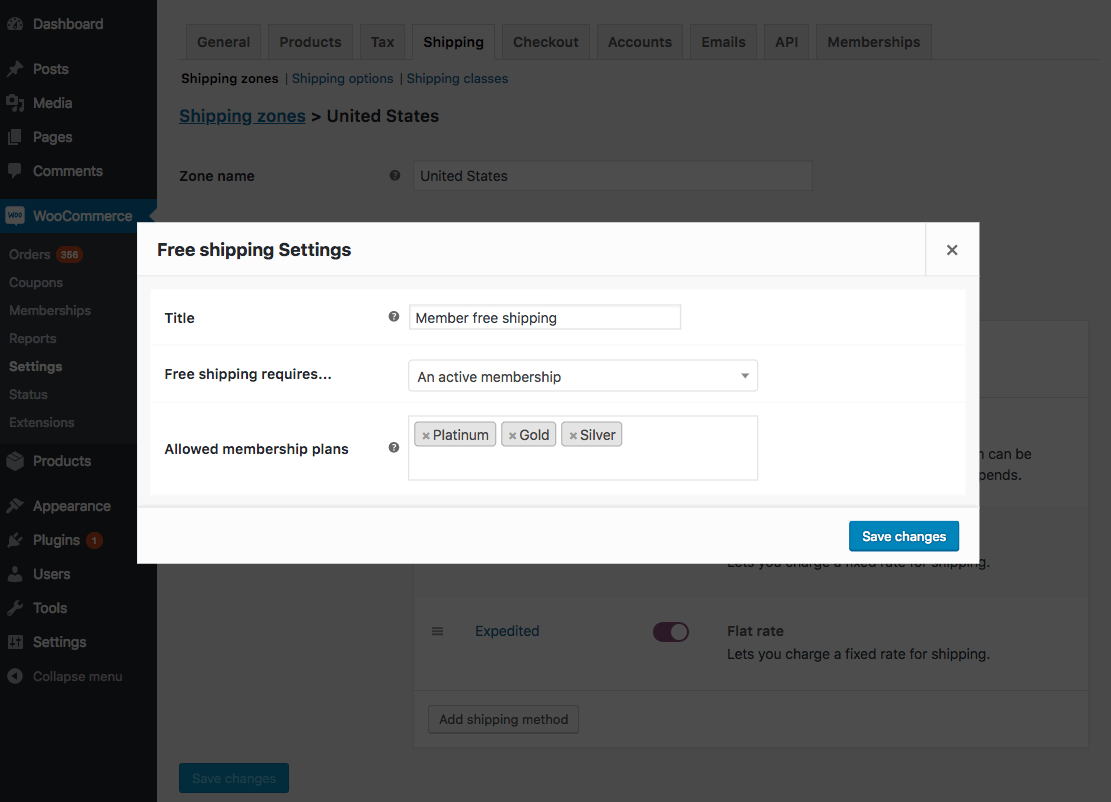
Members should be your most loyal customers. So if you offer them discounts that encourage them to shop with you repeatedly, they will keep coming back. Memberships extends your free shipping settings so you can offer your members free shipping directly, while non-members must meet other criteria (such as a coupon or minimum order value).
Reward members with special discounts
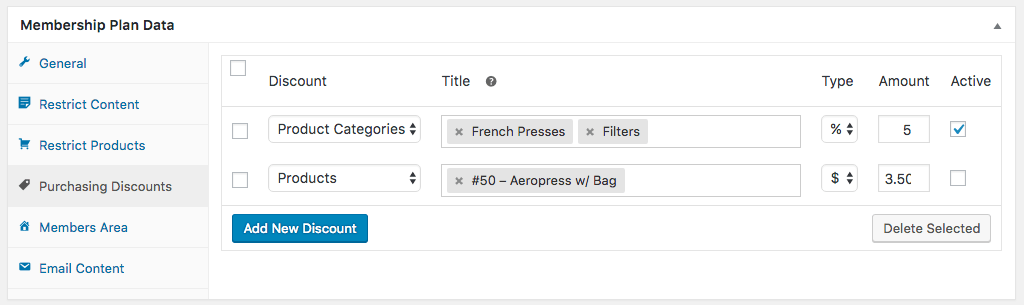
Since you may want to grant certain benefits to your members, you can grant member discounts for all products, some products, or specific product categories.
Automatically display benefits to members
While membership management should be simple for you, it should also be simple for your members. Members find all information about their membership in the Members Area. Members can access the area for each membership from the "My Account" page by clicking "View".
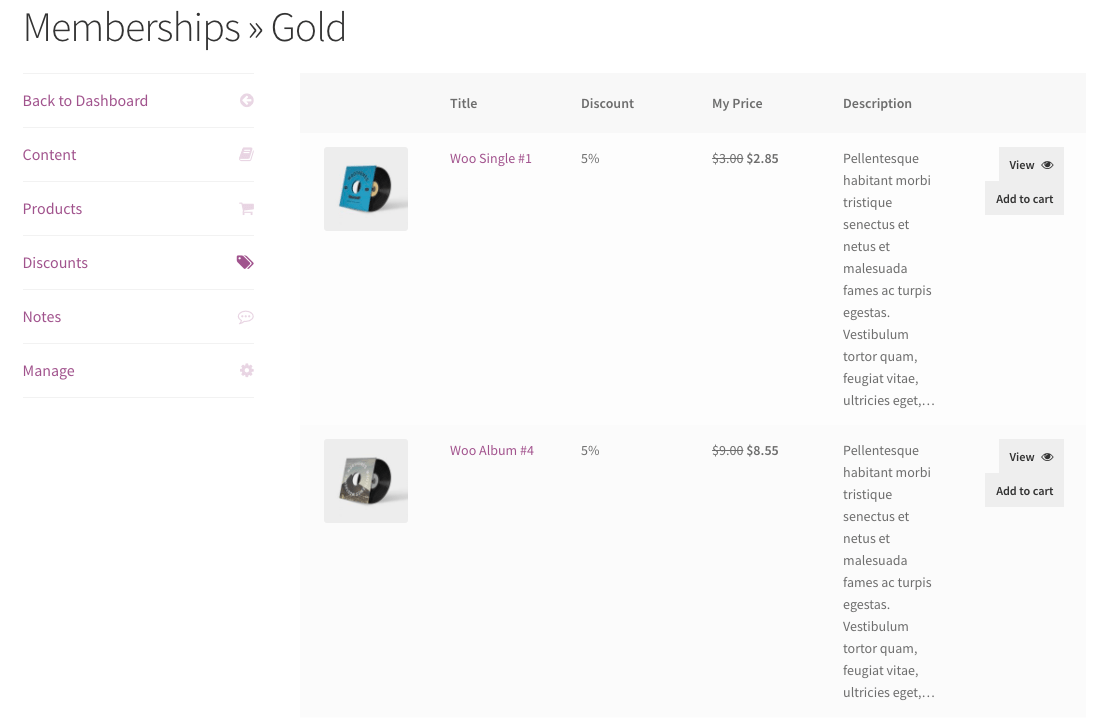
You can enable one or all areas of the members area to show members a list of accessible content (posts and pages), products, discounts and / or public membership notices. If a member will have access to content in the future, the member can also see the access date.
Import or export members
You have many tools to manage members in WooCommerce, but you may also want to connect to other services, such as importing a member list into an email tool. With Memberships, you can export members to a CSV file so you can retrieve member data from WooCommerce and into other tools.
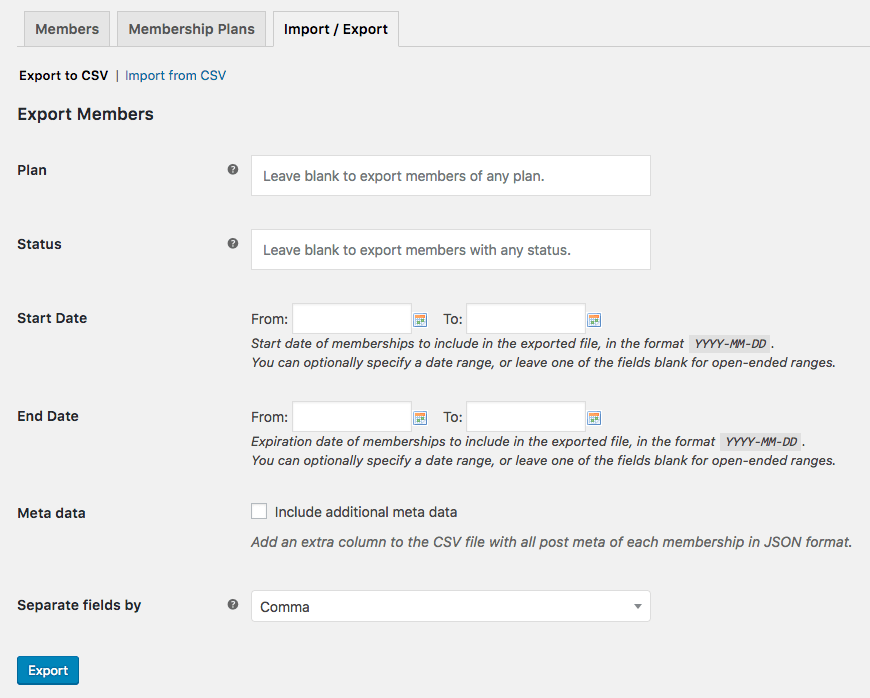
You can also import members via CSV to add new memberships, create new users, or bulk update existing members by merging your file with existing data.
Simplify communication with members
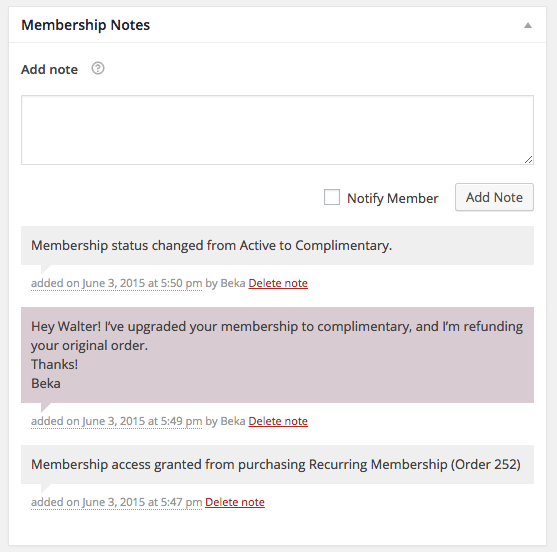
If you operate a membership website, you spend a lot of time on customer service and member management. We have tried to make this as simple as possible with memberships. We have added "membership notes" so you can track membership information for a customer, add your own notes for reference, and even easily communicate with a specific member by sending them a note via email.
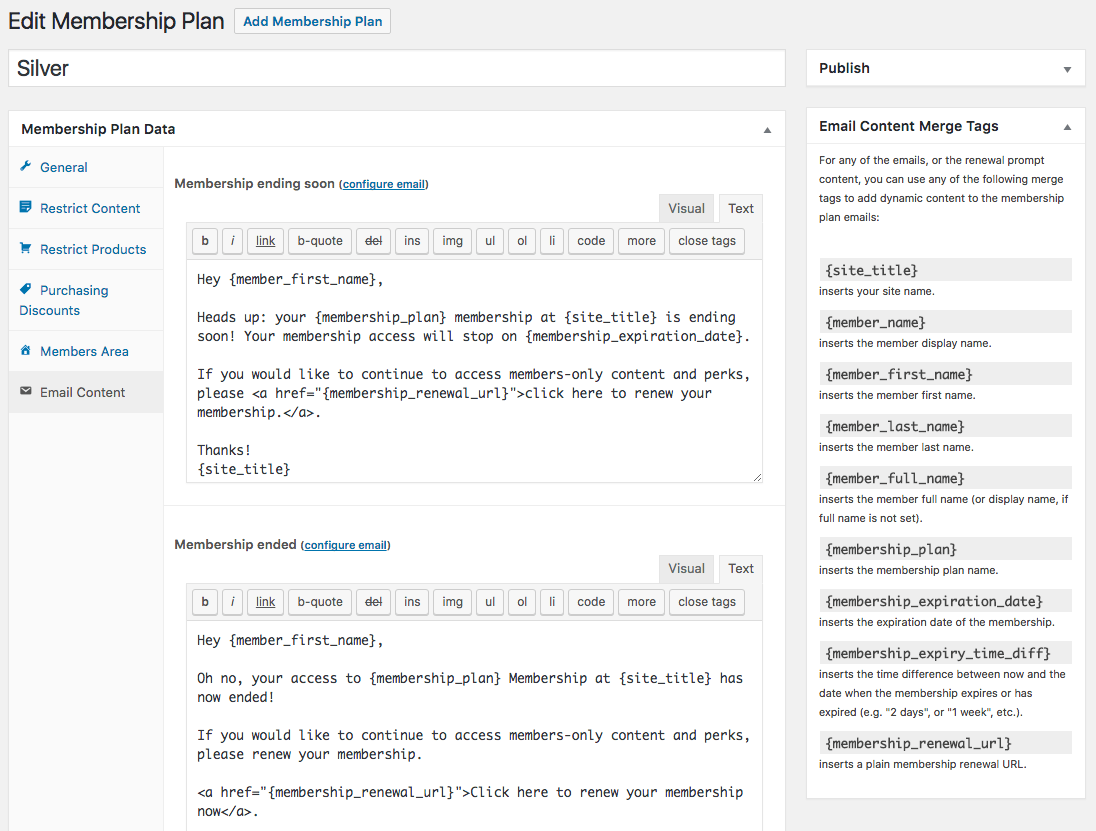
You can also use reminder emails for expiration and renewal to inform members about the end of their membership and encourage them to renew or upgrade.
Memberships + Subscriptions
Memberships is fully functional as a standalone membership solution, but works very well with the most advanced recurring e-commerce payment solution available: WooCommerce Subscriptions .
When both plugins are active, memberships can use some features of subscriptions to give you more flexibility in billing for membership (more details in our documentation):
- Memberships can use recurring billing (i.e., monthly payments) for the membership instead of a fixed term (e.g., one year).
- Memberships can use subscriptions as a payment plan, but control the access duration itself to support installment payments
- Free trial versions can be used for membership via a subscription
- Content restriction and dripping can include or exclude free trial periods, so you can control which content is available in trial versions
- Members can pause their own memberships by suspending a subscription
- Members can upgrade or downgrade their memberships by switching a subscription
- Upgrades and downgrades can use the subscription share to ensure membership costs are calculated correctly
Even if you do not want to use recurring billing, you can use the other features of subscriptions by setting the subscription duration to one billing period, so you can use upgrades and downgrades or trial periods.
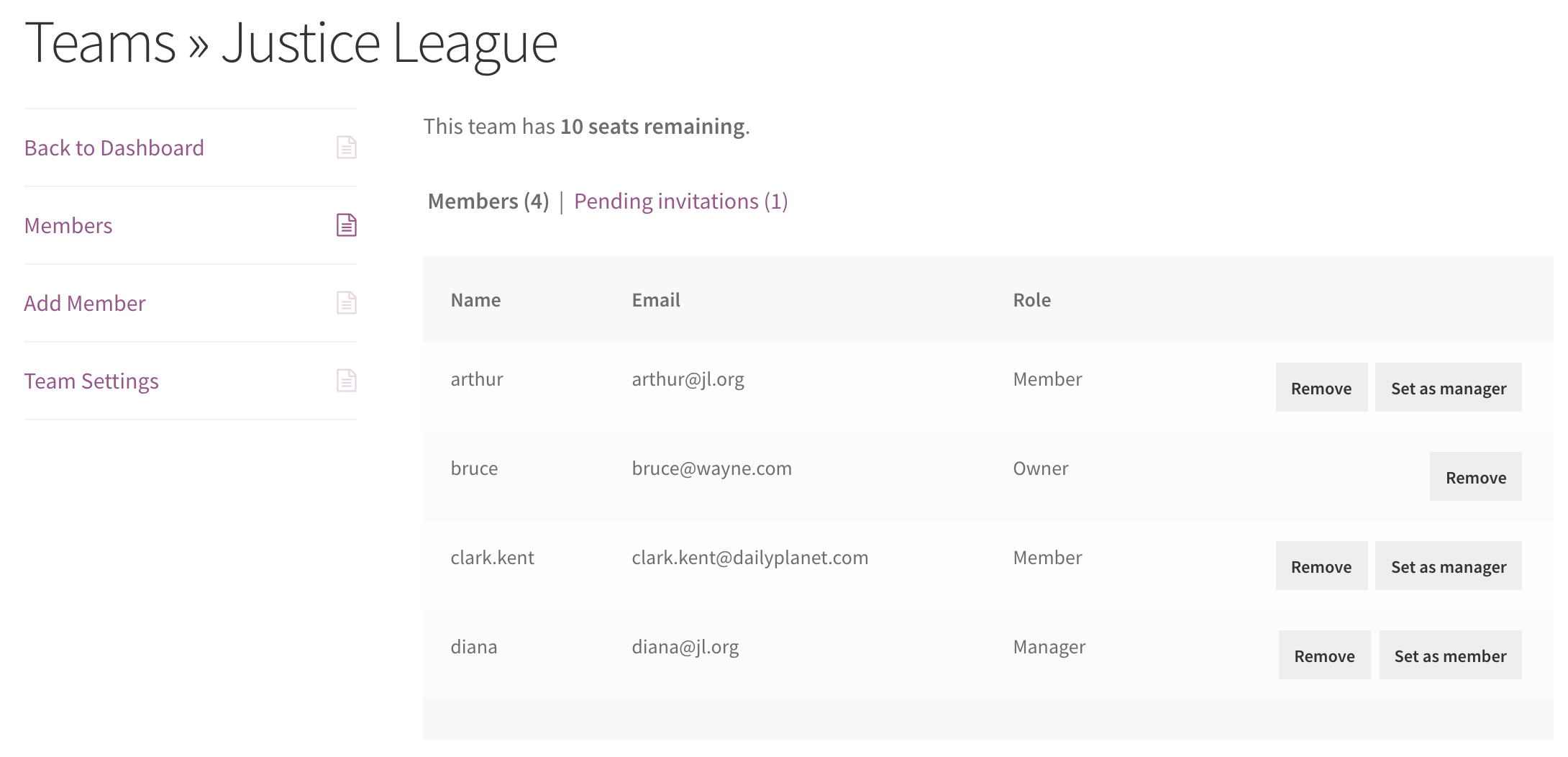
Sell memberships to companies or groups
Do you need to sell memberships to teams, companies, or groups instead? Check out the Teams for WooCommerce Memberships extension (available separately). This plugin extends WooCommerce Memberships and enables you to sell access to a group of users instead of an individual.
How to get started with WooCommerce & membership plugin:
Are you ready to create memberships for your customers? With these steps you can get started:
- Purchase this extension
- Download memberships and install them in your WooCommerce shop
- Create your membership plans and members
- Check out our comprehensive documentation for help with advanced setup
- That's it! Sit back and enjoy your fully integrated membership page!

Questions about the Membership Plugin or support?
E-Mail: fi@vastcob.com
Florian Ibe





 DE
DE

