
Almost every day we hear about another company whose email newsletters and other automated messages have ended up in the spam folder. This can be a big problem, as it not only damages the company’s reputation but also leads to lost business and customer service issues. One way to prevent this is to use an email spam test & spam checker. In this blog post, you will learn how to quickly and easily check your emails for spam suspicion with an online tool called Email Spam Test. We will also provide detailed instructions for each „point of failure“ so that you can fix any potential problems before they harm your business.
Email Spam Test Check: How to quickly & easily check your emails + newsletters for spam suspicion + IP Blacklist & Spamfilter Checker
When emails or newsletters end up in the spam folder, it leads to poor response rates, lost business and revenue, and customer service problems. Check your email quickly and easily for spam suspicion & blacklists. The Test Email Spam online is a check that works in a few steps with SPF + DKIM Record and MX check. In addition, there is an instruction for each „deficiency point“ with a detailed explanation and helpful links. We also recommend an IP Spam Test to check if the mail server is on an IP blacklist.
We recommend performing or doing a spam test and checking the blacklist mail BEFORE every newsletter dispatch.
Also, when changes are made to the mail servers and/or IT systems, a spam score test should always be performed.
How can I check my emails for spam and perform a spam test? Free spam test at mail-tester.com + another tip
There are various ways to check your emails for spam. One option is to use an online spam checker, such as the Email Spam Test. This tool allows you to quickly and easily check your emails for spam suspicion and receive a spam score along with tips and instructions.
It does NOT matter whether you want to test regular emails from Outlook, Office 365, Apple Mail, Thunderbird etc., or perform a newsletter spam test check from your own mail server or other systems like Mailchimp, Newsletter2Go (Sendinblue) etc.
The Mail Tester tool checks for spam include:
- HTML + Text Version
- Apache SpamAssassin Check
- Permissions by Mail Server Spam Check (Spam Score Checker)
- SPF Check
- DKIM Check with DMARC
- DNS Settings
- IP Spam Test + Hostname Verification
- MX Check with IP Blacklist Check (extra tool)
- Suggestions for improvement in German
How can you test your emails for spam suspicion? Instructions for each „error point“ in the email spam test & checker.
With the E-Mail Spam Test Tool, you can test your emails for spam suspicion and important technical facts.

Perform a spam test now with the Email Tester Spam:
- Call up www.mail-tester.com
- Copy the email address shown above (******@srv1.mail-tester.com)
- Enter it in the email recipient field or, in the case of a newsletter, use the test sending function in the newsletter tool
- Send and shortly thereafter click on the „then check the result“ button
- The loading bar will load and within 10-30 seconds you will receive the result.
The goal is at least 8 out of 10 points. Of course, 10/10 would be best.

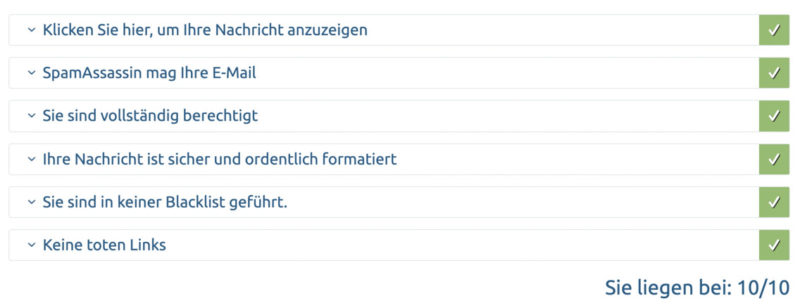
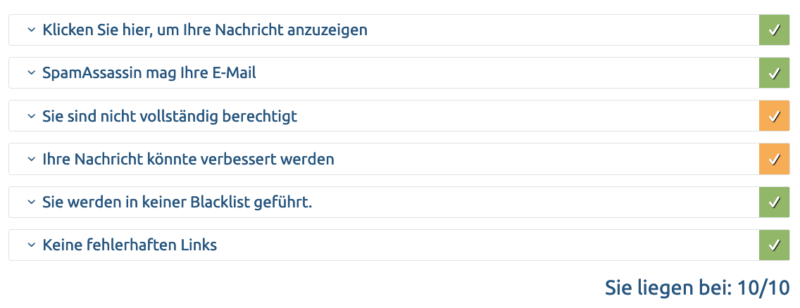
The following result would also be acceptable, as, for example, the DMARC entry does not have a very large impact:
Become more visible on Google & Social Media?
In a free strategy consultation for data-driven online marketing, we uncover your untapped potential, review any existing ad accounts if necessary, examine your SEO ranking and visibility, and determine which strategy is appropriate for your budget and which active measures will lead to more inquiries or sales.

✅ More visibility & perception through targeted placement
✅ More visitors > prospects > customers > revenue
✅ Reach target groups scalably with SEA
✅ Act and grow sustainably with SEO
🫵 Maximum success with our hybrid strategy
💪 More than 15 years of experience across industries in over 1,000+ projects demonstrable!







Another important test = Check Blacklist Mail using IP Spam Test (MX Spam Check)
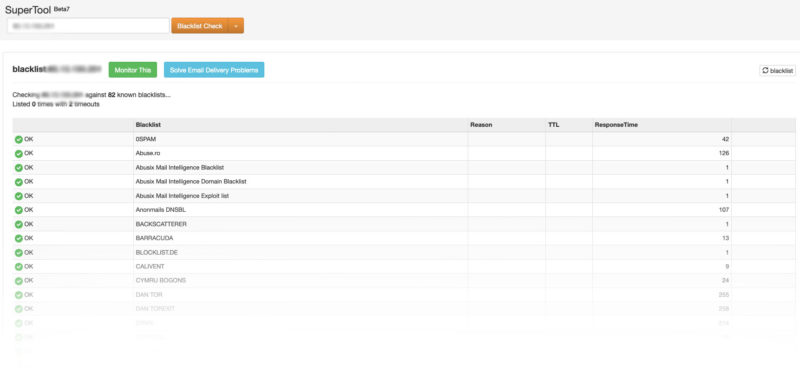
The blacklist check compares the IP address of a mail server with over 100 DNS-based email blacklists. (Commonly referred to as Real-time Blacklist, DNSBL, or RBL). If your email server has been blacklisted, some emails you send may not be delivered. Email blacklists are a common method for reducing spam.
Simply copy the IP address from the email spam test mentioned above and paste it into the input field.
After a few seconds, the IP spam test is completed, and ideally, there is a green checkmark or a timeout everywhere. If not, your mail server is negative in the spam check, and you should urgently contact your web hosting & server provider and, in the case of an IT service provider, take immediate action.
What is email spam and why is it a problem?
Email spam consists of unsolicited bulk messages sent via email with commercial or fraudulent intentions. It is problematic because it clogs your inbox, making it difficult to find important messages. Additionally, it can contain malicious links or attachments that could harm your computer.
How do you know if an email is spam?
There are several ways to determine if an email is spam. One way is to look at the sender’s address. If you don’t recognize the sender or if the message looks like it was mass-produced, there’s a good chance it’s spam. Another way to tell if an email is spam is to look for spelling and grammar errors, as well as unusual formatting. Finally, be wary of any emails that ask you to click on a link or download an attachment, as these can be used to install malware on your computer. Another way to identify spam is to look for signs of suspicious activity, such as unusual login attempts or messages from unknown addresses. Finally, you can set up filters in your email program to automatically delete or flag messages that meet certain criteria, such as containing specific keywords or coming from known spammers.
Conclusion & Summary: The importance of regularly testing your emails for spam and avoiding blacklistings.
It is important to regularly check your emails for spam, not only to maintain your reputation but also to avoid potential problems with customers. The email spam test allows you to quickly and easily check your emails for suspected spam and test them against the most common spam filters. Simply follow the steps described here in the blog article and on the online email spam test, and you can determine whether your email is safe or not. We also recommend performing an IP spam test to ensure that your mail server is not on an IP blacklist. By taking these precautions, you can be sure that your email communication is secure.
Perform a spam test now and play it safe!

Florian Ibe
CEO & Marketing Consultant
Sie benötigen Hilfe bei Ihren E-Maileinstellungen? Service ab 160€:
Open contact form
Your contact person: Florian Ibe
Do you use WordPress and want to send newsletters reliably? Our recommendation:
Probably the best WordPress newsletter plugin with WooCommerce interface + email marketing functions





 DE
DE