

Google Ads offers a variety of tools and features to help advertisers effectively reach their target audiences. One of the lesser-known but incredibly useful features is the use of Google Ads scripts for the automatic management of placement exclusion lists – i.e., removing (excluding) non-meaningful and often cheap foreign sites from the list for ad serving in the Display Network. In this blog article, we explain why you should use such a script and how it can optimize your Google Ads campaigns. Campaign performance automatically improves significantly.
Google Ads Display Network Placement Exclusion Script for Automatic Exclusion
The Google Ads Display Network Placement Exclusion Script for Automatic Exclusion is an indispensable tool for anyone looking to optimize their Display campaigns. It enables automated review and exclusion of unwanted placements, ensuring that your ads only appear on relevant and suitable websites and apps. This script not only saves valuable time but also improves the efficiency of your campaigns by ensuring that your advertising budget is spent wisely. By excluding placements on gaming websites and unwanted domains, you can increase the quality of your traffic and ultimately maximize your conversion rates and ROI. With this script, you can ensure that your advertising message reaches the right target audience and that your campaigns are continuously optimized.
What is a Google Ads Script?
Google Ads scripts are JavaScript-based tools that allow you to automate routine tasks in your Google Ads account. They can be used to generate reports, change bids, manage campaigns, and much more. A specific application example is the automatic management of placement exclusion lists.

The Problem with Unwanted Placements and the Solution
When you run Display ads in Google Ads, your ads can appear on a variety of websites and apps. This can sometimes lead to your ads appearing on unwanted placements, such as gaming websites or foreign domains that do not match your target audience.
This can negatively impact your click-through rate (CTR) and ultimately your return on investment (ROI).
Benefits of an Automated Placement Exclusion Script
- Time Savings: Instead of manually checking which websites your ads are displayed on and excluding unwanted placements, the script automatically handles this task for you.
- Cost Efficiency: By excluding placements that are irrelevant to your target audience, you can use your budget more efficiently and only display your ads where they will have the greatest impact.
- Better Target Audience Engagement: By ensuring your ads only appear on relevant websites and apps, you can better reach your target audience and convey your advertising message more effectively.
- Improved Performance: Targeted placement of your ads leads to higher click-through rates and a better conversion rate, which in turn results in a better ROI.
Implementing the script for automatic URL + keyword exclusion of placements in the Display Network
Here is an example script that automatically performs daily checks and adds unwanted placements to an exclusion list:
</p>
<p>// Google Ads script for automatic exclusion list<br />
function main() {<br />
// Define the exclusion list<br />
const EXCLUSION_LIST_NAME = 'AUTO-P-Exclusion';<br />
const EXCLUDED_DOMAINS = ['.de', '.com', '.net', '.info', '.eu', '.org'];</p>
<p>// Retrieve the placement exclusion list or create a new one<br />
let exclusionList = getOrCreateExclusionList(EXCLUSION_LIST_NAME);</p>
<p>// Retrieve yesterday's placements<br />
let report = AdsApp.report(<br />
`SELECT Url<br />
FROM PLACEMENT_PERFORMANCE_REPORT<br />
WHERE Date DURING YESTERDAY`);</p>
<p>let rows = report.rows();</p>
<p>while (rows.hasNext()) {<br />
let row = rows.next();<br />
let url = row['Url'];</p>
<p>if (isGame(url) || !isValidDomain(url, EXCLUDED_DOMAINS)) {<br />
exclusionList.addPlacement(url);<br />
}<br />
}<br />
}</p>
<p>function getOrCreateExclusionList(name) {<br />
let exclusionLists = AdsApp.excludedPlacementLists()<br />
.withCondition(`Name = '${name}'`)<br />
.get();</p>
<p>if (exclusionLists.hasNext()) {<br />
return exclusionLists.next();<br />
} else {<br />
return AdsApp.newExcludedPlacementListBuilder()<br />
.withName(name)<br />
.build()<br />
.getResult();<br />
}<br />
}</p>
<p>function isGame(url) {<br />
const gameKeywords = ['game', 'gaming', 'spiel'];<br />
return gameKeywords.some(keyword => url.toLowerCase().includes(keyword));<br />
}</p>
<p>function isValidDomain(url, validDomains) {<br />
return validDomains.some(domain => url.toLowerCase().endsWith(domain));<br />
}</p>
<p>
Explanation of the script:
This script performs the following steps:
- Defines the name of the placement exclusion list and the valid domain extensions.
- Retrieves the placement exclusion list or creates a new one if it does not exist.
- Runs a report on the placements of the last day.
- Checks each placement to see if it belongs to a gaming site or if the domain extension is not in the list of valid domains.
- Adds the invalid placements to the exclusion list.
Adjust or extend the line yourself: const EXCLUDED_DOMAINS = [‚.de‘, ‚.com‘, ‚.net‘, ‚.info‘, ‚.eu‘, ‚.org‘];
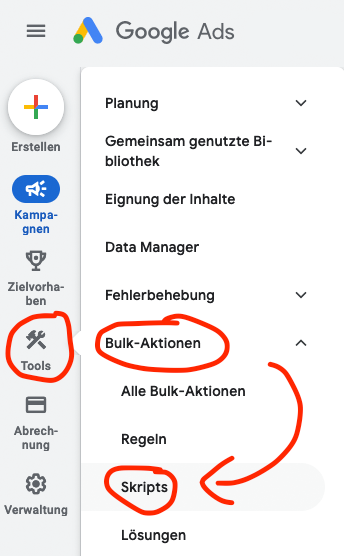
You can insert this script into your Google Ads account under Tools > Bulk Actions > Scripts and set a schedule for daily execution:
Become more visible on Google & Social Media?
In a free strategy consultation for data-driven online marketing, we uncover your untapped potential, review any existing ad accounts if necessary, examine your SEO ranking and visibility, and determine which strategy is appropriate for your budget and which active measures will lead to more inquiries or sales.

✅ More visibility & perception through targeted placement
✅ More visitors > prospects > customers > revenue
✅ Reach target groups scalably with SEA
✅ Act and grow sustainably with SEO
🫵 Maximum success with our hybrid strategy
💪 More than 15 years of experience across industries in over 1,000+ projects demonstrable!







Direct link to script integration: https://ads.google.com/aw/bulk/scripts/management
Implementing a Google Ads script to automatically manage your placement exclusion lists can help you make your campaigns more efficient and effective. You save time, reduce costs, and improve the performance of your ads. Every Google Ads user who wants to optimize their campaigns should therefore consider using such a script.
Take advantage of automation and let Google Ads scripts do the hard work for you. This allows you to focus on the strategic aspects of your campaigns and achieve better results.
Globally applying a placement exclusion list in Google Ads
Globally applying a placement exclusion list in Google Ads is an effective method to keep your advertising campaigns away from unwanted placements. By centrally managing and applying this list to all your campaigns, you can ensure that your ads only appear on high-quality and relevant websites and apps.
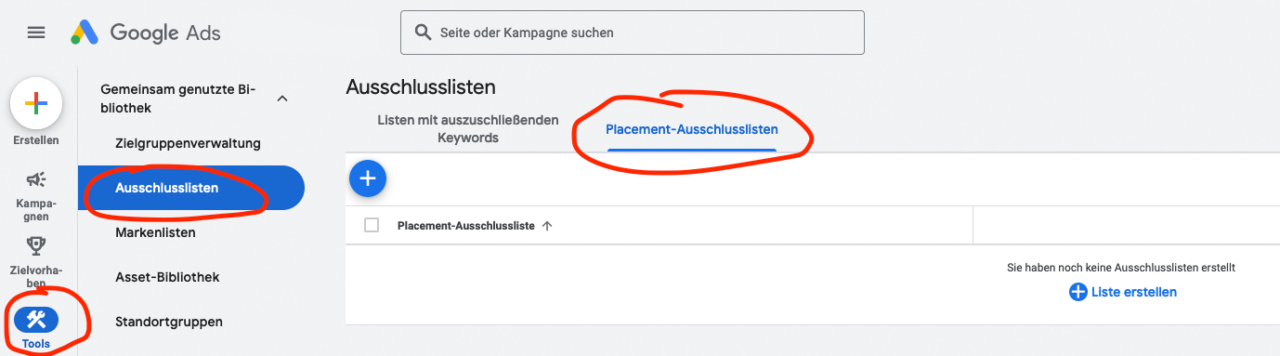
This helps to minimize wastage and use your advertising budget more efficiently. The global placement exclusion list allows for easy and consistent control over your ad placements, leading to better campaign performance and a higher return on your advertising spend. With this strategy, you can ensure that your ad environment is optimal and your advertising messages reach the right target audience.
Direct link to placement exclusion lists: https://ads.google.com/aw/placementexclusionlists

Florian Ibe
CEO & Marketing Consultant
Your contact person: Florian Ibe
Conclusion & why everyone should use the script if the Display Network is used:
Using Google Ads scripts to automatically manage your placement exclusion list and applying it globally is an essential step towards optimizing your advertising campaigns. These practices not only save time and resources but also ensure that your ads are only shown on relevant and high-quality websites and apps.
This leads to a more efficient use of your advertising budget, higher click-through rates, and improved conversion rates. By automatically excluding unwanted placements and implementing a global exclusion list, you can significantly improve the overall performance of your campaigns and achieve your marketing goals more effectively. Rely on automation and central management to get the maximum benefit from your Google Ads campaigns.





 DE
DE

