

Everyone wants to sell more, and a proven way to achieve this is to remove purchasing barriers = building trust through information. For many customers, the more information they have about a product beforehand, the fewer excuses they have to avoid buying it. By giving your customers access to product documentation, you can reduce purchasing barriers or easily display product information to your customers.
Add WooCommerce Product Documents (Files, Manual, Instructions, Assembly, Warranty, Notes, etc.)
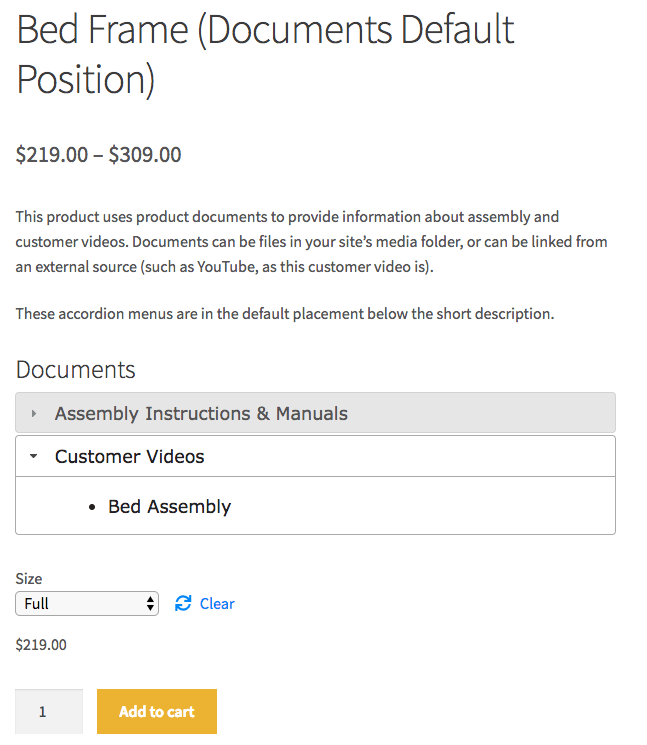
All types of files and documents can be linked, and in unlimited quantities. Additionally, videos / explanatory videos can be flexibly added to the product (more information in the article).
Provide customers with product documents such as assembly instructions or videos before purchase
Product documents can display documentation below the product short description, in the sidebar with our widget, or anywhere you can use shortcodes!
Most people use the plugin as an extension for:
- PDF files
- Manuals (user manual)
- Instructions
- Assembly instructions
- Warranty information
- Certificates
- Important notes
The display, where the documents are presented and listed, is completely flexible. As always, everything can be translated into German with Loco Translate.
How can I use the WooCommerce Document Plugin?
Do you want to sell an e-book? In many cases, offering sample chapters can be a helpful way to motivate readers and encourage purchases (why else does Amazon give away chapters for the Kindle edition of books for free?). You can now list sample chapters, sample images, and more in a sophisticated front-end display with virtually no effort.
You can provide customers with technical specifications or assembly instructions for your products with one click by adding documents to your products. Perhaps you spent tons of money printing instruction manuals that many customers end up losing or throwing away? Now you can go completely paperless! How about adding a card when shipping products that directs users to your website, where you can provide user manuals and warranties for products without having to worry about rising printing costs again? Centralize all your documents to save printing costs, reduce purchase barriers, and make them easy for customers to find.
Do you link to manufacturer specifications or post instructional videos on YouTube? You can link product documents to a URL to provide customers with the information they need!
Become more visible on Google & Social Media?
In a free strategy consultation for data-driven online marketing, we uncover your untapped potential, review any existing ad accounts if necessary, examine your SEO ranking and visibility, and determine which strategy is appropriate for your budget and which active measures will lead to more inquiries or sales.

✅ More visibility & perception through targeted placement
✅ More visitors > prospects > customers > revenue
✅ Reach target groups scalably with SEA
✅ Act and grow sustainably with SEO
🫵 Maximum success with our hybrid strategy
💪 More than 15 years of experience across industries in over 1,000+ projects demonstrable!








What can the WooCommerce Product Documents Plugin do?
- Upload any file type to share documents with customers in an accordion-style menu
- Display product documentation from other page URLs such as YouTube
- Customize the name of tabs and file names in your menu
- Display menus below the product short description or anywhere you can use shortcodes on your website
- Display the documentation menu for the corresponding product in a sidebar using our widget
- Use a shortcode to display a list of all attached documents on your website (listed by product)
Super Easy User Interface
Adding new menus, tabs, and files is easy from the product page. Under Product Datayou can add as many files or URLs and as many menu tabs/sections as you need, so that customers have all the information they need for a purchase. Imagine having installation instructions, links to helpful videos, technical specifications, and warranty information in a single, user-friendly menu!
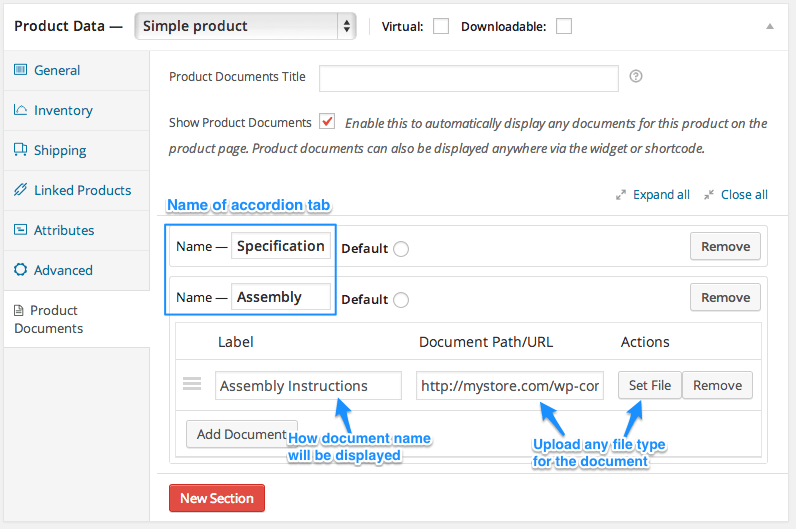
Backend: Add Tabs and Documents
Use shortcodes to embed product document menus anywhere!
You can use the extended shortcode to embed the Product Documents menu for the defined product on a page of your choice. How do these shortcodes help you? Firstly, if you have multiple products that use the same product documents, you can simply copy/paste this shortcode onto every product page that uses these documents. Or if you want to display the product documents in a blog post or on a separate page of your website, you can use this shortcode to refer to the product documents for the product you need.
The basic shortcode embeds the documentation menu wherever you place the shortcode on the corresponding product page. We recommend using the WooCommerce Tab Manager to insert the documentation into a custom product tab:
Use Widgets to Display Documentation on Product Pages
The Product Documents widget allows you to place product documentation on the corresponding product page for all products with the menu name of your choice. This widget responds to display the documents for the product being viewed and can be used instead of displaying documents in the short description.
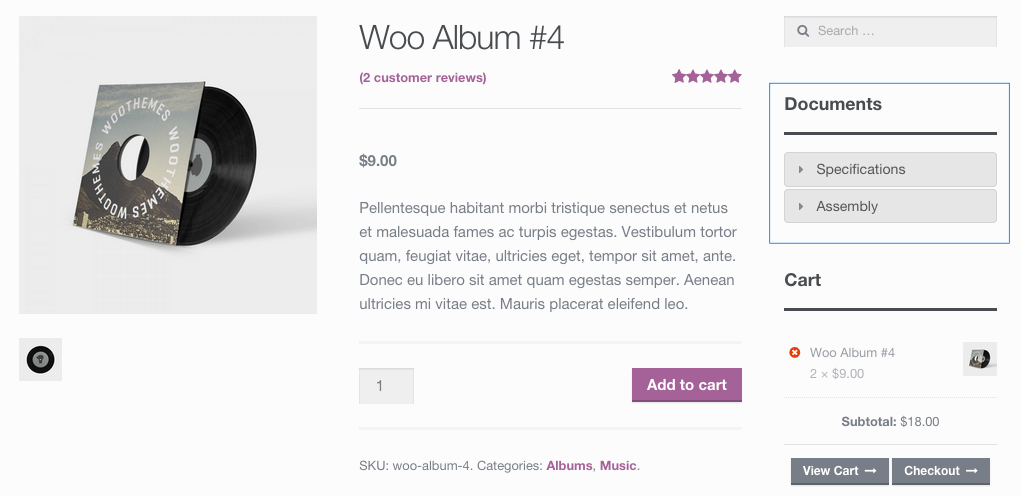
With the Product Documents extension, you can all ofCustomers needed documents, such as installation instructions or technical specifications, published in one place and help you save printing costs by adding these documents to your product pages. Providing more information before purchase also helps reduce purchasing barriers: you can refer to external URLs or links to helpful videos or reviews post and help make documents easily discoverable for customers, so they have all the information needed for purchase.
Explanation of how to get started.
- Purchase the plugin here*
- Download, install, and activate it in your WooCommerce shop
- Start uploading product documents on the product page under Product Data > Product Documents
- That’s it! Sit back and enjoy organized, beautiful product documentation!
A free but not quite as powerful alternative is the Products for WooCommerce Plugin on wordpress.org.
The Product Documents extension allows you to add an accordion-style menu to your product page or anywhere on your website using shortcodes or widgets. You can display technical specifications, installation instructions, warranty information, e-book sample chapters, and more in a clear, user-friendly format.
Installation
- Download the extension from your WooCommerce Dashboard
- Go to Plugins > Add New > Upload and select the ZIP file you just downloaded
- Click Install Now and then Activate
- Click the Configure link and read the next section to learn how to set up the plugin.
Setup and Configuration
The Settings
You do not have to set a default title for your product documents. However, if you know that you will be using the same title repeatedly, you probably want to save some time and can set a default title (e.g., „Product Documents“, „Sample Chapter“, or „Technical Specifications“) by going to WooCommerce > Settings > Products > Display and navigating to Product Documents:
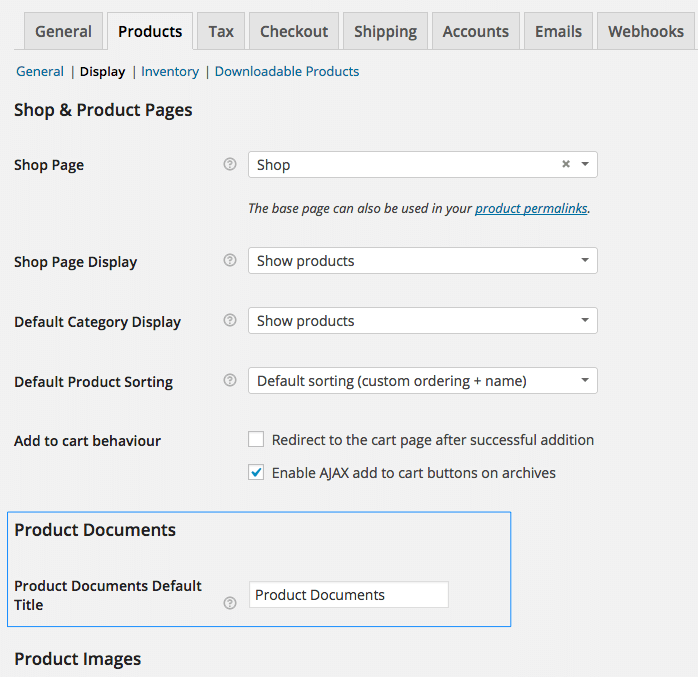
This name is the default name for your documentation under your product information (changed here to „Documents“) or when you use corresponding shortcodes:
Product Configuration
You can override this default name for a specific product. While editing the product page, you can view Product Documents under the Product Data tab. If you leave the „Product Documents Title“ blank, the default name from the settings page will be used.
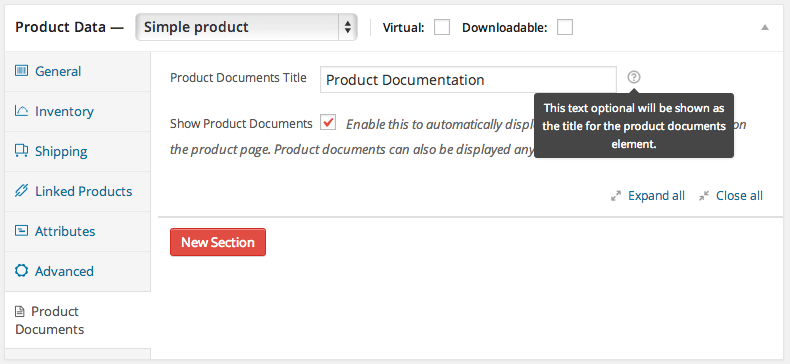
Your new title will be displayed for this product when it is overridden:

Once your product documents are named, you will want to start adding documents for display. The „Name“ displays the title on the accordion tab, and adding new sections will add as many tabs as you need for your documentation. Under each tab/section, you can without file type restrictionadd as many documents as you like. The „Label“ field is the displayed name of the document. If you leave this field blank, the label will default to the file name:
You can add multiple tabs and documents by clicking „New Section“ or „Add Document“ and reordering your sections or documents as needed:
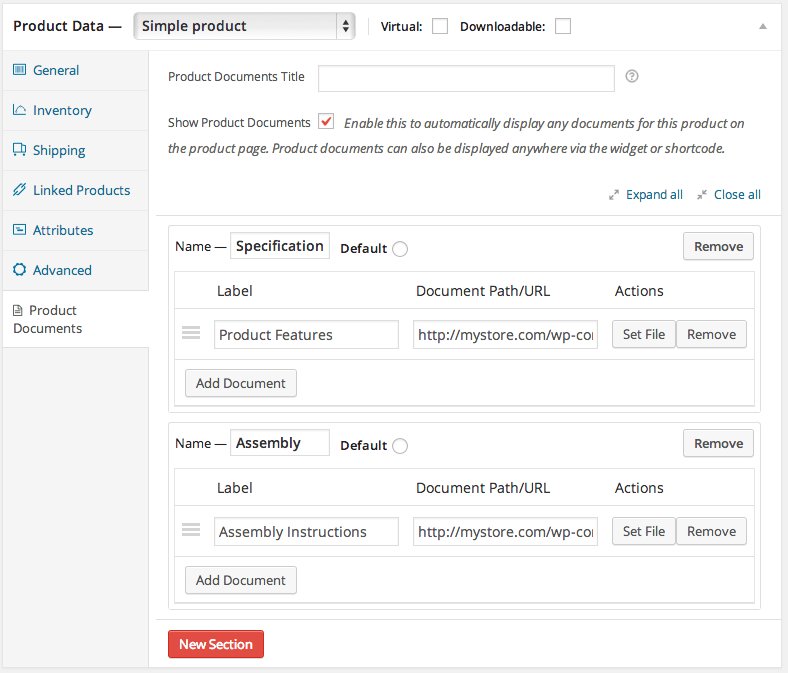
You can even add URLs to reference other sources or include links to instructional videos for your products!
To quickly display your product documents on your product page, enable „Display Product Documents“ below the product short description. If you want to display your product documentation elsewhere using a shortcode or widget, you can disable this (or use both!):

Once your sections and documents have been added and you have enabled „Display Product Documents“, they will appear on your product page:
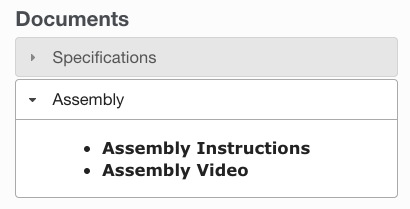
Now for the last part! If you want one of your menus to open automatically so that documents are visible without an initial click, use the Default Selection :

This results in a default layout where this menu is open instead of having all menus closed:
Using Shortcodes/Widgets
Widgets
If you want to use the Product Documents widget, you can display your product documents in the sidebar on the corresponding product page. For example, drag the WooCommerce Product DocumentsWidget in your main sidebar:
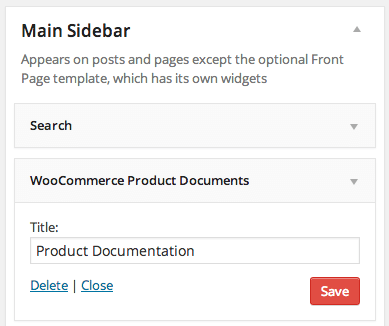
Your product documents will then be displayed on the corresponding product page in the sidebar:
Shortcodes
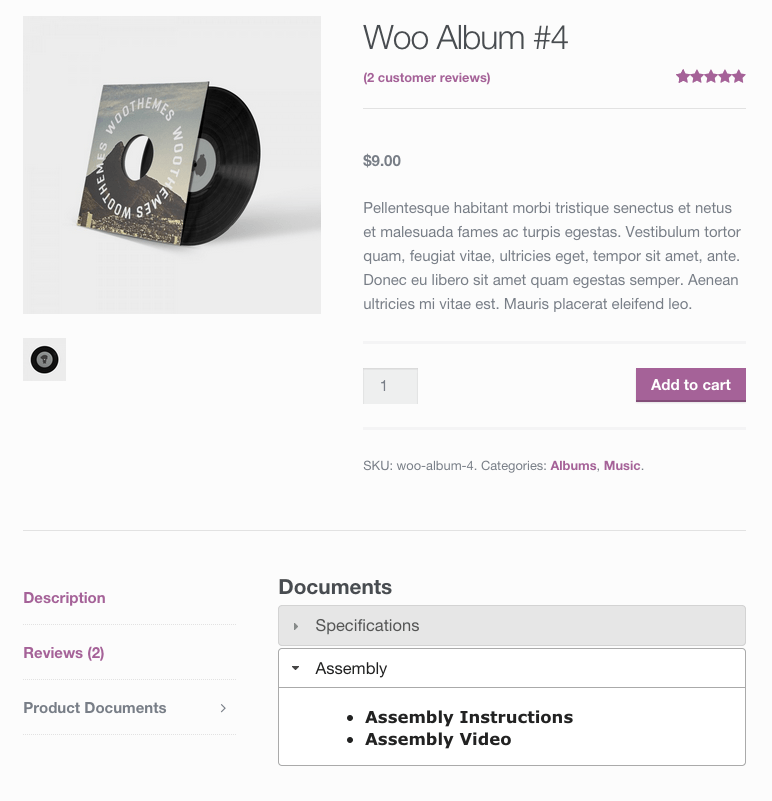
Would you like to display product documents elsewhere on the product page or any other page? No problem! You can use shortcodes to display your product documents menu wherever you wish. In this example, we are using the WooCommerce Tab Manager to add our product documents to a custom tab on our product page.
We can add the following shortcode to embed the product documents menu anywhere where shortcodes are allowed on your website. All arguments in the second shortcode are optional ; The first, basic shortcode works well for a specific product.
- [woocommerce_product_documents] embeds the product documents menu where it is used. This basic shortcode displays information for the product on whose page it is used by default. In the following example for the tab manager, we could have simply done this, as we used the shortcode on the same page as the product.
- [woocommerce_product_documents product_id=”123″ product_sku=”ABC123″ title=”Product Documents”] embeds the product documents menu for a specific product on a page of your choice. Why would we do that? If you have multiple products that use the same product documents, you can simply copy/paste this shortcode to each product page that uses these documents. If you want to display the product documents in a blog post or on a separate page of your website, you can also use this shortcode to refer to the product documents for the product you need.Note that the
product_skuattributeignoresthe product_id attribute if it is specified. If you use the shortcode anywhere other than the product page itself, only one of them needs to be specified.
This is what it looked like when we used our shortcode with the WooCommerce Tab Manager added to a custom tab (again, we could have just used the basic command):

And this is what we got when displaying it:
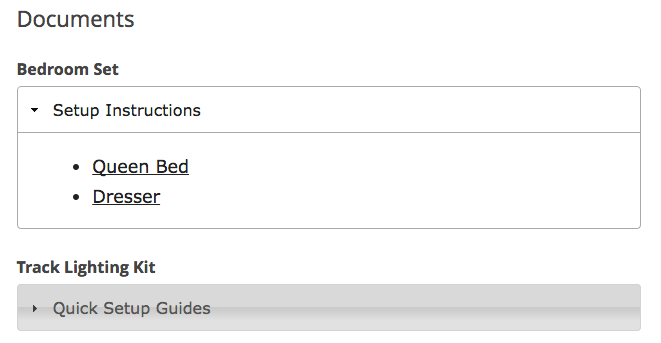
There is another shortcode that can be used to display all documents. With [woocommerce_product_documents_list]you can display a list of all product documents available in your shop, which creates a list ordered by the product to which the document is assigned. The product title will be displayed as well as all document tabs and document links:
That’s it! Product Documents is designed to make product information easy to use and display anywhere on your website.





 DE
DE

