
Small price reductions can enable more sales and higher profits in the long term. With automatic discounts in Google Merchant Center, Google uses AI to optimize offer prices in Shopping ads. Merchants retain control over their margins through set minimum prices. Setup in Merchant Center is relatively straightforward, but technical integration in WooCommerce is more demanding. The WooCommerce plugin for automatic discounts simplifies implementation and ensures that Google discount prices are applied correctly in the shop and checkout.
Example: With €100,000 monthly revenue and 10% margin, a 2% price reduction and 10% more orders result in €107,800 revenue, but initially lower gross profit. With 25% more orders, the original gross profit is reached again.
Additionally, new customers acquired can become profitable in the long term through repeat purchases, email marketing, and a higher customer lifetime value.
Automatic discounts for Google Shopping with WooCommerce: More sales despite smaller margin?

Activate Google Automated Discounts in Merchant Center, technically connect WooCommerce, and calculate the actual additional revenue.
A lower price in Google Shopping can influence the purchase decision. But are automated discounts also worthwhile for merchants with already tight margins? Google offers the „Automated Discounts“ function in Merchant Center. This allows Shopping offers to be dynamically optimized in terms of price. Setup in Merchant Center is relatively clear – reliable implementation in your own WooCommerce shop, however, is considerably more demanding.
VASTCOB has been supporting Google Ads, WooCommerce integrations, SEO, and sustainable optimization of online shops since 2010. With our ROI/ROAS calculator, you can calculate the profitability of various scenarios.
What are automatic discounts in Google Shopping?

With Automated Discounts, Google decides based on its price optimization which participating products will be offered at a discounted price. Merchants control the economic limits via product data or product groups. Google sets the specific offer price; a WooCommerce plugin like SweetCode ensures that this price actually applies in the shop.
This is different from a classic WooCommerce coupon code or a permanently reduced product price: the discounted price must match the clicked Google offer and be correctly applied throughout the entire checkout process.
Become more visible on Google & Social Media?
In a free strategy consultation for data-driven online marketing, we uncover your untapped potential, review any existing ad accounts if necessary, examine your SEO ranking and visibility, and determine which strategy is appropriate for your budget and which active measures will lead to more inquiries or sales.

✅ More visibility & perception through targeted placement
✅ More visitors > prospects > customers > revenue
✅ Reach target groups scalably with SEA
✅ Act and grow sustainably with SEO
🫵 Maximum success with our hybrid strategy
💪 More than 15 years of experience across industries in over 1,000+ projects demonstrable!







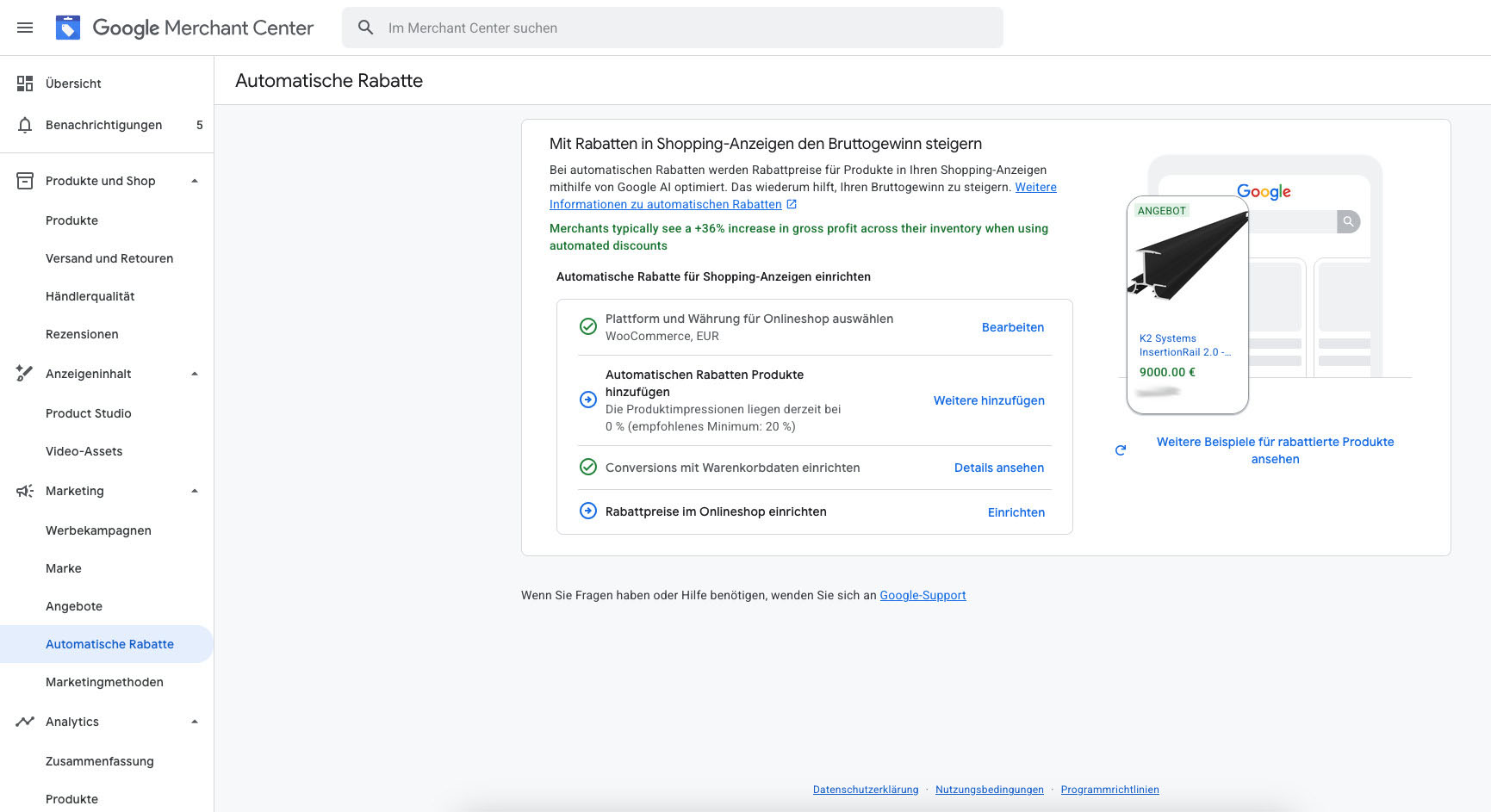
Figure 1: The „Automatic Discounts“ feature in Merchant Center. In this example, platform/currency and conversion data are already set up; product selection and shop price integration are still missing.
Set up the feature directly in Google Merchant Center

Under Marketing → Automatic Discounts Google guides you through the setup. For product selection, there are two methods:
1. Update product details in the data source. For participating products, the attributes cost_of_goods_sold (cost of goods) and auto_pricing_min_price (minimum price) are transmitted via the feed. This allows individual price floors and more accurate gross profit estimates. Google requires that the minimum price is below the current price, but not below the specified cost of goods. Outside the US and Canada, the minimum price must be specified including sales tax.
2. Select product groups. Alternatively, merchants can define groups by, for example, brand, product type, or label, enter a gross profit margin, and set the maximum discount percentage. This saves feed effort, but works with rougher assumptions. Google specifies for product groups a maximum discount between 5% and 40%, which must not exceed the specified margin.
Google recommends including products that together account for at least 20% of Shopping product impressions. The details are documented in the official Google help on product selection.
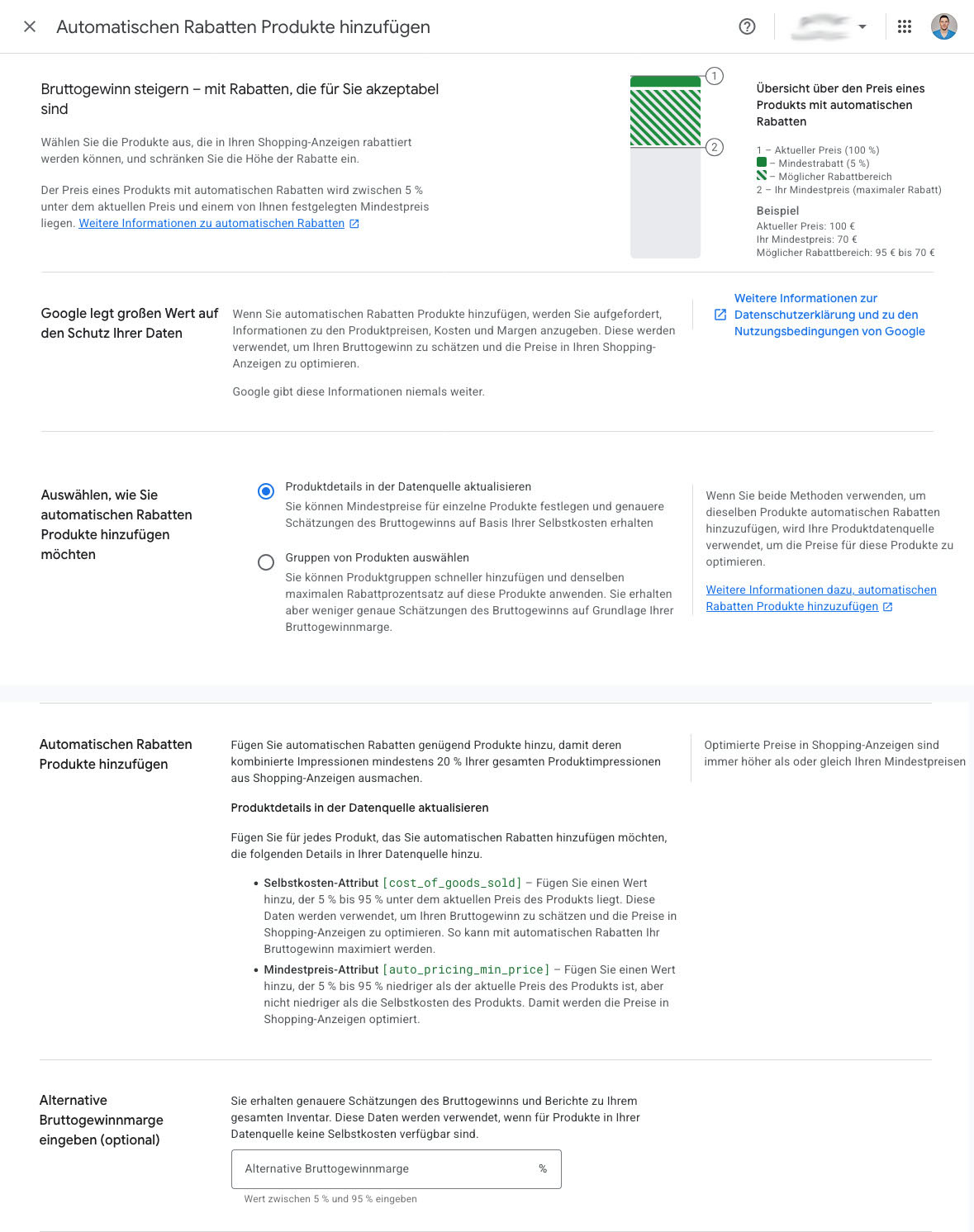
Figure 2: Product selection and feed requirements in the Merchant Center in a combined view – including cost of goods, minimum price, and alternative gross profit margin.
Why the Merchant Center alone is not sufficient

The selection of products in Merchant Center does not yet activate a ready-made discount function in the WooCommerce checkout. Google transmits discounted prices via signed JSON Web Tokens (JWT) in the URL parameter pv2. The shop must, among other things, validate the cryptographic signature, expiration time, merchant ID, product ID, and currency. After that, it must display the correct price on product pages and maintain it despite page changes, sessions, or caching.
Google requires display on product landing pages for at least 30 minutes as well as in the shopping cart and checkout for at least 48 hours. Variable products, tax logic, page caching, and existing discount rules can also complicate the implementation. For shops in the European Economic Area, there are additional requirements for displaying previous prices. The official technical Google documentation (Step 5) describes these requirements in detail.
Conclusion for practice: The Merchant Center interface is easy to use. However, implementing a secure, Google-compliant integration yourself is a separate development and testing project.
Support with implementation: VASTCOB supports WooCommerce and Google Ads projects with experience since 2010 – from data feed configuration through tracking and Google Ads to technical further development and maintenance of WooCommerce shops. This way, tests with automatic discounts can also be carefully set up and verified.
SweetCode: Google Automated Discounts Pro for WooCommerce

This is where Google Automated Discounts Pro for WooCommerce by SweetCode comes in. According to the manufacturer, the plugin takes over the verification of Google tokens, the discounted price display, and price transfer up to the order. It supports, among other things, variable products, WooCommerce Cart/Checkout Blocks and HPOS as well as test and diagnostic functions.
The great advantage is the division of labor: Google optimizes the offered price, Merchant Center and product feed define the economic boundaries, SweetCode handles the technical implementation in the shop. Use requires authorization for Google’s Automated Discounts program. Even with the plugin, feed data, conversion tracking, caching, and checkout must be checked.
Those already using Google Product Feed for WooCommerce by Ademti Software can generally keep this feed: The WooCommerce documentation describes the integration for the attribute auto_pricing_min_price. This saves a complete switch of the feed system. The connection of cost of goods must also be configured correctly. Those who do not want to maintain their own developer resources can implement the setup and ongoing support together with VASTCOB: Since 2010, VASTCOB has supported Google Ads, SEO, and development and maintenance of WooCommerce shops.
Example calculation: €100,000 monthly revenue, 1,500–1,800 orders, 10% margin

What matters is not only how many additional orders a lower price generates, but whether the absolute contribution margin increases. Let us assume a shop with €100,000 in monthly net sales,1,500 to 1,800 orders and 10% initial margin. This initially corresponds to €10,000 gross profit before additional costs not separately modeled here. The calculation assumes that the same products are reduced in price by 2% overall, while unit costs remain the same.
After the price reduction, per previous euro of sales, €0.08 instead of €0.10 unit contribution remains. With unchanged sales volume, sales decline to €98,000 and gross profit to €8,000. For the shop to reach the previous gross profit of €10,000 again, it needs 25% more orders – that is, approximately 375 to 450 additional purchases per month.
| Scenario | Orders at previously 1,500–1,800 | Monthly revenue | Gross profit |
|---|---|---|---|
| Initial situation, 10% margin | 1,500–1,800 | 100,000 € | 10,000 € |
| 2% price discount, same order quantity | 1,500–1,800 | 98,000 € | 8,000 € |
| 2% price discount, +10% orders | 1,650–1,980 | 107,800 € | 8,800 € |
| 2% price discount, +25% orders | 1,875–2,250 | 122,500 € | 10,000 € |
| 2% price discount, +50% orders | 2,250–2,700 | 147,000 € | 12,000 € |
Just 10% more orders means in the model 150 to 180 additional purchases, €7,800 more revenue compared to the original baseline, but a gross profit that is €1,200 lower. The additional revenue alone is therefore not proof of higher profitability.

Florian Ibe
CEO & Marketing Consultant
Your contact person: Florian Ibe
What does „conversion rate +1%“ mean? Precision is important here. If the conversion rate rises, for example, from 2% to 3%, that is an increase of one percentage point, but 50% more orders with the same number of visitors. In the example, this results in 750 to 900 additional orders, €47,000 more monthly revenue and €2,000 more gross profit despite the lower price. If, on the other hand, the conversion rate only rises relatively by 1% (e.g., from 2.00% to 2.02%), there are only around 15 to 18 additional orders; in this model, gross profit would fall to €8,080.
Important limitation: The scenarios are model calculations, not earnings forecasts. They assume a constant number of visitors, an unchanged product mix, and constant unit costs. Additional ad costs, shipping costs, returns, and payment fees can change the result. In reality, moreover, only individual shopping purchases may receive an automatic discount – in that case, the discounted portion must be calculated separately.
Additional customer value: Why new customers are crucial in the long term

The immediate increase in revenue through better conversion rates is only one side of the equation. Especially with consumable and repeat purchase products, a first discounted order can make economic sense if it leads to a longer-term customer relationship. The Customer Lifetime Value (CLV) considers the contribution a customer provides across multiple orders – not just at the first purchase.
Example: Someone who discovers a shop for the first time thanks to an attractive Google Shopping offer can order again directly later. With well-established email marketing, appropriate repurchase reminders, helpful content, customer service, and a strong brand, repeat purchases can be encouraged. In the case of a direct repeat purchase, repeated Google Ads acquisition costs can be avoided. However, this revenue is not entirely „free“: email software, support, discounts, shipping, and other costs remain. Additionally, the legal requirements for email marketing must be met.
For the evaluation, both factors therefore count: the short-term contribution margin of the discounted first order and the realistic, measurable customer value over time. Since 2010, VASTCOB has supported companies in combining Google Ads, SEO, conversion optimization, and technical development as well as maintenance of WooCommerce shops – so that newly acquired buyers can ideally become loyal regular customers.
Don’t just look at ROAS: Check profitability

Higher revenue or a better conversion value alone says little about actual profit. ROAS shows revenue per advertising dollar; ROI considers profitability based on the effort invested. For discount decisions, margins, cost of goods sold, and the contribution margin after advertising costs are also relevant.
With the VASTCOB ROI calculator for marketing and advertising, shop operators can compare key advertising and profitability metrics such as ROI, ROAS, POAS, ACOS, CPA, and CPL. To evaluate discounts, the changed margin, new order quantities, and contribution margin should also be considered. VASTCOB explains the fundamentals and differences in the article „ROAS vs. ROI“.
Conclusion: Automatic Google Shopping discounts are a lever – not a self-runner
Google Automated Discounts can be interesting for price-sensitive product ranges. The function in the Merchant Center offers control by products, minimum prices, or product groups. For WooCommerce, however, the technical price transfer remains challenging. SweetCode is therefore an obvious solution, especially if Google Product Feed for WooCommerce is already being used.
Before a broad rollout, retailers should test with a limited product range, calculate minimum prices carefully, and compare not only conversion rate and revenue, but also the absolute contribution margin after discount and advertising. Only then will it become clear whether additional purchases truly compensate for the lower margin.
Looking for a practice partner? VASTCOB brings experience since 2010 in Google Ads, SEO, and WooCommerce and supports integration, testing, further development, and ongoing shop maintenance.
Further Information: Google: Add products with automatic discounts · Google: Set up discount prices technically · Test SweetCode plugin · WooCommerce Google Product Feed compatibility





 DE