


Have you always needed to control product batches with batch numbers and expiration dates that you sell in your WooCommerce store? These plugins make it super easy, lightweight, and fully integrated into your current WooCommerce experience.
WooCommerce Batches (Batch Numbers + Expiration Date / Expiry Date)
The WooCommerce Product Batch Numbers Plugin is a small extension that allows you to manage batch numbers or lot numbers at the product and order level in WooCommerce. It supports both simple and variable products, making it easy to track these numbers in relation to expiration date, supplier, and availability.
If your business runs on batch numbers (for example, if you sell food or supplements), this is the perfect tool to keep track of your inventory.
Batch Numbers = engl. Batch-Numbers
It is quite easy to use with existing products and newly created products in WooCommerce. Inside the inventory tab, you will see a table populated with batch numbers for that specific product. If you have variable products, the steps are the same, but in this case, we keep the tab for the main product, and you will see another table in the variation to manage these lot numbers at a variation level.
When batch numbers have been assigned to a product, the batches are automatically distributed/assigned to orders placed in your store using FIFO (First In, First Out) principles, so you don’t have to deal with the tedious stuff and can focus on selling. If necessary, you can manually adjust the batch assignment per order/item number.
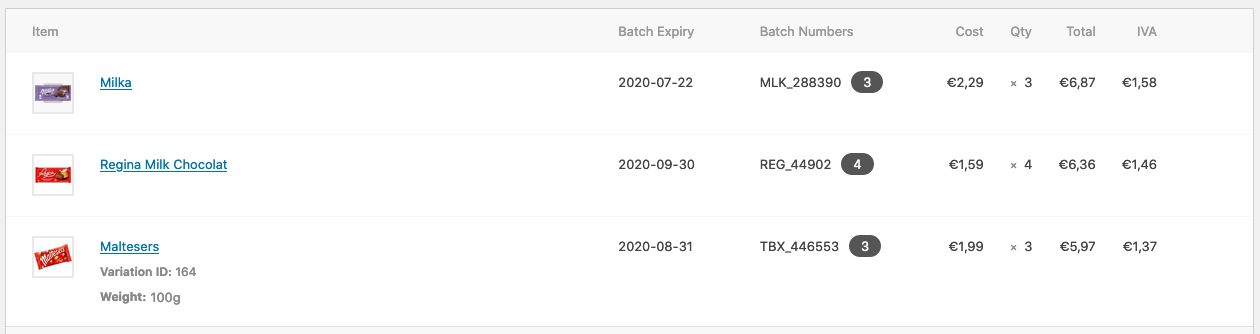
Have strict control over your inventory with batch numbers
Keep your inventory organized and up-to-date with a solid batch number management system.
The WooCommerce Product Batch Numbers Plugin is a small extension that allows you to manage batch numbers at the product and order level in WooCommerce. It supports both simple and variable products, making it easy to track these numbers in relation to expiration date, supplier, and availability.
Become more visible on Google & Social Media?
In a free strategy consultation for data-driven online marketing, we uncover your untapped potential, review any existing ad accounts if necessary, examine your SEO ranking and visibility, and determine which strategy is appropriate for your budget and which active measures will lead to more inquiries or sales.

✅ More visibility & perception through targeted placement
✅ More visitors > prospects > customers > revenue
✅ Reach target groups scalably with SEA
✅ Act and grow sustainably with SEO
🫵 Maximum success with our hybrid strategy
💪 More than 15 years of experience across industries in over 1,000+ projects demonstrable!







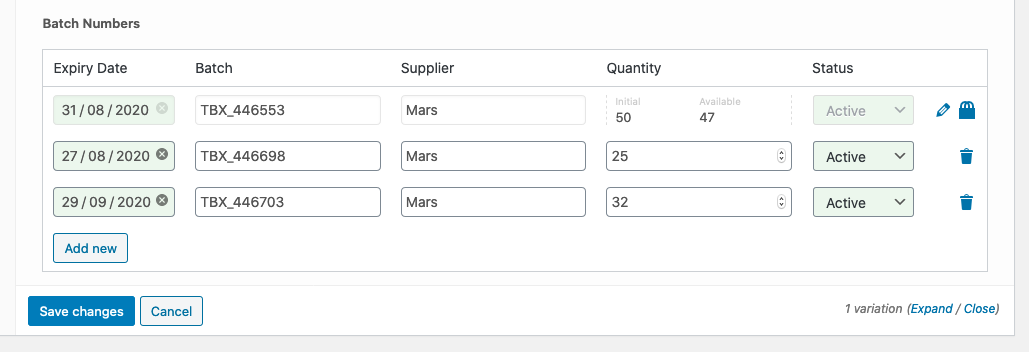
Keep an eye on expiring dates = expiration date
When the expiration date ends, the color changes to red to warn you about selling outdated products in your store.
Know and manage the orders that contain a specific batch
Keep track of orders with a specific batch number to get an overview of sales and customers. If something happens to the product, you know exactly who bought it and when.
Control your inventory easily and quickly
When you add a batch number, you must also add an inventory quantity. This is required to track the stock units for the batch. When the stock limit is reached, the system archives the batch and uses the next available one.

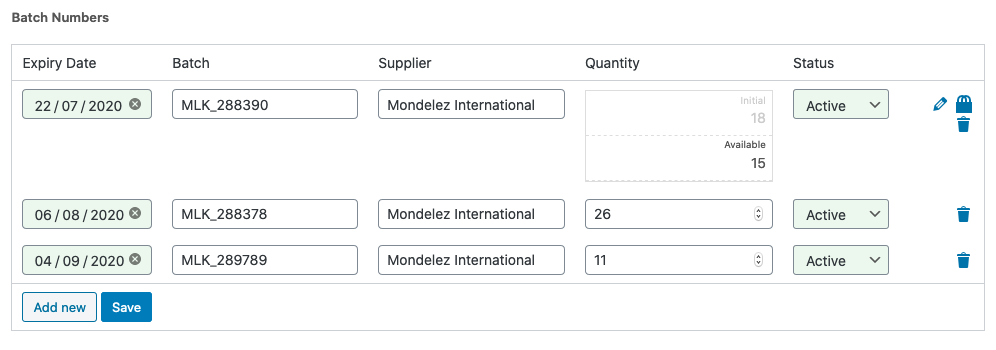
Manage simple and variable product batches
If your products have different colors, sizes, or any type of variation, this extension allows you to manage batch numbers even for variable products. For both product types, processing is very easy in the inventory area (inventory management).
Additional features for batch management with numbers & date
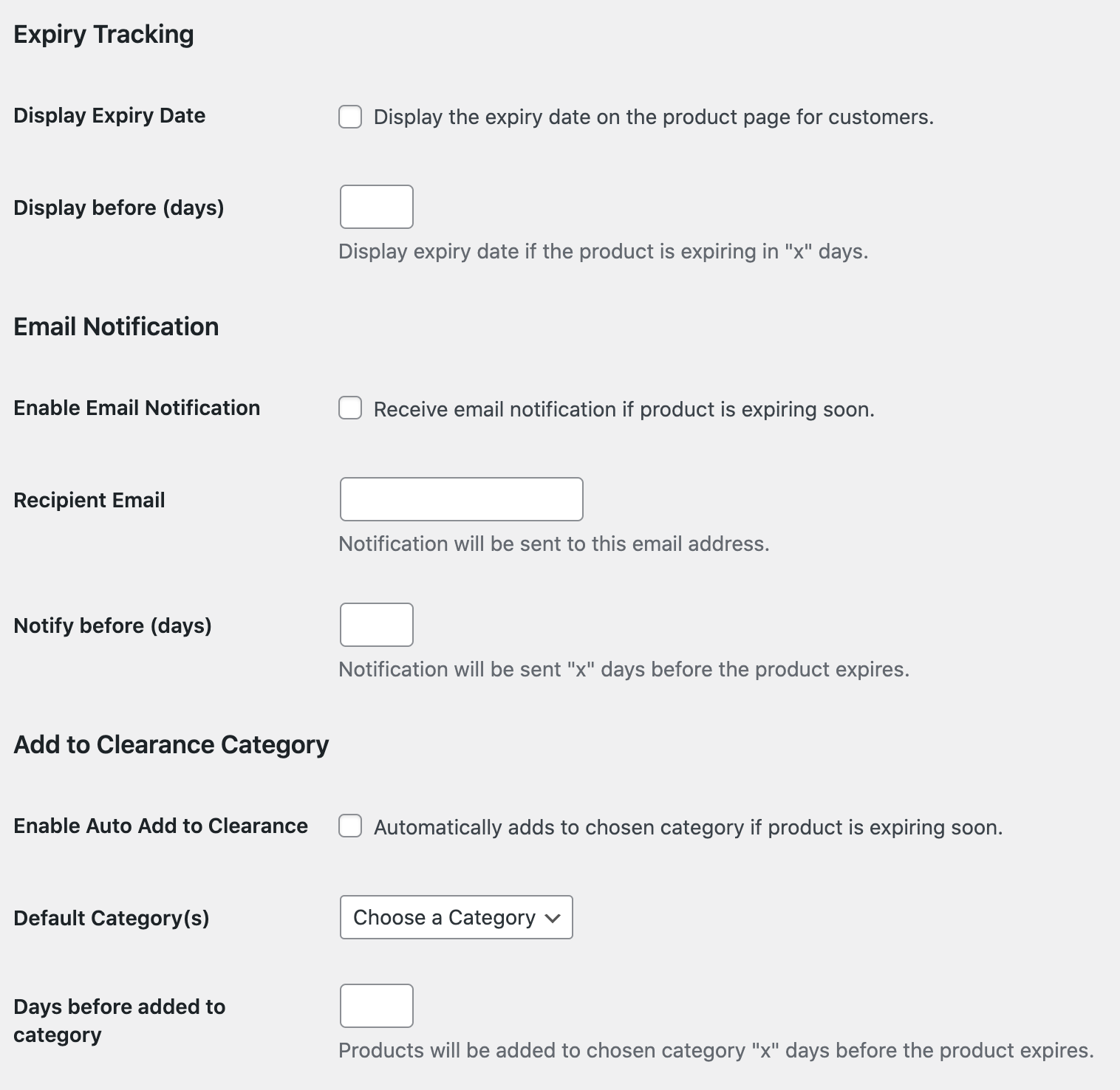
In addition to the main features mentioned above, there are some additional features that you can choose to configure in the settings. The settings page can be found by going to the Products tab and clicking on the „Batch & Expiration by Webis“ sub-tab (note that these settings require expiration tracking to be enabled). Here is the list of additional features:
- Display expiration date – When enabled, the expiration date will appear on the product page if a batch expires within a set number of days.
- Receive emails for soon-to-expire products – When enabled, the plugin will send a notification email with a list of products that expire a certain number of days from the current day.
- Add to Clearance Category – When enabled, if a product’s expiration date reaches a certain number of days, the product will be added to a designated category.
- Shortcode to show batch number and expiration date – You can use the [wpbet-batch-expiry] shortcode to show the batch number or expiration date wherever you want.
Florian Ibe Your contact person: Florian Ibe 
CEO & Marketing Consultant
Florian Ibe Your contact person: Florian Ibe
CEO & Marketing Consultant





 DE
DE

