Your own WooCommerce chat with a chatbot? Online chats with or without a chatbot are becoming increasingly important in eCommerce. These digital purchasing advisors can handle simple or complex tasks, relieve the support team, and even display suitable products directly with upselling in the chat. In this article, we have presented 2 of the best plugins, from simple to complex. Both solutions are high-performing, theme-independent, and, as always, can also be translated into German via Loco Translate.
WooCommerce ChatBot / Live Chat – simple or with marketing automation
Below is the first of two descriptions of plugins for high-performance WooCommerce chat:
Woo Bot for WooCommerce Chat
Woo Bot is a fully configurable, simple ChatBot that lets your customers search for products quickly and easily. It helps online shops convert abandoning visitors into customers. This ChatBot answers questions intelligently and allows the owner to configure unanswered questions. The owner can configure the welcome message and respond to all unanswered questions. In the welcome message, you can set offers or vouchers that entice visitors to buy something in your online shop.
Woo Bot is a next-generation customer interaction platform that enables online shops to connect with their customers and automate live chat conversations in customer service. Statistics show that chat bots increase conversion rates and 38% of customers say they are more likely to return to an online shop with a chat feature ( source ). It increases customer loyalty and satisfaction, which leads to increased revenue.
Chatbot features
- Open the chat bot when exiting.
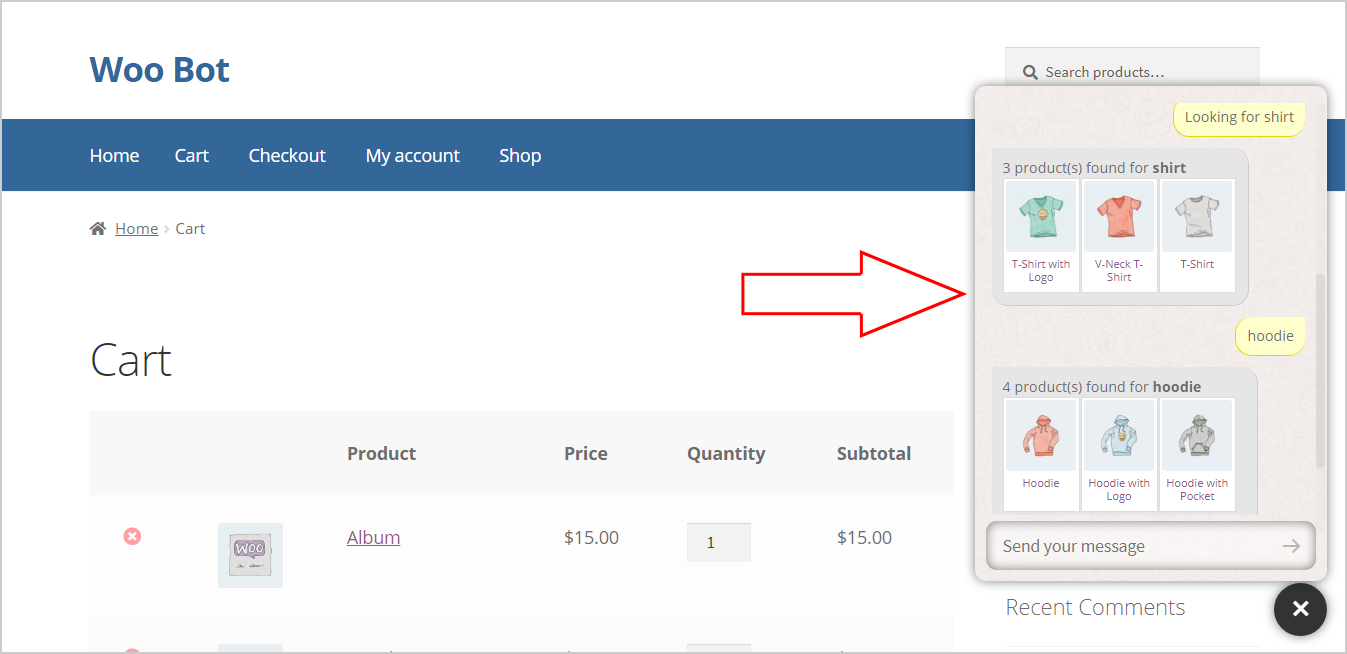
- Product Search.
- Product thumbnail in chat with link to product page.
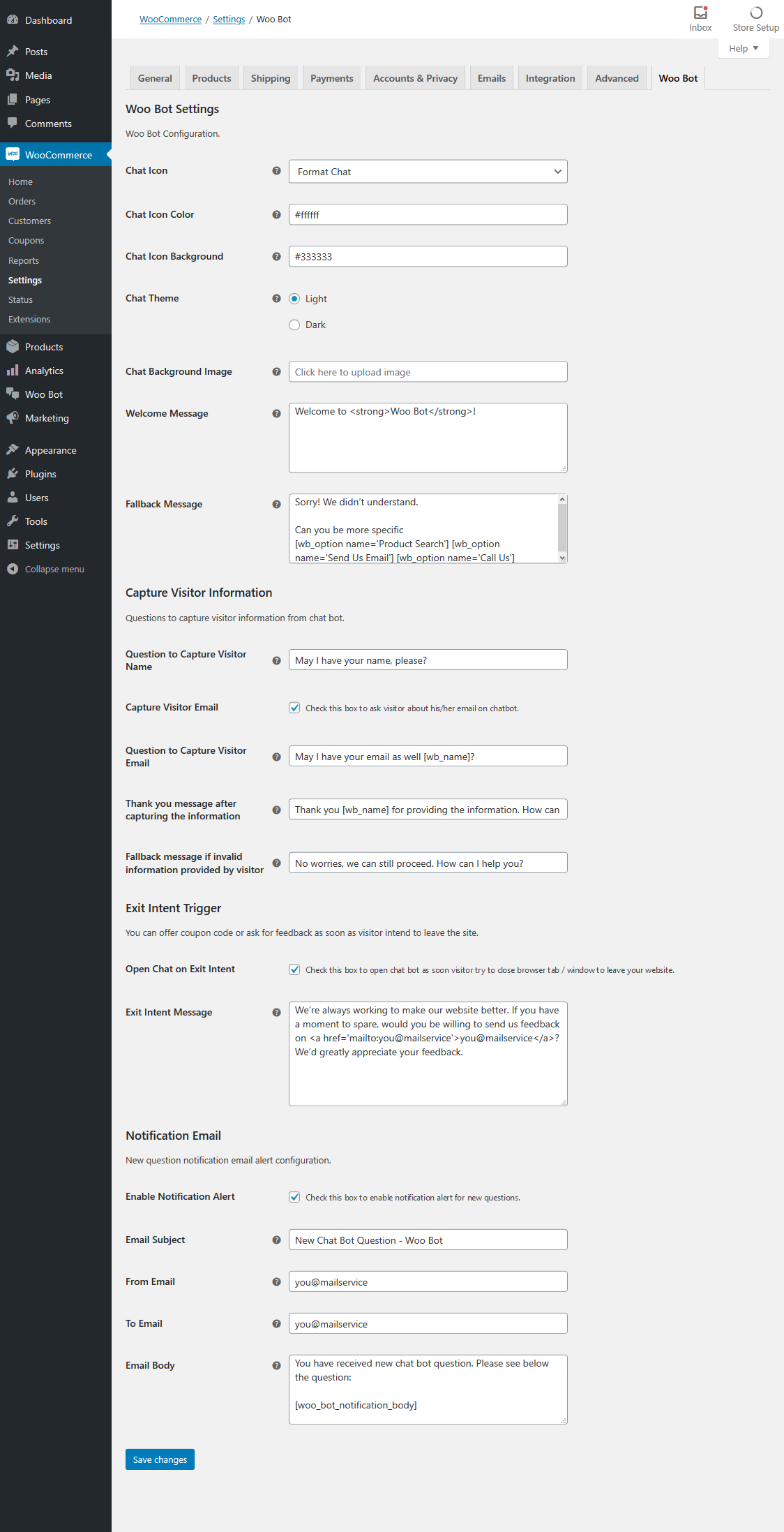
- Configuration of the chat icon.
- Chat icon and background color configuration.
- Configuration of chat popup theme (dark / light).
- Configuration of chat popup background image.
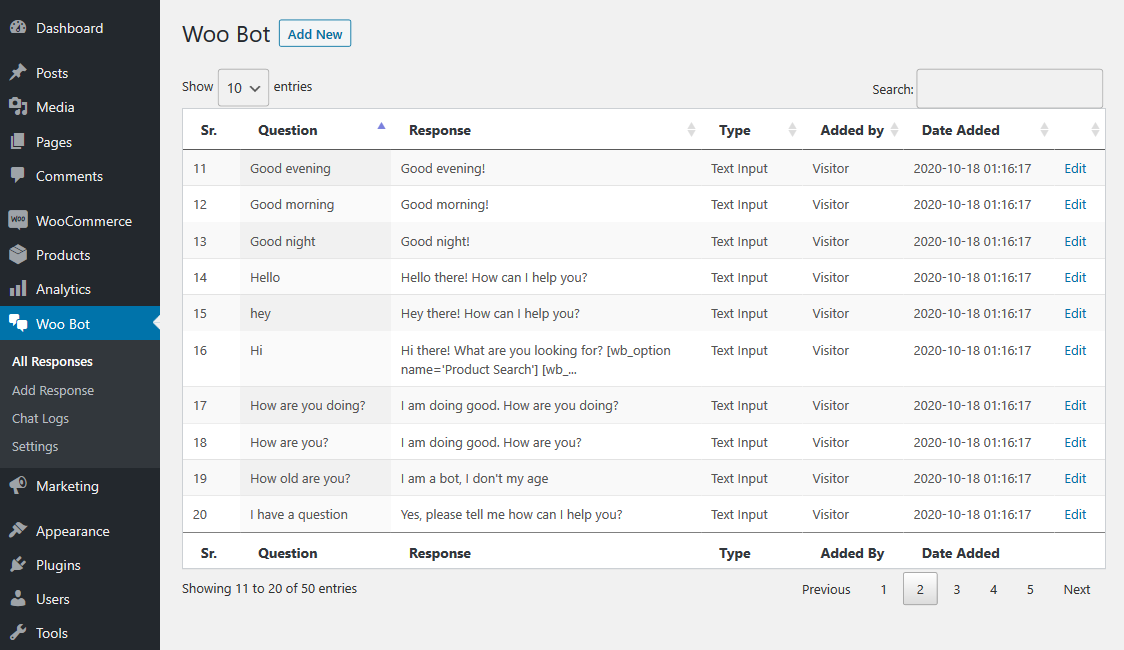
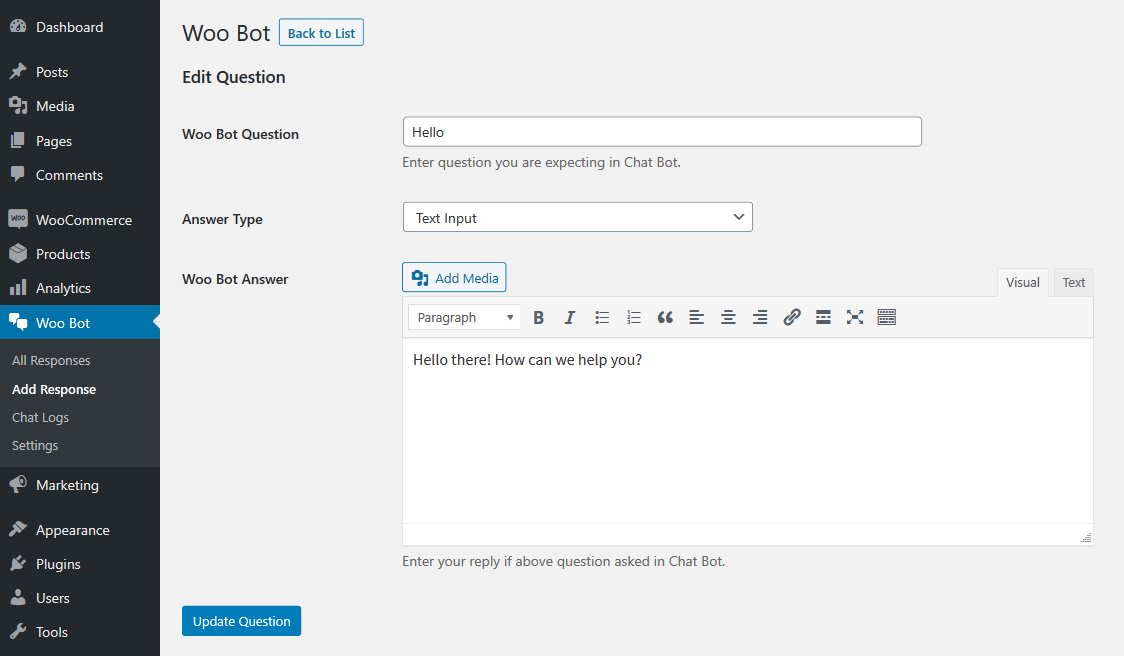
- Add answers to frequently asked questions in the backend.
- Email notifications for new questions.
- Simple shortcode for chat call to action.
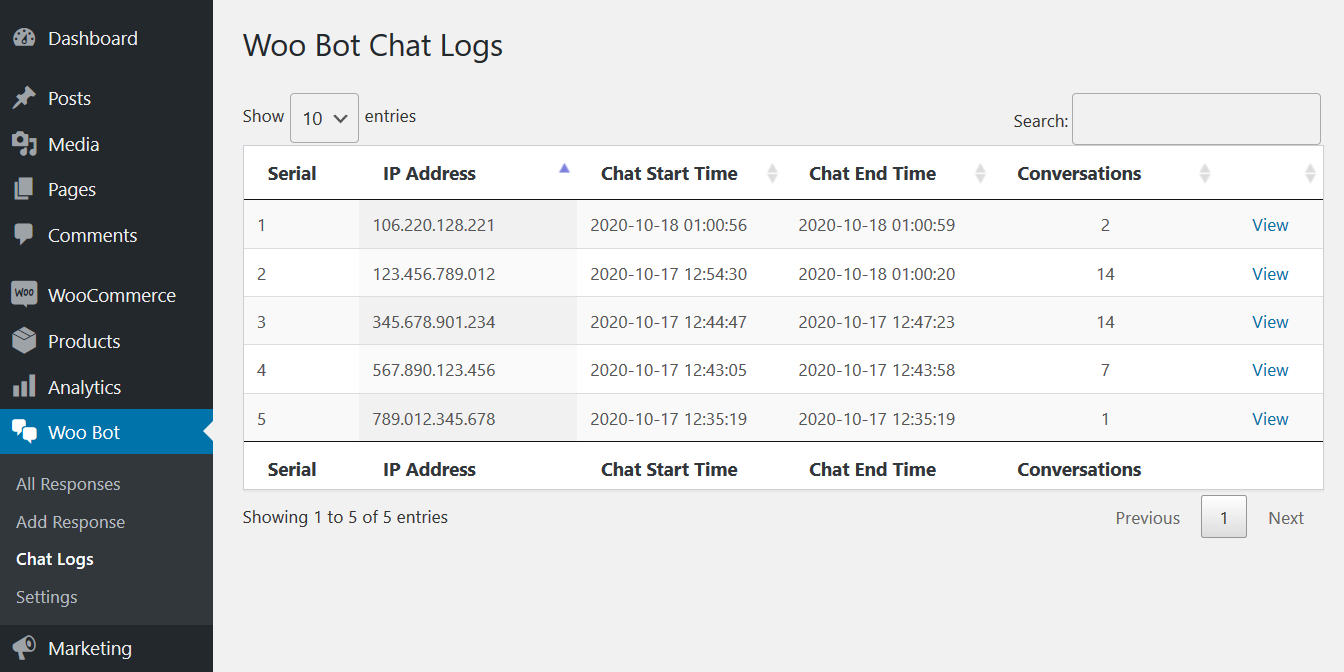
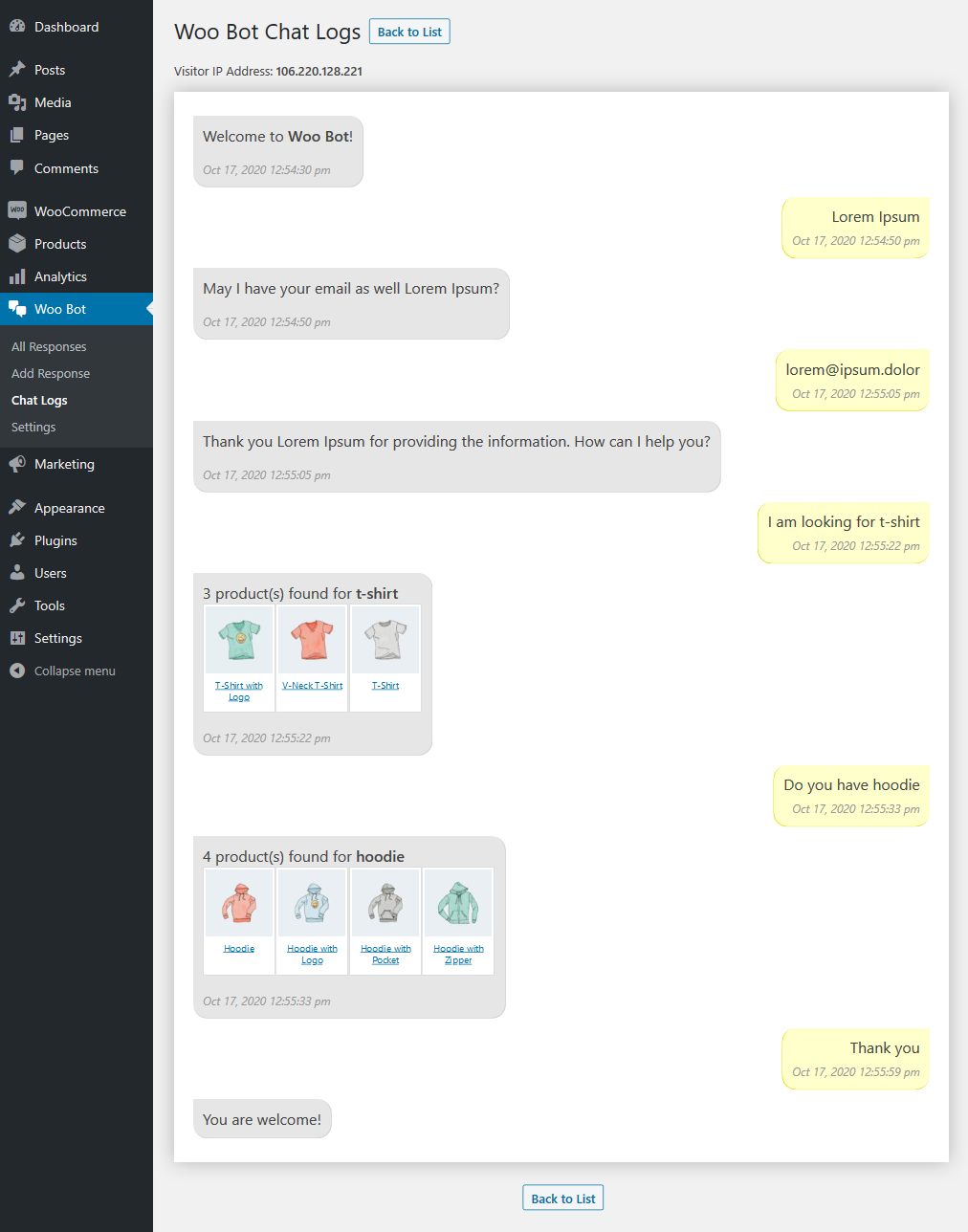
- Track all chats with chat log.
Using the WooCommerce Chatbot
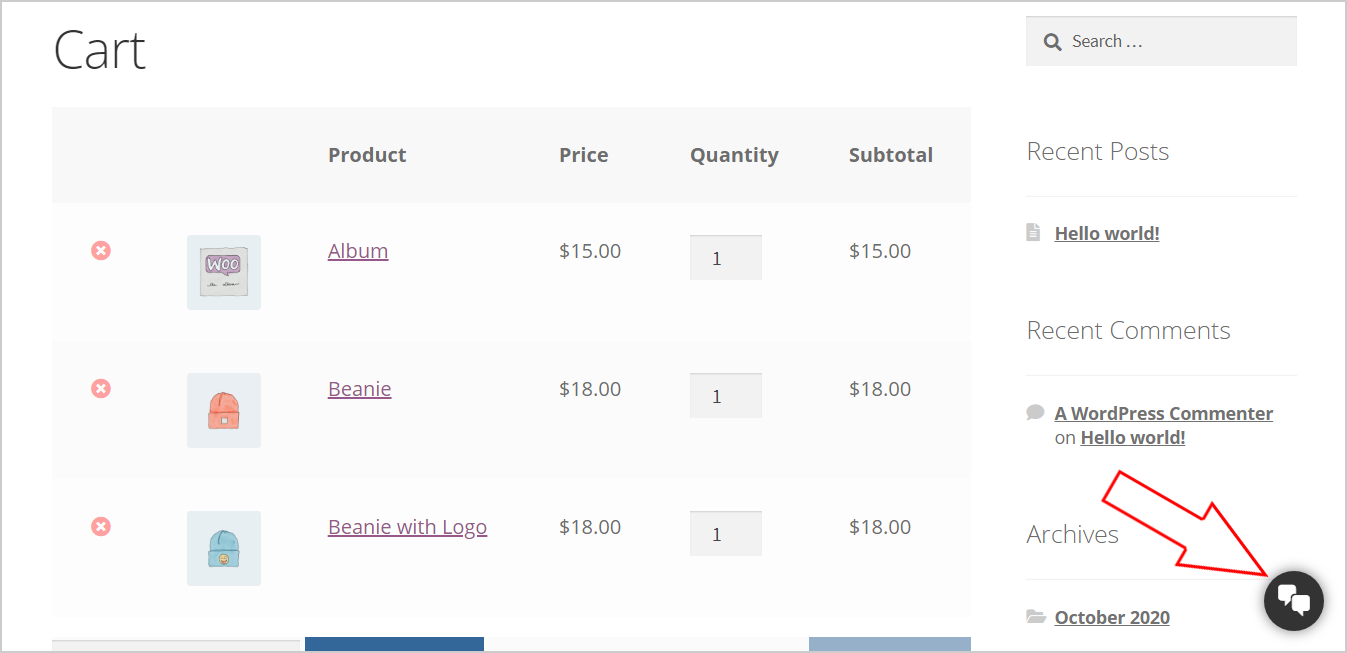
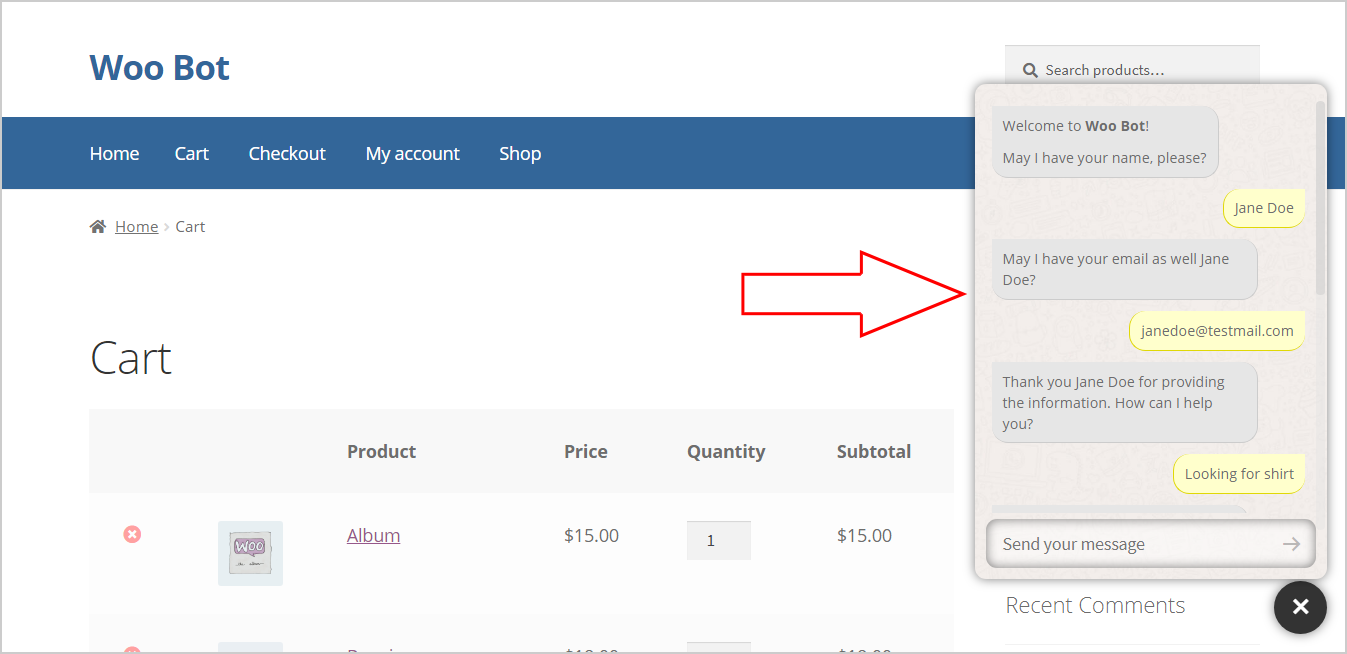
Customers can see the chat icon in the lower right corner of your website. After clicking on the chat icon, customers can see the chat popup and start a conversation. All conversations are saved in the backend and administrators can track all chats.
Plugin Setup – Backend
Response List – Backend
Add/edit response – Backend
List of chat logs – Backend
Become more visible on Google & Social Media?
In a free strategy consultation for data-driven online marketing, we uncover your untapped potential, review any existing ad accounts if necessary, examine your SEO ranking and visibility, and determine which strategy is appropriate for your budget and which active measures will lead to more inquiries or sales.

✅ More visibility & perception through targeted placement
✅ More visitors > prospects > customers > revenue
✅ Reach target groups scalably with SEA
✅ Act and grow sustainably with SEO
🫵 Maximum success with our hybrid strategy
💪 More than 15 years of experience across industries in over 1,000+ projects demonstrable!







Chat Conversation View – Backend
Chat Icon – Frontend
Chat conversation – Text
Chat conversation – Product search
Frequently asked questions
How Does It Work?
With Woo Bot for WooCommerce, you can convert customers who abandon their shopping cart into customers. Users can search for products and get answers to their questions.
How does the technology work?
Exit-intent technology tracks cursor movement in real-time and opens the chat popup with an exit message. You can offer a coupon code to convince customers not to leave the website.
How Does It Help Increase Revenue?
A chat bot is a second chance to bring a visitor one step closer to becoming a customer, which increases your conversion rate and of course your revenue.

ChatBot for WooCommerce – Retargeting, Exit Intent, Abandoned Cart, Facebook Live Chat – WoowBot
Increase your sales with ChatBot for WooCommerce
WoowBot is a plug-and-play plugin for WooCommerce Shopping ChatBot WordPress that lets you noticeably increase your shop's revenue . Buyers can keep up with the ChatBot seamlessly – thanks to the integration with Google Natural Language Processing (AI and NLP) via Dialogflow, search and add products to the shopping cart directly from the chat interface and receive support .
You can set up this ChatBot so that it works simply and quickly with any language . Facebook Messenger Live Chat is integrated, if you would like to provide a live chat channel for support in addition to the chatbot. Call me back& customer feedback modules are also available. You can also schedule the ChatBot to run only when you are not available for live chat with another service – outside normal office hours.

Not using WooCommerce? Try our ChatBot for WordPress – WPBot!
Need a complete customer help portal? Try our KnowledgeBase WordPress plugin with ChatBot!
The onsite retargeting helps you optimize the conversion rate by displaying your special offers and vouchers on exit intent, time interval or scroll in the chatbot window. Remove these other exit intent popups with a chatbot that communicates directly with the buyer. Reduce abandoned shopping carts by displaying current messages with the chat bot! Track customer conversions with statistics and reports to find out whether customers abandon shopping carts without completing orders. Increase your revenue!
Customers can converse with the Intelligent Chat Bot, view products directly via the chat interface and add them to the shopping cart, or send you valuable customer feedback and support requests. WoowBot also offers FAQ – support, email user inquiry, quick cart, order status, recently viewed products, shortcode for landing page, integrated Facebook Messenger live chat, onsite customer retargeting, exit intent with ChatBot pop-up and other features such as cutting down checkout reminders to the task of the shopping cart !
What is WoowBot ChatBot?
WoowBot is the next-generation conversational commerce platform for the WooCommerce platform. For basic use, this standalone chat bot requires no other third-party service and is ready to serve your customers with minimal configurations and settings. However, you can integrate the bot into Dialog Flow for artificial intelligence, machine learning and NLP. You can also integrate it into Facebook Messenger, which gives you the option to include a live chat function with real people as well as faster button options such as WhatsApp, Viber, Skype, phone call and web link!
Conversational Commerceis the future of e-commerce. Enter WoowBot: A new way of customer interaction that allows brands to connect with their customers on a personal level while creating a more natural interaction that mimics the physical world.24/7/365WoowBot offersYourCustomers aintelligent live chatservice as well as product search services, order status and support. Increasecustomer satisfaction, reduce scaling costs and improve customer retention. You can even use the WoowBot shortcode to create a single-page shopping experience!
How can the ChatBot increase your sales?
In addition to intelligent chat, search and help functions, WoowBot can increase your business's revenue by up to 25% with its intelligent retargeting messages and reduction of abandoned shopping carts. You can also create special offer messages for the time interval or scroll down in the chatbot window.
WoowBot Features
Personalized, 24/7 shopping bot
A personal welcome goes a long way toward brightening the day. WoowBot warmly greets each person and remembers previous chats. It helps the buyer find the perfect product they were looking for. What is worse than not having a live chat on your e-commerce website? The message "No one is available for chat" is displayed. WoowBot is always there to find products and help.
Plug and Play Bot
Sure, there are other chat bot alternatives such as Facebook Messenger Bots. However, they require complex training and integration. WoowBot is truly plug-and-play. If your shop is available in English – you can simply install WoowBot and you are ready to go . For other languages, you can change all bot responses. But that's it! In addition, WoowBot offers countless additional features that let power users fine-tune the bot's personality!
Artificial Intelligence
WoowBot is intelligent. Integrated into Google's Natural Language Processing (NLP), machine learning and artificial intelligence (AI) via DialogFlow V2. It is able to engage in small talk, continue a conversation flow and fulfill all reasonable requests. This feature is optional. You do not have to enable this feature. However, if you do, AI training data is bundled with the plugin, which you can easily import into the DialogFlow console. You can also create custom intents and responses in the dialog flow or in the step-by-step search.
User intent recognition.
WoowBot works based on two types of user intents for commands.
Predefined intentscan work without integration into DialogFlow API and AI. These are available immediately after installing the plugin and can be switched on or off individually. Examples of predefined intents include advanced product search and display, order status, callback and feedback collection, recommended and discounted products, shopping cart and recently viewed products, frequently asked questions, etc.
Custom IntentsGive you the ability to create a truly human, intelligent and comprehensive chatbot. Create all kinds of intents and responses (including extensive message responses) directly in DialogFlow and train the bot accordingly. When you create custom intents and responses in DialogFlow, WoowBot displays them when user input matches your custom intents along with the responses you have created. You can also create rich responses by enabling the Facebook Messenger response option.
In addition, you can activate the advanced step-by-step search. With this feature, you can create a series of questions in DialogFlow that are asked by the bot. Based on the user's input, a customized product search query is created to search all your WooCommerce products. You must create a custom question tree in DialogFlow to capture search criteria from the user.
Integrated Facebook Messenger Live Chat and more
Integrate the FaceBook Messenger experience directly into your website. This way, your customers can interact with your business at any time and enjoy the same personalized rich media experience they get in the FaceBook Messenger live chat! This feature is completely optional and not required for normal chatbot activities.
The main purpose of this feature is to provide a live chat channel for support in addition to the chatbot.
On-site retargeting, remarketing, conversion optimization, exit intent
Recover up to 25% of visitors with on-site retargeting. WoowBot detects exiting visitors and shows your visitor a targeted offer that you have defined. Up to 25% of retargeted visitors respond to your message and become subscribers or customers. Targeted offers can be a voucher code, a free eBook, etc. Reduce your shopping cart abandonment rate and win back sales by setting perfectly timed messages that offer a discount or free shipping so that your customers do not leave before checking out.Use on-site retargeting to direct visitors to a desired conversion goal or landing page. You can point abandoning visitors to some of your most popular content or best-selling products to keep them on your website and improve your quality factor.
Reduce shopping cart abandonment Increase revenue
In addition to exit intent and remarketing offers, WoowBot can remind users to complete the purchase process if buyers have products in the shopping cart but do not complete the order for any reason. Many buyers add products to the shopping cart but leave the website from other pages after continuing to search before or after reaching the shopping cart page.
WoowBot reminds customers to complete the order process if they have products in the shopping cart but have not completed the checkout for a certain period of time on your website. They may be browsing other websites in other windows or tabs. A gentle reminder from the bot will work wonders in such cases.
When a user leaves the website and returns later, WoowBot reminds the buyer with a custom message to complete the order!
All of this leads to a much higher customer conversion rate by reducing the potential for abandoned cart.
Customer conversion rate tracking
Track whether your customers abandon their carts. Conversion report and statistics showing how many buyers add products to the cart, how many reached the checkout page, and how many actually completed the order process. Very helpful for taking the necessary measures to reduce cart abandonment. Combine this WooCommerce conversion tracking report with the retargeting features to increase your revenue by up to 25%!
Advanced Product Search and Display
WoowBot offers an advanced product search through special database indexing, which allows product categories, tags and additional WooCommerce fields to be searched. This enables faster and more accurate search results. Products can be added to the shopping cart directly via the chat interface.
In-Chat Support and Contact
WoowBot provides support directly from the chat window. You can add frequently asked questions (FAQ) and answers in the backend , which WoowBot displays when the user goes to the support area. If the buyer does not find answers to their question in the FAQs, they can send an email to the site administrator via chat !
Newsletter Subscription
WPBot can prompt the user to enter an email subscription. Link this with your retargeting ChatBot window popup and a special offer. People can register their email address, which you can export later! GDPR-compliant with the command option to unsubscribe from the ChatBot!
Call me back
With the Call Me Back function of this chat bot, you can receive call requests from your customers. The call request is sent to the administrator by email. With this great function, you can collect the phone numbers of potential buyers and call them back as you wish.
Collect customer feedback
Buyers can quickly select an option to send feedback and email your website about their shopping experience. Collect customer feedback and improve your e-commerce website with WoowBot.
Order Status
Customers can retrieve their order status directly through the chat window. WoowBot logs a user into the chat window and automatically displays the last 10 order statuses.
Shortcode for Page
Load WoowBot with shortcode on a page. With this feature, you can create a single landing page where buyers can add your products to their cart and check out!
Selected and available products for sale
In addition to advanced product search, WoowBot can display featured and on sale products to buyers. With a bird's eye view, you can sell more products from your website.
Integration of Skype, WhatsApp, Viber, web link and phone call icons
You can also enable quick icons for Skype, WhatsApp, Viber, web link, and phone call in the chat window. If you provide support through any of these channels, this is an excellent way to serve your customers.
Customize your chatbot!
Choose from one of the 4 modern chat window templates . Upload your own background image to display it behind the chat window. Add multiple variations of ChatBot responses for each node . They are used randomly and appear more human.
Image and YouTube video support
The ChatBot supports images and YouTube videos . Simply insert an image (jpg or gif) or the full link of a YouTube video into the ChatBot language center or your Dialogflow intent responses and they will be displayed in the ChatBot! Add animated GIF images from your WordPress media library or Giphy quickly and easily from the ChatBot language center using the floating image options.
Floating Cart, Quick Cart and recently viewed products
WoowBot displays the floating quick cart from every page of your website with the number of products added to the cart, even when the chat window is not open. Additionally, recently viewed products are displayed as an easy reference for the buyer.
Language support
MO / Pot file included, but not really necessary unless you also want to translate the backend. Otherwise, all chat bot responses and system texts displayed in the chat window can be edited easily and quickly in the WoowBot backend. WoowBot also supports RTL!
Planning bot activity
You can set the day and time when WoowBot is operated. This opens up the possibility of running the bot in conjunction with another live chat support system. You can run WoowBot only when you are not available for live chat – outside your normal office hours. Make sure your customers never get stuck waiting for an answer.
Catalog mode – Hide add to cart button
Hide the add to cart buttons and display WoowBot only to search and display your WooCommerce products and provide support, FAQs, etc.
WoowBot ChatBot Features
- Advanced quick search with database indexing
- Google Artificial Intelligence, Machine Learning or AI Engine with DialogFlow V2
- Natural language processing via Google's Dialogflow
- Automatically supports custom intents and responses that you create in the dialog flow
- Automatically supports follow-up intents and step-by-step question answering via custom Dialogflow intents
- Automatically supports rich message response and card responses from Dialogflow as Facebook Messenger app
- Automatically supports images (JPGs, animated GIFs) and YouTube videos from DialogFlow intent responses
- Automatically supports images (JPGs, animated GIFs) and YouTube videos from the ChatBot language settings responses
- Simply add any image (jpg or gif) or YouTube complete video link
- Add images from your WordPress media library or Giphy animated GIF images quickly and easily from the ChatBot Language Center with the floating image options
- Advanced search with additional WooCommerce product fields such as category name, tags, excerpt, SKU, etc.
- Show or hide cart item numbers
- Fine-tuning of WoowBot icon position
- Product display order and sorting options
- Option to display only parent categories with or without subcategory list.
- Option to display order status with or without login
- Option to select on which pages WoowBot should be loaded
- Upload a custom ChatBot icon
- Upload the custom agent icon
- Choose from 5 design templates for the ChatBot interface
- Unique Mini-Mode Template
- Option to disable WoowBot on mobile devices
- Option to exclude out-of-stock products from search results
- Option to enable/disable product search, recommended products, sale products, and order status buttons on startup
- Show or hide opening notifications
- Option to enable/disable the email address query after the name query
- Upload your own background image for the chatbot
- Customize the colors of text and buttons
- Upload custom icons for the lower area
- Create FAQ section with multiple questions and answers (supports HTML)
- Add a video in the support section by inserting the YouTube link
- Add multiple store notifications that appear above the ChatBot icon
- Display recently viewed products to make them easily accessible to the buyer
- Display featured products until the buyer has viewed products
- Quick Cart View
- Faster access to support
- Quick help for commands that can be used in the chat
- Administrator customizable chat commands
- Stop Words dictionary included and can be edited by the administrator. The bot automatically excludes stop words from search criteria and chat commands
- Advanced Language Center to edit and change all WoowBot responses, system languages, stop words, and info messages!
- Add multiple variations of ChatBot responses for each node. They will be used randomly and appear more human-like.
- Option to skip the greeting and display the start menu even with DialogFlow integration
- Works with / without DialogFlow integration via the start menu
- Display product details in chat – complete with images, option to add to cart, and support for multiple images
- Option to open product details on a single page instead of the bot window
- Persistent chat history across the buyer session on the website
- Remember the chat history in the browser's local storage and greet returning customers
- Shortcode for WoowBot on page
- Embed WoowBot into any site – including static HTML sites (with exception of some advanced features).
- Language support . Mo / Pot file included so you can translate into any language
- RTL- Support
- Integration with Facebook Messenger for Live Chat
- Integration with Skype, WhatsApp, Viber, web link and phone calls with floating icons
- Call me back – Customer leaves phone number.
- Collect customer feedback via email.
- Collect user email for newsletter subscription
- Compliance with GDPR (message with link to privacy policy page)
- E- mail address unsubscribe command
- Advanced Name Recognition
- Example of a DialogFlow agent for quick import
- Prompt users for email subscription with retargeting message
- Export email addresses as CSV
- On-site retargeting and remarketing to increase customer conversion rate and revenue!
- Display retargeting messages for customers on exit intent, after scrolling down "X" percent, or after "X" seconds.
- Custom background color for message retargeting.
- Reminder at the checkout at set time intervals to reduce cart abandonment.
- Cart reminder for recurring customers who have products in their shopping cart.
- Schedule day and time of WoowBot execution. Ensure WoowBot works with other live chat software.
- Customer conversion reports with charts and graphics
- Buyer conversion statistics by day, week, month, and custom date range
Why WoowBot Pro?
- Developed by a company with over 15 years of experience. You can rely on us
- Always up to date and in active development for new features
- Advanced documentation
- Simple and Error-Free Setup
- Fully responsive templates
- Unique Features
- Fast, reliable, factual and friendly one-to-one support
Help for WooCommerce or questions?
Feel free to contact us as one of the leading WooCommerce agencies.


 DE