

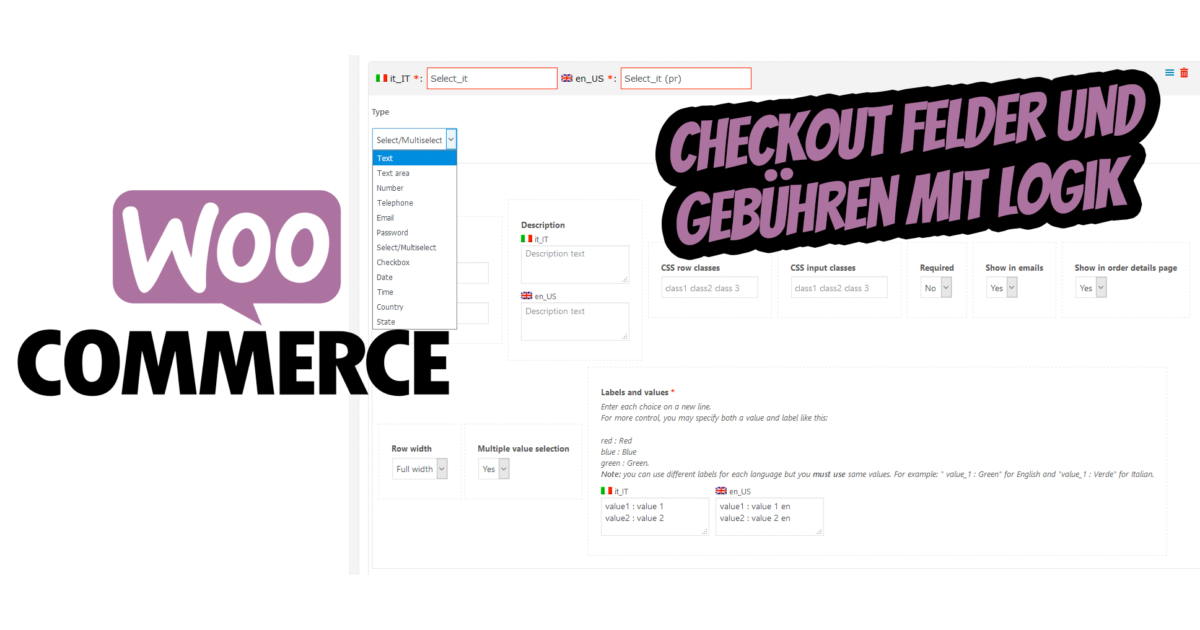
With WooCommerce Checkout Fields & Fees, you can easily apply fees (or discounts if the fee value is negative) and display additional fields in the billing and shipping forms of the checkout per order! Both fees and additional fields can be applied/displayed according to logical rules… and all with a nice visual editor!
WooCommerce Checkout Fields and Fees with Logic at Checkout
The plugin allows the shop administrator to create fees (or discounts if the fee value is negative) and additional fields for billing and shipping, to which they can optionally assign some conditional rules. According to these conditional rules, the plugin decides whether the additional fields need to be displayed in the checkout forms and whether the fees need to be applied to the checkout cart.
For each field/fee, multiple conditional rules can be linked with AND/OR conditions. A conditional rule can take into account various product/category/cart/user aspect data, such as quantity spent, size, weight, taxes, user roles… For more information, please refer to the Conditional Logic section!
More Flexible Input Fields and Options with Logic at the WooCommerce Checkout + Fee Calculation / Discounts
FIELD AND OPTION TYPES
With the plugin, the shop administrator can create the following field types:
- Text
- Textarea
- File
- Number
- Phone
- Password
- Selection / Multiple Selection
- Date
- Time
- Country
- State
- Headline
For each field, you can configure your own options such as CSS classes assigned to the input field, placeholder text, display in emails, order details page, line size, etc.
FIELD CONDITIONAL LOGIC
For each field, multiple AND/OR conditional logic rules can be set, making the field visible only when they are met. A condition can have the following typologies:
- Product
- Category
- Cart
- User
FEE-BASED LOGIC
The fee can be applied dynamically according to the following customer and cart data:
- User Role
- Billing / Shipping Country and State
- Billing / Shipping City
- Billing / Shipping Postcode
- Payment Method
- Shipping Method
- User Role
- Products / Categories in Cart
- Total, Subtotal, Taxes, Volume, Weight, etc.
TEXT, TEXTAREA, NUMBER, PHONE, EMAIL AND PASSWORD
There is not much to explain… with the plugin you can easily add the „classic“ HTML fields like text, number or email!
Become more visible on Google & Social Media?
In a free strategy consultation for data-driven online marketing, we uncover your untapped potential, review any existing ad accounts if necessary, examine your SEO ranking and visibility, and determine which strategy is appropriate for your budget and which active measures will lead to more inquiries or sales.

✅ More visibility & perception through targeted placement
✅ More visitors > prospects > customers > revenue
✅ Reach target groups scalably with SEA
✅ Act and grow sustainably with SEO
🫵 Maximum success with our hybrid strategy
💪 More than 15 years of experience across industries in over 1,000+ projects demonstrable!







SORT CHECKOUT FIELDS
All checkout fields can be sorted and conditional fields can be temporarily hidden via the Sort & Hide menu.
FILE UPLOAD
Upload any file size to the checkout page! Once a file has been selected, the plugin displays a nice visual bar showing the current progress of the file upload! Once the customer is done, they can place the order. The file can recently be accessed via the order details page for administrators and optionally via email and the order details page for the frontend. Optionally, it can be deleted and re-uploaded by the admin!
If the order is deleted, all associated files will also be deleted! This way you avoid unnecessary waste of space!
HEADING
Would you like to separate fields with headings? You can! Use the special Heading Field to render headings between fields!
SELECT FIELDS / MULTI-SELECT FIELDS
The plugin allows for easy creation of select and multi-select fields. To do this, simply create a select / multi-select field where values and labels are specified in the following format:
Value1: Value 1
Value2: Value 2
In each line, the value and label are separated by the character :.
Note for WPML users: You can use different labels for each language, but you must use the same values.
For example: „value_1: Green“ for English and „value_1: Verde“ for Italian.
STATE AND COUNTRY FIELDS
The plugin allows you to create fields for country, state, or country and state. The first option allows the customer to select only a country, the second option only a state of a specific country. The last option is a complete country and state selector that populates the state selector according to the currently selected country.
Note: Regarding the state selector, only the states/provinces for the permitted sales countries configured in the WooCommerce -> Settings -> General menu can be selected.
DATE AND TIME FIELDS
You can easily add date and time fields, allowing your customer to select the desired values using a beautiful visual selector! Furthermore, the plugin allows you to restrict the date and time range by selecting minimum and maximum date/time values, which can be absolute and temporal or relative to „now“!
FEES AND DISCOUNTS
The conditional fees feature can also be used to grant a discount. In fact, if the fee value is a negative value, the plugin will actually grant a discount!
FREE SHIPPING!
The fee/discount feature provides the ability to set the shipping cost in case a fee rule is applied.
WPML COMPATIBILITY
When WPML is detected, the plugin automatically displays multilingual input fields for labels, placeholders, etc. This allows you to enter different texts for each language.
Product / Category Conditions
Allows you to make the field visible according to the following options:
- Cart / Stock Quantity
- Stock Quantity
- Amount Paid
- Amount without Taxes
- Length
- Height
- Width
- Weight
- Volume
For multiple product selections, selected values can be considered for each item or as a sum of the item values. You can also configure the rule to be met when all selected products are in the cart, or to apply only to the products actually in the cart.
Cart Conditions
Allows you to make the field visible according to the following options:
- Subtotal, total, shipping, or discount (with or without taxes)
- Subtotal, total, shipping, or discount tax
- Sum of item quantities, weights, or volumes
- Number of unique items in the cart
Terms and Conditions
The field is displayed if the current user has one of the selected roles or not
FRONTEND INTEGRATION
Additional fields are seamlessly integrated into the billing/shipping form when the conditional rules are met. Optionally, fields are also displayed on the user’s order details page and in notification emails.
BACKEND INTEGRATION
Additional fields and charges are seamlessly displayed on the order details page
CUSTOM CSS AND JS CODE
Through the “ Custom JS & CSS “ menu, you can quickly and easily define custom JavaScript codes for the checkout page.
WOOCOMMERCE BOOKING – FIELD PER PERSON
The plugin also allows displaying a conditional field per person selected by the user for a bookable product. To enable this feature, you only need to create a billing or shipping field and then create a conditional logic rule that is selected as the option Product or Category. Select a bookable product (or a category with any) and then enable the option Show field for each person.
For example, you can create the following fields for a bookable product
- First Name
- Last Name
This will be displayed on the checkout page for each person the user has selected.
Note: The per-person field is not available for the „Country“ and „State“ fields.
NOTE ON VARIABLE PRODUCTS
If a field has been selected to be visible for a variable product, when multiple variations have been added to the cart, the field will only be displayed once, not for each variation in the cart.
NOTE ON MODIFIED CHECKOUT FORMS
If you have in any way modified the addition/removal/customization of fields in checkout forms using third-party plugins, this may affect the WCCCF plugin and cause it to not function properly.
SCREENSHOTS
Type Selection – Field Configurator Page
Selection of Condition Options – Field Configurator Page
Selection of Condition Type – Field Configurator Page
Checkout Page
Frontend Order Details Page
Admin Order Page
Bookable Product – Field per Person
Custom additional fields and extra options for products are possible with the WooCommerce Product Extra Options.
WooCommerce Variable Products with Extra Options (Product Extra Options)

Questions or expert advice about WordPress & WooCommerce?
E-Mail: fi@vastcob.com
Florian Ibe




 DE
DE


2 Kommentare
[…] Den Artikel mit weiteren Informationen finden Sie hier. […]
[…] Eine weitere Alternative sind WooCommerce Checkout-Felder und Gebühren mit Logik an der Kasse. […]