

Pricing based on customers and customer groups is one of the most important components of an online shop operator’s business strategy, in this case a WooCommerce shop. In an age of personalized pricing, offering a unique price to specific customer groups can be a useful approach. By offering different prices, you can focus more specifically on building long-term customer relationships. The idea is usually that those customers who consistently get the best price from you will be happy to return to your store and webshop. This can be an important part of your promotional pricing strategy, especially if you have and sell in wholesale, B2B or even B2C long-term customer relationships (Customer Life Time).
WooCommerce Customer Group Prices / Discounts – Top 5 Role Based Pricing Plugins
In this article you will find a number of role-based WooCommerce pricing modules (English: Role Based Pricing Plugins) that you can use to create customer groups in WooCommerce. This is mostly used for WooCommerce B2B shops. If you are not yet familiar with WordPress and WooCommerce, you will find a detailed explanation of user roles below.
All plugins are, of course, compatible with WPML multilingual functionality and are translated into German or translatable with Loco Translate.
Our absolute favorite can be found under point 2!
The Top 5 WooCommerce Role-Based Pricing Plugins for User and Customer Groups for Pricing, Showing and Hiding Categories, Products, and Using Percentage or Fixed Discounts and Special Prices per Product
If you are looking for solutions, you will find some good role-based WooCommerce pricing modules (plugins) for managing customer groups in WooCommerce with many additional rules (automatic or manual). Most of these plugins also have additional features that will assist you with your general pricing strategies. Let’s look at some of the best role-based WooCommerce plugins for customer groups (user groups).
It is also possible to display prices in WooCommerce only for registered users.
1. YITH WooCommerce Role Based Pricing Plugin*
Dealing with a wholesale business or a retail business with segmented prices can be a real problem. Often you have to create price tables for specific customers or customer groups. With this YITH plugin, you can automate the entire process and implement role-based pricing smoothly in your store. This plugin helps you authenticate registered users and display a unique price for each of them. For each user role, you have the choice of whether to display the regular price, the sale price, or a unique user role-based price. Please note that this plugin does not allow you to create new user roles. However, you can use one of the plugins mentioned in this article to create new user roles.
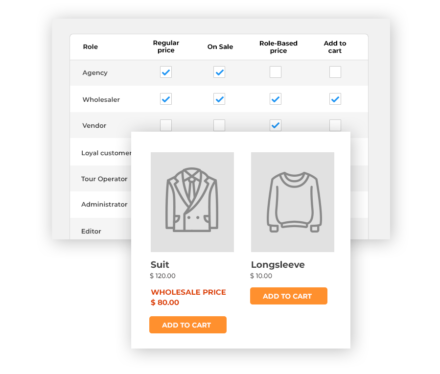
You can set role-based rules and purchasing conditions for registered users in your store. The plugin also helps to apply role-based rules to all products in your store or only to products belonging to specific categories or tags. You can apply discounts and markups with the plugin and also combine multiple rules to apply them to the same user role. If you do not display a price for a user, the plugin allows you to display a custom message in its place.
You can add a custom label to your prices so that a role-based price can be easily distinguished. The plugin also helps you choose your tax display options. For certain user roles, you can display prices including taxes, while for certain others, you can display prices without taxes.
Become more visible on Google & Social Media?
In a free strategy consultation for data-driven online marketing, we uncover your untapped potential, review any existing ad accounts if necessary, examine your SEO ranking and visibility, and determine which strategy is appropriate for your budget and which active measures will lead to more inquiries or sales.

✅ More visibility & perception through targeted placement
✅ More visitors > prospects > customers > revenue
✅ Reach target groups scalably with SEA
✅ Act and grow sustainably with SEO
🫵 Maximum success with our hybrid strategy
💪 More than 15 years of experience across industries in over 1,000+ projects demonstrable!







This plugin becomes particularly exciting with the official extension „YITH AUTOMATIC ROLE CHANGER WOOCOMMERCE*“. You can use it to automatically change the role of your users based on the purchase of a specific product or a specific purchase amount for your store. This plugin can be combined with membership plugins, subscription plugins, points and rewards systems, etc. Learn all about the features and integration with other plugins.
You benefit from this in the following ways, among others:
- You can define the change of a user role and the event or action that the user performs to trigger it automatically.
- You can add value to your users and reward those who shop more frequently or have been shopping for a long time by assigning them an ad-hoc role.
- Integrated with other plugins such as YITH Role Based Prices or YITH Points and Rewards, you can retain customers and encourage purchases by offering discounts and offers to users with a specific role.
An alternative would be the following plugin: WooCommerce Role-O-Matic*
The WooCommerce Role-O-Matic (WCRA) plugin is a powerful tool that allows the shop administrator to create „assignment rules“ that dynamically assign roles to customers based on how much money has been spent within configured periods or which products have been purchased. This tool can be very useful as it can be used in conjunction with WooCommerce Pricing! (or a third-party plugin) to assign dynamic prices or discounts according to the assigned roles.
This plugin is significantly more flexible to use, more complex, yet still very simple. After installation and activation, a new „WooCommerce Role-O-Matic“ entry appears in the main menu, through which the shop administrator can access the „Amount Configurator“ or „Product Configurator“ menus to configure the „Role Assignment Rules“.
The Amount Configurator allows rules to be defined according to which roles can be assigned based on the amounts spent (excluding taxes) during the configured periods, according to user roles, the minimum amount spent (and optionally a maximum amount spent), and product/category restrictions.
Each time a customer places an order, or when the shop administrator saves an order, or when they change an order status (using the WC_Order method or the administration area), the plugin checks whether an „amount role rule“ exists that matches the current time and amount spent to apply it to the customer. Optionally, each rule assignment can be deferred by specifying a different date on which the role assignment must take place.
The Product Configurator allows roles to be assigned based on the products purchased. Once the order has been placed, the customer is assigned the rules for the purchased products. In addition, expiry dates, product restrictions, and more can also be configured.
This can be very useful for managing subscription plans.
Tip: In general, Yith offers very well-programmed and powerful plugins for WooCommerce. An overview can be found here*.
2. Prices By User Role for WooCommerce*

Directly to our favorite from Fest-Team:
Or a new alternative from Addify from woocommerce.com:

Role-Based Pricing for WooCommerce
Add different prices for different user roles and customers. Add a fixed price, a markup, or an existing discount in percentage and fixed amount.
- Adjust prices for individual customers and user roles
- Set a fixed product price
- Increase price by fixed or percentage amount
- Discount price by fixed or percentage amount
- Change prices at product level
- Add rules to change prices for specific products or categories in bulk
- Compatible with product variations
- Set minimum and maximum order quantity
- Replace original price when price increases
- Strike out old price and display new price as a special price
- Configure start and end date for each pricing rule
- Hide price & add to cart for non-logged-in and specific user roles &
- Replace price with custom text
- Replace Add to Cart with a new custom button and link
How does the price change work?
WooCommerce Role Based Pricing is a smart plugin that efficiently handles price markups and markdowns. For price markups, the original price is replaced with the new increased price, while for price markdowns, the original price is struck through and the new price is displayed just below the original price. This gives your customers a feeling of being special and helps improve the conversion rate.
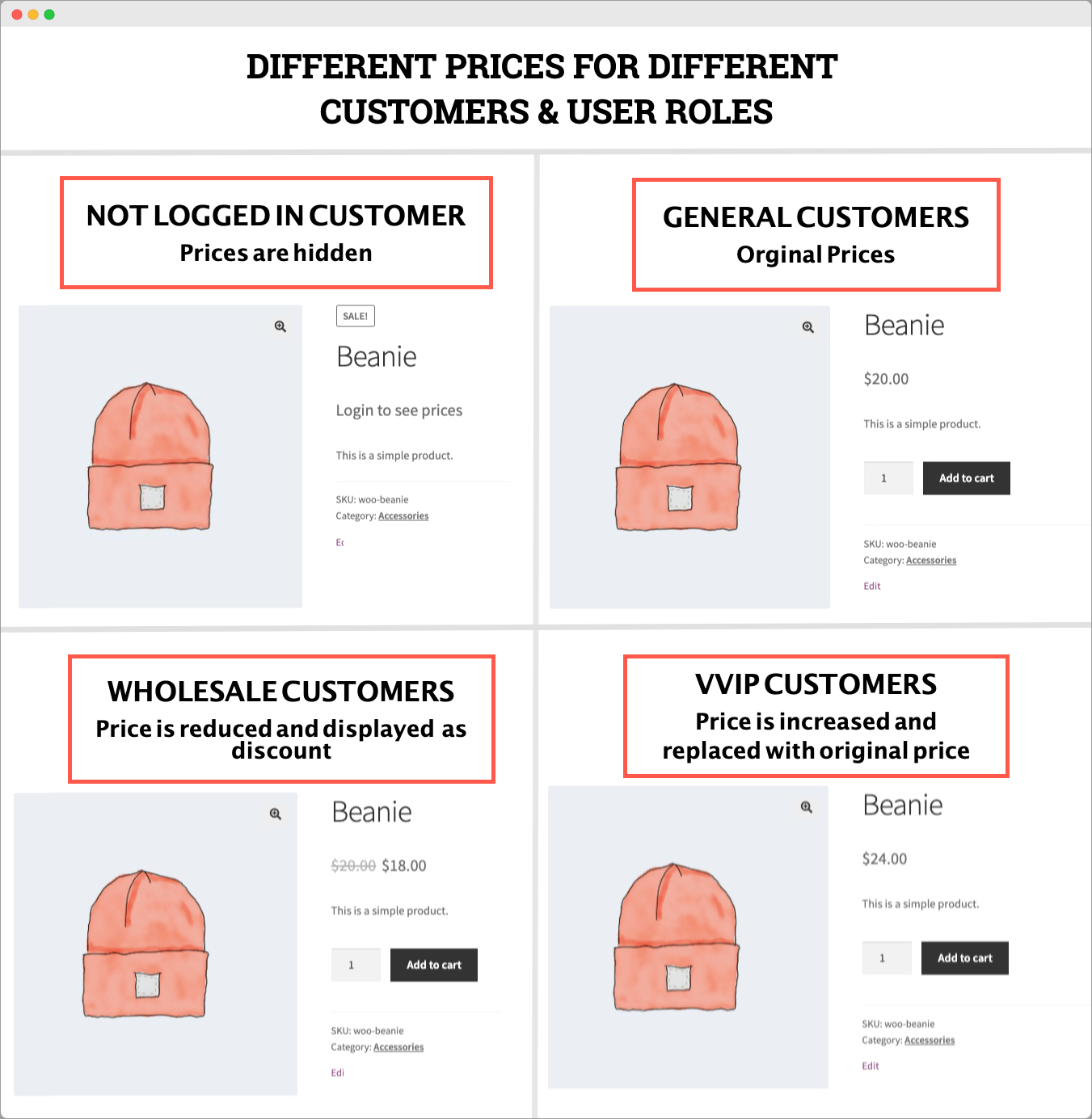
Product-level pricing
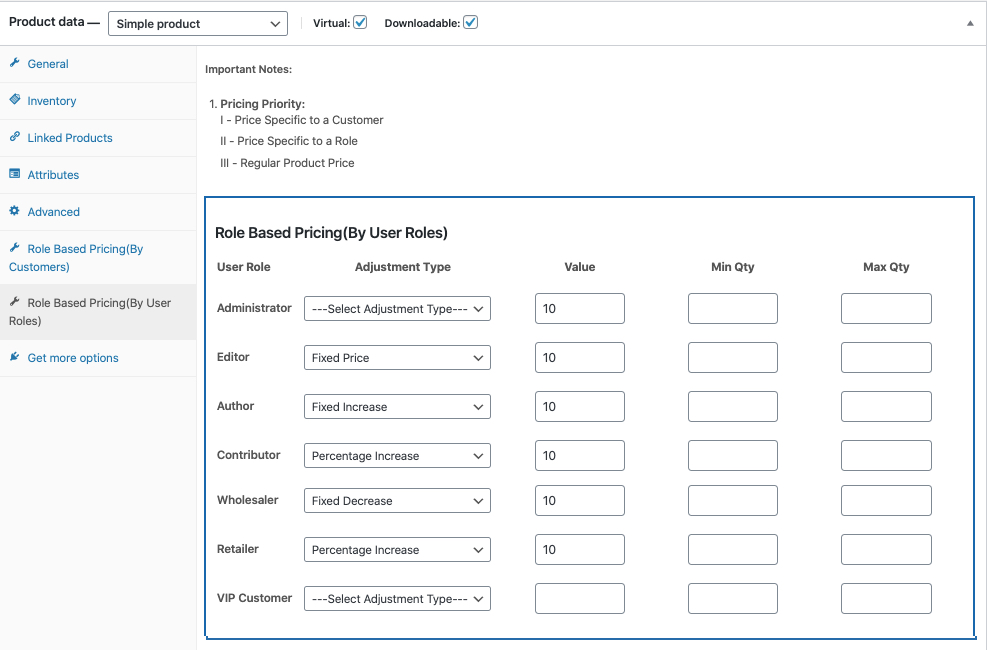
You can update the price based on user role and customer at the product level. The product-level settings allow you to:
- Set price for each user role (Leave empty to use the default price)
- Change price for each customer
- Specify minimum and maximum order quantity
- Set a fixed price or increase/decrease the price by a percentage or a fixed amount.
Compatible with product variations:
With WooCommerce Price by User Role, you can configure separate prices for each variation. Set different prices for different user roles and individual customers.
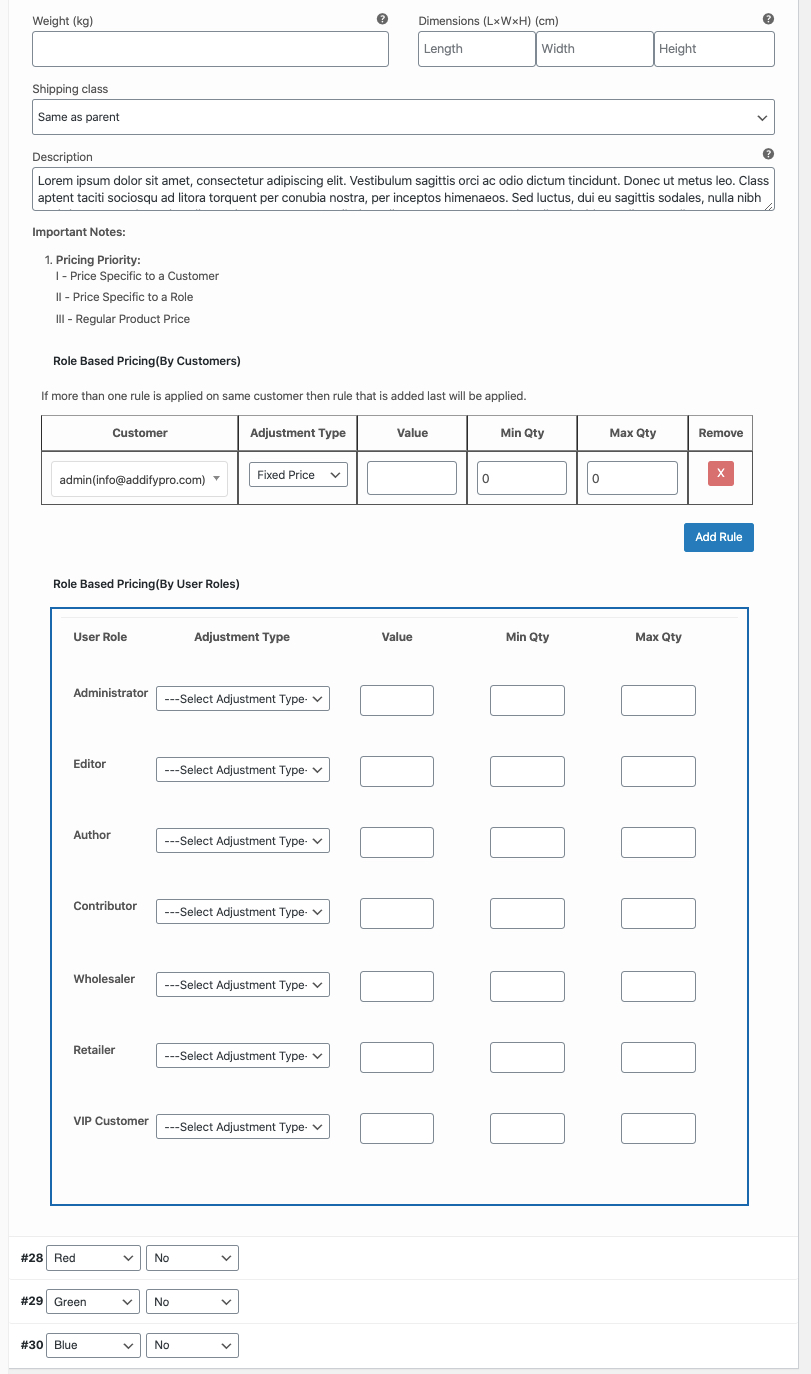
Rule-based price management
Rule-based price management allows you to change product prices in bulk. Instead of changing prices product by product, you can use the rule-based feature to change prices for specific products and categories in bulk.
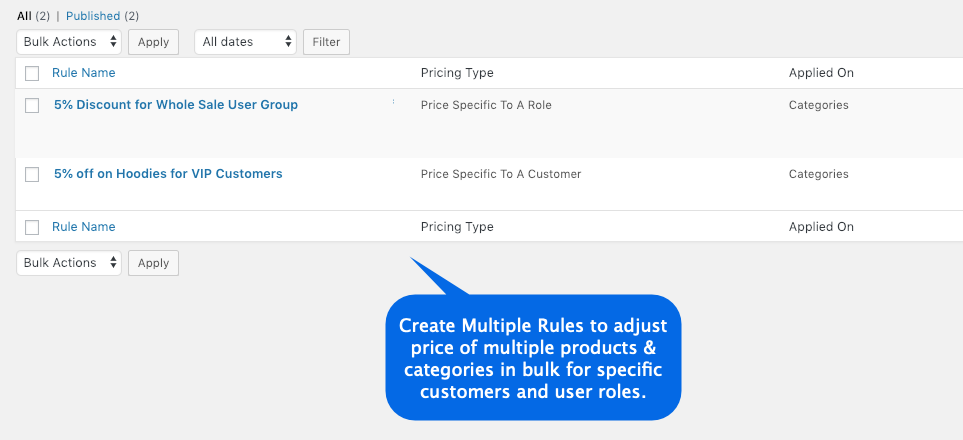
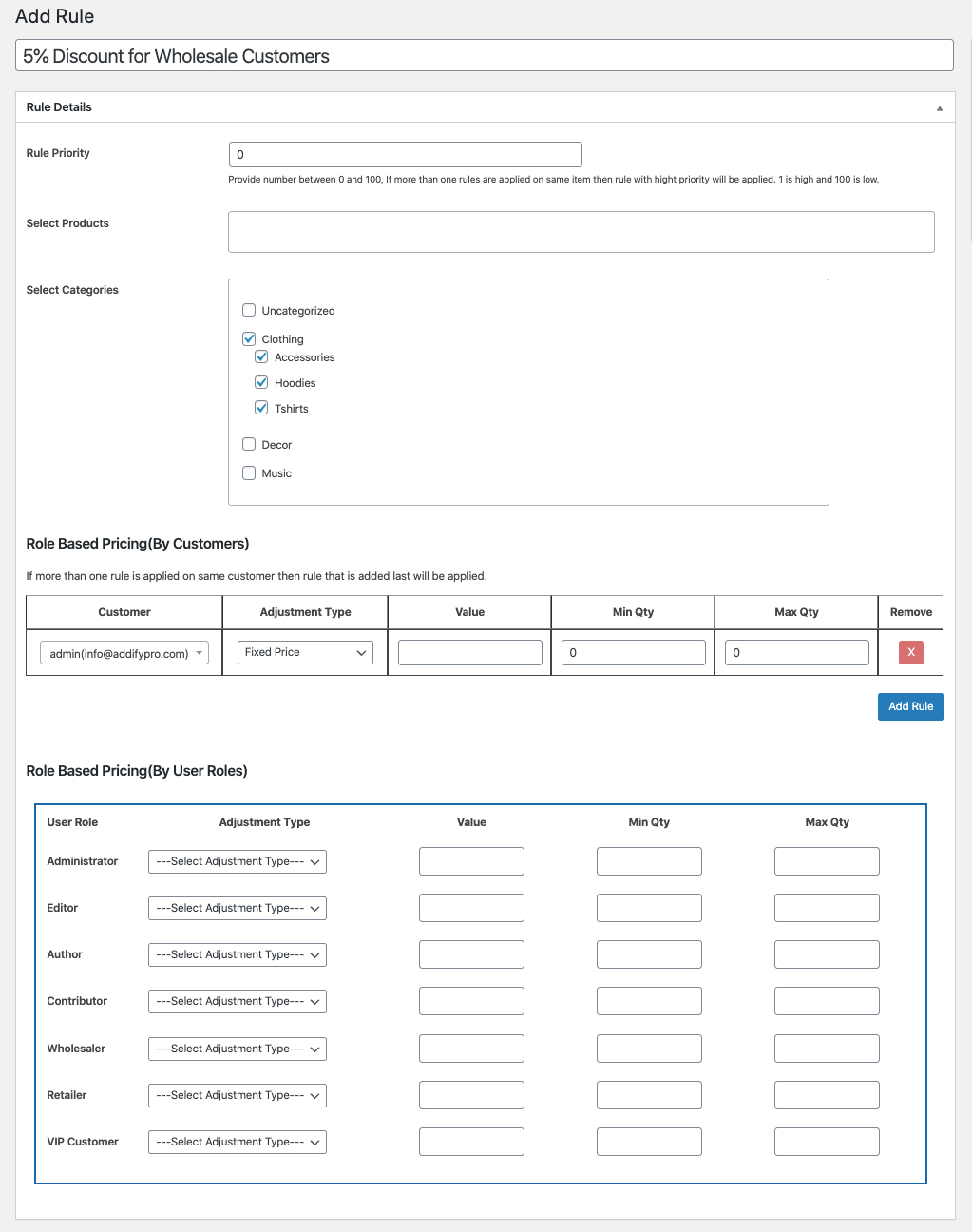
When creating a new pricing rule, you can:
- Specify user roles and individual customers
- Specify minimum and maximum order quantities
- Set a fixed price or increase/decrease the price by a percentage or a fixed amount.
- Select products and categories to apply the new price change.
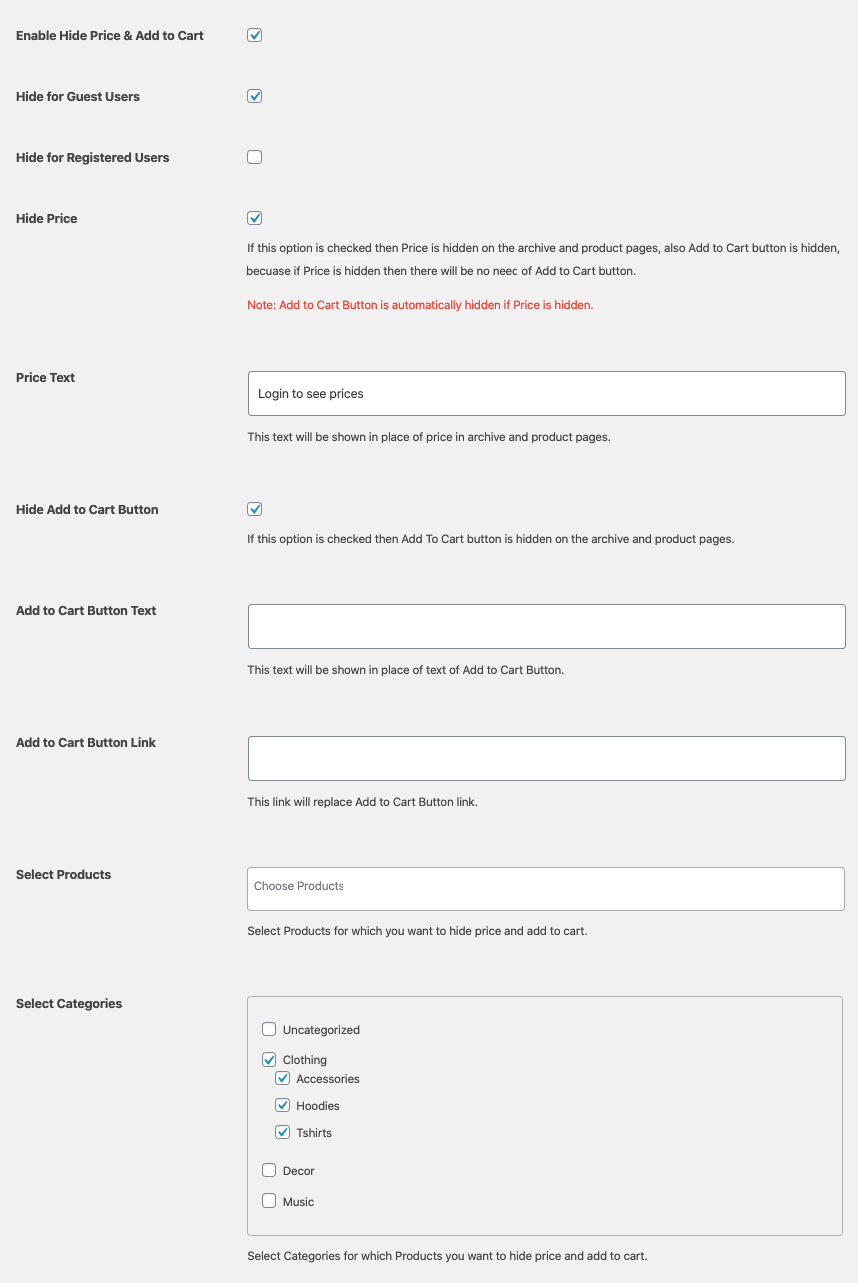
Hide Price & Add to Cart:
The WooCommerce role-based pricing plugin allows you to hide the price and/or the add-to-cart button for non-logged-in users and specific user roles. You can also hide prices for all or specific products and categories.
Use Cases for Role-Based Pricing in WooCommerce:
To better understand this WooCommerce extension „Prices by User Role“, we have listed a detailed use case that covers every aspect. All these pricing rules can be active simultaneously.
- Has 50% discount on product category Z
- Has 20% discount for specific products
- Has a surcharge of 20% on product category X
- Has 40% discount on product category Z
- Has 30% discount on specific products
- Has a 30% markup on product category X
- Has 10% discount on all products
Registered customer D
- Has Markup 10 for all products
This plugin also helps you to create different prices for different user roles in your shop. It will help you to set up a separate price tag for wholesale and retail buyers. Likewise, you can grant a special discount only to your loyal customers. You can also hide prices and the „Add to Cart“ button for certain user roles or guest users.
With the help of this plugin, you can add a discount or a markup for specific user roles. You can also display custom text if you do not show a price. It also offers the option to show the percentage of savings to customers. This would be a great way to achieve a better customer experience in your shop.
This plugin also offers the option to set individual product prices based on user roles. You can also set a different price for individual variations. Another useful feature of this plugin is that you can deactivate price adjustments for individual products. You can also set a sale price for the role-based price you have configured.
This plugin also serves to hide WooCommerce prices and/or the „Add to Cart“ button from unregistered users or individual role groups in your online shop and much more. Prices by User Role is a fantastic e-commerce tool that will help you make your online shop even better!
Attention: Not compatible with a multisite!
Most of the possible functions:
- Prices by User Roles Features
- Role-based pricing for products
- Discount for the user role group
- Markup for user role group
- Hide „Add to Cart“ button from unregistered users
- Hide prices for unregistered users
- Text instead of price for unregistered user
- Hide „Add to Cart“ button in the respective user role group
- Hide prices for the respective user role group
- Text instead of price for the respective user role group
- Display the saving percentage
- Custom User Groups
- WooCommerce CSV import for product list
- Set different prices for different roles for individual products
- Calculate different prices for each variation of a variable product
- Hide the price for unregistered users for individual products
- Hide the price and „Add to Cart“ button for individual products from user groups
- WooCommerce REST API support
- WPML translation ready
- CSV import of variable products
- Disable discount per product
- Hide product categories per user role
- Sales price for the role price
- Hide products by user role
- Text instead of „Add to cart“ button
- Display zero price as custom text
- Add custom text for guest users
- Create a WooCommerce store for members only
- Compatibility with custom product types
- Tax options (enable / disable taxes for roles)
3. Woocommerce Dynamic Pricing By User Role
This rather new plugin combines some functions of the other plugins with clean programming according to current programming standards and a very simple user interface. It is less complex with the same functionality and offers 95% of everything needed for, for example, a WooCommerce B2B shop. The great thing is above all the fact that the plugin will probably be developed very well and quickly. This ensures that you can actively participate in functions. Therefore, it is a clear favorite and we have already successfully implemented a larger Woo-Shop with it.
Key Features and Functions:
- Easy Configuration
- Role-based pricing for products
- Role-based discount
- Role-based markup
- Hide „Add to Cart“ button from non-registered users and replace it with custom text
- Hide prices from non-registered users and replace them with custom text
- Hide the „Add to Cart“ button in the respective user role group and replace it with custom text
- Hide prices for the respective user role group and replace them with custom text
- Write custom text after price generally or role-based (price suffix)
- Create and delete custom role
- Set different prices for different roles for individual products
- Calculate different prices for different roles in variable products for each variation
- Hide the price for unregistered users for a single product
- Hide the price and „Add to cart“ button from user groups for individual products
- Disable discounts and surcharges for individual products
4. WooCommerce Role Based Pricing Pro*
This is another useful plugin that allows you to set up role-based pricing for your WooCommerce store. It helps you separate registered users from guest users on your website and promote long-term patronage in your store.
Interestingly, the plugin offers a time-based universal key that you can provide to customers to access their role-based pricing. You can also set the start and end dates for a user role-based price to be active. This plugin also offers the ability to restrict payment gateways based on user roles. Similarly, you can change product visibility for specific user roles.
You can use this plugin in conjunction with the official WooCommerce Dynamic Pricing plugin* to make it more powerful. A variety of integrations with other plugins can be found on the product page. Take a look at the different use cases.
These plugins primarily allow you to set a range of pricing rules for your WooCommerce store. One of the many features is the option to create discounts for specific user roles. You can also configure discounts based on a customer’s email address, etc. If you want to make price adjustments at the product, category, cart, and combination level, you can use this plugin.
With this plugin, you can set up your simple WooCommerce store in a multi-currency, multi-tier marketplace where products can be offered at different prices for different customer groups. For example, subscribers or contributors receive different prices than new customers. Differentiate your registered users to make your store more attractive. New roles can be created and managed.
The latest version has been greatly improved to ensure smooth and faster operation. All user interfaces have been enhanced to provide a more user-friendly user/webmaster experience.
To name just a few important features:
- Role-based pricing for simple products
- Role-based pricing for variable products
- Hide price & Add to cart button for selected roles
- Rename eligible user roles
- Shortcode for product price
- Bulk editing of variable role-based prices
5. MORE THAN JUST USER GROUPS: WooCommerce Dynamic Pricing & Discounts (versatile)*
WooCommerce Dynamic Pricing & Discounts is a universal pricing and promotion tool for online retailers. Its strength lies in its flexibility – a variety of pricing methods and conditions can be combined to match virtually any pricing strategy.

This actively maintained extension for WooCommerce can easily replace multiple tools – use it for regular sales, promotions, special offers, tiered pricing, volume pricing, bundle pricing, deal of the day, flash sales, wholesale pricing, member pricing, individual pricing, loyalty programs. Behavior-based pricing, location-based pricing, etc. If needed, you can also increase prices or charge additional fees under certain conditions.
Boost your sales with smart rules and offers
Sell more! Set up attractive discounts for customers who buy in large quantities. Run special Christmas, Easter, or Black Friday promotions. Set up a clearance or flash sale. All laptops 15% off until midnight! Free case with every mobile phone! With this extension, you can set up the most powerful promotions within minutes!
Increase customer loyalty
Create long-term pricing strategies to retain your best customers. Reward customers who achieve certain lifetime goals (money spent, orders completed). Use one store for retail and wholesale. Open a club and grant insider discounts. Set up discounts for individual customers based on direct agreements.
WooCommerce Dynamic Pricing
The Dynamic Pricing functionality adjusts the product price based on a set of rules managed via a single user interface. Access a specific variant, the entire shop, or something in between. Dozens of conditions and priority options ensure that only the correct rules are applied.
- Simple Adjustment
Decreases, increases, or sets the price to a fixed price, regardless of quantity - Tiered Pricing
Decreases the price with quantity – all units receive the highest discount or subsequent units receive an increasing discount - Product Groups
Applies a discount when products are purchased in specific quantities - Buy X Get Y
Applies a discount to the Y quantity when the X quantity is purchased at full price - Exclude Matching Items
Excludes matching products from other pricing rules
WooCommerce Cart Discounts
Cart discounts work exactly like regular WooCommerce coupons, except no coupons need to be redeemed. This ensures that eligible customers see their savings immediately without having to take any action, which positively impacts your conversion rates.
Configure cart discounts based on cart subtotal, cart items, customer data, shipping address, previous purchases, and other conditions.
WooCommerce Checkout Fees (Fees at Checkout)
Checkout fees offer the possibility to charge a customer additional fees based on the details of their order. Use this option to cover costs that your business may incur when processing certain orders, e.g. fee for international order processing or perishable product handling.
This feature completes the package. Instead of using multiple tools for a variety of tasks, you can now use an all-in-one extension for everything related to your customers‘ payments.
Comprehensive conditional logic depending on the case with almost unlimited possibilities
Virtually unlimited scenarios
We know your head is probably spinning with perfect ideas, but here are some examples of what this plugin can do for you, in case you need a hint:
- Buy at least 10 units and get 5% off
- Any 3 t-shirts for 9.99 EUR, except t-shirts with custom graphics
- Buy between 2 and 5 units, get 10% off, buy at least 6 units, get 20% off
- With every desktop computer, you get a wireless keyboard with 50% off
- 5% lifetime discount after your 10th order, 10% after 50
- Additional processing fee of 15 EUR if heavy items are in the shopping cart
- For spending at least 1000 EUR, you get 15% off your order
- Book a hotel for 7 nights, get 1 night free
- SPA treatments 20% off with a stay of 3 nights or more
- 10% off for first order only if other promotions do not apply
- iPhone case with every iPhone purchased
- When purchasing items from the „Apparel“ category, you receive a 5 EUR discount
- Everything for 9 EUR until midnight, but only if you buy at least 3 items
- Every fifth accessory is 30% off
- This month, all music albums save 10%, singles 25%
- Processing fee of 10 EUR for international orders
- 15% discount for reorders
- Users with the Shop Manager role receive 100% discount for testing purposes
- 5% discount if no other discount is granted
- Automated rewards program with tiered discounts for loyal customers
- VIP Club members receive 25% discount on all items
- 10% discount on laptops, but only if the customer is not a VIP Club member
- And almost every other pricing, discount, or fee scenario you can imagine!
Other plugins that didn't make it into the top 5, but can still be useful:
- WooCommerce Advanced Pricing
Create pricing rules based on your conditions to target specific products and/or customers. Tiered pricing, pricing rules per user role, schedule pricing rules, setup at product or global level, New: Set pricing rules for sale prices, 15 conditions are available to set up your own pricing rules.
Advantages of Role-Based Pricing with User and Customer Groups in the Online Shop (E-commerce)
Let’s look at some of the advantages of using role-based pricing in your WooCommerce store.
Improve the customer experience
There will be several cases where customers do not make a purchase due to the higher price of a product. Similarly, you probably also have a group of customers who are not price-sensitive at all. A unique price suitable for a specific customer segment would improve both sales and customer experience. The trick, however, is to achieve the right segmentation with the correct use of analytics and market research.
While it may look interesting, this approach can also have its downsides. If customers find that you are making offers in a discriminatory manner, it can damage your store’s reputation. Role-based pricing may require trial and error to properly understand its usefulness in your business.
Use in wholesale stores (especially B2B)
Role-based pricing is particularly useful when you segment customers based on their purchase volume. This is especially easy for a wholesale business where you can easily create different user roles for customers based on the quantity they buy from you. As part of a wholesale strategy, you can conveniently make offers to customers who buy more products from you.
Offer a great customer experience with role-based WooCommerce plugins
Providing custom prices for your online shop’s users can be a tedious task with a lot of manual effort. Often, wholesale markets have to create separate price lists for their customers and then communicate them directly. With the help of role-based WooCommerce plugins, you can create individual and global product prices for specific user roles. These plugins should naturally take a lot of pressure off your shoulders and offer your customers a superior experience. Leave a comment to share your experiences with role-based WooCommerce plugins.
Explanation of User Roles and Customer Groups for WordPress + WooCommerce
Additional User Roles in WooCommerce
When WooCommerce is installed, two additional user roles are initially registered. These are:
- Shop Manager
- Customer
In addition, it offers the administrator additional functions to:
- Manage WooCommerce settings
- View WooCommerce reports
Let’s now look at the two specific roles for WooCommerce:
The Customer Role of a Buyer
Any user who registers using the checkout or sign-up option is defined as a customer on your website. Currently, the functions of the customer role are as follows:
- Read access, similar to a blog subscriber
- Can view orders and order history
- Can edit own account details
Shop Manager Role
If you hire someone to manage your store, you will need to grant them access to the back-end of your website. This is where the Shop Manager role comes in. This role has the same functions as the customer role, as well as the option to edit WooCommerce settings and products. In addition, this role can also view WooCommerce reports. The Shop Manager role is similar to the Editor role in WordPress.
Existing User Roles in WordPress – WordPress defines user roles as follows:
- Administrator
- Editor
- Author
- Contributor
- Subscriber
Administrators have full access to all administrative aspects of the site. Unique functions that define the administrator role include deleting pages and posts by other users, updating the core, creating and deleting users, etc. Additionally, administrators can add, delete, and manage plugins and themes on the site. Administrators also have the freedom to change the details of other users, including passwords. Essentially, you should restrict administrator access only to website owners and only to trusted individuals who have full control over your website.
In several locations, there is a user role called Super Administrator. This role has all functions by default. However, on a single site, the Administrator role is equivalent to Super Administrator.
Editor
With an Editor role, you can access and edit other users‘ posts. The editor role is best suited for the person who manages the blogs and other posts on your website. Essentially, the editor role only concerns the content aspect of your website. Those with an editor role can edit or delete all posts on your website. They can also moderate, edit, and delete comments on the site.
Author
Authors can create and publish their own posts. However, this role does not have access to other people’s posts. They can also delete their posts if necessary. Furthermore, users with an author role cannot create new categories. However, they can use existing categories on your website and create new tags. Additionally, individuals with an author role cannot moderate or delete comments on your website, although they can view them. Likewise, they do not have access to plugins and themes on your website.
Contributor
A Contributor is a user who can write and edit posts on your website. However, these users cannot publish posts. Therefore, an editor must review and publish the posts written by contributors. This is particularly useful if you employ freelance writers to generate content for your website. A disadvantage, however, is that users with contributor permission classes cannot upload files to your website. And as shown above, the Contributor role does not have access to plugins, themes, or other users‘ posts.
Subscriber
Those in the subscriber role only have read access to your site. Additionally, they can manage their own profiles on the site, such as user information and password. Otherwise, they can only read posts and leave comments on your site. You may find it useful if your site structure requires users to log in to read blog posts.
Conclusion on user management, customer groups and intelligent discount and pricing policy in WordPress + WooCommerce
User roles in WordPress help to provide a stable structure and organization for different users of your website. In addition, you can use them to create selective access to the content of your website. When it comes to WooCommerce, user roles offer more scope for creating tiered and wholesale prices. This article has tried to bring more clarity regarding different user roles and their potential applications. You also need to have an idea of some plugins that you can use to effectively use WooCommerce user roles.

Sie haben Fragen, möchten Kundengruppen effektiv nutzen und benötigen Hilfe? Ihr Ansprechpartner:
E-Mail: fi@vastcob.com
Florian Ibe





 DE
DE


1 Comments
[…] Preise nach Benutzerrolle / Benutzergruppen Prices By User Role ist ein WooCommerce-Plugin für rollenbasierte Preise und Großhandel, mit dem auch der Katalogmodus im Online-Shop aktiviert werden kann. Preise nach Benutzerrolle bietet dem Kunden dynamische Preise, sodass Produkte für verschiedene Kundengruppen zu unterschiedlichen Preisen angeboten werden können. Wenn Sie beispielsweise Groß- und Einzelhandelskunden unterschiedliche Preise in Rechnung stellen oder den Rabatt für die jeweilige Rollengruppe hinzufügen möchten, ist das Plug-in “Preise nach Benutzerrolle” genau das Richtige für Sie. Dieses Plugin dient auch dazu, WooCommerce-Preise und / oder die Schaltfläche “In den Warenkorb” vor nicht registrierten Benutzern oder einzelnen Rollengruppen in Ihrem Online-Shop und vielem mehr zu verbergen. Prices by User Role ist ein fantastisches E-Commerce-Tool, mit dem Sie Ihren Online-Shop noch besser machen können! » Ganzen Artikel zu Benutzergruppen lesen […]