

Show WooCommerce product variations as individual products on the shop page, category pages, search results, and filtered results. For example, you sell a T-shirt in 5 colors. Show this to customers as individual products instead of just small color circles or not at all. This will improve the user experience and increase the conversion rate.
Displaying WooCommerce variations as individual products easily on the shop page, category pages, search results, and filtered results

E-commerce platforms, especially WooCommerce, offer diverse options for product presentation. A common concern is the display of product variations as individual products. This approach can increase the visibility of each product and help potential buyers find specific product variations more easily. In this article, we explain how you can easily display WooCommerce product variations as individual products.
Displaying variable products as individual products in WooCommerce can significantly improve usability and increase the sales rate by up to 15%!
Displaying / Representing WooCommerce Variations as Individual Products: A Simple Guide
WooCommerce and Product Variations
By default, WooCommerce treats product variations as part of a parent product. For example, if you sell a T-shirt in different colors and sizes, these variations are listed under the main product. A customer must visit the main product to see the different available variations.
While functional, this approach can confuse or deter customers looking for a specific variation. Displaying variations as individual products offers a practical solution here.
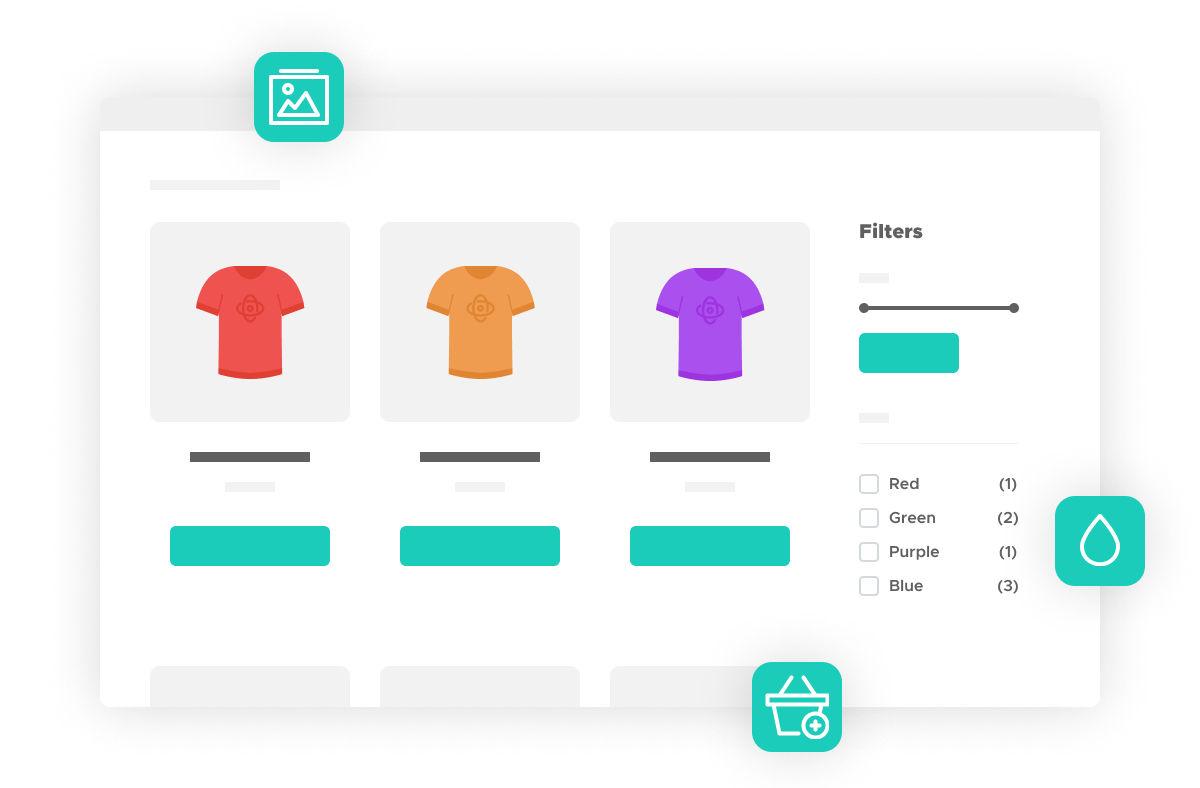
Display product variations as individual products
Displaying product variations as individual products requires a certain degree of technical setup. Here are the basic steps you should follow:
- Install a suitable WooCommerce Show Single Variations – Show WooCommerce Variations on the Shop Page plugin (click here)*
- Configure the plugin: After installing the plugin, you should configure it accordingly. In most cases, you need to activate the plugin and select the option to display variations as individual products. In some plugins, you can also choose on which pages the individual product variations should be displayed (e.g., search results, product categories, etc.).
- Create and manage your product variations: Finally, you need to create and manage your product variations. The plugins usually allow you to set a separate image, title, description, and price for each product variation.
Video on this:
Become more visible on Google & Social Media?
In a free strategy consultation for data-driven online marketing, we uncover your untapped potential, review any existing ad accounts if necessary, examine your SEO ranking and visibility, and determine which strategy is appropriate for your budget and which active measures will lead to more inquiries or sales.

✅ More visibility & perception through targeted placement
✅ More visitors > prospects > customers > revenue
✅ Reach target groups scalably with SEA
✅ Act and grow sustainably with SEO
🫵 Maximum success with our hybrid strategy
💪 More than 15 years of experience across industries in over 1,000+ projects demonstrable!







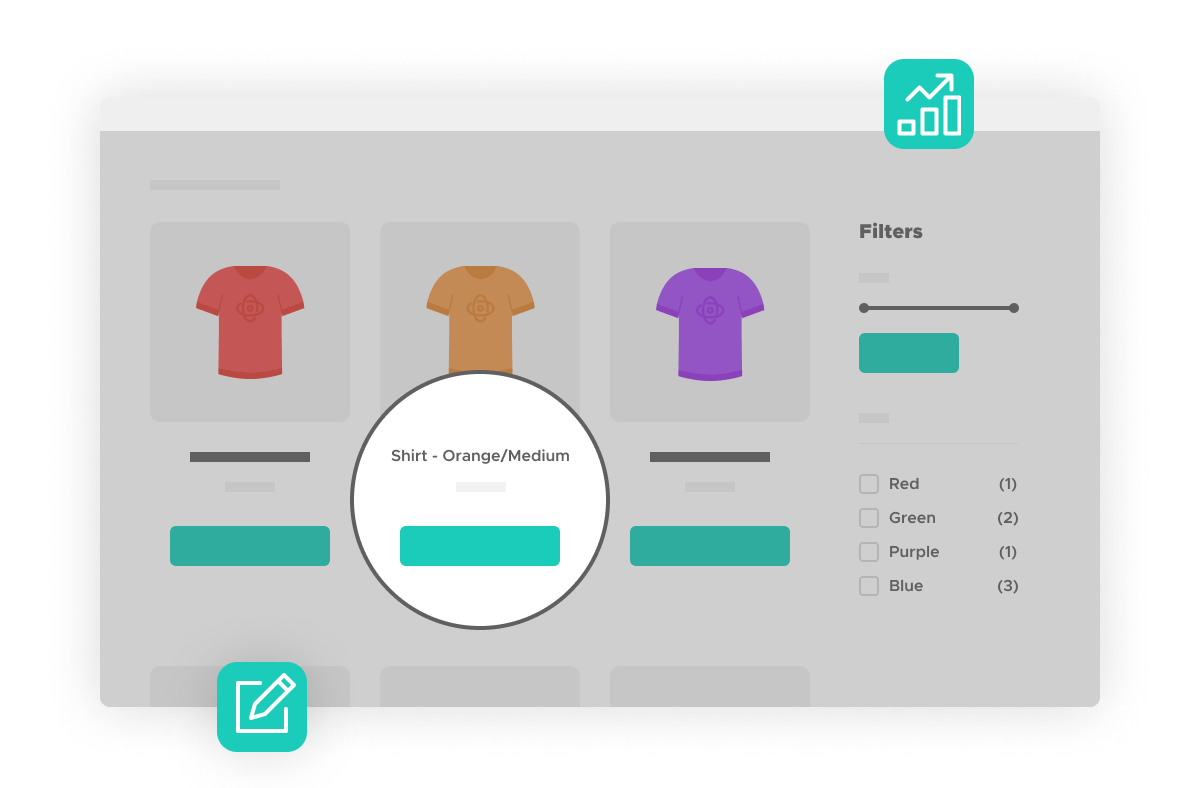
Advantages of displaying variations as individual products
Displaying product variations as individual products offers a number of advantages. Firstly, it increases the visibility of each product variation, which can lead to higher sales figures. Secondly, it allows customers to find specific variations more easily, which improves the user experience. Finally, it can help improve your website’s SEO, as each product variation can have its own meta tags and keywords.
Display variations on the shop page
Help customers find what they are looking for:
- Provide customers with a clear and straightforward shopping experience by displaying variations as individual products.
- Display accurate search and filter results that show individual products rather than all variable products.
- Save your customers time, clicks, and frustration by improving the browsing experience.
Display variations in filter and search
Expand your product catalog with just a few clicks
- Choose which variations should be displayed on the shop page, in filtered results, in search results, in featured listings, or in none of the above.
- Hide the parent variable „product“ for a cleaner appearance.
- Help your customers find the right products quickly.
Add to cart with one click without extra selection
Save your customers clicks
- Add variations directly to the cart on product listing pages.
- Avoid unnecessary clicks on individual product pages.
- Increase the average order value of your shop by making shopping easier for your customers.
EXTRA TIP: Edit variation titles
Create engaging variation titles
- Change the default titles for each of your product variations.
- Increase sales opportunities by making each product appealing and „clickable“.
Benefits summarized:
- Display variations
Boost your sales by displaying some or all of your product variations directly in the catalog listing. - More products
With WooCommerce Show Single Variations, you can display more of your product range. - Easy to use
After installation, simply choose where to display the individual variations: catalog, filtered results, and search results. - Seamless
Works with any theme and seamlessly integrates your variations into your catalog and shop pages. - Integrated
Looks and behaves as if it were a native WooCommerce functionality. - Easy to set up
There are no complicated settings, just simple options for each variation. - Add directly to cart
You can choose for each variation whether it can be added to the cart from the catalog list. - Filter
If a variation is set to appear in filtered results, it will also be added to the product count of the layered navigation.
An alternative plugin directly on woocommerce.com is available here*.
WooCommerce variations are displayed in a dropdown menu on a single product page. The customer has to go to the single product page, select a variation, and add it to the cart. For stores selling products with more variations, displaying product variations as individual products reduces friction in the shopping flow. With Variations as Single Products for WooCommerce, customers can instantly add multiple variations to their carts. This plugin allows you to save your customers time and improve their browsing experience. You can also hide the parent product on product listing pages.
- Display product variations as individual products on shop, category, and search results pages.
- You can give custom product titles to variations displayed as individual products on product listing pages.
- Includes an option to hide the parent product on shop, category, and search results pages.
- You can control the option to display variations as individual products and hide parent products globally or at the product level.
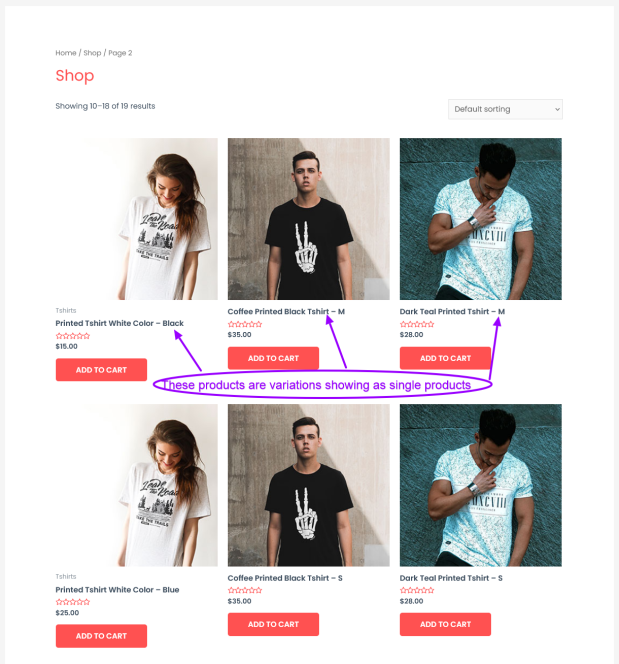
Conclusion on displaying WooCommerce product variations as individual products on the shop page, category pages, search results, and filtered results
Displaying WooCommerce product variations as individual products is an effective way to increase the visibility of your products and improve the shopping experience for your customers. With the right plugins and configurations, this approach is easy to implement and can have a significant impact on your e-commerce success. Try it out and see how it can improve your business!

Florian Ibe
CEO & Marketing Consultant
Your contact person: Florian Ibe
Variations as Single Products: The Key to More Sales in Your WooCommerce Shop
Imagine browsing an online shop on your smartphone. You’re interested in a T-shirt that comes in different colors and sizes, but you only find the first image and no further information about the available variations. Frustrated, you click away and keep searching… This scenario could easily be avoided! In this post, I’ll show you how to improve the user experience and increase your sales figures by displaying variations as individual products. Let’s dive in!
Why Variants as Individual Products Are Important
Have you ever wondered why some online shops simply perform *better* than others? One of the secrets is the idea of presenting variants as individual products. This strategy improves product visibility and helps buyers make decisions faster.
Better Product Visibility
When variants are displayed as individual products, customers can see the different options at a glance. This makes it easy to find the desired product. Therefore, it is important to present products attractively and transparently. After all:
„Every additional piece of information available can make the difference between a purchase and an abandonment.“
Increasing Purchase Incentives
Buyers are more motivated when they see all possible variants. For example, if a T-shirt is offered in multiple sizes and colors, that means more options. This can boost sales. When customers feel confident that they are seeing everything they need, the likelihood that they will make a purchase increases.
Optimizing the Mobile User Experience
Aren’t most of you always on the go? Statistics show that around 70-80% of purchases are made on mobile. That is why it is crucial that the mobile user experience is optimized. When customers have to navigate through numerous pages, they often lose interest. A clear presentation of the variants can solve the problem.
Avoiding Confusion When Scrolling
When confusion arises while browsing through variants, it has negative consequences. Ideally, buyers want to quickly find the relevant information. A clear product layout prevents frustration and confusion.
Increasing Conversion Rates
Studies show that better visibility and user experience can significantly increase conversion rates. A simple plugin could help with this. When products are displayed clearly, customers are more willing to buy. It is expected that the revenue increase from better visibility will be up to 15%.
| Statistic | Value |
|---|---|
| According to current studies, 70-80% of purchases are mobile | 70-80% |
| Expected revenue increase through better visibility | up to 15% |
The advantages of presenting variants as individual products are indisputable. If you run an online shop, you should consider how these approaches can be integrated into your strategy. You will be surprised at the differences that *simple* design and user-friendliness can make.

Practical implementation for improved user-friendliness
If you run an online shop, you know how important user-friendliness is. A good user experience can increase sales by up to fifteen percent. But how do you achieve that? This is where a practical plugin comes into play that can help you. Let’s take a look at the step-by-step guide to installing the plugin.
Step-by-step installation guide
- Download the plugin.
- Install it via the dashboard of your WordPress site.
- Activate the plugin.
- Go to the settings and adjust the options.
How easy is that? „It’s so incredibly easy and extremely fast.“ Well, that’s it!
Examples of current projects for illustration
Consider two compelling examples: a T-shirt in various colors and an alpaca blanket. These products show how important it is for the variants to be visible. When customers see the colors immediately, the likelihood that they will make a purchase increases.
Notes on customizing the display
- Use appealing images for each color variant.
- Change the product names to increase their appeal.
- Hide the main product when there are no variants.
This customization can significantly change the first impression of your products. And keep in mind that well-presented products often receive more attention!
Tips for manipulating product names and images
Change the names with creative, descriptive adjectives. Offer a visual experience that is informative and inviting. Ask yourself: What attracts the most customers? The image or the name? Often it is a combination of both.
Alternatives to paid plugins
If you have a limited budget, there are also free alternatives. Look for plugins with similar features. In many cases, these solutions offer a satisfactory user experience without additional costs.
Increasing revenue through the plugin
Implementing this plugin can have a significant impact on your revenue. Take a look at the following data:
| Product | Sales increase in percent |
|---|---|
| T-shirt | 30% |
| Alpaca blanket | 25% |
These numbers are convincing. They show that improved user-friendliness leads directly to more purchases.
The possibilities are endless when it comes to optimizing your product presentation. Are you ready to experiment with good practices to increase your sales figures?
Understanding the Target Audience: Who Buys When?
Understanding your target audience is crucial for the success of any online shop. But how can you find out who buys when? Here are some important points to consider:
1. Analyzing User Data
Analyzing user data is the first step to offering the right product variations. How often have you seen products in a shop that simply didn’t suit you? Perhaps it was because the variations were not displayed correctly. Statistical data shows that mobile users, in particular, are very sensitive to poor user guidance.
2. Understanding Target Audience Needs
Every target audience has different needs and expectations. When offering a product, you should always ask: What does this buyer need? How can I help them? A study has shown that consumers are more likely to make a purchase if they feel that the products offered are specifically tailored to their needs.
3. Personal Anecdote on Purchase Decisions
Let me tell you a short story. Last year, I wanted to buy a new jacket. I searched for hours for the perfect color and size, but most shops only showed me a single variation. Frustrated
4. Importance of Target Audience Research
Target audience research provides valuable insights. This information can significantly influence your business and shop design. If you know who your customer is, you can influence their decision.
„Sometimes what is not said is more important than what is said.“
5. Different Approaches for Different Age Groups
A younger audience often has different expectations of online shops than an older clientele. Is your shop prepared for this? Segmenting your customers allows for tailored approaches.
Market research shows that there is also growth in certain buyer segments. Buyers between the ages of 18 and 34 are more frequently accessing online shops via mobile devices. Their mobile usage is high, and therefore it is important that your site is optimized.
Chart on mobile usage and revenue statistics
| Age Group | Mobile Usage (%) | Revenue by Gender (%) |
|---|---|---|
| 18-24 | 75% | 60% male / 40% female |
| 25-34 | 80% | 50% male / 50% female |
| 35-44 | 70% | 55% male / 45% female |
| 45+ | 65% | 40% male / 60% female |
The analysis of purchasing behavior of different target groups can help you develop the right marketing strategies and increase your conversion rate. Make sure that what your conversation with customers shows is often more important than the products themselves. Стек{„lang“:“de“}
Misunderstandings and errors in variant presentation
The design of product variants can be a major challenge. Often it is the small details that make the difference. But what common mistakes are there? And how can these confusions arise for users?
Common mistakes in the design of product variants
- Insufficient visibility of variants: If customers cannot see which colors or sizes are available, this can lead to disappointment.
- Too many options: Sometimes too much choice leads to customer overwhelm. They don’t know what to decide on.
- Unclear descriptions: If product information is inaccurate, buyers can quickly lose interest.
Have you ever wondered why customers don’t buy your products? Often it is such mistakes that reduce sales.
Confusions that can deter users
Customers are looking for clarity. If your shop does not offer a clear presentation of product variants, this could unsettle potential buyers. An example:
Imagine a customer sees only one color variant of a T-shirt. But the customer wants to see the different options to make an informed decision.
„If you ignore your customers‘ needs, they will quickly leave.“
Tips to avoid the most common pitfalls
- Increase visibility: Display all variants clearly. Use swatches or thumbnail images.
- Limit options: Offer only the most important variants to avoid overwhelming customers.
- Clear descriptions: Ensure that each variant has a clear and precise description.
Examples of shops that have implemented this poorly
There are many shops that fail on these points. They offer a variety of variants, but users cannot find them easily. For example, you often see only one color of a product, while many other variants are hidden. This leads to lost sales, and this is not just speculation.
How you can learn from the mistakes of others
An error analysis is crucial. Look at successful shops and learn from them. What do they do differently? For example:
- They rely on simple navigation and clear presentation.
- These shops use plugins to increase the visibility of variants.
Current statistics show that up to 80% of users are mobile. This figure cannot be ignored. So if your shop doesn’t look optimal on mobile devices, you’ll lose potential customers.
By learning from the mistakes of others and optimizing your own website, you can not only improve user-friendliness. You also increase your sales. And that’s ultimately the goal, isn’t it?
Remember that clear and appealing presentation of variants is crucial for your shop’s success. Don’t miss this opportunity!
Long-term strategies for e-commerce growth
E-commerce is never really finished; it’s a continuous process. If you want to be successful in online retail, you need to review and adjust your strategies regularly. How do you achieve this? Here are some essential approaches you should consider.
1. Growth through continuous optimization
Continuous optimization is the heart of every successful e-commerce business. Here are some methods to implement this:
- Regular review of your website performance.
- Testing features to improve user experience.
- Optimizing call-to-action buttons to achieve more conversions.
How often do you check the user experience in your online shop? A regular look at user analytics can help you identify weaknesses.
2. Market research as a decisive factor
Market research is the foundation for every decision. It provides you with important insights about your target audience and competitors. Use:
- Surveys on customer satisfaction.
- Analyses of competitors.
- Trend analysis to identify new market opportunities.
Have you ever wondered how your customers think? These answers are essential for your strategic planning.
3. Expansion of product range and platforms
Consider whether your product range is sufficient. Diversification can help you attract new customers. Additionally, opening up new platforms, such as social media or marketplaces, can give your business a boost.
4. Importance of customer feedback for improvement
Customer feedback is an indispensable element for optimization. Here are some tips to use it effectively:
- Actively ask for reviews and opinions.
- Conduct surveys after purchase.
- Convert feedback into real improvements.
How often do you listen to your customers? Their opinion can not only improve your products, but also strengthen your relationship with them.
5. Set long-term goals and KPIs
Set clear, measurable goals. These KPIs can help you track your progress and make necessary adjustments. Consider which goals are important for your business, for example:
- Revenue growth per quarter.
- Reduction of shipping costs.
- Increase in customer retention.
Have you already defined your KPIs? They are crucial for evaluating and ensuring the continued success of your business.
Remember that long-term strategies for e-commerce growth should always be adaptable. Continuously monitor new trends and keep learning. The use of data-driven decisions will ultimately secure your competitive success.
Another option:
Conclusions and Outlook
The e-commerce sector has developed rapidly in recent years. This dynamic will continue in the future as well. There are many future trends in e-commerce that you should keep an eye on. Progressive digitalization, increasing personalization of user experience, and the rapid growth of mobile commerce are just a few examples.
The Role of Innovations and Technologies
Innovations and technologies play a crucial role in the further development of e-commerce. New tools enable you to make your online shop more efficient. Think of plugins and extensions that improve user-friendliness. If you want to increase sales, it is important to rely on such technologies. A question you should ask yourself: How can you use technology to better serve your customers?
Active Engagement with the Topic
It is not enough to simply watch how the market develops. You must actively participate in what is happening. Engage with new trends, develop ideas, and test different approaches. Only this way can you unlock the full potential. And do not forget:
„The only mistake you can make is not to try.“
Invitation to Discussion in Comments
We live in a time of change. Your experiences and opinions are valuable. I invite you to discuss in the comments. What are your experiences with new technologies in e-commerce? Which trends do you see coming your way? Let us talk about it together!
Importance of Networking with Like-Minded People
Networking is another important element for your success in e-commerce. Build relationships with other entrepreneurs. Share your insights and learn from others. Together you can benefit from each other and find new ways to scale your businesses. Imagine what can happen when you harness the power of cooperation!
Overall, reviewing the key points is crucial for your future direction. The world of e-commerce offers enormous opportunities. It is up to you to seize them. Take the time to think about what you want to achieve in the coming months. It is an exciting journey that often brings challenges with it. Yet that is precisely where the opportunity for further development lies. Be ready to forge new paths and discover how you can make your online shop even better.





 DE
DE

