

Set rules for dynamic bulk pricing by category and products. Enable store-wide sales (B2B resellers), private deals (B2C end customers), automatically add coupons, and much more. Role-based dynamic pricing for B2B/B2C and wholesalers.
WooCommerce Dynamic Pricing for B2B/B2C and Wholesalers (User Groups)
In contrast to the WooCommerce rule plugin presented here in the article with maximum flexibility but also complexity, the WooCommerce plugin „Roles & Rules B2B for WooCommerce“ presented here is significantly simpler and much easier for price adjustments. As a WooCommerce agency, we know that it doesn’t always have to be complex, and therefore this plugin is particularly well suited for simpler handling and maintenance without more complex rules. More on this here in the text with screenshots. Of course, the plugin can also be translated into German with Loco Translate.
Recommendation: Be sure to also check out our article on WooCommerce B2B shop solutions.
Role-based dynamic pricing for B2B / B2C and wholesalers
Roles & Rules is a role-based solution for both B2B and B2C customers. If you have loyal customers or perhaps want to start selling to wholesalers / B2B customers, this is the solution you should consider. Easily set up roles for your customer groups and create quantity pricing rules for all roles, including guest users (B2C). Imagine you have VIP customers to whom you want to give 5% off all products in a category, perhaps you add a dynamic pricing rule like: buy 3 or more, get 10% off, a simple task with Roles & Rules B2B.
Perhaps you have plans for a B2B shop where you want to show products to B2C customers, but no prices and no possibility to shop. With Roles & Rules, this is just one click in the settings and you have a private B2B shop. Or how about store-wide sales for one or more roles? Again, a simple task; you can even set the time when the sale starts and ends. Where other solutions have their own price fields, Roles & Rules only refer to your current product prices, which means simpler and less administration for you.
Roles & Rules B2B Key Features:
- Easily manipulable prices for roles/members.
- Easily manipulable prices for guest users (B2C).
- Create quantity pricing rules for categories, products, and subscriptions.
- Create dynamic pricing rules for categories and products such as: Buy 3, get 40% off.
- Easily create the roles you need for your wholesaler's B2B / B2C shop.
- Create store-wide sales based on role, day, and time.
- Add coupons to your rules for additional discounts in the shopping cart.
- Private Store option.
- Exclusive VAT option for each B2B role.
- Hiding products and categories is possible.
- All prices are calculated based on the current product price (no additional price field added).
- Increase or decrease prices in percentage or as a fixed amount.
- A range of options to manipulate the B2B shop in the settings.
- Included languages: English, Spanish, French, and Norwegian.
- Easy to set up and a simple user interface.
- A simple way to set quantity discounts for any roles in your store.
Quick Activation of Roles (User Groups)

The tabs in Roles & Rules make it easy for you to navigate and get your role-based solution live. If you want to set some general rules, do this under General (the first tab). On the General tab, you can set the rule to active (active role marked green). On this tab, you can also add coupons and set up store-wide sales.
Price Rules for Categories
Easily Add and Set Up Rules for Categories
Become more visible on Google & Social Media?
In a free strategy consultation for data-driven online marketing, we uncover your untapped potential, review any existing ad accounts if necessary, examine your SEO ranking and visibility, and determine which strategy is appropriate for your budget and which active measures will lead to more inquiries or sales.

✅ More visibility & perception through targeted placement
✅ More visitors > prospects > customers > revenue
✅ Reach target groups scalably with SEA
✅ Act and grow sustainably with SEO
🫵 Maximum success with our hybrid strategy
💪 More than 15 years of experience across industries in over 1,000+ projects demonstrable!







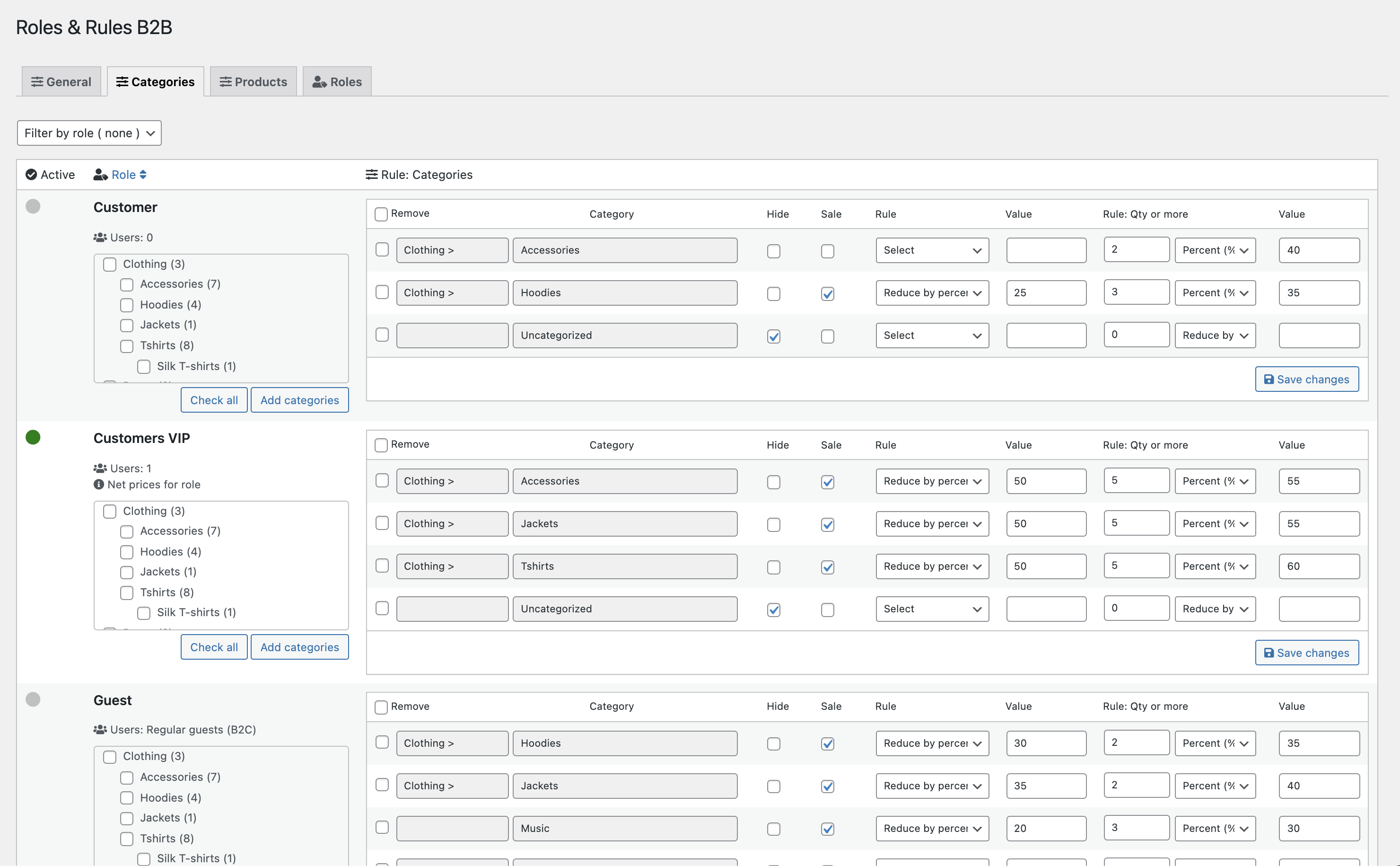
- Set discount rules per category
- Set quantity rules per category
- Tag categories on sale
- Hide categories and associated products
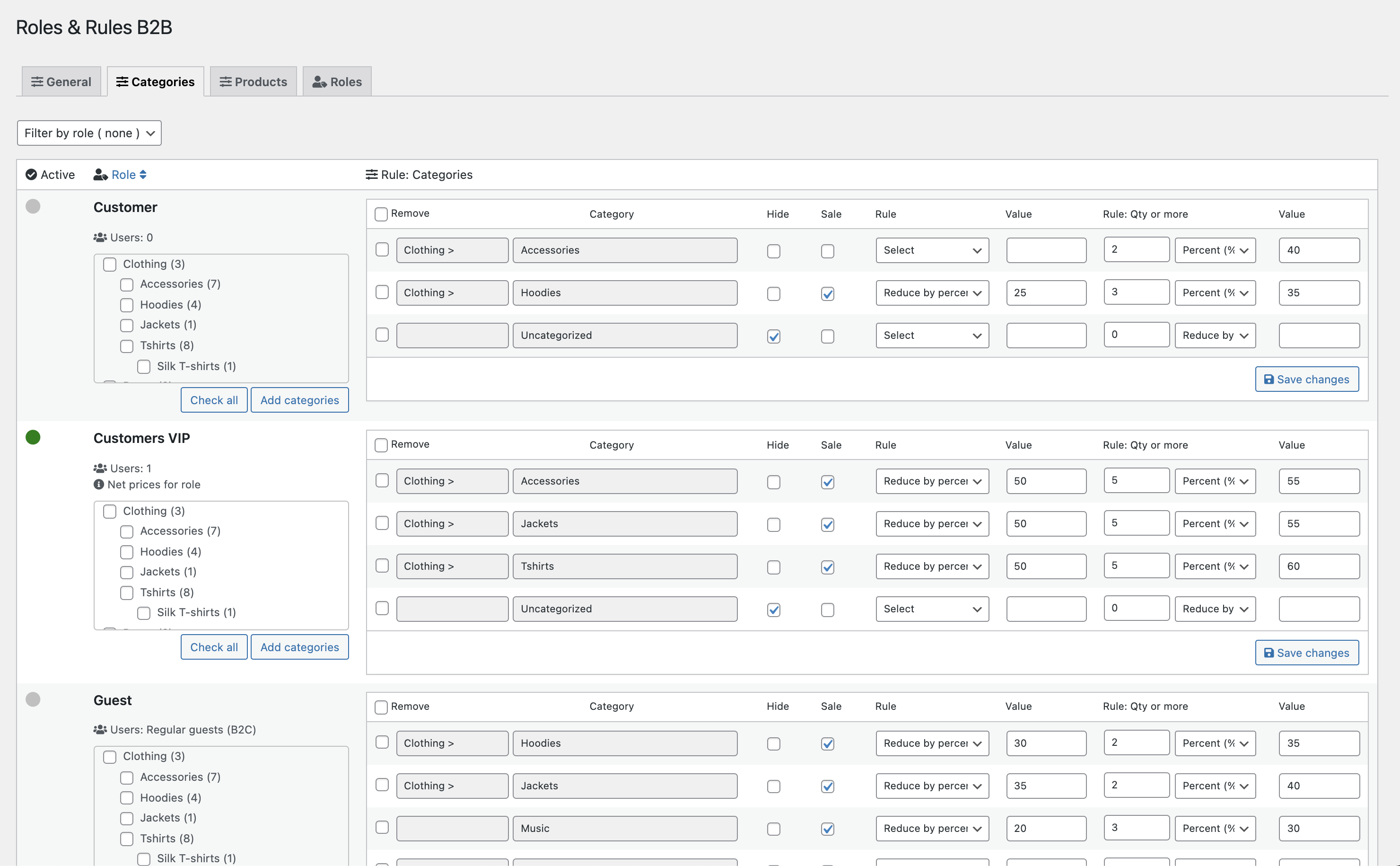
With rules for categories, you can easily set up your store with discounts like Category 1 = 50%, Category 2 = 30%, and so on, and mark categories on sale if you wish. Furthermore, you can set up dynamic pricing rules, such as buy 3 or more and get 40% off (will be labeled in the store).
Individual Pricing Rules for Products, Variations, and Subscriptions
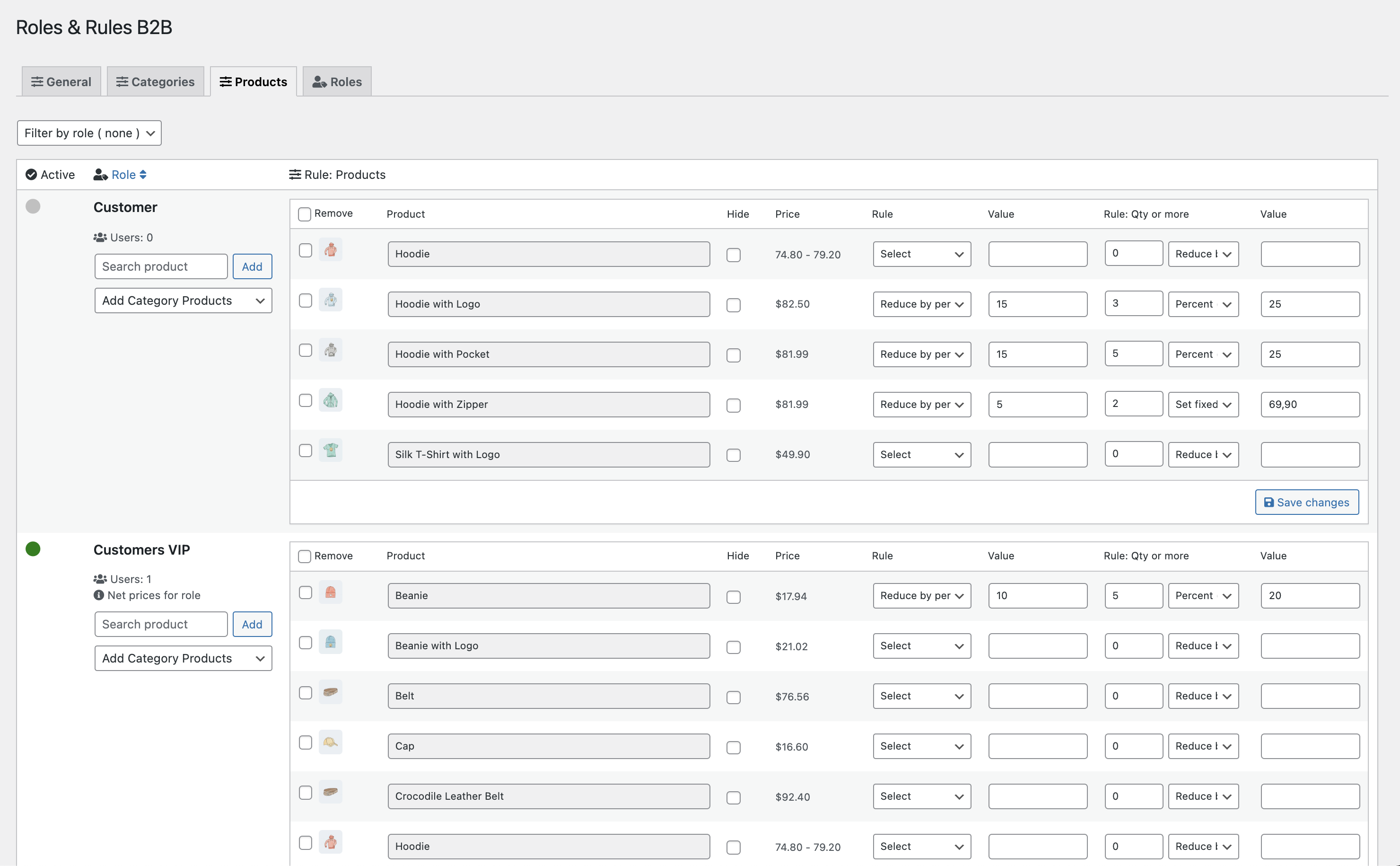
Set rules for each product or variation in your store. Use the convenient product search and add products to the rule list. Set pricing rules, such as: increase or decrease the price by a percentage, set a fixed price for your product, or add dynamic pricing rules, such as buy 3 or more, get 40% off. The product list includes a practical image magnifier, the current product price, and various options to set the correct price for this customer role. The products for which you select a rule and set a value will automatically become active in an active role. There is also the option to hide individual products.
Add User Roles
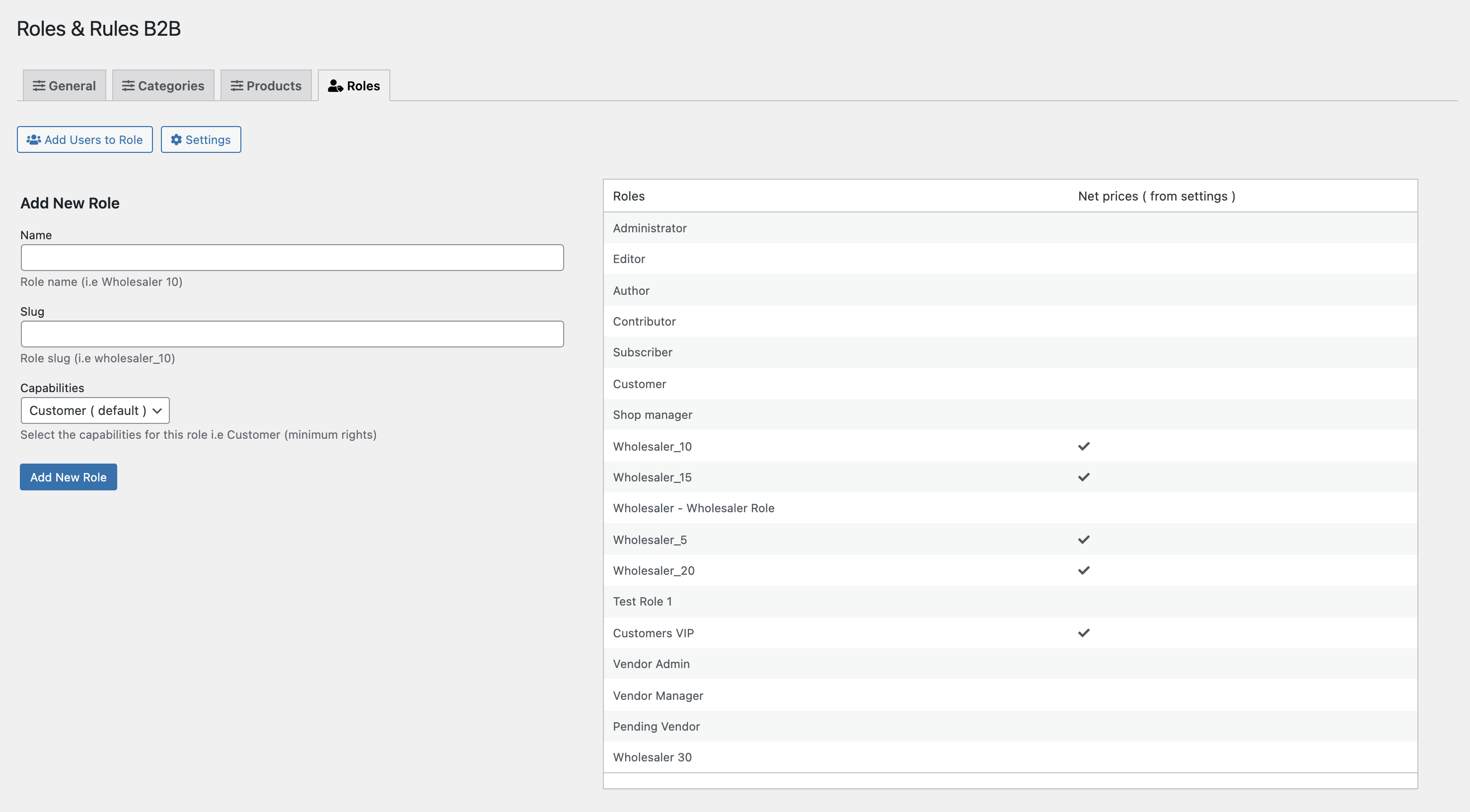
Simply add the roles and functions you need for your B2B or B2C shop in the Roles (tab). After adding roles, you can use the ‚Add user to role‘ button, then you will be redirected to user management and can easily assign users to the new role in bulk. The table lists roles and if they use net prices (e.g., VAT) – simply set it up in the settings.
Automatically add coupon discounts
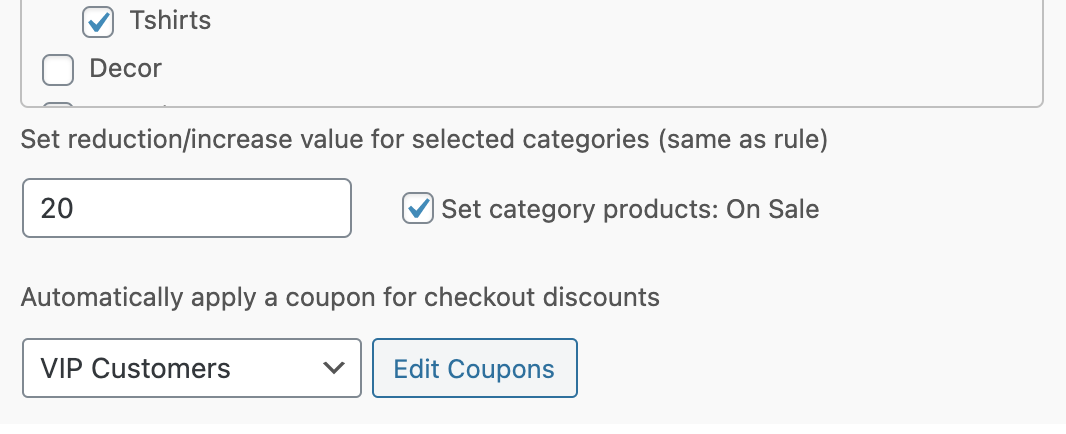
You can easily use coupons and attach them to a rule. You can grant additional discounts if the customer buys a certain quantity or if you want to offer free shipping or another benefit. Each rule has a dropdown field with your coupons and a button to edit them or create new ones if needed. The coupons are automatically added to the cart and at checkout.
Store-wide Sale
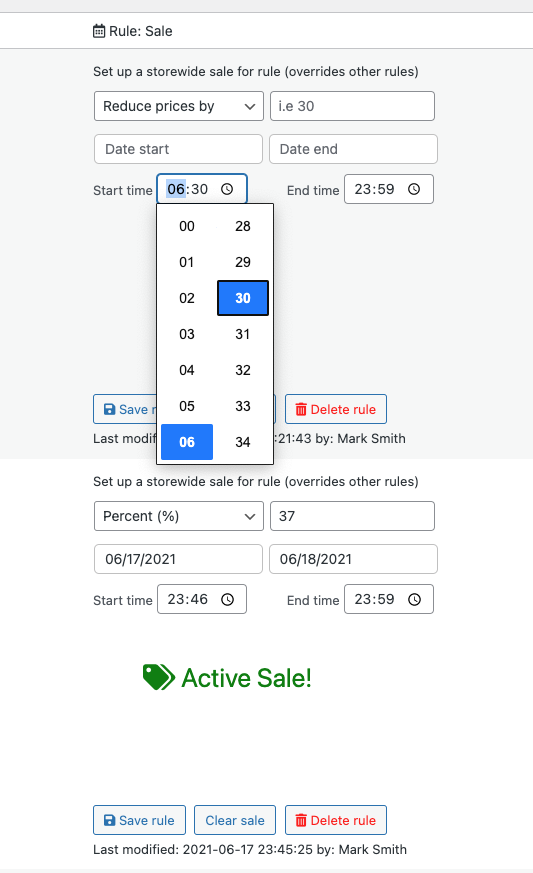
In addition to the general rules, there is an option for a store-wide sale for a selected role. Setting up a sale is simple: just set „Reduce price“ by a factor such as a percentage, set a start/end date for the sale and a start/end time if you wish, and save the rule. When the sale begins, it will appear like any other sale in your store with sale badges, etc. The sale option allows you to have different sales for different roles whenever it suits you.
Price Format and Discounts
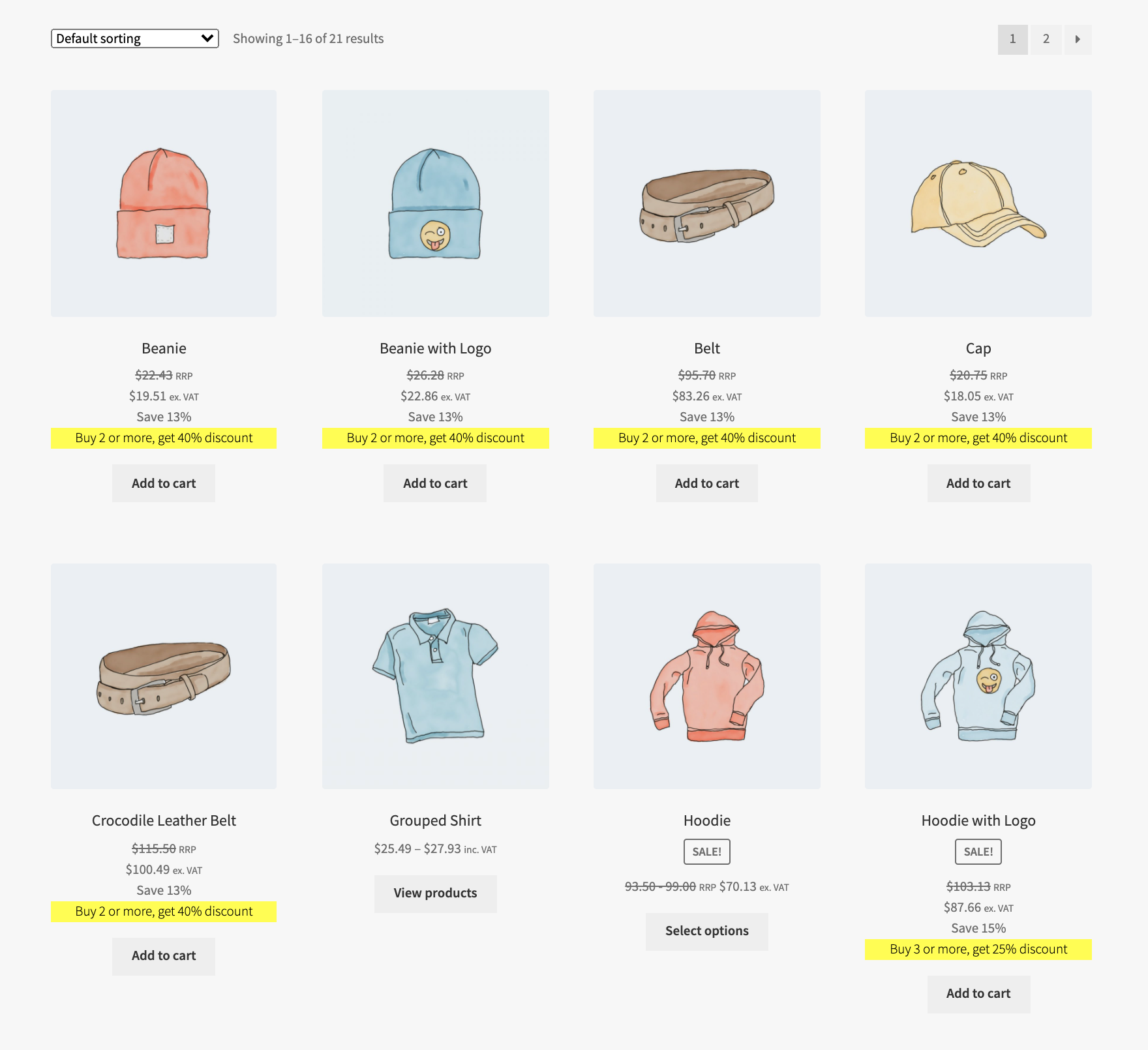
In the example above, we used the selection in the settings: Use net prices for B2B. VAT, if you wish, and your B2C shop runs independently with prices including VAT.
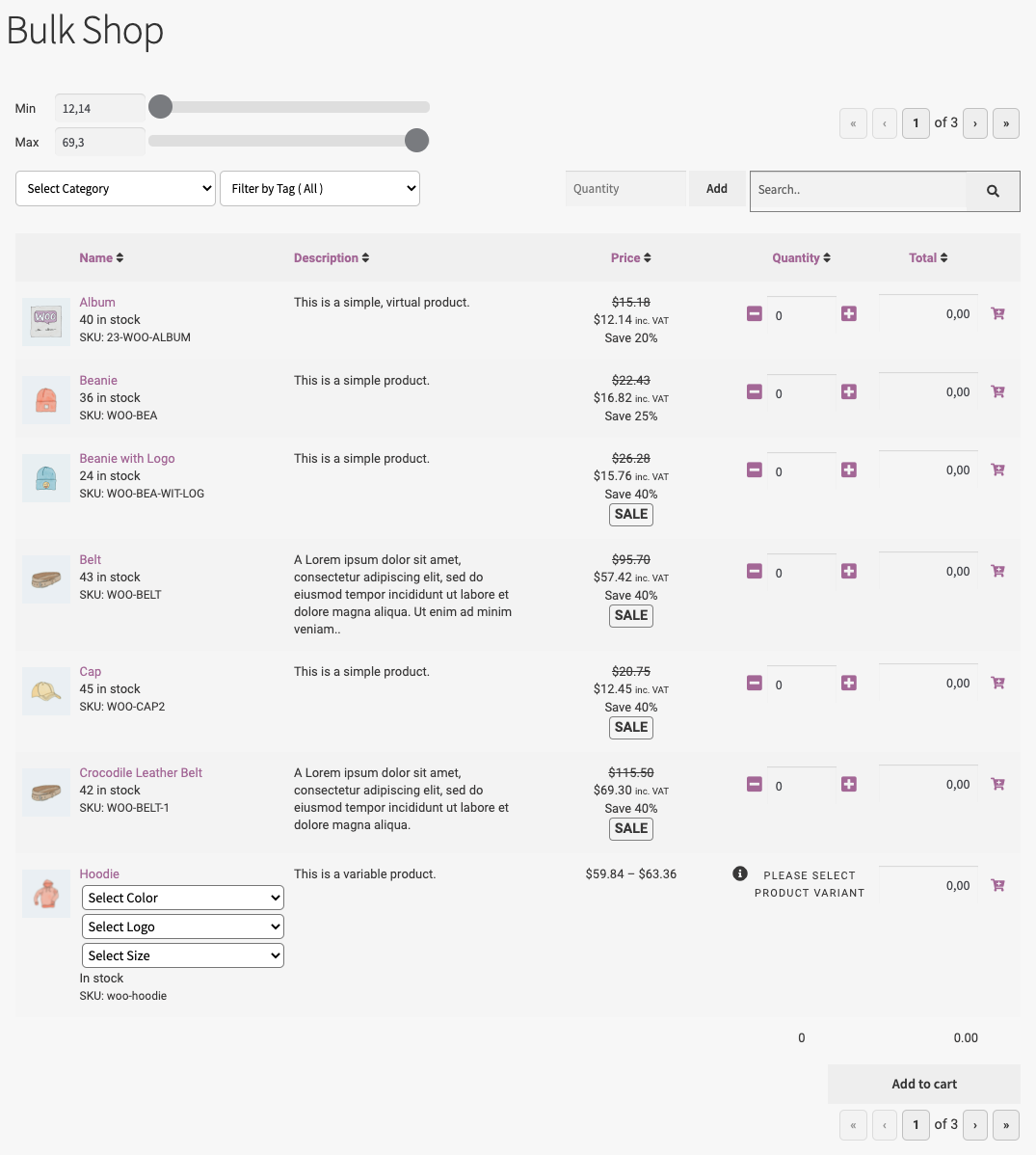
The example above shows role prices for a guest user with an order form (Bulk Shop for WooCommerce).
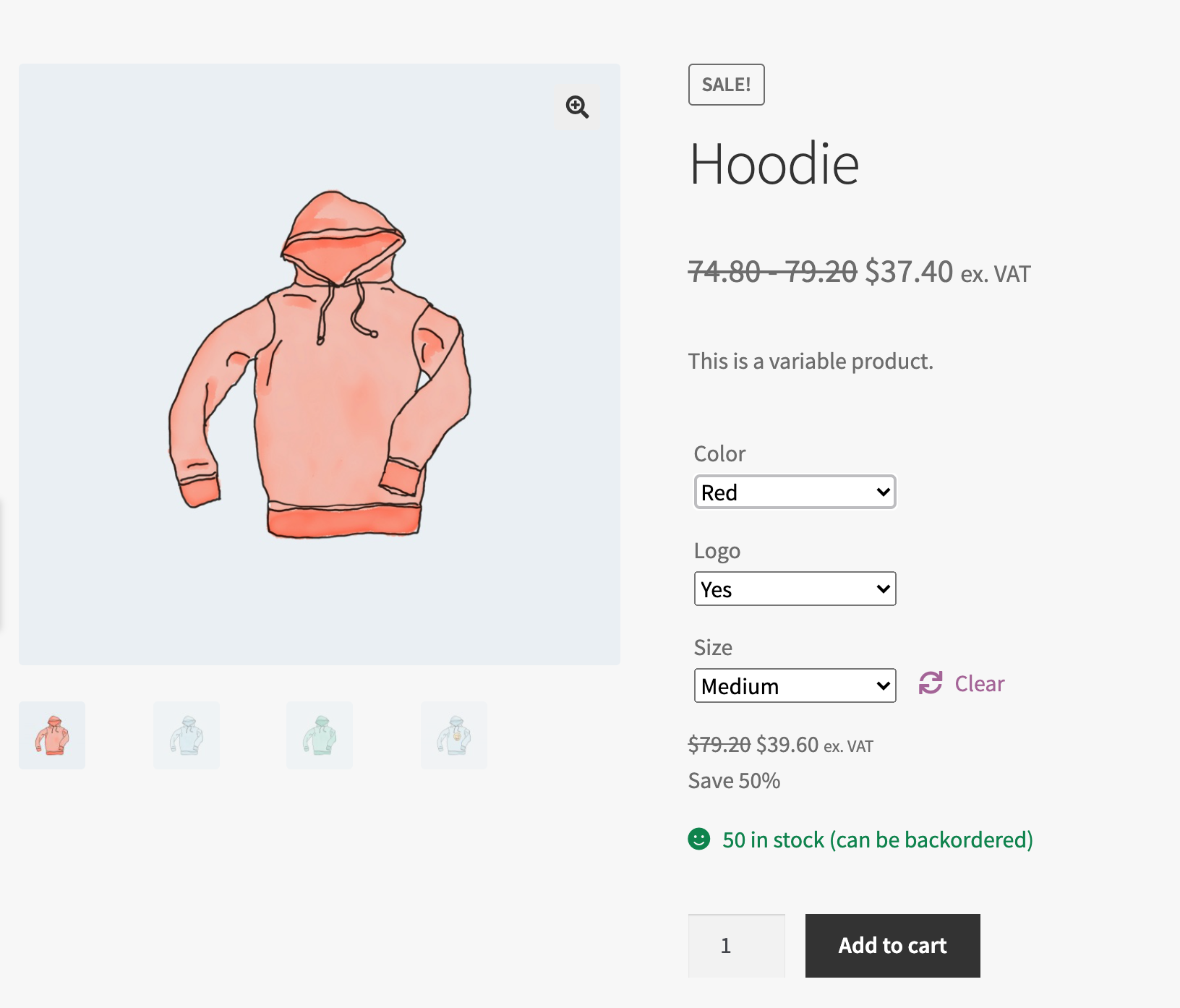
Prices on a variable product page, shown ex. VAT (option in the B2B settings for Roles & Rules)

After logging in, the shop with a B2B role can look like this. There are several options for setting prices, VAT, and price labels, which you can find in the settings. In the Roles & Rules settings, you will also find several options to display percentage reductions and labels for them.
Price display only after login
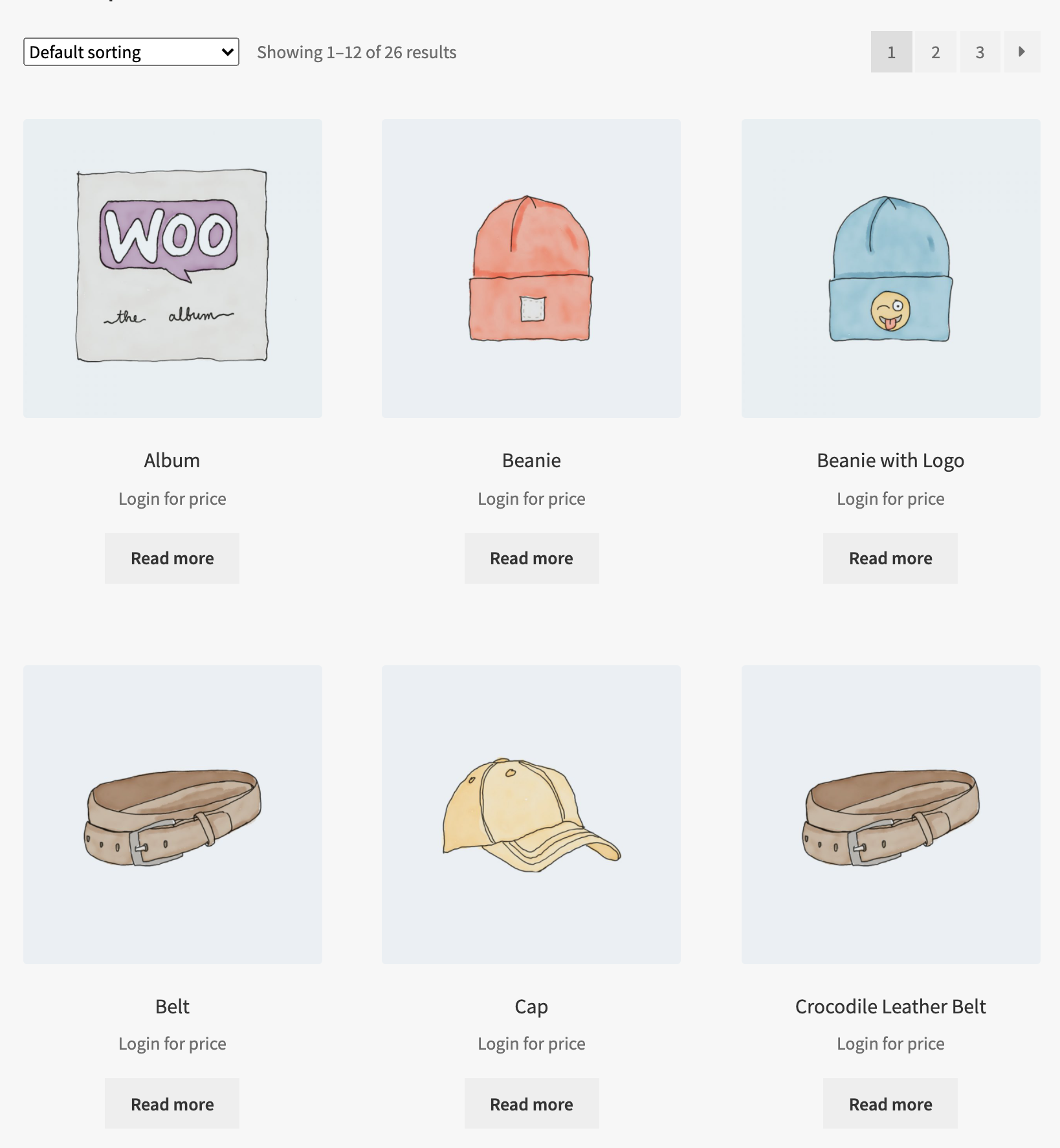
The extension offers the option to display prices and shopping functions only to logged-in users. You can find this option in the settings. If the option is activated, your shop will not display any prices or add-to-cart buttons. The name of the Add-to-Cart button will automatically change to „Read More“ (product). This option allows you to create a B2B shop that displays your end customers‘ products without showing prices. By default (not logged in), the shop displays your regular prices and the shop functionality you already have.
Example of price adjustment shop categories
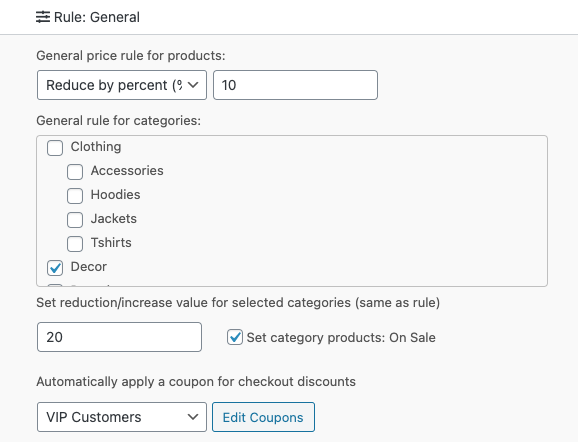
You can set up a role for some of your wholesale customers and give them a general 10% discount on all products. First, you add a role, using the included Add Roles (tab) in Roles & Rules B2B. Then you go to the Rules (tab) and add a rule for this role.
Example calculation:
- Wholesaler 10
- We have a general rule with a 10% discount (this percentage is automatically reduced from the regular price of the products).
- We have good profit on decor. For this category, we want to give a 20% discount. So we:
- Check the Decor category in the general rule for categories.
- Enter 20 in the field below (this value uses this percentage as set for the rule).
- Activate the „On Sale“ checkbox (customers will now see the sale prices).
- Activate the active rule with the checkbox in the Active column and save the rule to activate it.
- If we have other categories, we want to set special discounts on:
- Find the tab – Categories
- Activate the categories for which you want to have rules + Add Categories (button)
- Hide a category and its products – simply activate the hidden checkbox
- Set up your discount rules and save (button)
- Set up your dynamic pricing rules, such as buy 3 to get 40% off
- And finally, for some selected products, if we want to set unique prices:
- Enter the Wholesaler-10 rule
- Search Product + Add (button)
- or select a category and all products in that category will be listed
- Set up a price rule and/or a dynamic price rule, e.g., buy 3 or more to get 20% off
- Save the changes
This was just one example of how to set up a rule for a role. For more information on rules, please refer to the product documentation.
Configure your shop and your price tags
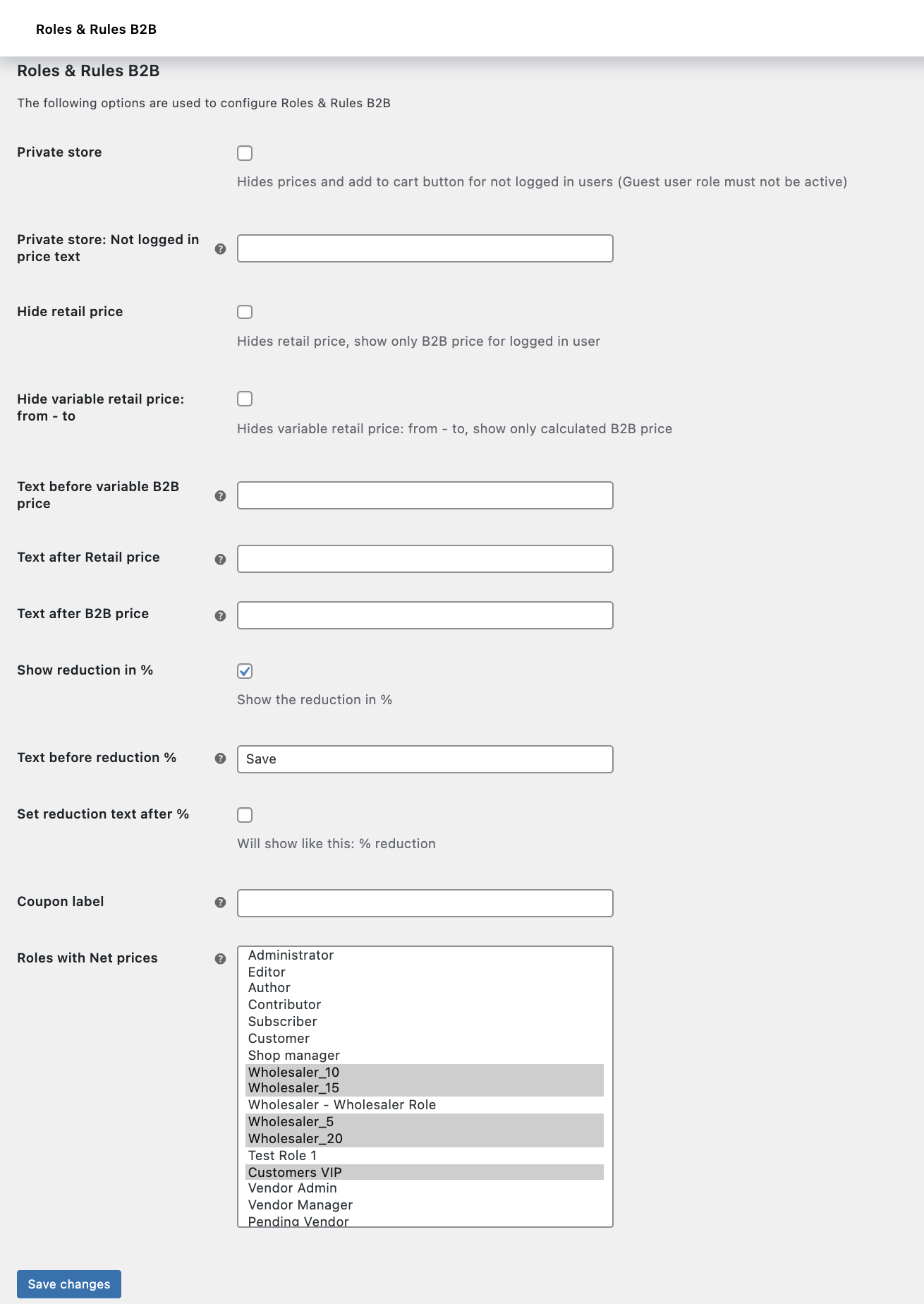
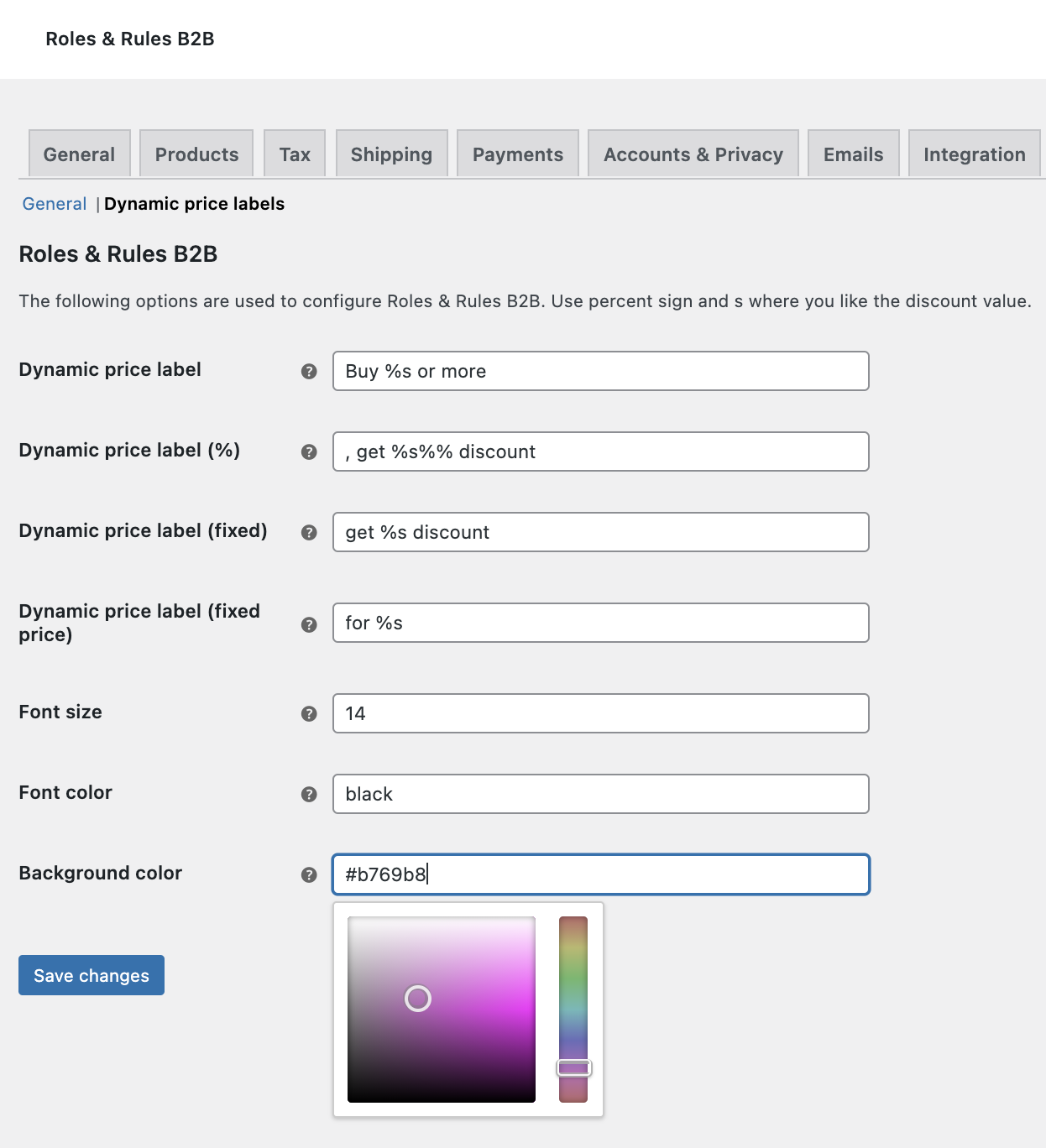
The settings for Roles & Rules make it easy to define your labels, make the shop private, add coupon labels (cart/checkout) or prices e.g. VAT for B2B customers.
Features of the plugin
- Sale for each role in the shop
- Set rules for guest users (B2C).
- Start and end date for the sale.
- Start and end time for store-wide sales NEW
- Add roles and capabilities easily and seamlessly.
- View the number of users for each role.
- Link to WP Admin Users for easy assignment of users to a role.
- Easily create rules for each role.
- Set percentage or fixed price discounts.
- Increase prices by a percentage or a fixed value.
- Specific Rules for Categories:
- Set Quantity Discounts / Increases
- Set Dynamic Quantity Discounts (Buy 3 or more, get 40% off) NEW
- Put on Sale
- Set Categories as Hidden (hide a category in a store and its products)
- General Rules for Categories.
- Select categories and a value (increase or decrease according to the general rule).
- Selected categories can be set to: „On Sale“
- Product Rules
- Set Discounts / Increases
- Set dynamic discounts (buy 3 or more, get 40% off) NEW
- Hide products
- Automatically set coupon discounts for each rule
- Option to hide prices and shop functionality for non-logged-in users.
- Option to hide retail price
- Option to set text after retail price and B2B price
- Option to display a percentage reduction and label it before or after
- Option for net prices for B2B shop / prices without taxes NEW
- Access roles: Shop Manager and Administrator.
- Includes POT file for translations
- Included languages:
- American English)
- Spanish
- French
- Norwegian
- Included languages:
The extension is compatible with
- WooCommerce Products and Variations
- WooCommerce Subscription and Variations
- Bulk Shop for WooCommerce
- Bulk Table Editor for WooCommerce
- Costs & Reports for WooCommerce
- Product Bundles
- Currency Converter

Florian Ibe
CEO & Marketing Consultant
Your contact person: Florian Ibe





 DE
DE

