

Would you like to improve your WooCommerce URLs and make them more attractive for customers and search engines? With the right permalink settings, you can remove the base slugs (base) such as /product/ or /product-category/ from the URLs, making your category & product pages shorter, clearer, and more SEO-friendly. This means a clear, streamlined URL structure that is easy for your customers to remember and strengthens trust in your shop.
This is not possible in the standard version of WooCommerce! Use this simple customization to make your WooCommerce website more appealing to customers and more visible to Google – without complicated settings!
We present the right plugin for this with maximum functionality and clean programming here. Comparison + alternative plugins (free of charge) below in the article!
Edit and change WooCommerce permalinks without category & product base
Explanation upfront: 🤔 Permalinks are the permanent URLs that lead to your products, categories, and pages in WooCommerce. A clear and structured URL is essential to be understandable for both customers and search engines. By default, WooCommerce adds prefixes such as /product/ or /product-category/ to the URLs, which are often unnecessarily long. By customizing the permalinks, you can remove this base and create more user-friendly, SEO-optimized links that lead to better findability and user experience. In WooCommerce, product URLs are provided with a category or product base by default (e.g., /product/ or /product-category/). To obtain cleaner and shorter URLs, you can remove this base. The result: Instead of myshop.com/product/productname, the URL becomes myshop.com/productname. ❌ However, this is NOT possible in the standard version of WooCommerce.
👌 Therefore, an extra plugin is needed to customize the links that handles this cleanly.
Optimize your WooCommerce URLs and increase your visibility! With the Primer Permalink Manager, you can make your URLs clearer and more user-friendly by removing unnecessary slugs such as /product/ or /product-category/. Our guide shows you step by step how to improve your URL structure, use automatic 301 redirects, and achieve SEO benefits. Start now and give your WooCommerce shop the professional appearance that your customers will love!
⭐ The WooCommerce Permalink Manager by Premmerce is a plugin that allows you to customize the URL structure of a WooCommerce store. With this tool, you can remove standard prefixes such as /product/ or /product-category/ from your URLs, creating shorter and more user-friendly links. For example, meinshop.de/product/productname simply becomes meinshop.de/productname.
The alternative solution from woo.com:
Become more visible on Google & Social Media?
In a free strategy consultation for data-driven online marketing, we uncover your untapped potential, review any existing ad accounts if necessary, examine your SEO ranking and visibility, and determine which strategy is appropriate for your budget and which active measures will lead to more inquiries or sales.

✅ More visibility & perception through targeted placement
✅ More visitors > prospects > customers > revenue
✅ Reach target groups scalably with SEA
✅ Act and grow sustainably with SEO
🫵 Maximum success with our hybrid strategy
💪 More than 15 years of experience across industries in over 1,000+ projects demonstrable!







Beforehand: CAUTION regarding the BeRocket Permalink Plugin, which is free. This is NO longer updated (as of November 2024)
Optimize Your WooCommerce URLs: A Guide to Using the Premmerce Permalink Manager
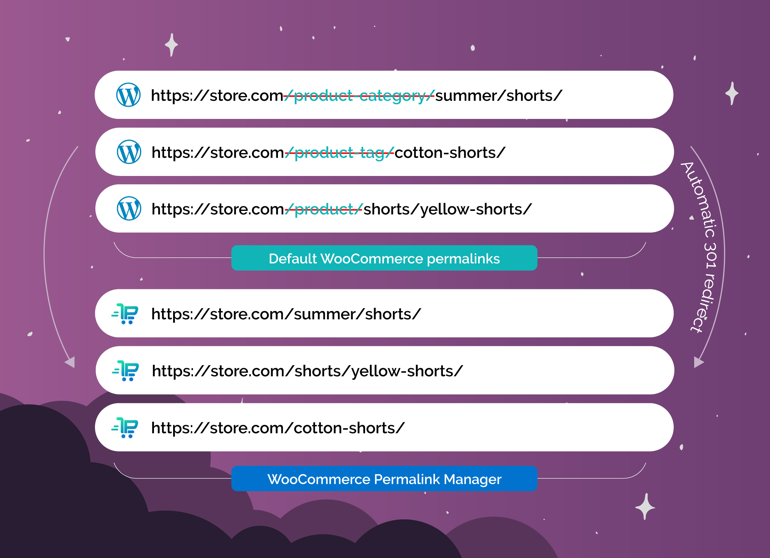
Imagine running an online store, and your URLs are long, complicated, and incomprehensible. Frustrating, right? In my own store, I had the same problem until I discovered the Premmerce WooCommerce Permalink Manager. In this article, I discuss how this plugin can revolutionize your URLs and why this is crucial for your online store.
The Challenges with WooCommerce Default URLs
The default URLs of WooCommerce can pose a significant challenge for online shopping. Why? Well, default URLs often contain unnecessary prefixes such as „product category“ or „product.“ Such long and complex URLs can impair the user experience and are not exactly user-friendly.
Usability Issues
Users and search engines struggle with these URLs. They are often confusing. Is it really necessary to pack so much information into a URL? Sometimes less is more – and that applies to URLs as well. How often have you left a website simply because the address was too complicated?
The question is: How do these URLs affect the shop’s visibility? Search engine optimization (SEO) requires clear, concise URLs. If your URL looks like a messy jumble, your shop may not be rated well. In particular, potential customers might quickly bounce due to these confusing URLs.
Exemplary Analysis of User Frustration
Many online shops actually struggle with the default structure of WooCommerce. They are caught in a web of unnecessary prefixes and misleading links. This could jeopardize your revenue! User frustration is often directly proportional to complicated URLs. Imagine you are looking for a product. You click on a link, and the URL looks like this:
www.example.com/produktkategorie/produkt/beispiel-produkt
Does that sound intuitive to you? Probably not.
The Importance of Clear URLs
To emphasize the importance of clear URLs, here are some statistics that prove it:
| Statistic | Percentage |
|---|---|
| Internet users who prefer noticeable and concise URLs | 81% |
| Online shoppers who leave the page due to unclear URLs | Over 60% |
So how important are clear URLs to you? Take a look at what
„Good URLs are the key to the user experience in online shopping!“ – Marketing expert
says. These words sum it up perfectly.
If you optimize your URLs, it could significantly improve not only the user experience but also your conversion rates. By addressing the issue of default URLs, you take the first step toward a more user-friendly website.
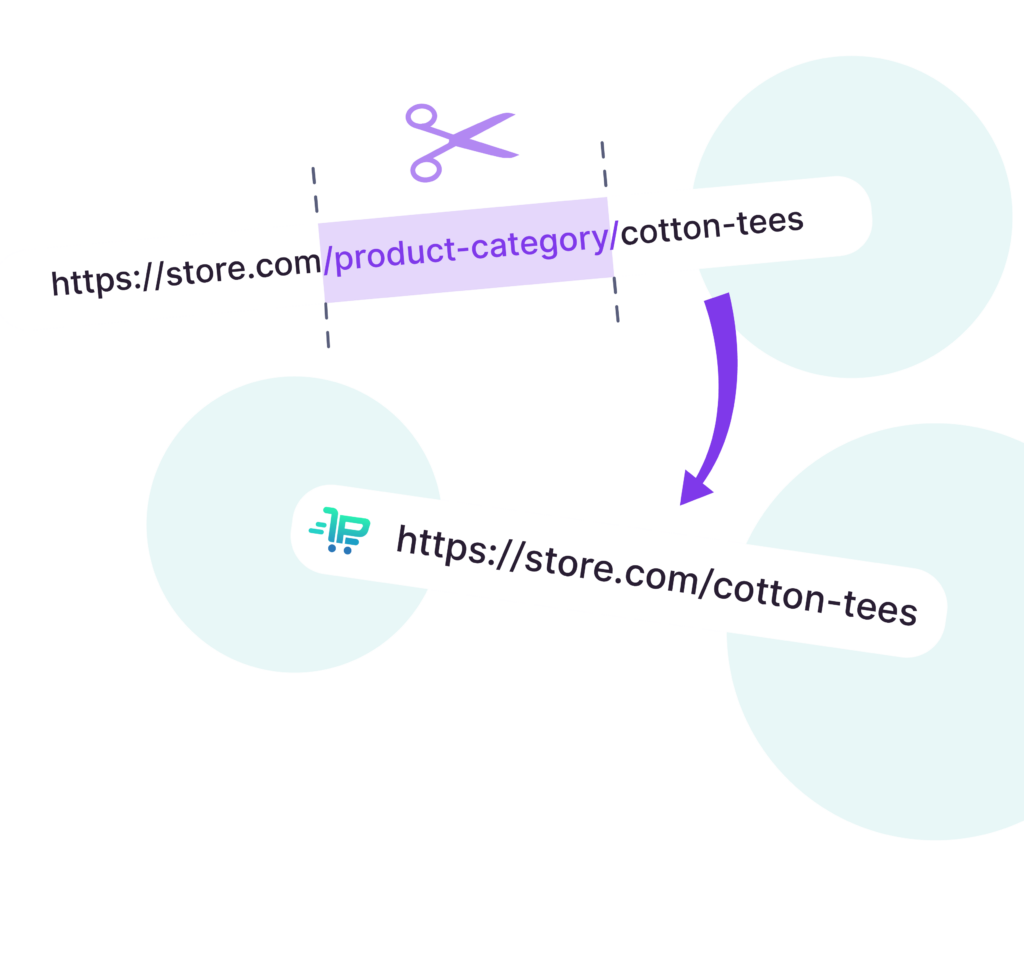
Introduction to the Primer WooCommerce Permalink Manager
Have you ever wondered how you can optimize the URLs of your WooCommerce shop? If so, then the Primer WooCommerce Permalink Manager is the solution. This plugin allows you to change the URL structure of your products and categories. Why is this important? A clean URL structure helps both you and search engines to better understand your shop.
1. What is the Primer WooCommerce Permalink Manager?
The Primer WooCommerce Permalink Manager allows you to optimize the format of your URLs. By default, URLs in WooCommerce often contain additional prefixes that appear confusing and unprofessional. The plugin frees you from these prefixes. You can customize the URLs as you wish, which is important for both user-friendliness and SEO.
2. How do you activate the plugin?
Activation is simple. Download the plugin and install it via your WordPress dashboard. Go to „Plugins“ and activate the Primer WooCommerce Permalink Manager. After that, you can adjust the settings.
3. The dashboard and first steps
After activation, you will find a user-friendly interface in the plugin’s dashboard. Here you can make the desired changes. You have the option of whether the category name remains or whether only the product name is displayed. This allows you to greatly simplify the URL structure.
4. The importance of the right URL structure
Why does the URL structure play such a big role? If your URLs are clear and helpful, both sides benefit: users and search engines. SEO specialists often emphasize the importance of understandable URLs. A quote that sums this up well:
„The best plugin for URL optimization is the one that does not distract the user from the idea of going shopping.“ – E-commerce specialist
5. Possible reservations and FAQs about plugins
As with any plugin, there are also concerns. Some users wonder whether the installation affects the page load times. In general, the Primer WooCommerce Permalink Manager is lightweight and does not negatively affect the shop’s speed.
6. Comparison with other similar plugins
How does the Primer WooCommerce Permalink Manager compare to other plugins such as Yoast and Rank Math? Unlike these tools, the Primer has been developed specifically for WooCommerce and offers tailored solutions for online shops.
| Plugin versions | Free | Premium |
|---|---|---|
| Primer WooCommerce Permalink Manager | Yes | Yes |
| Yoast | Yes | Yes |
| Rank Math | Yes | Yes |
In summary, the Primer WooCommerce Permalink Manager offers many useful features to improve the URL structure. With simple steps, you can make your shop more attractive and user-friendly.
A detailed comparison follows further down in the article!

Customizing product URLs with the plugin
Nowadays, a user-friendly URL structure is crucial for the success of an online shop. The way your product URLs look can significantly influence both the user experience and SEO rankings. But how can you achieve this?
The options for product URL customizations
With the Primer Permalink Manager, you have numerous options for customizing your product URLs. This means that you can decide how your URLs look and which elements they contain. For example, you can choose whether category names or full category paths are displayed in the URLs.
- Keep the category or change it entirely.
- Remove unnecessary prefixes such as „product.“
- Use the „Primary Category“ option for optimal results.
Through these customizations, you can optimize user navigation.
Customizing categories in the URL
Have you ever seen a link that was so long and confusing that you didn’t even know where it leads? Long URLs can deter users. The plugin helps you customize categories in the URL so that they are clear and understandable. This makes sense not only for users but also for search engines.
The impact on the user experience
A clear URL is like a well-signposted path in the forest. As the UX designer aptly puts it, simple and understandable URLs significantly influence the user experience. When users encounter simple, logical URLs, they tend to feel more confident when navigating.
Case study of a shop: Before and after
A typical example is an online shop with long, incomprehensible URLs. Before the adjustment, the links looked like this, for example:
www.shopname.com/product-category/product1234
After the adjustment, the link might now look like this:
www.shopname.com/product-name
This change means that users not only navigate more easily, but 75% of respondents also state that they prefer simplified URLs.
Why consistent URLs are important
Consistent URLs are not just a question of aesthetics. They promote credibility and visibility in search engines. Search engines can more clearly recognize what a page is about when the URLs are uniform and descriptive.
Diving deeper technically: How can SEO benefit?
When you adjust your URLs, this has a decisive impact on SEO. A clear URL structure ensures that search engines index your pages better. Equally important is the function of setting canonical links. This helps to avoid duplicate content and strengthen the relevance of your pages.
| Example Shop | Before customization | After customization |
|---|---|---|
| Product URL | long, incomprehensible URLs | clear, user-friendly URLs |
This transformation of your product URLs can enormously help your shop. So if you want to make users and search engines happy, consider using the plugin!
All main features of the best WooCommerce permalink plugin
- Removing the /product-category base from URLs
Remove the unsightly /product-category/ base from your WooCommerce store’s category URLs. This changes
store.com/product-category/sommer/shorts/
to simply
store.com/sommer/shorts/. - Removing the /product base from product URLs
Remove the base slug /product/ from your product page URLs, leaving only the individual product slug. This changes
store.com/product/shorts/
to
store.com/shorts/. - Use 301 redirects for duplicate URLs
Get automatic redirects for all duplicate URLs. Old URLs are automatically redirected to the new ones, without negative impact on SEO. - Manage SEO for duplicate URLs
If you do not want 301 redirects, you can instead add the ‚rel=canonical‘ attribute to duplicate pages to show Google the preferred URL. - Show only the main category in URLs
Show only the main category slug and the product in the URLs, without subcategories.
store.com/main-category/subcategory/cotton-shorts/
then becomes
store.com/main-category/cotton-shorts/. - Show all product categories in URLs
You can also generate a URL structure that includes the product slug as well as the entire category hierarchy. - Use product SKU in the URL
Add the product SKU to the product slug or replace the product slug with the SKU. From
store.com/product/shorts/
it becomes
store.com/product/shorts-4739/. - Remove the /product-tag base from the URL
Remove the unsightly base /product-tag/ from your WooCommerce store’s URLs. This turns
store.com/product-tag/cotton-shorts/
into simply
store.com/cotton-shorts/.
Now, convert permalink URLs in your WooCommerce shop meaningfully:
The alternative solution from woo.com:
Improving Categorization and Tag Management
A clear structure is the heart of a successful online shop. To achieve this, categories and tags should be meaningfully integrated into the URL. Why is this so important? The answer is simple: clear URLs improve the shopping experience and make it easier to find products.
Integration of Categories and Tags into the URL
The URL should reflect the content of the page. Imagine you are looking for a specific product. A confusing URL format makes it harder for you to find what you want. If you integrate categories and tags correctly, you guide your users to their goals much more efficiently.
The problem with default tags
In WooCommerce, it often happens that the default tags are given the prefix „product tag“. This creates a confusing structure. These tags not only limit visibility, but also hinder search engines from indexing your pages. This is where you should intervene.
What does ‚tag base‘ mean?
‚Tag base‘ refers to the prefix that is added to all tags. By default, it indicates that it is a tag. However, you can customize it or remove it entirely to give the URLs meaning. Why make it complicated when it can be simple?
How the plugin helps remove prefixes
The Primer’s WooCommerce Permalink Manager plugin allows you to do exactly this. After activation, you can decide which information should really be visible in the URL. Want to get rid of the „product tag“ prefix? No problem! This makes your URL more user-friendly and SEO-optimized.
Practical tips for using categories
- Use highly relevant categories that truly reflect the product selection.
- Keep the number of categories within a manageable range.
- Design the hierarchy of categories logically. Users should be able to click through quickly on their own.
User reports of improved page visibility through adjustments
After switching to a clearer structure, many users report a significant improvement in the visibility of their pages. This is no coincidence. When you optimize the URL structure, it not only looks better, but is also indexed better by search engines.
„The internal structure of your URLs is the foundation of your online store.“ – SEO analyst
| Specification | Value |
|---|---|
| User-friendliness through clear categories and tags | 50% |
| Findability through optimized tag structure | Increased |
These steps can make a big difference for your online business. With the correct application of these principles, you can create a page that is not only user-friendly but also preferred by search engines.

Florian Ibe
CEO & Marketing Consultant
Your contact person: Florian Ibe
Alternative plugins (NO recommendation!)
Here is a detailed comparison table of the features of various WooCommerce permalink plugins, including their Pro versions, as well as the SEO plugins Yoast SEO and Rank Math with their respective additional features for search engine optimization:
| Function | Permalink Manager Lite | Permalink Manager Pro | Premmerce Permalink Manager | Premmerce Permalink Manager Premium | Yoast SEO Free | Yoast SEO Premium | Rank Math Free | Rank Math Pro |
|---|---|---|---|---|---|---|---|---|
| Anpassung von Produkt-URLs | No | Ja | Ja | Ja | No | No | Ja | Ja |
| Anpassung von Kategoriebasis | No | Ja | Ja | Ja | No | No | Ja | Ja |
| Anpassung von Tag-Basis | No | Ja | No | Ja | No | No | Ja | Ja |
| Entfernung von Basis-Slugs (z.B. /product/, /product-category/) | No | Ja | Ja | Ja | No | No | Ja | Ja |
| Unterstützung für benutzerdefinierte Beitragstypen | Ja | Ja | No | Ja | Ja | Ja | Ja | Ja |
| Unterstützung für benutzerdefinierte Taxonomien | No | Ja | No | Ja | Ja | Ja | Ja | Ja |
| Automatische 301-Weiterleitungen | Ja | Ja | No | Ja | No | Ja | Ja | Ja |
| Anpassung von Permalinks in Bulk | Ja | Ja | No | No | No | No | Ja | Ja |
| Integration mit WPML/Polylang für mehrsprachige URLs | Ja | Ja | No | No | No | No | Ja | Ja |
| SEO-Titel und Meta-Beschreibungen | No | No | No | No | Ja | Ja | Ja | Ja |
| Fokus-Keyword-Analyse | No | No | No | No | Ja (1 Keyword) | Ja (mehrere Keywords) | Ja (mehrere Keywords) | Ja (mehrere Keywords) |
| XML Sitemaps | No | No | No | No | Ja | Ja | Ja | Ja |
| Schema-Markup-Unterstützung | No | No | No | No | No | Ja | Ja | Ja |
| Internal Link Suggestions | No | No | No | No | No | Ja | Ja | Ja |
| 404-Monitoring | No | No | No | No | No | Ja | Ja | Ja |
| Redirect-Manager | No | No | No | No | No | Ja | Ja | Ja |
| Lokale SEO-Funktionen | No | No | No | No | No | Ja (mit Add-on) | Ja | Ja |
| WooCommerce-SEO-Funktionen | No | No | No | No | No | Ja (mit Add-on) | Ja | Ja |
| Unterstützung für mehrere Standorte (bei lokalem SEO) | No | No | No | No | No | Ja (mit Add-on) | No | Ja |
| Automatische Bild-SEO (Alt- und Title-Tags) | No | No | No | No | No | No | Ja | Ja |
| Content-Analyse und Lesbarkeitsprüfung | No | No | No | No | Ja | Ja | Ja | Ja |
| Breadcrumbs-Integration | No | No | No | No | Ja | Ja | Ja | Ja |
| Unterstützung für mehrere Fokus-Keywords | No | No | No | No | No | Ja | Ja | Ja |
| Google Search Console-Integration | No | No | No | No | No | Ja | Ja | Ja |
| Google Analytics-Integration | No | No | No | No | No | No | Ja | Ja |
| Automatische Vorschläge für interne Links | No | No | No | No | No | Ja | Ja | Ja |
| Automatische Vorschläge für verwandte Keywords | No | No | No | No | No | Ja | Ja | Ja |
| SEO-Analyse-Tool | No | No | No | No | No | No | Ja | Ja |
| Unterstützung für benutzerdefinierte Felder in Permalinks | No | Ja | No | No | No | No | No | No |
| Unterstützung für benutzerdefinierte Taxonomien in Permalinks | No | Ja | No | No | No | No | No | No |
| Unterstützung für benutzerdefinierte Beitragstypen in Permalinks | Ja | Ja | No | No | No | No | No | No |
| Unterstützung für benutzerdefinierte Taxonomien in Permalinks | No | Ja | No | No | No | No | No | No |
| Unterstützung für benutzerdefinierte Beitragstypen in Permalinks | Ja | Ja | No | No | No | No | No | No |
| Unterstützung für benutzerdefinierte Taxonomien in Permalinks | No | Ja | No | No | No | No | No | No |
| Unterstützung für benutzerdefinierte Beitragstypen in Permalinks | Ja | Ja | No | No | No | No | No | No |
| Unterstützung für benutzerdefinierte Taxonomien in Permalinks | No | Ja | No | No | No |
The ideal combination is Yoast SEO or RankMath in combination with the Permalink Manager plugin:
or

+
A good and solid alternative from the official woocommerce.com site with very good similar features:

Technical optimizations for search engines and redirects
Technical SEO is a crucial factor for better placement in search engines. It encompasses various aspects that can increase the visibility of your website. When optimizing URLs, canonical tags and redirects play a particularly important role.
The role of canonical URLs in SEO optimization
Canonical tags help search engines identify the preferred version of a page. This is crucial when similar content exists under multiple URLs. But why is this important? Imagine you have several pages with identical or very similar content. Without clear guidance, search engines don’t know which page to index, which can negatively impact the user experience. Canonical tags provide the answer here – they indicate which URL is the „original version.“
How Redirects Secure Website Traffic
Redirects are necessary to ensure that users do not land on „dead links.“ If you change content, e.g., URLs are restructured, redirects are the solution. They redirect the user from an old URL to a new one. This is not only the user-friendly solution but also important for SEO. If users click on the old URL, they receive the correct information. „Redirects are not just important, they are necessary!“ –
Senior Web Developer
The Correct Implementation of Canonical Tags
- Place the canonical tag in the
<head>section of your pages. - Ensure that the URL is accurate and complete.
- Avoid using canonical tags on pages that do not have duplicate content.
Errors to Avoid
The implementation can cause errors. What are common errors?
- Incorrect URL in the canonical tag.
- Disregard of redirect chains.
- No clear decision on the canonical URL for similar content.
Testimonials about traffic increases through implementation
One company reported a 30% increase in traffic after implementing canonical tags. Surprised? These numbers show how powerful a correct technical SEO strategy can be.
Recommended procedure for redirects
- Use 301 redirects for permanent changes.
- Set up 302 redirects for temporary changes.
- Regularly check your redirects for errors.
The most important things at a glance
Understanding the technical aspects of URLs can significantly increase your website’s visibility. The correct application of canonical tags and redirects is crucial. Do not ignore them, as the consequences could be negative.
Here are some numbers that underscore the importance:
| Analysis | Result |
|---|---|
| Traffic analysis | 30% increase after implementing canonical tags |
| Error rate for redirects | 15% of companies use incorrect redirects |
Keep these factors in mind to perfect your website’s technical SEO.
Unfortunately, we cannot recommend the free version of the plugin, as it lacks essential functions:
The video as a tutorial for it:
The conclusion: The value of a well-structured online shop
If you operate an online shop, you have certainly come across the topic of URLs at some point. But how important are they really? The value of clearly structured URLs can hardly be overestimated, both for your users and for search engine optimization (SEO). A well-designed online shop can make the difference between a purchase or a click to the next page.
Summary of the benefits of the plugin
The new plugin, such as the Primer’s WooCommerce permalink manager, offers you the opportunity to optimize the URL structure of your shop. Instead of seeing the unwieldy prefixes „product“ or „product category“ in the URLs as usual, you can now create user-friendly URLs. This not only provides more clarity but also improves visibility in search engines.
Personal assessment after use
After using this plugin, I can say: The change is noticeable. User-friendliness has improved significantly. A simple and clear URL structure leads to more clicks. Studies show that over 60% of users are more likely to click on organized search results with clear URLs. Surprising, isn’t it?
A look into the future: How will URL design develop?
In the future, we could see even more changes in the way we design URLs. With the emergence of new technologies and methods for user interaction, it will be crucial to adapt. The trends indicate that an even higher level of user centricity will be achieved.
What points should business owners pay attention to?
If you are a business owner, you should keep a few important points in mind:
- You should ensure that the URLs of your products and categories are clear and understandable.
- Avoid unnecessary spaces or special characters in the URL.
- Regularly update your policies to ensure they comply with the best SEO practices.
Practical tips for use
Make the most of your plugin’s features. Activate the canonicals and create redirects to ensure that no one encounters dead links. Also, pay attention to the primary category according to the recommendations of the Yoast SEO plugin.
A final piece of advice for shops under development
If you are currently working on the development of your shop, I can only advise you to take a look at the premium version of the plugin. This can offer you a variety of promotional opportunities that you should not underestimate. As the industry expert says:
„Good URLs are the key to the success of an online shop!“
In summary, investing in a well-structured URL design not only increases user-friendliness but is also crucial for the success of your online shop . Do not hesitate to use the tools at your disposal to optimize your SEO efforts!
The Primer WooCommerce Permalink Manager helps you optimize your URL structure, improve user experience, and increase search engine visibility. Learn about the plugin’s features and how it can transform your business.
Additional: If you are interested in (automatic) internal linking, please refer to this article:
Automate WordPress Internal Links with Pro Plugin for Best SEO





 DE
DE

