

WooCommerce Gift in Cart with Rules allows shop owners to create promotions in WooCommerce by giving customers free or discounted items that meet certain criteria. Promotions that reward customers for purchasing more than a certain value or quantity in a store encourage higher order values.
WooCommerce Gift in Cart with Rules (Free Gift Product, add for free if…)
With the free gift plugin for WooCommerce it is effortless to offer incentives to your customers when they take an action that increases their overall order.
- You offer a free product if a customer buys a specific product (or a product from a specific category)
- Example: Get a free hat with the purchase of a coat.
- You offer a free product if a customer’s order total exceeds a certain amount.
- Example: Buy 99 Euros or more and receive a free e-book.
- You offer a free product if a customer buys multiple products.
- Example: Get a free coffee mug when you buy five or more bags of our premium coffee.
Setup and Configuration for Free Gifts
The settings page for Free Cart Gifts can be found in WP Admin > WooCommerce > Conditional Free Product.

From this settings page, you can add a new action or edit or delete an existing action.
Add / Edit an Action

When adding or editing an action, there are several settings you need to configure:
- Name : Provide a descriptive name for the action to easily identify it, among other things. A name is for internal reference only and is not shown to the customer.
- Action Type: There are five action types:
- Product in Cart : A product is added to the customer’s cart once they have added a specific product to their cart.
- Example: A free coffee mug is added to the customer’s cart after they add a bag of a specific coffee type to their cart.
- Product from a category in the cart : A product is added to the customer’s cart as soon as they have added a product from a specific category to the cart.
- Example: A free coffee cup is added to the customer’s cart after adding a bag of coffee to the cart.
- Cart Total Greater Than : A free product is added to the customer’s cart as soon as their cart total is more than a certain amount.
- Example: A free poster is added to the customer’s cart after they have added products worth 99 dollars to their cart.
- The product quantity : Similar to the cart, a free product is added to the customer as soon as they have added a certain number of a specific product to their cart.
- Example: A free T-shirt is added to the customer’s cart after they have added two pizzas to the cart.
- Number of Category : Similar to the Category in Cart, a free product is added to the customer’s cart once they have added a certain number of products from a specific category to their cart.
- Example: A free display case is added to the customer’s cart once they have added ten or more of a collectible item to their cart.
- Product in Cart : A product is added to the customer’s cart once they have added a specific product to their cart.
- Products in Cart : This option is only available if the promotion type is in cart or in the. Select the products that should trigger the promotional product to be added to the customer.
- Product Variations in Cart : This option is only available if the promotion type is Product in Cart or in the quantity of a product. Enter a comma-separated list of product variation IDs that should be in the cart before this action is triggered.
- Categories in Cart : This option is only available if the promotion type is Product from a category in cart or in the category of the category of the category is available. Select the category(ies) that the promotional product should add to the customer’s cart.
- Cart Total : This option is only available if the action type is Cart Total Greater Than. Enter the total cart amount that the customer must reach before this action is triggered. Enter only numbers without currency symbols. For $99 and above, enter 99.
- The quantity of the product : This option is only available if the action type is Quantity of a product. Enter the quantity of the product that the customer must add to their cart before this action is triggered.
- Number of categories : This option is only available if the action type is Quantity of a category. Enter the number of products from the selected category(ies) that the customer must add to their cart before this action is triggered.
- Product to be added : Select the product that will be added to the cart when this action is triggered.
- Product variation to come : Optional. Enter the product variation ID that will be added to the cart when this action is triggered.
- Product price added: By default, the product will be added to the customer’s cart for free. However, if you wish to charge a discounted fee for the product, you can do so by entering the price here. Enter only the numbers without currency symbols. For a price of 10 dollars, enter 10.
- Start date/End date: You can restrict an action to only a specific period (i.e. Black Friday or other seasonal actions). Select the month, day, year, hour and minute the action should begin and end. Leave these fields blank for the action to run continuously.
Using the Plugin
After creating an action with free gifts and add-ons, your customers can automatically receive a promotional product if their shopping cart meets the specified conditions.
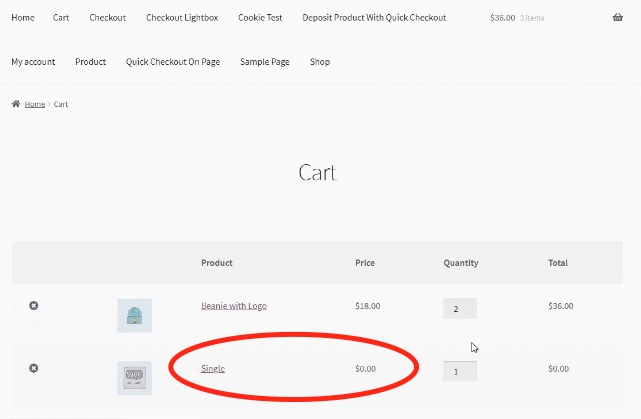
In the GIF below, you can see that the customer receives a free single album when they add two or more beanies to their cart.

If the customer’s cart is updated and no longer meets the criteria for receiving the promotional item, this promotional product will be automatically removed from the customer’s cart.
Become more visible on Google & Social Media?
In a free strategy consultation for data-driven online marketing, we uncover your untapped potential, review any existing ad accounts if necessary, examine your SEO ranking and visibility, and determine which strategy is appropriate for your budget and which active measures will lead to more inquiries or sales.

✅ More visibility & perception through targeted placement
✅ More visitors > prospects > customers > revenue
✅ Reach target groups scalably with SEA
✅ Act and grow sustainably with SEO
🫵 Maximum success with our hybrid strategy
💪 More than 15 years of experience across industries in over 1,000+ projects demonstrable!












 DE
DE

