


Do you want to create your own merchant marketplace like Amazon, eBay, Shopify, or Alibaba? For this, you need a platform with all the features that these sophisticated marketplaces offer. Unfortunately, there are so many options that it becomes difficult to choose a platform for your market. To simplify, we recommend WordPress, as it is the best CMS on the market and very powerful for creating an e-commerce shop with WooCommerce.
However, there is another option for the single e-commerce business model: the WooCommerce multi-vendor marketplace. With a multi-vendor marketplace, you host a small or large group of suppliers on your website and skip the hassle of ordering and storing inventory.
WooCommerce Multi-Vendor Marketplace (Merchant Marketplace) – What is the best WooCommerce multi-vendor (multiple sellers/merchants) plugin for WordPress?
Again, there are so many options available that you might feel overwhelmed and unable to make a decision. Fortunately, as a WooCommerce agency, we have spent a lot of time on countless client projects researching, comparing, and finding the best WooCommerce Multi-Vendor Plugins for multiple vendors/sellers/merchants. During our research, we found so many plugins and narrowed our results down to only 5 WordPress plugins with WooCommerce compatibility.
In this article, we will talk about the best WooCommerce Multi-Vendor Plugins for multiple merchants (sellers) that allow you to create your own marketplace with WordPress + WooCommerce as your shop software.
Explanation:
- Vendor (English) -> Seller
- Dealer / Merchant (English) -> Dealer
- Marketplace (English) -> Marketplace / Trading Place
First and foremost, and very important: To create a WooCommerce marketplace with multiple vendors, you need an additional paid multi-vendor plugin with features that streamline your administrative tasks and attract more vendors to your business. Choose a plugin that fits your budget and business goals. And think about the future. Find a multi-vendor plugin that suits your business and provides the features you truly need as the store grows.
The following list is not exhaustive but is representative of a group of plugins with marketplace features for vendors that you should consider.
To make it even easier for you, we have already integrated a short, concise statement about each plugin into the list, and further down you will find detailed descriptions + the link to the plugin.
Popular and also the best multi-vendor plugins for a multi-vendor shop system are:
RECOMMENDATION since 2024: B2B King with Multivendor Marketplace
Kingsplugins has more than 139+ features, making it arguably the most comprehensive / complete B2B solution with and without a marketplace.
- Multi-Vendor Marketplace for WooCommerce MarketKing is the ultimate multi-vendor marketplace solution for WooCommerce, with everything you need to set up your dream marketplace.
- B2BKing is the complete solution for running a wholesale, B2B, hybrid B2B+B2C or private membership shop with WooCommerce.
- SalesKing is the complete solution for managing a sales team, sales representative or agent, compatible with any WooCommerce shop.
The plugins are absolutely great and we have preferred only these since 2024!
Become more visible on Google & Social Media?
In a free strategy consultation for data-driven online marketing, we uncover your untapped potential, review any existing ad accounts if necessary, examine your SEO ranking and visibility, and determine which strategy is appropriate for your budget and which active measures will lead to more inquiries or sales.

✅ More visibility & perception through targeted placement
✅ More visitors > prospects > customers > revenue
✅ Reach target groups scalably with SEA
✅ Act and grow sustainably with SEO
🫵 Maximum success with our hybrid strategy
💪 More than 15 years of experience across industries in over 1,000+ projects demonstrable!









Other very good plugins (alternatives):
- Official plugin „Product Vendors“ from www.WooCommerce.com*
Inexpensive with an annual license, offers many functions and is not too complex, good support, compatibility with Bookings etc. and really simple - YITH WooCommerce Multi Vendor Marketplace*
The developers of Yith stand for simplicity, speed and great support with manageable functionality – keep it simple - WordPress WooCommerce Multi Vendor Marketplace Plugin by webkul*
Very intuitive plugin with perfect support and the most important basic functions - Dokan Multivendor – www.wedevs.com/dokan*
Probably the most complex but also in some ways the best plugin with great support, a demo version, but also the highest price in comparison + paid add-ons – not for beginners! - WC-Vendors – www.wcvendors.com
Intuitive, very comprehensive functions, good support and free „test“ version, Pro necessary + possibly paid add-ons - WC Marketplace – www.wc-marketplace.com
Free!, Attention: Add-ons are more expensive, good support, quite complex but easy to use
All plugins have different prices (licensing models) and possibilities, but all are suitable for a multi-vendor shop system with WordPress + WooCommerce.
Attention: As always, all plugins can be easily translated into German with Loco Translate and are compatible with all good themes!
WooCommerce.com Product Vendors Plugin for Your Own Multi-Vendor Marketplace*
Turn Your Store Into a Multi-Vendor Marketplace
Do you have an existing website and a loyal community and are looking for ways to diversify your income? Or do you want to start an e-commerce business without having to invest in creating your own product line? With Product Vendors for WooCommerce, you can instantly turn a WooCommerce store into a marketplace with multiple vendors, products, and payout settings.
Allow multiple vendors to sell through your website and in return receive a sales commission to cover the costs of running the website while you focus on building a community.
Why use the official Product Vendors?
- Create a marketplace that can sell anything. From physical, handcrafted products to digital downloads like photos, themes, fonts, audio or video, to time-based bookings with our integration with WooCommerce Bookings.
- Continue to sell your own products. Display vendor products for sale directly alongside your own products.
- Set vendor-specific commission rates. Incentivize new vendors to join your marketplace or reward loyal or high-earning vendors with vendor-specific commission rates – and still set a separate base commission rate for your marketplace.
- Reduce your admin. Allow vendors to manage their own products. Give vendors the ability to manage their own products.
- Do not pay commissions for orders that are not completed. Set commissions to be assigned to vendors only after the order is completed.
- Stay up to date with sales reports. Get an overview of sales, commissions, and vendor revenue per month by vendor.
- Delay commission payments to account for returns. Use PayPal Payouts to delay commission payments for physical product returns.
Product Vendors is aimed at both vendors and marketplace owners with specific features that ensure the following:
Vendors can:
- control their public profile
- Manage their products and edit shipping rules for each product themselves
- Add private notes to orders or notes to customers (e.g., tracking numbers)
- View their orders and sales performance reports
- Sell physical and/or digital products as well as time-based bookings
- Receive commission payouts
Marketplace owner can:
- Accept and approve applications from potential vendors
- Set up one or more vendor administrators to manage vendor information
- Set up each vendor’s commission and payout schedule
- Integrate with WooCommerce Bookings so vendors can sell time-based bookings
- Display a vendor rating composed of ratings for all products they sell
- Set products to require approval before being added to the store on a vendor basis
- Enable commissions for sales as a fixed amount or percentage and set them individually, per vendor, per product, or per store
- Make payments to vendors instantly, manually, weekly, bi-weekly, or monthly
Potential vendors can register via a registration form.

Once a vendor submits the form, the store owner will receive an email notification that a vendor has applied, and a user account will be created for the vendor.
A pending vendor status/role will be assigned until the store owner approves the registration and applies a different role. There are two possible roles:
- Vendor Admin – Has access to all settings.
- Vendor Manager – Has limited access to the Vendor Dashboard.
A vendor will then receive an email with the username and password that their application has been approved. They can start setting up and managing their store.
Vendor Settings
Vendors can configure settings in the WordPress Dashboard as they wish by going to Store Settings.

„Vendor Settings“ fields in the „Vendor Administration“ dashboard:
- Vendor Logo
- Vendor Profile : Enter a description of yourself and your business.
- Vendor Email : List of comma-separated email addresses that will receive business-related notifications.
- PayPal Email : Email associated with the vendor’s PayPal account to receive payments.
- Commission : This is set by the store owner.
- Time Zone: Vendor shop location.
The store owner can also edit the vendor settings via Products> Vendors.

Vendor settings fields that the store owner can edit:
- Name: The vendor’s name will be displayed to the public.
- Slug: Based on the vendor name and automatically assigned.
- Notes: Enter notes about this vendor. Only seen by store owners.
- Vendor Logo
- Vendor Profile: Enter a description of you and your business.
- Vendor Email: Comma-separated list of email addresses that will receive business-related notifications.
- Vendor Admins: List of users who have access to manage this vendor. Only added by the store owner.
- Commission: This is the commission amount the vendor will receive. A product-level commission can be set, which will override this commission.
- Commission Type: Choose whether the commission amount should be a fixed amount or a percentage of the cost.
- : Pay the commission to the vendor instantly when the order is paid. (Uses PayPal Mass Payments)
- PayPal Email: Scheduled commission payouts will use this PayPal email to receive payments.
- Time Zone: Set the local time zone.
- Show Shipping Rules Per Product: If enabled, the vendor can edit shipping rules per product.
- Enable Booking Feature: Enable this option to allow vendors to create bookable products like booking classes or lessons.
Add Products
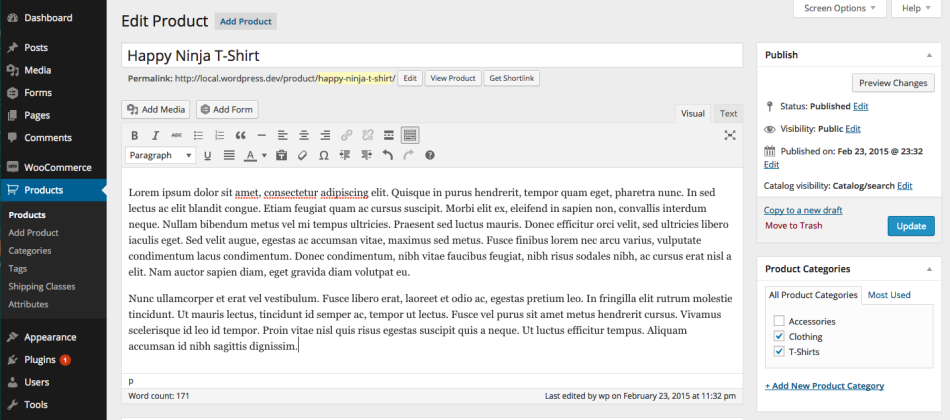 Adding products to product vendors is similar to adding products to WooCommerce. All users who manage access to the vendor can add/edit products. More information at: Adding and Managing Products.
For product vendors, the only difference is that vendors must have their products approved by the store owner. The process is:
- The vendor creates a product, which is pending review after submission to the store owner.
- An email is sent to the store owner informing them that a vendor has submitted a product.
Types of Products
- Simple, digital / downloadable products (note that vendors cannot create grouped products)
- Variable
- Bookable products, if the store owner has enabled this option. More at: Creating a Bookable Product.
Reports
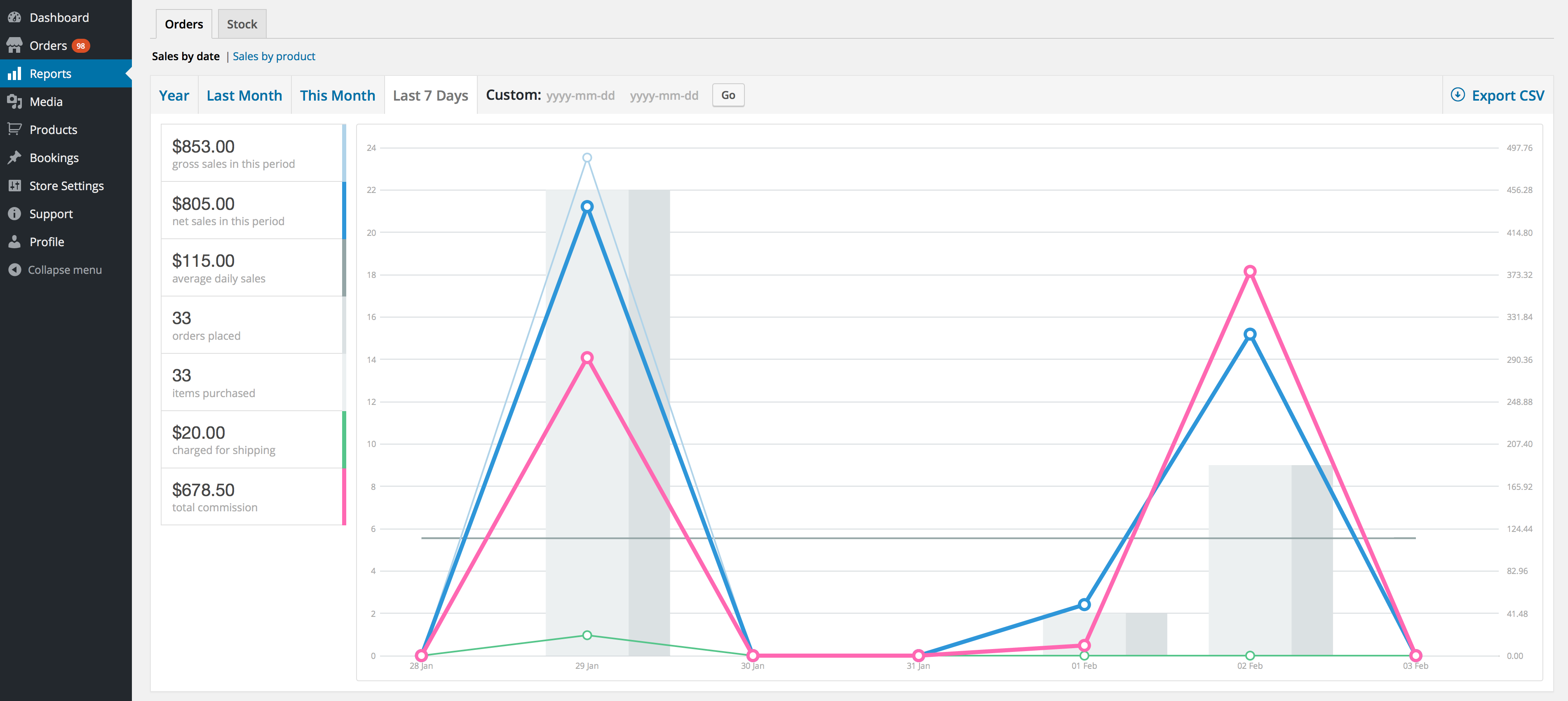
Vendors see reports similar to WooCommerce reports and located in the same place, but only for their own sales.
Commission
Commissions at the product, vendor, or store-wide level are set by the store owner.
If they have enabled instant payment or scheduled payments (weekly, bi-weekly, or monthly), vendors need a PayPal account to receive a commission payment.
PayPal Setup
Product Vendors use an integrated PayPal gateway for mass payments to pay commissions.
Vendors need a PayPal account of any type to receive instant and scheduled payments. Go to PayPal.com to sign up or verify that the email address in your existing account is correct.
* Product Vendors has not been tested with another payment gateway. If you wish to use Stripe or another payment solution, this must be customized.
Roles
Product Vendors adds some user roles. These roles relate to orders, products, and settings that are restricted to the product vendor to which their account is assigned under Products > Vendors. For example, they can only edit their own products.

A vendor can have one of two different roles:
- Manufacturer Administrator – Has access to all settings: Orders,Reports,Media,Products,Store Settings,Support (contacts the store administrator), and Profile
- Vendor Manager – Has restricted access to the Vendor Dashboard: Orders , Media , Products and Profile .
A single user with a user account can be set up to manage multiple vendors as needed and switch between vendors they have access to.
Shipping and Fulfillment
The seller is responsible for fulfilling and shipping/dispatching orders after a customer has purchased their products.
There are two possible shipping methods:
- Shipping per product – If this has been enabled by the store owner, the shipping costs are passed on to the vendor, and the vendor can add their own prices per product. See below.
- All other shipping methods – If enabled by the store owner, shipping costs will be charged to the customer and payment collected at checkout.
Shipping per product
Vendors must set their own shipping costs per product if the store owner has enabled shipping per product.
This is set in the Product Data under Shipping > Shipping Rules . More information at: Defining shipping costs for products .

VAT Regulation
The store owner sets up vendors and assigns them to the correct tax class with the appropriate tax rates depending on their location.
Email Notifications
Several emails are set up in Product Vendors for Vendors and the Store Owner.
- Vendor Registration (Store Owner) – Sent when the vendor submits the registration form.
- Vendor Registration (Vendor) – Sent to confirm that the registration form has been sent to the store owner.
- Order Email ( Vendor ) – Notifies the vendor of a new order.
- Canceled Order Email ( Vendor ) – Sent to inform the vendor that the customer has canceled.
- Vendor Approval – Sent to vendors with login and password when approved for registration.
- Product Added Notice – Sent to the store owner for review when a product is added by a vendor.
- Order Note to Customer – Sent to the customer when the vendor adds a note, e.g., tracking number, personal thank you.
Widget
Product Vendors has a widget that displays vendor information according to the store owner’s settings. It can be:
- Context-sensitive: Shows the vendor which page is being visited
- General, shows a specific vendor, regardless of which page is being visited
Send approval emails to vendors

You can now notify potential vendors when their application has been approved and send an email directly to their inbox.
Multiple Vendor Settings

Choose from multiple vendor role settings, including Vendor Admin (access to all vendor settings) and Vendor Manager (limited access, sales tax or other settings are not displayed).
Feature-rich Vendor Management

Set up one or more WooCommerce users to manage the vendor’s information, including profile, email address, and logo.
Intuitive Commission Management

Commissions for sales can be a fixed amount (e.g., $5 on each purchase) or a percentage (e.g., 25% of each sale) – you can set this amount individually per vendor, per product, or per store.
Manage Orders, Shipments, and Customer Notes

Product vendors have integrated shipping per product and offer the ability to add private notes or notes to customers (e.g., tracking numbers).
Selectively Display Vendor Information

Transform your business into a true marketplace by selectively displaying each vendor’s name, name per product, overall rating, profile photo, and profile information.
Manage Payout Settings

Payments to vendors can be instant (this is a per-vendor setting only and uses PayPal Payouts*), manual, weekly, bi-weekly, and monthly.
* subject to PayPal approval
YITH WooCommerce Multi Vendor / Marketplace*
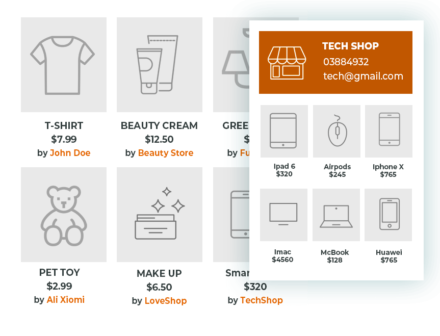
Yith offers the plugin for the easiest way to turn your shop into a powerful multi-vendor marketplace. Transform your e-commerce into a multi-vendor marketplace and start earning from their sales now.
Attention: There is even a free version available for testing.
However, the paid version is the better option!
How you can benefit from it:
- You can easily and quickly create a complex marketplace as a business model.
- You can generate passive income from sales by users who publish their products in your e-commerce store.
- Thanks to a diverse catalog with steady growth, you will increase your visibility and consistency in e-commerce.
- You can organize targeted marketing campaigns and maintain control over the entire e-commerce store by monitoring orders, revenue, reviews, etc.
This plugin is used by over 18,000 customers with a rating of 4.5 / 5 and a customer satisfaction of 98% in support!
Get more traffic and sales to your website and earn with vendor commissions
Multi-vendor e-commerce is a new idea of an e-commerce platform that is becoming increasingly popular on the web. Just think of websites like Etsy, Amazon, and Ali Express, which are setting the new trend for online shopping. This offers customers a higher number of products from different suppliers and thus a greater choice.
If you have an e-commerce, you might consider making it a multi-vendor store. Owners of multiple product vendor websites have the great advantage of generating passive income, as they earn a commission on every sale. The more vendors on your websites, the more sales, the more you can earn without lifting a finger. The more vendors, the more traffic will be directed to your website and the better the positioning will be.
It’s like a virtuous circle, vendors receive traffic and sales, your website becomes stronger and it gets better and better positioned. Then more and more vendors are interested in selling on your platform and benefiting from endlessly increasing traffic. And it’s all easy for you to earn!
- Creation of the vendor page with the following information: name, PayPal email address, owner, business description, slug
- Global commission rate
- Superadmin can activate or deactivate sales for each vendor
- Manage the vendor’s products
- Filter the product list table by manufacturer.
- Manage linked products: grouped, upsells and cross-sells
- Edit manufacturer information: name, description, PayPal email address, slug
- Change manufacturer name
- Superadmin makes payments based on its own policies agreed upon by the vendors at the beginning of the collaboration
- Sales and Commission Reports
- „Vendor“ tab with vendor information (if available) and link to the vendor page on the single product page
- Vendor name next to the product name on the shop page
- Vendor name next to the product name on the single product page
- Widget to display a list of all vendors
- The Superadmin can create vendor orders from the admin area New
- Different order management for each vendor of the store
- Synchronization of orders, so that every change to the main order is also applied to the vendor’s orders
- Dashboard notification for products that need to be approved
- All users who wish to become vendors are registered in the shop with the „Vendor“ role
- Customize vendor pages with additional information (contact information, social networks, etc.)
- Set a default header image for the vendor store.
- Appoint one or more administrators for your vendor shop.
- Edit the commission rate for the vendor and for a single product.
- Compatible with WooCommerce Cost of Goods: You can include or exclude the production costs of your products in the commission calculation.
- Publish products for sale without the permission of a super administrator (customizable for each vendor).
- Advanced reports for vendor shops: orders, stock management, and commissions.
- Advanced reports for administrators: registered vendors and sales report for each individual vendor.
- Search commissions by order number.
- Pay commissions with bulk actions.
- Pay commissions manually.
- Pay commissions automatically with YITH Stripe Connect for WooCommerce (Premium Version).
- Notify commission payments by email.
- Edit coupons: The super admin can decide whether coupons should be included in the commission calculation or not
- View a summary of all commissions and filter them using advanced filters (product, user, date, etc.)
- Link to the vendor’s page, displayed under the product
- Set the position for the „Vendor“ tab on a single product page
- Product list: Display vendors‘ products on the shop page or not
- Use a shortcode to display products by vendor ID (requires WooCommerce 3.2.X or higher)
- Use shortcodes to display products of a specific category or all product categories
- Add or remove links to the Vendor Shop on the general shop page, on a single product page, and on the category page
- Advanced management of related products
- Display the shop Google Map for each vendor thanks to the YITH Vendor Store Location widget
- Add a contact form to the sidebars of the product and vendor detail pages: The message will be forwarded directly to the vendor (YITH Vendor Quick Info widget)
- Hide the „Quick Info“ widget for non-logged-in users
- Customize Vendor Shop Page Header
- Manage your vendor using bulk actions
- Register a new vendor from the frontend
- Become a vendor page: To allow your already registered users to become vendors of your website
- Dashboard notification for admins for every new vendor registration
- Automatically accept vendor registration and skip manual approval by admins
- Set the maximum number of products each vendor can sell
- Each vendor can create their own coupons
- Each vendor can manage reviews of their own products
- Allow users to send messages to the admin about shop products
- Resend the notification email to vendors for a new or canceled order
- Admins can set a minimum commission threshold below which payments will be prevented
- Allow or block vendors to set one or more products as featured
- Show the quantity sold of each product associated with a vendor
- Show the quantity of products sold for each vendor on the related detail page
- Use the shortcode to add the full list of all vendors in the shop
- You can send administrators a copy of the email sent with the „Quick Info“ widget’s contact form
- Administrators can allow vendors to close their shops for a specific number of days to take a vacation, and enable/disable product sales and visibility.
- Users trying to register as vendors must add their VAT number
- Refund management system available for vendors
- Change the vendor taxonomy
- Hide the vendor logo on their page or let them choose whether or not to display it
- Remove the „Vendor“ tab from the product detail page
- Option to hide the „Customer“ section for vendors on the order detail page
- Extended editor for shop description, vendor page
- Administrator can rename „Vendor“ tab
- „Legal Information“ field for vendors
- IBAN / BIC fields in vendor’s personal information
- Administrator can disable payment information on „Order Details“ page for vendors
- „Terms and Conditions“ fields for vendors on „Registration“ and „Become a Vendor“ pages
- Vendors can manage media via WordPress gallery
- Create a WordPress menu with a list of all vendors
- Administrator can massively assign more products to individual vendors
- Administrator can access vendor dashboard via user switching
- Thanks to the shipping module, vendors can:
- Create their shipping zones and apply the corresponding shipping methods
- Apply costs based on shipping
- Apply additional costs to each new product added to the cart
- Display refund and shipping policies
- Set the country from which the products are shipped
- Compatible with Currency Switcher: All amounts are automatically converted.
Attention: The following is a detailed overview of the most important functions for your own WooCommerce marketplace with the Yith Multi Vendor Plugin:
Add more details for each vendor
Contact details and social network profiles are grouped in a customizable header

Do you have multiple administrators?
Every shop owner can select any registered user to help manage the shop.

Allow users to sell and edit their own products
Avoid pending status until approved by admin

Choose commission rates freely
You can assign different rates to vendor shops and products

Apply Actions to Commissions
How to Change the Status of Commissions

Manage Coupons
Choose whether the commission should be calculated on the reduced total amount or not.

Allow vendors to create coupons
They can offer discounts or deals to potential customers of their products

Offer Better Control Over Reviews
With the premium version, vendors can edit their product reviews just like the store administrator.

Choose your preferred payment method
To pay your suppliers either manually or automatically

Generate Advanced Reports
Filled with important information and relevant details for website management

Export data to CSV
So they can be freely used outside the WordPress environment

Choose on which page you want to display the vendor’s name
Freely decide between the shop page, the product detail page, or the product category page

Let your users register as vendors much faster
Allow automatic approval of registrations or use the classic manual system.

SPECIFIC TERMS AND CONDITIONS
Ask your users to accept these to register as a vendor

REQUIRED IBAN / BIC
Pay commissions quickly and easily via bank account

Limit the number of products for each vendor
If you want to set a specific number of products, vendors can create them

Apply changes to all vendors simultaneously
Use bulk actions to manage, approve, or delete with just one click

Exclude products from specific vendors from the shop
This way, the products will no longer be displayed in the shop, but only on the vendor’s page

Display the complete list of vendors in your website’s sidebars
Thanks to the YITH Vendor List widget

Display Google Map for each shop location
The map is calculated based on the address available in the vendor’s profile

Allow users to ask vendors questions directly before the sale
You can send the email from both the product detail page and the product page.

Do you offer an extended administration area?
An important administration platform for every vendor, through which they can retrieve reports or edit information.

Support better communication with users
Let administrators receive messages from users about shop products

Resend an email to your new providers
If the first one somehow got lost

Set a minimum commission amount
This is what vendors must reach to be paid with PayPal MassPay

Empower your vendors to set featured products
Without having to ask for your approval every time

Display the number of sales for each vendor
So that users can be convinced by very active and trending vendors

Use the YITH WooCommerce Multi Vendor List shortcode
Display the list of all vendors selling in your store

They can choose to keep their products purchasable or display them in catalog mode.

ALLOW VENDORS TO MANAGE REFUNDS
They are free to refund partially or fully the value of products purchased in their stores.

INSTANTLY REQUEST VAT / SSN NUMBERS
If users want to become vendors, they must add their VAT / SSN number to complete registration.

ADJUST USER CONTROLLABILITY
With the specific option according to your needs

SHOW VENDORS 'LOGO
And let them choose whether to include it on their shop pages or not

PROTECTING USER PRIVACY
By hiding the „Customers“ search area, providers cannot access their email address.

PROVIDE AN ADVANCED EDITOR
So that vendors can add a description of their shop with WordPress’s advanced text editor

INSERT LEGAL NOTES
Displayed on the provider’s detail page

Allow vendors to manage media
All WordPress gallery features for adding and managing new media to combine with products for sale

Manage Google Maps
Provide your Google API credentials to get the most out of your account

Quickly assign products to vendors
To optimize your administration time

CREATE A VENDOR MENU
Display the full list of all vendors in the shop

Access the vendor dashboard
By switching users

Enable vendors to manage shipping costs
Vendors manage their shipments just like Superadmin

Display Vendor Shipping Data
On every product page linked to a vendor

Pay vendor commissions via Stripe Connect
Split payments directly on the checkout page between administrator and vendor

Handle privacy policies and data deletion
Information about vendors, uploaded media, commissions, and transactions

WordPress WooCommerce Multi Vendor Marketplace Plugin by webkul*

The WordPress WooCommerce Multi Vendor Marketplace Plugin* converts your e-commerce store into a fully functional multi-vendor marketplace with a separate vendor profile and offers vendors the ability to add products from the vendor panel. With this plugin, the vendor can view and edit their profile information. They can view their product list and search, edit, or delete products within it. The vendor can view a record of their transactions and sales charts on their dashboard. They can view their order history for all orders, change their password, and even ask the administrator questions.
The administrator can also manage the product list, vendor list, commissions, and settings. The administrator can edit or delete products, approve, reject, or assign products to vendors, set separate commission rates for different vendors, and change settings such as automatic product publishing and automatic vendor approval.
With this plugin, anyone who wants to earn additional income online can succeed. The best part is that no technical knowledge is required for setup. The developers have made the setup very easy even for beginners.
Furthermore, this plugin offers interesting features that you won’t see in other plugins like it. The developers are constantly updating and adding new features, making it even better every day. Without a doubt, the WooCommerce Marketplace is the „game-changer“ for WordPress WooCommerce store owners. You don’t have to waste time looking for an alternative. You can download the plugin today and enjoy the fantastic features that come with it.
This brilliant plugin converts your WordPress WooCommerce Store into a Multi Vendor Marketplace with separate vendor collection and vendor order management. After webkul created the best marketplace module for Magento and Joomla, they received so many requests that they should create something like the same marketplace plugin for vendors for WooCommerce.
Features of the WordPress WooCommerce Multi Vendor Marketplace

Main Features
- All Supported Product Types –
Sellers can add 5 product types – Simple Product, Grouped Product, External/Affiliate Product, Variable Product, and Downloadable Product. - Seller Rating & Review –
customer and can give the seller rating & reviews. This feature makes the seller believe. Customers buy products from sellers who offer good product and shipping quality. A good seller always gets more sales. - Seller Name on Product Page – The
seller/supplier name is displayed on the product page. Now a seller is identified by their name. Once a seller earns the trust of customers, they will definitely choose the product. - SEO-Friendly URL Structure –
All URLs are SEO-friendly. Using a search-friendly URL is one of many search engine optimization techniques. Many websites that use incorrect or suboptimal URLs are poorly indexed by Google crawlers, thereby reducing their website ranking. - Marketplace Seller Central – The
administrator can create a WooCommerce Marketplace Seller Central where users can register separately as sellers. The user who wants to become a seller can register here. With the help of this feature, users now have a separate login page to become sellers. - Invoice Management – The
order history and order management are a must for any stable marketplace. The WooCommerce Multivendor Marketplace includes order management that allows the supplier to manage the order and create the invoice. The marketplace administrator can also create the invoice for the orders.
Seller / Vendor Features
- Separate Seller Profile –
Every seller has their own separate seller profile. Once you have set up your WordPress site with WooCommerce Marketplace, you can allow people registered on the site to register as sellers or vendors. It offers a separate profile that is managed by the seller. And it is a very important feature of a B2C marketplace. - Shipping Management –
Now the marketplace sellers can manage their shipping through their own account. Sellers can easily set up new shipping zones and add shipping methods for these zones. - Product by Feature –
When you use the product by feature, buyers can see the seller’s name on the product page. In addition, the customer can check a seller’s profile page by clicking on the seller’s name on the product page. - Ask the Administrator –
The seller can inquire with the administrator by asking the administrator a question. This feature allows sellers to submit a request to the administrator if they get stuck somewhere. The administrator can resolve requests from sellers by providing appropriate answers. - Social Network Accounts –
The marketplace offers the possibility to directly connect the user’s Facebook account with or without registration at the time of submitting reviews for a specific seller. - Order Management –
Sellers can view all their orders with the customers‘ billing and shipping addresses. - Favorite Sellers –
A customer/buyer can mark any seller/supplier of the marketplace as a favorite seller. A customer can view all marked favorite sellers in their account. The seller can also see their followers and send a customer message to them.
Admin Functions
- Flexible Commission Management –
The administrator can set commissions for the sellers. The administrator can set the commission for all sellers globally as a percentage. However, it also has the option to set different commissions for different sellers. This is a very helpful feature. Now the administrator can reduce the commission percentage for sellers whose sales are very good. - Set Automatic Approval for Sellers
– The Administrator can set Automatic Approval for Sellers. With this feature, a new seller who wants to join the marketplace will be automatically approved. - Automatic Approval for Seller Products
Set – The administrator can set automatic approval to allow sellers to publish their products. Now, not every product added by the seller needs to be approved. The products are automatically published on the marketplace. - Approve / Reject Seller / Seller’s Product
– The Administrator can approve or reject any seller or the seller’s product. If there is a seller involved in fraudulent activities or whose services do not meet the market requirements, the administrator can reject that seller. Even the administrator can reject a product if it is counterfeit or the price is not correct. - The administrator can make an existing customer a seller – The
administrator can make a customer a seller via the admin panel. Now you no longer have to wait for a user’s request to become a marketplace seller. A customer can also become a seller. The administrator can simply update a customer’s role to a seller. - Assigning a product to any seller – The
administrator can assign any product to any seller as needed. This feature allows you to quickly set up a seller account.
Full Feature List
- Multiple sellers can register and upload their products.
- Separate seller profile, shop logo, and seller collection page with banner image.
- Sellers can manage shipping through their account.
- Product featured for function on the product page.
- The administrator can assign a separate seller dashboard to sellers, which is identical to the administrator’s dashboard.
- A seller can easily switch to the standard view of the seller dashboard.
- Sellers can submit queries to the administrator. These queries are listed under the Seller Queries option.
- The administrator can respond to the seller’s questions.
- A seller can edit their profile information.
- The seller’s products can be edited or deleted by both the seller and the administrator.
- The seller can add 4 types of products: simple, grouped, external/affiliate, and variable product.
- The seller can add their social media accounts, which will be displayed on their profile page.
- Order management is very easy due to the visibility of customers‘ billing and shipping addresses.
- The seller can also print the order invoice. A seller can ask the administrator questions.
- The administrator can approve or reject a seller or products of the seller.
- The administrator can assign a product to any seller.
- SEO-friendly URL structure has been integrated into the marketplace.
- Users can register directly by logging in with their Facebook account and verifying a seller.
- The administrator can set the default commission for each seller.
- The administrator can also configure a different commission percentage for different sellers.
- A buyer can add any marketplace seller as a favorite seller.
- The administrator can assign products to a seller in bulk. Sellers can add upsell and cross-sell products.
- The administrator can perform transactions with the sellers against the orders for which they have transferred the money to the seller’s account.
- Sellers can also check the transactions that the administrator has made for them through their account.
- The administrator can set different categories for different sellers.
- The administrator can set the product type globally for all sellers in the marketplace.
- The administrator can approve reviews for sellers from their end.
- Supports standard WooCommerce email templates.
- The administrator can configure the endpoint and title for a seller’s dashboard, product list, order history, seller profile, etc.
- Sellers can manage refunds for their orders at the seller’s end.
- The administrator receives product notifications to publish a seller’s product when a seller creates or edits a product on the seller side.
Start today with the WordPress WooCommerce Multi Vendor Marketplace
With this plugin, anyone who wants to earn additional income online can succeed. The best part is that no technical knowledge is required for setup. The developers have made the setup very easy even for beginners.
In addition, this plugin offers interesting features that you won’t see in other plugins. For example, we can add various functions using the add-ons. Some add-ons like the Marketplace Quote System are very useful for the B2B Marketplace. Another add-on Marketplace Mass Upload can be used to upload products from the seller/supplier.
The Webkul Multi Vendor Marketplace plugin is fully compatible with all third-party themes, provided it works perfectly with the standard WooCommerce platform. Take a look at the WooCommerce theme of the electrical electronics store from MadrasThemes.
The developers are constantly updating and adding new features, making it even better every day. No doubt, the WooCommerce Marketplace is the „game-changer“ for WordPress WooCommerce shop owners. You don’t have to waste time looking for an alternative. You can download the plugin today and enjoy the fantastic features that come with it.
Dokan Multivendor – Exceptional Features of the Dokan Multi-Vendor Marketplace*

The #1 Multivendor Marketplace for WordPress
An amazing video as a complete guide for WooCommerce Dokan Multi Vendor Marketplace in English:
At this point, we would first like to address the prices, as they are somewhat higher than with other solutions (but justified!).
There is a free demo version with some features. The cheapest package will be sufficient for most uses.

- Marketplace with independent stores
Similar to Shopify, eBay, or Amazon, Dokan offers each vendor a customized storefront and the ability to provide additional support. - Visually appealing frontend dashboard for vendors and customers
Customers and vendors get access to a comprehensive frontend dashboard that allows for easy management of product inventory including sales, orders, discounts, coupons, and more. - Earn from every sale as an administrator
Charge a worldwide commission to a vendor or receive a special commission for a single product. A fair commission model allows both parties to share in the success of your marketplace! - Store insights with reports and statements
Vendors can view the store’s sales report in detail and also get a complete
overview of their store’s performance. - Coupon & Voucher management directly from the dashboard
You don’t have to worry about coupons. Let your discounts take care of themselves. - Increase brand value with product reviews
Good reviews can help other customers gain trust and increase the value of your marketplace brand. - Easy payout system for your suppliers
With Dokan, withdrawal is really easy. Vendors can send payment requests to you directly from the frontend dashboard. You can set the payout limit, payment channel, minimum payout limit, and more. - Vendors configure their own store settings
Vendors can add additional information about their store and brand via the frontend dashboard. You don’t have to do anything. - Shipping management for each store
Worried about shipping issues? Let your suppliers handle their own shipping with the zone-wise shipping feature for each store. And if you enable ShipStation, they can also handle their shipping with the popular shipping solution. - Announce important news directly in the dashboard
You can send important announcements to all vendors or specifically to a set of vendors. The announcements will be displayed in the vendor dashboard. - Control who sells and who doesn’t
You can enable/disable a vendor’s selling rights. This truly makes you the administrator of a marketplace. - Hundreds of payment gateways
No matter what type of payment network your customers prefer, you can be sure that your online marketplace supports it. We even support Moip. - Multilingual ready – WPML
With the global spread of e-commerce, the need for multilingualism has increased. Dokan helps by making your website multilingual.
Who is Dokan suitable for? – In short: For ALL areas!
- Traditional Marketplace
Ready-made garments
Laptop, iPhone, Electronics
Books, magazines, comics
Beauty care products
Shoes and handicrafts - Digital Marketplace
Audio and songs
Theme, Plugin, Software
Paintings, Photography
Video, 3D animation
Apps, eBooks, PDF - Service Based Marketplace
Technician, Support
Spa service, Therapist
Consulting services
Childcare
Tour operator
Why use Dokan?
Dokan saves you hundreds of hours of work when creating an online marketplace. See some of the many reasons that make it the leading open-source solution for multiple vendors.
- Best Frontend Experience
Vendors get full functionality through the frontend dashboard. - Easiest Configuration Option
Create and customize with ease. No programming required! - Best-in-Class Customer Support
You can be sure that you are in the hands of competent support engineers. - Compatible with all WooCommerce themes
Works perfectly with themes that support WooCommerce and its features. - Dokan is easy for the savvy WordPress admin
The features are almost limitless, beginners will be overwhelmed, advanced users will love it!
WC Vendors – Build Your Marketplace with WordPress*
Again, we would like to start with the prices:


Each vendor gets their own customizable, independent storefront. Including their own unique URL to send their customers to as well.
v


Our supplier review system provides valuable feedback that builds trust in your marketplace. Customers rate vendors after purchase to increase their brand value. Vendors can add their social media to increase their visibility.


Control all areas of the vendor dashboard experience. Define which fields should be displayed and which are required. Increase your quality control and ensure that all published products contain the required information.

WC Vendors is built to save you time and money
WC Vendors is a standard solution on the market. It saves months of development work and can be launched quickly. Why pay for a custom solution when you can have a solution tested daily by thousands of users?
Complete Frontend Experience
A fully integrated self-service frontend dashboard provider. The vendor dashboard offers vendors an integrated frontend experience that seamlessly integrates with your theme. Empower vendors to take control of their businesses while you can focus on building the marketplace.
Flat Rate & Custom Shipping
We have the most comprehensive and complete shipping system of all marketplace plugins. Allow your suppliers to set shipping on a flat rate or table rate basis.
Over 100 Payment Gateway Options
Use the payment gateway for your region to ensure your customers can pay seamlessly. Any payment gateway written for WooCommerce can be used.
Customize with Ease
Simple settings-based configuration. No coding required.
Earn More With Memberships
Earn more by charging your vendors a monthly membership fee
Built For WooCommerce and all Themes
Choose from thousands of WooCommerce compatible themes.
Whether you want to sell physical goods, digital downloads, or cooking classes, WC Vendors is your solution. Create any type of marketplace without limitations. Cost-effective, fast, and easy.
Examples:
Physical Products
Electronics
Farmer’s Market
Fashion
Artwork
Handmade
Digital Products
Music
Videos
Graphics
Courses
eBooks
Service or Subscriptions
Cooking Classes
Fitness Classes
Beauty Boxes
Wine Tastings
Coffee Tastings
WC-Marketplace – a free WordPress plugin that allows you to build your multi-vendor marketplace in no time
WCMp offers you a fully customizable marketplace solution to drive growth at every stage of your business.
One-Stop Solution for Your Marketplace Needs
- Administrator
Commission
Coupon
General
Product Management
Reports & Analytics
Shipping & Taxes
Vendor Shop Settings - Customer
Customer Information
Email
General
Review - Seller
Commission
Coupons
Email
General
Inventory Management
Product Management
Reports & Analytics for Own Products
Shipping and Taxes for Own Products
Own Dashboard
Vendor Order Management
Own Compartment Shop Settings
Commission
Bank Book Overview
With this feature, your vendors can now quickly review their branch transactions, commissions, withdrawals, refunds, partial refunds, and fees.
Withdraw Pending Commissions
The vendor can request the “Request Payout” button if the commission value is above the payout threshold (if any) and the day you request your commission has passed the payout lock period (if any) set by the admin.
Receive commission as per pre-configured payment schedule
The vendor can receive payment automatically from the admin to their own PayPal / Stripe account on an hourly / monthly, etc. basis.
Choose preferred payment method
The vendor can choose any preferred payment option from all the allowed payment options set by the admin. This ensures that the vendor gets paid through that payment mode.
View All Transaction History
The vendor can view all previous commission transactions. They can also download a CSV file of the transactions, sort by date range, and view their payments.
Admin can manually mark the paid commission
WCMp allows the admin to manually manage the commission status.
View Vendor Commission Details
A detailed commission page where the admin can view the detailed information about the vendor’s earnings for a specific order.
The administrator can sort the commission by paid / revered / unpaid
A practical tool for administrators to view all unpaid / paid / canceled commissions in a list. The administrator can view the commission status in a list
Share Coupon Option
If you share the cost of a coupon, the administrator can decide who bears the coupon cost. You can calculate the commission with / without the coupon amount.
Payment Gateway Fee
You can deduct the gateway fees from your vendor’s commissions yourself. You can use either percentage / fixed amount. Suppose a vendor receives a commission of $100, and the gateway fee to be deducted is 5%. Now he receives a commission of $95 instead.
Set the Payout Hold Period
If vendors have the right to withdraw their due payment, this option allows you to set the number of days a vendor must wait before requesting funds for an order.
Set Payout Threshold
The administrator can set a schedule for payment disbursement. If you set an hourly payout, vendors will be paid one hour after the order.
Set Vendor Payment Methods
Select your preferred payment methods to disburse payments and commissions to your vendors. However, the vendor can choose their preferred payment mode to receive commissions from the methods you have approved.
Dynamic commission set up
With the dynamic commission settings, the administrator can set the general commission per product / supplier / category commission
Vouchers / Coupon
Create percentage / fixed coupon
The provider can also create a percentage / fixed coupon for the entire website
Create percentage / fixed coupon
The vendor can also create a percentage / fixed coupon for the entire website
Create percentage / fixed coupon
The vendor can also create a percentage / fixed coupon for the entire website
Create percentage / fixed coupon for the entire shop
The administrator can create a percentage / fixed coupon as desired
Coupon Auto / Manual Approval
The administrator can manually review each vendor before publishing / have the coupon published directly by the vendor.
Provider List
Displays all registered providers on the site. Customers can search for any provider using this widget.
Vendor Location
Displays the vendor’s business location in Google Map on single product page.
WCMp Contact Vendor
Available on vendor’s shop page and single product page through which customer can send message to vendor.
Vendor Quick Info
Displays a brief introduction/information about the vendor’s shop as set by the vendor in the „Store Description“ section of the vendor dashboard and displayed on the vendor’s shop page and on a single product page.
Top Rated Vendor Product
Displays the vendor’s top-rated products on a single page.
Vendor Product Category
Displays the product categories added by the vendor on the vendor’s shop page.
Latest Product Per Vendor
This section displays the latest 12 products added by the vendor on a single page.
New Order Email
The vendor is notified by email when a customer purchases one of their products, so they can keep track of the products sold.
Add Order Note Email
The customer receives an email every time the order status changes from the administrator and when the order is marked as shipped by the vendor.
Receives a notification about shipping details by the vendor / administrator
The customer receives an email notification when their order is shipped by the supplier, so that they are aware and can track the progress of their order using the tracking details.
Purchase with the payment method supported by Woocommerce
Allow any payment option on your website to receive payments from the customer as you wish.
View Vendor Details
The customer can view vendor reviews on each product page to check the vendors.
Report Abuse Button
Allow users to report abuse regarding a specific product.
Ask the Vendor a Question
Customers can ask questions about products they need help with in the Q&A section
Buy products from different vendors in one order.
The customer can buy from multiple vendors in a single order
Compare the rate of the same product from different vendors
Customers get a quick comparison of the same product sold by different vendors and make a better choice from the available options.
View all products from one shop
The shop page of a vendor where the customer can view the products / sort the product by category or rating.
List all vendors
Display all the shops available on the website on a single page. Let the customer sort the vendors by category, name, etc.
Manage customer queries from the dashboard.
Display questions from customers regarding products they need help with in the Q&A section on the single product page. Vendors can answer the queries using this widget.
Set social profiles for the shop page
The vendor can share social media details to connect with more customers
Set physical shop location via Google Map
Set your business location that will be displayed on your store and help your customers find your store.
Manage Store Settings
Allows vendor to manage their store details, shipping, policies, and billing.
Location Based Sales Report
Displays the analysis of a vendor’s store and products on a seven to thirty day basis. It shows countries from which the vendor’s store/products were visited. The vendor gets a brief description of their target countries.
Weekly and Monthly Sales Report in Dashboard
The „Vendor Statistics and Reports“ widget displays the vendor’s store statistics on a weekly or monthly basis.
Separate Inbuilt Frontend Dashboard for Vendors
An engaging vendor experience with an advanced and extended vendor dashboard. Get an insight into your business right after logging in!
API support for exchanging data with other applications
WC Marketplace 3.1+ has been fully integrated with the WordPress REST API. This allows developers to now interact with websites remotely by sending and receiving JSON objects: https://wc-marketplace.github.io/rest-api-docs/
Automatic and manual re-registration approval
With WCMp, willing vendors can apply through a registration form on your website. You can also approve them manually or automatically once they are registered.
Can accept payments via all gateways supported by WooCommerce
Accept payments with the right provider for you – choose from over 100 payment gateways for WooCommerce to receive payments from customers.
Manage your own To-Do list
To-do lists record all tasks that require your attention. Depending on your configurations, this option lists your pending activities that require action.
Generate a vendor-wise report
This gives an overview of the total sales, daily sales, orders placed, admin earnings, and vendor commission in a given period.
Configure the shop for vendors
Set up the shop for a single vendor and hence configure the shop page for the vendors.
Configure Multi-Vendor Multi-Seller Flow
Allow multiple vendors to sell the same product. This way customers can get a quick comparison of the same product sold by different vendors and make a better choice from the available options.
Add and Manage Vendors
This tab allows you to easily manage thousands of vendors. Edit vendor details and set up their profile.
Customize Vendor Registration Form
A marketplace will not be the same without vendors. Understanding the need for the same, willing vendors can apply to your website with a fully customizable vendor registration form.
Automatic Setup Widget for Marketplace Setup
The WCMp Setup Wizard is a step-by-step guide that helps the admin to easily set up their site and key settings.
General
Purchase with Woocommerce supported payment method
Allow any payment option on your website to receive payments from the customer as you wish.
View Vendor Details
The customer can view vendor reviews on each product page to check the vendors.
Report Abuse Button
Allow users to report abuse regarding a particular product.
Ask the vendor a question
Customers can ask about products they need help with in the Q&A section
Purchase products from different vendors in one order.
The customer can shop from multiple vendors in a single order
Compare the rate of the same product from different vendors
Customers get a quick comparison of the same product sold by different vendors and make a better choice from the available options.
View all products from one shop
The shop page of a vendor where the customer can view the products / sort the product by category or rating.
List all vendors
Display all the shops available on the website on a single page. Let the customer sort the vendors by category, name, etc.
Manage customer queries from the dashboard.
Display questions from customers regarding products they need help with in the Q&A section on the single product page. Vendors can answer the queries using this widget.
Set social profiles for the shop page
The vendor can share social media details to connect with more customers
Set physical shop location via Google Map
Set your business location that will be displayed on your store and help your customers find your store.
Manage Store Settings
Allows vendor to manage their store details, shipping, policies, and billing.
Location Based Sales Report
Displays the analysis of a vendor’s store and products on a seven to thirty day basis. It shows countries from which the vendor’s store/products were visited. The vendor gets a brief description of their target countries.
Weekly and Monthly Sales Report in Dashboard
The „Vendor Statistics and Reports“ widget displays the vendor’s store statistics on a weekly or monthly basis.
Separate Inbuilt Frontend Dashboard for Vendors
An engaging vendor experience with an advanced and extended vendor dashboard. Get an insight into your business right after logging in!
API support for exchanging data with other applications
WC Marketplace 3.1+ has been fully integrated with the WordPress REST API. This allows developers to now interact with websites remotely by sending and receiving JSON objects: https://wc-marketplace.github.io/rest-api-docs/
Automatic and manual re-registration approval
With WCMp, willing vendors can apply through a registration form on your website. You can also approve them manually or automatically once they are registered.
Can accept payments via all gateways supported by WooCommerce
Accept payments with the right provider for you – choose from over 100 payment gateways for WooCommerce to receive payments from customers.
Manage your own To-Do list
To-do lists record all tasks that require your attention. Depending on your configurations, this option lists your pending activities that require action.
Generate a vendor-wise report
This gives an overview of the total sales, daily sales, orders placed, admin earnings, and vendor commission in a given period.
Configure the shop for vendors
Set up the shop for a single vendor and hence configure the shop page for the vendors.
Configure Multi-Vendor Multi-Seller Flow
Allow multiple vendors to sell the same product. This way customers can get a quick comparison of the same product sold by different vendors and make a better choice from the available options.
Add and Manage Vendors
This tab allows you to easily manage thousands of vendors. Edit vendor details and set up their profile.
Customize Vendor Registration Form
A marketplace will not be the same without vendors. Understanding the need for the same, willing vendors can apply to your website with a fully customizable vendor registration form.
Automatic Setup Widget for Marketplace Setup
The WCMp Setup Wizard is a step-by-step guide that helps the admin to easily set up their site and key settings.
Inventory Management
Set Inventory for Products
With the „Include Inventory“ option, the vendor can manage the stock of each product.
Product Management
Add GTIN Number
The vendor can add GTINs for internal tracking and for use in product feeds
Support for custom product attributes via the frontend
Do you need more attributes? With our wide selection of hooks/filters, you can add any custom attributes for vendors.
Manage product tags
Product tags are another way to relate products to each other, in addition to product categories. The vendor can also add tags to the product.
Category-specific product segmentation
Your vendors are now forced to add a product to a category. This process benefits both the vendor and the administrator in terms of SEO and improves Google indexing.
Set tax/shipping class
The vendor can add tax class and shipping to their products
Digital, virtual product option
The vendor can also add virtual and downloadable products
Sell existing product
The vendor can add a product from another vendor’s store with a single click and customize it as desired.
Backend Product Support
Vendors can sell variable/grouped products from the admin backend.
Simple Product from Frontend
These are the most commonly uploaded product types in a WooCommerce store. It is a standalone product that the customer can purchase from the vendor.
Product Automatic / Manual Approval
The admin can manually review each vendor before publishing / let the vendor publish the product directly.
Manage Product Types Enabled For Vendors
The admin has full control over the product types (e.g. simple / variable etc.) that the vendor can add
Reviews
Vendor Reviews
Customers can rate and review vendors, which helps build trust and loyalty with vendors, thus enabling better communication between customers and vendors.
Vendor Product Review
Allows customers to rate and review the vendor’s products for other customers to view while making a purchase decision.
Reporting / Analytics Tool
Vendor Last Days Business Report Widget
Through this widget, the vendor can get a quick overview of traffic, the number of orders placed, total sales, vendor earnings, and the amount paid out over the last week.
Product Sales Report
The vendor can view the product sales report (i.e. total sales, their earnings, the number of products placed by the customer) via their dashboard for any custom date range.
View Vendor Product Sales Report
Allows the administrator to track the vendor’s product sales report (gross sales, administrator’s earnings, vendor’s commission) based on year/month/week/any custom range.
View Vendor Sales Report
The admin can view the vendor sales report based on gross sales, admin earnings, and vendor commission.
Generate a vendor-wise report
The admin can view a particular vendor’s report based on year/month/week/any custom date range.
Shipping and Taxes
Control Shipping Options
Each vendor can set up their preferred shipping method for each zone. For example, if there are two zones, namely USA and UK. Then the vendor can enable flat rate from USA and local pickup for UK
Table Price Shipping
Allows vendors to create complex rules for worldwide shipping of their products, so vendors can define multiple rates based on the product’s destination or zone, and add rules based on product weight, number of items, shipping class, and price.
Configure Shipping Costs
Allows vendors to configure shipping costs for each zone, where each zone can have different (and multiple) prices.
Add desired shipping methods
Vendors can add their own shipping methods from their dashboard and configure the prices.
Enable / Disable Shipping Zones
The vendor can enable or disable their already added shipping zones as per their choice.
Set Shipping Method
If the administrator wishes, they can select and configure the shipping methods [Flat rate, local pickup, or free shipping] or allow their vendors to configure them.
Add Tax Rates
Allows the administrator to set up different tax rates under the tax classes and based on the country (Standard, reduced, zero).
Add Tax Class configure
Allows the admin to add different tax classes based on the tax jurisdiction under which your business resides.
Configure WooCommerce Shipping
Admin can configure each WooCommerce shipping method such as Flat rate, local pickup, and free shipping as per the requirements.
Add your own shipping zones
In the shipping zone, the administrator can customize their own shipping zones based on regions (zones) and add their own shipping rate (flat rate, local pickup, free shipping).
Vendor Dashboard Widget
Customer Questions
Displays questions customers have asked about products that need their help in the Q&A section on the single product page. Vendors can answer the queries using this widget.
Vendor Reviews
This widget displays the feedback the vendor (and not their products) has received from their customers.
Product Statistics
Displays a brief statistic of the vendor’s added products. It shows the total published products, those pending, drafted, or even awaiting approval from the administrator.
Product Sales Report Widget
Displays the products sold in the last seven days with the product name and the quantity sold.
Pending Shipping Widget
This widget shows which order needs to be shipped, and you can also mark the order as shipped via this useful widget! The vendor can also mark the order via the rocket icon under action by simply clicking on it and entering the tracking URL and ID.
Visitor Traffic
This widget shows the countries from which the vendor’s store/products were visited.
Vendor Last Days Store Report Widget
Shows store traffic, number of orders received, total sales, commission earned, and commission withdrawn.
Vendor Order Management
Vendor Order Status Vendor Order Status
Now the vendor can change the order status so that customers can be informed about their order process.
Add Order Note
The seller can send an order note to the customer/admin to resolve any order-related issues.
Vendor can export orders
The vendor can download a CSV that gives them an overview of their total sales, earned commission, number of orders placed, total number of products purchased, number of coupons used in the date range, total coupon rating, and total number of customers within a specific period.
Real-time Split Order
Share a part of your order management power with your vendors to speed up your marketplace operations. Your vendors will have the same control over their orders to reduce your workload.
Integrated Refund Module
Vendors can now disburse refunds for their part in an order and without any admin intervention.
Vendor Registration
Setting up the Vendor Registration Form
The administrator can use the vendor registration form to collect all vendor data and verify the details. Creating a confirmation form is child’s play. Simply go to the registration page settings and configure the form. This document will help you with a further description of the entire process: https://wc-marketplace.com/knowledgebase/setting-vendor-registration-wcmp/#nav-1
Attention: Addons are more expensive than normal. Check this beforehand!
So, these were the 6 best WooCommerce plugins for WordPress. With these plugins, you can easily set up your marketplace for multiple vendors without sweating over small issues.
The plugins mentioned in the list are quite advanced and include almost all the features you would ever need if you are running a multi-vendor marketplace.
If you have any questions about the plugins, please feel free to comment below. I would be happy to help you choose the right plugin for your business.
Build your own vendor marketplace with WordPress and WooCommerce!




 DE



2 Kommentare
Hallo Florian, danke für den umfangreichen Beitrag. Ich hatte schon Dokan, Woo Product Vendors, WC Vendors und WCFM getestet und habe mir dann nach Deinem Beitrag eben noch das von Webkul zugelegt. Und prompt hat das Plugin, Site Health zeigt kritische Fehler vom Webkul Plugin an und es funktioniert einfach nicht. Scheinbar ist es noch nicht mit WC 5.0 kompatibel, was ich beim Kauf über Envato leider übersehen habe. Ich hab jetzt dem Support von Webkul ein Ticket geschrieben und schon nach wenigen Stunden eine erste Antwort. Umso ärgerlicher das die, und viele andere auch, nach einem Admin-Zugang und FTP-Zugang fragen. Ich meine, sowas gehört der Vergangenheit an und ist nicht wirklich nötig. Aber die Gestrigen bleiben uns wohl noch lange erhalten.
Hallo Adrian, Webkul hat einen super Support. Ohne Login können die keinen Bugfix machen. Evt. liegt es auch an anderen Faktoren in deiner Installation. Einfach Login senden und die es fixen lassen. WC 5.0 sollte man sowieso noch nicht nutzen, aber das nur am Rande erwähnt da es ein Major Update war und man damit immer 2-3 Monate lieber wartet, damit Themes und Plugins nach ziehen können.