


As a WooCommerce agency, we are increasingly asked how to implement a postcode search with an input field, similar to pizza.de or lieferando.de, to offer and deliver regional products. This postcode input can be useful not only for delivery services but also ideal for regional products in an online shop.
In this article, we introduce the main plugin and the add-on for the search function = input field for the postcode.
WooCommerce Products by Delivery Area (Postcode) + Postcode Input Field Search
The WordPress Woocommerce Delivery Area Pro Plugin* displays products filtered based on the postcode entered by the customer. Either a field can be displayed per product with the main plugin, or the search function can be adjusted so that a search input field for the postcode (PLZ) is displayed.
ATTENTION: Sales are unfortunately only possible via the official website www.woodeliveryarea.com.
- The extension setting can be managed on the same plugin settings page for the WooCommerce delivery area
- The administrator can define the order by criteria for the products filtered by customers
- Dynamic messages and headings for the search results page
A WooCommerce extension that allows your shop customers to check whether a product from your shop can be delivered to the desired shipping location or not. Our plugin offers 6 different methods that allow the administrator to easily create and save their delivery areas in the back-end. When a product is queried by the user for delivery from the front-end, the postcode entered by the user is searched/matched in all saved delivery areas, and the user is shown a corresponding yes/no message in the front-end.
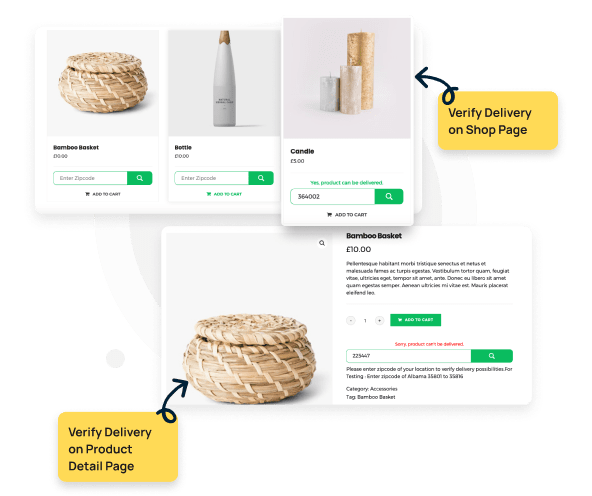
Every major e-commerce website in the world offers its customers this functionality. They can go to their product page and see a text field asking for the postcode to confirm delivery before proceeding with the order. For WooCommerce webshops, we have developed this plugin so that you can offer your customers the same comprehensive user experience.
New Link: www.woodeliveryarea.com
Premium Add-On to enhance user experience with postcode input field
The Search Input Field Add-On* for the main plugin works seamlessly and complements the function:
Become more visible on Google & Social Media?
In a free strategy consultation for data-driven online marketing, we uncover your untapped potential, review any existing ad accounts if necessary, examine your SEO ranking and visibility, and determine which strategy is appropriate for your budget and which active measures will lead to more inquiries or sales.

✅ More visibility & perception through targeted placement
✅ More visitors > prospects > customers > revenue
✅ Reach target groups scalably with SEA
✅ Act and grow sustainably with SEO
🫵 Maximum success with our hybrid strategy
💪 More than 15 years of experience across industries in over 1,000+ projects demonstrable!







The AddOn settings are as follows:
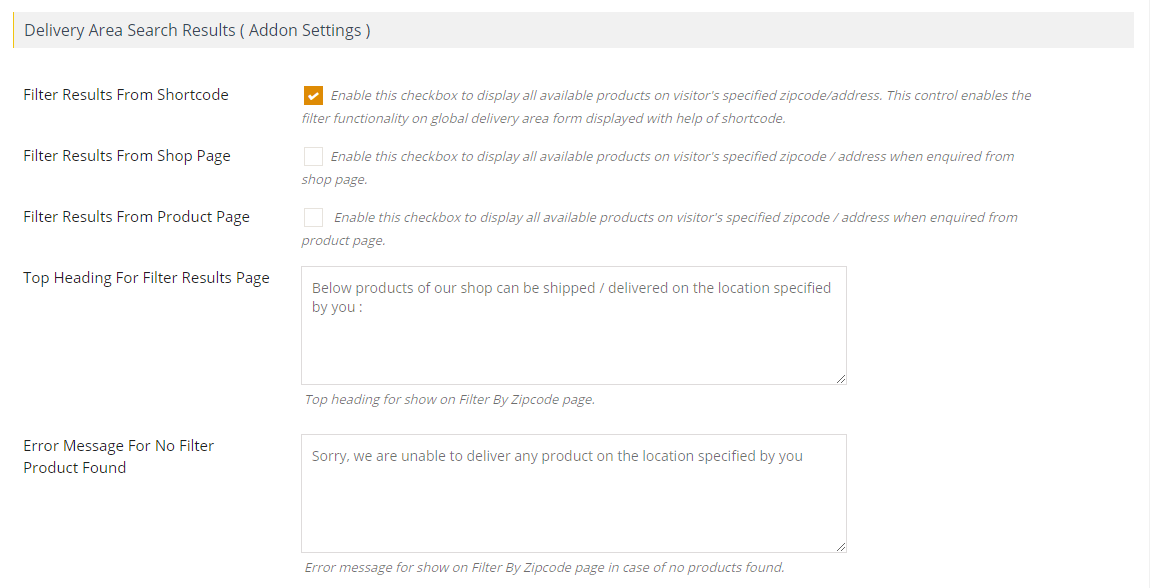
- Five modes to set the product delivery area via the backend for your Woocommerce products.
- Define the delivery area by directly specifying the postcodes.
- Define the delivery area by drawing a polygon shape on Google Map in the backend.
- Define an entire country as a delivery area for your Woocommerce store.
- Define an entire continent as a delivery area for your Woocommerce store.
- Define an entire subcontinent as a delivery area for your Woocommerce store.
- Country Restriction – A very few locations in different countries have the same postal code ranges. If your product delivery area falls under this category, you can enable the country restriction feature in the backend by specifying your country. Enabling this feature will return faster results on the frontend and avoid conflicts with other locations having the same postal code. It is not mandatory to enable this feature.
- Option to relate specific delivery areas to selected products or all products.
- Option to display the postal code search field on the product page, shop page, cart page, and checkout page.
- This plugin creates a new "Product Availability" tab on each product detail page, next to the standard tabs, where customers can view the entire product delivery area for that current product.
- The tab consists of a Google Map displaying various polygon shapes representing product delivery areas for the current product.
- UI aspects of polygon shapes can be managed from the backend. Such as background color, color, stroke color, etc. The administrator can change the appearance of polygons in the backend.
- The tab also includes a postal code list for the current product for which the product is available for shipping.
- Automatic recommendation on the Google Map product availability for easy use to quickly find a location.
- The settings for the product availability map can be fully managed from the backend.
- Apply Snazzy Maps styles to your product availability map to improve customer engagement.
- Ability to display product availability status for each product individually on the checkout page, based on the postcode entered in the standard Woo-Commerce checkout form. This allows the customer to decide before ordering.
- Ability to stop the standard checkout process if one of the products added to the cart is not available for shipping to the location where the user has entered the postcode in the Woo-Commerce checkout form. This feature allows the administrator to stop accepting incorrect orders. The restriction is applied during the standard checkout process and the user is shown a proper notification of what has happened.
- Manage errors/notifications via the backend.
- UI aspects of the product availability form can be managed via the backend, including background color, color, etc.
- Easy-to-use backend interface.
- Maps are 100% responsive and tested on real devices.
- Extensible Woo Commerce extension that provides some hooks to change the default functionality.
New link: www.woodeliveryarea.com






 DE
DE

