


Enable your customer to calculate shipping before adding the product to the cart with the available shipping methods. A product page shipping calculator for WooCommerce is particularly useful for displaying the correct shipping costs directly on the product page. Shipping by weight can also be taken into account here. Below in the article, you will find an overview of the setting options and a preview of how the shipping calculator on the product page could look for you (completely customizable).
WooCommerce Shipping Calculator on the Product Page – Calculate Shipping Costs on Product Page
Check the available shipping methods for your region = ideal as solutions for delivery services (regional delivery) like pizza delivery, sushi delivery service etc. through simple postcode entry. The customer thus knows directly whether the product can be delivered to this location or not, so they don’t have to go to the checkout page to find out that you don’t deliver to that location = better usability.
The plugin displays the available shipping method on the product page, even if the customer has not added their address. The plugin displays the method based on the shipping zone assigned to the customer by WooCommerce. The customer can change the delivery location and see the changed costs and the shipping method available for that specific location.
This plugin displays shipping costs on the product page, which helps customers check the product’s shipping costs on the product page itself, instead of having to go to the cart page first.
You can still set WooCommerce shipping costs globally in the shipping zones settings as before. Nothing changes there. 😉
Note: As always, the plugin can also be completely translated into German with Loco Translate.
Features & Properties of the plugin for displaying and calculating shipping costs directly on the product page:
- Enable your customer to calculate shipping costs on the product page.
- Add the shipping calculator anywhere on the website using the shipping calculator shortcode.
- Calculate shipping costs with Ajax (directly without reloading the page!)
- Option to add a custom shipping message.
- Option to display the shipping method in radio or dropdown (selection box)
- Option to display all available shipping methods with price simultaneously
- Option to hide the shipping cost calculator for specific products
- Option to display shipping costs before or after the shipping form
- Unlimited color options for buttons and more..
- Bulk edit option to hide the shipping calculator for multiple products
- Quick edit option to hide the shipping calculator for specific products
- Custom CSS option for individual look and styles
- No code programming required.
- It supports WPML and Polylang
Preview of shipping cost calculation on the product page as an example:


Become more visible on Google & Social Media?
In a free strategy consultation for data-driven online marketing, we uncover your untapped potential, review any existing ad accounts if necessary, examine your SEO ranking and visibility, and determine which strategy is appropriate for your budget and which active measures will lead to more inquiries or sales.

✅ More visibility & perception through targeted placement
✅ More visitors > prospects > customers > revenue
✅ Reach target groups scalably with SEA
✅ Act and grow sustainably with SEO
🫵 Maximum success with our hybrid strategy
💪 More than 15 years of experience across industries in over 1,000+ projects demonstrable!







Option per product to disable shipping cost calculation on the product page:

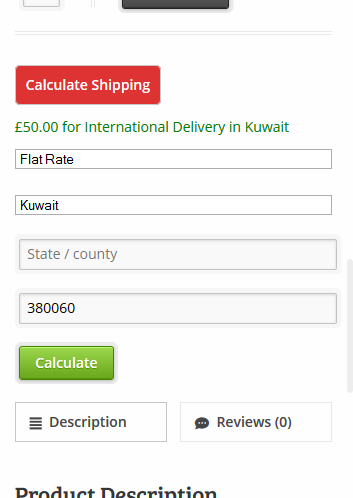
Mobile view of shipping costs on the product page with calculation function:

Florian Ibe
CEO & Marketing Consultant
Your contact person: Florian Ibe





 DE
DE

