

Recurring payments, subscriptions and customer loyalty over a longer period are becoming increasingly popular, and online retailers and shops often promise discounts or benefits as a result. An subscription model or subscription products with a subscription function in a WooCommerce shop are possible using a WooCommerce subscription plugin and offer the best solution and option for automatically collecting payments monthly, quarterly or annually via various payment providers, and thus for offering a recurring service or a product (physical or digital) with a term.
WooCommerce Subscription Plugin (Recurring Payments Solution - Monthly, Quarterly, Annually)
In this article, we present 3 solutions in the form of subscription plugins, which are well suited for both physical and digital products. The features are generally compatible with all themes and other plugins. However, testing is also the best option here, as incompatibilities can occur, but these can be resolved through minor adjustments. As always, all presented plugins can be easily translated into German with Loco Translate.
UPDATE: Since April 2022 it is even better to use with various new add-ons! More information below in the article.
Tip for a payment provider:
WooCommerce subscriptions with WooCommerce Subscriptions*
The market leader and arguably the "best" subscription plugin for the WooCommerce store. Capture remaining revenue with recurring payments for any interval and period.
Can you guarantee how much money your business will earn this month? If you offer subscription-based products (WooCommerce subscription products), you can do exactly that.
With WooCommerce Subscriptions, you can create and manage products with recurring payments – payments that help you generate recurring revenue you can rely on.
With the plugin and the WooCommerce subscription features, you can introduce a variety of subscriptions for physical or virtual products and services. Create clubs of the month, weekly service subscriptions, or even annual software billing packages. Add sign-up fees, offer free trials, or set expiration dates.
With a subscription-based model, you can generate more recurring revenue – and all you need to do is ship the orders.
Become more visible on Google & Social Media?
In a free strategy consultation for data-driven online marketing, we uncover your untapped potential, review any existing ad accounts if necessary, examine your SEO ranking and visibility, and determine which strategy is appropriate for your budget and which active measures will lead to more inquiries or sales.

✅ More visibility & perception through targeted placement
✅ More visitors > prospects > customers > revenue
✅ Reach target groups scalably with SEA
✅ Act and grow sustainably with SEO
🫵 Maximum success with our hybrid strategy
💪 More than 15 years of experience across industries in over 1,000+ projects demonstrable!







Extension: WooCommerce Subscription Downloads (click here)*: Offer your subscribers additional downloads via downloadable products listed in your shop.
Why use WooCommerce Subscriptions?
- Multiple billing plans are available to meet your business requirements
- Integration with over 25 payment gateways for automatically recurring payments
- Supports manual renewal payments via any WooCommerce payment gateway as well as automatic email invoices and receipts
- Supports automatic billing of failed subscription payments so you never lose revenue
- Give subscribers the ability to manage their own plan, including upgrade or downgrade, without having to wait for you
- Integrated renewal notifications and automatic emails inform you – and your customers – when subscription payments have been processed, so there are no surprises.
- With detailed reports you can track recurring revenue, the number of active subscribers, and more
Features for WooCommerce subscriptions
Free trials and sign-up fees
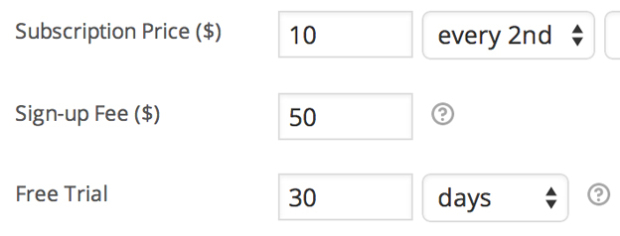
Load an initial amount to cover customer setup costs, or allow customers to try it before purchase by adding sign-up fees and free trials to each subscription product.
Subscription management
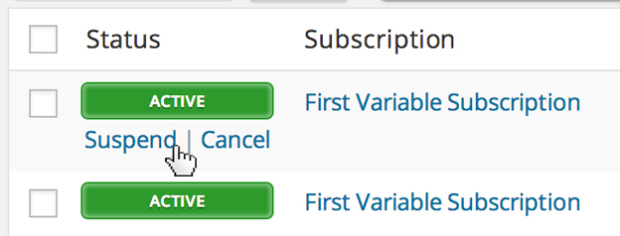
Store owners receive comprehensive subscription management via the screen WooCommerce > Edit Subscription Management. You can suspend or cancel a subscription, change the trial expiration, add items, shipping, fees or taxes to the subscription, or change the recurring amount for future payments.
Synchronized Payments
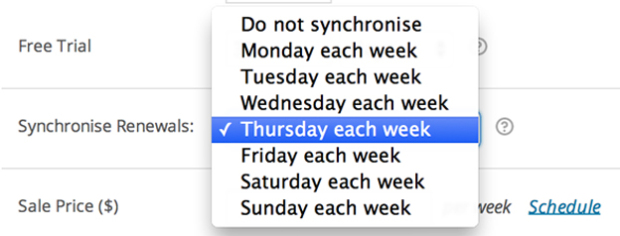
If you only want to ship on certain days of the month or want to align all customers to the same annual membership term, you can use the renewal synchronization feature of WooCommerce Subscriptions. You can even prorate the first payment of a synchronized subscription purchase .
Flexible Product Options
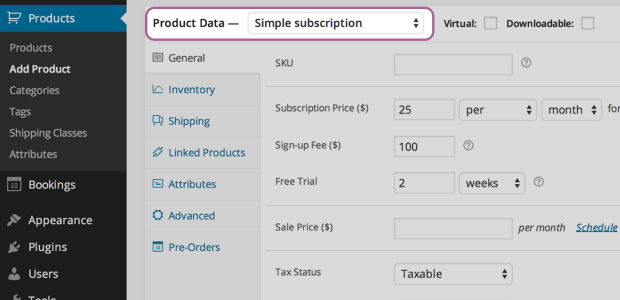
When you create a subscription product (subscription products), you can make the product available for virtual or physical download, charge weekly, monthly, or annual renewal payments, limit the product to one per customer, and even charge shipping only on the initial order.
Subscription Vouchers
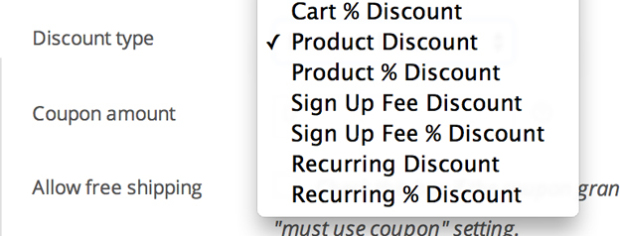
Offer customers a discount on their monthly payments or only on the registration fee. Subscriptions include both recurring discount coupons and registration fee coupons.
Variable subscriptions
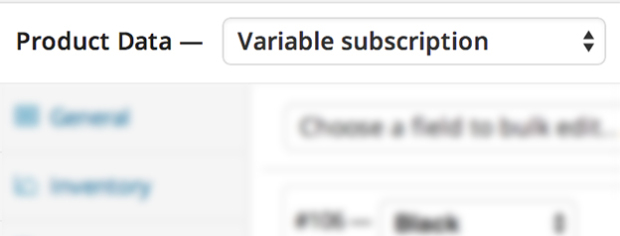
Create products with variable subscription and allow your customers to choose a subscription that meets their needs. You can even allow customers to choose their own billing plan.
Subscriber Account Management
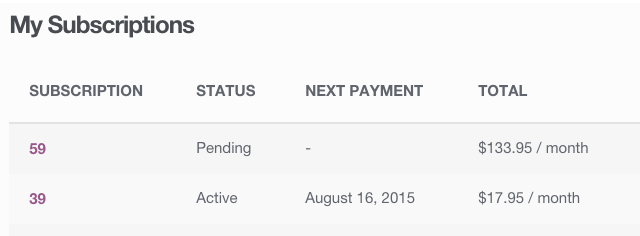
Your customers can also manage their own subscriptions. On the page My Account > Subscription subscribers can pause or cancel a subscription, change the delivery address or payment method for future renewals, and update or downgrade their subscription.
Upgrades / Downgrades
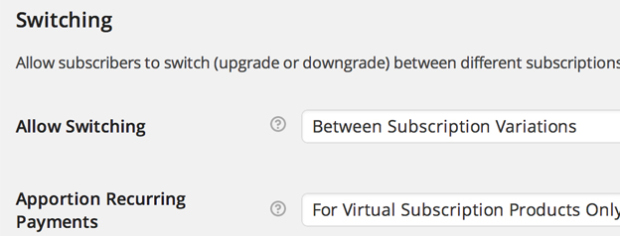
Allow customers to upgrade, downgrade, or cross-grade between different subscription products. With flexible proration options for the recurring amount, signup fee, and length, you can also adjust the cost of switching to a new subscription product to meet your business requirements.
Multiple subscriptions
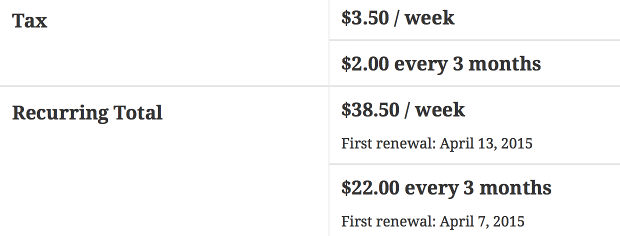
Your customers can also purchase different subscription products in the same transaction. Subscriptions group the products to reduce payment gateway fees and logistics costs for future renewals.
Customer emails
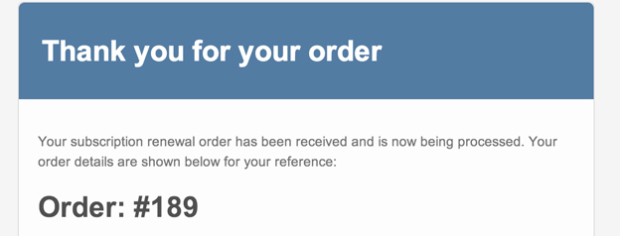
Automatically notify customers when a payment to renew the subscription is processed, a subscription is cancelled, or a subscription expires using the integrated subscription emails.
Capture more residual revenue from existing subscriptions
Whether your goal is to send loyal customers a surprise package of products every month or to charge them for a personalized service provided by your small business, WooCommerce Subscriptions can make capturing these important recurring revenues stress-free.
You can track how many subscribers you have, when they are billed, and how much revenue you generate. This way, you always know how much revenue your business can count on as you continue to grow.
Subscription function for downloads (files)

WooCommerce Subscription Downloads adds a new field to your downloadable products in the metafield Product Data. Once you have set up your subscription product, the subscription can be searched via the new Subscription field that appears when adding your downloadable product.
Update access permissions easily
When you update the files available for a downloadable product, your subscribers automatically receive the update.
Subscriber view
Your subscribers will find their downloads on their My Account >> Downloads page.

How to get started with the WooCommerce Subscriptions plugin:
- Purchase this extension
- Download the plugin in your WooCommerce store, install it and activate it
- Set up your first subscription-based product or service and take it live
- Read our detailed documentation to customize your subscription products, renewal options, and more
- Sit back and enjoy more revenue with WooCommerce Shop!
Also a useful add-on for the subscription function:
AddOn: Buy Once or Subscribe on ONE Product Page
With this powerful extension for WooCommerce subscriptions, make all your existing products available for subscription purchase.
Offer any of your products as subscriptions or for one-time purchase
With this extension, you can convert all your standalone products into subscription packages. This is an add-on for the WooCommerce Subscription plugin. For this plugin to work, please first purchase and install the WooCommerce Subscription plugin* and then the AddOn (click here)*.
Show them how much they can save through a subscription instead of making a one-time purchase.
- Offer a discount to entice customers to subscribe to a subscription instead of purchasing it once
- Configure subscription discounts based on subscription frequency
- Simplify your SKU management
Sell the same SKU both as a one-time product and as a subscription. This saves customers money while increasing your recurring revenue. Create these benefits without adding additional SKUs.
Combine extensions and offer additional exceptional features
Boost your recurring e-commerce revenue even more when you use "Buy Once" or "Subscribe" for WooCommerce Subscriptions together with the Self-Service Dashboard for WooCommerce Subscriptions. This is the only extension of this type that is compatible with the Self-Service Dashboard.
By adding the self-service dashboard to your online store, you reduce support tickets related to adjusting your customers' subscriptions. You also reduce churn and increase your customer lifetime value.
- Enable your customers to purchase a simple or variable product on shop, category, or product pagespurchase once or subscribe.

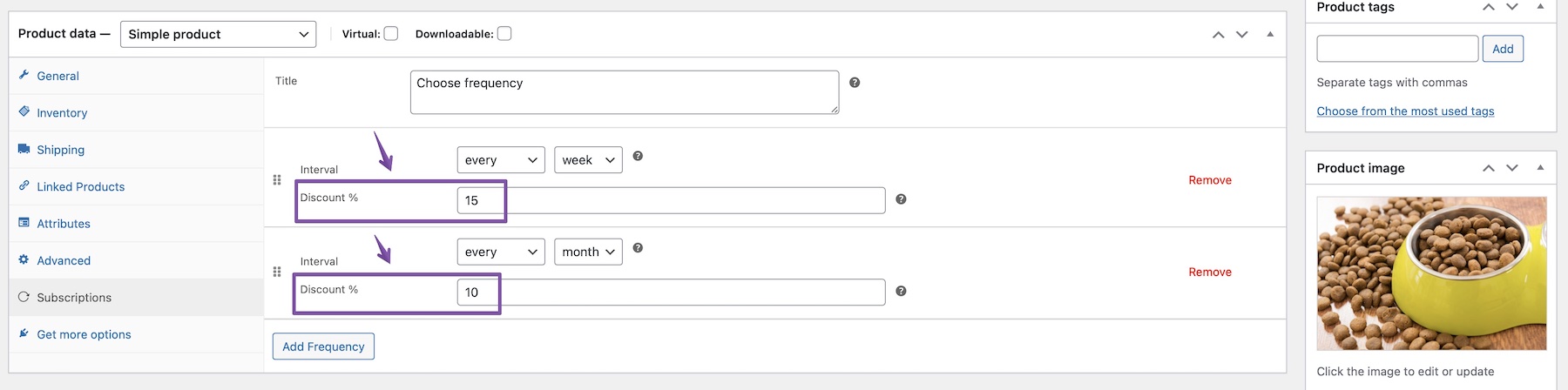
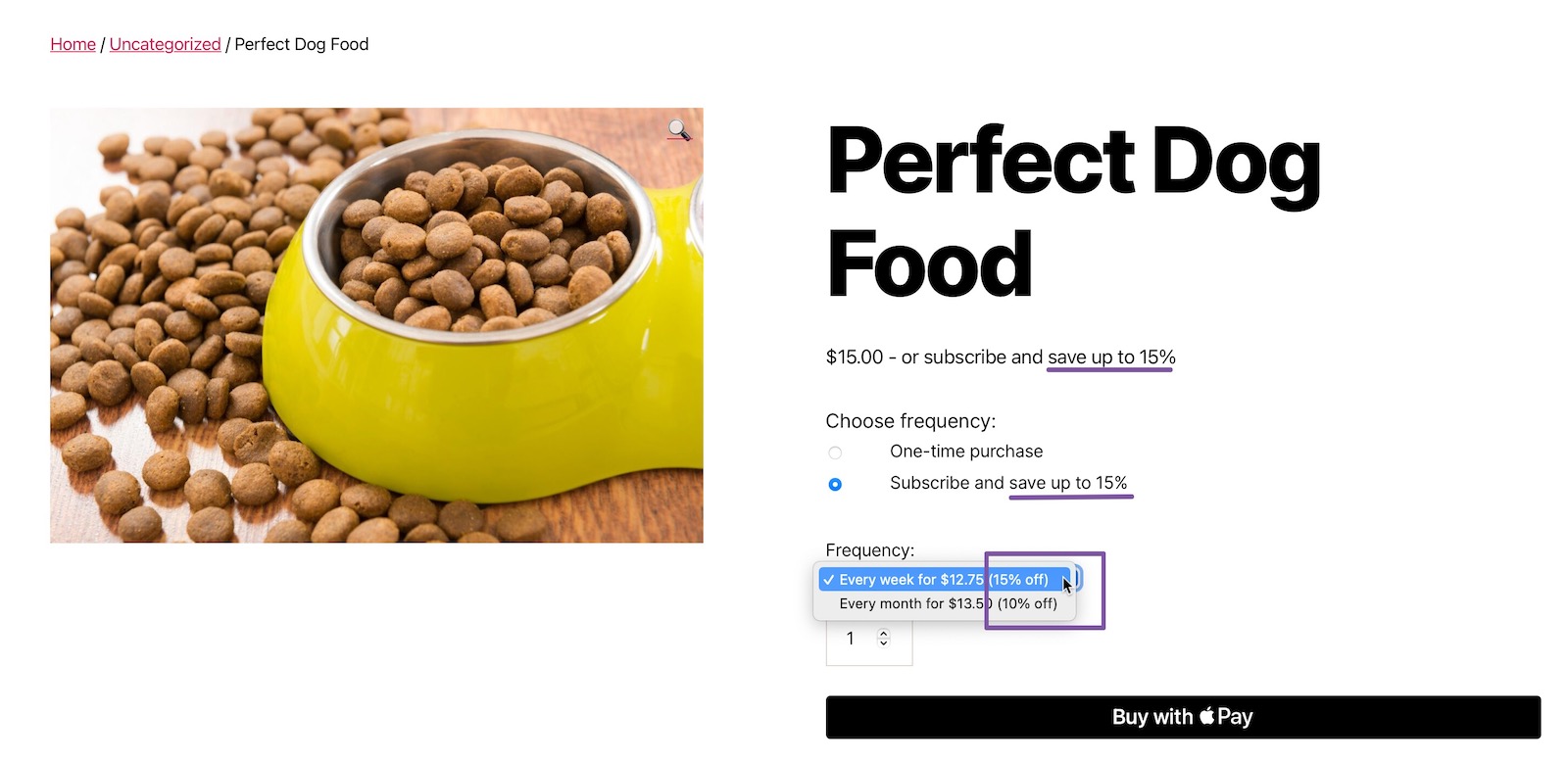
Buy once or subscribe to a Simple product 
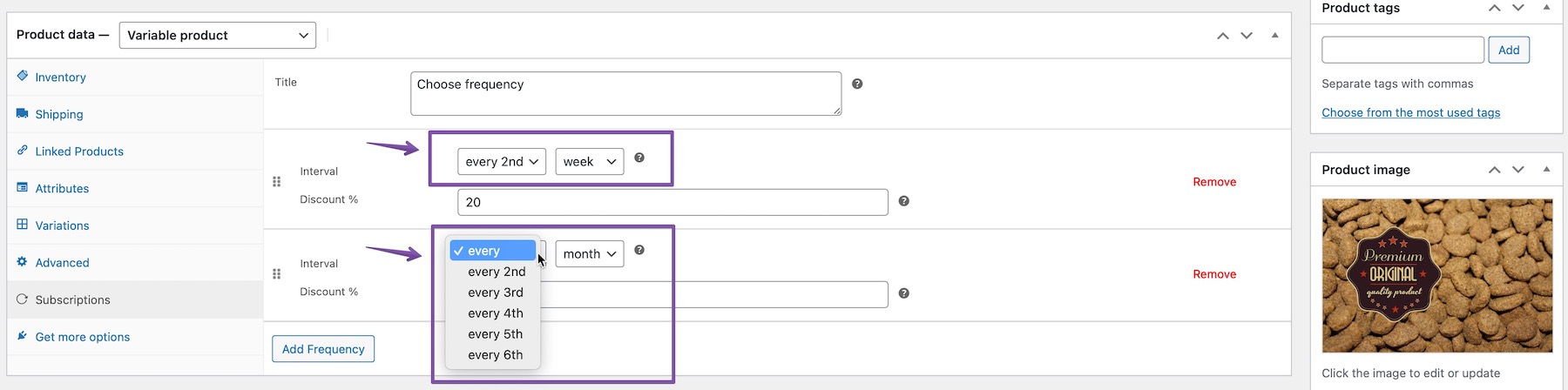
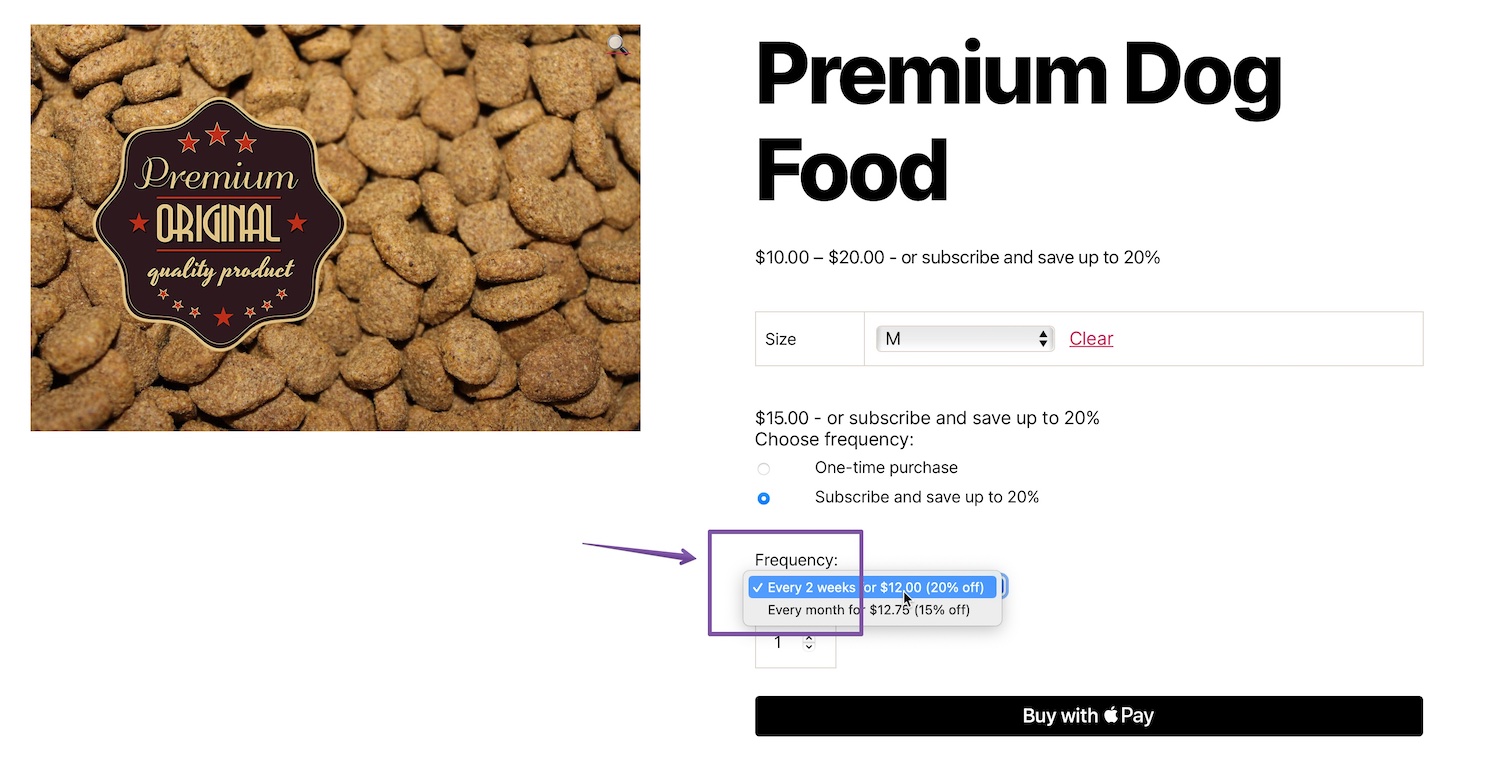
Purchase once or subscribe to a variable product - Define subscription frequencies: You can further customize subscriptions by adding multiple frequencies from the admin area and different discounts to each frequency.

Set frequency in backend 
Display frequency in frontend - Add discounts for individual frequencies: For selected products that are to be sold as a subscription, you can add a discount or not add one. Adding a discount will generally encourage customers to purchase regularly with the subscription option. In the backend, you only add the percentage and the extension calculates the final price, which is automatically applied to each variant for variable products.
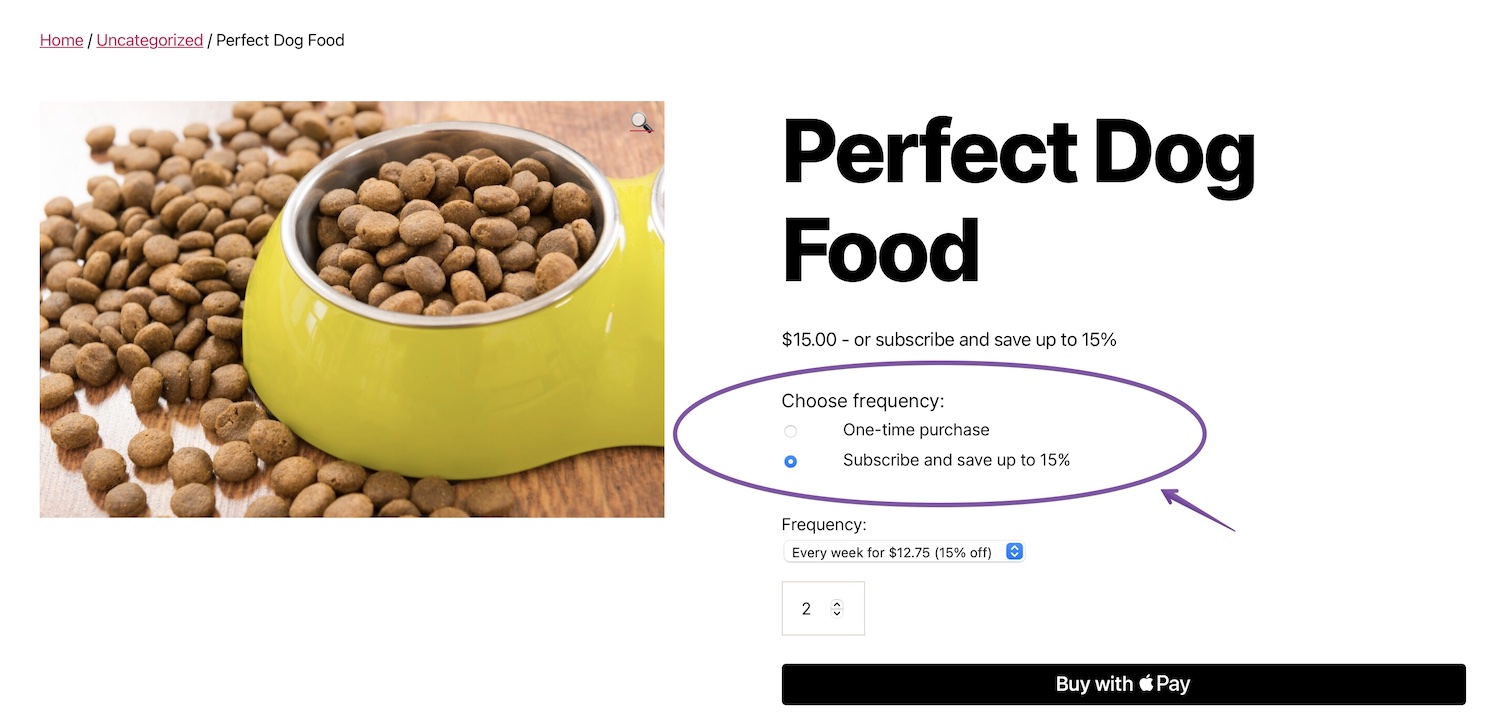
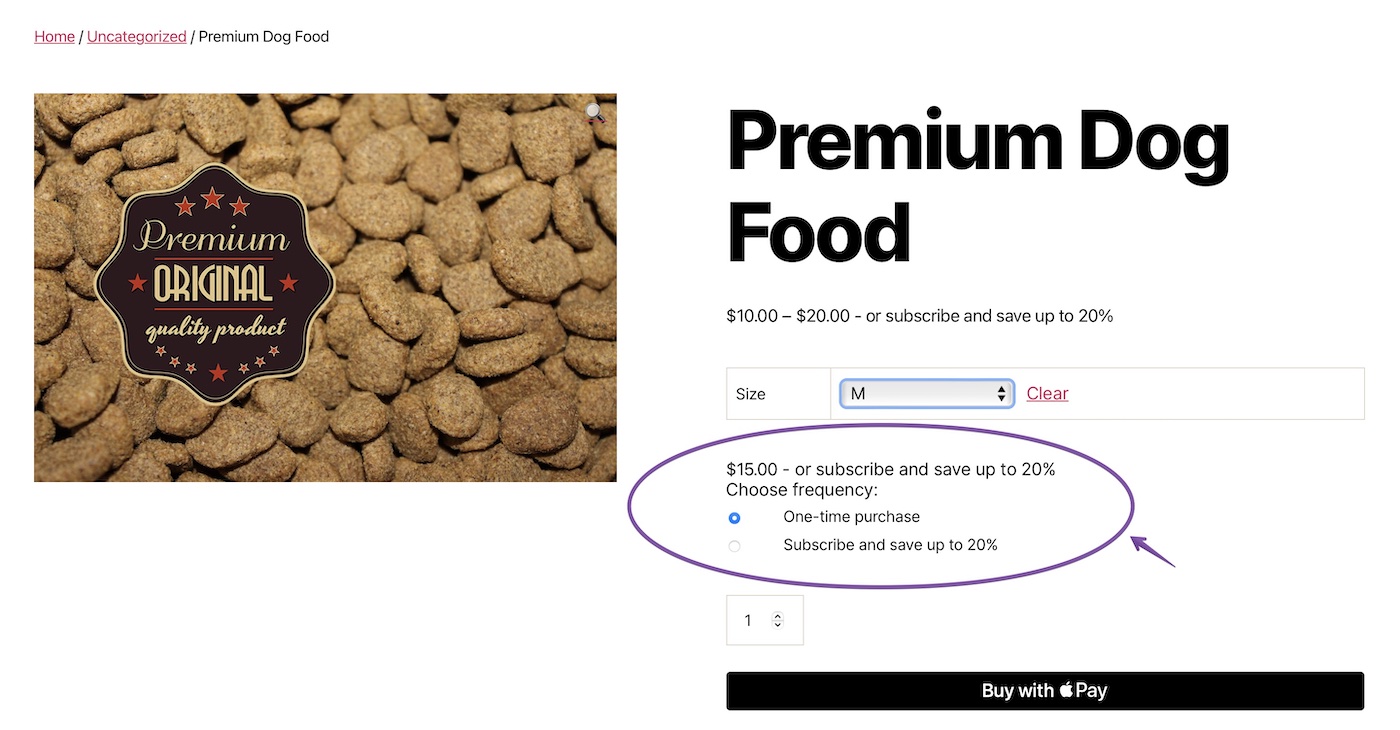
- Purchase and install the WooCommerce subscription plugin*
- Purchase, download and install additionally the plugin: "Buy Once or Subscribe for WooCommerce Subscriptions" (click here).
- Create a new, simple or variable product, or select an existing product that you want to make available by subscription.
- Go to Product Data > Subscriptions (see screenshot below)
- Select the title for your call-to-action
- Click Add Frequency and select the interval and discount
- Add additional frequencies as needed
- Publish
- Watch how your recurring revenue grows now!
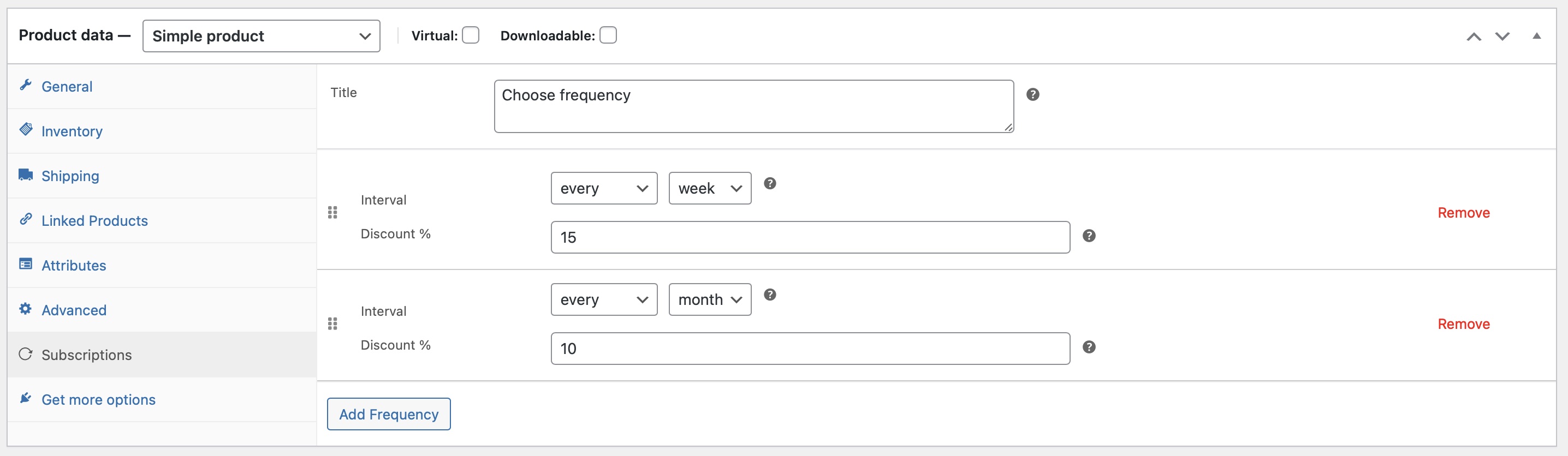
You can find further information in the documentation.
Customers can purchase products they like either once or as a subscription, which makes their lives easier and increases your recurring, predictable revenue. Additionally, purchasing a product as a subscription is more attractive to customers because you can offer them the product at a reduced price.
AddOn: Custom Start Date for WooCommerce Subscriptions
Customize subscription start dates
Have you always wanted to sell a subscription but also book it for a later start? Now you can!
Choose a start date or allow your customers to choose their own with the Custom Start Date for WooCommerce Subscriptions plugin.
Set specific start dates
Set a specific date to start all subscriptions or just one product. You can receive your payments in advance and start subscriptions whenever you want.

This is how it looks on the product page:

Set a fixed delay time
Do you need a grace period or preparation time before a subscription begins? Set up a delay of days, weeks, or months between the first payment and the start of the subscription.

This is how it looks on the product page:
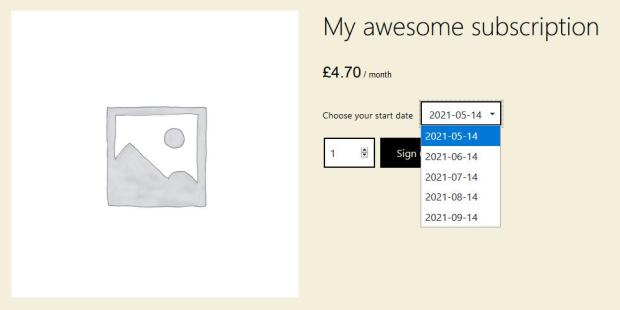
Let your customers choose a specific date to start their subscriptions
Would you like to let your customers select the exact day they want to start their subscription? You can do it with this plugin. Your customers can book and start their subscription anytime when they are ready.

This is how it looks on the product page:
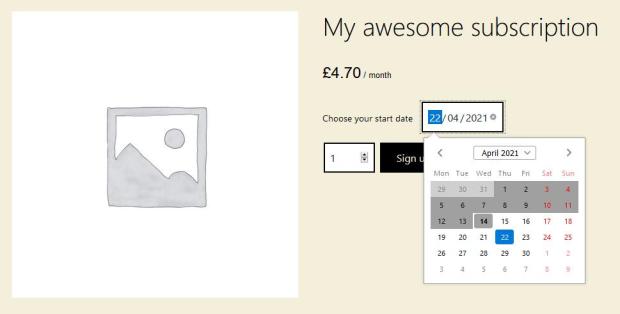
Shopping cart & checkout
Your customers see the future start date and the updated renewal date in their cart and at checkout

How it works with custom start date
- Set up a custom date in the product options or give your customer the option to choose a start date.
- After paying and checkout (for the first period and others for sign-up fees), the subscription is created and scheduled to start on the custom date. Your customer is neither active nor has access to your services until the start date.
- The subscription begins on the selected start date, which is set in the future, and all services are available from this custom date.
- Future payments are automatically scheduled according to the custom start date.
Why do you need it?
- Offer subscriptions as gifts for special occasions. Gift subscriptions can be purchased in advance and only begin at the time chosen by the gift giver.
- Starts subscriptions on a fixed date. It is ideal for a situation like a course or school year. Allow enrollment throughout the year and align their tuition fees with the start of the semester.
- Offer a seasonal service or product for sale every season. Subscriptions only start during the special season. You can market them year-round and let customers secure their subscriptions in advance.
FAQ for custom start date
What happens between the purchase date and the start of the subscription?
The subscription is scheduled; the customer has no access to products or services available to active members/subscribers until the start date. Then the subscription is automatically activated.
Can a customer purchase multiple subscriptions with different start dates?
Yes. The plugin groups subscriptions based on their start dates and billing periods. Each product with different start dates is considered a single subscription and managed separately, but they can be purchased together in one checkout.
Does it work with all subscriptions?
At the moment it works with simple subscriptions created with the WooCommerce Subscriptions plugin. We plan to expand it to work with additional subscription plugins soon
YITH WooCommerce Subscription*
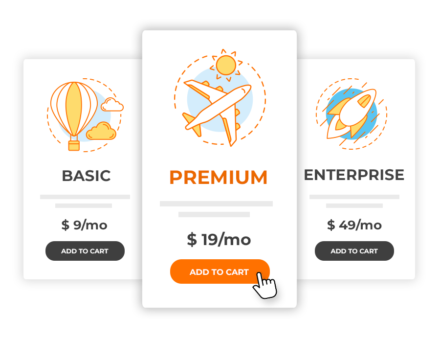
Sell subscription products with a subscription in your WooCommerce e-commerce shop and bind your customers in the medium and long term.
How you can benefit from the subscription features:
- Your company will benefit from the most powerful subscription system to achieve more profitable recurring results.
- You will build loyalty among a niche of customers who renew their subscription monthly and earn income automatically and guaranteed.
- You can set lower prices for expensive products and services and enable more customers to make purchases.
- You can offer your customers a trial period and let them test your products so you can drive them to purchase. You can increase revenue by 56% because users are more likely to buy after becoming familiar with a product or service.
- Create a subscription for simple, virtual, or downloadable products
- Support for PayPal Standard for automatic payments
- Choose how the subscription should be renewed (daily or monthly).
- Block subscription renewal (PayPal only)
- Administrators can delete a subscription
- All features of the free version
- Pay for subscriptions with PayPal or credit card (a complete list of supported gateways can be found on this page.)
- Enable product variants as subscription-based
- Users can pause a subscription for a specific number of times (set by the administrator) and resume it later: the expiration date will be updated accordingly
- Summarize subscription information on one page with:
- Start date
- Expiration date
- Details of subscribed product
- Billing and shipping information
- Orders linked to the subscription
- Offer users a trial phase before subscribing to a plan
- Ask for a registration fee when purchasing a subscription
- Choose whether users are allowed to access their subscription content even after the expiration date and while you are waiting for their payment
- Block access to content on the expiration date without deleting the subscription
- Users find subscription information on the "My Account" page
- Allow users to re-subscribe to a plan from the My Account page and receive the same terms as the expired or cancelled plan without paying the sign-up fee again or using the trial period again. New
- Synchronize all subscription payments with a specific day of the week, month, or year. New
- Organize and plan your subscription-based product deliveries and decide whether you want to synchronize all deliveries on a specific day (every Monday, every 1st of the month, etc.). New
- Automatic sending of an email under the following conditions:
- The subscription plan expires
- Payment has been processed
- Subscription plan has been cancelled
- The subscription plan has been paused
- The subscription plan has been resumed
- 2 additional coupon types:
- Voucher for registration fee
- Coupon for the recurring fee
- Upgrade or downgrade a subscription plan (configurable only in variable products)
- Customize the label of the "Add to cart" button
- Customize text and colors for trial and signup fees.
- Display to users the total duration and total amount of a subscription
- Automatically cancel a subscription when the associated order is cancelled
- Automatically suspend a subscription if the regular payment fails
- After three failed payment attempts with Stripe or PayPal, the subscription is automatically set to "Canceling".
- Delay the automatic status switch (for the status "active", "overdue" and "suspended") by a specific number of hours
- Restrict users to only one subscription per product.
- Choose whether a user can add only one or multiple subscription products to the cart. New
- Allow users to pay shipping fees only once during the subscription period with one-time shipping
- Edit and update the billing and shipping address in the subscription details
- Allow users to edit the address for one or all subscriptions directly on the My Account page
- Edit subscription details such as renewal date, expiration date, amount, billing cycle, if used (not available with PayPal Standard).
- Allow users to force payment after the first attempt fails (Renew Now button).
- Export all your subscriptions to a CSV file.
- Automatically enable staging mode when cloning your site to avoid duplicate charges.
- A fully equipped Gutenberg block for subscriptions
- Please note the General Data Protection Regulation: Handle requests for personal data and the anonymization process, and choose how long data should be retained for accounting purposes if necessary
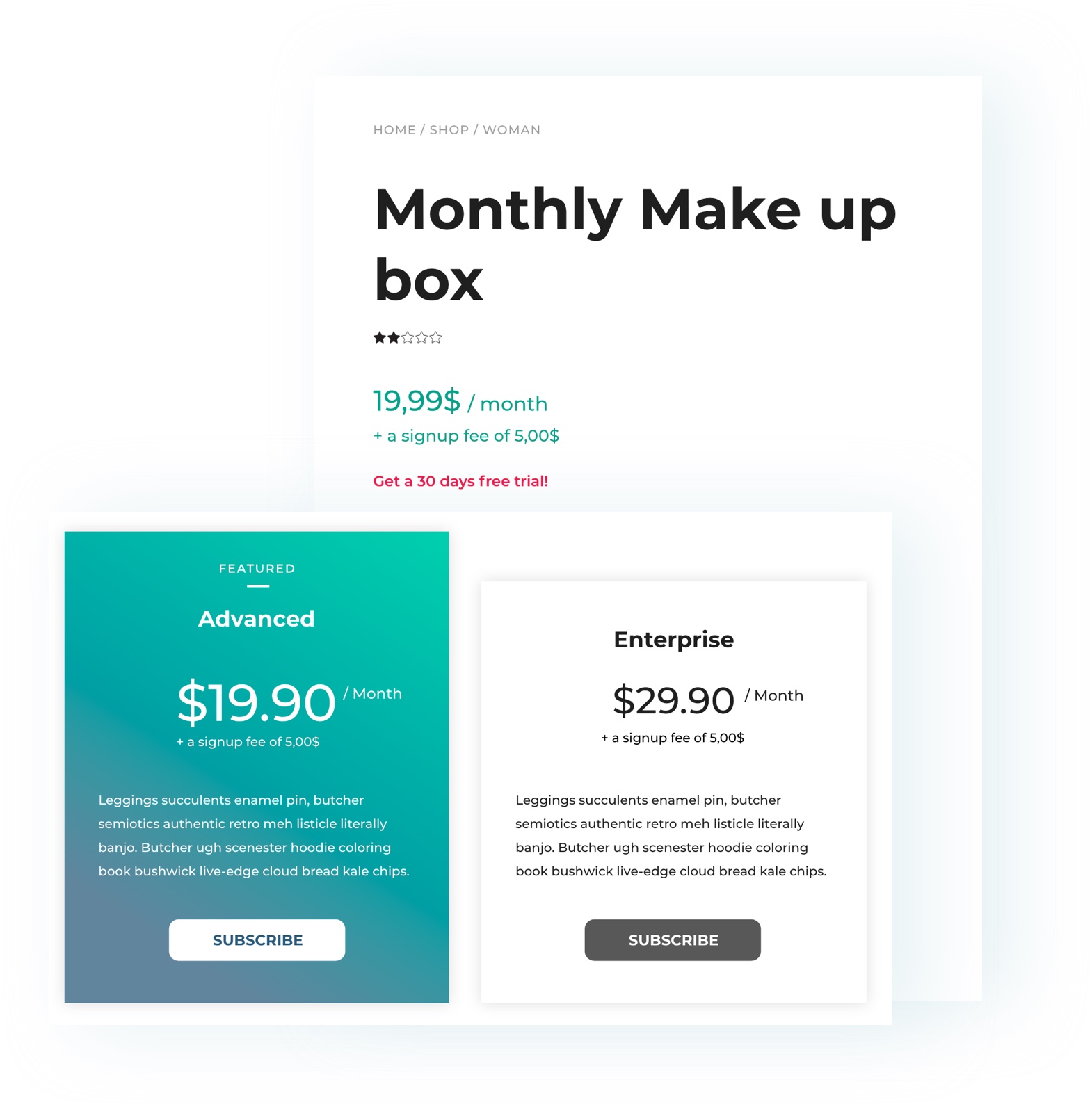
Create your recurring revenue system with products and services sold on a subscription basis
By selling products on a subscription basis, you can receive regular payments and monitor your income growth month after month.
This has become the most popular business model in recent years: users pay for a subscription – usually weekly, monthly, or annually – to use software, access training courses, read a magazine, and gain unlimited access to an archive of useful resources (e.g., the audio file library offered by Amazon Audible or websites with photo libraries) or to benefit from a hosting service. However, this also applies to fitness studios, video games, libraries, consulting or coaching services, legal advice, etc. It is a successful business model suitable for most products or services offered for sale.
Thanks to full integration with YITH WooCommerce Membership, you can create subscriptions for digital products and grant exclusive access to those who purchase them, such as video courses, monthly podcasts, etc.
In test mode, your customers can access your products for free and for a limited time: you can ask them to register in your shop (an effective way to build a good mailing list) and increase conversions: it is easier to move customers to purchase if they could test the strengths of your product themselves.
Furthermore, the reminder system included in the YITH WooCommerce Subscription prompts your customers to activate or renew their subscription.
Automatic charges for renewal orders are available with the following payment methods: PayPal Standard, YITH WooCommerce Stripe Premium, YITH WooCommerce Stripe Connect Premium, YITH PayPal Express Checkout for WooCommerce, YITH WooCommerce Account Funds Premium, and WooCommerce Stripe Payment Gateway.
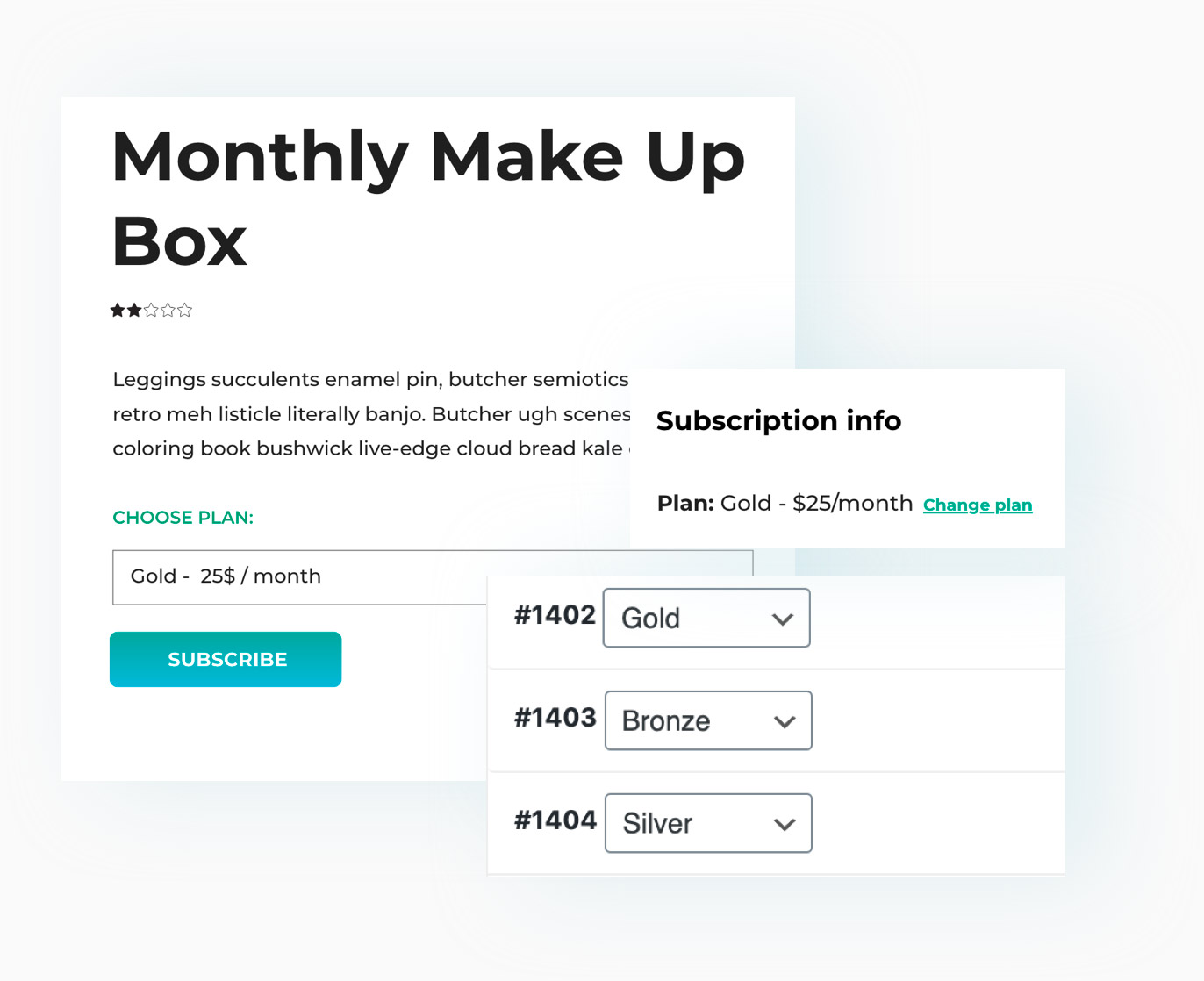
Use product variants to create different subscriptions
Use product variants to create unlimited subscription plans for your product or service and allow your users to easily upgrade and downgrade or switch from one plan to another. For example, you can set the conditions under which a customer must pay the difference between the old and new subscription.
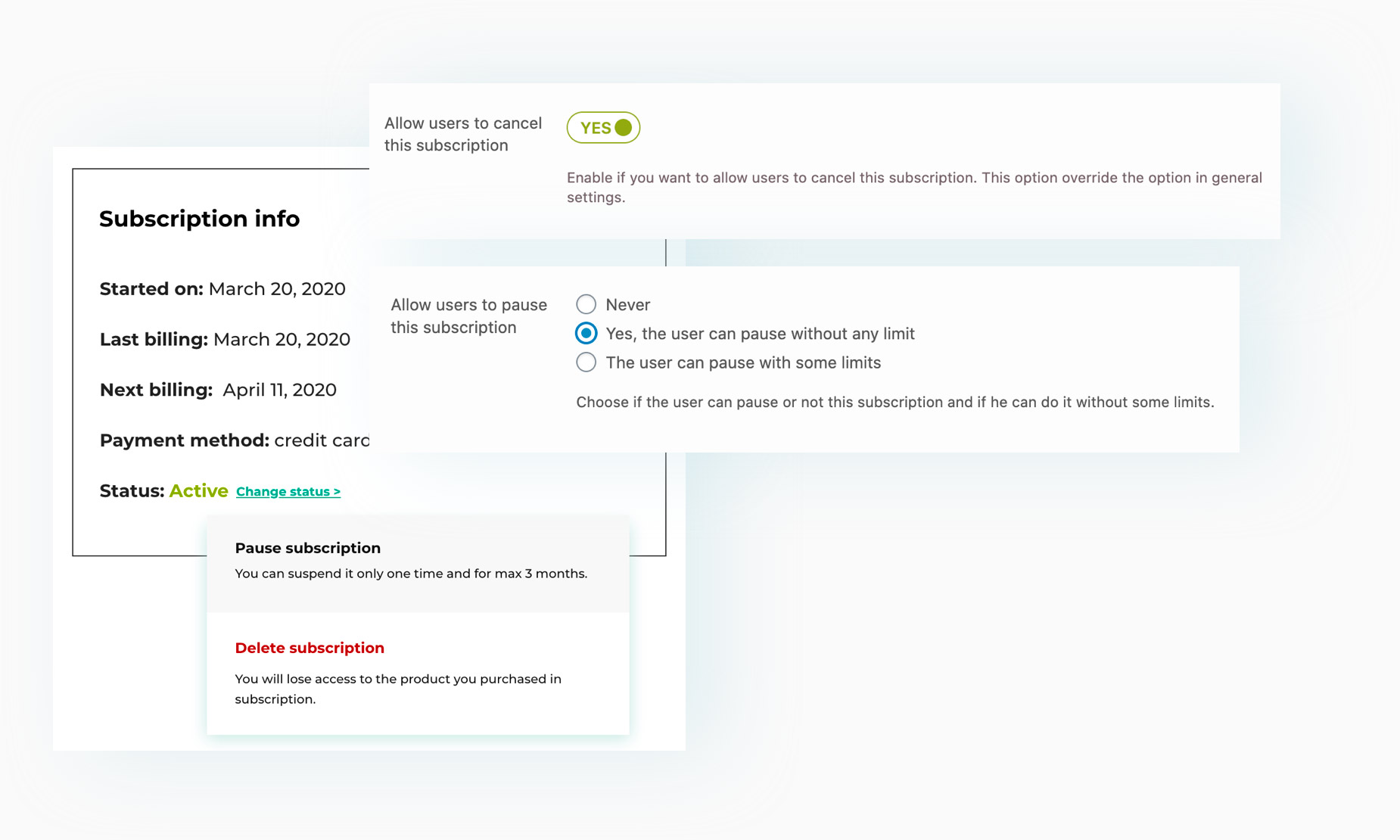
Allow users to switch, pause, or cancel the subscription
Choose whether the user wants to pause a subscription (set limits such as the maximum number of pauses or the maximum number of paused days allowed before it automatically reactivates), switch to a different plan, or cancel a subscription directly from their account.
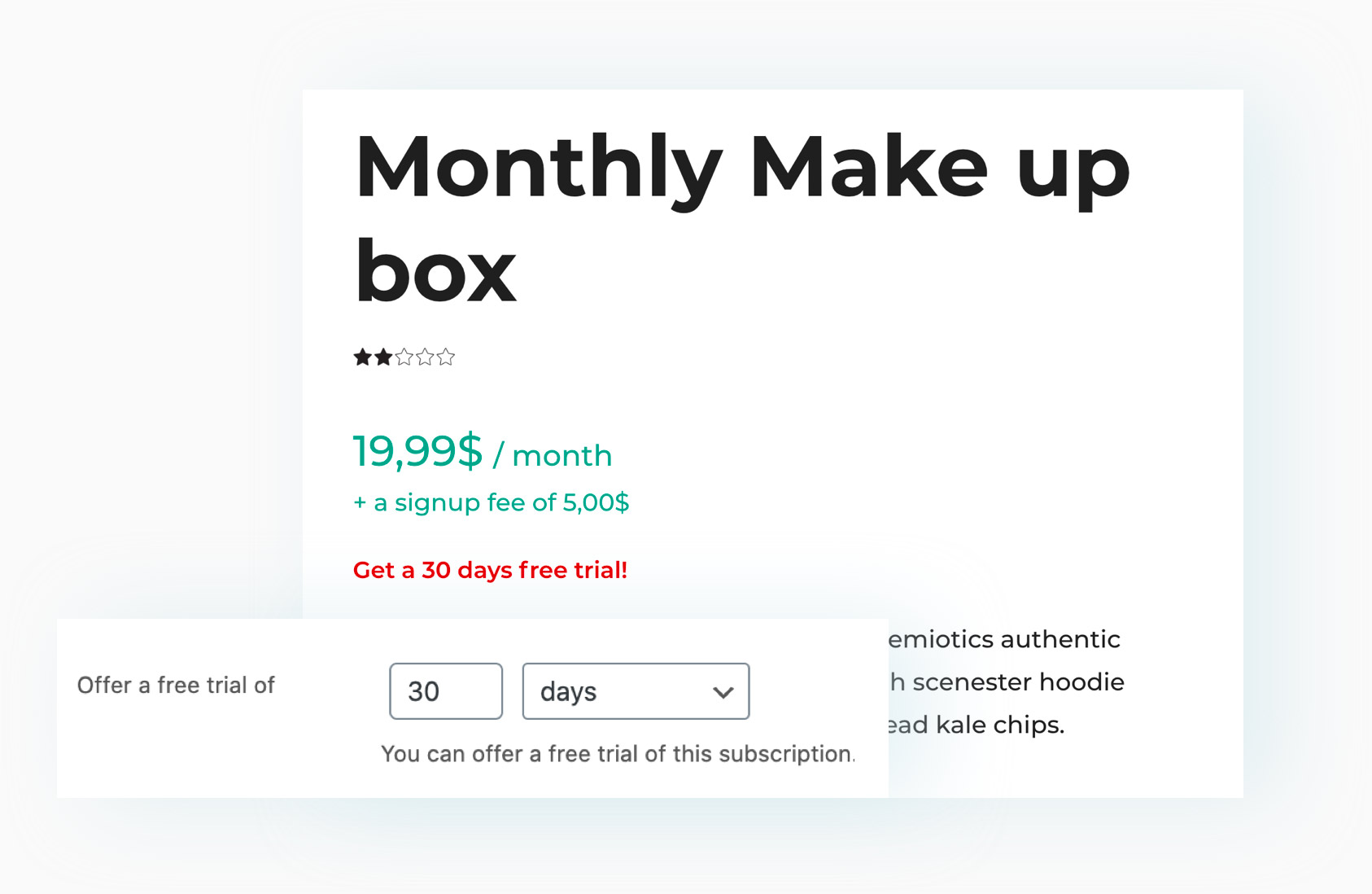
Set a free trial period to create a list of customers and move them to purchase later
A free trial period is possibly the most effective tool to encourage your users to subscribe to and test your products or services for free. After the trial period expires, you can more easily get them to make purchases and increase conversions.
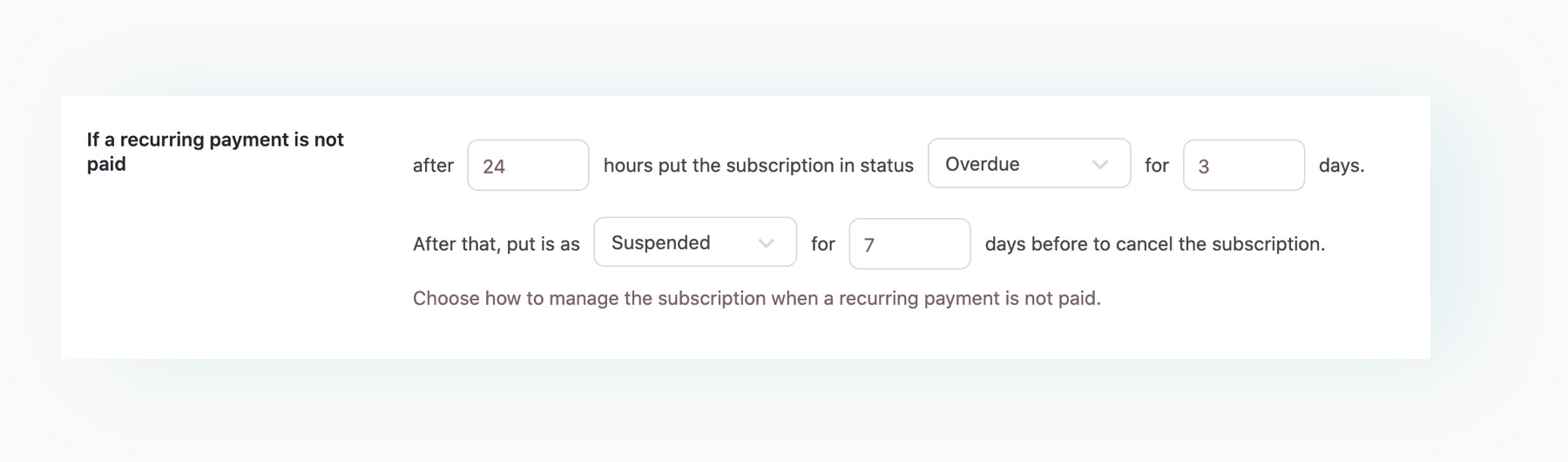
Choose how failed payments should be handled and when a subscription should be suspended or cancelled
Thanks to some advanced options, you can choose how subscriptions with failed payments should be handled: set the number of days that are allowed before the subscription is suspended, and how long it can remain suspended before it is cancelled.
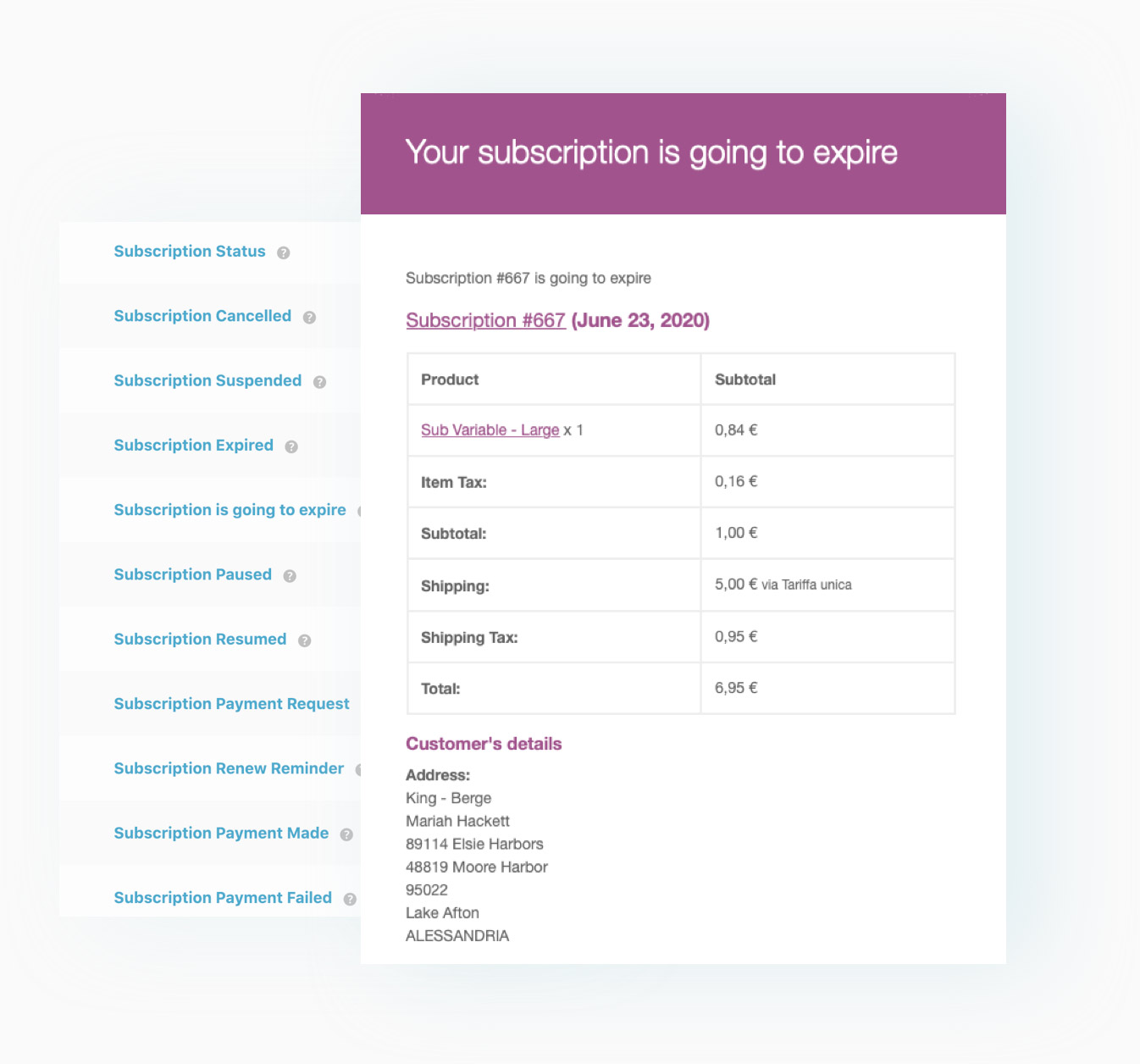
A wide range of email notifications for administrators and customers
The plugin enables sending various types of email notifications to both the administrator and subscribers. For example, the user can be notified multiple times about the expiring subscription, the expired subscription, a failed payment, or a successful payment when the subscription is paused, and so on.
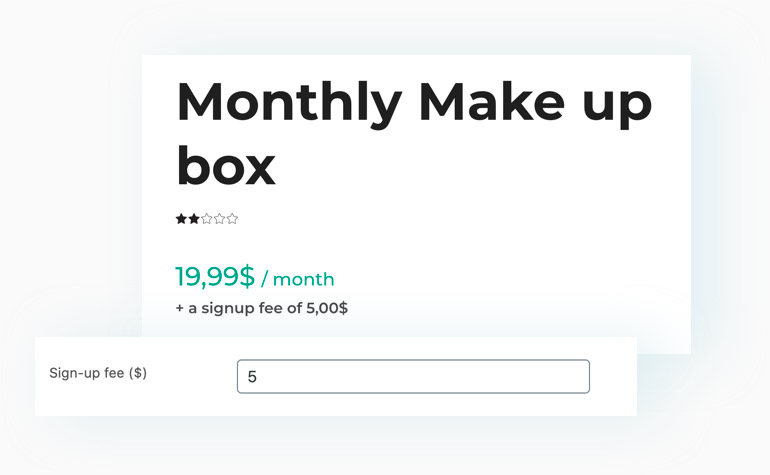
Set a sign-up fee for your subscriptions
Choose whether you want to charge a sign-up fee for your subscription-based products.
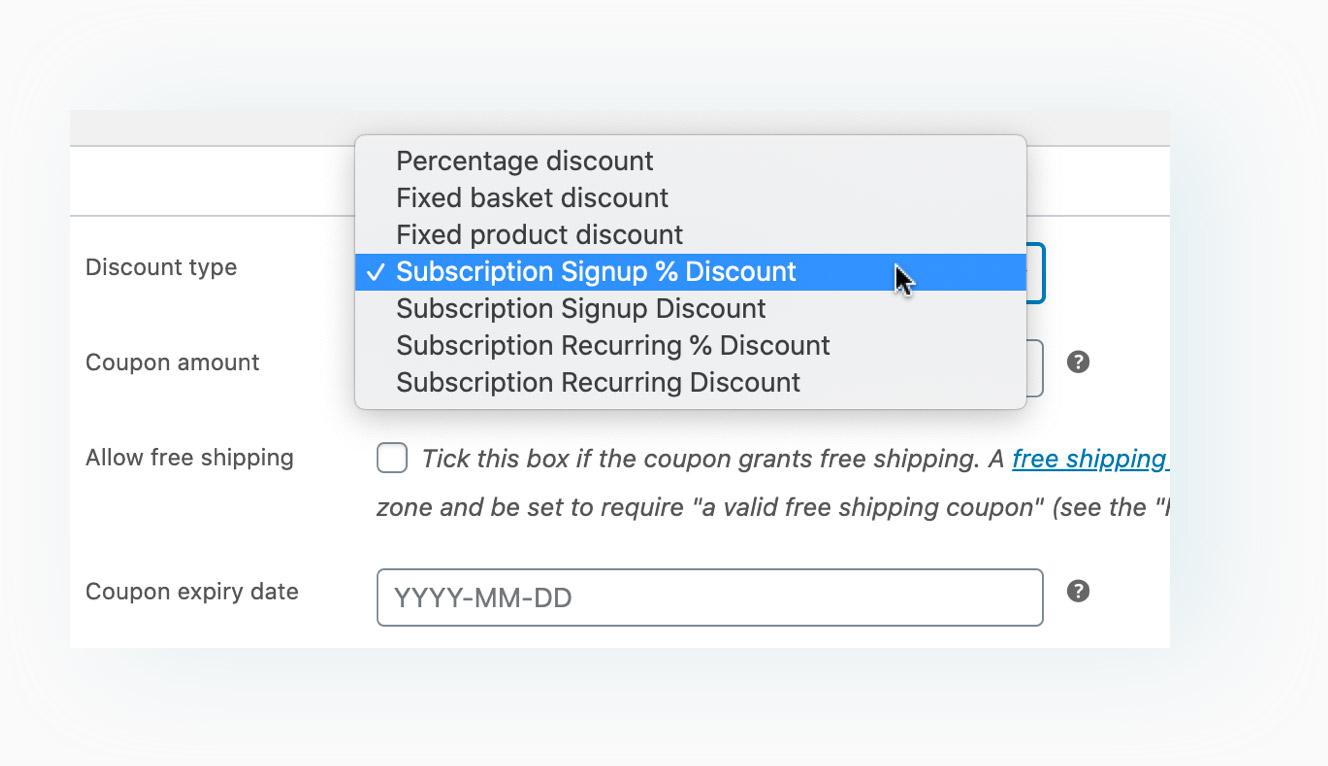
Two additional coupon types to grant discounts on the registration fee or the recurring payment price
Create a coupon to give your customers a discount on the registration fee or on the recurring fee.
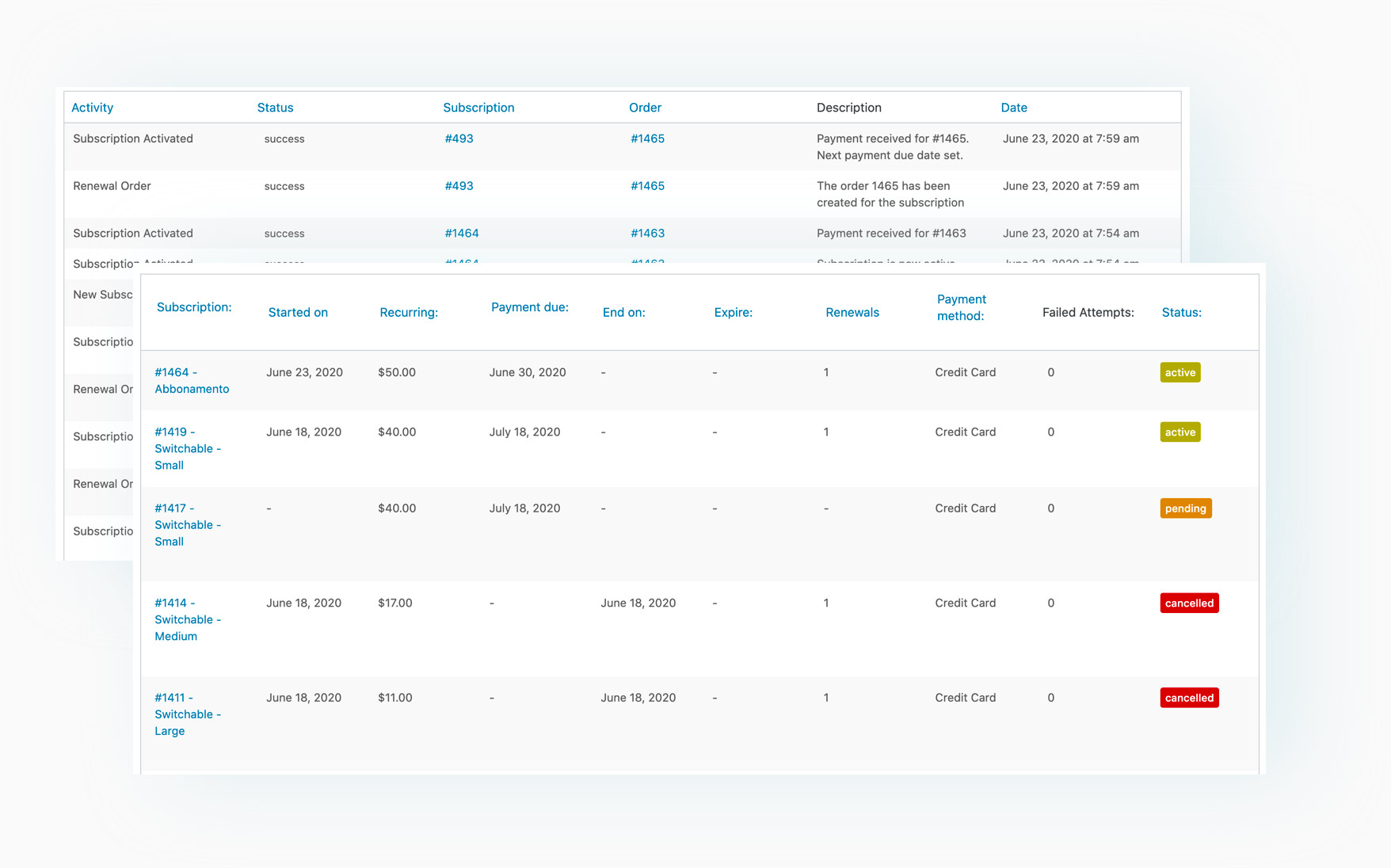
A dashboard for easy tracking of all subscriptions and subscription activities
Monitor the status of each subscription (start and end date, next payment date, payment amount, etc.) via the integrated dashboard.
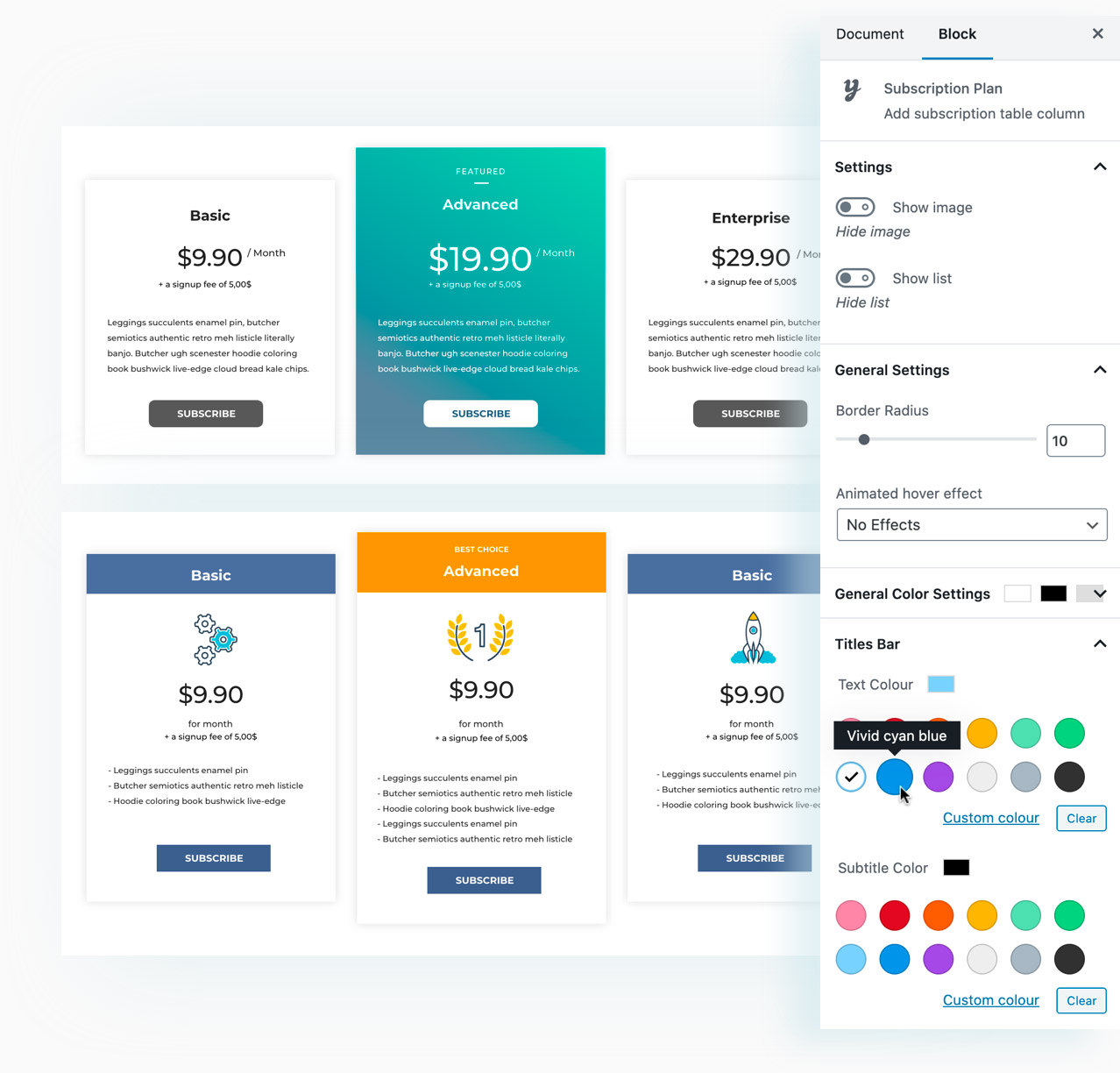
A Gutenberg block for easily creating and displaying subscription modules in your shop
If you use Gutenberg, you can find the Subscription Plan block and create custom forms with a few clicks to visually display your available subscription plans. You can customize colors, typography, gradients, icons, and much more.
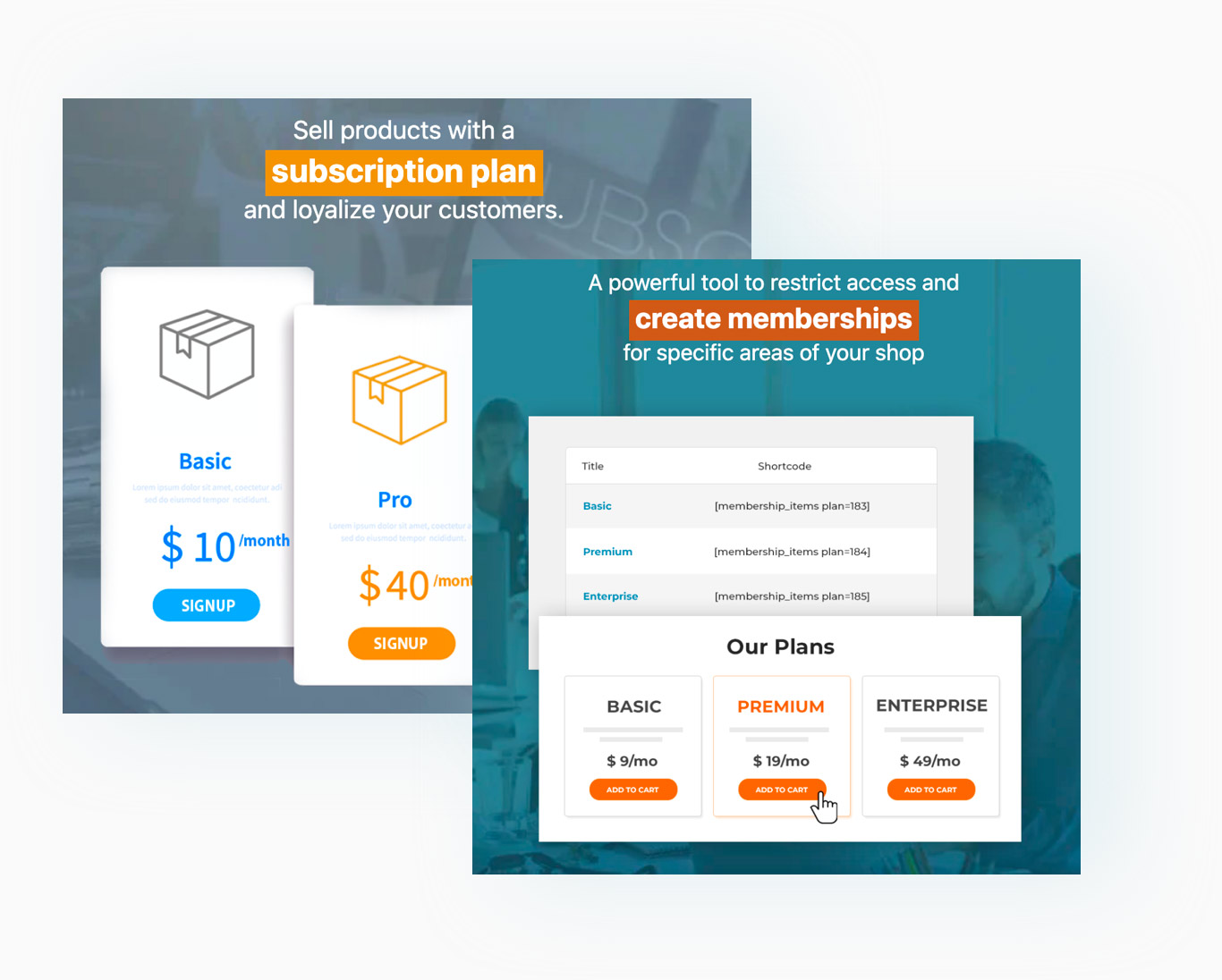
Integration with YITH WooCommerce Membership
Integrate our membership plugin and enable your subscribers to access private content and restricted sections.
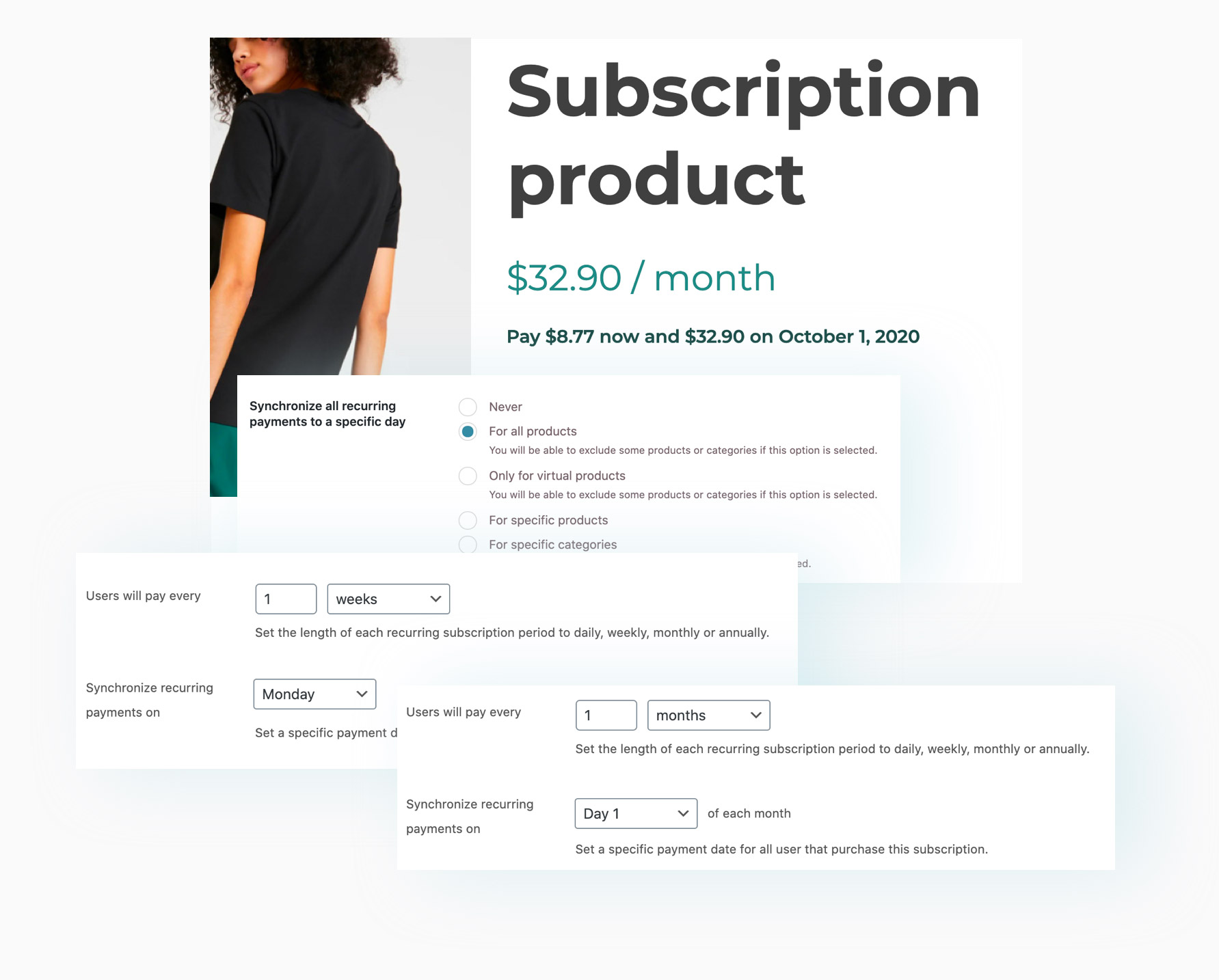
Synchronize all recurring payments with a specific day (of the week, of each month, etc.).
Optimize the management of your shop subscriptions by synchronizing all recurring payments to the same day (the first day of the month, every Monday, etc.) and decide how the first subscription payment should be handled: you can charge the user a prorated amount or defer the full payment to the day selected in the synchronization options.
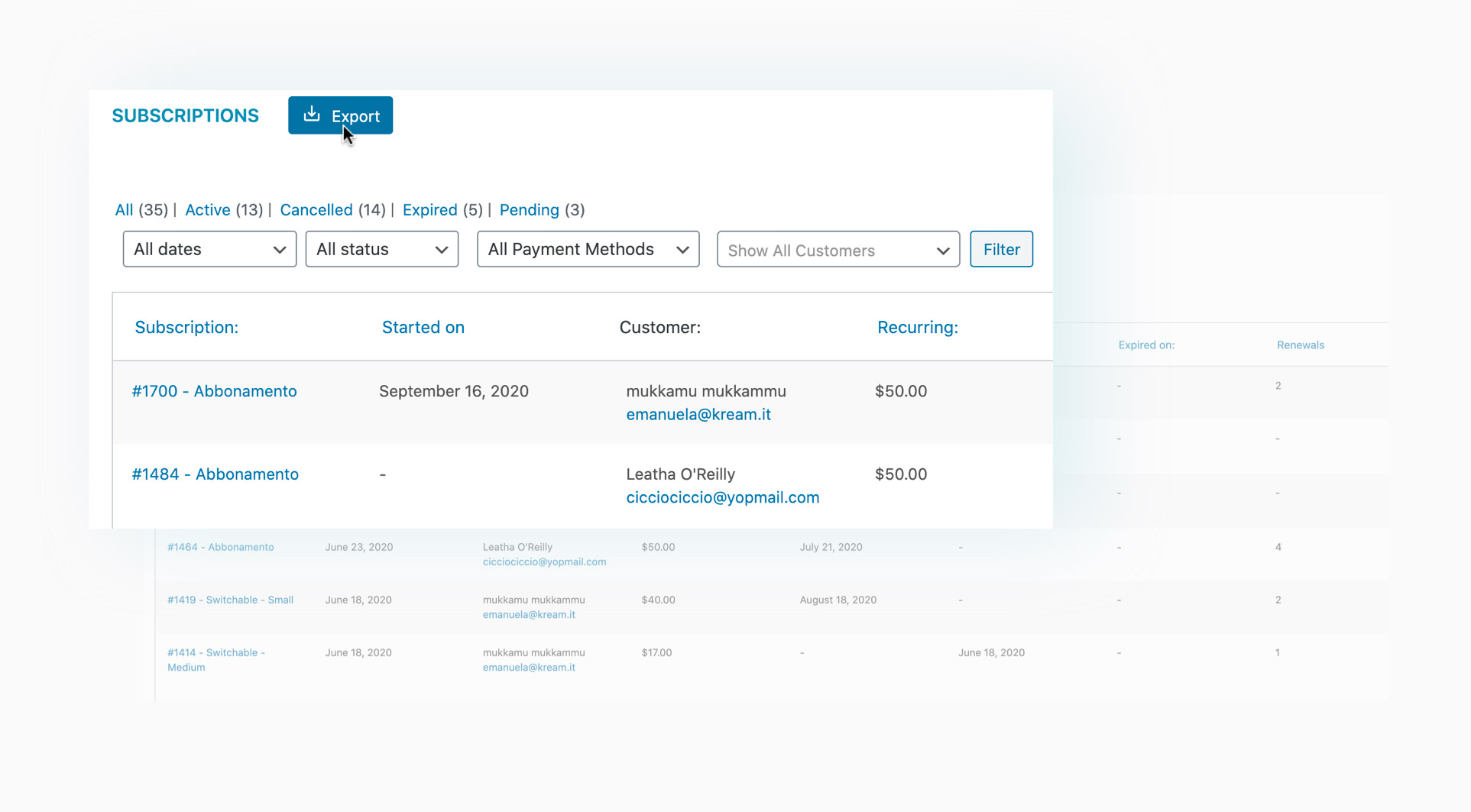
Export all subscriptions to a CSV file
Would you like to download and print an overview of all subscriptions in your shop? Download the CSV file with all subscription details with one click directly from the dashboard.
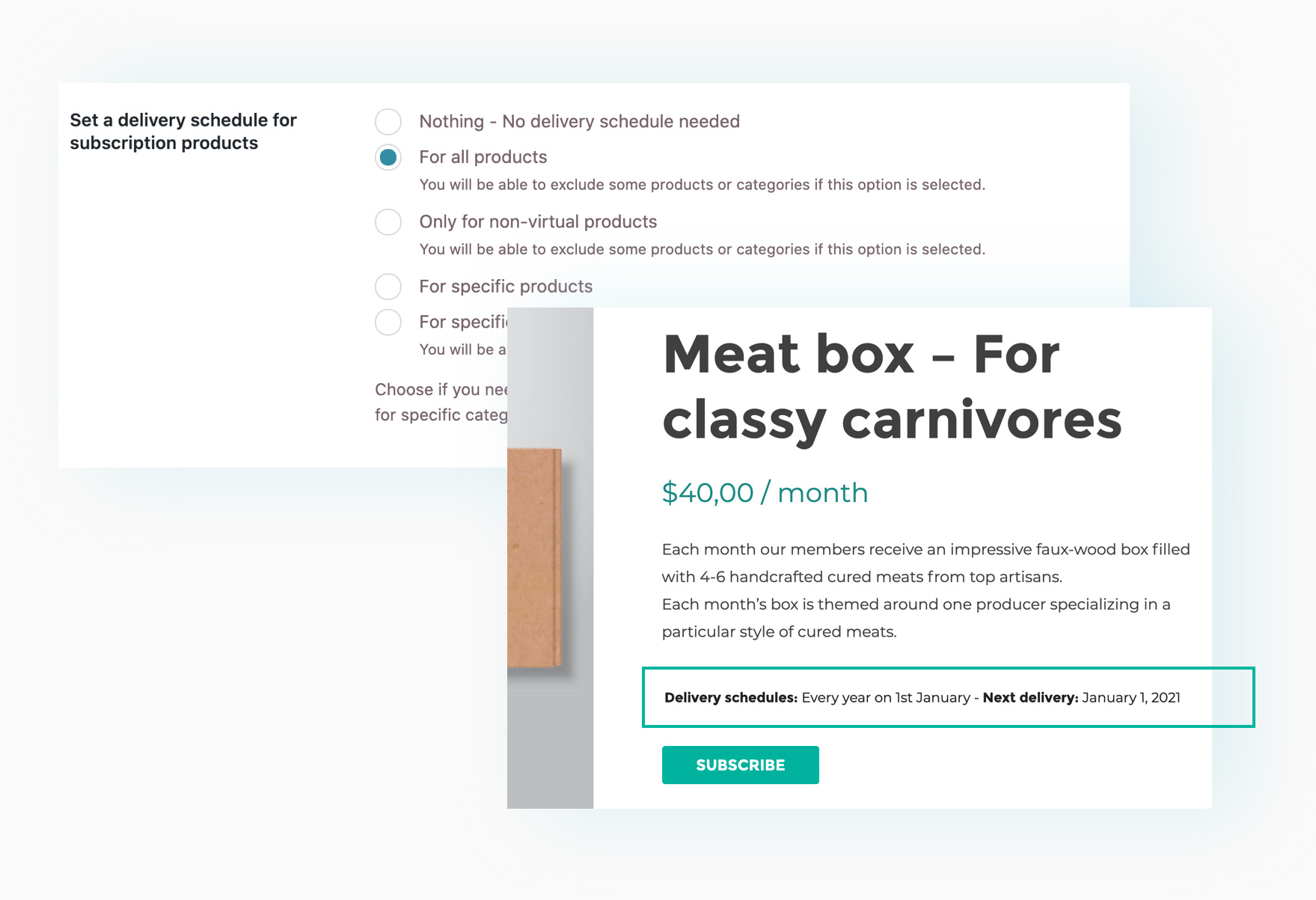
Schedule the delivery of products linked to a subscription
Do your subscriptions include planning the shipment of products (such as a product box, printed magazine, etc.)? Use the dedicated "Shipping Schedule" option and decide whether you want to synchronize all shipments on the same day (e.g., every Monday, every 1st day of the month, etc.).
Subscriptio – WooCommerce Subscriptions Plugin by RightPress*

Subscriptio is a WooCommerce extension* that allows you to sell subscriptions. Subscriptio extends WooCommerce with recurring payment functionality, so you can sell products such as magazine subscriptions, online memberships, e-learning packages, and other tangible or intangible products.
Both simple and variable products can be configured as subscriptions and allow you to set the payment cycle, free trial duration, subscription duration, and a setup fee. When a customer purchases a subscription, a subscription flow is initiated, which consists of the following actions in chronological order:
- Order Placed
- Receive payment (skipped in the case of a trial version without setup fee)
- Subscription activated (or enters an optional trial period)
- Renewal order generated
- Payment reminders sent
- Attempt to process automatic payment (if the payment gateway supports Subscriptio)
- Subscription marked as overdue (grace period; optional)
- Overdue payment reminders sent (optional)
- Subscription suspended (optional)
- Cancellation warnings sent (optional)
- Subscription cancelled if no payment is received
- Subscription expired (if not cancelled before reaching the maximum subscription duration)

Both shop managers and customers can pause, resume, and cancel subscriptions. However, it is possible to disable this option for customers. There are additional configuration options, such as when reminders should be sent, the duration of the pause, etc. Additionally, there are many hooks and filters that developers can use.
Features & Subscription Function of Subscriptio
- Enables the sale of subscriptions with WooCommerce
- All subscription-related actions are executed automatically
- Supports Stripe and PayPal for automatic subscription payments
- Both simple and variable products can be converted into subscriptions
- Set any billing cycle length and maximum subscription length
- Enables the collection of a one-time sign-up fee in addition to the recurring total
- Enables configuration of a trial period for subscriptions of any length
- Subscriptions can be manually paused, resumed, and canceled
- Multiple configuration fields so that this plugin works the way you want it to
- Subscriptions are purchased as regular WooCommerce products
- It is possible to purchase subscription and non-subscription products at a single checkout
- It is possible to purchase multiple subscriptions and any quantity of each subscription
- Tools for subscription lists and subscription management for customers
- Associated subscriptions are displayed for each order that contains subscriptions
- Associated orders are displayed for each subscription
- Super easy to use yet powerful admin area for administrator subscriptions
- All subscription transactions are logged and displayed
- Sell all tangible or intangible products
- Sell online memberships with recurring changes (requires additional renewal)
- Many hooks and filters for developers
Payment processing with subscription function – easier than ever!
Subscriptio supports semi-automatic billing and fully automatic billing. With semi-automatic billing, customers receive an email at the beginning of each billing cycle, click a Pay Now link, and perform their payments manually. With fully automatic billing, payments are processed automatically and require no action.
For semi-automatic billing, Subscriptio works with all WooCommerce payment gateway extensions.
For fully automatic billing, Subscriptio requires some specific features that are implemented in the Payment Gateway extension, allowing Subscriptio to process recurring payments at its discretion.
Subscriptio has two integrated payment gateway extensions that enable fully automatic standard billing – Stripe and PayPal Express Checkout. They have all the features required by Subscriptio and also function as regular payment methods.
Please note that for the integrated PayPal Express Checkout extension, Reference Transactions must be enabled so that your PayPal account can process recurring payments, for which you may have to pay a monthly fee to PayPal. If in doubt, contact PayPal Support.

Florian Ibe
CEO & Marketing Consultant
Your contact person: Florian Ibe





 DE
DE

