

Are you looking for an easy way to manage, add, and customize tabs in your WooCommerce store, simply, individually, and quickly? Do you want to reorder, rename, or disable product tabs? Or do you even want to create new custom tabs, depending on the category or product, or global tabs?
Then this article and the featured WooCommerce Tab plugins are your ultimate solution!
WooCommerce Tabs Plugin for Maximum Flexibility and Unlimited Tabs on the Product Page
These plugins in the article extend the WooCommerce shop so that you can add custom tabs to product pages. The tabs are displayed on the individual product pages to the right of the standard „Description“ tab or, depending on the WooCommerce Theme used, also above or below it. It is definitely compatible with EVERY theme/template!
Individual product tabs are managed in the WooCommerce „Edit Product“ administration and can be added per product. You can also create saved tabs and add them to multiple products as needed. Tabs can be easily added, deleted, and reordered.
Tab content areas use the standard WordPress text editor and can contain text, images, HTML, or shortcodes. Everything you need!
Adding custom tabs – product tabs – has never been easier.
Bestseller: WooCommerce Tabs – Ultimate Custom Product Tabs*

Features & Functions of the Product Tabs Plugin:
- Disable WooCommerce Tabs
- Reorder WooCommerce Tabs
- Rename WooCommerce Tabs
- Create Custom Tabs
- Set a custom title
- Set a custom priority
- Set a custom callback:
- Editor
- Contact 7 Form
- Display single products
- Display products by category
- Show Product Categories
- Show Cart
- Show Checkout
- Show Order Tracking
- Show My Account
- Show Recent Products
- Show Featured Products
- Show Sale Products
- Show Bestselling Products
- Show Top Rated Products
- Show Related Products
- Limit the number of products to be displayed on the related products callback.
- Configure how many columns, for example, are displayed in the related products callback.
- Apply the custom tab for specific product categories
- Apply the custom tab for specific products
This plugin requires the free Redux Framework Plugin to provide you with an easy-to-manage settings panel.

Become more visible on Google & Social Media?
In a free strategy consultation for data-driven online marketing, we uncover your untapped potential, review any existing ad accounts if necessary, examine your SEO ranking and visibility, and determine which strategy is appropriate for your budget and which active measures will lead to more inquiries or sales.

✅ More visibility & perception through targeted placement
✅ More visitors > prospects > customers > revenue
✅ Reach target groups scalably with SEA
✅ Act and grow sustainably with SEO
🫵 Maximum success with our hybrid strategy
💪 More than 15 years of experience across industries in over 1,000+ projects demonstrable!







The official WooCommerce Tab Manager*
Fully customize product tabs with the WooCommerce Tab Manager
As WooCommerce store owners, we know you love your products. In fact, you love them so much that you probably want to tell your customers everything about them, from dimensions to shipping and manufacturing details. We get it! But you probably want a really sophisticated way to do this on your product pages, right? With the Tab Manager, you can create professional, informative product pages using easy-to-manage product tabs.
With the Tab Manager, you have complete control over your product page tabs. This allows you to easily create new tabs for products, share tabs across multiple products, reorder tabs using a visual drag & drop interface, and much more. No more messing with filters, template files, or changing your theme; you can conveniently create custom tabs directly from the WordPress dashboard. Even most 3rd party tabs added by other plugins are recognized, allowing you to hide or reorder them alongside your own tabs.

What can the Woo Tab Manager do?
- Core Tabs – Reorder, remove, or rename the Description, Additional Information, and Reviews tabs
- 3rd Party – Tabs – most 3rd Party – Plugins are automatically detected and will be sortable
- Global Tabs – Create tabs that can be added to multiple products. This allows you to easily share content and save time!
- Global tabs can also be restricted to display only for specific product categories. NEW
- Product-level tabs – Create tabs customized for a specific product.
- Create a default tab layout (reorderable!) that can be applied to all products
- Override the default layout per product to customize the tabs for a single product.
- Add any number of custom product tabs and reorder them
- Include tab content in website search results NEW
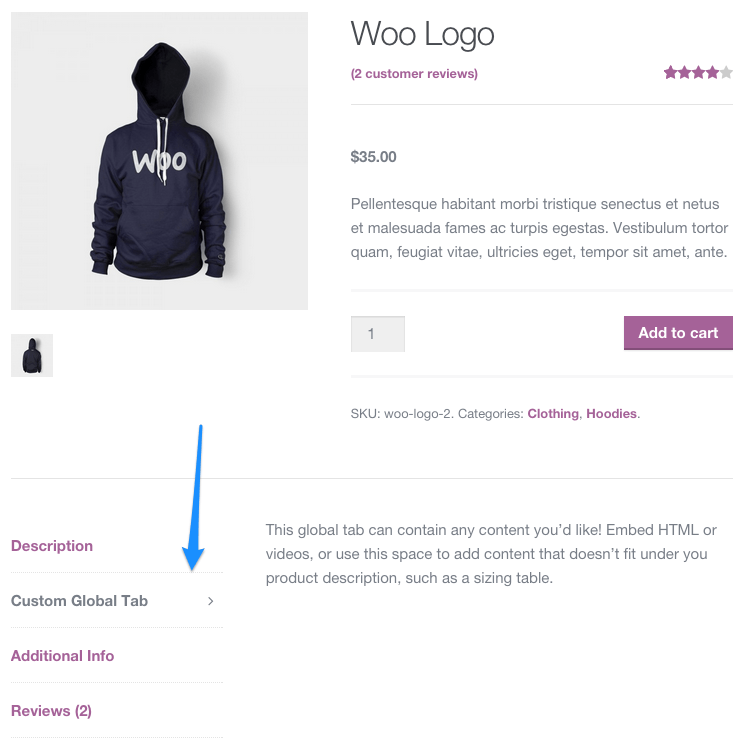
Default Tab Layout
Manage the default tabs for all products in your store (which can be overridden per product)! You can reorder tabs, rename them, remove core tabs, and add your own global tabs.
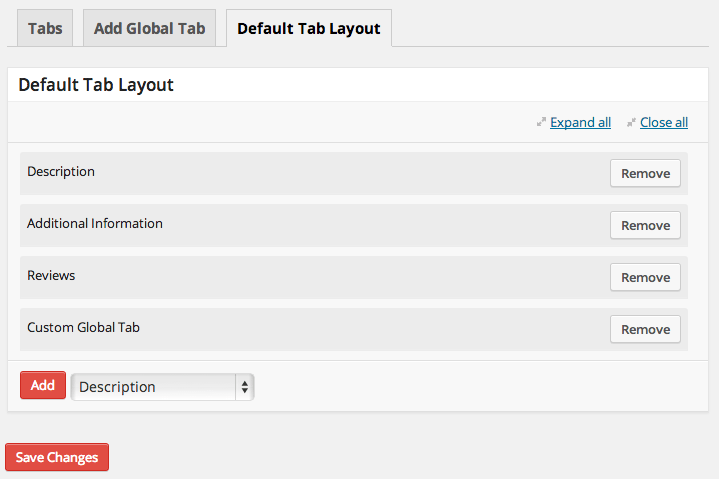
Global Tabs Per Category – NEW
Do you need to add global tabs, but only for certain product categories? You can specify which global tabs should be displayed in which categories, even if the global tab is part of your default layout.
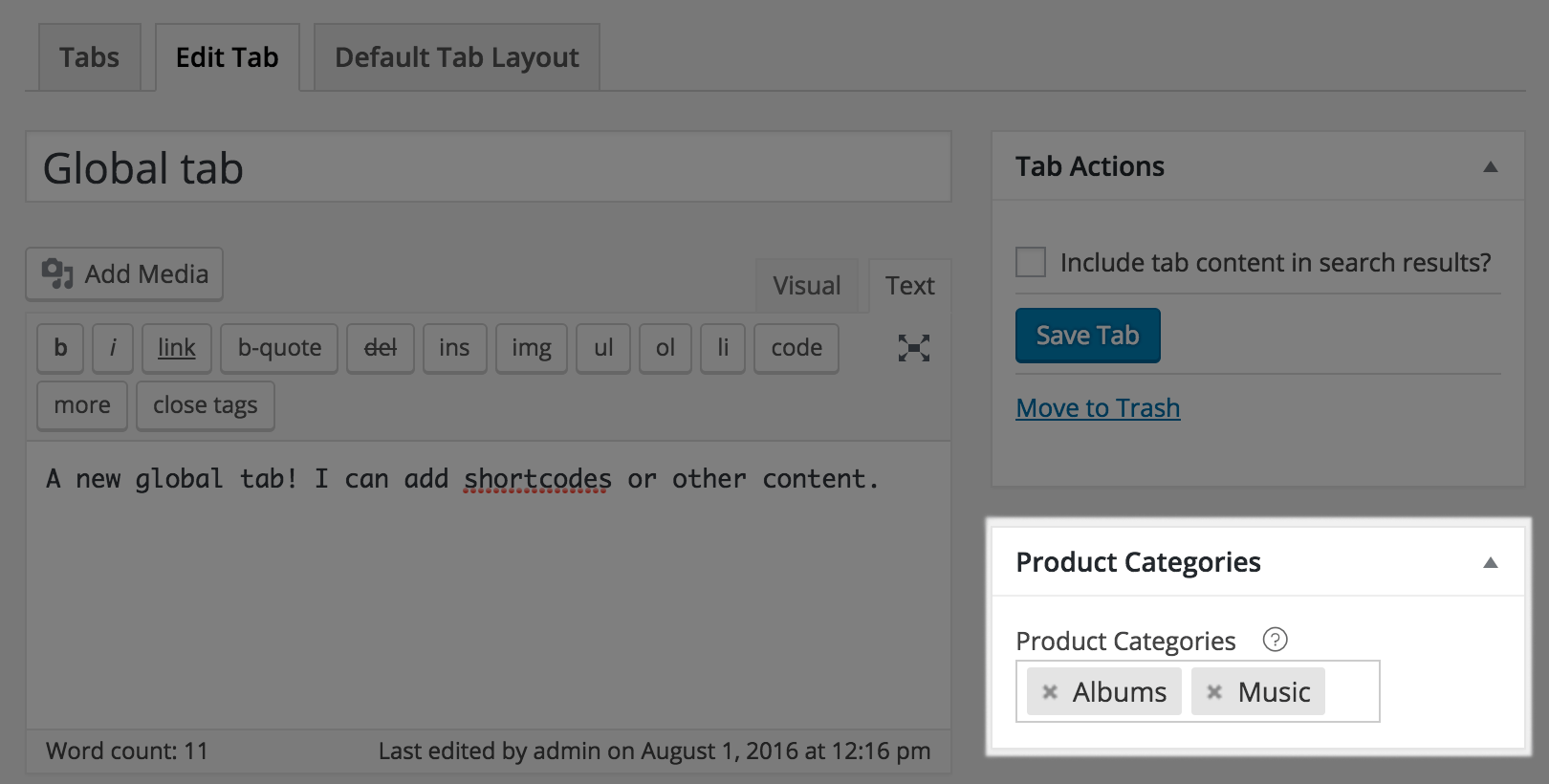
Or simply leave your category selection empty to display global tabs for every product.
Override Product Layout
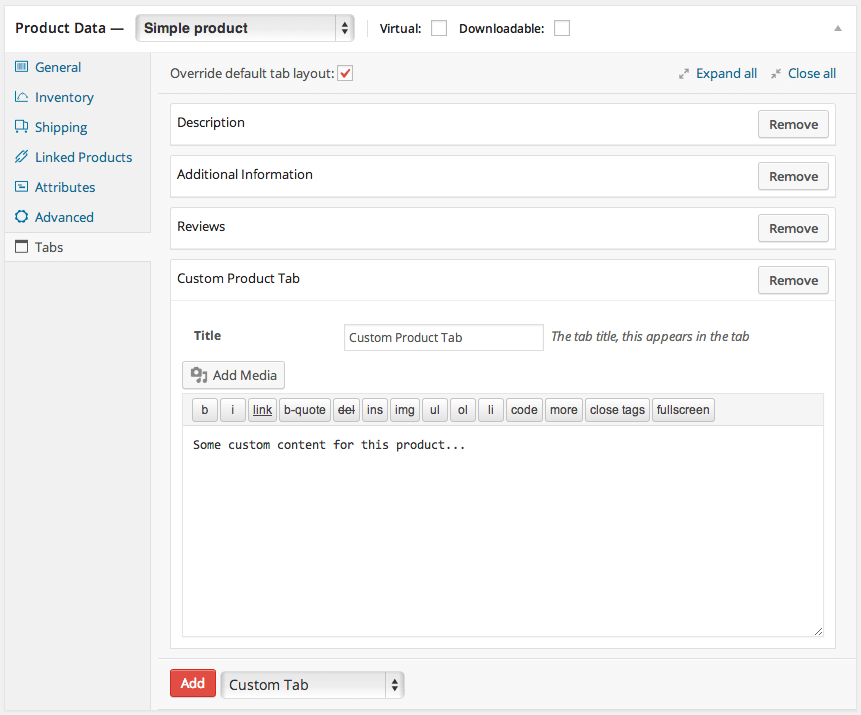
If a product requires a unique tab layout or a custom tab, you can override the default tab layout. This allows you to reorder tabs for the product, remove tabs from the default layout, add global tabs, or add a custom tab for that product.
Keep tab content in your search results
Any product-specific tabs you add will most likely contain content. If a customer searches for a keyword within this content, the product will appear as a search result. You can also make global tabs searchable. This is helpful if a global tab is only used for specific products.
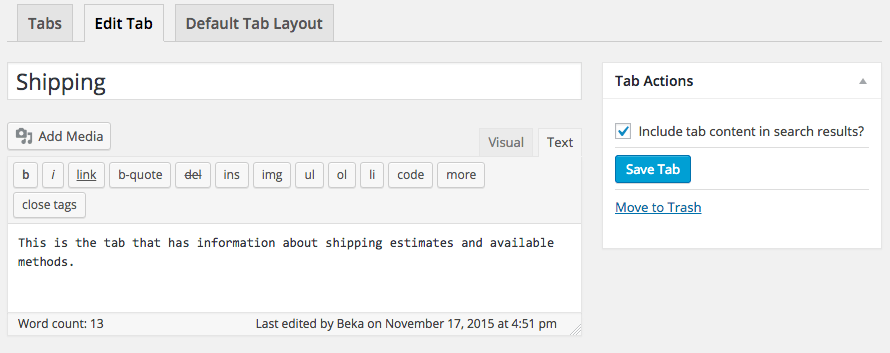
This is even compatible with the popular, free Relevanssi plugin to keep tab content in your search index.
Embed forms and information in tabs
You can use separate tabs to display embedded information such as videos, images, and more. Shortcodes are expanded within the tab content, allowing you to embed information from other common plugins like Gravity Forms for pre-sales forms, embed YouTube product explanation videos, or use other shortcodes to change content display.
The free alternative with fewer features or self-programming
A free and very simple option to start with is the Custom Product Tabs for WooCommerce Plugin.
If you prefer to manually edit and develop something yourself, you should look at the official explanation with code snippets here on woocommerce.com.

Fragen zu WooCommerce oder Hilfe benötigt?
E-Mail: fi@vastcob.com
Florian Ibe





 DE
DE

