

With the extension, the „Product Visibility by User Roles“ plugin, you can hide or show products and categories for specific user roles (users within an assigned user group). You can manage visibility for multiple user roles and display a custom error message or redirect to another URL if a user tries to access a restricted product or category.
You can also manage visibility for guest users and prevent Google from ranking restricted pages. Products remain hidden in shop, category, search, and other listing pages (widgets & blocks).
WooCommerce Product Visibility by User Roles / Users
Why private WooCommerce products and stores?
Private WooCommerce products are useful in many cases:
- Custom products: As a wholesaler, you need a private website to sell products only to retailers. No one else should be able to access your product catalog.
- Members-Only Shop (Users with Login): If you are creating a WooCommerce members-only shop, you need a solution to hide all your products from non-members.
- Service-Based Businesses: You offer both standard and premium services, but not all customers can purchase both. You want to offer premium services only to your VIP members.
There are several ways to „privatize“ your WooCommerce shop products. You can use WordPress’s built-in visibility feature and install password protection or a membership plugin. However, the following solution is the easiest and extremely simple.
Show or hide shop products by user role – The solution, it’s that simple:
The WooCommerce Product Visibility by User Role plugin* offers two ways to manage your catalog’s visibility:
1) Hide Products
The „Hide“ function allows you to hide selected products and categories from specific user roles and guests. For example, if you hide Product A and Category B from general customers, they will remain hidden only for general customers, while other users can view them.
2) Show Products (Assign)
Instead of hiding, you can choose to „Show,“ i.e., assign products and categories from specific user roles and guests. This feature allows you to restrict catalog visibility for each user role. No other products will be visible than those you have assigned to them.
For example, if you show Product A and Category B to wholesale customers, they will remain visible only to wholesale customers, while all other products and categories will no longer be displayed. At the same time, using the global visibility settings, you can hide Product A and Category B from guests and all registered customers. This makes Product A and Category B explicit only for the wholesale user role.
Become more visible on Google & Social Media?
In a free strategy consultation for data-driven online marketing, we uncover your untapped potential, review any existing ad accounts if necessary, examine your SEO ranking and visibility, and determine which strategy is appropriate for your budget and which active measures will lead to more inquiries or sales.

✅ More visibility & perception through targeted placement
✅ More visitors > prospects > customers > revenue
✅ Reach target groups scalably with SEA
✅ Act and grow sustainably with SEO
🫵 Maximum success with our hybrid strategy
💪 More than 15 years of experience across industries in over 1,000+ projects demonstrable!







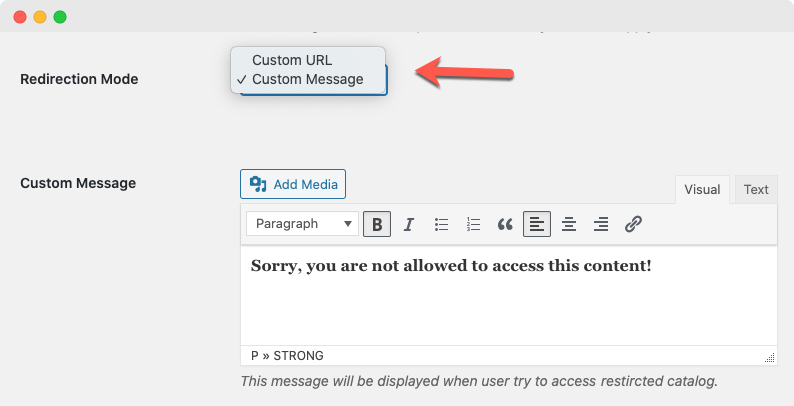
Display custom message or redirect to another link:
The extension has two different redirect modes that allow you to redirect users to a different URL or display a custom message to them. You can customize different error messages and redirect links for different user roles.
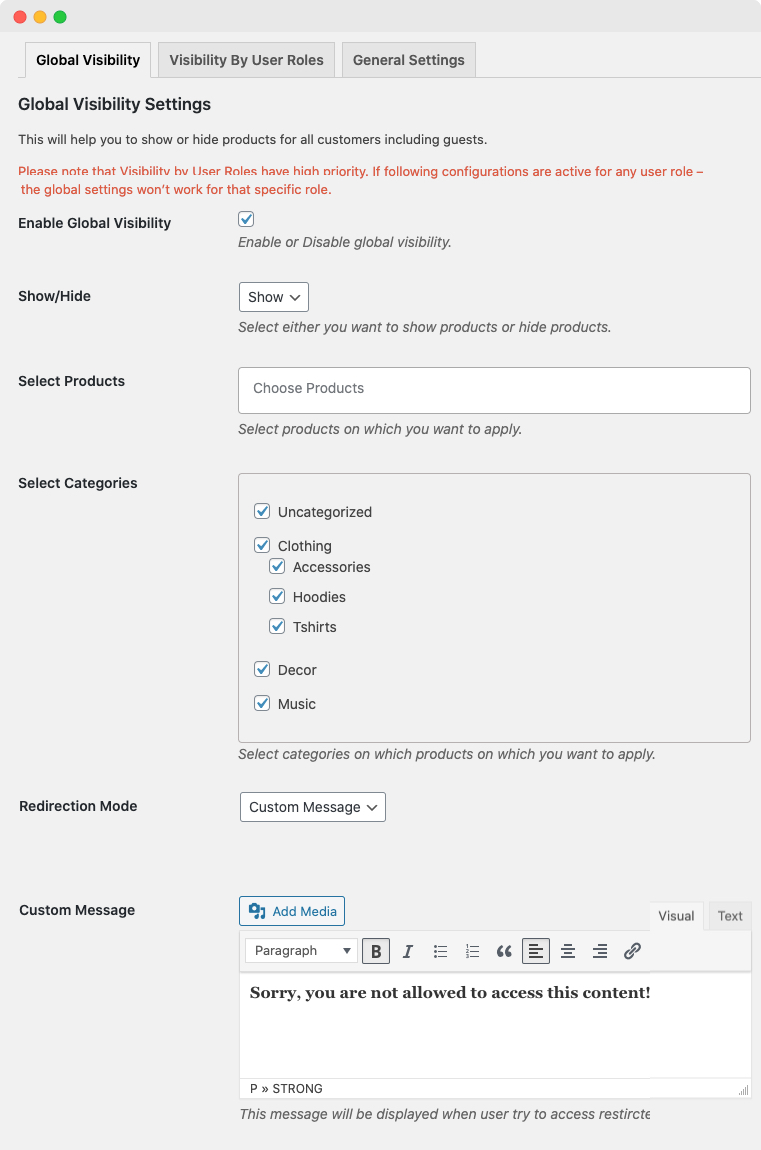
Global settings for hiding products from guests and registered users
You can hide products and categories from guests and registered users. This global WooCommerce feature for hiding products is useful if you want to hide your entire store or specific products from guests and all registered users, regardless of their user role.
Allow search engines to rate your pages
You can specify that search engines are allowed to crawl and rate your private products and categories that are restricted to guest users.
Plugin Setup & Configurations
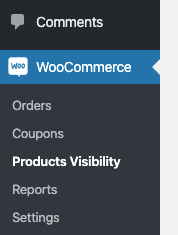
After activating the „Product Visibility by User Roles“ plugin, „Product Visibility“ will appear in the „WooCommerce“ menu. Click here to open the settings page.
On the settings page, you will find 3 different tabs where you can configure the product according to your requirements.
- Global Visibility (Hide / show catalog for non-logged-in or all registered customers)
- Visibility by User Roles (Hide / show catalog by user roles)
- General Settings (Allow / disallow Google to crawl your hidden pages)
Global Visibility:
In the „Global Visibility“ tab, you can hide / show products for non-logged-in customers or all registered customers regardless of their user roles. Here you can hide
- Products
- Categories
You can also create a custom message that will be displayed to visitors who try to access the restricted page.
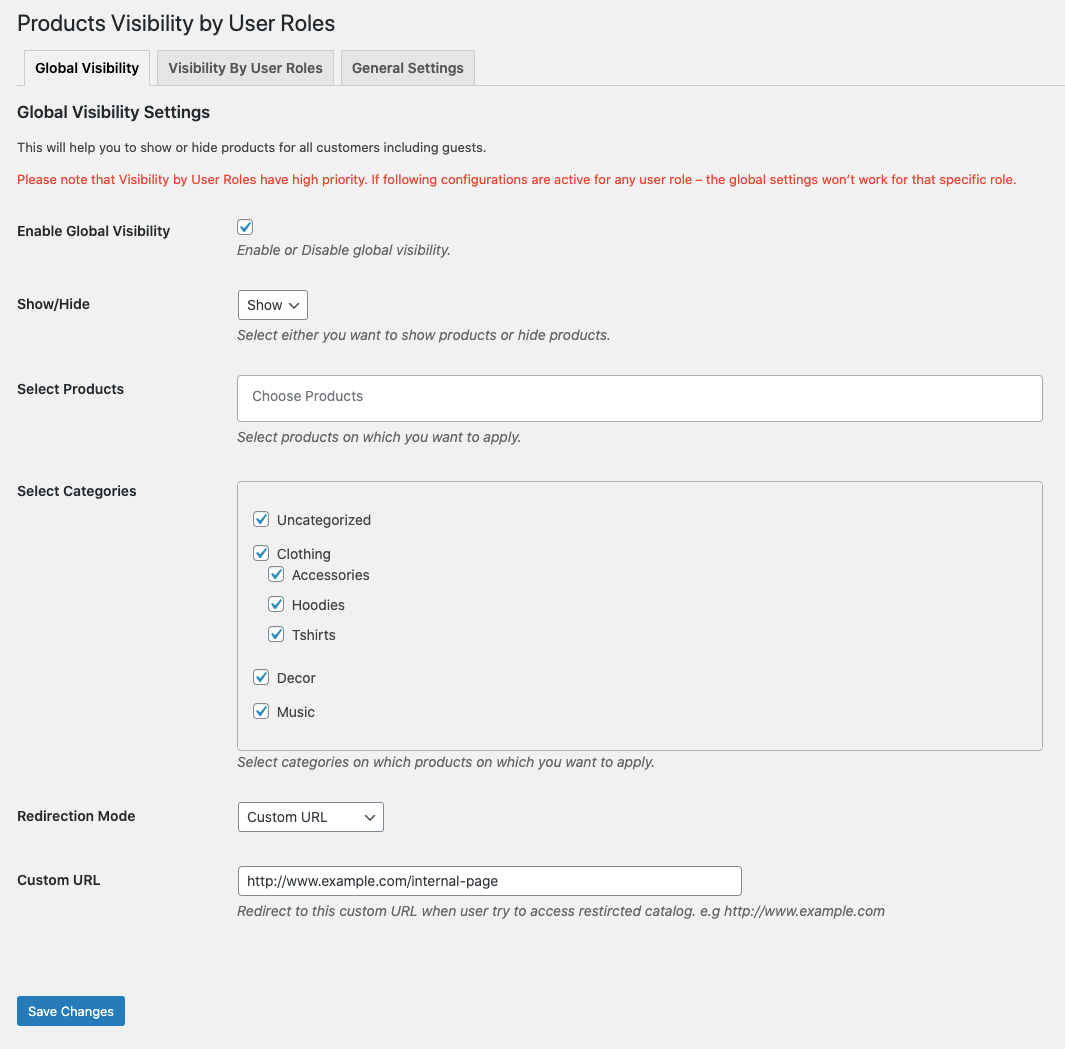
Product Display & Catalog Visibility by User Roles
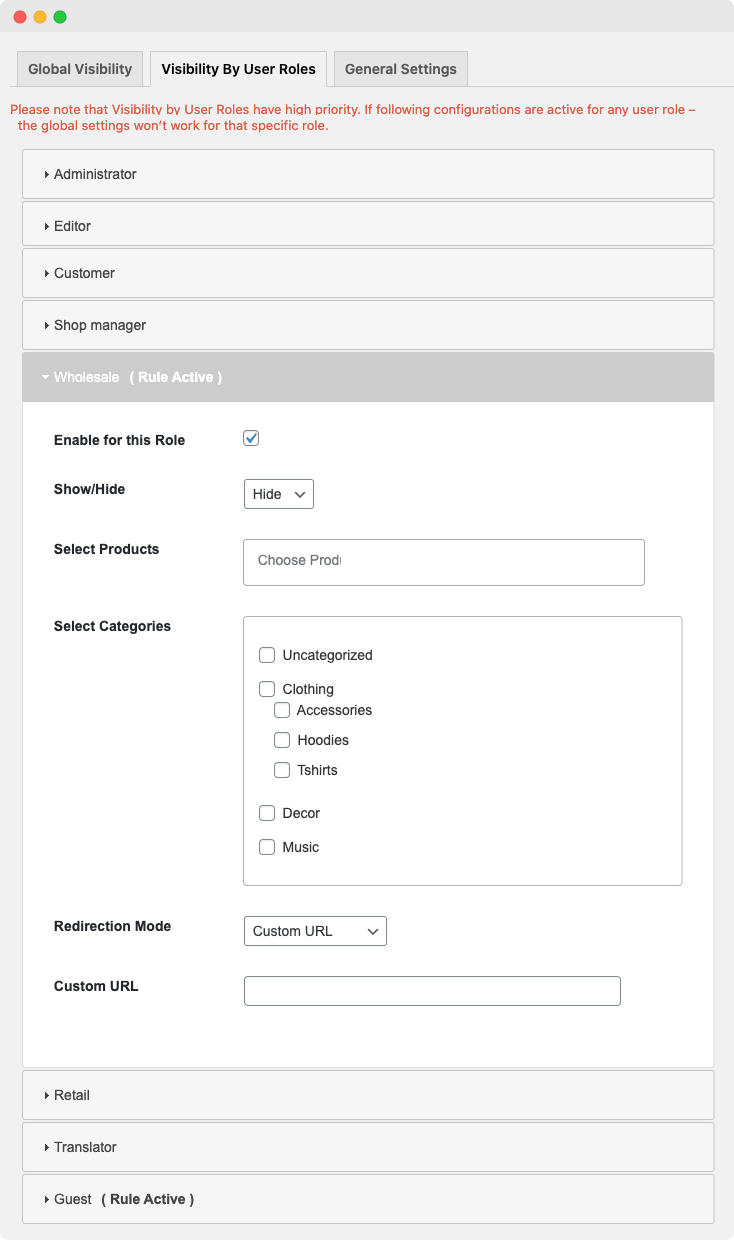
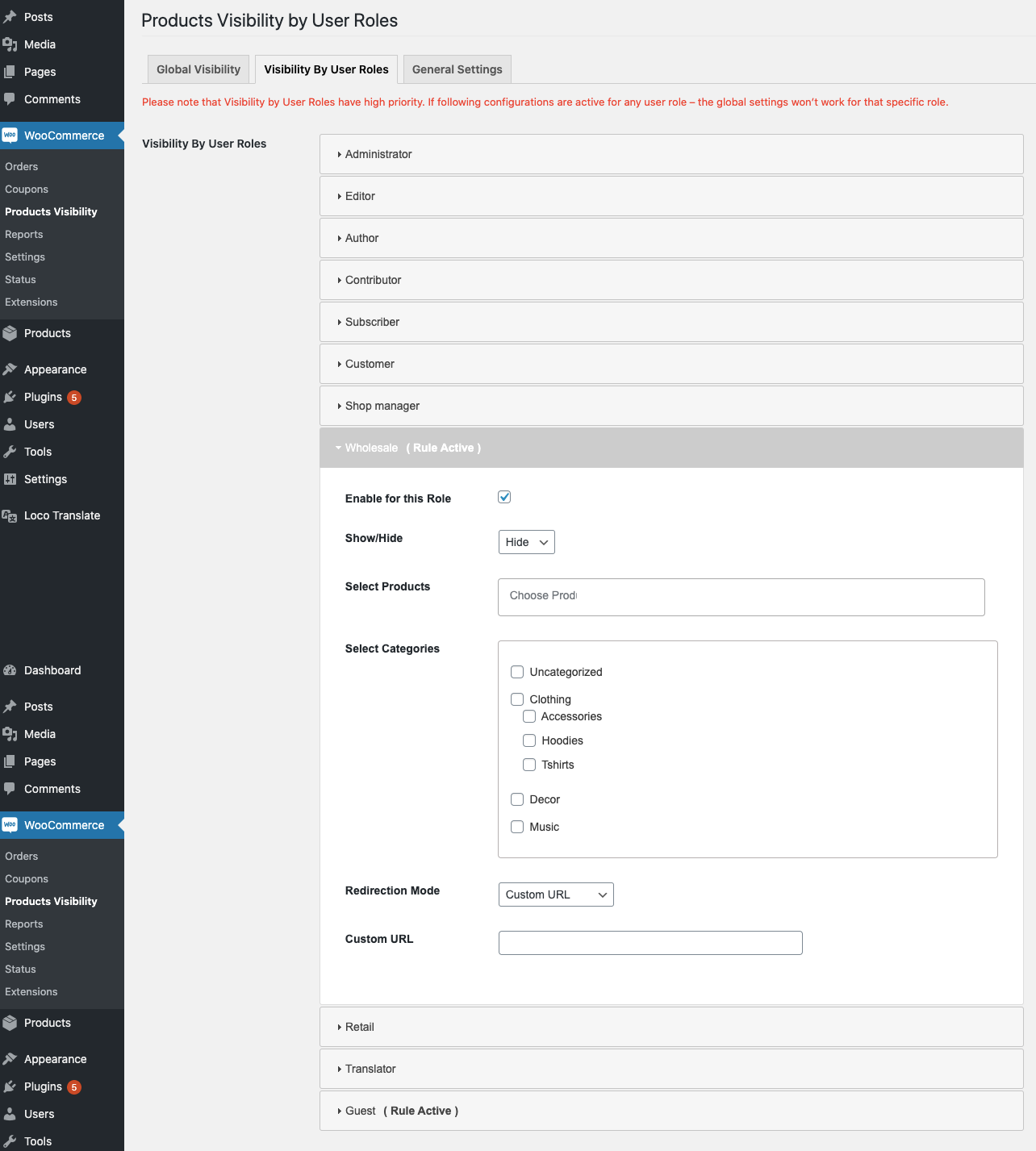
The Visibility by User Roles tab allows you to show/hide products for each user role. Click on the role for which you want to customize your catalog visibility. Click “ “ to apply new catalog visibility changes.
- Show – Products will only be visible to the specified user role and hidden from the rest.
- Hide – Products will only be hidden from the specified user role and available to the rest.
You can show/hide products and categories for all user roles at once.
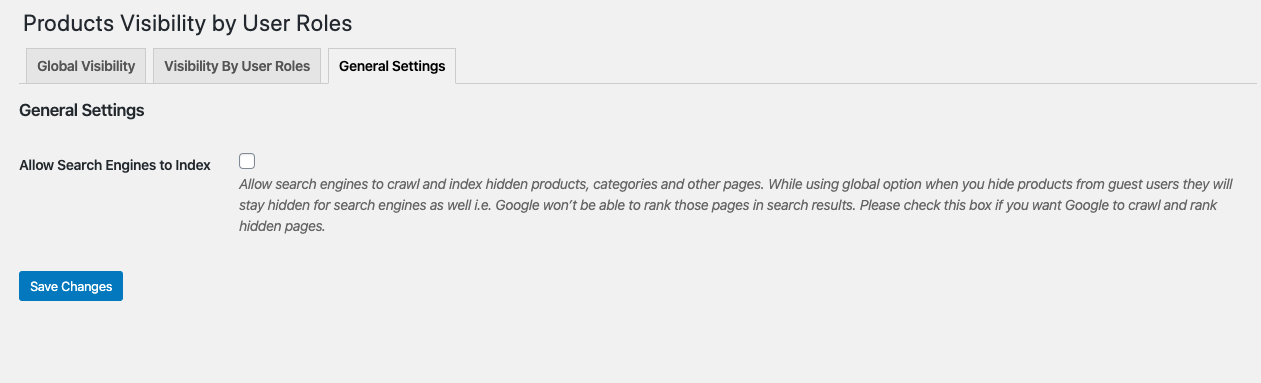
General Settings:
General settings allow you to allow/disallow search engines to crawl, index, and rank your site. If you hide certain products and categories from unregistered customers, they will also remain hidden from Google. Check this box to allow search engines to crawl and rank these private pages.
Now that they are hidden from everyone, you can open them for the retailer and any other user role. To display the product, switch to the „Visibility by User Roles“ tab and navigate to the user role for which you want to open this hidden product and category. In this case, it’s the retailer. Select „Drop“ from the drop-down list as well as all categories and click the „Save“ button.
Now the specified product and/or category remains hidden from everyone except the retailer’s user role.
FAQs:
Can I hide the entire catalog from guest users?
Yes, you can hide the entire catalog from guest users.
Can I show a specific product or category only to retailers and hide it from everyone else? How do we do that?
Yes, you can assign a specific product or category to one or more user roles and hide it from other registered users and guest users. For more information, please refer to the documentation.
The hidden products will no longer be displayed in the shop, in categories, and on search results pages.
Yes, the hidden products will no longer be displayed on listing and search results pages. If a customer accesses them via a direct link, a custom error message will be displayed. However, in some cases, you may need to manually remove them from your menu.

Fragen zu WooCommerce oder Hilfe beim Shop benötigt?
E-Mail: fi@vastcob.com
Florian Ibe





 DE
DE


2 Kommentare
Sehr guter Artikel, danke hierfür.
Kann ich auch nur bestimmten Content eines Artikels vor nicht-eingeloggten Nutzern verstecken? Also nicht nur über css ausblenden für nicht-eingeloggte Nutzer, sondern ganz eliminieren?
Hallo Nici,
das hat leider nichts mit dem Artikel zu tun. Dafür musst du andere Plugins nutzen. Wir können dir hier gegen Bezahlung eine Lösung anbieten.
Florian