


Do you want to duplicate pages in WordPress, copy a WordPress page, or duplicate a blog post to reuse existing content? Unfortunately, WordPress does not offer a standard function for this, but the solution is very simple.
Duplicate / Copy WordPress Pages (also Posts, Products or other Taxonomies)
WordPress, in its basic functionality, does not offer a dedicated, integrated function for directly duplicating or copying posts and pages. The standard WordPress installation allows you to create, edit, and delete posts and pages, but there is no built-in button or option to directly duplicate content.
Duplicating content must either be done manually (by copying and pasting the content into a new post or page) or by using additional tools such as plugins. Plugins like „Duplicate Post“ or „Yoast Duplicate Post“ are very popular in the WordPress community because they offer a simple and efficient way to duplicate content with just a few clicks – more on this in the article.
Solutions for Duplication: Copy WordPress Page / Duplicate WordPress Post or other content areas
Duplicating WordPress pages or copying posts or other content types (taxonomies) in WordPress is a common concern, especially when working with extensive or complex content. Here are some common methods by which this can be achieved (further details in the blog article):
- Manual Method: Simply copy the content of the post or page and paste it into a new post or page. This is practical for smaller content but can be time-consuming for extensive pages.
- Using Plugins: There are many WordPress plugins specifically designed to simplify the duplication of pages and posts. Popular plugins include „Duplicate Post“ or „Yoast Duplicate Post“. These plugins often add a duplication option to the dashboard, allowing the process with a single click.
- Builder Tools: Some WordPress page builders like Elementor, Beaver Builder, or Divi offer their own functions for copying and pasting content within the builder. These options are useful if you want to copy layouts or designs.
- Database Methods: For advanced users, duplication can also be done directly in the WordPress database using SQL commands. However, this requires in-depth technical knowledge and caution to avoid data corruption.
- WordPress Export/Import Function: WordPress offers a built-in export and import function that allows content to be transferred from one installation to another. This can be used for copying posts between different websites.
Please note that when copying content, SEO aspects should also be considered to avoid issues with duplicate content. It is advisable to edit copied content accordingly or mark it as „noindex“ if it is not intended for public indexing.
NOTE: This article is NOT about copying an entire WordPress installation or moving/cloning it to another web host! This is a separate topic "Copying a WordPress site to another domain".

Instructions for the individual methods for copying content in WordPress with advantages & disadvantages
Here are detailed instructions, advantages, and disadvantages for each of the above methods for duplicating WordPress pages or posts:
1. Manual Method – Duplicating / Copying WordPress Content
The manual method for duplicating WordPress content is the most basic form. It requires no additional tools or plugins and is based on simply copying and pasting content.
Become more visible on Google & Social Media?
In a free strategy consultation for data-driven online marketing, we uncover your untapped potential, review any existing ad accounts if necessary, examine your SEO ranking and visibility, and determine which strategy is appropriate for your budget and which active measures will lead to more inquiries or sales.

✅ More visibility & perception through targeted placement
✅ More visitors > prospects > customers > revenue
✅ Reach target groups scalably with SEA
✅ Act and grow sustainably with SEO
🫵 Maximum success with our hybrid strategy
💪 More than 15 years of experience across industries in over 1,000+ projects demonstrable!







Instructions:
- Open the post or page to be duplicated.
- Select all content and copy it (Ctrl+C or Cmd+C).
- Create a new post or page.
- Paste the copied content into the new post or page (Ctrl+V or Cmd+V).
Advantages:
- No additional plugins required.
- Simple and immediate for small content.
Disadvantages:
- Time-consuming for extensive or complex content.
- No automatic transfer of metadata such as categories, tags or special settings.
- Cannot be used with page builders

2. Using plugins to duplicate and copy content
Plugins like „Duplicate Post“ offer a simple, user-friendly solution for duplicating WordPress pages and posts as well as other content types. They add a direct duplication function to the WordPress dashboard, which makes the process possible with just a few clicks.
Instructions:
- Install and activate a duplication plugin, such as "Duplicate Post".
- Go to the post or page you wish to duplicate.
- Click on the "Duplicate" option added by the plugin.
Plugin selection:
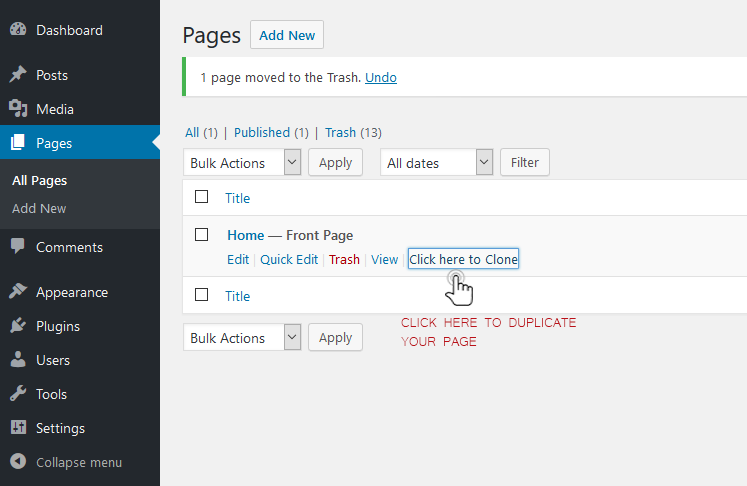
Alternative if that doesn't work well:
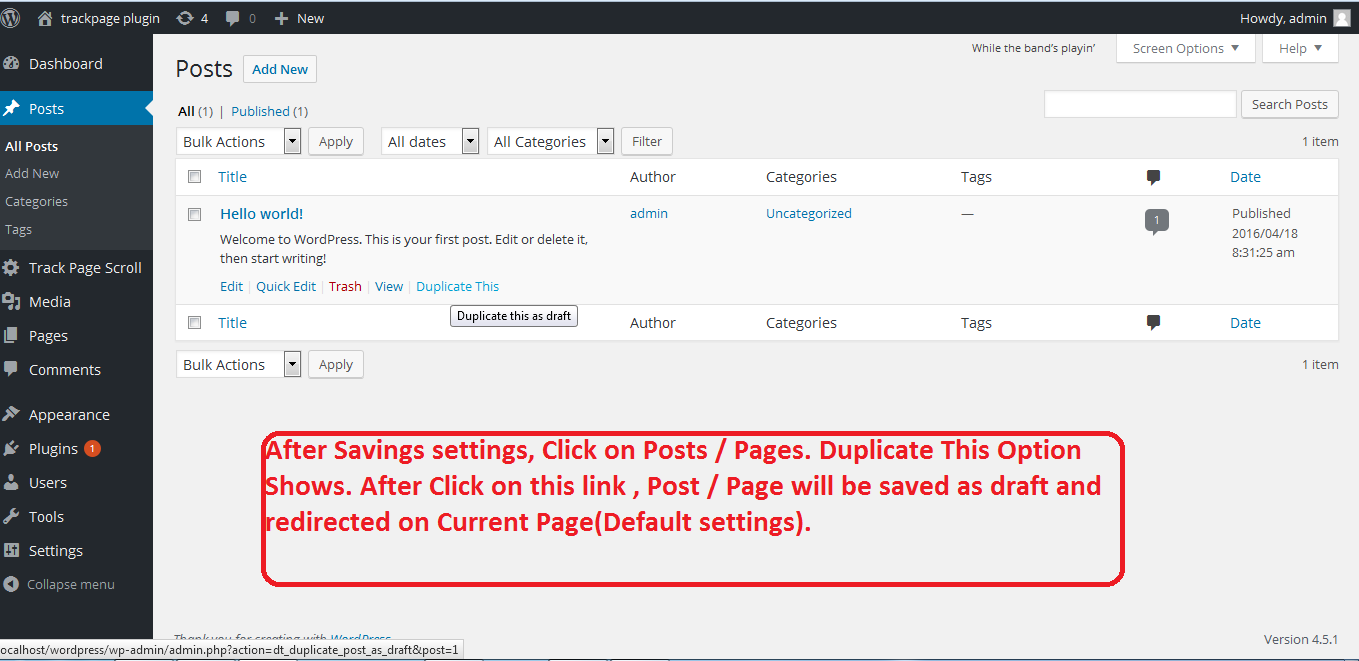
Favorite if Yoast SEO is used:
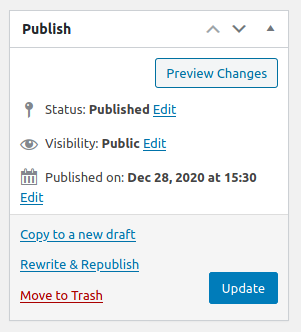
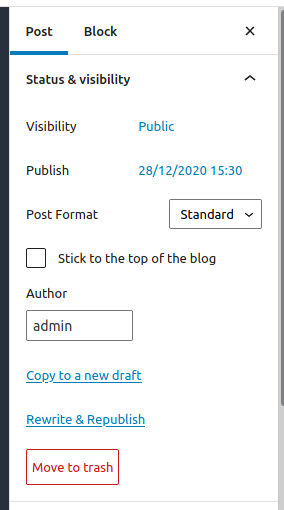
Another alternative with central management:
Advantages:
- Fast and efficient, especially for extensive content.
- Often takes over metadata and settings.
Disadvantages:
- Requires installation and configuration of an additional plugin.
- Some plugins might be incompatible with other plugins or themes.
- Mostly only limited compatibility with Page Builders (Test!)
This method is preferred by us as a WordPress agency.
3. Builder Tools (Elementor, Beaver Builder, Divi)
Page builder tools like Elementor, Beaver Builder, or Divi offer specialized functions to copy and paste design elements and layouts within their own environment, which is particularly useful for complex page structures.
Instructions:
- Use the chosen page builder to edit the post or page.
- Look for the copy/paste function within the builder to duplicate content.
Advantages:
- Ideal for copying layouts and design elements.
- Integrated into the page builder's workflow.
Disadvantages:
- Only works within the respective builder.
- Not useful for standard WordPress posts and pages without page builder elements.
4. Database Methods (not recommended and not very useful!)
For technically savvy users, it is possible to duplicate content directly in the WordPress database. This method requires a thorough understanding of the WordPress database structure and should be used with caution.
Instructions:
- Access the WordPress database, usually via phpMyAdmin.
- Identify and copy the relevant table entries (caution is advised!).
Advantages:
- Direct manipulation at the database level.
- Allows duplication in cases where other methods fail.
Disadvantages:
- Requires technical understanding of the WordPress database structure.
- High risk of data corruption if handled incorrectly.

5. WordPress Export/Import Function (also suitable for transferring content to another installation)
The WordPress export and import function is a built-in solution for transferring content from one WordPress installation to another. This method is well-suited for copying posts between different websites.
Instructions:
- Export the content via "Tools" > "Export" in the WordPress admin bar.
- Create a new WordPress site or use an existing one.
- Import the previously exported content via "Tools" > "Import".
Advantages:
- Useful for transferring content between different WordPress websites.
- No additional plugins required.
Disadvantages:
- Not practical for quickly duplicating individual posts/pages within the same website.
- The import process can be time-consuming depending on the size of the exported file and server performance.
These methods offer different approaches for various requirements and technical abilities. Choosing the best method depends on your specific needs, the complexity of the content to be duplicated, and your technical comfort level.

Florian Ibe
CEO & Marketing Consultant
Your contact person: Florian Ibe
Frequently Asked Questions and Answers
- Question: Can I directly duplicate a page or post in WordPress?
- Answer: By default, WordPress does not offer a direct function to duplicate pages or posts. However, this can be achieved by manually copying and pasting the content or by using special duplication plugins such as „Duplicate Post“.
- Question: Does duplicating content negatively affect my SEO?
- Answer: Duplicated content can cause SEO problems, especially if it is considered duplicate content by search engines. It is advisable to modify duplicated content or mark it as "noindex" to avoid negative SEO impacts.
- Question: Which plugins can I use to duplicate WordPress pages?
- Answer: Popular plugins for duplicating WordPress content include „Duplicate Post“ or „Yoast Duplicate Post“. These plugins offer an easy way to copy pages and posts with just a few clicks.
- Question: Can page builder tools like Elementor be used to duplicate pages?
- Answer: Yes, some page builder tools offer their own functions for duplicating layouts and design elements within their environment. However, these functions are usually limited to the respective builder.
- Question: Is it safe to duplicate content directly in the WordPress database?
- Answer: Duplicating content directly in the database is possible, but it requires technical knowledge and should be done with caution. Errors can lead to data loss or malfunctions.
- Question: Can I duplicate content between different WordPress websites?
- Answer: Yes, this can be achieved through WordPress's built-in export and import function. Content can be exported and then imported into another WordPress installation.





 DE
DE

