

WP ERP optimizes your small and medium-sized businesses with powerful HR Manager, CRM, and Accounting tools – utilize more features with over 20 extensions and the Project Management module. Find more information about the WordPress ERP & WooCommerce ERP System in the article. At the end, you will find a video overview and further information on the topic of WordPress E-commerce ERP solution.

WordPress ERP & WooCommerce ERP System with flexible extensions for EVERY application
Optimize your growing business with an all-in-one Business Manager directly from WordPress (with WooCommerce):
- ERP
- CRM
- Project Management
- HR Personnel
- Financial Accounting
The abbreviation ERP stands for Enterprise Resource Planning and refers to a software solution for resource planning of a company or organization. It integrates a variety of business applications and operational data, which are processed and stored in a central database. Since WordPress (with WooCommerce) already combines many global functions, integrating ERP functions is very logical and advisable with performant web hosting.
Global Benefits…
- Free & Open-Source
The core plugin and the HR, CRM, and accounting modules can be used for free. It is also customizable to your ideas and needs. - Guaranteed to Grow Your Business
Modules are designed to take your business to the next level. If you have a small business, this is ideal for keeping your budget tight and still achieving professional results. - 24/7 Support
We have detailed documentation and related videos on all topics related to WP ERP. We also have 24/7 customer support for our valued users.
The WP ERP plugin has a demo version and more than fair pricing.
Are you looking for a customer management and merchandise management system instead of an ERP? Take a look here:
WordPress WooCommerce Inventory Management WaWi – Best Solution for Your Shop

Become more visible on Google & Social Media?
In a free strategy consultation for data-driven online marketing, we uncover your untapped potential, review any existing ad accounts if necessary, examine your SEO ranking and visibility, and determine which strategy is appropriate for your budget and which active measures will lead to more inquiries or sales.

✅ More visibility & perception through targeted placement
✅ More visitors > prospects > customers > revenue
✅ Reach target groups scalably with SEA
✅ Act and grow sustainably with SEO
🫵 Maximum success with our hybrid strategy
💪 More than 15 years of experience across industries in over 1,000+ projects demonstrable!







Manage your customers with advanced WordPress CRM
WordPress CRM Plugin – No limits for anything!
Manage your contacts like a pro with simple filters and live stages, send emails, schedule meetings, calls, create tasks, create segments and much more.
Complete Customer Management
Dealing with customers and company representatives. From a fresh lead to a regular customer, manage content and support the essentials for everyone. Use filters to segment your users as you wish!
Schedule your meetings, send emails and take notes. Review your progress with individual logging and evaluate the performance of your compliance team. Transfer customers to higher staff if necessary and create customer groups for more targeted support.
Manage multiple representatives of a company with company profiles to track them unhindered.
Video about WordPress CRM:

Integrated project management system with calendar, to-do lists and much more.
Are you looking for a perfect project management solution that works just as well as your favorite popular solutions, but is also cost-effective?
With the WP Project Manager integration, we have equipped you with essential features for all your business project management needs!
Everything at a glance with Calendar & To-Do List
View your project overview with due, completed and future tasks. See which milestones need to be completed and who is responsible for them. Change the due date by drag & drop.
Privacy in everything
Send messages, create to-do lists, tasks, milestones, and even share documents privately if you don't want other users to see them.
Fully synchronized with WP ERP
WP Project Manager currently powers more than 10,000 businesses with its amazing project management features. We have an integrated project management and ERP solution so you can manage things better.

Empower your workforce with HR Manager / Human Resources Management
A WordPress HRM plugin that provides simple employee management for your company. Detailed employee profile, leave request, promotion, raise, performance logs, announcement, email notification, HR report and more!
Every employee has their own personal dashboard to stay informed about the latest announcements, wish a colleague or who is out of the office, and a self-attendance system [via attendance extension].
WP ERP offers a complete leave management system for your HR department. Your employees can request leave and get an overview of upcoming leave days and remaining leave balances. The HR manager has full control over absences and easy reporting is also available.
Do you need some quick reports for the right decision-making? The WP ERP HRM module can generate graphical reports about the entire company based on various factors.

Accounting for all non-accountants
Take complete control of your company’s finances in real time with the accounting module. Manage customers, suppliers, sales, expenses, bank accounts and various reports. Create live and detailed reports and conduct transactions, create invoices and pay employees – all from a single place.
Quick statistics
Get a quick overview of your company’s finances with the dashboard. It updates in real time and covers everything you need. Great for a quick check in between.
Make payments easy
Create invoices for everyone (customers, suppliers, vendors), make and receive payments from every customer, and see data update in real-time on your dashboard. All your transactions are easy to read, log, and secure with our solution.
Practical accounting reports
In every section, there are reports for everything. Reports help you better present your numbers and absorb information more easily.
Video overview (English) about the WordPress ERP & WooCommerce ERP:
Consider integrating WordPress ERP into your e-commerce platform (WooCommerce Shop)

Perhaps the biggest advantage of choosing a WordPress ERP plugin for your business is the fact that you get most features completely FREE. In addition, WordPress plugins are easy to install and modify for further customization.
Furthermore, you can also run your company website and other functions from a single platform. Having everything under one digital roof builds a strong network between all parts of your organization. This way, you keep track of all the moving parts of your organization. This reduces the likelihood of data loss or redundancy.
Furthermore, there is a high probability that you and your team are already familiar with the WordPress environment, as it is currently the most popular CMS platform. This will make it easy to operate the entire system without complexity. And you won’t have to get used to a new interface to efficiently manage your business.
If you are only looking for a WooCommerce merchandise management system, I recommend the following article:
WordPress WooCommerce Inventory Management WaWi – Best Solution for Your Shop
How to get the best WordPress e-commerce ERP solution for your business
It is crucial to integrate the right e-commerce ERP solution into your business, as numerous options are available on the market. And most of them have useful features that serve specific purposes. So it is your duty to consider your requirements and choose the perfect solution for your online shop.
But the best would be if this solution would include almost all important facilities that a company might need.
WP ERP – A full-fledged HRM, CRM, and accounting solution for WordPress

WP ERP is the first full-fledged ERP system (Enterprise Resource Planning)* that allows you to manage your WordPress site and business from a single platform. It gives you complete control over human resources, customer relationships, and accounting. In fact, there is also a fourth module for project management.
Most amazingly, you get all the basic features to manage your business for FREE. However, it supports more than 20 premium modules to take your system to the next level. In addition, over 10,000 companies in 160 countries use this plugin to keep their business running smoothly.
Outstanding Features & Functions:
- CRM, Accounting, and HRM solutions come together
- Adaptable to your business approach to the customer
- Easy integration with widely used apps like WooCommerce
- Contact group management and customer management is easy
- Multifunctional filter for quick listing
- Easy account management for non-accountants
- Manage payments in over 40 currencies
Best Suit: This plugin is so beginner-friendly and offers various tools for employee management, accounting, and customer management. This makes it perfect for all types of business sectors.
How to Integrate Your ERP Solution with WooCommerce
WP ERP has a premium extension called WooCommerce Integration. This allows you to synchronize all your WooCommerce details with your WP ERP CRM and accounting module. This way, you can import all your WooCommerce order details with just a few clicks.
With this feature, you can:
- Merge all your WooCommerce order details instantly
- Configure how your WooCommerce order data is imported
- Synchronize WooCommerce orders with accounting sales
- Overview complete activity record in customer profile
- Manage newsletter subscriptions easily.
The main requirements to activate this eCommerce ERP solution on your website are listed below:
- WordPress
- ERP Pro
- WooCommerce
Activate WooCommerce Extension
After installing all the required plugins, now go to WP ERP→ Modules→ Activate WooCommerce.

Configure Settings Tab
To find the synchronization option, navigate to WP Admin Dashboard → WP ERP → Settings → WooCommerce
On the top left side, you will see the WooCommerce tab. Click on it to review all the setting options.

Let’s explain all the setting options so you can configure your WooCommerce store with powerful CRM and accounting integrations and easily manage customers.
Synchronization of all important data
In the synchronization settings, you will find a Synchronize Data button. There are two types of synchronization: synchronize order data & product data.

If your orders exist, clicking this button will immediately synchronize all your WooCommerce order and product-related data with your WP ERP’s CRM and Accounting module.
Please note that you must have a WooCommerce order in your WooCommerce plugin beforehand.
You will not lose any of your existing data. After clicking the „Synchronize Data“ button, do not close the window until the process is complete.
Product Synchronization
After you add a new product to your WooCommerce store, WP ERP Accounting will now automatically synchronize all products.

To find the products in WP ERP Accounting, navigate to WP ERP→Accounting→Products & Services.
Note: The Accounting module also synchronizes product categories.

Order Synchronization
Suppose you have created the following orders from your WooCommerce store. This means that when you activate the synchronization process, all your orders will be stored in the transaction area of your ERP accounting.

Navigate to WP ERP→Accounting→Transaction and retrieve your order details from the Transaction section of ERP Accounting.

It’s that simple!
Subscription Management
Under Subscription Settings, you will find options for:
- Enable Show Signup at Checkout: This allows your shop customers to sign up at checkout.
- Default Contact Group: Set the default contact group when the subscriber is added after signup.
- Signup Option Label: Add a message to be displayed when the signup option is shown to your customers.
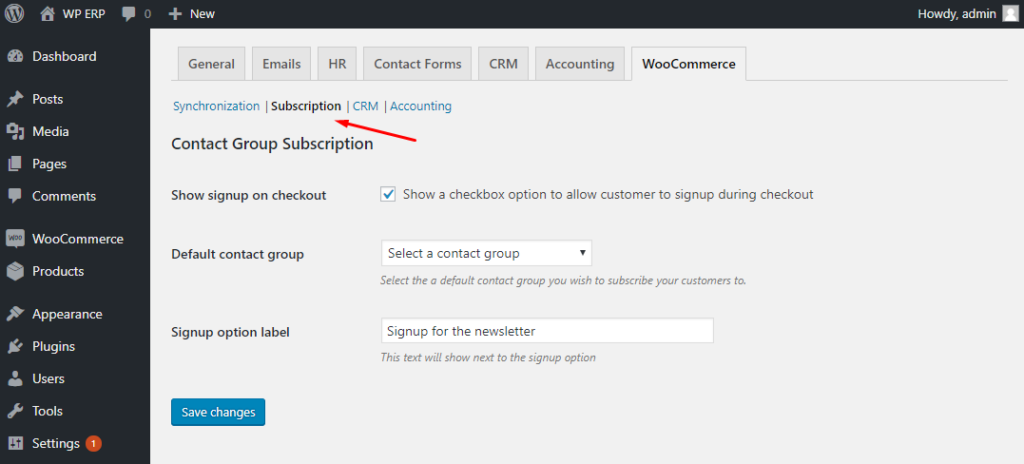
Click the Save Changes button to apply the configured options.
CRM – Customer Management
Then click on the CRM tab to view the settings for the CRM module:
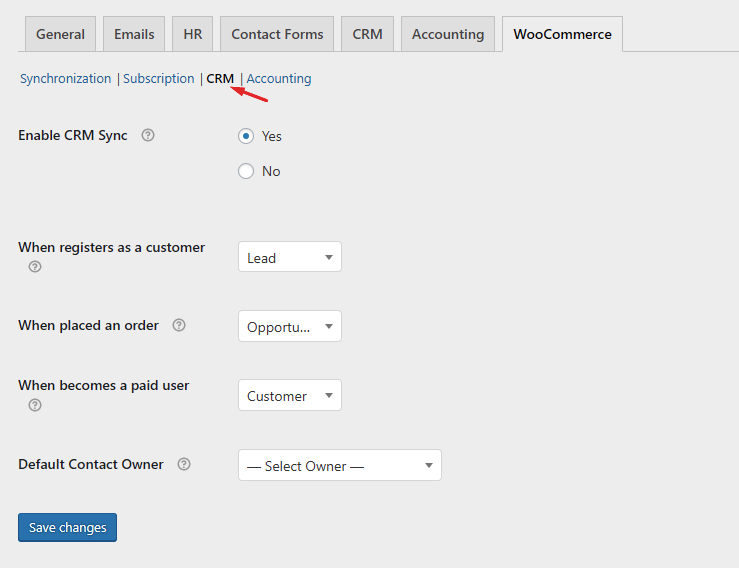
Included options are
- Enable CRM Sync: Enable or disable CRM sync.
- When someone registers as a customer: Automatically set a customer's lifecycle stage when they register
- After someone places an order: Set a customer's lifecycle stage when they place an order
- When someone becomes a paying user: Set the lifecycle stage when they purchase something from your store
- Default Contact Owner: You can set which CRM agent should be the default contact owner
Accounting
In the accounting settings, you can configure how your WooCommerce orders are synchronized with your accounting module.

Here you will find options for-
- Enable Accounting Sync: Enable or disable data import into the Accounting module
- Enable Product Sync: You can also enable or disable product sync here
- Default Product Type: Select the product type, either as standard or in another category
- Select the Default Product Owner and the Category
- Default Tax Category
It also allows you to update existing products.
Managing WooCommerce Orders
When a new or existing WooCommerce customer places a new order, their user data is automatically listed in the CRM contact list and the accounting customer list.
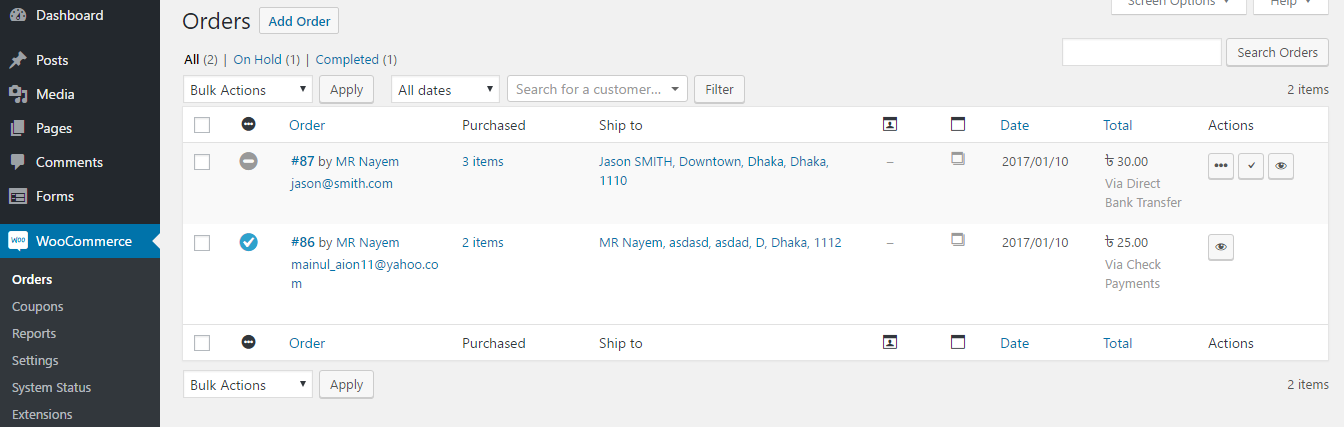
Go to WP Admin → WP ERP → Accounting → Transactions → Sales
You will find any customer’s latest WooCommerce order in the sales list. The status remains „Waiting for Approval“ until the administrator completes the order.
You can click on the „Waiting for Approval“ button to view the invoice details. However, you should not approve or complete payments via the accounting module. This integration currently has a one-way communication system. It can retrieve data from WooCommerce but cannot yet modify WooCommerce data.
CRM User Profile Enriched
Now navigate to WP Admin → WP ERP → CRM → Contacts
You will find the WooCommerce customer listed in the CRM contact list.
You can search your CRM contact list by creating search segments. WooCommerce billing, shipping, order, etc. information can be used to create new searches. You can use these saved searches to send newsletters and emails with various email plugins, including Email Campaign.

Now click on the contact to view details of their activities. Here you will find a detailed view of the contact’s profile. You will see the contact’s activity log, including their order and purchase logs. At the bottom of the page, you will find two new sections titled Delayed Orders and Purchased Products.
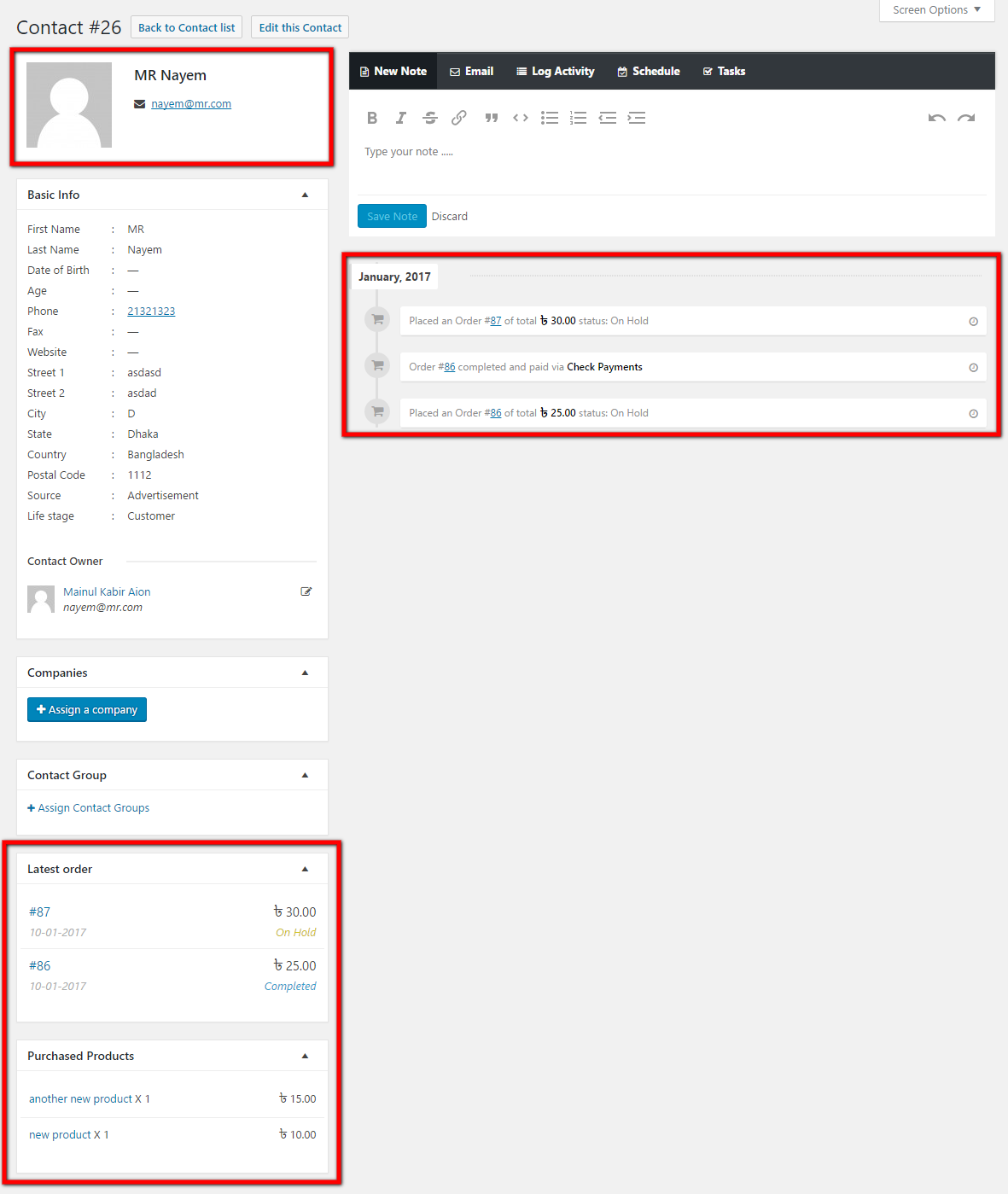
The last order section includes the order ID, order status, and total amount. The purchased products show a list of products bought by this contact, including their quantity and the amount paid.
Click on an order and the detailed information will be displayed. The ERP accounting invoice number will be included in the order notes.
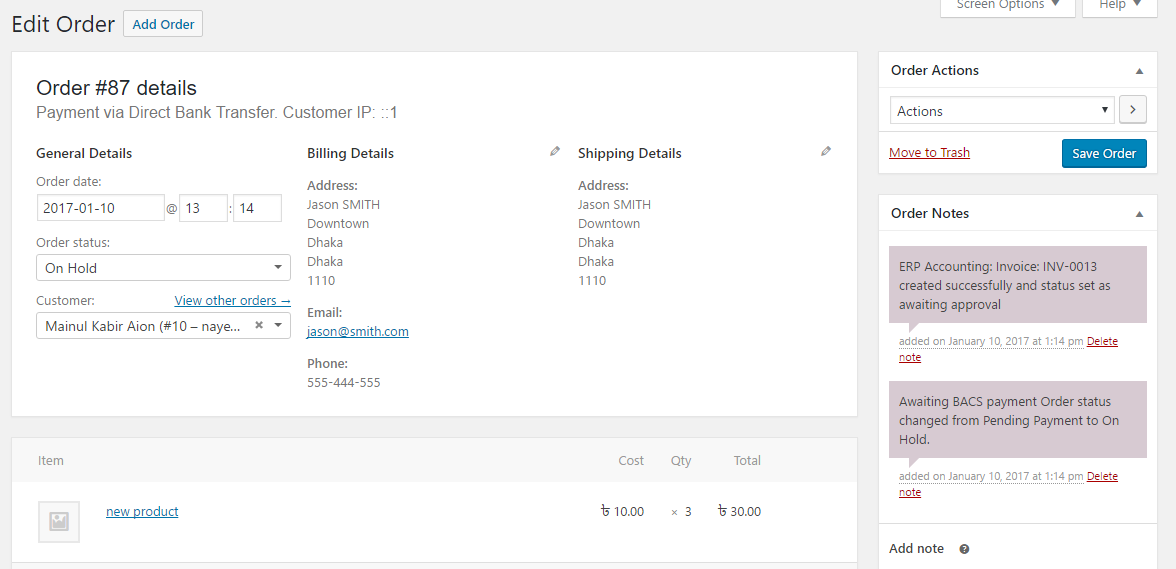
After the order is completed, the status of the order in the accounting module’s sales list will be changed to paid, and an invoice for the order will be created and saved.
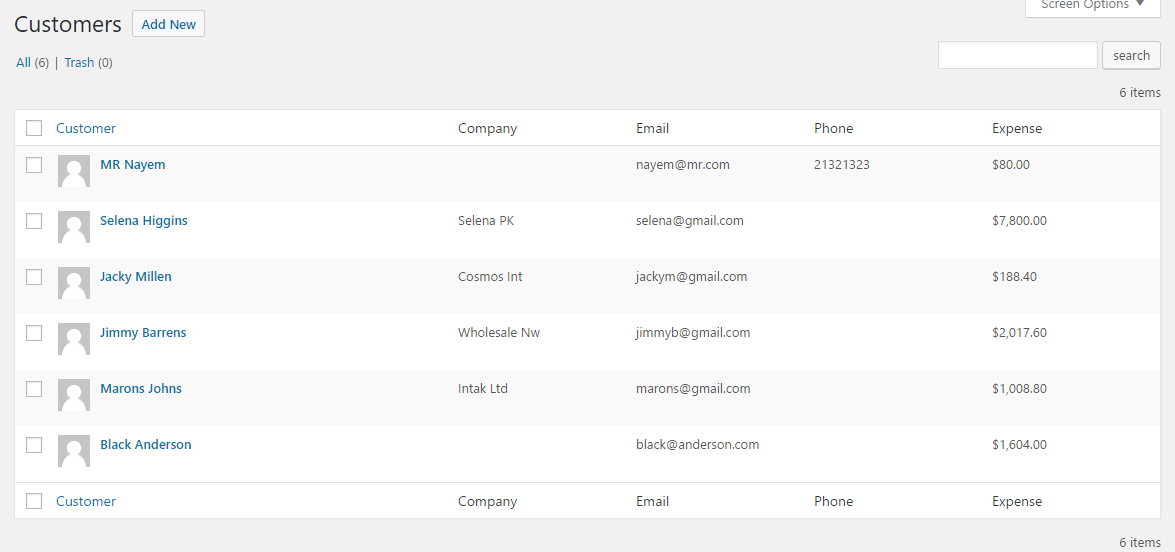
You can also check the accounting modules‘ customer list. All new and existing WooCommerce customers will also be synchronized with this list.
You can also watch the video tutorial to better understand the integration of WooCommerce with your ERP system.
Convinced? The WP ERP is available here*.

Florian Ibe
CEO & Marketing Consultant
Your contact person: Florian Ibe





 DE
DE

