


Super Forms is the only plugin you will ever need for your contact forms. This WordPress form plugin is very user-friendly when it comes to creating forms. With almost unlimited options, you can create any type of form. With conditional logic, multi-part elements, and countless customizable options and settings to adapt every color of every element to your needs. No matter what theme you have installed, Super Forms will fit with its color scheme functionality. The PayPal integration with a flexible form builder is the ideal combination + numerous add-on possibilities.
WordPress Form Plugin with PayPal Integration (Flexible Form Builder + Addons)
The WordPress PayPal integration with Super Forms as a form builder is extremely easy and well-documented. If you don’t speak English very well, it’s best to activate the Google Chrome translation function to easily understand and implement everything. As always, the plugin is translatable into German.
Further down in the article, we also introduce a Calculator Add-On for Super Forms, which allows for complex price calculations!
WordPress PayPal Payment Form Integration
For Super Forms, you will need the PayPal Add-On for approximately 18 Euros extra. With this, PayPal can be integrated into the form within a few minutes.
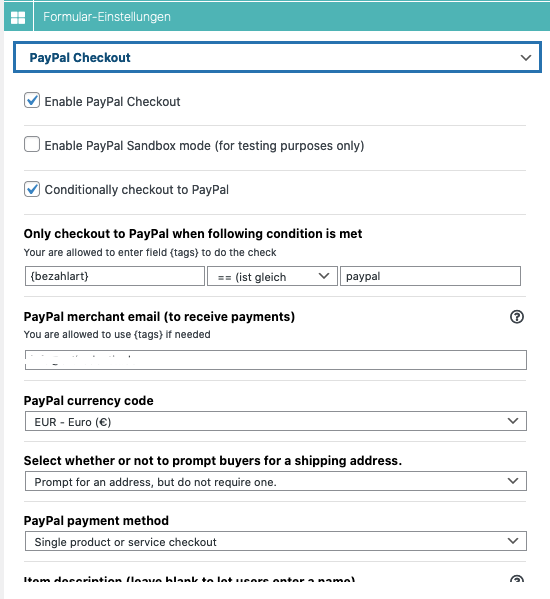
+ viele, viele, viele weitere Einstellungsoptionen 😉

Become more visible on Google & Social Media?
In a free strategy consultation for data-driven online marketing, we uncover your untapped potential, review any existing ad accounts if necessary, examine your SEO ranking and visibility, and determine which strategy is appropriate for your budget and which active measures will lead to more inquiries or sales.

✅ More visibility & perception through targeted placement
✅ More visitors > prospects > customers > revenue
✅ Reach target groups scalably with SEA
✅ Act and grow sustainably with SEO
🫵 Maximum success with our hybrid strategy
💪 More than 15 years of experience across industries in over 1,000+ projects demonstrable!







In short, this PayPal Add-on offers you the following features & integration of settings:
- Payment Methods
- Single Product or Service
- Donations
- Subscriptions
- Shopping Cart to Checkout (for multiple products)
- Option to define taxes, weight, discount amount, discount rate, processing fee
- Send email after payment is completed
- Optionally add attachments
- Update Post Status After Payment Completed (Frontend Booking Add-on Only)
- Registered User Login Status After Payment Completed (Register & Login Add-on Only)
- Change User Role After Payment Completed (Register & Login Add-on Only)
- Conditional Checkout to PayPal Based on Conditional Logic
- Change Contact Entry Status After Payment Completed
- Instant Buyers for a Shipment
- Ask for an address, but don’t require one
- Do not ask for an address
- Ask for an address and request one
- Custom Return URL The user will be redirected to this URL after payment URL
- Custom Cancel URL Users who cancel payment will be redirected to this URL
- Allow buyers to specify quantity
- Select weight unit (lbs/kg)
- Other options to define:
- Define PayPal Notification URL (IPN)
- Define Currency
- Define language for invoice information/login page
- Define handling fees
- Define invoice number
- Define area code for US phone numbers or country code for non-US phone numbers
- Define the three-digit prefix for US phone numbers or the entire phone number for non-US phone numbers, excluding the country code.
- Define the four-digit phone number for US phone numbers.
- Parse the address to PayPal based on the form input data
- Option to overwrite the PayPal member’s stored address
Compatible with:
- Calculator Add-on
- Frontend Posting Add-on
- Register & Login Add-on
Tip: An overview of all Form Plugin AddOns* (click here).
Now for general information about the form editor plugin, as well as a free but less flexible solution at the very bottom of the article.
Super Forms – Drag & Drop + Column/Grid System

Conditional Logic for WordPress Forms
Super Forms – Built-in Translation System
Super Forms – Main Features
Super Forms – Additional Features
Super Forms – Add-ons You Might Like
| |
|
|
|
|
| |
|
|
|
|
Examples of built-in form functions:
- Conditional Logic
- Dynamic User Fields (add more +)
- Variable Fields
- File Upload
- Google reCAPTCHA v2 and v3
- Multi-part / Multi-step Form
- Responsive Grid/Column System
- TABS Element NEW
- Accordion Element NEW
- WooCommerce Product Slider NEW
- Checkbox Image Selection
- GDPR Compliance/Consent (Conditional Contact Storage (Entry)
- Built-in Translation System
- Google Address Autocomplete
- Distance Calculator
- Summary / Dynamic HTML Icon in Fields
- Fields with Icons
- Advanced Date Picker
- Previous Value / Field
- Confirm Fields Auto-Populate Accept Service Terms
- Autosuggest Field
- Dynamic URL Redirect Parameters
- URL Parameters
- Retrieve Save Form Progress
- Form Data from Last Submission
- Retrieve Delete / Reset Form After Submission Add Attachments to Emails
- Add Lock Form After a Certain Number of Submissions Lock Form
- Lock After a Certain Number of Submissions Per User
Super Forms Add-on Examples:
- PDF Generator Add-on
- Calculation Add-on
- Calculate Days Between Dates Add-on
- Difference Between 2 Times Add-on
- Calculate Age Add-on
- PayPal – Single Product Checkout Add-on
- PayPal – Shopping Cart Checkout Add-on
- WooCommerce – Checkout Add-on
- MailChimp Add-on
- Signature – Add-on
- Frontend Register & Login Add-on
- Create Post Add-on
- CSV Attachment Add-on
- Email Reminders Add-on Email –
- Templates Add-on
- Password Protection Add-on
The Calculator Add-on for simple to complex price calculation
With this add-on for Super Forms you can create advanced calculation forms based on user input. Create fantastic booking and order forms or build complex estimation forms. It’s as simple as normal math.
Example form created with Super Forms + Calculator:
Settings / Options:
The free, but less modern and flexible alternative:
WordPress Contact Form 7 + PayPal & Stripe AddOn.





 DE
DE

