


Do you want to create a job portal, job board, or job platform with WordPress? Very good idea! A WordPress job portal is very easy to implement and flexibly expandable as a job board with job board for job listings. In this article, we present 3 of the best WordPress job themes with all features as well as the corresponding WordPress job listings plugin.
Create a WordPress job portal / job board with job board for job listings – the best themes & plugins
First, some important information. Like almost all pages in WordPress, a job portal as a platform also consists of the WordPress installation, an appropriate theme for the intended use, and a selection of plugins for the functions. The themes presented below include almost all important features through already integrated job board plugins (for job listings) and job application plugins (for applications).
Please note that there are some free plugins disguised with subscription solutions as SaaS solutions (Software as a Service), which only work in combination with external platforms. As a WordPress agency, we currently advise against these.
The key components:
- WordPress Job Listings Plugin / WordPress Job Board Plugin
WP Job Manager (click here for plugin) is a job listing plugin that allows you to add job board-like functionality to your WordPress site. Since it is shortcode-based, it can work with any theme (with some CSS styling) and is really easy to set up.- Add, manage, and categorize job listings through the familiar WordPress user interface.
- Searchable and filterable Ajax-powered job listings that can be added to your pages via shortcodes.
- Frontend forms for guests and registered users to submit and manage job listings.
- Enable job providers to preview their listing before it goes live. The preview matches the display of a live job listing.
- Each job listing can be linked with an email or website address so that job seekers can apply for the positions.
- In searches, RSS links are also displayed so that job seekers can be notified of new positions that match their search.
- Allow logged-in employers to view, edit, mark as filled, or delete their active job postings.
- Developer-friendly code – custom post types, endpoints, and template files.
- The plugin comes with multiple shortcodes to output jobs in various formats, and since it was built with custom post types, you can further extend it through themes.
- NOTE: There are some paid add-ons, but they only cost a few euros!
- WordPress Application Plugin / WordPress Hiring Plugin / WordPress Job Application Plugin
With the following suggestions, you can create and set up a WordPress job portal or WordPress job board for your company or as a regional or nationwide job platform yourself.
The 3 best WordPress job themes – everything you need for a professional WordPress job portal / job board with job listings:
Note: Jobify & Jobhunt are based on WP Job Manager with paid add-ons. Jobmonster (Theme 3 here in the article) has its own system and has everything integrated. So a comparison is worthwhile!
As always, all themes and plugins are also partially translated into German or can be easily translated yourself with Loco Translate.
Job search is now even easier with the job portal & job platform of the WordPress Jobify theme
With Jobify, it has never been so easy to create a website with job listings – the easiest-to-use job board theme available, with an integrated WordPress job listings plugin. Create a community of employers and potential employees.
- Simple live search and filtering makes finding relevant jobs easier than ever.
- A fully customizable homepage means you control your website's layout.
- Charge a fee for job listings and easily monitor and approve submissions.
Create your job page in minutes
WordPress is known for its five-minute installation and may be the part that takes the longest – installing the plugins and Jobify is quick and easy. They connect companies with people who are actively looking for jobs.
Become more visible on Google & Social Media?
In a free strategy consultation for data-driven online marketing, we uncover your untapped potential, review any existing ad accounts if necessary, examine your SEO ranking and visibility, and determine which strategy is appropriate for your budget and which active measures will lead to more inquiries or sales.

✅ More visibility & perception through targeted placement
✅ More visitors > prospects > customers > revenue
✅ Reach target groups scalably with SEA
✅ Act and grow sustainably with SEO
🫵 Maximum success with our hybrid strategy
💪 More than 15 years of experience across industries in over 1,000+ projects demonstrable!







Resume Manager / Management lets the search engine do the work
Today's job search is not about people manually reading and reviewing resumes. They let search engines scan and find keywords in resumes. Jobify supports candidate resumes so that employers, recruiters, and potential interested parties can find faster. (Plugin available separately and included free with the Jobify theme!!!).
Resume Manager is a plugin based on WP Job Manager that adds a resume submission form and resume listings to your website, all of which can be managed through the WordPress administrator.
- Allow candidates to publish resumes on your website and apply for positions with resumes. List resumes and restrict access to specific user roles if desired.
- Restrict which user roles can view candidate contact information
- Based on WP Job Manager, which makes it developer-friendly
The Resume Manager allows you to set up a lightweight resume posting website built on WP Job Manager. Since it is shortcode-based, it can work with any theme (with some CSS styling) and is really easy to set up.
The admin user interface is very similar to WP Job Manager, lists submitted resumes, and allows the administrator to approve, edit, and delete.
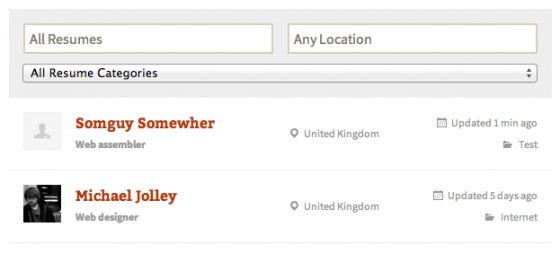
Filterable Resumes
The resume shortcode outputs are displayed in a list, followed by a search/filter form that is Ajax-powered (results are displayed immediately). Access to resumes can be restricted using WordPress user roles.
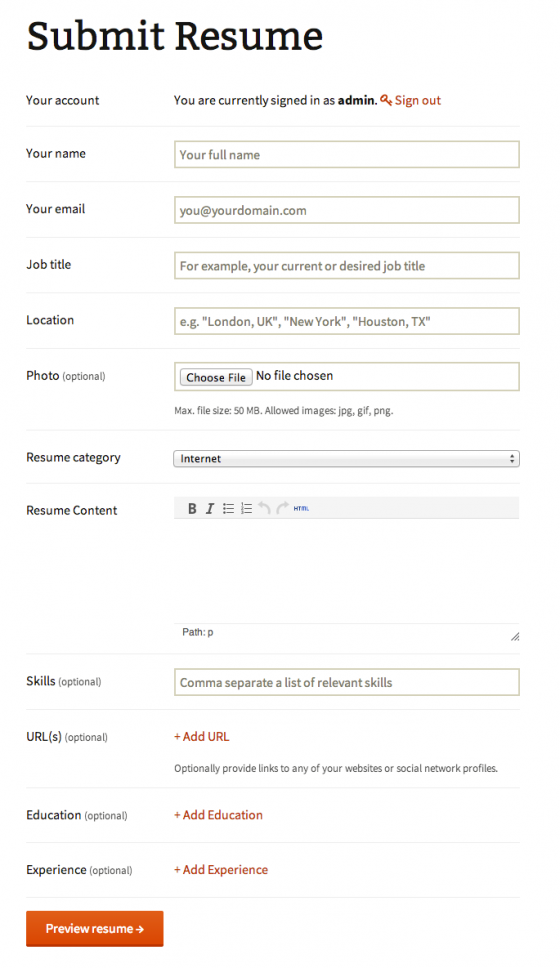
Submit Resume Easily
The resume submission form collects the candidate's name and contact information, websites, education, and employment history.
The candidate can add as many education and experience entries as desired, including notes, name, dates, and position/qualifications.
After submitting the form, a preview is displayed. The preview corresponds to the appearance of a live resume.
Submitted resumes can be edited or removed from the candidate dashboard when the candidate is logged in.
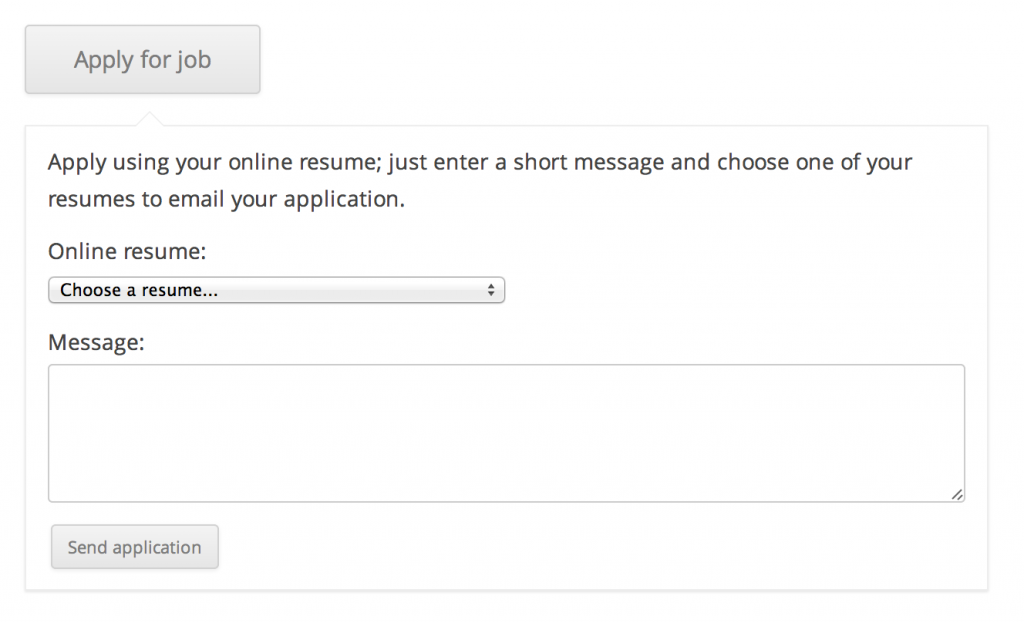
Apply for jobs with resume
Positions that have an email address for the application method can be applied for via resumes. A form is displayed asking the user to select a saved resume and enter their message, which is then emailed to the employer. The employer also receives a private link to view the online resume on site.
Logged-out users and users without a submitted resume can be prompted to submit one and apply for the position after submitting their resume.
Resume Display
Individual resumes display all collected data and also show a "Contact" button that employers can click to view the email address to contact the candidate.
You can restrict who can view resumes and contact information from WordPress user functions.
Powerful features in your palm
Like everyone else, your users carry their phones everywhere. Now they can browse job listings in the palm of their hand. Jobify is mobile-friendly with responsive functionality that allows users to search for jobs, submit a listing, and more.
Connecting people using the WordPress theme Jobify could not be easier:
- A company submits a job posting with information about the position and their company.
- A potential employee visits the website, searches the interactive map, filters the results, and applies for the job of their dreams.
- Site administrators can require a subscription or one-time payment to create a job listing.
Jobify Features at a Glance
- Integrated into the freeWP Job Manager plugin by Mike Jolley – the first fully integrated theme of its kind!
- Integrated with the Resume Manager plugin, which allows candidates to upload/post resumes to your website or publish them manually. (Plugin sold separately).
- Integrated with offer payments, which allow you to create custom job packages that can be purchased or redeemed during job submission. Note: This can only be used for selling job packages and not be set up as an entire store. (Plugin available separately)
- Integrates with the popular Slider Revolution Responsive WordPress plugin. (Plugin sold separately).
- Can be integrated into the free Testimonials by WooThemes plugin to display custom testimonials and brands of companies using your service
- Integrated into the popular free NinjaForms plugin, allowing users to submit resumes through a convenient popup modal.
- Integrates with the popular GravityForms plugin, allowing users to submit resumes via a convenient popup modal. (Plugin sold separately) Optional.
- Beautiful and clean, responsive design (optimized for iPad and iPhone)
- Large, stunning typography
- Designed for Retina displays
- Support for WordPress Theme Customizer Customize
- Complete design customization, i.e. logo, background, text colors
- Page Templates (Home, Testimonials, Pricing)
- Support for contact forms (JetPack forms, Contact Form 7, Gravity Forms)
- Custom shortcodes (Register, Login, Jobs, Job Dashboard, Job Summary and more)
- WordPress 4.6+ Ready (Menus & Featured Images)
- XML Dummy Content Included for Easy Setup
- Complete localization support (includes .po/.mo files)
- Comprehensive documentation

Our Favorite: Jobhunt – Job Board WordPress Theme for WP Job Manager
Important Note: Our Jobhunt live demo includes pages from the free WP Job Manager plugin as well as the paid WP Job Manager Core Add-On plugin (such as Candidates). If you have any doubts about whether a feature is included in a free plugin or not, please do not hesitate to contact us and we will clarify this.
The main function of a theme is to determine how a website looks and not how it works. The part "how it works" is intended for plugins and is referred to as plugin territory. Many job board themes try to include features that are clearly outside the scope of the theme, thereby encroaching on plugin territory. This causes great inconvenience to the user, as the user can never switch a theme or risks losing the website, its data, and functionality.
Taking into account the complaints mentioned above, we developed the WordPress Theme Jobhunt – Job Board for the WP Job Manager plugin. Our theme designs the appearance of the website, while the WP Job Manager plugin provides the job board functionality.
Jobhunt is an easy-to-use, cleanly coded, and fast job board WordPress theme that is based on the principle of separation of concerns for WP Job Manager. It supports all features of WP Job Manager such as filterable job listings, job submissions, employer dashboard, and job submissions.
Jobhunt also supports the WP Job Manager Core Add-on Bundle, which includes features such as resume manager, job notifications, Indeed integration, job tags, paid listings, job applications, and more.
Job Search Features
Developed for WP Job Manager
Our theme takes care of the part "How the website looks" and "How the website works" is handled by WP Job Manager. WP Job Manager is a lightweight open-source job board plugin for WordPress. This plugin is managed by Automattic, the same company that manages WordPress. With such solid support and contributions from the best minds in WordPress, WP Job Manager is the best job board plugin for WordPress.
Easy & Fast
I feel the need. The desire for speed.
-Lone Wolf
The theme is lightweight and with caching plugins like WP Rocket, CDN like CloudFlare, and a good server, you can achieve very fast loading times for your website.
Built without encroaching on the plugin territory
The theme contains no features that fall outside the scope of a theme. This means that your website functionality is not tied to the theme. You are free to extend your website's functionality with various available third-party plugins.
5 different homepages with 15+ blocks
Jobhunt comes with 5 different homepages and 15+ blocks. You can mix and customize different blocks with King Composer to make your homepage unique.
5 Headers and 5 Footers
You can choose from 5 different headers and 5 different footers. The header area is created using hooks and the footer area is equipped with widgets.
3 different job list styles and 3 different single job page styles
Jobhunt offers 3 different ways to list your jobs: Modern, Grid, and Classic. You can choose the style you prefer best and also set the individual job page from one of the 3 available styles.
Advanced filter and sorting options
Jobhunt offers advanced filtering and sorting options for job listings, employer listings, and resume displays through widgets, allowing you to expand the filter options for these listings.
Employers (Companies)
With Jobhunt, you can list employers who post job listings on their own page for the employer list and on the individual employer page. Employers can be listed in 4 different styles and the "Individual Employer" page is available in 2 different styles. There is also an employer dashboard where the publisher can manage their job listings. An employer page builds the trust of the applicant.
Candidates (plugin sold separately)
List candidates in 3 different styles and individual candidate pages in 2 different styles. Additionally, there is also a candidate dashboard page.
Compatible with the WP Job Manager Core Add-On Bundle (plugin sold separately)
WP Job Manager covers all features that are considered "core" for operating a simple job board site. Additional, advanced features are available via add-ons. The most popular add-ons are provided as a core add-on bundle. Jobhunt is compatible with this core add-on bundle and supports all features of this add-on bundle.
Compatible with King Composer
Use the drag-and-drop editor to create your homepages with King Composer. With more than 15 homepage blocks, you can create unique homepage layouts for your website.
Autocomplete for jobs & location with Google GeoLocate
Jobhunt uses WordPress's built-in jQuery Autocomplete for Jobs and Google GeoLocate to automatically complete job locations.
Line Awesome & Font Awesome Icons
Font Awesome is great, but many people also like line icons. Line Awesome consists of 674 flat line icons created based on the Windows 10 style. We have also added Font Awesome.
Compatible with WooCommerce Paid Listings (plugin available separately)
Jobhunt is compatible with WooCommerce Paid Listing as well as Simple Paid Listing plugins (available separately). You can use these plugins to charge your customers for uploading their jobs to your website powered by Jobhunt.
Structured data for job listings
WP Job Manager automatically adds structured data to your job listings on each individual job listing page. This helps Google and other search engines understand specific information about your jobs, such as the type, location, employer name, etc.
Demo installation with one click
Installing our demo content is easier with our one-click demo installation.
8 Static Pages
In addition to 5 homepages, Jobhunt includes 2 contact pages, About, Job Packages, FAQs, and 3 additional static pages
3 different blog styles
Choose from 3 different blog styles for your blog
WooCommerce Compatible
Jobhunt is also compatible with WooCommerce and supports all of its features.
Job Search Demo
Our Jobhunt live demo includes pages from the free WP Job Manager plugin as well as the paid WP Job Manager Core Add-On plugin. If you have any doubts about whether a feature is included in a free plugin or not, please do not hesitate to contact us and we will clarify this. This is how our demo works without the WP Job Manager Core Add-on plugin: Jobhunt Demo without WP Job Manager Core Add-ons

Jobmonster – Job Board WordPress Theme
As an expert in job boards and listing industry, Jobmonster has never disappointed customers. The job board WordPress theme was born to be the bridge connecting employers and candidates. Jobmonster offers new features such as modern advanced job search, front-end resume and job submission, easy installation and customization, edition for admin review, pricing plan for job listings, email notifications, and much more.
The theme allows customers to try different homepages and other pages with a super easy one-click demo importer, which allows users to set up the job board site in minutes. In previous versions, Jobmonster, integrated with WPBakery Page Builder (formerly Visual Composer) and Slider Revolution, will advance your creation process easier and faster. Users can create beautiful sliders with amazing effects using Slider Revolution and design the website with tons of custom elements from the most popular page builder – WPBakery Page Builder.
Recently, we have worked with great effort to release a new version of Jobmonster. Jobmonster is now compatible with Elementor, the most trendy page builder for WordPress at that time. Now you can customize your homepage with WPBakery Page Builder or Elementor. This is flexible because you can create complex layouts according to your ideas within minutes.
Additionally, Jobmonster successfully leverages the benefits of WooCommerce integration, which allows users to easily create packages, create add-ons for packages, and sell packages with more payment gateways (PayPal, 2checkout, MasterCard, Stripe, etc.).
The Job Board topic provides you with everything you need to easily create a powerful job board, which is the result of years of research and development in the job board industry. Jobmonster is constantly updated to remain one of the best job board themes.
More information below…
New package for employers
JobMonster now offers a new package for employers – Employer Package. The package adds a lot of new powerful features, especially with resume details and job details. Users can now easily show/hide all fields offered on the resume detail page and job page. Additionally, the new package offers you some new features in jobs such as refresh jobs, displaying candidate contacts, and changing the number of listings, etc.
Supports Google Maps and free open source Bing Maps
The new version will support Google Maps and free open-source Bing Maps, which are so useful in job search for accurate results. In particular, this feature allows users to search their managed jobs within an accurate radius based on their current location.
Many powerful features
Jobmonster offers many powerful features in the areas of job listing, company listing, job detail, resume listing, resume details. You should visit the theme to get these features in detail. On the job detail page, for example, you get some new options such as sharing on social networks, applying via Facebook, or other new features such as job follow, show more, quick view, etc.
Comfortable front-end management dashboard
Both employers and applicants feel comfortable with Jobmonster, which provides them with an easy way to manage both jobs and resumes. You can find separate sections in the employer management dashboard, including managing jobs, applications, messages, shortlists, advanced filters, etc. Regarding the applicant dashboard, you can easily manage resumes, applications, job notifications, bookmarks, followers, etc.
Job & resume submission
Jobmonster allows users to get frontend submission very easily. Employers and applicants simply submit and edit jobs directly on the frontend and select the best one.
Amazing job listing features
The job listing plays an important role on your job site, regardless of whether the positions are displayed well and reasonably so that users can find them or not. Therefore, it is so important to choose the job listing that matches your goal. Jobmonster offers users more options on the job listings page, including sending to a friend, saving, sharing, sending me jobs like this by email, etc.
Advanced Filter
To save time and find out what you need in the fastest way, Jobmonster updates the job search and job filter on every page. In the new version, we add a new search style of the search filter, which allows you to easily filter jobs by category, type, location, tag, distance, etc.
Unlimited number of custom fields
Jobmonster allows users to manage jobs, resumes, and other related job fields smoothly by offering specific custom fields for job, resume, candidate, and application form.
Intelligent Advanced Search
Both candidates and employers can easily find what they need with many specific fields in the advanced search, including keywords, location, category, and you can modify the search fields as needed.
WooCommerce Integration
The best e-commerce WordPress plugin allows users to easily create packages, create add-ons for packages, and sell packages with more payment gateways such as PayPal, Mastercard, and so on.
Jobmonster – WordPress job board theme features
- Responsive and Retina ReadyWe care about every user and how they access our job board site. Jobmonster is thoroughly tested to maintain its sharp appearance everywhere.
- 9 Home Variations
- Resume
- Homepage
- Search Map Home
- Candidate home
- Career home
- Recruitment Home
- Job categories homepage
- Rental apartment
- Employer Home
- Frontend Job Submission and Editing for Admin ReviewThe employer can submit and edit the job directly in the frontend by following the submission steps. The administrator can then review a job to approve or reject it.
- Resume Submission on FrontendAfter the submission steps, the candidate can publish the number of resumes directly on the frontend and select which one is searchable.
- Pricing plan for job listings with WooCommerce IntegratedYou can set the number of job listing plans. Payment can be effectively completed with integrated WooCommerce.
- Price plan for resuming bookingYou can easily set the number of resume booking plans.
- Employer Management DashboardThe employer can edit the company profile, manage jobs, view and respond to candidate applications.
- Advanced Custom Fields with SearchJobmonster contains countless advanced custom fields with search functionality, such as: Text, Number, Email, URL, TextArea, Select, Multiple Select, Radio, Checkbox, DatePicker, Image Upload, File Upload, Video.
- Private Messaging between Employer and Applicant (Integration with Frontend PM Plugin)The theme integrates with the Frontend PM Plugin, which provides private messaging between employer and applicant to connect them and facilitate their response.
- Candidate Management DashboardThe candidate can edit their profile, manage resumes, view applications, bookmark jobs, and manage job alerts.
- Apply to Jobs in 3 Flexible WaysApplicants can apply for positions by uploading their resume and selecting from their online resumes on Jobmonster
- Employers approve or reject applications with a message to the candidateJobmonster enables the administrator to review job submissions through the admin panel and then approve or reject them.
- Company Directory in 2 Layouts: Alphabet & GridDisplay the company list in Alphabet and Grid and the company profile with their available positions.
- 2 layouts for a single company pageThere are 2 layouts available for the single company page.
- Job Alerts and Bookmark JobsWe have just added the Job Alerts and Bookmark Jobs feature to help candidates easily find their ideal jobs.
- Slider Revolution integrated (Save $25)It also includes a powerful Slider Revolution plugin that allows you to impress both candidates and employers.
- Every action comes with email notificationsIn addition to the job notification sent to the candidate's email, most Jobmonster actions come with an email notification in the flow.
- Powerful CustomizerAll NooTheme themes are equipped with the super powerful customizer. Jobmonster Customizer works like the well-known original WordPress customizer and is much more versatile, as you can configure and modify the settings of almost every element on your website. It is easy to use with the custom bar on the left side and the live preview screen on the right side, which adapts in real time along with your changes. Play around until you are satisfied with the appearance of your website and immediately after clicking Save & Publish, all settings are published in the frontend. You do not need to switch back and forth between the dashboard and frontend to see your changes and keep them secret from visitors. You can also import and export your settings to use them with Jobmonster for the next website.
- Sign in with social networksNow candidates can log in absolutely with their social accounts, including Facebook, Google, and LinkedIn.
- Indeed IntegrationThe theme integrates with Indeed – the most comprehensive job search engine.
- ReCaptcha IntegrationReCaptcha is available in the login form, registration form, application form, and company contact form.
- WPBakery Page Builder (formerly Visual Composer)The best-selling drag & drop page builder for WordPress (valued at $45 USD)
- Elementor compatibleDeveloped and perfectly optimized for the world's best page builder
- Woo Commerce IntegratedJobmonster allows you to create job listing packages and enable seamless on-site payment with the Woo Commerce WordPress plugin
- Translation ReadyJobmonster supports multilingual translations with WPML or POEdit. Jobmonster includes many translated languages:
- French
- Spanish
- Portuguese
- Portuguese Brazil
- Russian
- German
- Mexican
- Arabic
- Dutch
- Romanian
- Turkish
- Latvian
- Unlimited Colors and Google FontsJobmonster is super flexible. Almost every color of its elements can be easily changed in our theme customizer.
- Comprehensive DocumentationWe have included a dedicated documentation file in the theme package that will guide you step by step through the installation and customization of the theme. You can also find the detailed online guide in our support center here.
- Regular UpdatesWe update the theme regularly with additional add-on features and minor bug fixes. Only a one-time payment, you receive lifetime updates for free
- First-class supportIn addition to dedicated documentation, the developers of Jobmonster support you. We are happy to help you build your great website.





 DE
DE

