

WordPress is becoming increasingly popular, and many users want a simple drag & drop homepage website builder. There are numerous plugins for this! This post will explain the pros and cons of these plugins for WordPress sites, webshops, and blogs, so you can decide if this type of web builder and design option is right for you.
If you have first read the pros and cons of WP Page Builder plugins, you might be curious which popular WordPress plugins you should try to refine and manage your current website, blog, or webshop, or to create your next website from scratch. There is an increasing number of WordPress page builder plugins available, as user demand for drag & drop functionality grows daily.
We have selected 5 of the best WordPress Page Builder plugins currently on offer to help you get started.
WordPress Page Builder: Pros & Cons + Top 5 WordPress Plugins for Drag & Drop Content Creation
What is a WordPress Page Builder?
In WordPress, a page builder is simply a plugin – usually one that adds drag & drop functionality to the backend of your WordPress site, allowing you to design the layout of posts and pages without HTML or CSS coding experience.
Essentially, WordPress page builder plugins are designed to allow WordPress beginners to create their own post and page layouts without having to hire or commission a WordPress developer.
So, do you want to create a website without having to worry about code? Hiring a developer would do the trick, but it could cost you a lot of money. Fortunately, with WordPress page builders, you can now cost-effectively and easily create a professional WordPress site all by yourself, without any programming knowledge required.
This article compares the best drag & drop page builders for WordPress for creating a WordPress website, blog, or webshop.
Why use a WordPress Page Builder Plugin with Drag & Drop?
Do you want more flexibility than the standard WordPress template but dread getting your hands dirty with CSS and HTML? Perhaps you are also looking at Wix, Squarespace, or other drag & drop website builder options because you are unsure if your WordPress template offers enough flexibility.
The good news is that WordPress page builder plugins give you more flexibility for page and post layouts and allow you to create the site you envisioned in your mind, without any programming or design knowledge. That being said, they can have their drawbacks. So, let’s look at the pros and cons before you go ahead and add one to your website or shop.
With a page builder plugin, you can add any type of content to a page by using ready-made drag & drop content elements (blocks, modules, or widgets).
You can easily customize, move, and arrange the content elements to create unique website layouts. The best part is that you don’t need any programming skills to design with a page builder. This also works very well for elaborate and visually appealing WooCommerce shop product pages!
Become more visible on Google & Social Media?
In a free strategy consultation for data-driven online marketing, we uncover your untapped potential, review any existing ad accounts if necessary, examine your SEO ranking and visibility, and determine which strategy is appropriate for your budget and which active measures will lead to more inquiries or sales.

✅ More visibility & perception through targeted placement
✅ More visitors > prospects > customers > revenue
✅ Reach target groups scalably with SEA
✅ Act and grow sustainably with SEO
🫵 Maximum success with our hybrid strategy
💪 More than 15 years of experience across industries in over 1,000+ projects demonstrable!







By the way, a WordPress installation is then just as easy to handle as all the website builders like wix.de, jimdo etc.!
So, are Page Builders only for beginners? Not really. With the help of page builders, developers can proceed faster when creating custom designs and work for more clients.
Important: Don’t be irritated by developers who don’t think anything of these modules!
PROS: The Advantages of WordPress Page Builder Plugins
Here are the three main advantages of using a WordPress page builder plugin to create your website.
No Coding Skills Required
No coding experience? No problem! One of the main advantages of using a WordPress Page Builder plugin to create your website is that no knowledge of HTML or CSS code is required. Seriously – you don’t need to use a single line of code to build your site.
Most WP page builder plugins have a user-friendly drag-and-drop interface that allows you to easily add elements to your page and then rearrange and resize them. Most of these plugins also offer front-end editor features, so you can play with your site’s layout in a live preview and get a feel for how different elements and styles look in your theme’s existing design.
One Plugin for All Rules
Another great advantage of using a WordPress page builder plugin is that it offers all-in-one functionality. This means you can access elements like social sharing buttons, image carousels, pricing tables, and galleries without having to download multiple individual plugins. This makes your builder a one-stop shop for all the elements you might be looking for – which can save you a lot of money if you would otherwise invest in premium plugins for each feature.
Instead of installing half a dozen dedicated plugins, you only need one. Perfect for WordPress newcomers who want to keep things as simple as possible.
Super Easy Customization
While there are literally hundreds of thousands of WordPress themes for users to choose from, the likelihood of finding one that perfectly matches the design you’ve created in your mind is quite low. Most WordPress users have to compromise on a design element of their website or enlist the services of a developer with programming skills to customize their theme and make things look right.
The third main advantage of using a page builder plugin is that you can quickly and easily adapt the look and functionality of your WordPress site or blog to your creative vision. Start with a blank canvas if you have something very specific in mind, or one of your Page Builder’s pre-built templates as a starting point.
CONS: The Disadvantages of WordPress Page Builder Plugins
WordPress Page Builder Plugins can be useful – but they have their drawbacks. Here are three disadvantages you should consider before adding one to your site.
You have complete control over the look, structure, and design
Sure, that sounds like a pro – but sometimes having control isn’t necessarily a good thing. You might imagine yourself to be a bit creative (and you probably are!), but that doesn’t mean a page builder will magically turn you into a designer.
While page builder plugins allow us to create our own websites, this can sometimes lead to disappointing results. This is especially true if you’re starting from scratch and don’t have a clear vision or idea of what you want your website to look like. Creating your own website can be a cheaper option, but sometimes it’s far better to invest a few hours with a developer and leave the design work to the professionals. This is particularly true if the website you’re creating is meant to promote your business.
Updates, Incompatibility, and Security
Such a plugin has a massive impact on the entire WordPress (WooCommerce) installation and is integrated on all pages, simply everywhere. If there are errors in the programming, this can have major consequences. In addition, there are sometimes problems with other plugins that can lead to display errors.
You will likely be tied to this plugin forever
WordPress Page Builder plugins offer great functionality by using shortcodes in the backend of your website. Using shortcodes is not a problem, but it’s important to know that they are typically plugin-specific. This means that if, for any reason, you deactivate your Page Builder plugin, all those shortcodes will no longer work. And neither will your website.
In short, if you use a WP Builder for a page, blog, or shop, you will have to use it forever.
A change is only possible with great effort, depending on the size of the website.
Slower Site Speed
Shortcodes? Well, these are basically abbreviations for longer, more complicated strings of code. The more features and functions you add to your site, the more code is hidden – which can lead to sluggish loading times and a slow-running site. This can not only be frustrating for users – a slow website can also negatively impact your website’s SEO.
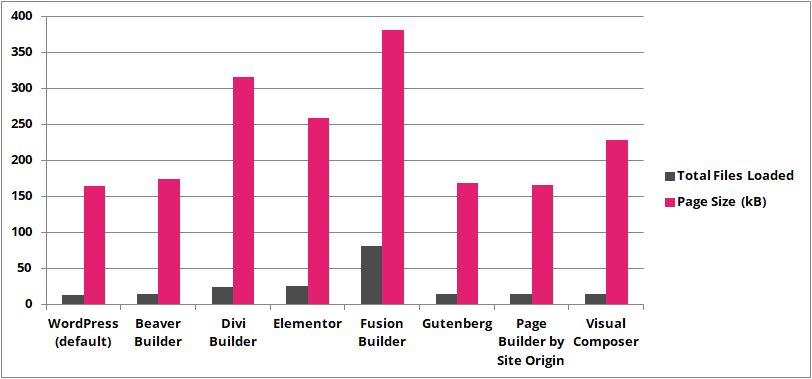
Statistics from 2017 already showed how much Page Builders affect the size of a website. Source: Primary Image
While most Page Builders have gotten better at this point, it’s still a factor.
Drag and Drop Homepage Builder with WordPress or not?
WordPress Page Builder plugins can be a great option for WordPress newbies looking for lots of cool features, custom design, and a flat learning curve – but they do have their downsides. Whether a Page Builder plugin is right for you depends on what you want to achieve with your website or blog, how much time you’re willing to invest, and whether you’re happy to continue using the plugin for the life of your website.
It’s worth noting that the developers of some of the most popular WordPress page builder plugins are working to further improve their offerings and solve some of their issues. This means that future versions will be even better quality and more user-friendly.
Are you looking to try a page builder plugin but are unsure where to start?
Die Top 5 WordPress-Seitengenerator-Drag-&-Drop-Plugins
1. Wp Bakery – Visual Composer Website Builder (Our Favorite)*
- More than 2,000,000 installations
- Powers 1.5 million WP websites
- Price starting from $34
Wp Bakery, formerly Visual Composer Website Builder* is a powerful drag & drop website builder for WordPress. You can use it to quickly and easily create an impressive WordPress website. Wp Bakery Visual Composer is easy to understand and intuitive to use, offering numerous features at a very affordable price for a top-tier WordPress page builder plugin. Perhaps this is why it is CodeCanyon’s best-selling plugin for creating drag-and-drop content AND the best-selling plugin overall.
Just like other builders, the Visual Composer plugin also features a real-time live editor, allowing you to see every change on the page instantly. You can click directly on any area of your page to edit and customize content.
The plugin comes with a package of professional templates. It offers powerful design options that allow you to customize the appearance of an element. You have full control over spacing, borders, background, parallax effects, and more.
Although most features are similar to other drag & drop tools, Visual Composer can do much more. You can also edit your website’s header and footer, menus, logos, sidebars, etc.
Visual Composer is a great tool for beginners and developers alike. A beginner can quickly and easily create a website, while developers can improve their workflow and create custom content elements and more powerful themes for their clients.
Price: starting from $45 for a single website (a free version is also available)
Why use Visual Composer? Visual Composer is a complete website builder for WordPress. If you are looking for an easy way to customize the entire look and feel of your website, including headers and footers, this is a great plugin.
Access the frontend editor (inline editor) or the backend editor at any time. Yes, WPBakery Page Builder comes with two types of editors that allow you to choose your preferred view. Create your WordPress website with the backend schematic editor or move your page creation process to the frontend to see your results live.
In addition, WPBakery Page Builder gives you full control over responsiveness. Create responsive websites automatically or adjust the settings you need to ensure your WordPress website looks perfect on mobile devices or tablets. WPBakery Page Builder offers everything to create a responsive website. Save money on buying different devices with WPBakery Page Builder’s out-of-the-box Responsive Preview.
With WPBakery Page Builder, you can easily start building your WordPress website. It only takes a few clicks:
- Add rows and columns to your page.
- Choose from over 50 predefined content elements or start with a professionally designed template.
- Drag elements around your page.
- Customize element settings easily with intuitive controls and options.
- Publish your page.
And that’s not all! With the page builder, you don’t have to be a developer to create a page. With WPBakery Page Builder, you don’t have to be a designer either.
- Extensions: Over 200 unique add-ons with hundreds of content elements exclusively available to WPBakery Page Builder.
- Template Library: Downloadable layout templates with Pro templates updated regularly. Create your layouts literally in seconds.
Your web developer (if you have one) will also love WPBakery Page Builder. We offer a comprehensive knowledge base describing our developer API, so you can extend WPBakery Page Builder. For those who don’t want to code, WPBakery Page Builder offers the Shortcode Mapper, which allows you to add third-party shortcodes to your WPBakery Page Builder content elements. With WPBakery Page Builder, you can work on new or existing websites, as it recognizes your existing content and adapts to any WordPress website. Forget page builders tailored to a specific theme that lock you in – WPBakery Page Builder works with any WordPress theme.
WPBakery Page Builder is the best-selling drag-and-drop plugin for frontend and backend pages on the market and already supports over 2,000,000 websites.
Join now and create beautiful WordPress websites in no time with minimal effort and, of course, without coding and [Shortcodes].
2. The Divi Builder
The Divi Builder is another powerful WordPress drag & drop page builder for WordPress. Similar to Beaver Builder and Visual Composer, Divi Builder is a true WYSIWYG editor (what you see is what you get), allowing you to preview your design as you create it.
With the Divi Builder plugin, you can customize everything, including your fonts, colors, sizes, spacing, etc., and create unique page layouts. There are 46 simple yet flexible content elements that you can use to create a beautiful page. You can easily organize the elements to your liking.
The Divi Builder plugin includes over 20 pre-built layout templates to help you quickly get started with your design. You can also create and save your own Divi layouts and import or export your layouts to use them on other Divi sites.
The Divi Builder plugin is the foundation of the popular Divi WordPress theme. However, you can use this plugin with any other theme. The advantage of purchasing this plugin is that you get access to the entire package of premium products from Elegant Themes.
Price: 89 USD for annual access
Why use the Divi Builder? The Divi Builder is a widely used page builder plugin that has received largely positive user reviews. It is a great alternative to Beaver Builder and a fantastic option if you want to use other products from the company.
 *
*3. Elementor Page Builder
- 379,000 Downloads
- FREE
- Pro packages from $49
Elementor was developed for speed and ease of use and is a powerful plugin for the WordPress page builder that comes with numerous pre-built templates and widgets. It is compatible with other WP plugins and themes and offers extensive customization options for your layout, including section widths and heights, column size and positioning, spacing, and margin settings.
Key Features:
- Instant real-time results
- Free and open source
- No coding required
- WooCommerce integration
- Automatic color control
A Pro version of Elementor offers more premium features and functions (including live form editing, global widget design, custom live CSS integration, and pre-built Pro templates) and is available for a single website starting at $49.
Why use Elementor? Elementor is easy to use and suitable for beginners. With this plugin, anyone can quickly learn its user interface and create beautiful pages. The Lite version is a good option for small businesses just starting out.
4. Beaver Builder WordPress: Beaver Builder
- Used by 1,000,000 WP sites
- FREE Lite version
- Own themes
- Pro packages from $99
Beaver Builder was designed for beginners and is considered by many to be the best WordPress page builder plugin (we use it here at WP Dev Shed). It is quick and easy to use and features a live drag & drop interface. It offers pre-built templates to get started and the ability to customize all features of your website.
Key Features:
- Live, Front-End Editing
- Optimized for SEO
- Supports Posts, Pages, and Custom Post Types
- WooCommerce Support
- Developer Friendly
Beaver Builder can be used with any theme and allows you to switch themes without losing your content – even if you no longer wish to use the plugin.
Beaver Builder Pro packages cost only $99 and can be used on an unlimited number of websites.
Why use Beaver Builder? Beaver Builder is a simple, beginner-friendly page builder that allows anyone to create an impressive website. It is a great choice for beginners looking for an affordable website solution.

5. SiteOrigin Page Builder (Free)
- Over 1 Million Active Installations
- FREE
- relatively simple in structure with fewer features
Site Origin Page Builder is by far one of the most popular plugins for the WordPress page builder – not only because of its price (forever FREE), but also because of its impressive functionality. Page Builder is compatible with all standard-compliant WordPress themes and supports live editing, allowing you to see your content and edit widgets in real-time. With the history browser, you can also scroll back and forth through your changes, giving you the freedom to experiment with different layouts and content without fear of damaging your website or content.
Key Features:
- Simple content creation interface
- Row and widget style
- Clean and efficient coding
- Compatible with all WP-compatible themes
- Real-time live editing
Site Origin’s Page Builder is available for FREE via the WordPress plugin directory and is actively being developed, with the latest update just two weeks ago. This plugin currently has over a million active installations and an average user rating of 4.8 / 5 stars.
Conclusion: The best WordPress Page Builder Plugin
After considering the why, as well as the pros and cons, and testing + daily use of the top 5 WordPress Drag & Drop Pagebuilders, we can safely say that the choice is not entirely easy. The simple user interface and powerful features for WordPress are more than good in all plugins, and all mentioned builders are constantly being developed.
If you are looking for a complete website builder with options to edit site headers, footers, and menus, you should use the Wp Bakery Visual Composer website builder. We use this for 95% of our sites.

Questions about WordPress or WooCommerce vouchers? We are happy to help:
E-Mail: fi@vastcob.com
Florian Ibe






 DE
DE


5 Kommentare
[…] AddOns für Page Builder: […]
[…] Sie unbedingt auch unseren Artikel zum Thema WordPress PageBuilder mit einem Vergleich und den vielen […]
[…] -> in 90% der Fälle ist das richtig, aber CSS-Kenntnisse und etwas HTML sind doch oftmals trotz Page Builder (visueller Editor) notwendig um ganz besondere Designs oder Elemente […]
[…] konvertieren. Um diese beiden Ziele gleichzeitig zu erreichen, sollten Sie sich für einen Website-Builder entscheiden, der eine integrierte automatische Reaktionsfähigkeit […]
[…] mit aktuellen Blogbeiträgen: Auf einer statischen Seite können Sie über einen sogenannten Page Builder (Baukasten) ein entsprechendes Content-Element für aktuelle Beiträge oä. einbinden oder aber auch im […]