


In 2026, bot traffic will become a real performance problem for many websites and shops. In addition to Google and Bing, AI crawlers, SEO tools, social media bots, price comparison services, feed systems, scrapers, and competitor monitoring tools now access websites.
The problem is not crawling itself! Crawling is important for visibility. It becomes critical when bots massively retrieve filter pages, search results, sortings, pagination, and parameter URLs.
Particularly affected are WooCommerce, Shopify, Magento, Shopware, and other e-commerce systems, because they can generate a large number of URL combinations through product filters, variants, collections, tags, and search pages.
The solution is not to block all bots indiscriminately, but intelligent crawl management:
- keep important product pages, categories, collections, landing pages, and blog articles open
- limit internal search, filter combinations, sorting parameters, and deep pagination
- specifically allow reputable search engines and relevant AI systems
- detect and slow down fake bots, scrapers, and aggressive crawlers
- regularly evaluate server logs
- use robots.txt, canoncials, sitemaps, caching, and bot limiters together
A modern bot limiter not only protects the server but also SEO, visibility, loading times, checkout stability, and hosting costs.
By the way, we also offer IMMEDIATE HELP here! Just write to us!
In short: Not every bot is bad. But not every bot should be allowed to crawl every URL without limits.
Crawler Flood 2026: Why modern websites need an intelligent bot limiter to distinguish between real and fake, as well as useful and not useful.
In the past, crawling was comparatively manageable. A website was primarily visited regularly by Google, Bing, and a few other search engines. This was technically predictable and, from an SEO perspective, even explicitly desired.
In 2026, the reality looks different.

How search engines, AI bots, SEO tools, and scrapers overload modern websites – and why blanket blocking is not a solution
Today, not only classic search engines access websites. In addition, there are AI crawlers, AI search systems, SEO tools, social media bots, link preview crawlers, feed systems, price comparison services, monitoring tools, commerce platforms, scrapers, competitive analyses, and data providers who want to build their own indexes.
Each of these systems pursues a legitimate or at least understandable goal: to capture content, understand products, compare prices, generate snippets, train data, improve search results, or provide new answer systems with information. The problem arises when useful crawling turns into uncontrolled technical load.
Become more visible on Google & Social Media?
In a free strategy consultation for data-driven online marketing, we uncover your untapped potential, review any existing ad accounts if necessary, examine your SEO ranking and visibility, and determine which strategy is appropriate for your budget and which active measures will lead to more inquiries or sales.

✅ More visibility & perception through targeted placement
✅ More visitors > prospects > customers > revenue
✅ Reach target groups scalably with SEA
✅ Act and grow sustainably with SEO
🫵 Maximum success with our hybrid strategy
💪 More than 15 years of experience across industries in over 1,000+ projects demonstrable!







Our video on this:
Important terms and definitions:
Fraud = Fraud / abusive act
Fraud refers to intentional deception or manipulation with economic damage. In the web context, this means, for example, click fraud, fake leads, fake orders, account abuse or automated actions with fraudulent intent.
Bot = automated program
A bot is a software program that performs tasks automatically. Bots can be useful, e.g. search engine bots, monitoring bots or security scanners, but also harmful, e.g. spam bots, scrapers or attack bots.
Crawler = bot for crawling websites
A crawler systematically accesses websites, follows links and collects content. Reputable crawlers such as Googlebot or Bingbot are used for indexing. Crawlers become problematic if they access too many pages too quickly or overload shops with filter, search and parameter URLs.
Scraper = bot for copying content or data
A scraper reads websites to automatically copy content, prices, product data, images or texts. In e-commerce, scrapers can generate server load, extract competitive data or cause content theft.
Good Bot = desired bot
A Good Bot serves a legitimate purpose, e.g. Googlebot, Bingbot, payment provider checks, monitoring services or SEO tools, if they work in a controlled and compliant manner.
Bad Bot = unwanted or malicious bot
A Bad Bot causes spam, scraping, fake traffic, credential stuffing, form abuse, shopping cart manipulation or massive server load. Not every Bad Bot is immediately a hacker attack, but it can cause significant economic and technical damage.
AI Crawler = crawler for AI systems
AI Crawlers collect website content to provide AI search systems, language models or answer engines with information. For companies, this can bring visibility, but at the same time generate server load and loss of control over content.
Rate Limiting = limiting access
Rate Limiting restricts how many requests a user, bot or IP address may make within a certain period of time. The aim is not to hinder normal visitors, but to slow down excessive access.
Bot Limiter = intelligent system for bot control
A Bot Limiter detects suspicious access patterns and limits, delays or blocks problematic requests. Ideally, it distinguishes between real visitors, good search engine bots and malicious bots.
Burst = surge / gush.
In the network/bot detection context: a phase in which a very large number of requests come from an IP in a very short time.
DDoS = massive overload attack
DDoS stands for „Distributed Denial of Service“. This involves overloading a website or server with a very large number of simultaneous requests. Unlike normal crawler floods, a DDoS is usually deliberately destructive.
Server load = technical load on the server
Server load is caused by database queries, PHP processes, shopping cart requests, filter pages, search queries, image calls, or many parallel visitors/bots. High server load leads to slow loading times, errors, or outages.
Load peak = short-term sharply increased utilization
A load peak is a sudden increase in accesses or server processes. It can be caused by real visitors, campaigns, bots, crawlers, attacks, or incorrectly configured tools.
So what does this mean for visitors, servers, loading time, and the security of websites and shops?
For simple corporate websites, this is often barely noticeable. For large shops (regardless of the system!), WooCommerce systems, directories, portals, and websites with many filters, parameters, pagination, sorting, and internal search, crawling can become a real performance and cost problem.
Server utilization can then quickly increase by 10 times or more, as shown here:
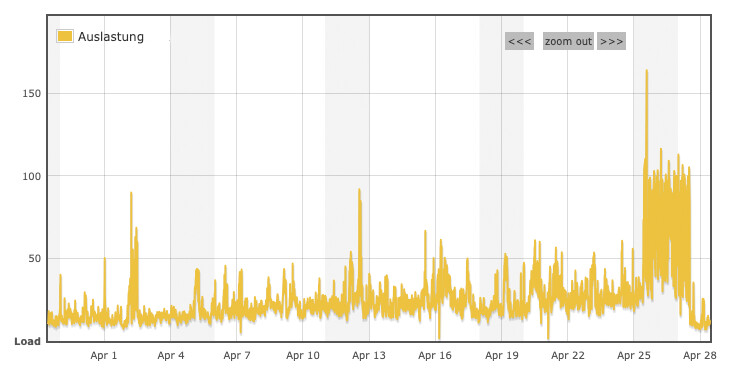
Weekly view: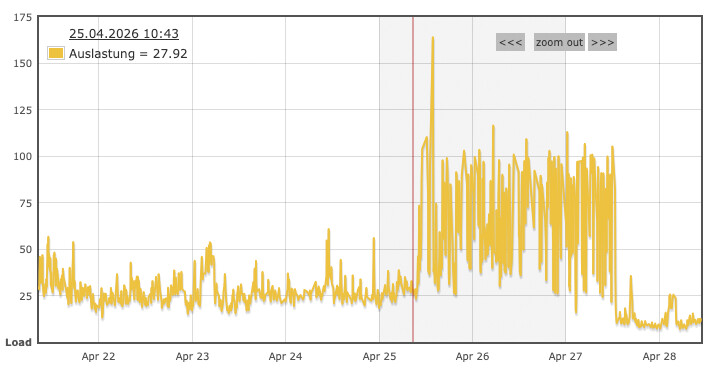
Google itself points out that faceted navigations and filtered URLs can generate enormous amounts of URL combinations and often unnecessarily consume server resources if crawlers retrieve them unfiltered. For many filtered product lists, Google therefore recommends specifically controlling crawling via robots.txt if these URLs do not have independent search value.
Exactly here lies the central question:
How does a website remain visible to search engines and relevant AI systems without bots overloading the server, database, and shop functions?
The answer is not: „Block all bots.“
The answer is: intelligent crawl management.
Our recommendation for very good and affordable hosting is always All-Inkl from the BUSINESS package*!
What is meant by „crawler flood“?
A crawler flood does not mean that every bot is automatically harmful. Crawling is a fundamental component of the open web. Without crawlers, there would be no Google search, no Bing search, no product ads, no link previews, no SEO analyses, and no visibility in many modern answer systems.
The problem is the quantity, speed, and depth of access.
A single bot that occasionally visits important pages is not critical. It becomes problematic when many systems simultaneously retrieve entire shops, filter pages, search results, parameter combinations, and pagination pages.

Typical bot groups are:
- classic search engine crawlers like Googlebot or Bingbot
- image, news, video, and commerce crawlers
- AI crawlers and AI search systems
- SEO tools for index, backlink, and ranking analysis
- social media and messenger bots for link previews
- price comparison and shopping systems
- feed and marketplace crawlers
- scrapers and automated competitive intelligence
- unidentifiable bots with changing user agents or IPs
Google itself documents different crawlers for various search products and use cases, including Googlebot, Googlebot-Image, Googlebot-Video, and other specialized systems. Crawling is therefore no longer just a single bot with a simple access pattern.
OpenAI also describes several crawlers or user agents for different purposes, including web search, training, and user-initiated retrievals. Website operators can control these accesses in a differentiated manner via robots.txt. (developers.openai.com)
Common Crawl operates its own web crawler, CCBot, and also provides a way to prevent access via robots.txt. (commoncrawl.org)
This shows: Crawling is no longer a uniform process in 2026. It is an ecosystem of many actors with different interests.
Recommendation:

Why WooCommerce shops are particularly affected
WooCommerce shops are particularly vulnerable because they often generate a large number of technical URL variants.
A shop with 1,000 products can quickly generate tens of thousands or hundreds of thousands of retrievable URLs through filters, categories, brands, colors, sizes, materials, sorting, and pagination.
Examples:
/shop/?filter_farbe=blau
/shop/?filter_farbe=blau&filter_material=baumwolle
/shop/?filter_marke-hersteller=...
/shop/page/48/?filter_farbe=blau&orderby=price
/shop/?per_page=96
/?s=searchterm&post_type=product
/usage/armchair/page/259/?filter_...
For users, some of these URLs are useful. Those looking for blue cotton products want to be able to filter. For search engines, however, not all combinations are valuable. Many filter pages have no independent search intent, no individual content, no backlinks, and no relevance as a landing page.
Technically, they can still be expensive.
Because each of these pages can trigger database queries:
- Product queries
- Taxonomy queries
- Meta queries
- Price filters
- Attribute filters
- Sortings
- Pagination
- Inventory determination
- Variant Logic
- Theme Templates
- WooCommerce Hooks
- Third-Party Plugins
- Caching Bypasses via Query Parameters
WooCommerce systems, especially those with many attributes and filters, often generate complex SQL queries. If bots access such URLs in large numbers, the load is not primarily caused by the homepage or product pages, but by technically expensive list, search, and filter pages.
The result:
- high CPU load
- high RAM consumption
- slow database queries
- overloaded PHP-FPM workers
- timeouts
- 500 errors
- poorer Core Web Vitals
- unstable checkout
- slow admin area
- increasing hosting or server costs
In the worst case, bots compete with real customers for server resources.

The Core Problem: Crawlers Do Not Automatically Understand What Is Economically Important
A bot initially only sees URLs.
It does not automatically know that /product/my-bestseller/ is valuable for the shop, while /shop/page/259/?filter_farbe=blau&orderby=price-desc&per_page=96 probably has no independent SEO value.
It also does not know that a specific internal search page triggers 20 database queries or that a specific filter is technically expensive.
From the bot’s perspective, it often holds true: If a URL is accessible, it can be crawled.
However, from the website operator’s perspective, not every accessible URL should be crawled indefinitely.
This is precisely the difference between technical accessibility and strategic crawl release.
Why Blanket Blocking Is Dangerous
Many website operators initially react reflexively to bot load:
„Then we’ll just block all bots.“
This sounds logical, but it is dangerous.
Because crawling is the foundation for visibility. Those who block too much risk:
- poorer indexing
- delayed updates of product pages
- poorer visibility in Google and Bing
- less discoverability in AI search systems
- problems with link previews in social media
- incorrect product data in commerce systems
- less data for SEO tools and monitoring
Google explicitly points out in connection with crawl budget that robots.txt prevents crawling and thus significantly reduces the probability that blocked URLs will be processed or indexed by Google systems. At the same time, noindex is often not an efficient solution for crawl budget problems, because the page still has to be retrieved before Google can see the noindex.
This means:
Those who block incorrectly may save server load, but lose visibility.
A good bot limiter must therefore not be crude. It must be able to differentiate.

The Right Strategy: Not Blocking, but Controlling
A modern bot limiter does not aim to exclude all crawlers.
It pursues three goals:
- Important bots are allowed to reliably crawl important content.
- Unimportant or expensive URL patterns are limited.
- Aggressive, unnecessary, or harmful accesses are reduced or blocked.
This is a fundamental difference.
A poor bot protection thinks in black and white:
Bot = bad
Human = good
An intelligent bot limiter thinks in categories:
Googlebot on product pages = important
Googlebot on endless filter combinations = limit
AI search bot on editorial content = strategically relevant
SEO tool with moderate frequency = useful
Scraper with high frequency = block
Unknown bot on search pages = severely limit
The goal is not maximum isolation.
The goal is SEO-safe prioritization.
What an intelligent bot limiter must be able to do
An intelligent bot limiter should not just read user agents and block them across the board. That would be too simple and too insecure.
It should combine several signals:
- User-Agent
- IP address
- Reverse DNS check for important search engines
- URL patterns
- Query parameters
- Request frequency
- Access depth
- HTTP method
- Referrer
- Known bot categories
- Behavior over time
- Server load
- Page value from an SEO perspective
The distinction between bot type and URL type is particularly important.
Because a good bot on a bad URL can still be problematic.
Example:
Googlebot on important product pages:
/product/ergonomic-office-chair/
→ desired.
Googlebot on endless filter and pagination combinations:
/shop/page/259/?filter_color=blue&orderby=price&per_page=96
→ often not useful.
Unknown bot on internal search:
/?s=xyz&post_type=product
→ usually limit or block.
Scraper on price and product pages with high frequency:
/product/...
→ strongly limit or block depending on the business model.
The most dangerous URL patterns for shops
From a performance and SEO perspective, these URL types are particularly critical:
1. Filter URLs
/shop/?filter_color=blue
/shop/?filter_color=blue&filter_size=xl
/shop/?filter_material=leather&filter_brand=...
Filters quickly generate millions of possible combinations. Some are valuable, many are not.
2. Sorting parameters
/shop/?orderby=price
/shop/?orderby=popularity
/shop/?orderby=rating
Sortings usually only change the order, not the actual content. This often does not create new added value for search engines.
3. Pagination with filters
/shop/page/48/?filter_farbe=blau
/usage/armchair/page/259/?filter_...
Deep pagination is particularly dangerous for bots because it opens up large URL spaces.
4. Internal search
/?s=searchterm
/?s=searchterm&post_type=product
Internal search pages can be massively generated by bots. They often contain thin, duplicate, or irrelevant content.
5. Per-page parameters
/shop/?per_page=96
/shop/?per_page=120
These URLs can become particularly expensive because more products are loaded per request.
6. Combined Parameters
/shop/page/20/?filter_farbe=blau&filter_material=baumwolle&orderby=price&per_page=96
This is where the actual load is generated. Not a single parameter is the problem, but the combinatorial explosion.
Google describes exactly this problem with faceted navigation: parameter combinations can generate enormous numbers of URLs that often have little or no independent value, but consume crawling resources and server performance.
SEO-safe crawl management: What should remain allowed?
A bot limiter must not accidentally cut off the most important pages.
As a rule, the following areas should remain easily accessible for reputable search engines:
- Homepage
- Main categories
- Strategic SEO category pages
- Product pages
- Important guide pages
- Blog articles
- Landing pages
- Brand or manufacturer pages with genuine search intent
- static information pages
- structured data
- XML sitemaps
- important images, if image search is relevant
Google points out that different Google crawlers are responsible for different search products and functions. Therefore, one should not blindly treat all Googlebot variants equally, but rather understand which areas are relevant for which visibility.
For WooCommerce, this means:
Product pages and important categories are crawl priority. Filter combinations, internal search, and deep parameter URLs are crawl risks.
robots.txt is important – but not enough
The robots.txt is a central tool for crawl control. It can tell crawlers which areas should not be crawled.
Example:
User-agent: *
Disallow: /*?s=
Disallow: /*?filter_
Disallow: /*orderby=
Disallow: /*per_page=
This can be useful, but must be carefully planned.
Why?
Because robots.txt is only voluntarily respected. Reputable bots adhere to it. Aggressive scrapers do not necessarily.
Furthermore, robots.txt can be too coarse. Perhaps one wants to block certain filter pages, but allow individual SEO landing pages with a clean URL structure. Perhaps Google and Bing should crawl certain areas, while SEO tools or AI training crawlers are more restricted.
Google also describes in its robots.txt documentation that for multiple groups, the most specific matching user-agent group counts. Incorrectly structured rules can therefore have a different effect than expected. (Google for Developers)
So, robots.txt is important, but it is not a complete bot limiter.
It is a crawl directive.
An intelligent bot limiter is a technical enforcement layer.

Why classic rate limits are often not enough
Many server setups work with simple rate limits:
Maximum 100 requests per minute per IP
This can help, but is often too imprecise for modern bot load.
Problem 1: Reputable crawlers can work with many IPs.
Problem 2: A single expensive request can cause more load than ten simple requests.
Problem 3: A limit per IP does not recognize whether a URL is SEO-important or technically worthless.
Problem 4: Good bots should not be unnecessarily slowed down when crawling important pages.
Problem 5: Bad bots sometimes disguise themselves as browsers or known crawlers.
An intelligent bot limiter should therefore not just count, but evaluate.
Not just:
How many requests?
Instead:
Who is requesting?
What is being requested?
How often?
With what pattern?
How expensive is this URL?
How important is this URL?
A good rule model for WooCommerce shops and other shop systems
A practical bot limiter for WooCommerce can work with several priority levels.
Level 1: Always allow
For trusted bots and important URLs:
/
 /product/
 /product-category/
 /brand/
 /blog/
 /guide/
 /sitemap.xml
But only if requests remain moderate and the bot’s identity is plausible.
Level 2: Allow, but limit
For bots in moderately important areas:
/page/2/
 /product-category/.../page/3/
 /tag/
 /author/
Here, a gentle rate limit can be useful.
Level 3: Strongly limit
For expensive or mostly unimportant patterns:
?filter_
?orderby=
?per_page=
?s=
/page/50/
These URLs should not be crawled indefinitely.
Level 4: Block
For clearly problematic patterns:
?s=any-bot-search
?add-to-cart=
?wc-ajax=
/cart/
/checkout/
/my-account/
Checkout, cart, account areas, and AJAX endpoints should generally not serve as crawling targets for bots.
Level 5: Escalate
For aggressive scrapers:
- high frequency
- changing parameters
- missing asset requests
- unusual user agents
- no cookie or session logic
- repeated access to expensive URLs
- retrieval of many product pages in a short time
Here, hard limits, temporary blocks, or challenge mechanisms are useful.
Particularly important: Do not blindly trust Googlebot
Many bots pretend to be Googlebot. Therefore, the user agent alone is not sufficient.
An access with:
Mozilla/5.0 ... Googlebot/2.1
is not automatically a real Googlebot.
For important search engines, verification via IP and reverse DNS should ideally be performed. Google documents that website operators can verify Google crawlers instead of relying solely on the user agent.
This is particularly important when rules need to distinguish between real search engines and fake bots.
Recommendation:

AI Crawlers: block, allow, or limit?
AI crawlers will be a strategic topic in 2026.
On the one hand, many companies want to become visible in AI search systems and answer engines. On the other hand, they do not want complete content, product data, or pricing structures to be scraped uncontrollably.
The decision is therefore not purely technical. It is strategic.
Possible approaches:
1. Allow AI search bots
Useful if visibility in AI answer systems is important.
2. Limit or block AI training bots
Useful if content should not be used for training purposes.
3. Allow editorial content, limit shop parameters
Often the best middle ground.
4. Selectively allow product pages
Useful if AI systems are allowed to find products, but should not crawl expensive filter and search pages.
OpenAI distinguishes its own crawlers or user agents by application and allows website operators to control them separately via robots.txt.
This is important: AI crawlers are not automatically the same. A bot for user-initiated search is to be evaluated differently than a bot for training data or a generic data crawler.

The difference between crawl management and bot defense
Many security solutions primarily view bots as a threat. This is true for DDoS, credential stuffing, or spam.
For SEO and shops, the situation is more complex.
A Googlebot is not an attacker. A social media link preview bot is not an attacker. An SEO tool is not automatically harmful. An AI search crawler can be strategically valuable.
But all of them can generate load.
Therefore, a separate category is needed:
Crawl Management.
Crawl management sits between SEO, server administration, performance optimization, and security.
It’s not just about protection.
It’s about control.
Why caching alone doesn’t solve the problem
Many shop operators first think of caching. This is understandable.
A good cache massively reduces load. But bot traffic on WooCommerce parameter pages is often difficult to cache.
Reasons:
- Query parameters create many cache variations
- Shopping cart and session cookies bypass the cache
- Filter pages generate dynamic content
- Sortings create new HTML versions
- Plugins set no-cache headers
- Personalized prices or tax logic prevent static caching
- Bots retrieve URLs that have never been cached
A cache helps with frequently requested pages. It helps less with a flood of bots from ever new URL combinations.
Therefore:
Caching reduces the cost per request. A bot limiter reduces unnecessary requests themselves.
Both go hand in hand.

Practical example: The shop is slow not because of customers, but because of bots
A typical scenario:
A WooCommerce shop has 20,000 products, many attributes and filters. During the day, CPU and RAM suddenly increase sharply. The checkout becomes slow. Memory limit errors appear in the error log. The database shows long queries. The operator initially suspects a plugin problem.
A closer analysis reveals:
- many requests to
/shop/page/.../ - many filter combinations
- internal search queries with
?s= - requests with
orderby=price - high frequency due to bots
- real users account for only a small part of the load
So the shop does not primarily have a „traffic problem“.
It has a crawl quality problem.
The solution is not to completely hide the website, but to reduce the crawl space:
- keep important product pages open
- maintain sitemaps cleanly
- limit filter combinations
- reduce deep pagination
- block internal search for bots
- verify known good bots
- slow down aggressive bots
- regularly evaluate server logs
What website operators should check now
Anyone who wants to know if their own website is affected should not guess, but analyze logs.
Important Questions:
- Which user agents cause the most requests?
- Which URLs are most frequently accessed by bots?
- How many requests go to parameter URLs?
- How often is the internal search crawled?
- How deep do bots go into pagination?
- Which requests generate 500, 502, 503 errors or timeouts?
- Which bots ignore
robots.txt? - Which bots hit the checkout, shopping cart, or AJAX endpoints?
- Which URLs are SEO-important and which are not?
- Which areas cause high database load?
Combined evaluations are particularly insightful:
User-Agent + URL Pattern + Status Code + Response Time
Because a bot with many fast requests is less problematic than a bot with fewer, but extremely expensive requests.
Tip: Book hosting & server with All-Inkl from the BUSINESS package*
Concrete measures for WooCommerce
1. Limit internal search for bots
Internal search pages are rarely good SEO landing pages. They can generate an infinite number of thin pages.
Typical pattern:
Disallow: /*?s=
Additionally, a server-side limit can apply if bots access search URLs.
2. Check filter parameters
Not every filter should be crawlable.
Example:
Disallow: /*?filter_
Disallow: /*&filter_
However, be careful: If certain filter pages are deliberately used as SEO landing pages, they should have their own clean URLs and content.
3. Block sorting parameters
Sortings usually only change the order.
Disallow: /*orderby=
4. Limit per-page parameters
Disallow: /*per_page=
Especially high product counts per page can be expensive.
5. Limit deep pagination
Not every page 259 of a category is crawl-important.
A possible rule strategy:
- Page 1–3 open
- then limit
- block or slow down very deep pagination for bots
6. Strengthen sitemaps
Bots should not have to guess. Good XML sitemaps help to specifically find relevant product, category, and content pages.
7. Set canonicals cleanly
Filter, sort, and parameter pages should have clear canonical strategies.
8. Treat facets with SEO value separately
If „blue cotton fabrics“ have real search volume and conversion potential, it should become a real landing page instead of a random parameter URL.
9. Detect fake bots
Known bots should not only be recognized by user-agent. Verification is especially important for Googlebot.
10. Use server load as a signal
A smart limiter can react more dynamically:
- low load: allow more crawling
- high load: limit expensive bot URLs more strictly
- critical load: temporarily block aggressive bots

Not just WooCommerce: Shopify, Magento, Shopware and other shop systems are also affected
The problem does not only affect WooCommerce. Shopify, Magento, Shopware, PrestaShop, Salesforce Commerce Cloud and other e-commerce systems can also be heavily burdened by uncontrolled crawling. The technical implementation differs depending on the platform, but the basic problem remains the same: modern shops generate a large number of retrievable URL variants through categories, product variants, filters, sorting, internal search, tags, collections, pagination and tracking parameters.
For example, on Shopify, collections, tags, sorting, search pages and parameter URLs can create additional crawl paths. On Magento and Shopware, similar patterns arise through layered navigation, attribute filters, price filters, manufacturer pages, sorting and paginated category pages. It becomes particularly critical when bots do not only retrieve individual product or category pages, but systematically go through every possible combination of color, size, brand, price range, material, availability and sorting.
For the server, it does not make much difference whether the platform is called WooCommerce, Shopify, Magento or Shopware. Every unnecessary bot call can trigger database queries, template rendering, app logic, plugin logic, cache variants or external API processes.
Therefore, larger shop systems fundamentally need a well-thought-out crawl strategy: important product pages, categories and landing pages should remain visible, while irrelevant filter, search, sorting and parameter URLs should be limited or excluded from crawling. An intelligent bot limiter is therefore not just a WooCommerce topic, but a central performance and SEO topic for modern e-commerce architectures.
Specific recommendation for Shopify shops
For Shopify, shop operators should pay particular attention to collections, tags, sorting, search pages and parameter URLs. Shopify is fundamentally very performant as a platform, but even here bots can generate unnecessary crawl paths if they systematically retrieve collections, tag URLs, internal search results or sorted variants.
Typical Shopify URLs that should be checked:
/collections/all-products
/collections/summer-dresses
/collections/summer-dresses/blue
/collections/summer-dresses?sort_by=price-ascending
/search?q=product-name
/search?type=product&q=...
/products/product-name?variant=...
The most important recommendation is: keep product pages, main collections and strategic SEO landing pages open – but limit search pages, irrelevant tag combinations, sorting parameters and unnecessary parameter URLs.
For Shopify, you should particularly check:
- whether collection tags are really SEO-relevant or merely represent internal filter logic
- whether
/searchURLs need to be accessible to bots - whether
sort_byparameters generate indexable or crawlable variants - whether product URLs with
?variant=create unnecessary duplicate URL patterns - whether tracking parameters such as
utm_,fbclidorgclidare properly canonicalized - whether apps generate additional dynamic URLs or parameters
- whether product feeds, Meta, Google Merchant Center and price comparison services generate their own retrieval patterns
For many Shopify stores, a sensible basic strategy is:
Allow important pages:
- Homepage
- Product pages
- Main collections
- Selected SEO collections
- Blog articles
- Pages
- Sitemap

Limit critical areas:
- /search
- sort_by parameter
- Irrelevant collection tags
- Deep pagination
- Tracking parameters
- Unnecessary app URLs
It is important: With Shopify, you should not blindly block all collections or tags. Some collection or tag pages can be valuable SEO landing pages, for example for brands, product types, colors, or specific use cases. These pages should then be consciously maintained – with their own title, meta description, description text, internal linking, and a clean canonical strategy.
The best Shopify strategy therefore consists of three levels:
- Consciously strengthen SEO-important collections
These pages remain crawlable and are actively optimized for Google, Bing, and AI search systems. - Limit technical filter and sort URLs
Anything that only creates a different order or random product combination should not be crawled indefinitely. - Regularly check bot traffic via logs, Shopify Analytics, Search Console, and server/CDN data
Especially with Shopify Plus, headless setups, or shops with Cloudflare, bot traffic can be analyzed and controlled much better.
The same basic rule applies to Shopify as to WooCommerce: The platform is not the problem, but the uncontrolled crawl space. Anyone who cleanly releases their most important product and collection pages, but limits unnecessary search, filter, sort, and parameter URLs, protects performance, crawl budget, and visibility simultaneously.
What an SEO-safe bot limiter should not do
A bad bot limiter can do more harm than good.
These mistakes should be avoided:
- Block Googlebot across the board
- Block Bingbot across the board
- Block all AI crawlers without a strategy
- Accidentally block product pages
- Block sitemaps
- Make CSS/JS/images inaccessible to search engines
- Misunderstand
noindexas a substitute for crawl control - Only rely on user-agent
- Disturb real users with hard challenges
- Mix checkout and shopping cart with SEO rules
- Create rules without log analysis
The confusion between index control and crawl control is particularly critical.
noindex says: „Do not index this page.“
robots.txt says: „Do not crawl this page.“
A bot limiter says: „This request is allowed, limited, or blocked under these conditions.“
These are three different levels.
Why the topic will become strategically more important in 2026 and beyond
The number of automated requests will not decrease.
On the contrary: the more important web data becomes for AI search, product search, price comparisons, commerce automation, and competitive analysis, the greater the pressure on websites.
For companies, this means:
- Visibility remains dependent on crawling.
- Performance remains dependent on technical control.
- Data sovereignty becomes more important.
- Server costs increase if crawl spaces are not managed.
- SEO becomes more technical.
- Bot management becomes part of the website architecture.
Anyone operating a large shop today should not only consider bots when the server crashes.
Crawl management belongs to the same category as:
- Caching
- Core Web Vitals
- Database optimization
- Technical SEO
- Security
- Hosting architecture
- Log monitoring
The ideal approach: Protect crawl budget, maintain visibility
An intelligent bot limiter should function like a traffic control system.
It allows important visitors to pass. It reduces unnecessary traffic. It blocks dangerous access points. And it keeps critical infrastructure free.
For websites, this means:
- Google is allowed to crawl important content.
- Bing is allowed to index relevant pages.
- AI search systems can see strategically desired content.
- SEO tools can work in a controlled manner.
- Social bots can generate previews.
- Scrapers are limited.
- expensive filter and search pages are reduced.
- real users and customers have priority.
The result is not less visibility.
The result is better technical control over visibility.
Conclusion: The future belongs not to the open or closed web – but to the controlled web
The 2026 crawler flood is not a short-term phenomenon. It is the consequence of a web where data is becoming increasingly valuable.
Search engines need data. AI systems need data. SEO tools need data. Price comparisons need data. Competitors want data.
This creates a new responsibility for website operators: they must decide which systems are allowed to retrieve which content, to what extent, and at what speed.
A blanket „allow everything“ is technically risky.
A blanket „block everything“ is strategically risky.
The right path lies in between:
intelligent, SEO-safe crawl management.
Modern websites do not need a simple bot blocker. They need a bot limiter that understands which bots are important, which URLs are valuable, and which accesses only generate server load.
Because visibility is not created by allowing everyone to crawl everything.
Visibility is created by ensuring that the right systems reliably access the right content.
FAQ: Crawler Flood, Bot Limiter and Crawl Management
What is a Bot Limiter?
A bot limiter is a technical solution that controls automated access to a website. Unlike a simple bot blocker, it does not indiscriminately block everything, but differentiates based on bot type, URL pattern, frequency, server load, and SEO relevance.
Is a bot limiter bad for SEO?
No, if it is implemented correctly. A good bot limiter protects important SEO pages and primarily limits unnecessary or expensive URL patterns such as filter combinations, internal search, sorting, and very deep pagination.
Should Googlebot be limited?
Googlebot should not be blocked indiscriminately. However, it can be useful to specifically keep Googlebot away from irrelevant parameter and filter URLs. Google itself often recommends for faceted navigation to exclude unnecessary filter URLs from crawling via robots.txt if they do not have independent utility.
Is robots.txt sufficient as a solution?
No. robots.txt is important, but only an instruction to cooperative crawlers. Reputable bots respect it, aggressive scrapers do not always. An intelligent bot limiter complements robots.txt with technical rules, rate limits, pattern recognition, and bot verification.
Should AI crawlers be blocked?
That depends on the strategy. If you want to be visible in AI search systems, you should not blindly block all AI crawlers. A differentiated control is more sensible: allow editorial content and important landing pages, limit expensive shop parameters and internal search pages.
Which URLs are particularly critical for WooCommerce?
Particularly critical are filter URLs, sorting parameters, internal search pages, deep pagination, per_page parameters, shopping cart URLs, checkout areas, AJAX endpoints, and combined parameter URLs.
Why do filter pages cause so much load?
Filter pages often trigger complex product, attribute, taxonomy, and meta queries. When bots retrieve many filter combinations, a large number of dynamic page views with high database load are generated.
Is caching not sufficient?
Caching helps, but doesn’t solve everything. Many bot URLs are not efficiently cacheable due to query parameters, dynamic filters, sessions, or never-before-accessed combinations. A bot limiter reduces unnecessary requests before they become expensive.
How to identify bot problems?
Typical indicators include high server load, many requests to parameter URLs, slow database queries, 500 errors, timeouts, high access to internal search, unusual user agents, and deep pagination calls by bots.
What is the goal of crawl management?
The goal is to keep important content accessible to search engines and relevant systems, while reducing unnecessary, expensive, or harmful bot access. Crawl management protects performance, server costs, and visibility simultaneously.
Also a related topic:
as well as:
Click fraud on Google Ads, Microsoft Ads (Bing Ads) & Meta Ads on Facebook / Instagram





 DE
DE

