

With an open job advertisement, quickly reach qualified applicants and fill the position in a short time? This article explains how recruitment can work quickly and effectively even in times of skilled labor shortage. LinkedIn has been the fastest-growing business network in recent years, and LinkedIn Recruiting is extremely helpful, especially for finding and actively searching for personnel. Employer branding on LinkedIn also plays an important role.
Finding personnel via LinkedIn (LinkedIn Recruiting)
Finding employees via LinkedIn – possible in the shortest time despite the shortage of skilled workers
LinkedIn is an invaluable resource for employers looking for employees. With over 690 million members, it is the largest professional network in the world and provides access to a wealth of information and resources. Employers can use LinkedIn to browse profiles and get a better picture of potential candidates, as well as to get in touch with passive job seekers who are not actively looking for a job. Recruiters can browse resumes and portfolios, view recommendations from previous employers, check educational backgrounds, and learn about work experience.
Finding employees via LinkedIn through direct mailings and employer branding strategies
LinkedIn not only provides employers with access to potential applicants worldwide, but also allows recruiters to build relationships with passive job seekers by giving them the opportunity to follow companies, join groups related to the company’s industry or field, attend events that match their interests, or even participate in conversations among like-minded individuals to create more meaningful connections.
Furthermore, employers can leverage LinkedIn’s powerful search algorithms to find exactly the right talent & employees they need. They have the option to search for people by their skills, their location, or specific areas of responsibility. And once they have identified potential candidates, they can save time by using automated tools like InMail Messaging and Talent Insights Services, which allow them to quickly send messages or track important industry trends that affect their hiring efforts.
Thus, LinkedIn is a powerful and indispensable tool for any employer looking for new talent – a tool that offers unparalleled access to active and passive job seekers alike. It enables recruiters to quickly identify qualified candidates in any industry worldwide – making it a valuable asset when it comes to hiring decisions.
We would be happy to advise you with our success strategy so that you too can find suitable employees on LinkedIn.
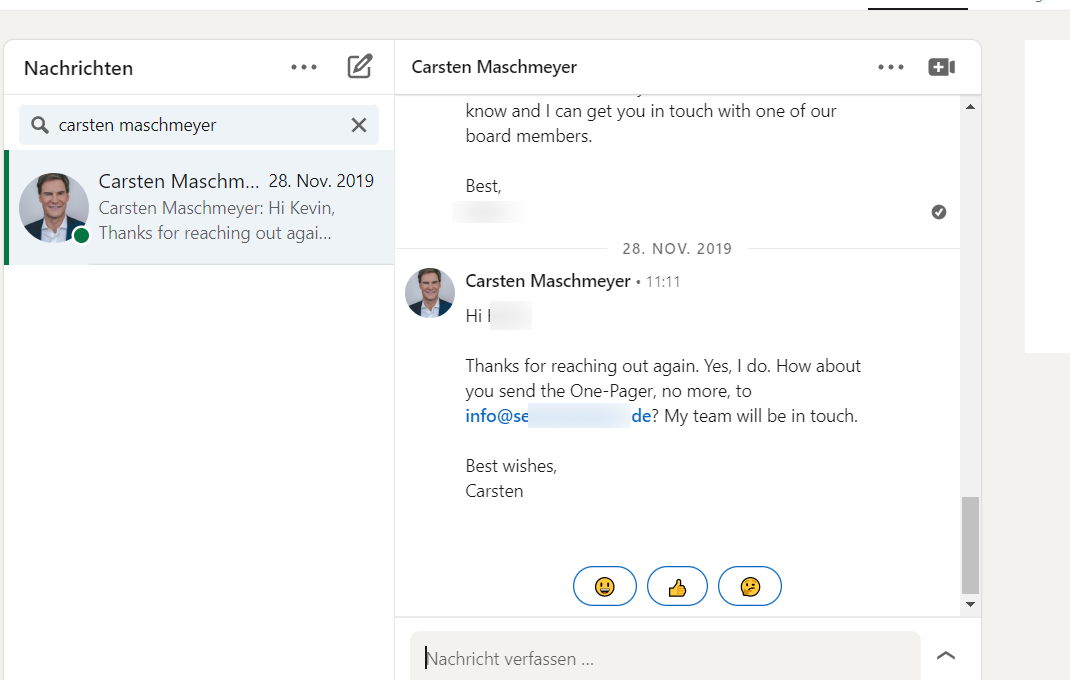
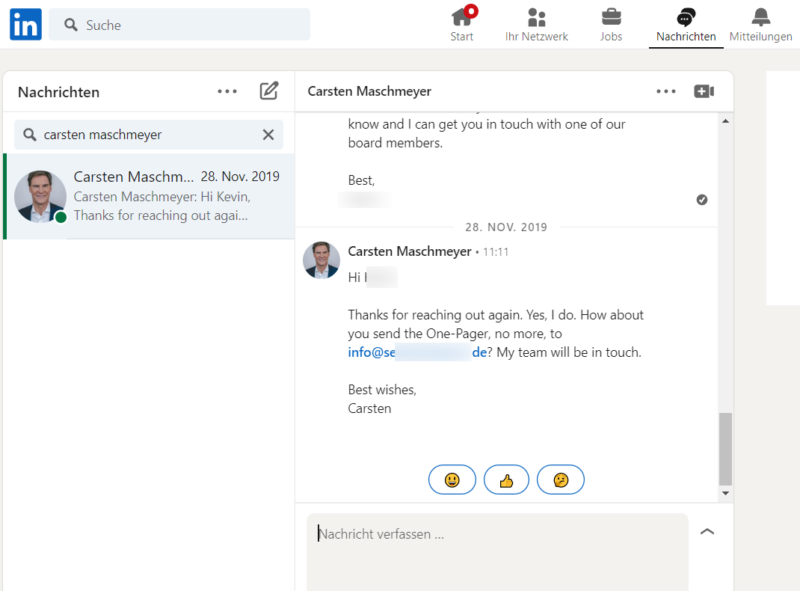
We use the largest professional network of our time – LinkedIn, because here, with the right technique, you can reach everyone from interns to CEOs. For example, the start-up investor Carsten Maschmeyer, known from Die Höhle der Löwen (we did not recruit him, of course, but contacted him as part of a LinkedIn campaign for lead generation):
And before you doubt: you don’t have to create LinkedIn job ads nor post on LinkedIn for this type of recruiting., do not engage in employer branding and also do not place advertisements.
As long as you have a compelling job offer, want to quickly find suitable new employees for it, and are able to communicate with qualified applicants on LinkedIn about it, there is nothing standing in the way of recruitment via LinkedIn.
New Employees via LinkedIn in 4 Steps – The Overview
We find qualified applicants and new employees on LinkedIn in five steps:
Become more visible on Google & Social Media?
In a free strategy consultation for data-driven online marketing, we uncover your untapped potential, review any existing ad accounts if necessary, examine your SEO ranking and visibility, and determine which strategy is appropriate for your budget and which active measures will lead to more inquiries or sales.

✅ More visibility & perception through targeted placement
✅ More visitors > prospects > customers > revenue
✅ Reach target groups scalably with SEA
✅ Act and grow sustainably with SEO
🫵 Maximum success with our hybrid strategy
💪 More than 15 years of experience across industries in over 1,000+ projects demonstrable!







- Create a list of potential applicants on LinkedIn based on criteria (current job titles, industry, company, company size, years in the role, etc.).
- Create a message sequence that qualifies potential applicants and defines the job’s requirement profile.
- Send a connection request with a qualifying accompanying message to potential applicants on LinkedIn.
- Clarify the job’s requirement profile to the people who accept your connection request – i.e., are interested in the position.
- If a person responds on LinkedIn, continue your application process as usual – by phone, video call, or in an on-site interview.
The beauty of this process is that steps 3 and 4 can be automated, and your time commitment – with good preparation in steps 1 and 2 – remains the same, whether you contact 5 or 500 potential applicants.
This gives you access to a much larger pool of potential applicants than in many other recruitment models – and suddenly, the shortage of skilled workers is only a problem for other companies that still contact applicants individually or hope that a job advertisement will attract applications on its own.
„But isn’t this way of finding new employees via LinkedIn too impersonal for applicants or doesn’t it ensure that they are actually qualified for the position?“
This is a question we hear daily from our future clients – for whom we achieve the following results:
158 responses to 1 job advertisement in 2 months – a case study
In fact, with the right target group selection and approach, it’s exactly the opposite, and the potential applicants who are addressed are happy to receive information about the job advertisement. In this case, a full 94.62% responded:
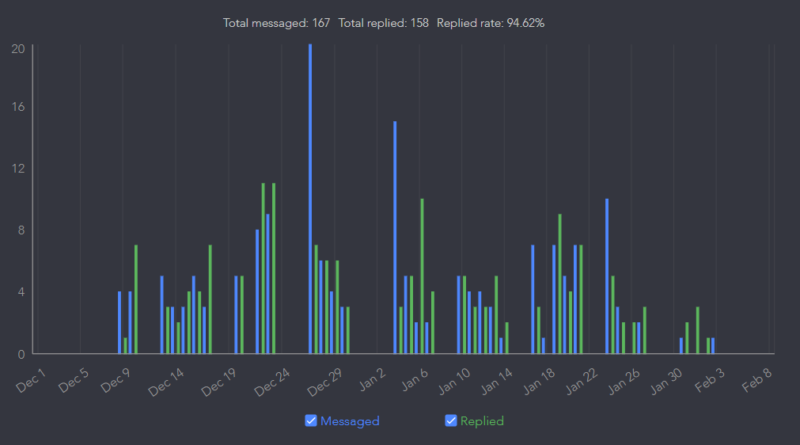
What’s more: The 167 messages sent in this campaign were not sent to just anyone, but only to potential applicants on our meticulously filtered list (addressed as step 1 and explained in detail below) who accepted our connection request and thus signaled their interest in the advertised position.
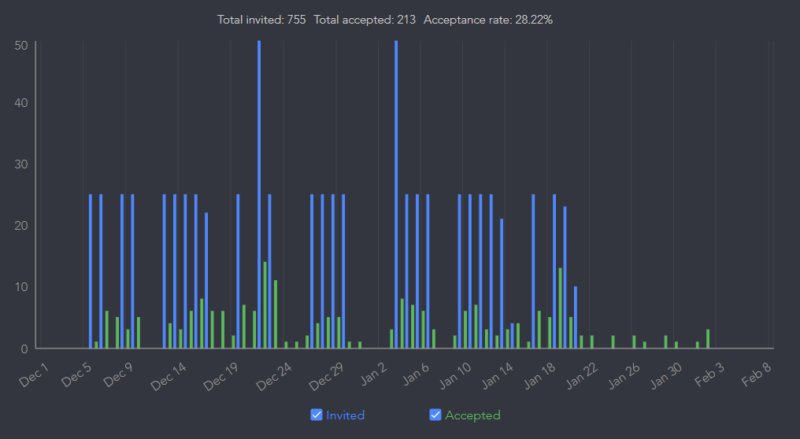
In this campaign, this active filtering (which requires no effort from you, but is done by the potential applicants themselves) saved us from talking to 542 (755 minus 213) people who were obviously not interested in the position at all:
An exemplary approach in the campaign looked like this (personal data redacted) …
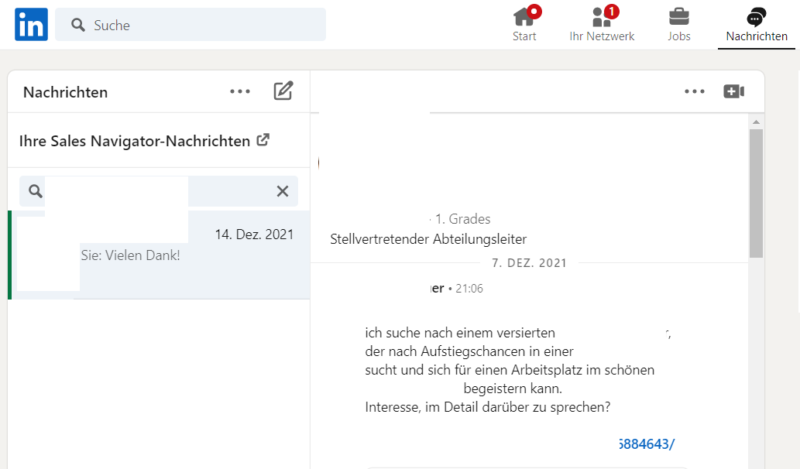
… and the reaction to it like this (personal data redacted):
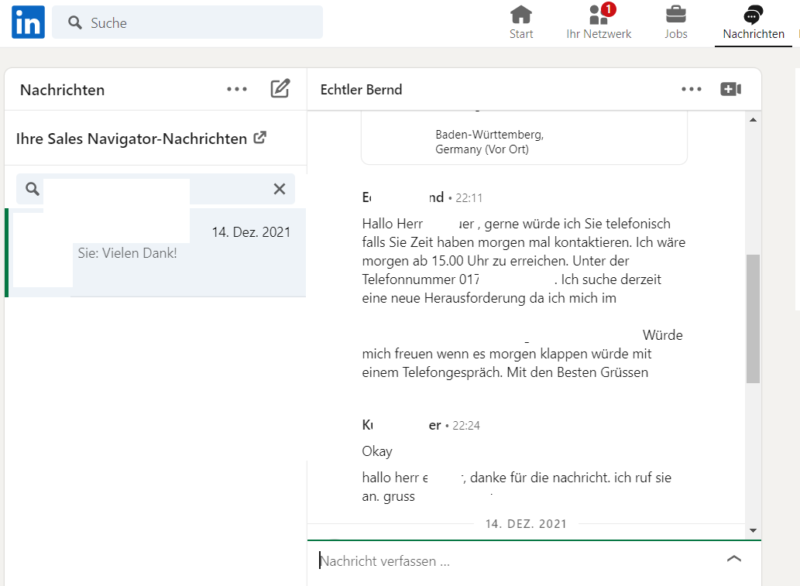
The data from this campaign therefore suggests that this type of recruiting via LinkedIn can both include large numbers of potential applicants in the pre-selection and, at the same time, filter so well in the first step that only interested applicants from the large pre-selection enter into a conversation with you. Shortage of skilled workers? Not on LinkedIn!
And yes, this was just one campaign – but we have dozens more in our database that confirm these conclusions!
But enough about the results; we will now show you how you can effectively find employees on LinkedIn yourself in five steps!
1. Create a list of potential applicants on LinkedIn.
LinkedIn has a wealth of information – both about its users and the companies they belong to. Therefore, you can filter precisely when selecting potential applicants, specifically according to criteria such as:
- Location of the potential applicant
- Current company
- University
- Industry
- Position / Job Title
- Number of employees in the company
- Company type (legal form)
- Company’s annual revenue
- Years at current company
- Years in current position
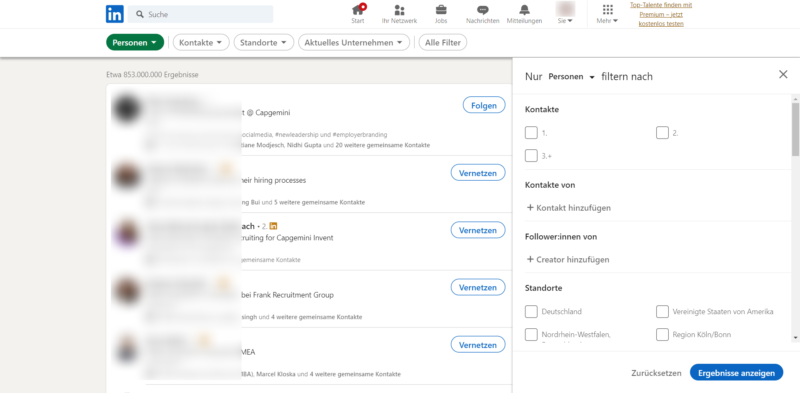
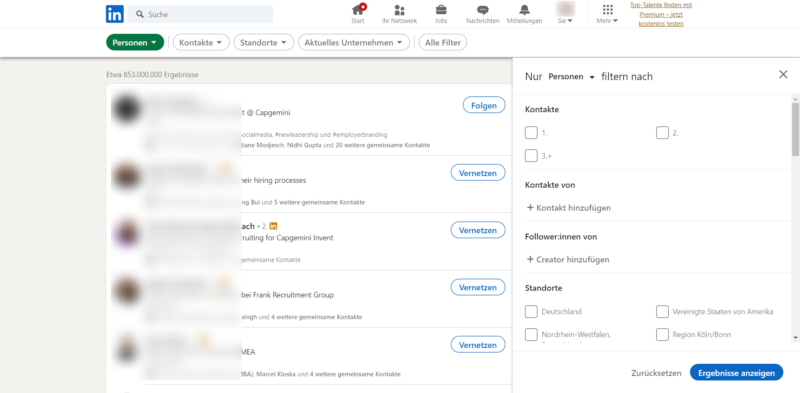
Criteria 1 to 5 are freely available in the LinkedIn search by entering nothing in the search field, pressing Enter, and then clicking on the chip labeled „All Filters“:
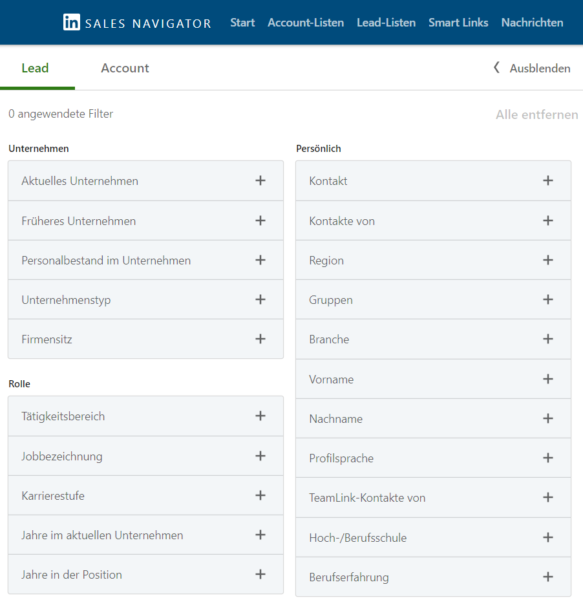
Criteria 6 to 10 are only available in LinkedIn Sales Navigator, an additional LinkedIn module, the use of which in the „Core“ version costs approx. 70 Euros per month (free trial month available at the beginning).
So that you can follow the following even without access to the Sales Navigator, let’s stick to the filters of the standard search. Assuming we are looking for a Customer Support Specialist for the call center of a bank, we set the following filters:
- Connections: 3+ (this means that we do not yet want to be connected with the potential applicants)
- Locations: Germany
- Past company: empty / no preference
- Current industry: Financial Services
- Profile language German
A click on „Show results“ with this configuration generates a list of 395 people, the first 5 of whom look like this:
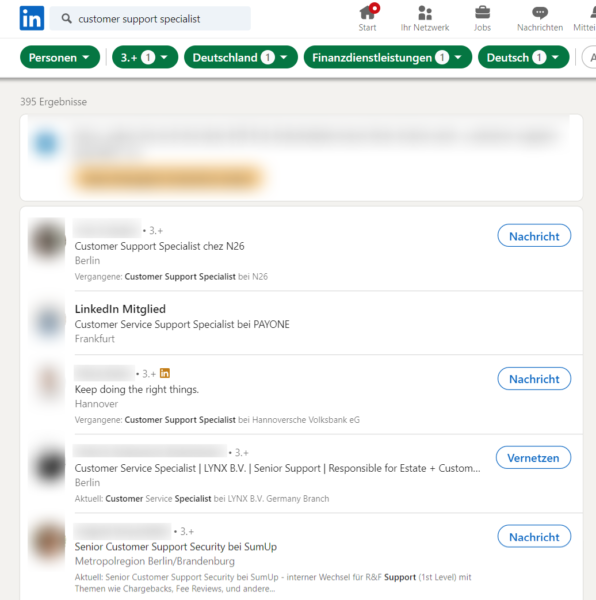
The screenshot shows:
- Within a few clicks, we found customer support employees from renowned financial service providers / banks such as N26 and SumUp.
- The person at list position 2 is displayed as „LinkedIn Member“, meaning they are too far removed from the contacts in our network to be contacted yet.
- The person at list position 3 is possibly no longer a Customer Support Specialist, but was one in the past at Hannoversche Volksbank. In LinkedIn Sales Navigator, this person would not appear on our list, as one can define there that the desired job title should only appear in current and not in previous jobs. In the standard search, we have to live with such „false positives“.
However, this example hopefully shows that the flood of information available on LinkedIn makes it easy and quick to find potential applicants who meet the requirements of your job description well.
We always recommend filtering in Sales Navigator to cover more complex recruiting cases; however, the whole thing also works – as shown – in the standard search.
2. Create a qualifying message sequence
But what if the 5 LinkedIn users shown above are potential applicants, but some of the 395 are not at all?
Or what if the potential applicants would formally fit the job advertisement based on their job title and industry – but do not meet the content requirements? Or if they do meet them, but are not interested in a new position at all?
These are valid concerns that we can elegantly resolve via LinkedIn! (Incidentally, these concerns apply not only to this method of personnel recruitment, but to every type of recruiting.)
We do this through a sequence of several messages, where:
- Message 1, as a accompanying message to the connection request, is intended to ensure that the potential candidate only accepts the latter if he or she is actively interested in the position.
- The remaining messages – usually 2 to 3, sent a few days apart – serve to provide the potential candidate with more information about the content requirements of the position, so that a conversation between them and you only takes place if he or she also meets the required profile.
In summary, a message sequence could then look like this:
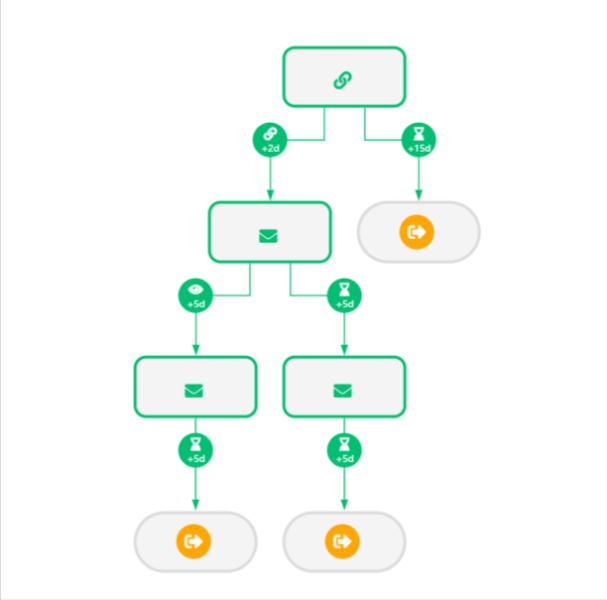
- Networking request with an accompanying message asking the contacted person to accept it if they are interested in the linked job advertisement
- Since not everyone uses LinkedIn every day (or even every week if they are on vacation), we observe for 15 days whether the contacted person accepts the request or not. If not, we interpret this as „not interested.“
- If they accept the request, we send them another message 2 days later to clarify whether they are not only interested but also meet the content requirements. Exception: if the contacted person already responds to our accompanying message for the networking request, the message sequence stops, and you proceed to the further application process.
- After sending message 2, we observe for 5 days whether the contacted person reads it or not. We can react to each of these cases with another message after 5 days.
- If another 5 days pass without a response, we classify the contacted person as „not interested.“
This scenario can, of course, be extended or compressed as desired, depending on the job advertisement. However, for recruiting campaigns, complexity is usually not required to achieve response rates in the region of the 94.62% shown above.
3. Send networking request with accompanying message to contact list
The networking request, including the accompanying message, will appear in your LinkedIn message module if the potential applicant accepts it.
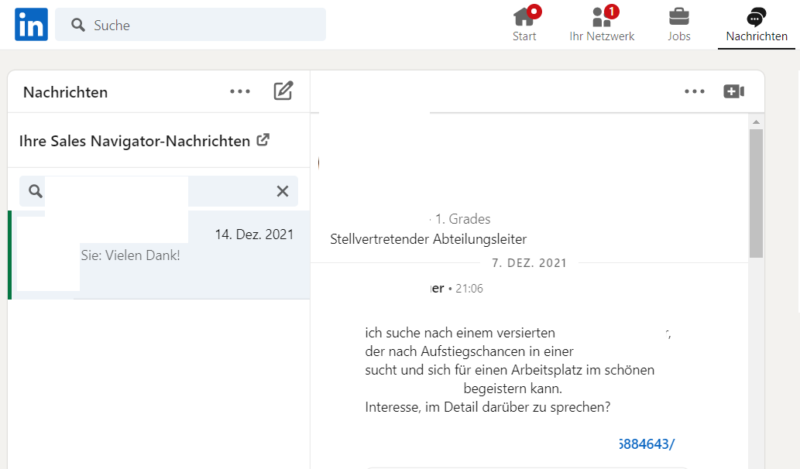
And often, that’s enough to elicit a response:
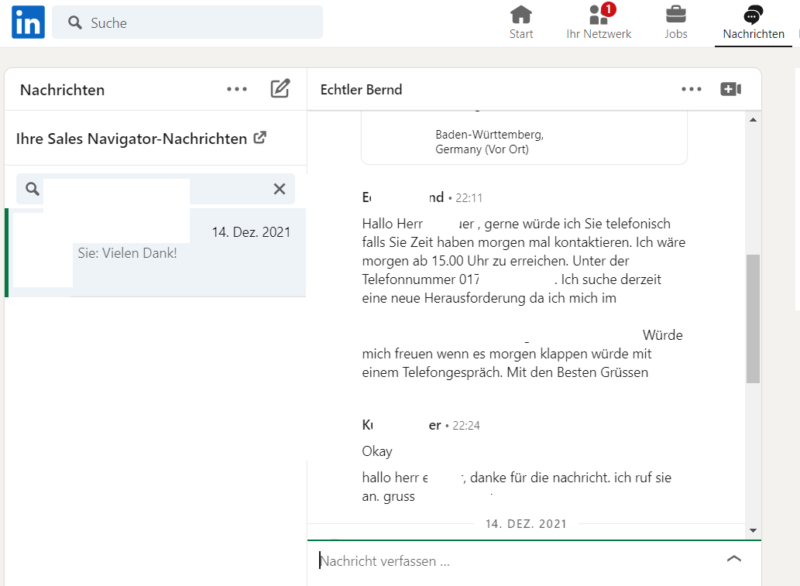
If you want to automate the process of requests and message delivery, you should be aware that you should not contact too many potential candidates per day. What „too many“ means depends a little on how active you already are on LinkedIn – but it should not be more than 80 to 100 potential candidates per day.
Another important point in automation is the right software. The market is now rich in so-called „LinkedIn automation software“, but in our tests, security vulnerabilities have become apparent in almost all of them over time. In the best case, these can lead to a temporary blocking and in the worst case to the deactivation of an account by LinkedIn.
Please feel free to contact us if you have any questions about a secure and scalable solution for recruiting on LinkedIn.
4. Send further messages
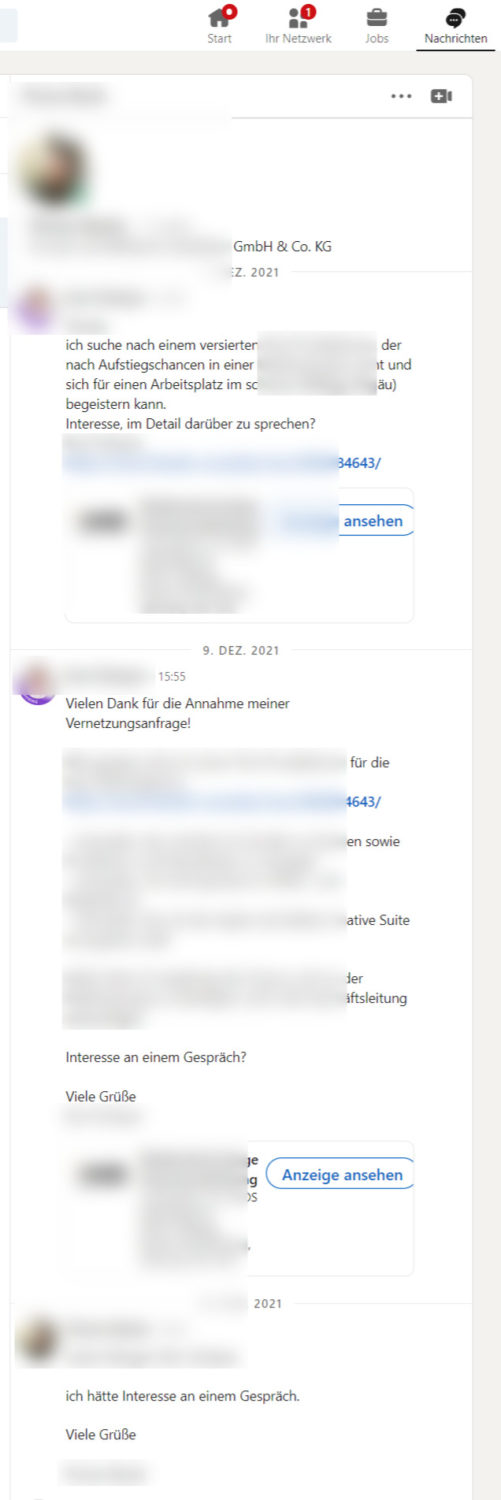
From the data of our numerous campaigns and thousands of messages sent on LinkedIn, we know: in a recruiting campaign, the accompanying message to the connection request usually generates the most responses.
Nevertheless, not everyone who is genuinely interested responds immediately – sometimes a message simply gets lost among many other smartphone and browser notifications.
Therefore, to reach applicants who have shown interest in the job advertisement but have not responded directly, you should send further messages. In our campaigns, the trend is towards 2 additional messages – after that, we generally assume that there is no interest.
As in this case:
5. Continue the application process and recruit employees
Once a response has been received, LinkedIn has done its job by adding a pre-qualified applicant to your pool.
From here, you can enter your usual and further application process – by phone, video call or on-site interview – and if you apply the method presented here to enough potential applicants, the probability of filling the position with a new employee within a few weeks is very high.
Finding staff on LinkedIn is really easy and very quickly effective, like with a digital headhunter. With the right strategy, tools, and a clean approach, LinkedIn Marketing for employer branding and e-recruiting ensures more and better applicants in the long term.

Florian Ibe
CEO & Marketing Consultant
Your contact person: Florian Ibe





 DE
DE

