Finding invoices and tax documents in Google Ads, formerly Google AdWords, is not that easy. Especially if you made the switch from Google AdWords to Google Ads in September-October 2021 and therefore have two or more payment profiles. Attention: These multiple payment profiles also arise if you have often changed the payment method! More on this further down in the article. Finding and downloading the right invoice, i.e. saving it, is very easy if you know how 😉
Find & Download Google Ads Invoice (Old + New Interface) – It's That Easy!
In 2023, Google carried out a significant update to the Google Ads user interface by implementing a new design. This change marked a significant step in the evolution of the advertising service, aiming to provide a more modern, user-friendly experience. During the transition phase, Google offered users the option to switch between the new and old layouts. This flexibility allowed users to get used to the new interface while still having access to the familiar, older version. MORE ON THIS FURTHER DOWN in the article!
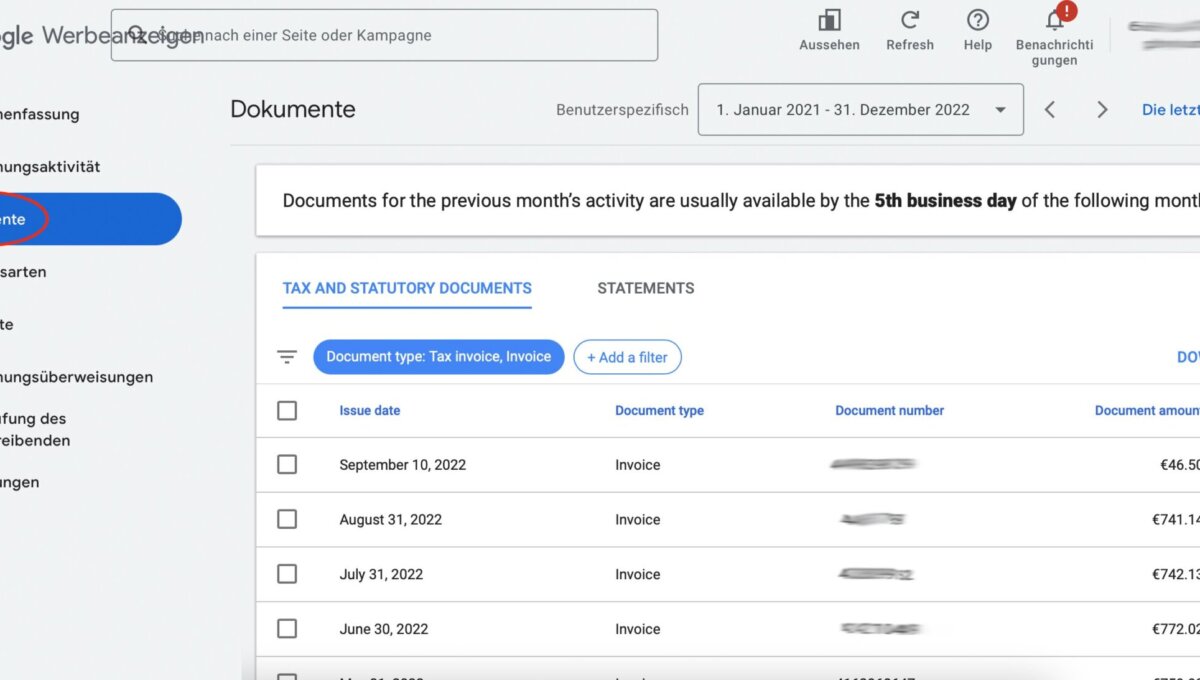
- Sign in to the Google Ads account for which you need the invoice, statement, or payment receipt.
- Click the tool icon in the top right and select „Documents“ under „Billing“.
- In the „Document number“ column, find the desired invoice, statement, or invoice with VAT shown.
- If you select the invoices to download using the checkbox, click „Download selection“ in the top right.
- If you want to open an invoice by clicking on the row, select „Download“ from the „Actions“ drop-down menu in the top right.
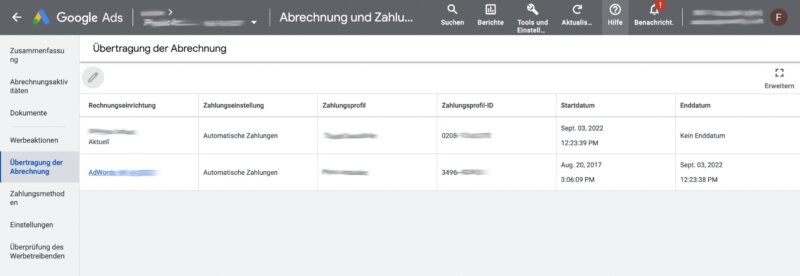
Old Interface:
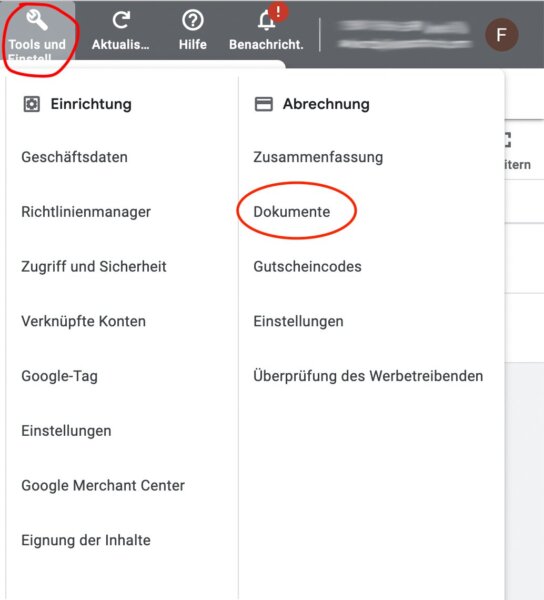
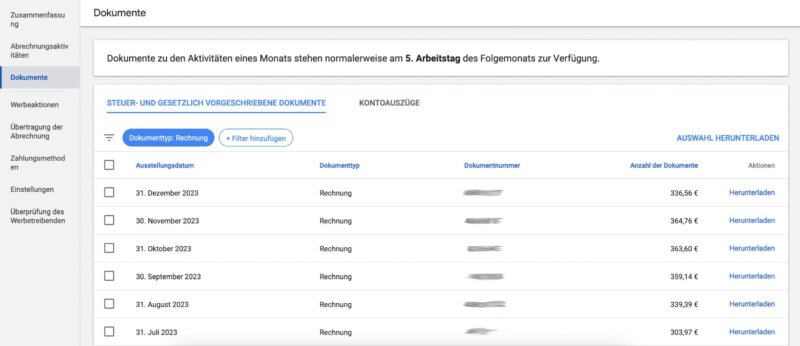
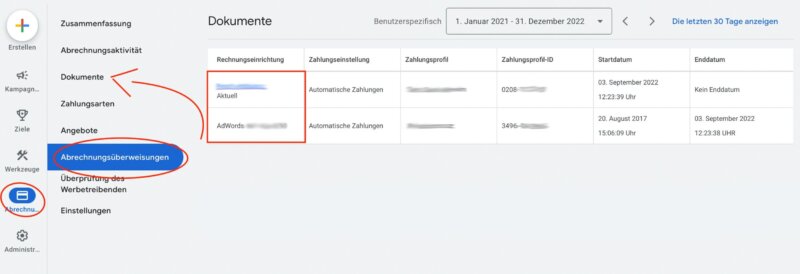
New Interface:
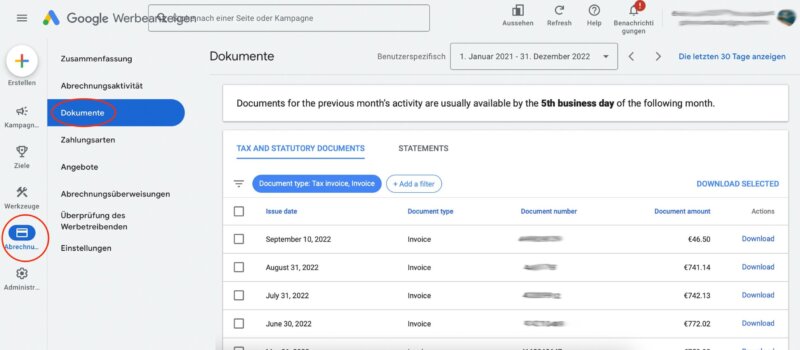
Find and download invoices from previous payment profiles or Google AdWords times
If you want to search for documents from a previous payment profile, first click on the „Billing Transfer“ option (or similar ENG -> DE translation, sometimes changes) in the „Billing“ menu and select the old profile. Then open the „Documents“ tab to find the corresponding documents and start downloading individual invoices or a collected zip file of multiple invoices.
So first click on the old payment profile (blue link) and then switch back to documents.
Become more visible on Google & Social Media?
In a free strategy consultation for data-driven online marketing, we uncover your untapped potential, review any existing ad accounts if necessary, examine your SEO ranking and visibility, and determine which strategy is appropriate for your budget and which active measures will lead to more inquiries or sales.

✅ More visibility & perception through targeted placement
✅ More visitors > prospects > customers > revenue
✅ Reach target groups scalably with SEA
✅ Act and grow sustainably with SEO
🫵 Maximum success with our hybrid strategy
💪 More than 15 years of experience across industries in over 1,000+ projects demonstrable!







Old Interface:
New Interface:

Florian Ibe
CEO & Marketing Consultant
Your contact person: Florian Ibe
Depending on the payment method and the country of the billing address, you will receive an invoice, a bank statement, a payment receipt, or an invoice with VAT shown. Check here which type of documents you receive according to the country of your billing address.
If you have changed your profile information (name or address) and this change needs to be reflected on an already issued invoice, you can recreate the invoice.
New Google Ads Interface Layout Design
Starting in 2024, Google plans to fully retire the old Google Ads layout and exclusively provide the new interface. This step underscores Google’s commitment to modernizing its services and improving the user experience. The new design aims to simplify navigation, make important information and features more accessible, and increase the efficiency of campaign management.
For long-time Google Ads users, this means an adjustment phase during which they will need to familiarize themselves with the new features and layout. To facilitate the transition, Google is expected to provide extensive help materials, tutorials, and support options. These resources are intended to help users get the most out of their advertising campaigns while fully leveraging the benefits of the modernized interface.
Overall, this change reflects the continuous trend in the digital advertising industry, which focuses on user-friendliness, efficiency improvement, and the use of advanced technologies such as machine learning and automation to help advertisers achieve their goals more effectively.
What about VAT on Google Adwords invoices?
First of all: The EU directive requires a VAT identification number, or VAT ID, for Google AdWords.
See Federal Central Tax Office: „What is a VAT ID needed for? A VAT ID is needed by an entrepreneur who […] uses other services of an entrepreneur based in the rest of the Community.“
The Google AdWords invoice as a PDF looks like this:
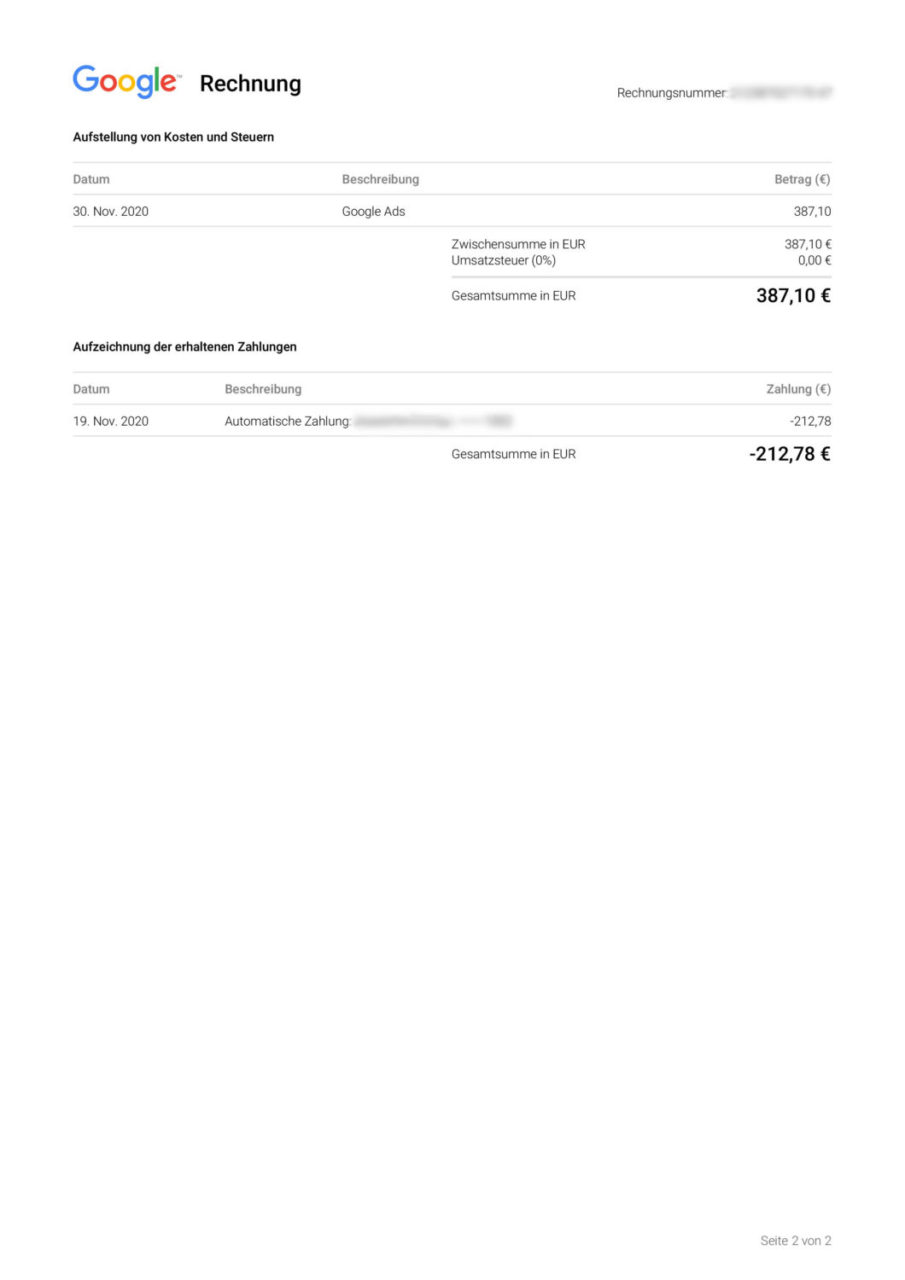
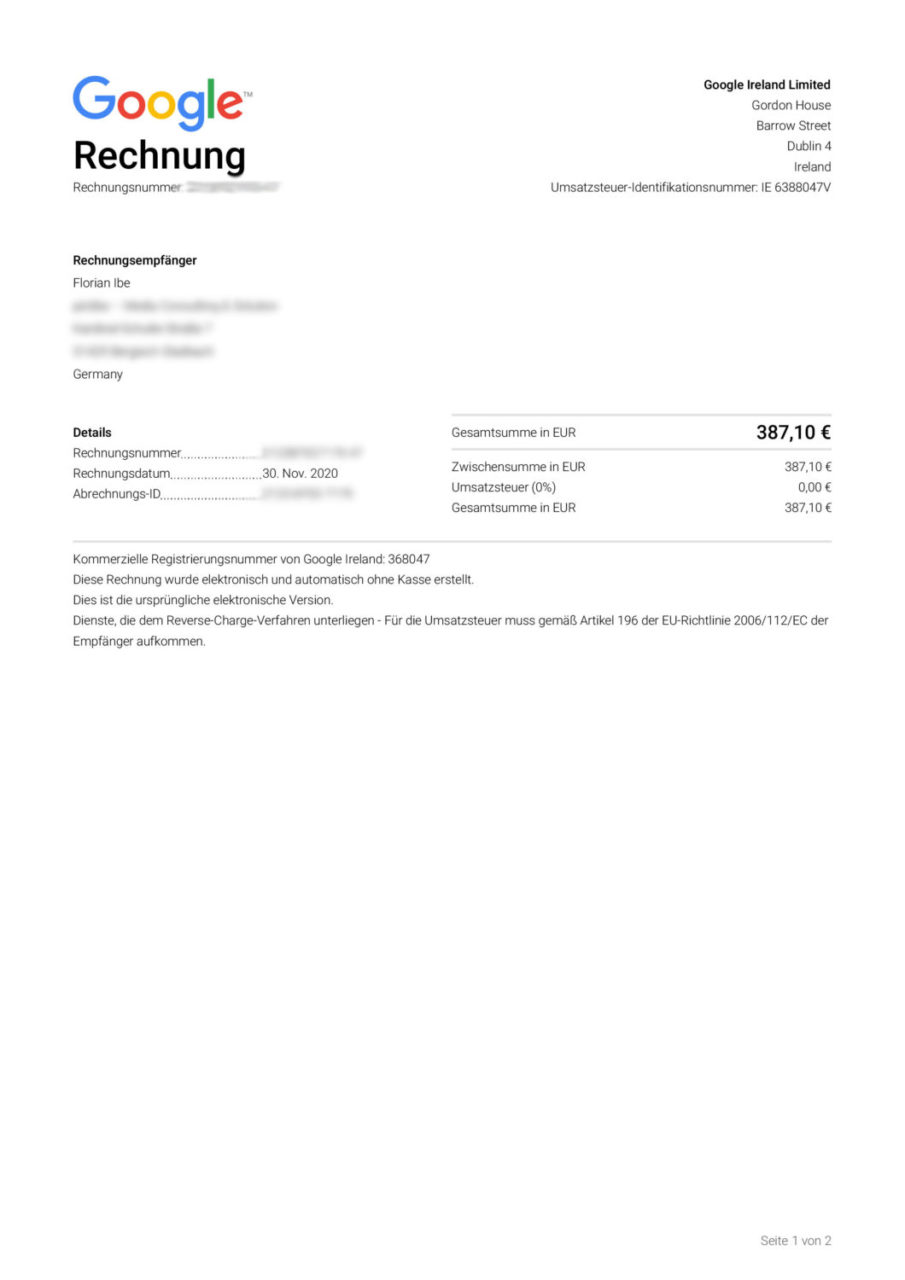
Please also note the following explanation regarding the different amounts (invoice amount & debit)!
No VAT is charged for Google Ads costs if your business address is within the EU but outside Ireland.
The invoices should therefore meet the requirements of the tax office and be compliant.
Official article: https://support.google.com/google-ads/answer/2375370?hl=en
Why does the AdWords invoice amount differ from the account debits?
Is the invoice amount not equal to the payment amount? That is correct! From an accounting perspective, this is not a problem and is correct, even if it doesn’t seem so clear at first.
In the PDF and on the Google AdWords invoice, a distinction is made between invoice total and liquidity.
- Invoice total = Amount actually spent in the past period (usually a month)
- Payment amount = Payment amount if „credit account“ is empty and needs to be used up (type of interim billing)
Information on this is provided in the transaction overview. There, it can be clearly seen how the month starts with an opening balance, which was transferred from the previous month (expenditure amount = closing balance). It is therefore a „flowing“ billing.
How does Google bill – Billing & Rhythm?
Google typically issues invoices at the end of each month or when your account reaches a balance of 500 Euros, so you may see multiple transactions per month. Google reserves the right to adjust the amount for the account billing limit at any time.
Difference between Google AdWords and Google Ads interface then and now
Google Ads, Google’s online advertising service, has undergone various changes and updates to its user interface over the years. The older interface, often referred to as „Google AdWords,“ was known for its complexity and wealth of features, which made it popular with experienced advertisers in particular. It offered detailed control over campaigns, keywords, ad placements, and bidding strategies.
In contrast, the newer Google Ads interface was developed with the aim of being more user-friendly and intuitive. It focuses on simpler navigation and a clearer presentation of data and campaign results. These changes are intended to make it easier for beginners to create and manage effective campaigns. The new interface also offers improved reporting functions and stronger integration of machine learning to help advertisers optimize their ad performance.
It is important to note that during the transition from the old to the new interface, some functions were restructured or replaced. This led to adjustment difficulties for some long-term users, while new users benefited from the simplified user experience. However, Google generally provides comprehensive resources and support to help users make the transition and unlock the full potential of their advertising campaigns.
As a professional SEA agency for Google Ads / AdWords & Bing Ads, we offer the best service at fair prices. If you would like to have your current advertising campaigns reviewed and placed in professional hands with conversion optimization, tracking, etc., please feel free to contact us.
Florian Ibe
CEO & Marketing Consultant
Your contact person: Florian Ibe





 DE
DE