

How easily you can switch your Google Adwords Express account to the normal Google Adwords interface
Whether it’s Google My Business, Google Maps or as a Google Ad Profile. Google’s services change and expand every month and increasingly the question is asked: „How do I switch Google AdWords Express to normal Google AdWords (from July 2018: Google Ads)?“. For a while there were 3 dots in the top right next to the user profile icon where you could click „switch to Google AdWords“. However, these are no longer displayed.
Often this automatically created Google AdWords Express account is created through a voucher, the popup when creating a Google My Business location or storing location data in Google Maps. Annoying! The Express platform is much much simpler, but not suitable for serious professional advertising (SEA). The limitations and strong simplification do not allow for proper setup of Google AdWords campaigns and everything is very imprecise and machine-controlled.
Quickly follows the desire for the „normal AdWords interface“!
Many forums report pages and pages on this topic, but the solution is remarkably simple and you do NOT need Google Support and also NO new Google account!
The Solution: The fastest and easiest way to convert Google AdWords Express to a regular Google AdWords account with interface:
Of course you can contact support, but the own solution is so simple, and takes only a few seconds:
- Log in to the affected Google account/account
- Click the following link: http://g.co/etoaw
- Enter the same email address as from the account in step 1 (if not automatically filled in), select country, time zone, currency.
- Click Save and Continue
- DONE!
IMPORTANT AND TIP:
Please make sure to delete or deactivate your AdWords Express campaigns. Otherwise, these will run in parallel against your Google Ads ads and campaigns. If you later have both interfaces and want to switch from Express to AdWords, you will find the 3 dots in the top right with „Show in AdWords“.
And this is how easy it is to convert and transform your existing Google AdWords Express account into a Google AdWords account without any outside help.
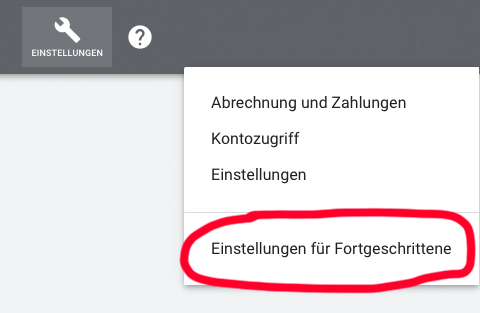
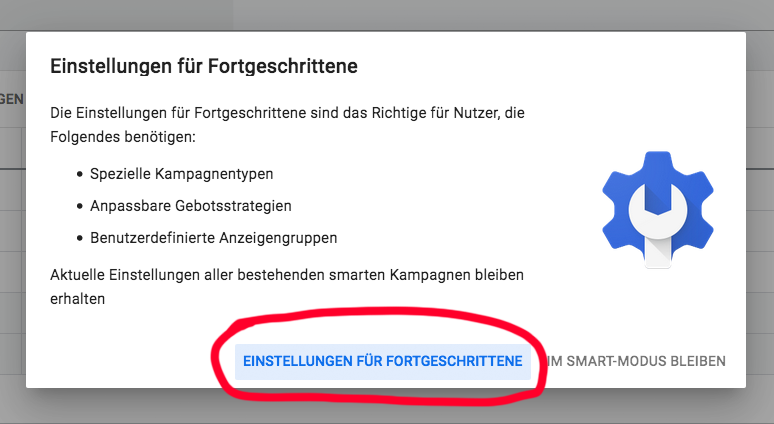
2 clicks to unlock "Advanced Settings" in the account:
Our free offer for your Google Ads account:
[ulp id=’waW39D5Hdw8cNlEI‘]

Ihr persönlicher Berater rund um SEA, Google AdWords:
E-Mail: fi@vastcob.com
Florian Ibe
Become more visible on Google & Social Media?
In a free strategy consultation for data-driven online marketing, we uncover your untapped potential, review any existing ad accounts if necessary, examine your SEO ranking and visibility, and determine which strategy is appropriate for your budget and which active measures will lead to more inquiries or sales.

✅ More visibility & perception through targeted placement
✅ More visitors > prospects > customers > revenue
✅ Reach target groups scalably with SEA
✅ Act and grow sustainably with SEO
🫵 Maximum success with our hybrid strategy
💪 More than 15 years of experience across industries in over 1,000+ projects demonstrable!







We are happy to help you with the setup, management, and review of your Google AdWords campaigns and ads as an SEA agency for DACH (Germany, Austria, Switzerland). Take a look at our AdWords packages and SEA services.
Comparison between AdWords and AdWords Express:
| AdWords Express | AdWords (Google Ads) |
|
| You only pay for clicks | ✔ | ✔ |
| Flexible ad scheduling | ✔ (limited) | ✔ |
| Ads in Google Search, on Google Maps and mobile devices |
✔ | ✔ |
| Additional ad formats (e.g. display, video ads) | ✕ | ✔ |
| Geographic targeting of ads | local | global |
| Remarketing with audiences |
✕ | ✔ |
| Campaign management | automatic | custom |
| Reports and tracking | simple | more complex, additional tool available |
| Website required | ✕ | ✔ |
| Setup in less than 10 minutes | ✔ | ✕ (roughly only with a lot of practice) |
View and book now:





 DE
DE


2 Kommentare
Funktioniert das immer noch?
Sollte noch funktionieren. Einfach ausprobieren!