


Beautiful websites with great fonts, from standard to handwritten to artistic calligraphy, have long been no problem thanks to Google Fonts and the variety of typefaces and fonts for websites. Using, embedding, and installing Google Fonts takes only a few minutes, and with a CMS like WordPress, it’s very quick. However, within the framework of the GDPR & TTDSG, some „restrictions“ have been in place since 2022, and with new legal rulings such as the judgment of the LG Munich, Google Fonts should be embedded locally in a GDPR-compliant manner. Step-by-step instructions below.
This article is not legal advice or assessment. For this, a data protection officer or specialist lawyer should always be consulted.
Google Fonts GDPR Checker – Embed and check webfonts Google Fonts locally (data protection compliant)
Google Fonts are stored locally on the web hosting and are no longer loaded from Google servers. This means there is no longer any IP transfer. Google Webfonts / web fonts are therefore „harmless“ if they are embedded locally. More on this below.
The connection to the Google server is not technically necessary!
Check website for Google Fonts – Check website for Google Fonts
Checking a website for Google Fonts is very easy and can be done by anyone. Online Google Fonts Checkers like those from sicher3 can help (click here to go to the checker). Here you can also easily identify the font used online.
Step-by-step guide to checking Google Fonts in the browser:
- Open browser in private window and enter the URL of the website to be checked in the search bar:

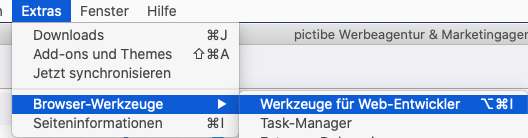
- Open developer tools (Example Firefox: Tools > Browser Tools > Web Developer Tools):

- In developer tools, open „Network Analysis“, disable cache, and filter by „Fonts“:

- Then reload the page using the „Reload icon“ or Ctrl + R (Mac: Cmd + R) and then check if fonts.gstatic, googlefonts, or similar appears after clicking on the „Host“ column:




If, as in the example, fonts.gstatic or similar appears, where the URL address of the entered website does NOT appear, then action must be taken.
By the way, this also applies to fonts.com, fonts.adobe.com, TypeKit etc. -> Wherever fonts are loaded externally, there is a risk of warning letters.
IMPORTANT: Check not only the homepage, but also some subpages, blog articles, and for an online shop, category and product pages!
Embed Google Fonts in a data protection compliant way in a website or webshop
How can I embed Google Fonts without loading them externally, i.e., from Google servers? Embedding fonts and Google Fonts locally is quite easy with WordPress. This works within a few minutes and works directly for about 80% of websites and shops.
To do this, simply install and activate the following plugin, then go to Settings > Optimize Google Fonts and click on „Save & Optimize“.
Become more visible on Google & Social Media?
In a free strategy consultation for data-driven online marketing, we uncover your untapped potential, review any existing ad accounts if necessary, examine your SEO ranking and visibility, and determine which strategy is appropriate for your budget and which active measures will lead to more inquiries or sales.

✅ More visibility & perception through targeted placement
✅ More visitors > prospects > customers > revenue
✅ Reach target groups scalably with SEA
✅ Act and grow sustainably with SEO
🫵 Maximum success with our hybrid strategy
💪 More than 15 years of experience across industries in over 1,000+ projects demonstrable!







Tip: Use the Pro version for even better font detection, even with special themes and various plugins.
Then the page reloads and a similar list as in the example here should appear:
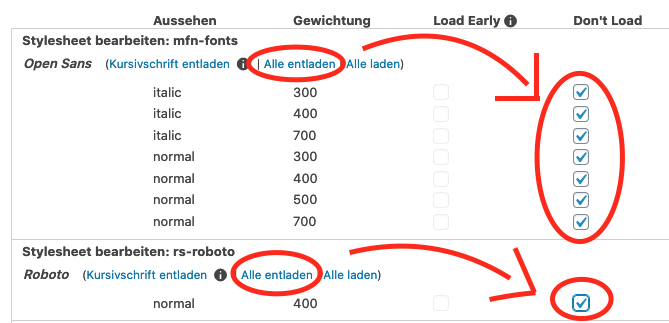
Then click on „unload all“ and again on „Save & Optimize“ at the very bottom.
VERY IMPORTANT: Afterwards, be sure to clear the cache, e.g., with WpRocket*, W3 Total Cache, Fastest Cache etc.
Then perform the check again using the instructions above.
If Google Fonts are still loaded externally, clear your browser cache, and if it still doesn’t work, as a WordPress agency, we can help you manually embed Google Fonts locally starting from 160 Euros:

Florian Ibe
CEO & Marketing Consultant
Your contact person: Florian Ibe
Using Google Fonts is not bad or „punishable“, but local embedding and the correct cookie notice are important so that you, as a website operator, fulfill your information obligations with an active consent option for the site visitor.
Tip for the correct WordPress GDPR TTDSG Cookie Banner:
WordPress GDPR Plugin (TTDSG) – Data protection compliant with cookie solution
If you do not use WordPress, we recommend the following compliance cookie solution:
Tip for legal texts with corresponding up-to-date checks and „warning protection“ from the IT-Recht-Kanzlei-München (click here)*.
Further topics around Google Fonts:
Which font for website
google typefaces
fonts google
font types google
google fonts handwriting
identify font online
identify fonts





 DE
DE

