

Reports for tracking profit and revenue of your WooCommerce shop with minimal effort + export. Have your margin automatically calculated per product, order, and customer. This makes your online shop more profitable and you always know where you stand without Excel.
Margin Calculation & Controlling: Automatically calculate revenue, costs, margin, profit, ROI in WooCommerce
Simply enter the cost of goods (purchase price) in the online shop for profit calculation. The bulk editing function for costs, profit margin calculation, prices, stock levels, etc., also greatly simplifies maintenance. Particularly practical are the reports for tracking the profit and revenue of the business.
Make your WooCommerce shop more profitable through clear and directly visible revenue insights per order, customer, and product, as well as revenue – costs = profit calculation (margin)
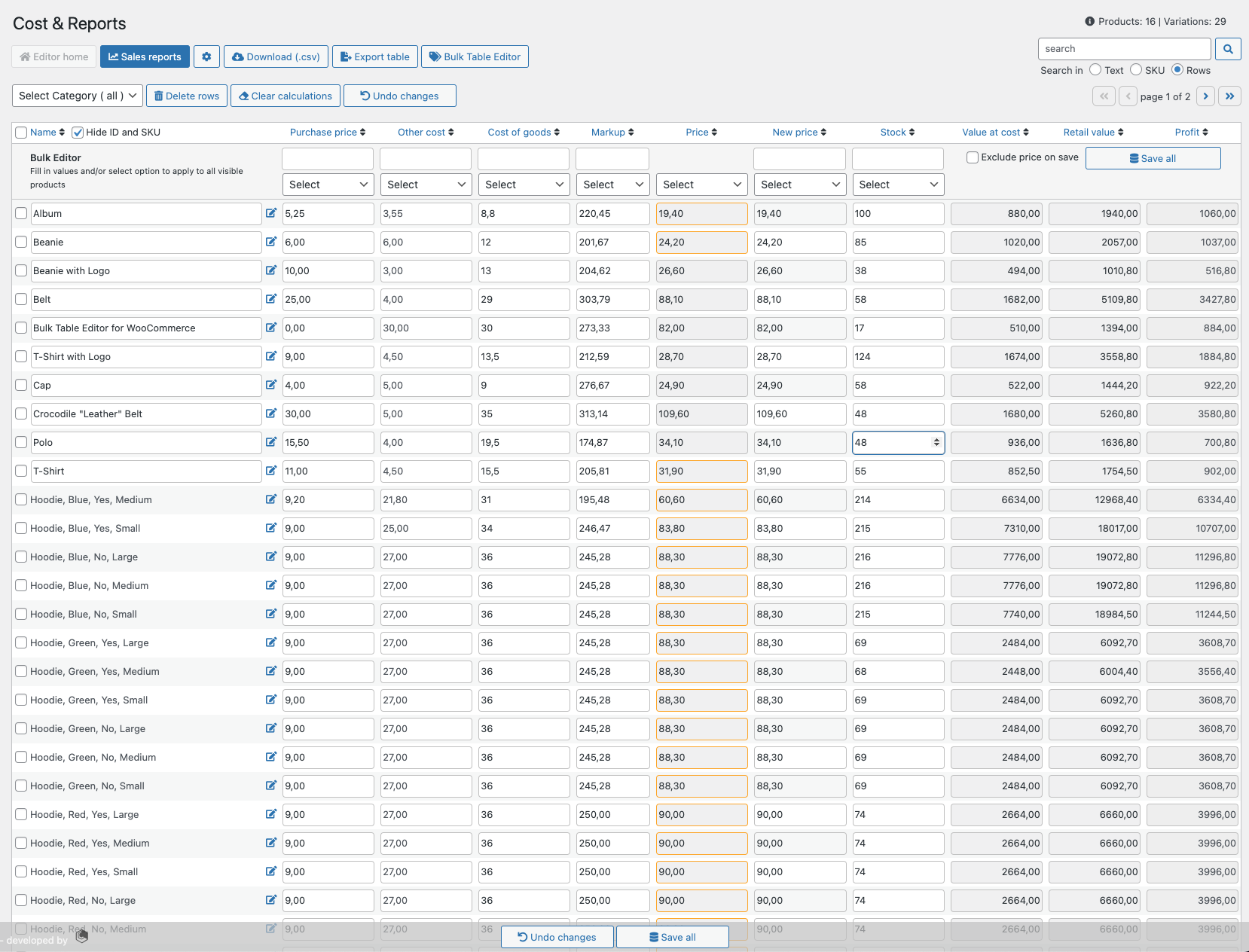
Add purchase price, landed cost, and cost of goods sold to your products / variations. Based on these values, new prices are calculated and suggested using your markup (profit margin). These values give you direct control over your shop’s profits and revenues. With the included table editor and its bulk functions, you can easily add and update all these values. In addition, you can seamlessly update inventory, view acquisition cost, sales value, and total profit. The price selection (NEW ) offers you several options for automatic calculation and display: Retail Value, Acquisition Value, and Profit based on the price you select (i.e., including VAT).
Cost & Reports includes valuable and unique sales reports. The reports detail your actual profits and revenues, not just bestsellers, but down to product or variation level. Retrieve reports by predefined or selected date ranges, see your acceptable profit (green background highlight) and your unacceptable profit (red background highlight).Download reports as .csv or export table data (based on your filters) for further processing in applications such as MS Excel or Apple Numbers.
Advantages of Cost & Reports:
- Adds important information about your business profit and revenue.
- Add valuable fields to your product/variants, such as: purchase price, cost, shipping, cost of goods, and markup.
- Make more accurate prices for your business (with cost of goods and markup).
- Historically editable metadata is added to your order items for purchase price and cost of goods.
- Table editor that can bulk add/update your costs, margins, prices, stock and more.
- Export features (as .CSV or .xlsx)
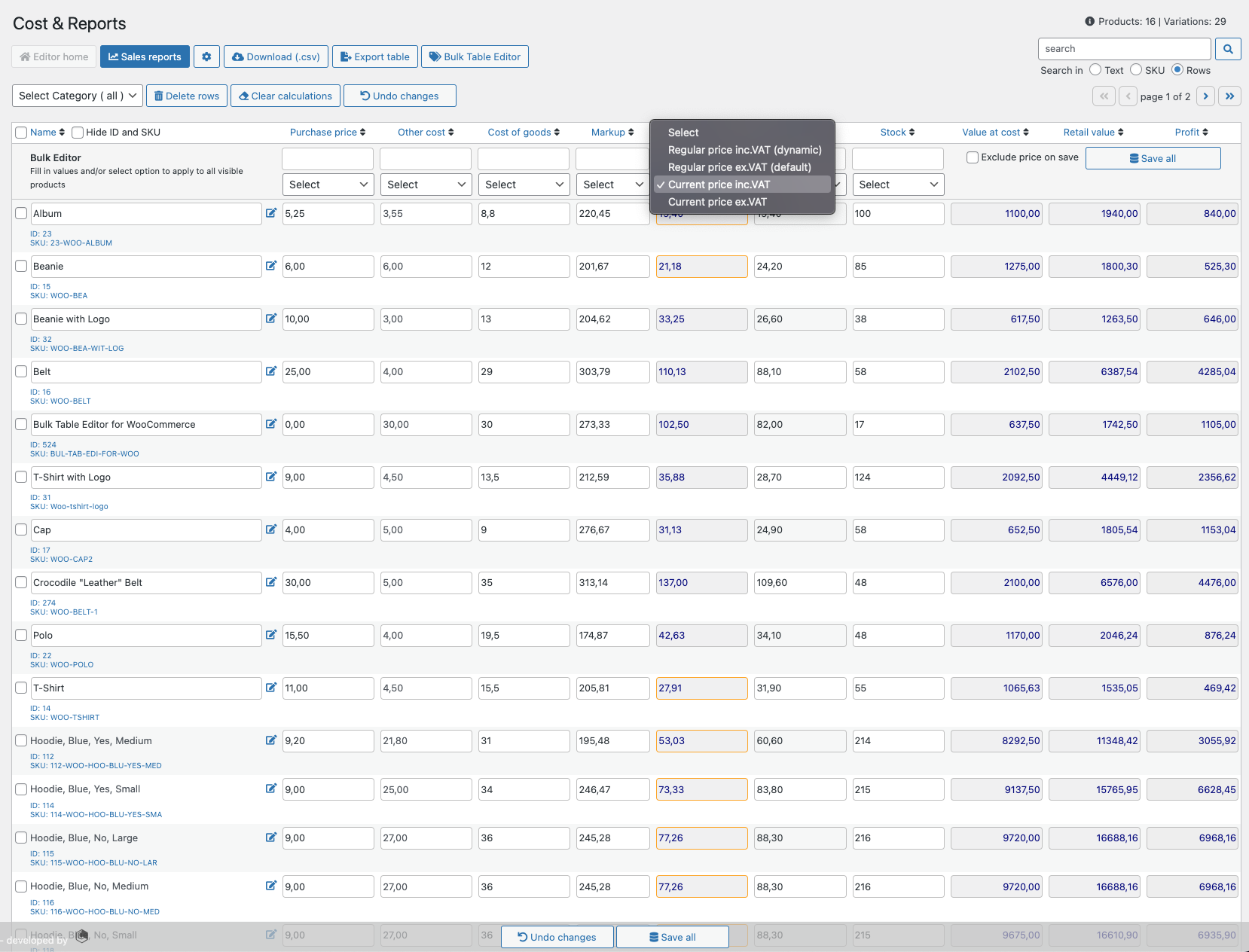
- Price selector for regular price and daily price (incl. and excl. VAT) NEW
- Colored border (gold) on products NEW IN SALES
- Colored font (blue) for prices incl. VAT . NEW
- Calculates acquisition value, sales value, and profit based on price selection NEW
- Reports per Order, Customer and Product / Variant (table view). Including:
- Search , date ranges, averages, profits, net sales, taxes, sidebar with summary information and bestsellers.
- Bestsellers with information such as profit, sales, and revenue.
- Product reports, which are dynamically calculated during filtering.
- Export as .csv file
- Export table to .xlsx (MS Excel or Apple Numbers)
- Live reports and counters (new orders)
- Compatible with products, variations, subscriptions, cost of goods, Bulk Table Editor, Order Status Manager, and more
- POT file for translations (English, German NEW and Norwegian)
Table Editor
Become more visible on Google & Social Media?
In a free strategy consultation for data-driven online marketing, we uncover your untapped potential, review any existing ad accounts if necessary, examine your SEO ranking and visibility, and determine which strategy is appropriate for your budget and which active measures will lead to more inquiries or sales.

✅ More visibility & perception through targeted placement
✅ More visitors > prospects > customers > revenue
✅ Reach target groups scalably with SEA
✅ Act and grow sustainably with SEO
🫵 Maximum success with our hybrid strategy
💪 More than 15 years of experience across industries in over 1,000+ projects demonstrable!







The Table Editor can bulk update: purchase price, cost, shipping cost, goods cost, markup, price, and stock. It calculates a correct price (suggested price based on item cost and markup). Additionally:
- Displays the cost value (per row and summed)
- Sales value (per row and summed)
- Profit (per row and summed)
- A range of search/filter options
- Show/hide ID and SKU
- Sorting by column
- On-Sale Indicator – gold border (price column)
- Export to CSV file (opens in MS Excel or Apple Numbers)
- Export current table (.xlsx)
Easy access to bulk functions!
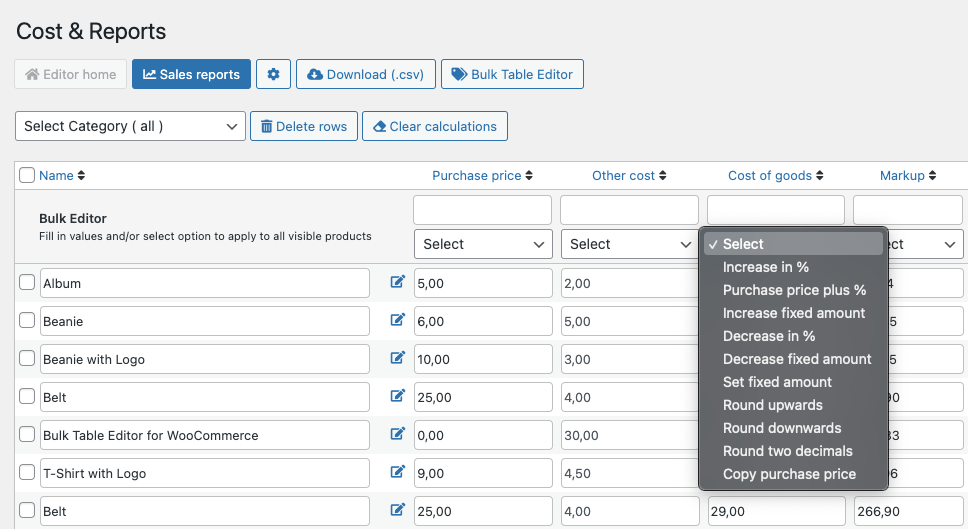
Most columns have bulk functions, here’s an example: We enter 10 into the „Other Costs“ input field, select „Increase Fixed Amount“ and 10 is now added to each row. When this is done, Cost & Reports adds this value to the cost of goods, then calculates each row and suggests a new price. If you are satisfied with the new price, simply use the „Save All“ button and this is now the current price for the selected products. If a price comes out with a number like 12.37, you can use the rounding function on the new price to make a cleaner price like 12.40, the markup will then automatically adjust to your new price.
Prices and Cost / Profit Calculations
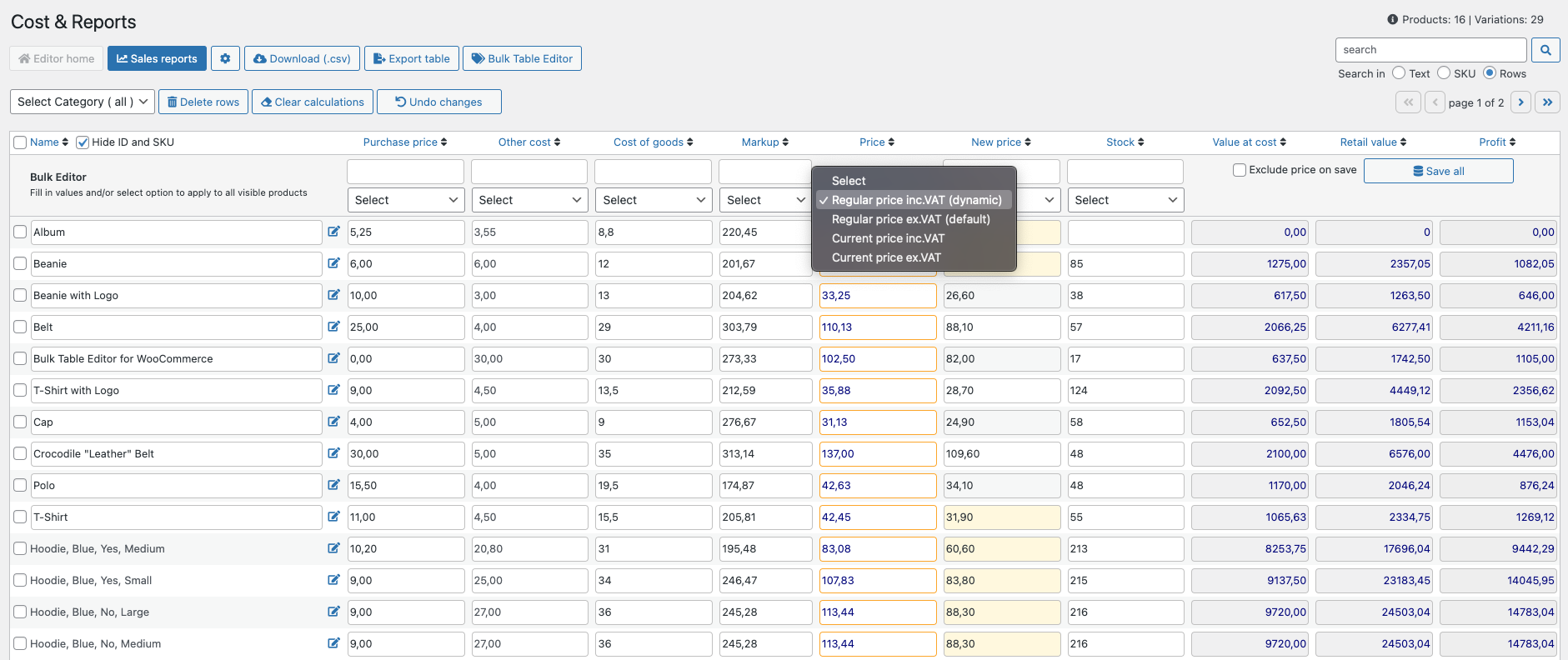
As a merchant, you often want to see and adjust the price if it includes VAT, so there is a function for that. You can now select the regular price incl. VAT, which makes it possible to adjust the price incl. VAT and convert it to the regular price excl. VAT automatically in the New Price column. This means that you can now easily set sales prices such as $19.90 (incl. VAT). In addition, you can select the regular price excl. VAT (standard) and the current price for your products (incl. VAT or excl. VAT). If a product is on sale, the price field has a gold-colored border. When you select a price, Cost & Reports automatically calculates the purchase value, retail value, and profit for you; if it is incl. VAT, the values are dark blue (excl. VAT is black by default).
Reports per Order
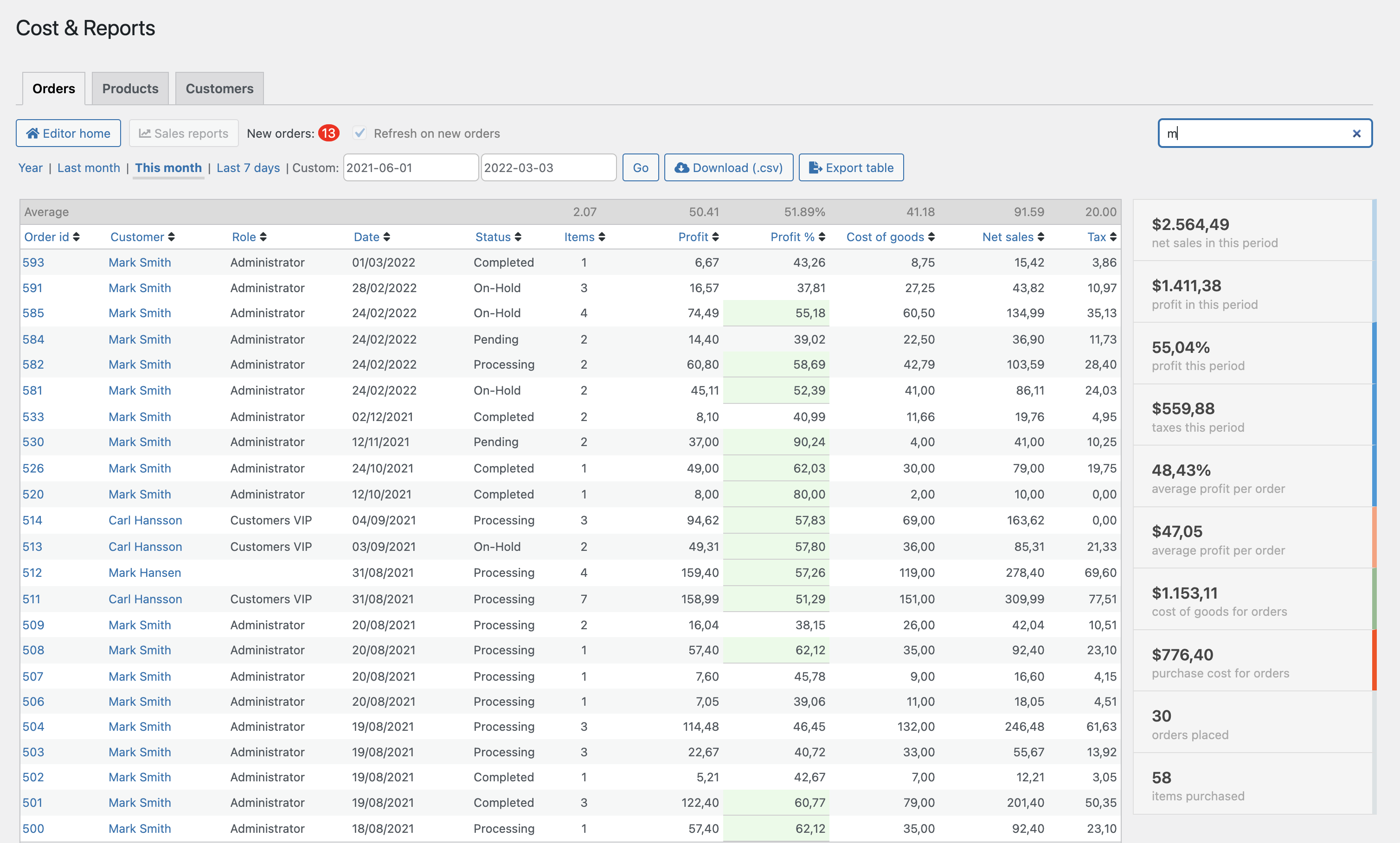
This report view shows all sales within a date range. Set your own range using the date picker or use the predefined ranges. In the table, you will find Order ID (links to the order page), Customer, Role, Date, Status, Item Quantity, Profit, Cost of Goods, Net Sales, and Taxes for the selected period. On the right side of the table, you will find the key values and averages from the period. Color indicators in the table for high and low profit are also included; these can be easily adjusted in the settings. Use „Search in rows“ to filter the reports by order ID, customer, role, and date. The role column is added to support role-based extensions such as Roles & Rules B2B.
Reports per Product/Variant
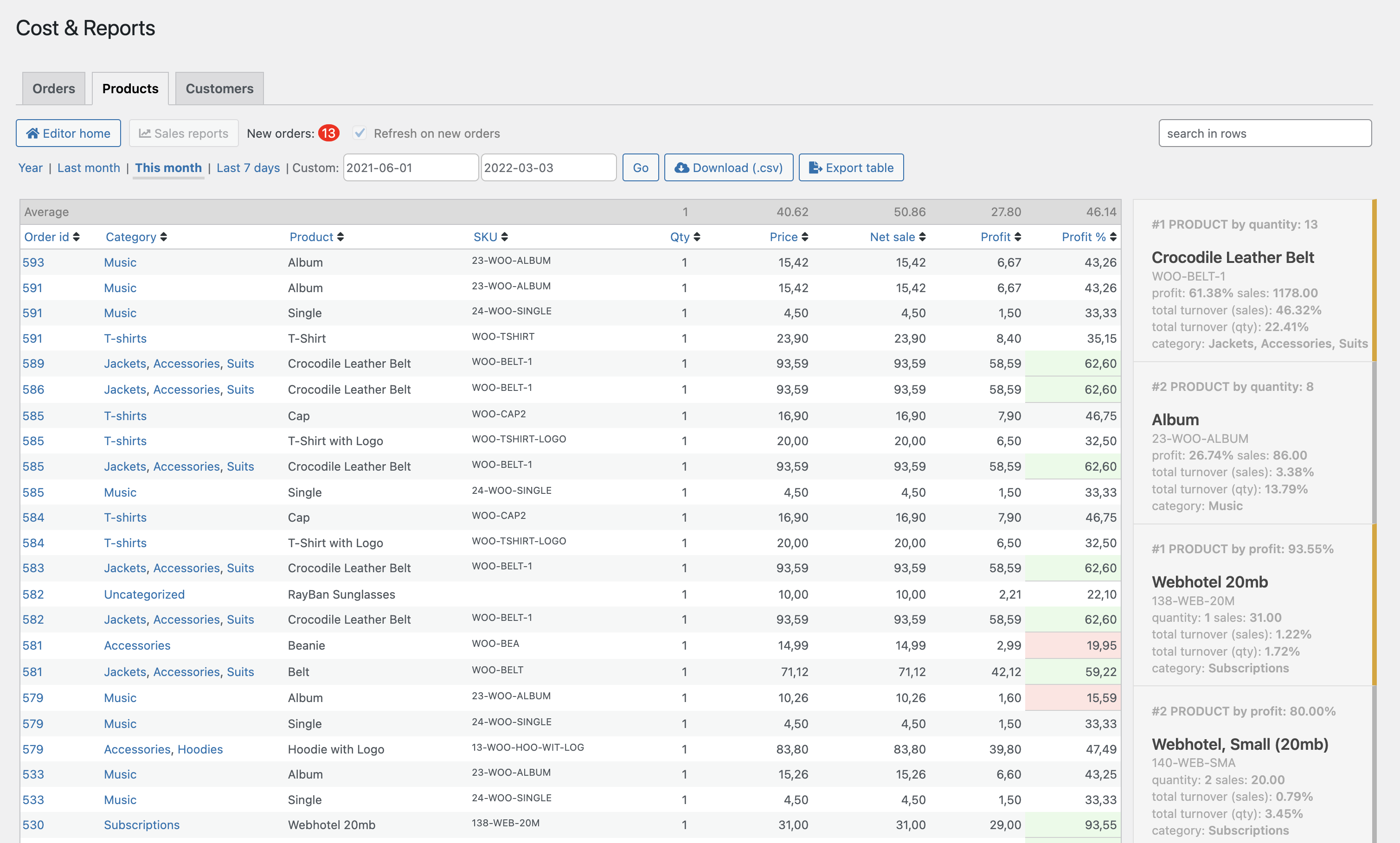
The product view has the same functions for selecting date ranges and the .csv download button. This table initially shows averages, then order ID, category (link to edit products in the category), product/variant name, SKU, quantity, price (at time of purchase), net sales, and profit (including percentage). Sort the columns as desired. On the right side of the table is a top product for the period based on quantity and profit. And other key values and averages from the selected period.
Customer Reports
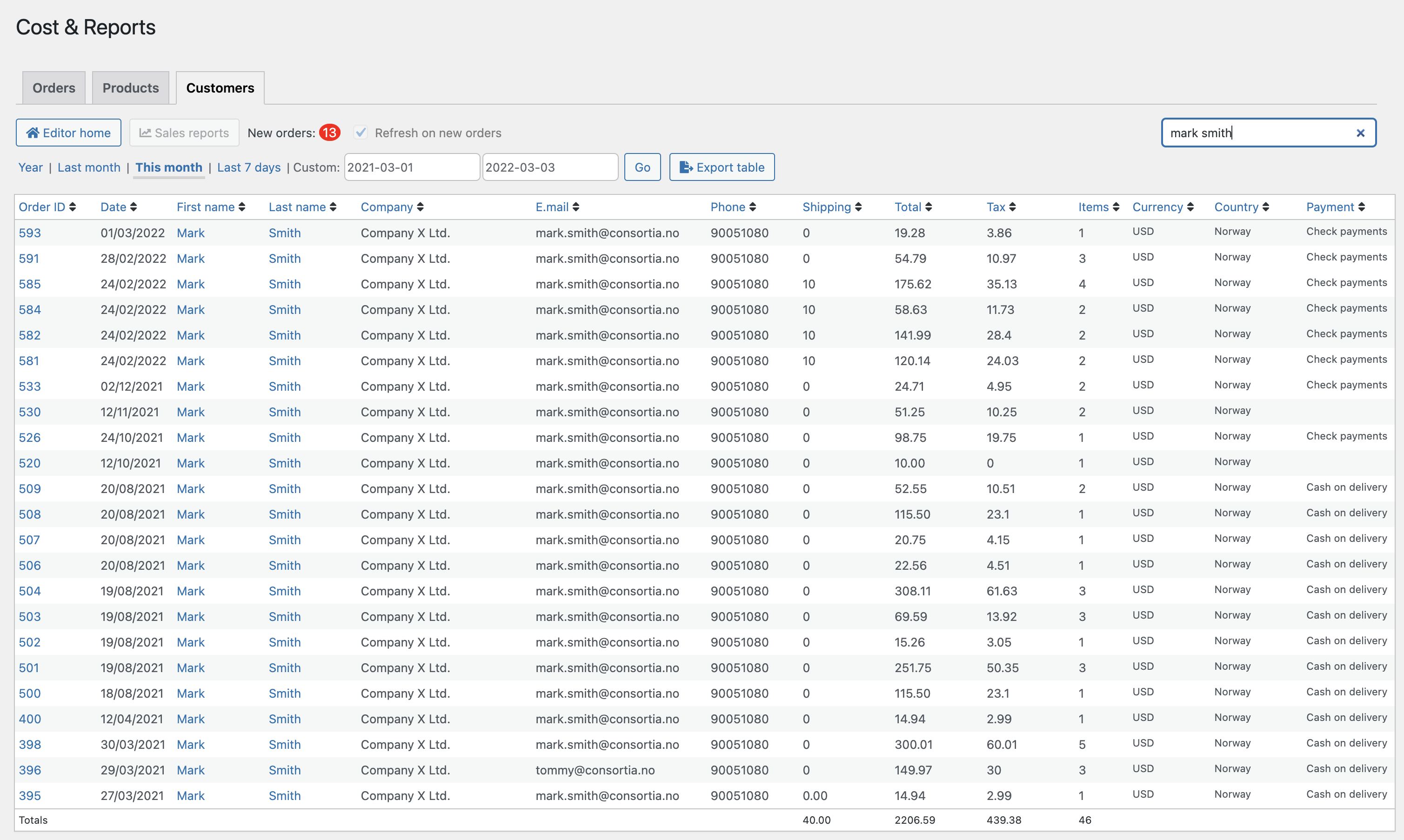
This report is set up to provide you with more information about customer orders. Here you will simply find name, company, email, and phone number if you need to contact the customer or wish to export this information. You will also find shipping costs, total order amount, total tax, items purchased, currency, country, and payment method. Use the row filter to summarize values for a customer or company.
Who is my best customer?
Row Search and Automatic Calculations
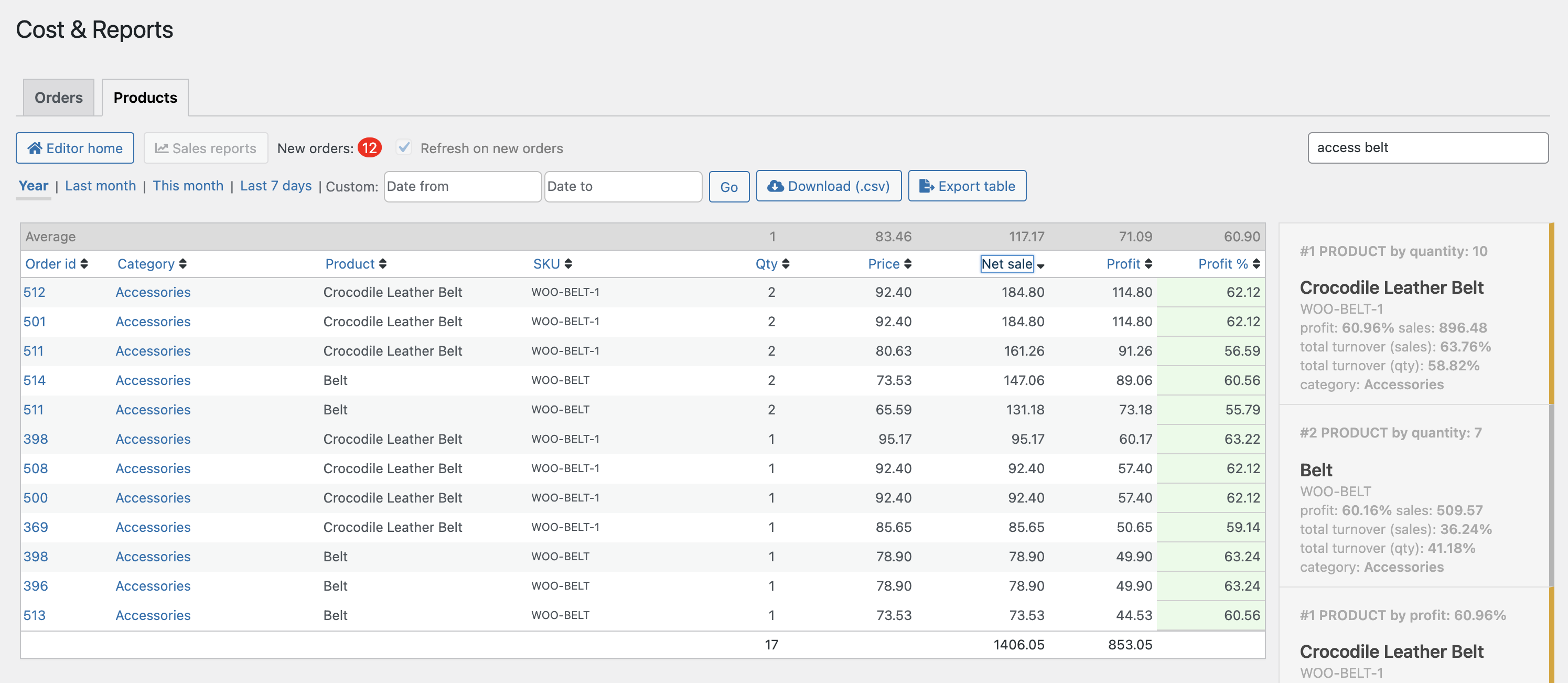
Use the „Search in Rows“ filter to display your selection of products/variants in the product report. You can use Order ID, Category, Product, and SKU when you want to filter in your product reports. When you filter, the plugin automatically updates averages, bestsellers, totals, and more, making it easy to see your gross sales and profits for your selection.
Live Reports
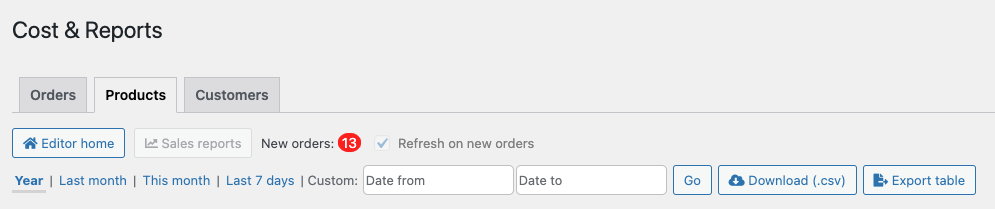
The reports now give you an automatic counter for new orders, and you also have the option to automatically refresh the reports (option in settings). For example, you can use this view as a live report and see the numbers and products sold updated throughout the day.
History added to order items
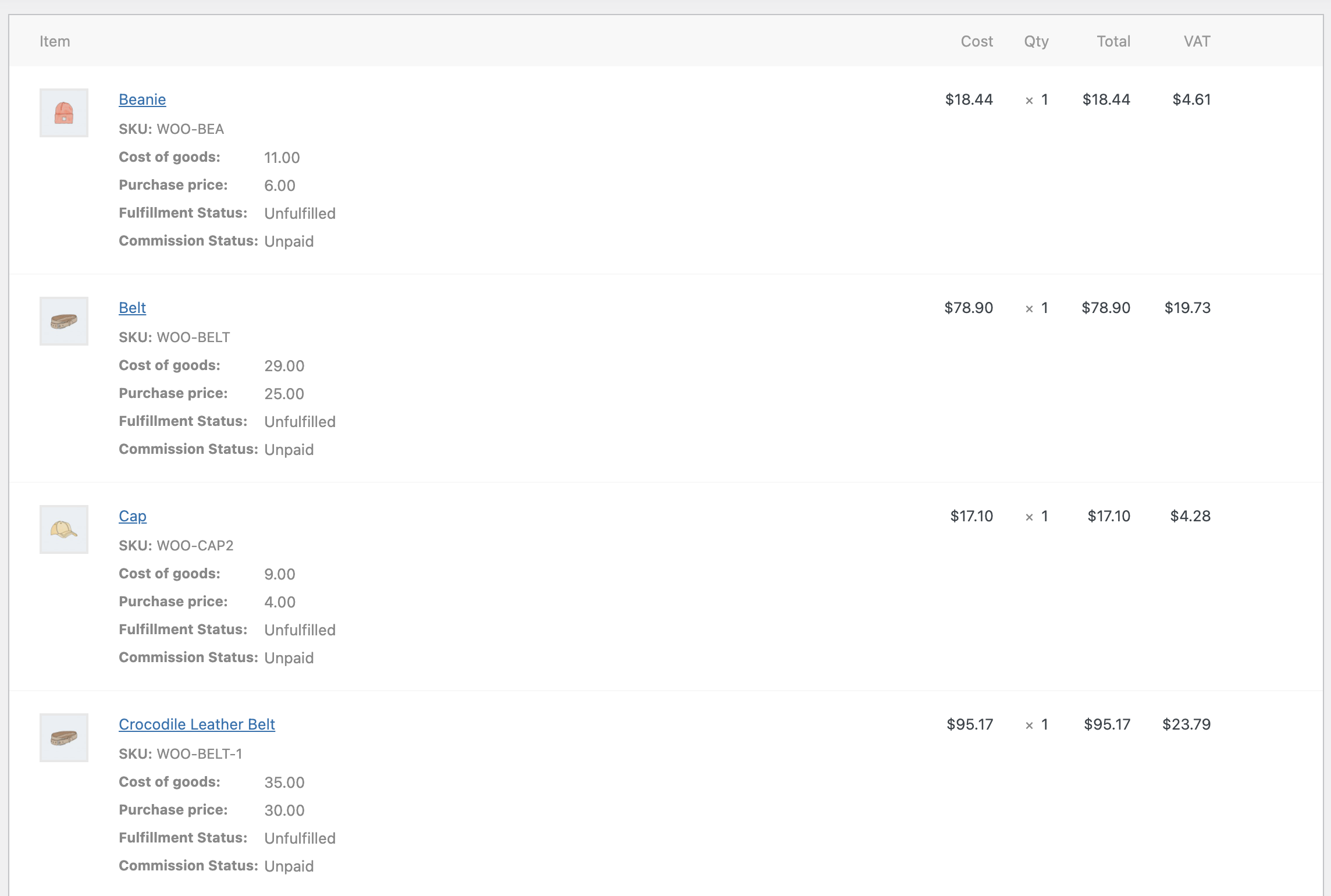
When customers purchase your products, Cost & Reports adds the cost of goods and the purchase price to each order item. This means you can see and edit what you bought the item for, and the cost of goods when you sold your products. This means that historically correct profits are shown in the renewal reports. (Cost of goods and purchase price on order items is for internal use).
Export Reports
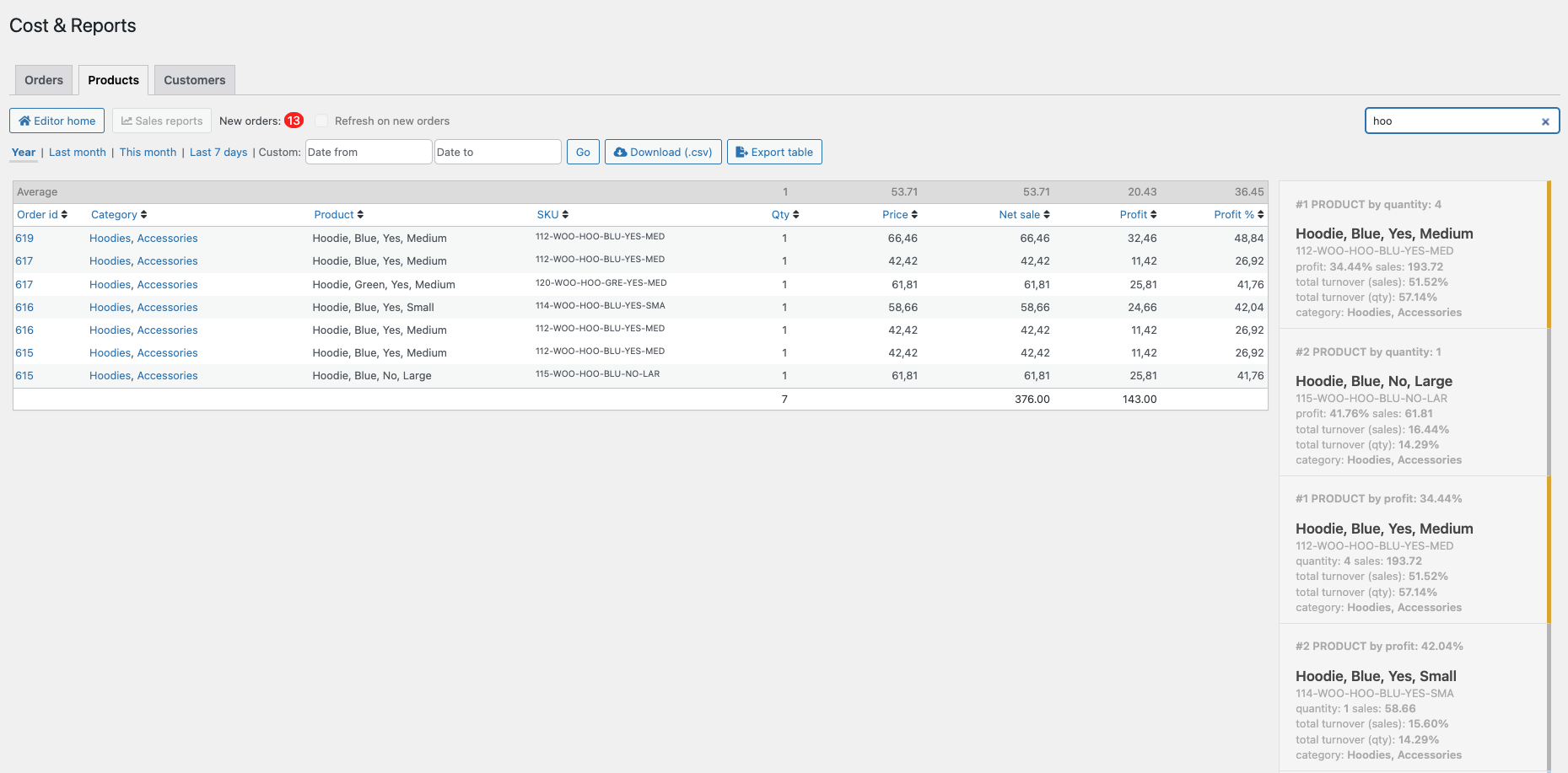
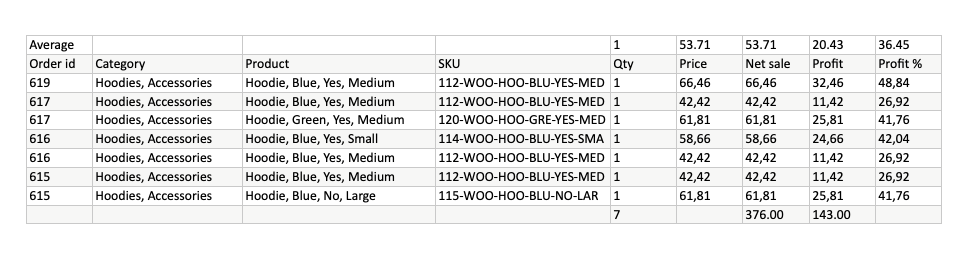
There are two buttons for export: Download (.csv) and Export Table. The first retrieves all your data from the database, while Export Table only exports what you see in the table. This means you can filter and sort, and once your selection is in order, simply click Export and you will receive an .xlsx file. This opens in MS Excel and Apple Numbers. The following image shows the export result.
Are you already using a margin calculation for your products?
If you are already using the Cost of Goods field for your products, simply go to Settings > Integration and enter the Cost of Goods field; Cost & Reports uses this value for Cost of Goods in related calculations. If you do not have this plugin, Cost & Reports creates a Cost of Goods field by default that is used for all your products. For more information on this integration, please refer to the documentation.
Use the Bulk Table Editor for WooCommerce
If you are working with prices in a category and want to set up sales, you can jump to the Bulk Table Editor via the „Set up sales“ link and set up sales in the same category. More information about your prices and profit will enable you to make better decisions when setting up sales for your products. The integration is automatic.
Main features & functions of the WooCommerce plugin
- Bulk functions for every price field, markup field, and stock quantity.
- Calculate automatically when entering values into the table or using bulk functions.
- Control mechanism for prices and negative profit values.
- Option to use Inc. VAT prices
- Adds purchase price and cost of goods fields to your existing products.
- Use shipping costs to calculate the cost of goods.
- The totals for inventory, cost price, sales value, and profit are listed in the table.
- Search and filter functions that allow you to set prices for a selection of products in bulk.
- Function to clear input fields for calculations.
- Progress bar during saving.
- Clear 0.00 values when in focus (mouseover), this makes it quick to set correct values when null is present.
- Bulk deletion of products and variations.
- Undo changes
- Download/Export (.CSV) file per category or all products. Includes calculations and last modified date.
- Supports multi-location network setup.
- Reports per order, customer and product.
- Reports per order.
- Reports per product/variant.
- Export to .csv file (database export).
- Export table (.xlsx)
- Color indicators for high and low profit percentage.
- Search in rows with automatic calculations.
- Counter and option to automatically update new orders
The extension is compatible with
- WooCommerce products and variants
- WooCommerce subscription and variants (WooCommerce Subscriptions)
Languages
- English (Standard)
- Norwegian
- German
- POT file for easy translation into other languages
More complex but very useful and simpler for multi-channel sales:
Billbee ERP:
WordPress WooCommerce Inventory Management WaWi – Best Solution for Your Shop

Florian Ibe
CEO & Marketing Consultant
Would you like to make your shop more profitable? We are happy to help:
Open contact form
Your contact person: Florian Ibe





 DE
DE

