

Having a good, solid database is the be-all and end-all and the most important thing when it comes to effective online marketing. With this plugin presented here, you can send all important events (activities) in your WooCommerce shop to the relevant services, platforms for marketing, tracking, etc., in just a few minutes.
WooCommerce Conversion Tracking Pro with Enhanced E-commerce Data (Google Ads, Facebook, Bing Microsoft Ads, Twitter & more)
With Conversion Tracking Pro for WooCommerce, send all important conversion data from your WooCommerce shop to Google/Facebook/Twitter/Bing (now Microsoft Ads) and many more.
Owners of WooCommerce shops need something that tracks WooCommerce orders and other data. Tracking conversions and other user activities is necessary to understand customer behavior,so you can better serve customers through other channels. The WooCommerce Conversion Tracking is an indispensable plugin for this reason.
This plugin inserts the pixels you receive from various advertising channels such as Facebook, Google Ads, Twitter, and allows you to send the data triggered by various user actions to these channels. This way, you can run better advertising campaigns by targeting the right users.
When you integrate an advertising campaign, they provide various tracking codes (mainly JavaScript) to insert on different pages of your website so that they can track how the conversion occurs.
This plugin also inserts these JavaScript tracking scripts on the WooCommerce cart page, the checkout success page, and after user registration. This allows you to track who adds your products to the cart, who buys them, and who registers on your website.
Enhanced WooCommerce Conversion Data with Tracking Pro for Better Targeting in Google Ads, Bing Ads, Facebook Ads, Twitter, and more.
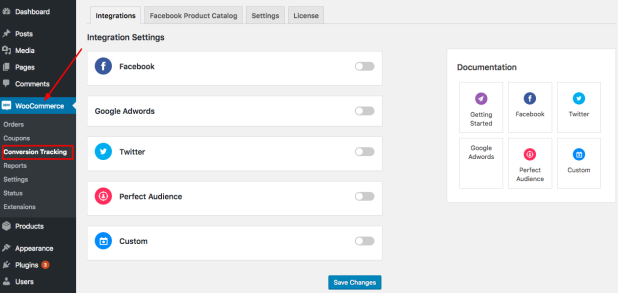
Connect your WooCommerce store with the most important advertising platforms. Send user-triggered events from your e-commerce store to your chosen platform.
Conversion tracking and appropriate measurement for retargeting is now as easy as ABC!
WooCommerce Conversion Tracking at a glance – all features & characteristics:
Become more visible on Google & Social Media?
In a free strategy consultation for data-driven online marketing, we uncover your untapped potential, review any existing ad accounts if necessary, examine your SEO ranking and visibility, and determine which strategy is appropriate for your budget and which active measures will lead to more inquiries or sales.

✅ More visibility & perception through targeted placement
✅ More visitors > prospects > customers > revenue
✅ Reach target groups scalably with SEA
✅ Act and grow sustainably with SEO
🫵 Maximum success with our hybrid strategy
💪 More than 15 years of experience across industries in over 1,000+ projects demonstrable!







- Enhanced Conversion Tracking for Your Shop
- Ability to connect multiple ad platforms
- Track trigger-based events
- Finely tuned audience retargeting
- Facebook Multiple Pixel and Product Catalog
- Quick and easy step-by-step installation
- Option to send values to connected sites, even with custom parameters
- No custom coding means you save time
- Control access to settings by user role
How the Conversion Tracking Pro for WooCommerce Plugin Works

Clean Facebook Conversion Tracking
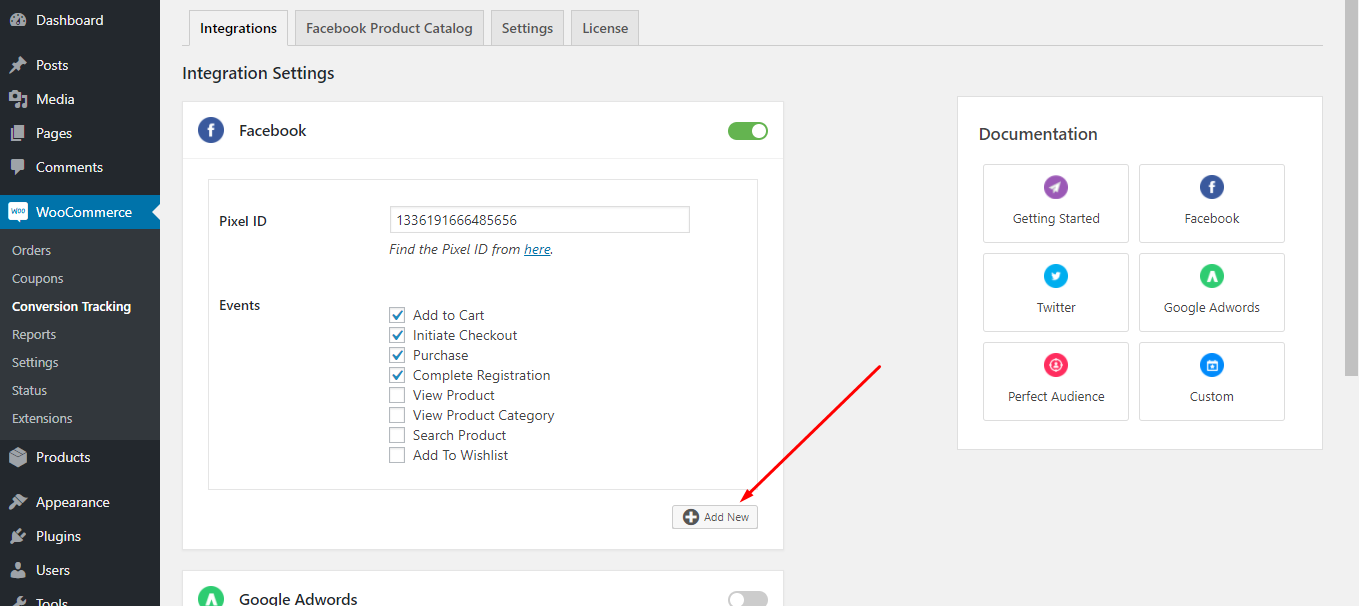
Send Facebook advertising data about who viewed your products, added items to a cart, searched, purchased, and registered, so you can maximize your ROI when remarketing to these users. Add multiple pixels if needed and create product catalogs.

Import Products into Facebook Product Catalog
The Facebook Product Catalog is a list of products you want to promote. Instead of adding products one by one, you can add them all at once with this feature.

Add Multiple Facebook Pixels
This feature is essential if you have more than one Facebook pixel, especially if you work with agencies or partners who want their own pixels on your website.
Google Ads Tracking
Add your Google Adwords account ID and send your purchase events along with the purchase labels to Google’s own platform. Get better ideas on how to make the most of your paid ads by targeting the right people.

Twitter Conversion Tracking
With advanced conversion tracking built into Twitter Ads, you can measure your events such as products added to a cart, successful purchases, registrations, and much more.

Microsoft Advertising Tracking (Bing Ads)
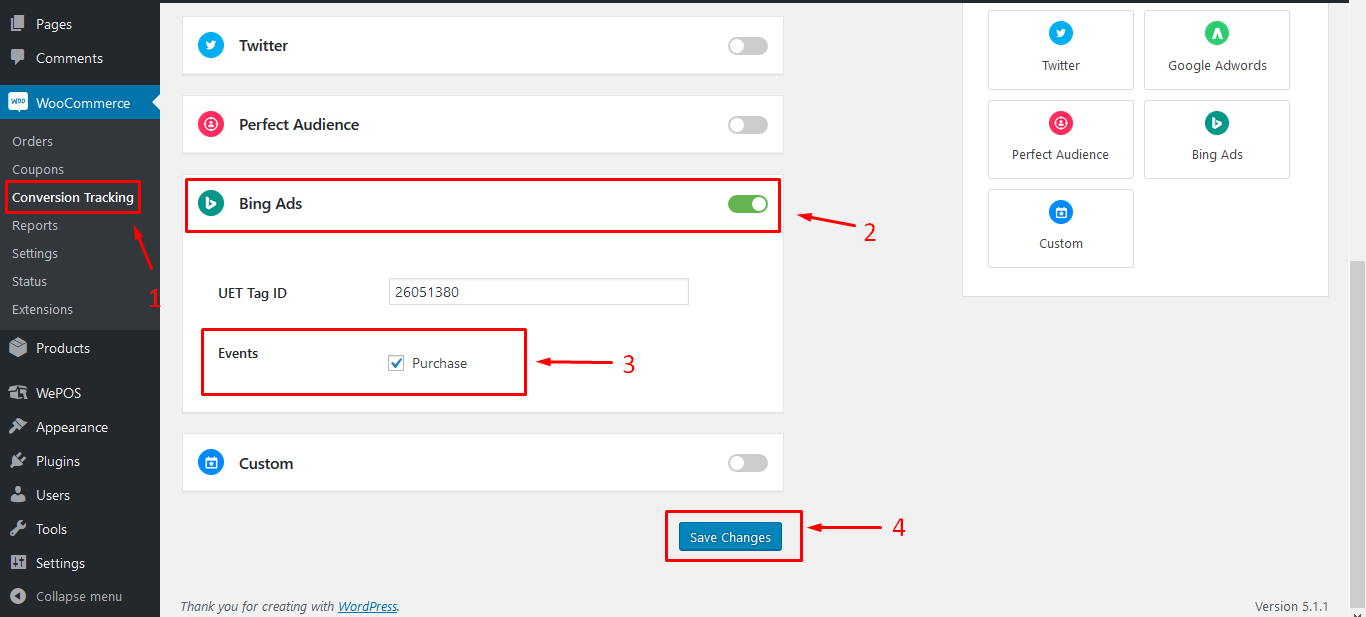
This is the easiest way to connect your WooCommerce store to Bing Ads. Send your conversion data to the Microsoft Advertising platform to reach a better audience.
Conversion Tracking for Perfect Audience
Do you want to achieve the best retargeting results ever? Our integration with Perfect Audience means you can target customers who are most likely to convert.

Conversion Tracking for Custom Platforms
You don’t want to be limited to these platforms? Do you have something else you’re already using? Connect the platform of your choice with the JavaScript tracking script function!

WooCommerce Conversion Tracking helps you
- Get advanced data on user behavior
- Track your WooCommerce business better
- Get detailed conversion data for analysis
- Create better ad campaigns
- Increase ROI from all paid media investments
- Ensure better customer retargeting for future marketing efforts


Florian Ibe
CEO & Marketing Consultant
Your contact person: Florian Ibe
Tip: Easily create a Google Shopping product feed:
WooCommerce Google Product Feed for Google Shopping & Merchant Center





 DE
DE

