With the WooCommerce Pre-Order Sales plugin, you can set up and sell pre-orders,bulk discounts, and time counters (countdown) for products and services in your WooCommerce store with just a few clicks.
WooCommerce pre-order sales, bulk discounts, and time counters can be charged in advance or when the pre-order products become available by setting the optional date and time for products and services. You can add pre-orders from your store, and not only can you add discounts, but you can also specify our price for pre-orders instead of adding the standard WooCommerce price.

WooCommerce Pre-Order Sales, Bulk Discount & Time Counter
WooCommerce Pre-Order Sales, Bulk Discount & Time Counter* is fully customizable and supports both pre-orders charged in advance and upon release. WooCommerce Pre-Order Sales, Bulk Discount & Time Counter is the best solution to increase your sales and prevent customers from leaving your store without ordering a product.
An alternative pre-order plugin with and without a deposit is further down in the article.
Features of the WooCommerce Pre-Order Sales, Bulk Discount & Time Counter Plugin
- Enable and disable the product pre-order option
- Pre-order product inquiry via email to the administrator
- User or administrator defines the pre-order price for products
- Pre-order product discount for customers
- Both fixed and percentage discount types
- Both simple and variable products are supported
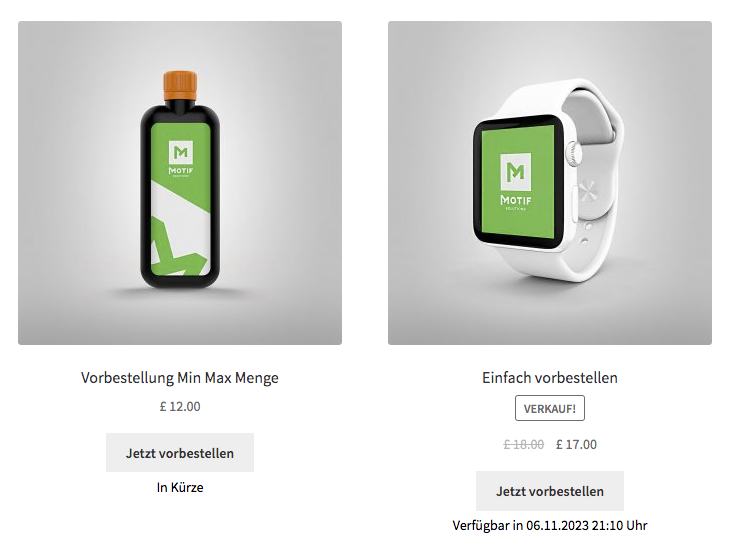
- Fixed and optional date/time when the product will be available
- Customers can view a list of all pre-order products in your shop
- Minimum and maximum quantity for pre-order products
- Remove all pre-order statuses from all products in your shop with settings option
- Automatically remove pre-order status when the date has passed
- Automatically add pre-order status when the product is out of stock
- The available date of the pre-order product will be added to the cart when someone adds a product to the cart
- Label if the countdown timer is not set for the pre-order product
- Button on the shop page single product page with full customization option
- You can see the date / text on both the shop and single product page
- Full customization options for the inquiry form, the option to upload a custom logo, text, colors, etc.
How the WooCommerce Plugin works
1) To configure the pre-order product, you need to set all the following fields. Check the Enable Pre-order Product checkbox and set all required fields according to your requirements.
2) To set the discount type, you need to select the fixed or percentage discount on the product page.
3) Single product page view, how it looks when you enable the minimum / maximum quantity with the product timer (counter).
Become more visible on Google & Social Media?
In a free strategy consultation for data-driven online marketing, we uncover your untapped potential, review any existing ad accounts if necessary, examine your SEO ranking and visibility, and determine which strategy is appropriate for your budget and which active measures will lead to more inquiries or sales.

✅ More visibility & perception through targeted placement
✅ More visitors > prospects > customers > revenue
✅ Reach target groups scalably with SEA
✅ Act and grow sustainably with SEO
🫵 Maximum success with our hybrid strategy
💪 More than 15 years of experience across industries in over 1,000+ projects demonstrable!







With minimum and maximum quantity base product.!
4) Pre-order product mini mini view with date.
5) Pre-order product cart view with date.
6) Pre-order product with fixed discount price.
7) Pre-order product with percentage discount price.
With discount base product.!
8) Now you see the pre-order product support with variable product type.
With variable product support.!
9) Pre-order product email when someone buys the product.
10) View of the product inquiry email template when the customer sends an inquiry about pre-ordered products.
If no date is set by the administrator.!

Schedule a non-binding consultation appointment now:
E-Mail: fi@vastcob.com
Florian Ibe
A very good alternative for WordPress WooCommerce pre-orders with and without down payment

A pre-order is an order for an item that has not yet been released. The idea for pre-orders came about when people found it difficult to get popular items in stores due to their popularity.
WordPress WooCommerce Pre Order Plugin allows customers to purchase a product in the store that is currently out of stock. And a customer can even purchase products that have not yet arrived in the store.
The plugin is very flexible in many ways, as customers can order items with multiple stock units with partial payment if allowed by the admin.
Note: If a client has applied ajax to the add-to-cart functionality on the product page via a third-party plugin, the plugin functionality will break, as WooCommerce does not support add-to-cart functionality on the product page by default; it is applicable to all archive pages such as the shop, the cart, the cart functionality.
Shipping is not generated at the time of pre-order, otherwise it is generated as soon as the product is back in stock and the buyer re-places the order.
This module is now compatible with WooCommerce’s new High-Performance Order Storage (HPOS) feature.
Features for pre-ordering in the shop:
- Works with products such as Simple, Downloadable, Virtual, Grouped, and Variable.
- The customer can order products.
- The admin can set status and availability.
- The admin can pay a customs amount for the pre-bid product.
- The admin can set the pre-order approval as automatic, manual, or both.
- The admin can set the email notification as automatic, manual, or both.
- Admin can add dynamic text on the pre-order button.
- A custom message has been added to the pre-order page.
- The admin can restrict any payment method for pre-order products like COD.
- With this plugin, the customer can either pay the full amount at once or pay a portion of the amounts.
- Email notification to all registered customers for the new pre-order product.
- Email notification to customers once they pre-order pre-order products.
- Admin can enable/disable the pre-order reminder email to all customers.
- The admin can enable/disable the pre-order in-stock reminder email to all customers.





 DE
DE