

A flipbook PDF with WordPress? No problem. The so-called FlipBook plugins offer the simplest and best basis for WordPress and WooCommerce to create an unlimited number of flip catalogs for websites, webshops or blogs. The possibilities are very diverse and almost unlimited. Interactive flip PDFs with clickable table of contents, links, buttons, videos and embedded frames are also possible.
All plugins presented in the video and here in the article can be purchased once with a lifetime license and include 6 months of support from the plugin author via the Envato marketplace.
WordPress Flip Function for PDF Flip Catalog Plugin – Create Flip PDF

Simply Flip PDF – the best solution for the WordPress flip function with PDF as a flip catalog – the best plugin for FlipBooks
The world’s best-known solution for „Digital Publishing“ with flip functions is issuu. Simply put, it’s the YouTube for magazines, brochures, catalogs, journals, lookbooks, etc. This service has a very simple free version, but it is very limited. The paid version starts at $19 per month and is only worthwhile for regular publications.
NEW idea and solution: FlipBooklets* as a special offer for clean integration with an ad-free and optimized external tool.

In terms of price, this external tool without limitation is cheaper than a plugin and sometimes has more functions and optimizations.
AND especially for first-class product catalogs with direct links etc., FlipLinks* as an extended online service is ideal and extremely inexpensive for an enormous added value in functions and optimizations.

Become more visible on Google & Social Media?
In a free strategy consultation for data-driven online marketing, we uncover your untapped potential, review any existing ad accounts if necessary, examine your SEO ranking and visibility, and determine which strategy is appropriate for your budget and which active measures will lead to more inquiries or sales.

✅ More visibility & perception through targeted placement
✅ More visitors > prospects > customers > revenue
✅ Reach target groups scalably with SEA
✅ Act and grow sustainably with SEO
🫵 Maximum success with our hybrid strategy
💪 More than 15 years of experience across industries in over 1,000+ projects demonstrable!







Both tools can, of course, easily embed all PDFs, catalogs, etc. into a WordPress website or WooCommerce shop, as well as all other systems.
So, if you have a WordPress website, blog, or WooCommerce shop, you should rather use the following plugins and only pay a one-time fee of a few euros for the module.
Note: The functions of the flipping feature and the behavior of the flip catalog with PDF files are all very similar and all are responsively optimized for all devices. All plugins are independent of the theme/template and other plugins.
Important: The FlipBook plugins work with Elementor, Divi, Wp Bakery, and all other Page Builders and themes!
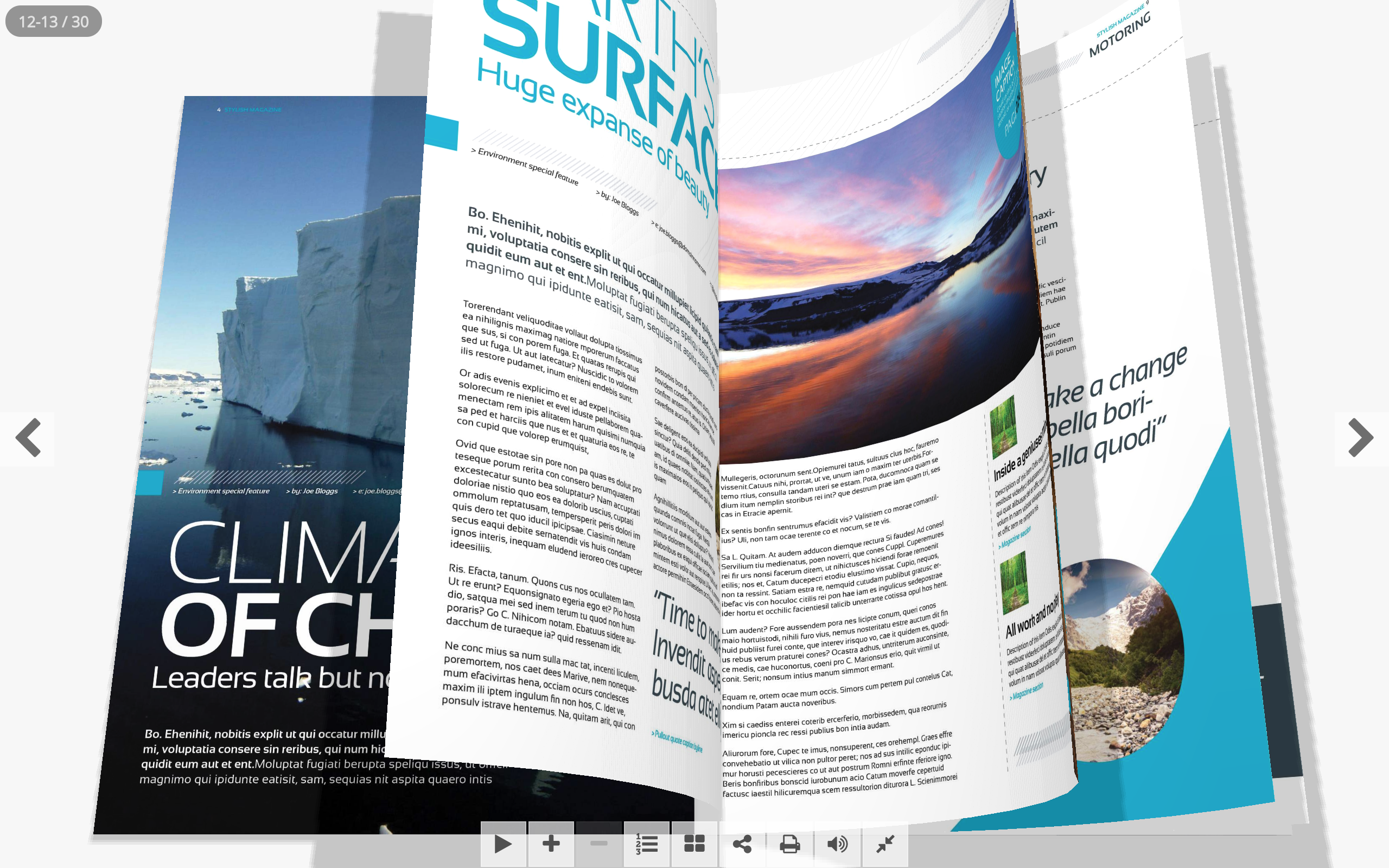
BESTSELLER: Real3D FlipBook WordPress Plugin*
The most powerful PDF and image viewer for your website!
Real3D Flipbook displays your PDF files or images as ultra-realistic 3D flipbooks on your website. No Flash required, 100% HTML5. Easy to use. Customizable interface. Customizable flipbooks. Responsive and optimized for mobile devices. Single page view, deep linking, interactive pages, PDF text search, PDF hyperlinks, unlimited number of books and pages, lightbox (Lightbox PopUp) and much more.

Real3D Flipbook works on all platforms – desktop and mobile. Optimized for mobile. Separate options for mobile phones. Support for dynamic HTML content on pages. Comes with multiple viewing modes and automatic fallbacks. It is a mature product that offers the best reading experience on all platforms and devices. All future updates are free. Source files and documentation included. The standard WebGL mode offers realistic 3D page-turning animations with bending, lights, and shadows. This mode is supported by desktop browsers. There is an alternative CSS3D mode that uses only CSS3 animations. There is also the single-page mode, which can be used as standard or only on mobile devices.
Easy to use
Creating flipbooks is quick and easy. Simply upload your PDF files or images and insert the shortcode into your post or page. Many settings can be changed via shortcode parameters. Multiple PDF files can be displayed with a single shortcode. Easy migration to another server with export/import.
Flipbook from PDF
Display PDF files directly on your website! The user can view your PDF files without downloading them and without leaving your website. PDF pages are rendered individually, allowing the user to read the PDF file before the document is fully loaded. Supports internal and external links. All links in the PDF file automatically work in the flipbook. Supports text selection and text search with keyword highlighting.
Flipbook from images (JPG, PNG)
You can also create a flipbook from images. Images can be in landscape or portrait format, as a single page or a double page with a cover sheet as a single page.
Realistic WebGL Flipbook
Real3D Flipbook uses the Javascript 3D library three.js to create ultra-realistic 3D flipbooks with page bending, glossy pages, lights, and shadows. This allows you to customize the flipbook in great detail. You can change the page thickness, metalness and roughness, shadow darkness, camera angle, camera zoom, light color, and position. You can also enable/disable lights, shadows, and anti-aliasing.

CSS 3D & 2D Views
Ultra-fast and lightweight flipbook using CSS3, without using WebGL. If your priority is fast page loading and high performance, CSS flipbook is the best option.
Swipe Book
The touch-friendly swipe mode can be used only on mobile devices or as a default viewer. In swipe mode, documents are displayed with horizontal swipe instead of flip, which is more natural on mobile devices. The swipe mode detects screen size and orientation to display a single page or a double page layout.
Customize User Interface
Real3D Flipbook fits perfectly into any theme because you can fully customize the user interface. You can change menu colors, button colors, shape, size, border, shadow, and hide unnecessary buttons. Each menu button can be positioned left, right, or center, top or bottom. The top and bottom menu bars can be full width, centered, or transparent. Buttons in the transparent menu bar can be styled differently from normal buttons. Button order is customizable. Choose from 3 predefined skins and 4 predefined UI layouts. Choose between Font Awesome and Material icon sets. Use advanced UI options to further customize everything.
Customize PDFs for flipping, flexible flipbooks
Create a flipbook that perfectly matches your content by adjusting page turning speed, page turning sound, paper thickness, camera angle, lighting, page gloss, page metalness, and end zoom levels.
Lightbox (Full-screen Overlay)
In Lightbox mode, you can place a text link or an image link anywhere on your website. Clicking a link opens the flipbook in a lightbox. This way, you can have multiple books/magazines/brochures on the same page.
Responsive (in a box)
In responsive mode, a flipbook with optional size is created, which can be placed anywhere on a page or in a post.
Full Screen (Fullscreen)
In full-screen mode, the flipbook covers the entire page, with the option located below the page navigation.
Table of Contents
Create a custom table of contents with multiple levels. Also supports PDF outlines (table of contents embedded in PDF file).
Unlimited Flipbooks
You can create an unlimited number of books that can be placed anywhere on your website.
Easily Manage Flipbooks
You can edit, duplicate, and delete books in your library. You can also export all books to JSON. The duplicate function allows you to create template flipbooks, so you can quickly create new flipbooks by duplicating the template.
Shortcode Parameters
Shortcode supports a number of different parameters for even easier use. Use the same shortcode to display different PDF files.
Single Page View
The flipbook layout can be changed depending on the device type. In addition to the standard double-page view, there is a single-page view that can be used either on mobile devices or on desktop and mobile devices. The single-page view offers a better reading experience on smaller screens, but retains the 3D mirror effect and shadows.
Right to Left Mode
Right-to-left flipbook for Eastern countries. The flipbook starts from the right and the pages are in reverse order.
AddOns for Page Builders:
And for websites, blogs, and shops with other CMS or static pages, Real3D Flipbook is also available as a jQuery script*.
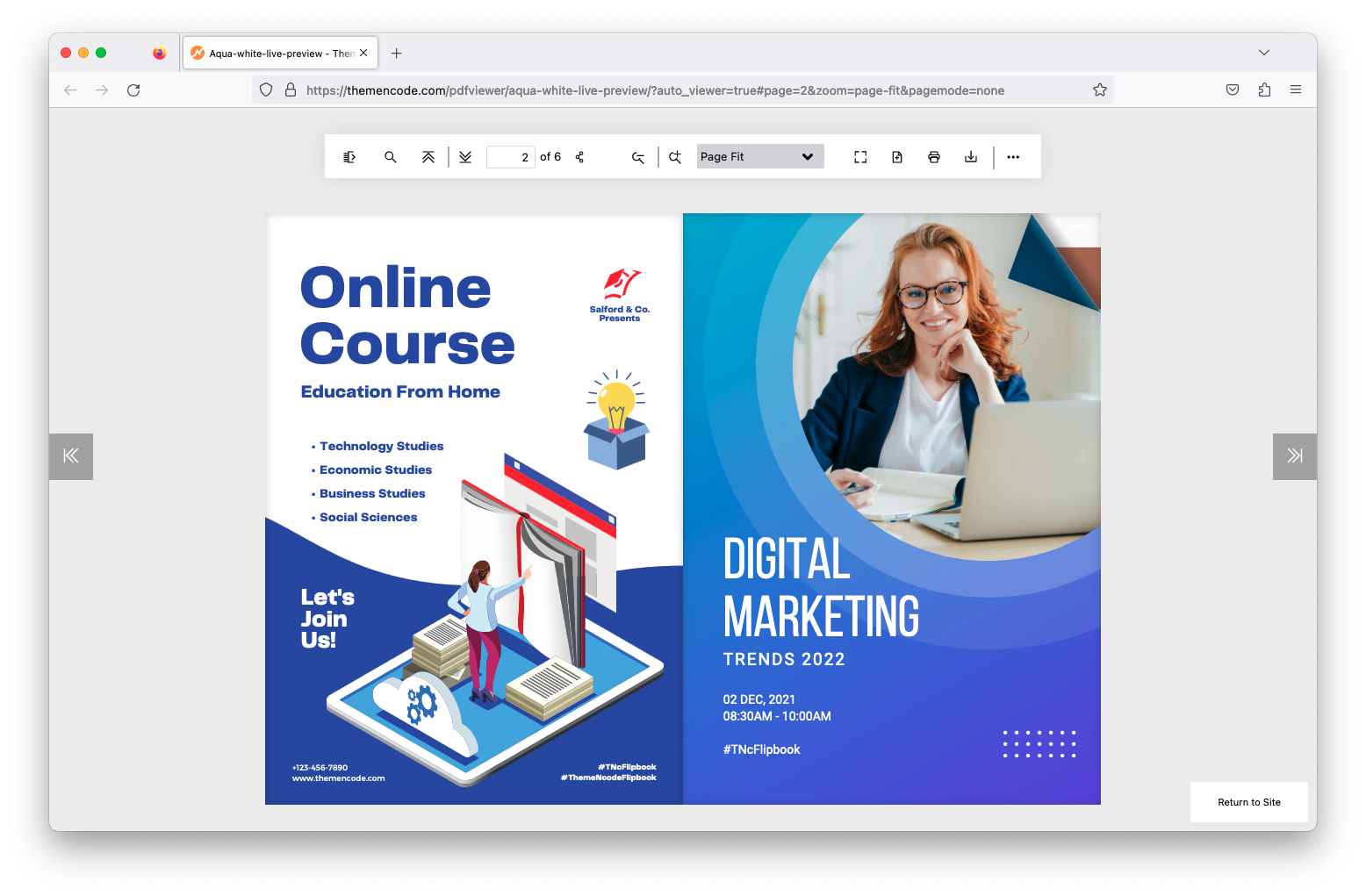
TNC FlipBook – PDF Viewer for WordPress
TNC FlipBook is arguably the best WordPress FlipBook plugin*, which can convert any PDF into a FlipBook and embed it on your WordPress page or post. This plugin has various PDF viewing modes for WordPress, such as flip, vertical scroll, and horizontal scroll. You can also brand the viewer with your logo, customize colors, hide or show the print and download buttons, disable right-click, text copy keyboard shortcuts, disable control toolbar elements, and much more.

TNC FlipBook – PDF Viewer for WordPress is a premium FlipBook plugin that allows you to showcase your PDFs in a stunning FlipBook format on your WordPress website. This plugin offers a fully functional FlipBook, providing your visitors with a more interactive reading experience. The FlipBook enables users to easily navigate through pages by flipping them like a real book. Check out the live preview.
Customize the FlipBook with your brand colors. You can also choose different viewing modes for individual PDF files. Set the toolbar in 4 different positions and select the size of the icons from three options. You can display your brand logo with the FlipBook. Choose the page spread, zoom level, viewer language, etc., on your own to match your website. Check out the live preview.
What is TNC FlipBook – PDF Viewer for WordPress?
TNC Flipbook – PDF Viewer for WordPress is a simple WordPress PDF FlipBook plugin that provides a neat interface to display PDF files as a FlipBook on your WordPress website. Now you can embed PDF files and FlipBooks with a beautiful viewer directly on any WordPress page or post. It also comes with various shortcodes that allow you to embed a PDF viewer and FlipBook or create a link to the PDF viewer and FlipBook with text or an image easily.

This is a great and useful plugin if you want to display PDF files on your website with the best viewer as a FlipBook in WordPress. It comes with page navigation, download, print, presentation mode & many more cool tools.
Here is a list of features of the TNC PDF Preview Plugin:
- Automatically find pdf links and enable the viewer if you choose this option.
- FlipBook View makes it look more attractive.
- Flip Sound gives you the feeling of turning the pages of a real book.
- Translate into 100 languages
- 3 different types of scrolling and a FlipBook
- Fully customizable PDF Viewer. Adjust the colors of the viewer to match your website’s color scheme.
- Change the placement of the toolbar. There are 4 different positions where you can place your toolbar. It can also be full-width or centered.
- Icon size can be changed. From small, medium, and large icon sizes, choose the one that suits your viewer.
- pdf with a feature-rich viewer on WordPress page/post
- Feature-Rich Admin Panel & Shortcodes
- Share pdf on social networks
- Send link to friend by email
- Enable/Disable social sharing
- Enable/Disable print
- Enable/Disable download option
- Enable/Disable presentation mode
- Enable/Disable option
- Enable/Disable logo
- Enable/Disable zoom
- Enable/Disable page navigation
- Enable/Disable automatic linking of PDF links to the viewer
- Brand viewer with your own logo
- Create different viewers with different logos
- Logo links to your website’s homepage
- Set favicons on your viewer page
- 3 shortcodes with many parameters.
- Shortcode to publish PDF files on any post/page
- Shortcode to add a text link to your PDF file on a post/page
- Fully responsive PDF viewers
- Style & customize all individual items.
- Compatible with most modern browsers
- Works with almost all page builders
- Fast and smooth user experience
- Image quality maintained
- No third-party links, install the viewer on your website.
- No pdf size limitation
- It uses jQuery to replace the url automatic, which does not affect your website’s SEO if you use the plugin on the old website.
WordPress FlipBook Plugin*

3D FlipBook is a WordPress plugin that allows you to browse images, PDFs, or HTMLs as a flipbook. It can naturally be used for showcasing magazines, books, cards, brochures, booklets, and much more. It helps to attract the user’s attention and make a greater impression on them. With 3D FlipBook, you can browse images, PDFs, or HTMLs as a flipbook. It can naturally be used for showcasing magazines, books, cards, brochures, booklets, and much more. It helps to attract the user’s attention and make a greater impression on them.
Realistic View
With the 3D FlipBook, you can create a book with real volume and real page thickness. It is the most accurate computer model of a book or magazine from our life. The plugin can simulate the opening of books. Modeled books repeat the same actions as the actual prototype: while the cover is opened or closed, the internal pages deform as it happens in life. The deformation can be customized. You can reduce or turn it off.
Flexible Page Corners
The main goal of 3D FlipBook is maximum usability. The main key to friendly behavior is the behavior familiar to the user. How are we used to turning pages in books? – Of course, pulling a page while holding a corner! 3D FlipBook is a well-known 3D plugin that has such a feature.
Natural Behavior
The plugin is called 3D FlipBook, so it can perform a page-flipping animation.
HTML, PDF, Images as Sources
The plugin can use PDF, images, and HTMLs as textures for pages. HTML format support as a texture is a new technology not supported by any other plugin. With HTML, you can easily create interactive books, handle user events, and manage plugin behavior. Using HTML textures is the next important step in the development of web animations.
Interactive
HTML support offers extensive possibilities for creating interactive books. It allows the use of CSS3 and JavaScript, the creation of navigation, the use of hover effects, and much more.
Responsive
3D FlipBook is designed to occupy the entire container where you place it. So, if the container size changes, the plugin recalculates its dimensions. Keep the container responsive, and the plugin will also be responsive.
Easy to Use and Customize
3D FlipBook is well-documented, includes many examples, and a getting-started manual. It’s easy to get started. The plugin supports skins, making it possible to create your own skins or customize the style or template files of existing ones.
The plugin offers many customization options (see documentation). If that’s not enough, you can edit the project. It is written in modern object-oriented JavaScript (ES6) style. Very easy to understand how it works.
PDF To FlipBook Extension – Responsive FlipBook Plugin – *

Easily create a FlipBook. Convert PDF files to FlipBook with just a few clicks. This is the Responsive FlipBook Plugin extension, which includes: Bookshelf, Zoom, Hardcover, Lazy Load, and much more.
With the PDF Wizard – Responsive FlipBook WP Extension, you can convert any PDF into a fully functional FlipBook with just a few clicks. It works on any server. High-resolution images for zoomed pages are automatically created for you. The process is completely effortless and requires no technical knowledge. To see how easy it is, just watch our video presentation. This plugin only works with our Responsive FlipBook WordPress Plugin.
FlipBook Features:
- Flat & Clean Design
- WYSIWYG Page Editor,
- Hardcover,
- Stack Page Upload – Easily create books with page tones.
- Easy PDF to FlipBook – available with separate extension,
- 4 PSD Book Mockups,
- 11 Predefined Styles,
- Table of Contents Generator
- Text or Icon Navigation
- Fullscreen Mode,
- Popup Flipbook,
- Bookshelf function,
- HTML and jQuery driven
- Responsive & Retina ready,
- Slideshow,
- Show all pages,
- Skin settings for navigation: border, color, background, radius, width, spacing, margin and much more;
- Navigation alignment setting: top, left, right, bottom;
- Icon selection for navigation buttons
- WPML support,
- 2 Table of Contents styles
- Table of Contents shortcode
- 5 positions for navigation arrows
- Book Always Open Function – No Need to Design Covers
- Add a link to a page
- Full-screen background settings: background color + opacity
- Multiple books on one page,
- Easy setup via advanced admin panel, no programming skills required
- Inserted via the shortcode assistant for posting/inserting pages. Copy/paste is not required
- Double pages,
- Automatic page numbering with display options
- Simple page styling with HTML & CSS,
- Works the same on desktop and mobile devices.
- Batch image upload,
- Preview pages in the panel,
- Import/Export settings,
- Full-screen view,
- Single page zoom,
- Unique URL for each page,
- No Flash Player required,
- Clean and simple design
- Resizable book – scales down to device resolution,
- Perfect tool for content presentation,
- Keyboard support (use arrows to flip pages),
- One flipbook per page (not domain),
- All shortcodes mapped for Visual Composer
- 1000+ icons,
- 650+ Google Fonts for Headings / Content / Page Break / Table of Contents,
- Well documented

What is a FlipBook and what can I use it for?
A flipbook is an interactive online HTML5 publication that has the appearance of a real publication with page-turning (including page-turning sound effects, page shadows, and more). Flipbooks are currently used to replace traditional digital PDFs and paper-based documents such as reports, presentations, magazines, catalogs, brochures, books, and more. A digital flipbook looks and feels just like a printed publication with pages that can be turned – without the printing costs!
Flipbooks also have many interactive features: the ability to add YouTube videos, lead capture forms, news banners and advertisements, images and links, SEO optimization, design customization, integrated statistics, embedding, and more.
Typical Customers, Industries, and Examples:
- a photographer showcasing their portfolio
- an auto parts company with its parts catalog / spare parts catalog
- a spa with its service and price brochure
- a restaurant with its digital menu
- a company with its annual business report or employee handbook
- a real estate agent sharing their property brochure
- a hotel with its activity brochure
- a non-profit organization with its information brochure
- Marketing and advertising agencies
… the possibilities are endless.
Magazines & Ebooks
Flipbooks are used for publishing online magazines and e-books because they „feel real“ on all screens and devices and are clear and sharp. Flipbooks are easy to edit and distribute. They are used for fashion and lifestyle magazines, cookbooks, children’s books, admission books, trade journals, etc.
Catalogs & Brochures
Flipbooks are also used in e-commerce for digital product catalogs and brochures. These flipbooks can be easily sent to potential customers via a simple, clickable link. This opens the publication instantly (flipbooks have no upload or download time). The digital brochures, accessible on all devices, are used by companies to create cost-effective and engaging marketing results that can promote their business to a larger audience. Browse our catalog and brochure examples for more inspiration.
Reports
Flipbooks for business and financial reports are the ultimate solution for companies, as they offer a simple and engaging way to keep key stakeholders informed. In addition, the privacy and security features of flipbooks are suitable for protecting confidential information.
Digital Menu Cards
Digital menu flipbooks offer customers realistic, appetizing, and interactive experiences with your food. Statistics show that people are over 50% more likely to visit your restaurant and choose improved dining options when presented with an appealing digital menu. Digital menus also allow restaurants to advertise themselves outside of business hours and reach potential customers. Finally, connecting the menu to Google Analytics provides insight into your customers‘ demographics and purchasing behavior.
Real Estate
Flipbooks can transform buying and selling guides, real estate fact sheets, and branding materials for real estate agents into SEO-optimized online publications. You can easily improve your ranking on Google when searchers look for agents and increase your overall reach by sending your brand materials via a link. Flipbooks display seamlessly, have excellent image resolution, and allow for interactive integration of videos and links to enhance every property feature.
What is the difference between a PDF and a FlipBook, the page-turning function?
A PDF file is a file that is protected from editing and formatted to always have its original layout. PDFs only allow time-consuming scrolling through the document and text search. They are also difficult for search engines like Google to index.
On the other hand, a flipbook is a digital publication formatted to look like a real publication with a page-turning effect, a shadow in the middle, and even a page-turning sound. It is responsive and available on all devices, which makes navigation significantly easier for the user compared to a PDF document. In addition, internal links to other pages of the flipbook can be inserted to facilitate navigation and improve the user experience.
What makes a FlipBook – PDF for flipping – better than a PDF file
There are several reasons why an online flipbook with a flipping function is better than a PDF file:
- First, unlike PDF documents, where a user has to download the document before they can view it, online flipbooks can be viewed instantly online.
- Second, online flipbooks have numerous insightful statistics and analytics on performance – PDFs do not.
- Third, if there is an error in your online flipbook, you can simply use the overwrite function, which immediately updates the original link you shared for the new file. With a PDF, you have to make the changes, save the PDF, re-upload it to the website, or resend the attachment.
- Finally, online flipbooks offer the possibility to add numerous interactive features: videos, hyperlinks, pop-ups, advertising banners, and more.
Elementor Flip Book Plugin Tip – dFlip PDF

The dFlip Flipbook WordPress plugin offers readers an amazing 3D flipbook experience. It is easy to create PDF flipbooks with just the PDF link without any problems. It is responsive and optimized for the WordPress post-page environment, making it user-friendly to create a WordPress flipbook. In addition to PDF, images can also be used to create an image flipbook.
With dFlip, it is easy to create a WordPress flipbook with images or PDFs. Simply add the link to the PDF file and your PDF flipbook is ready to use. You no longer need traditional PDF-to-image conversions. If you want to use images instead, you can also use them.
Realistic 3D Flipbook
Based on a realistic 3D model library and powerful 2D CSS3 transformation, you get the best possible flipbooks in a single plugin. The plugin uses modern WebGL technology to power the WordPress flipbook. Along with WebGL, THREE.js is used to provide a better experience when using the 3D flipbook on the website.
Smart CSS Flipbook Fallback
You can start with 3D and the plugin will handle the fallback if some browsers don’t support 3D and use 2D flipbook. 2D flipbook is a fully functional CSS flipbook that offers all features except the 3D experience. The CSS flip effects are best suited for 3D flipbooks and work without WebGL. You get all PDF links and outlines without restrictions. CSS flipbook is recommended if your WordPress flipbook contains fine or too much text, as it is better suited for sharper text.
Easy-to-use Options and Configuration
The dFlip Flipbook WordPress Plugin offers many features that are easy to use, detailed, and categorized. You can configure most settings for automatic/global use. These will then be used in all flipbooks unless you want the settings to be different in individual WordPress flipbook posts.

Fragen zum PDF blättern und Blätterfunktion mit WordPress WooCommerce? Wir helfen gerne:
E-Mail: fi@vastcob.com
Florian Ibe






 DE
DE

