

Making a WordPress site faster or reducing loading times in WooCommerce shops are among the most important tasks for site and shop operators. Page speed, i.e., website speed (performance), is one of the most crucial factors for successful websites, blogs, or shops. In this article + video, we show the important factors and our recommendation for WordPress installations. Updated August 2024
Make WordPress Site Faster 🚀 WP Website Woo WooCommerce Shop Page Speed Optimization Loading Time
You should definitely watch the entire video and then test the plugin recommendation for your website or webshop. It also includes the topic: „Making WordPress faster in general and improving performance“.
NEW BETTER SOLUTION: Making WordPress faster is now possible within 5 minutes, regardless of web hosting!
Make WordPress faster now with the best plugin ever, without extensive setup!
WordPress too slow? This is the solution for all websites, blogs, and also WooCommerce shops!
If your WordPress website is too slow and you are looking for a comprehensive and cost-effective solution, NitroPack is an excellent choice. NitroPack* combines all the advantages of WP Rocket and RocketCDN in a single, user-friendly package and offers them at a more affordable price. Here are some reasons why NitroPack is the best option to optimize your WordPress website’s speed.
NitroPack is the Ultimate Solution for a Fast WordPress Website + WooCommerce Shop.
Blog article with all information on how to make WordPress faster:
Become more visible on Google & Social Media?
In a free strategy consultation for data-driven online marketing, we uncover your untapped potential, review any existing ad accounts if necessary, examine your SEO ranking and visibility, and determine which strategy is appropriate for your budget and which active measures will lead to more inquiries or sales.

✅ More visibility & perception through targeted placement
✅ More visitors > prospects > customers > revenue
✅ Reach target groups scalably with SEA
✅ Act and grow sustainably with SEO
🫵 Maximum success with our hybrid strategy
💪 More than 15 years of experience across industries in over 1,000+ projects demonstrable!







Nitropack: Pagespeed optimization with just one click without settings in under 5 minutes?
Tip in advance: Use NitroPack*!
The most important factors for a fast, short loading time of the WordPress website or WooCommerce online shop
- Hosting (to the info article)
- Database cleanup (Wp Optimize)
- Optimization of images, graphics and logos
- Use image compression (to the info article)
- Use modern formats like webp + svg
- Utilize caching + enable compression (especially Memcache, Redis-cache depending on hosting)
- Lazy Load = loading images only when they are displayed
- CDN = Content Delivery Network = A static cache on an extra external cloud service
- Additional (optional): Optimize and reduce code → usually done by professionals, agencies, and freelancers
This is followed by: Speed test + Test + Test + Test
→ Google Page Speed Insights (click here)
→ GTMetrix (click here)
→ Pingdom (optional)
Our recommendation: WpRocket Caching Page Speed Plugin* + EWWW for image compression (to the EWWW plugin)
 *
*

Free alternative, but not quite as good and more complex → Cachify and W3 Total Cache
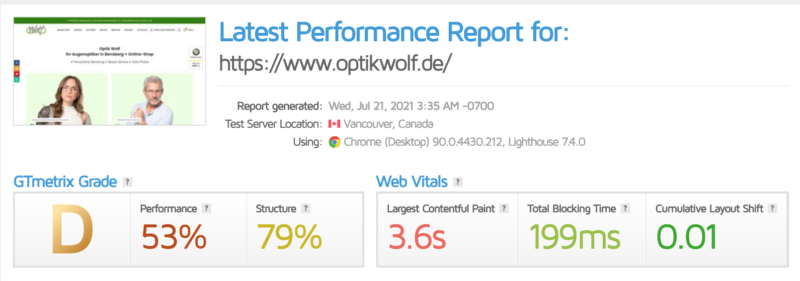
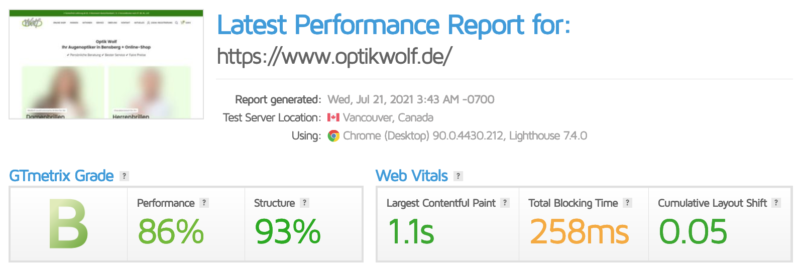
Example of a Wp Rocket Page Speed optimization with caching and EWW for image compression:
WordPress too slow? How to make your WordPress website faster
A fast website is not only crucial for user-friendliness but also for search engine optimization. A slow website can deter visitors and lead to a lower dwell time. Here are some general tips on how to improve the speed of your WordPress website:
Caching
Caching is a technique where a static version of your website is stored to reduce loading times. Caching means that not all data has to be retrieved from the server every time a user visits, which significantly improves performance.
Image Optimization
Images are often large files that can extend loading times. By optimizing and compressing your images, you can reduce loading times. It is also helpful to use modern image formats like WebP, which offer smaller file sizes with the same quality.
Content Delivery Network (CDN)
A CDN distributes your website’s content across servers worldwide, allowing users to retrieve data from the geographically closest server. This significantly reduces loading times, especially for international visitors.
Database Optimization
Your WordPress database can become overloaded with unnecessary data over time. Regular cleaning and optimization of the database help to improve performance.
Minification of Files
Minifying CSS, JavaScript, and HTML files can remove unnecessary spaces, line breaks, and comments. This leads to smaller file sizes and faster loading times.
High-Quality Hosting
Choosing a good hosting provider is crucial for the speed of your website. A powerful server and an optimized hosting package can significantly improve loading times.
Lazy Loading
Lazy Loading ensures that images and videos are only loaded when they appear in the visible area of the browser. This reduces the initial page load time and improves performance.
Reduction of HTTP Requests
Every file on your website, such as images, CSS, and JavaScript, requires a separate HTTP request. By reducing the number of these requests, you can shorten loading times. This can be achieved by combining and minifying files.
Regular Updates
Make sure that WordPress, your themes, and plugins are always up to date. Updates often contain performance improvements and security fixes that make your website faster and more secure. Above all, an up-to-date PHP version should also be used! This is often forgotten.
Lightweight Theme
Choosing a lean and well-optimized theme can significantly improve your website’s loading times. Avoid themes with unnecessary features and high resource consumption.
By implementing these general measures, you can significantly improve the speed of your WordPress website and provide a better user experience.
Blog article with video on Wp Rocket:
Probably the best WordPress Cache Plugin / Caching Plugin for maximum Page Speed (fast loading time)
Performance Theme Recommendation for regular WordPress websites + blogs:
Performance Theme Recommendation for WooCommerce webshops:
+
https://www.vastcob.com/das-richtige-caching-plugin-fuer-das-woodmart-theme/
With these tips and the Page Speed Plugin, you can very easily and quickly improve performance and accelerate WordPress loading time.

Florian Ibe
CEO & Marketing Consultant
Your contact person: Florian Ibe





 DE
DE

