

Saving the WooCommerce cart is one of the most important optimizations to increase sales in your online shop with WordPress & WooCommerce.
In this video, I will show you how to:
- Save open carts in the database (MySQL)
- Get an overview of all open, completed, and lost (abandoned) carts
- Send an email to users with a registered email address (Attention: GDPR)
- Use the clear reports in WooCommerce
The „Cart Reports“ show you the abandonment statistics and diagrams in the dashboard and in the reports of your WooCommerce shop / webshop carts.
WooCommerce Cart Reports Plugin explained in German – Must-Have & huge added value for all WordPress/WooCommerce webshops!
The „WooCommerce Cart Reports“ extension provides real-time metrics for your customers‘ open and abandoned shopping carts. Keep track of your customers‘ shopping carts and manage them more efficiently in your online shop.
Features of WooCommerce Cart Reports at a glance:
- Easy to install and manage
- Clear dashboard widgets
- Extensive custom date range reports
- The „Cart Save Detail“ view shows cart products, last update, and more.
- Contact the customer if they have logged in but not completed their purchase
Cart Reports for WooCommerce provides comprehensive reporting features on a new „Cart“ tab within the „Reports“ tab of WooCommerce, under „WooCommerce“ and then „Reports“. On the Cart tab, you can view converted / open / abandoned carts over a custom date range, the most abandoned products, and product abandonment per month.
Cart Reports for WooCommerce Reports provides a list view for analyzing open, abandoned, and converted carts (completed purchases). In the list view, you can filter by cart date, cart status, or customer. You can view cart actions, where available, including „View Order“ for converted WooCommerce carts and „Email Customer“ for carts associated with a user.
The list view also offers two dashboard widgets that provide administrators with a quick overview of cart trends and statistics. View currently open carts and a 30-day chart overview directly in the WooCommerce dashboard.
► NOTE: This WooCommerce plugin is part of the standard basic equipment for every WordPress + WooCommerce webshop and is officially from woocommerce.com
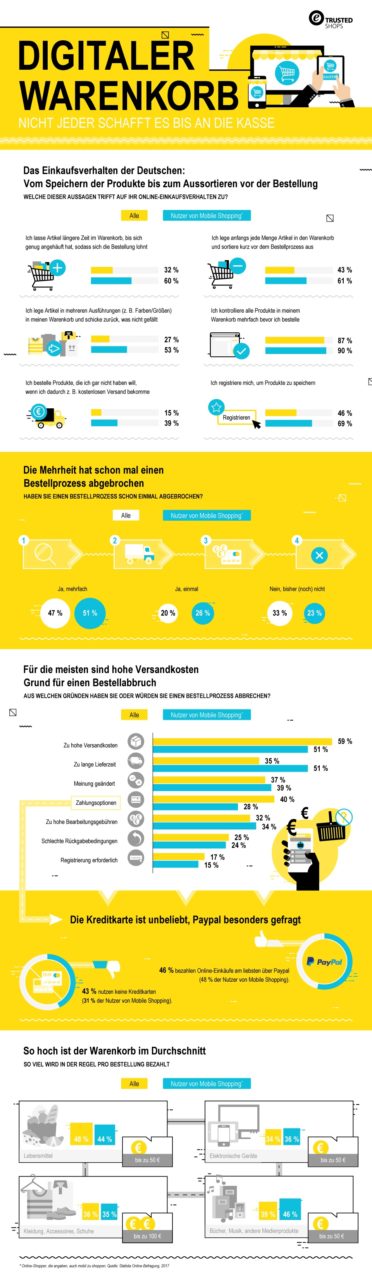
This graphic from Trusted Shops shows why cart saving is so enormously important:
Click to enlarge
Become more visible on Google & Social Media?
In a free strategy consultation for data-driven online marketing, we uncover your untapped potential, review any existing ad accounts if necessary, examine your SEO ranking and visibility, and determine which strategy is appropriate for your budget and which active measures will lead to more inquiries or sales.

✅ More visibility & perception through targeted placement
✅ More visitors > prospects > customers > revenue
✅ Reach target groups scalably with SEA
✅ Act and grow sustainably with SEO
🫵 Maximum success with our hybrid strategy
💪 More than 15 years of experience across industries in over 1,000+ projects demonstrable!








Fragen zu WooCommerce oder Hilfe? Jetzt unverbindlich melden:
E-Mail: fi@vastcob.com
Florian Ibe





 DE
DE


1 Comments
[…] WooCommerce Warenkorb Speicherung | Cart Reports Plugin Deutsch Erklärung […]