

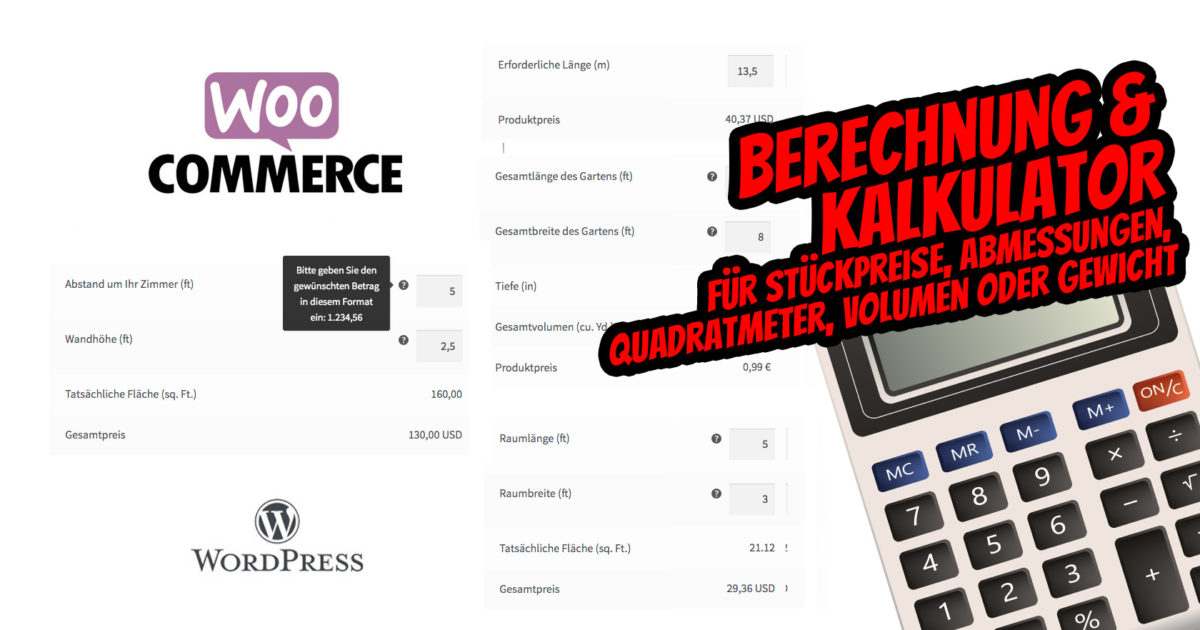
Sell items at unit prices or allow customers to add their own quantities using the measurement price calculator. The WordPress + WooCommerce plugin „Measurement Price Calculator“ enables flexible calculation of almost unlimited possibilities for your online shop. Attention: Note the July 2024 update with a plugin alternative for a calculator. More information in the article.
Easy Calculation: WooCommerce Price Calculator for unit prices, dimensions, square meters, volume or weight – the plugin for calculating e.g. flooring, wallpaper, fill quantities, volume etc.
While selling normal products in single quantities, such as perfumes, fashion, spare parts or phone cases, is no problem with WooCommerce as a shop system, many of us also sell products that are not sold in quantities of „1“, such as flooring, wallpaper or more. The Measurement Price Calculator for WooCommerce solves the problems you have probably encountered when setting up and pricing these products.
With the paid plugin and the „Measurement Price Calculator“ extension for WooCommerce, you can add and configure a calculator to your products that sells in quantities based on dimensions,square footage,volume or weight. This way, you can easily sell products whose measurements per item are known. For example, let’s say you have tiles that sell for $2.09 per square foot, and you offer a box of tiles that is 35 square feet, or a larger box that is 60 square feet. If you use the same price per square foot, you can simply enter the size of the box and the calculator will display the total price per box.

Would you rather tell your customers how much they need? With the measurement price calculator as an online calculation, you can also sell products based on the price per unit of measure (per square foot, cubic meter, etc.). Perhaps you sell mulch at a price per cubic meter – you can allow the customer to specify the area and depth of the mulch, and the calculator will derive the total cubic meters and the final price. Configure any combination of units and customize the labels to meet your store’s requirements!
NOTE: The plugin can, of course, also be easily translated completely into German. To the instructions
UPDATE July 2024:
WordPress Calculator Plugin with WooCommerce Function / Integration:
Become more visible on Google & Social Media?
In a free strategy consultation for data-driven online marketing, we uncover your untapped potential, review any existing ad accounts if necessary, examine your SEO ranking and visibility, and determine which strategy is appropriate for your budget and which active measures will lead to more inquiries or sales.

✅ More visibility & perception through targeted placement
✅ More visitors > prospects > customers > revenue
✅ Reach target groups scalably with SEA
✅ Act and grow sustainably with SEO
🫵 Maximum success with our hybrid strategy
💪 More than 15 years of experience across industries in over 1,000+ projects demonstrable!







The Woo Plugin: Main Features of the WooCommerce Price Calculator for Quantity Calculation for Area, Volume, Weight in the Shop
- Use the quantity calculator for products based on known product dimensions (e.g., tiles, product dimensions).
- Use the price calculator for products whose price is fixed and sold per unit: foot, square meter, cubic meter, etc. (i.e., garden mulch by volume, wallpaper by area).
- Product prices can be displayed per unit (e.g., „$1.75 / foot“, „from $3 / sqm“) in the shop and on product pages.
- Price Calculation Inventory Support: Product inventory can be managed "per unit"
- Price Calculator Dynamic Weight: Product weight can be set/calculated "per unit" for shipping
- Price Calculator Price Table: Set price breaks based on simple measurement ranges product
- Calculator available for all physical properties: dimensions, area, surface, volume or weight
- Area, volume, perimeter and surface calculators allow simple inputs or independent entry of length, width and height
- Use any combination of units
- When allowing custom inputs, optionally add an automatic overrun estimate. NEW
- Customize dimension and price labels
- Set minimum and maximum values or accepted steps/increments for customer-entered dimensions. NEW
- Variable products for individual prices, shipping weight and stock
- Special calculator for wallpaper sales
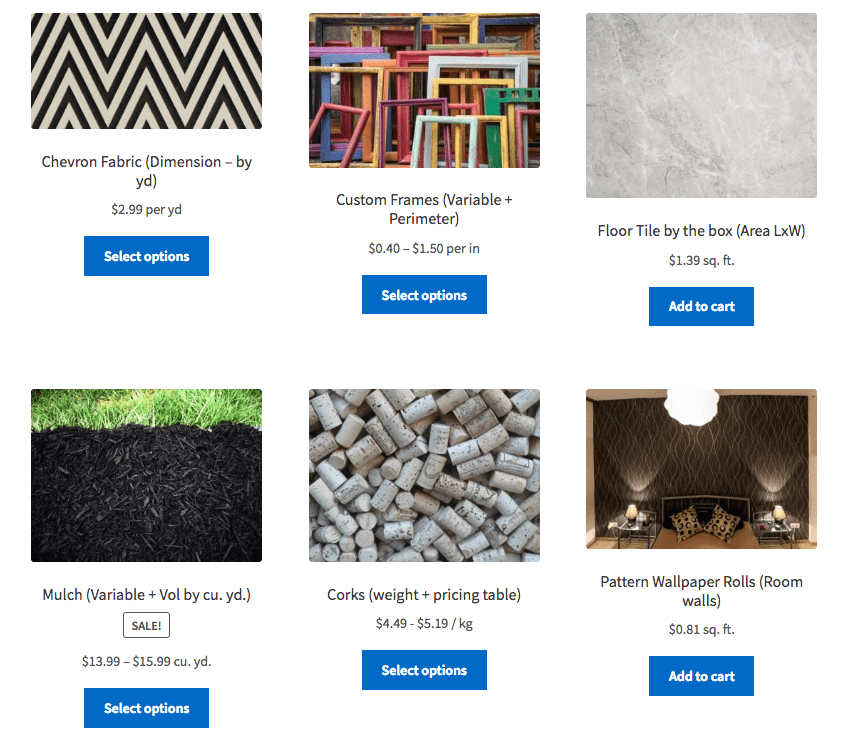
Some of the possibilities:
- Tiles sold by the box for a given area: Demo
- Variable mulch sold by the cubic yard, with the customer providing an area and depth: Demo
- Colored fabric by the yard: Demo
- Wallpaper by the roll according to room size: Demo
- Foam sold by the cubic foot
- Fencing for a garden perimeter
- Coffee sold by the pound
- Wrapping paper by area
- And much more is possible… Be creative!
One plugin, two calculator modes for e.g. area calculation
With this one plugin, you can configure two different calculator modes: quantity-based and custom. For information on setting up products for each mode, please refer to the documentation.. The quantity-based calculator is ideal for selling products with a fixed measure, e.g. The calculator is displayed on the frontend and prompts the customer to enter length and width (for example). You set the label and the units to be used, and your customer can easily buy the minimum number of boxes based on the area of their floor and the coverage of each box:
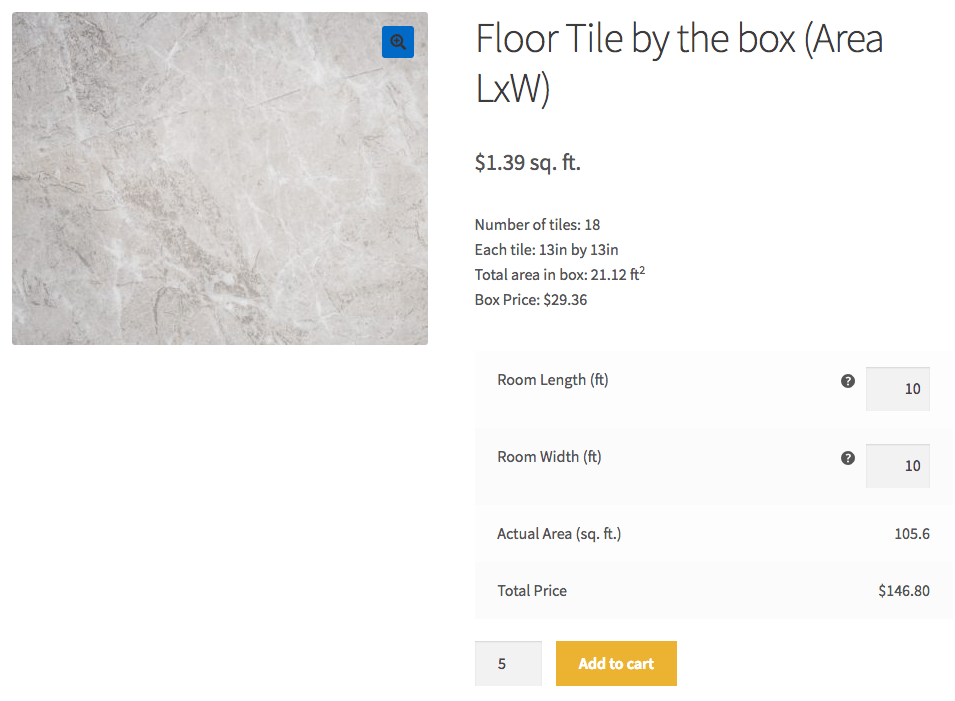
As shown in the example image, the plugin can be configured to display the price „per unit“, as is common for tile sales. The price for the product (e.g. a box of tiles) is divided by the configured size of the product (e.g. the square footage coverage of the box of tiles) to determine the price per unit. Of course, any of the calculators can be used: dimensions, area, volume or weight, with any combination of units and custom labels.
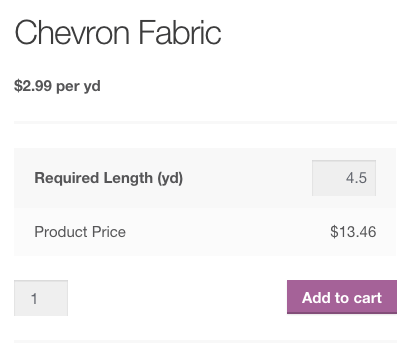
On the other hand, in custom calculator mode, you can sell products that are available per unit and in custom sizes. This calculator is ideal for selling products that are made to order: for example, fabric sold by the foot, with the length specified by the customer. If the ‚Calculated Price‘ option is enabled, the price is defined as the price per unit and the amount entered by the customer.
On the product page, the customer can specify the desired length and see the final price based on their dimensions:
The measurement specified by the user is displayed on the shopping cart page, order details, emails and order administrator:

Price Calculator Inventory Support (Stock)
In the latest version of the plugin, inventory can now be managed „by units“ for products with custom dimensions (custom mode). When enabled, you can track product stock in the same units it is sold. For example, if your product is a lineal good, you can configure your product stock in terms of available lineal feet. So, if a customer orders two 10-foot lengths, a total of 20 feet will be deducted from your product stock.
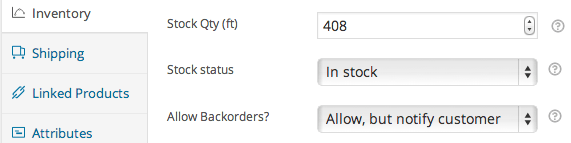
Price Calculator Dynamic Weight
You can now configure a „per unit“ weight for your custom calculator products. If you enable this option, you can, for example, set a weight per square foot so that shipping costs for products customized by your customers can be correctly totaled.

Control via a price table
For simple products with prices that depend on the total dimension of the item, we are pleased to introduce the Price Table feature. You are no longer limited to a single price per unit for your price calculation products – simply define one or more price rules consisting of a measurement range, a price per unit, or a sale price per unit, and the measurement price calculator will take care of the rest. The price will be updated instantly on the product page based on the product size configured by the customer.
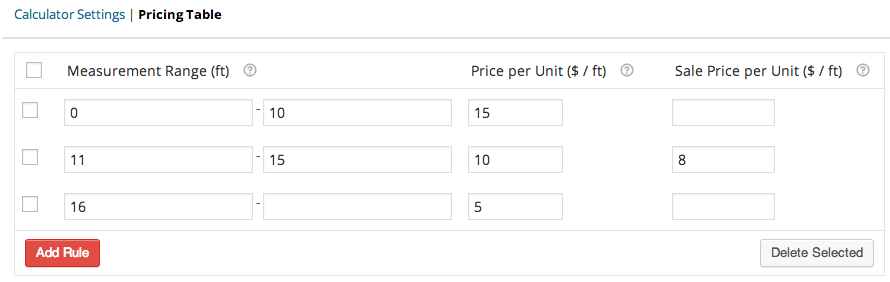
Display available prices on the frontend with a simple shortcode that can be used on the product page or anywhere shortcodes are accepted. Encourage your customers to buy more and save money. Would you like a suitable place to display this? How about a listing of the pricing plan in a custom tab added by the Premium Tab Manager:
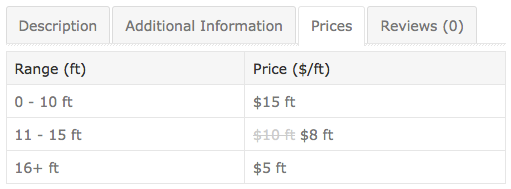
Remember that any of the calculators can be used: dimensions (length, width, height), area (simple area or length x width), area, perimeter, volume (simple volume, area x height or length x width x height) or weight with any combination of units and custom labels. With the measurement price calculator, you can configure product calculators that are as unique as your product line!
Getting Started (in 5 minutes or less)
- Purchase this extension here.
- Download and install it in your WooCommerce store
- Define the measurements to be used under WooCommerce Settings > Products
- In our documentation you will find some tips for setting up
- Update the product data on the product page under Measurement for all products that use the calculator
- That’s it! Enjoy products whose price is automatically calculated by measurement!

Hilfe bei WordPress? Jetzt unverbindlich anfragen und aktiven Support erhalten:
E-Mail: fi@vastcob.com
Florian Ibe






 DE
DE


2 Kommentare
[…] Eine weitere komplexere Möglichkeit ist das Woo-Plugin als Mess-Preisrechner und Kalkulator für Fläche, Volumen, Gewicht etc. […]
[…] » Zu dem Artikel rund um die Berechnung & Kalkulation […]