
Disabling and locally embedding Google Fonts in WordPress is very easy with a plugin. Depending on the theme and plugins used, it can take just a few clicks or a little longer. Nevertheless, it is not rocket science and is really easy to implement, usually without programming knowledge. From a legal perspective, caution has been advised, especially since mid-2022, and Google fonts should not be loaded directly from the Google server. A WordPress Google Fonts Plugin helps with this. In this article, we show the simplest and currently best solutions.
Disable & Locally Embed WordPress Google Fonts (Plugin)
Attention: Before simply installing and activating a Google Fonts WordPress plugin, you should first check the theme settings and configurations. For example, Avada, Divi, Enfold, Astra, Kadence, BeTheme, WoodMart, Elementor and many more already have a direct setting for this. It’s best to test these first and only use a plugin if they don’t work. How to check this is linked below in our other detailed article.
There are basically no disadvantages. Loading the fonts from your own server creates a slightly greater load on the server. However, this is negligible for fewer than 1,000 visitors per day. With local embedding, of course, no automatic update of Google Fonts is performed. However, if you use a theme and the plugin mentioned below, this should not be a problem either.
In our opinion, the best and most stable WordPress Google Fonts plugin for local embedding of Google fonts is OMGF:
Installation is quick and the initial settings are loaded via Settings > Optimize Google Fonts and then by clicking „Save & Optimize“.
After reloading, a table with loaded fonts should appear. Simply click „Unload all“ next to the bolded name of the Google font. Checkmarks will automatically be set for all font weights.
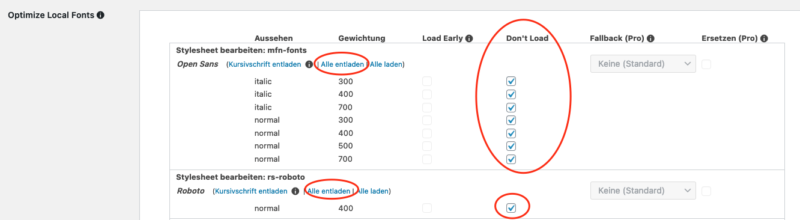
Then click „Save & Optimize“ again.
IMPORTANT: If you are using a caching plugin, be sure to clear the cache afterwards. The OMGF plugin also displays a notice. Afterwards, you can check in the frontend whether no Google fonts are being loaded externally.
Another tip: Use the OMGF Pro Version*, as it checks even more thoroughly and finds and automatically optimizes further settings.
Become more visible on Google & Social Media?
In a free strategy consultation for data-driven online marketing, we uncover your untapped potential, review any existing ad accounts if necessary, examine your SEO ranking and visibility, and determine which strategy is appropriate for your budget and which active measures will lead to more inquiries or sales.

✅ More visibility & perception through targeted placement
✅ More visitors > prospects > customers > revenue
✅ Reach target groups scalably with SEA
✅ Act and grow sustainably with SEO
🫵 Maximum success with our hybrid strategy
💪 More than 15 years of experience across industries in over 1,000+ projects demonstrable!







OMGF Pro complements the free version of OMGF with advanced detection schemes:
- Webfont Loader or
webfont.js, - Inline
@importor@font-facestatements, @importand@font-faceembedded instructions in CSS files,- Google’s Early Access API, etc.
- Basically everything! This includes Material Icons,Material Symbols and resource hints, i.e.
dns-prefetch,preloadorpreconnectheaders!
Maximize Performance
- Define a fallback font stack : Reduce cumulative layout shift by correctly implementing font display swapping and defining a (stack of) fallback font families for each of your fonts.
- Simply replace unwanted Google Fonts with a system font of your choice,
- Ensure text remains visible during webfont loading, by forcing the font-display (swap) attribute in all your stylesheets and @font-face declarations.
- Preload Fonts: Easily preload key requests from the admin area.
Reduce Font Bloat
OMGF Pro goes beyond hosting Google Fonts locally, providing you with tools to reduce bloat, caused by other plugins and themes:
- asynchronously load Google Fonts with JavaScriptremove,
- Easilyunloadfont styles (e.g.italic) and/or font weights (e.g.bold) that you don’t use,
- Definewhichsubsetsshould be loaded for all fonts across your entire WordPress configuration. This can reduce the size of your Google Fonts stylesheets for the most popular fonts by ~90%!
Should you need assistance, we as a WordPress agency are happy to help you.
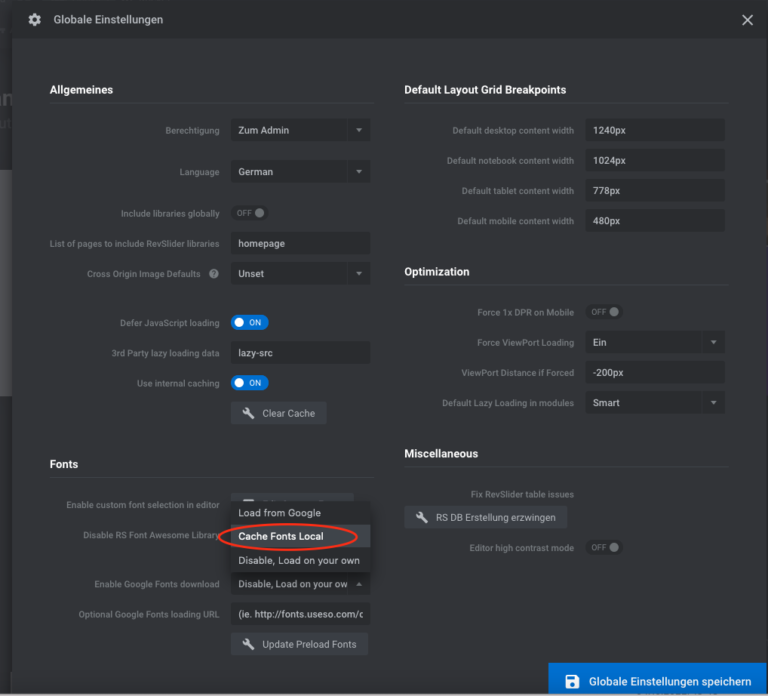
Are you using Revolution Slider? Here is the important setting so that Google Fonts are also loaded locally in the plugin:
Under Global Settings, you can load and cache Google Fonts locally in the slider with just one click. Also try „Disable, load on your own“.
The Easy Google Fonts plugin takes a different approach and first enables the integration of Google Fonts with a clean embedding:

Florian Ibe
CEO & Marketing Consultant
Your contact person: Florian Ibe
We have already published a detailed general article on checking WordPress websites for Google Fonts / fonts here:
Google Fonts GDPR Checker – Webfonts Google Fonts locally integrate (privacy compliant) & check
Tip for the correct WordPress GDPR TTDSG Cookie Banner:
WordPress GDPR Plugin (TTDSG) – Data protection compliant with cookie solution
If you do not use WordPress, we recommend the following Compliance Cookie solution:
Tip for legal texts with corresponding up-to-date checks and „warning protection“ from the IT-Recht-Kanzlei-München (click here)*.





 DE